
Micro segmentation
Inside one virtual network, contractors' laptops and HR servers share a routing domain and should not all reach each other. Micro segmentation adds a finer layer: security groups, access contracts, and a group-based policy binding a source and destination pair to a contract. Once integrated with ISE, Catalyst Center owns the policy and ISE becomes read-only. And a saved policy does nothing until it is deployed.
By Arif, founder of Daveth · Updated
The full 4 min walkthrough is in Daveth Pro (Network). See what the plan opens
What this page answers
What is micro segmentation in SD-Access?
A second, finer layer of control within each virtual network, between specific roles and device types, using security groups and access contracts: a group-based policy names a source and destination group pair and the contract between them. Read it in “Two building blocks, and what binds them”
Where is SD-Access group policy configured, Catalyst Center or ISE?
In Catalyst Center. When integrated with ISE, Catalyst Center by default becomes the primary administration point for group-based access control, and ISE becomes a read-only policy engine for TrustSec data. Read it in “Who owns the policy”
Why is my new SD-Access group policy not working?
It may be saved but not deployed. If you update policies and do not deploy them, the network devices are not notified, and the active policy may differ from what Catalyst Center displays. Read it in “Save, then deploy”
The second layer, inside the first
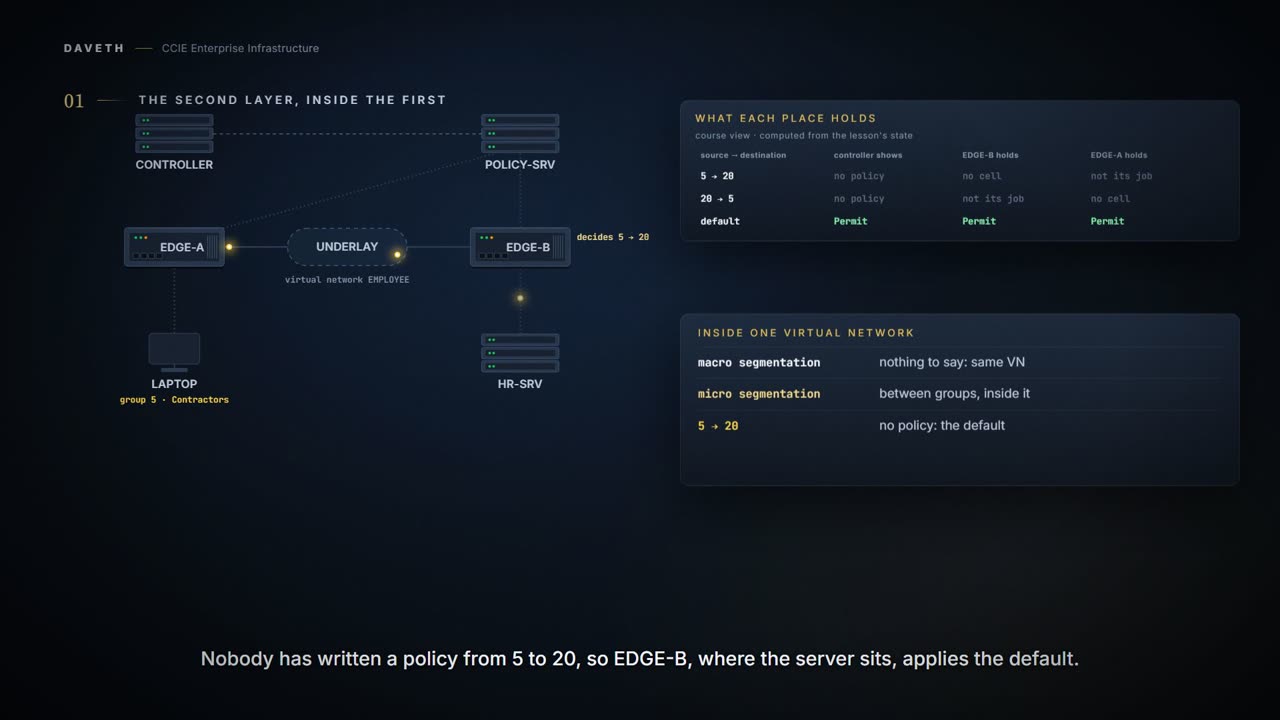
2.1.f.i separated the domains that should never meet. Inside EMPLOYEE there are still contractors' laptops and HR servers, sharing a routing domain, and they should not all reach each other.
Within each VN, micro-segmentation provides a second, finer layer of control between specific roles and device types, producing a hierarchical model that aligns with zero‑trust principles.
And the mechanism? Already yours, in one line: a group is assigned when an endpoint authenticates, carried in the header, and enforced at the destination's edge node. That was 2.1.b.iii and is not repeated. What is left is authoring the policy, and the step that catches people.
Right now nothing is authored between them. The laptop opens a connection to the HR server, and EDGE-B applies the default. Which row of its counters moves?
EDGE-B# show cts role-based counters
Role-based IPv4 counters
From    To      SW-Denied  HW-Denied  SW-Permit HW-Permit SW-Monitor HW-Monitor
*       *       0          0          0          900        0          0
! Proves which cell this device has been applying, and whether it denied or permitted. Does not prove which endpoint sent the packets. The counts are this page's own; which row moves, and in which column, is the reading.
The default policy is Permit.
Two building blocks, and what binds them
Security groups and access contracts are the basic building blocks of access control policy. A classification category to which you can assign users, network devices, or resources. An access contract is a set of rules that controls the type of network traffic that is allowed to pass between the source and destination security groups. A group-based access control policy identifies a specific source and destination group pair and associates an access contract.
| block | when it is wrong, you get |
|---|---|
| security group | the right rule, applied to an endpoint in the wrong group |
| access contract | the wrong rule, between the right groups |
| policy | the right rule in one direction, and nothing in the other |
You can choose only one contract for a policy. These policies are unidirectional.
One contract per policy, and one direction per policy. Keep those two, because the second one comes back to bite later on this page.
Who owns the policy
This trips people who knew ISE before SD-Access.
When Catalyst Center is integrated to ISE, Catalyst Center by default becomes the primary administration point for group‑based access control, and Cisco ISE functions as a read‑only policy engine for TrustSec data. In this mode, Catalyst Center owns a single policy matrix (Production) on ISE and enforces one access contract (SGACL) per TrustSec policy.
So you author in Catalyst Center. If your instinct is to open ISE and edit the matrix there, that instinct is from a different arrangement:
The TrustSec Workcenter user interface screens for Security Groups, Security Group Access Control Lists (SGACLs), and Egress Policy are displayed in Read-Only mode in Cisco ISE to prevent policy synchronization issues.
The other arrangement exists, and it is a choice made when the two are integrated:
Optionally, Catalyst Center can be configured to have TrustSec policy administered directly on Cisco ISE.
On this page Catalyst Center authors. What ISE holds between a save and a deploy is not stated by the pages cited, and this page does not claim it. What is stated is its job:
Cisco ISE provides the runtime policy platform for providing policy download to the network devices on behalf of Catalyst Center.
Save, then deploy
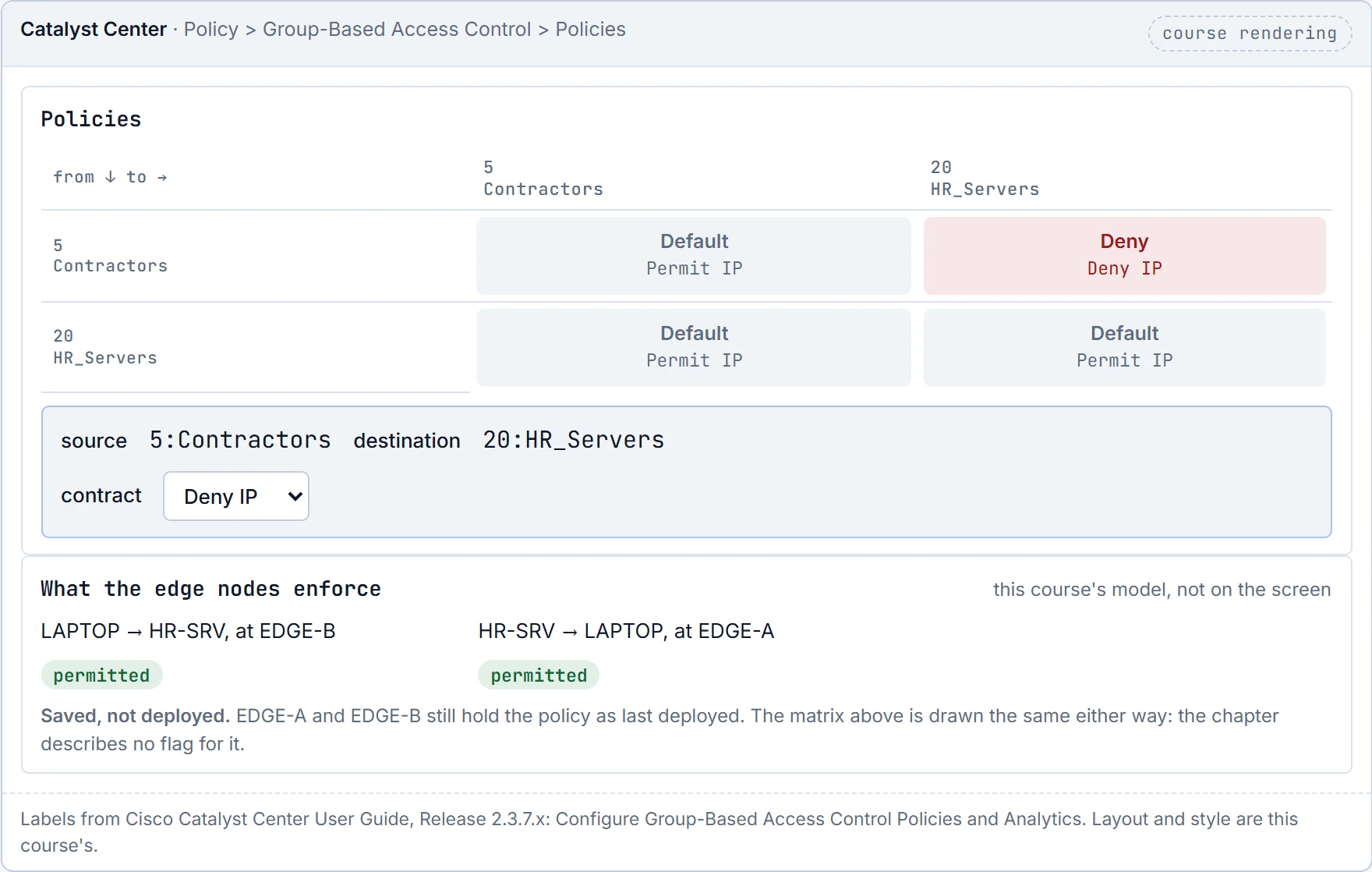
Somebody creates a policy: source 5:Contractors, destination 20:HR_Servers, contract Deny IP, and clicks Save Now. The matrix shows it, and the connection it should block is still open.
When you update the security groups, contracts, or policies, you must deploy the changes on the network devices. If you update the policies and do not deploy the updated policies, notifications about the policy changes are not sent to the network devices, and the policies that are currently active in the network may not be consistent with the policy information displayed in Catalyst Center.
Save and Deploy are two different actions. Until you deploy, the network devices are not told, and what they enforce may not match what Catalyst Center shows.
What does EDGE-B hold after the save?
EDGE-B# show cts role-based permissions
IPv4 Role-based permissions default:
Permit IP-00
RBACL Monitor All for Dynamic Policies : FALSE
RBACL Monitor All for Configured Policies : FALSE
! Proves which cells this device holds, and the access list in each, right now. Does not prove that this matches what Catalyst Center shows, or that any other device holds the same.
The default and nothing else. That the device prints the Permit IP contract as Permit IP-00 is this course's reading of the samples' names.
This course's reading: what Catalyst Center shows against what each edge node holds
place           default    policies
CENTER          Permit IP  5 to 20: Deny IP
EDGE-A          Permit IP  none
EDGE-B          Permit IP  none

Catalyst Center shows what no enforcement point holds
That is a genuinely easy state to ship. The matrix shows the policy, a screenshot of it looks right, and the change record is accurate about everything except the network.
Now Deploy Now, and ask again:
EDGE-B# show cts role-based permissions
IPv4 Role-based permissions default:
Permit IP-00
IPv4 Role-based permissions from group 5:Contractors to group 20:HR_Servers:
Deny IP-00
RBACL Monitor All for Dynamic Policies : FALSE
RBACL Monitor All for Configured Policies : FALSE
This course's reading: the traffic, against what is authored
packet              authored   enforced               so
LAPTOP to HR-SRV    denied     denied on EDGE-B       agree
And the message that tells the devices, and how long it takes? Not claimed. The notifications are documented as not sent until you deploy, and not how they travel or when they arrive. So check the device rather than the console.
Do it on the matrix yourself. Save a Deny IP policy from 5:Contractors to 20:HR_Servers and look at the matrix, then at what the edge nodes enforce. Then Deploy Now. The matrix draws the policy the same before and after; only the edge nodes change.
Continue the lesson
The whole lesson, with its drawings and its questions. 7 more sections after the ones above.