
Peer device and the fusion router
Virtual networks do not reach each other, and neither do they reach DHCP, DNS, ISE or Catalyst Center in the shared services block. The fusion router is a device outside the fabric, running no LISP and no VXLAN, that peers with the border per VRF and leaks routes between the VNs and those services. The leak is an import and export map naming exactly which prefixes move.
By Arif, founder of Daveth · Updated
The full 5 min walkthrough is in Daveth Pro (Network). See what the plan opens
What this page answers
What is a fusion router in SD-Access?
A device outside the fabric that peers with the border and performs controlled route leaking between the virtual networks and the shared services they need. It runs no LISP or VXLAN: it does ordinary VRF and BGP work. Read it in “The answer sits outside the fabric”
How does the fusion router leak routes?
With import and export maps in each VRF, using prefix lists that name exactly which prefixes move between the VRF and the global table where the shared services sit. Read it in “The leak itself”
How many BGP sessions does a fusion router need?
One per VRF: the VRFs stay separate across the handoff, so each has its own address family and its own BGP session with the border. Read it in “How the routing crosses”
You built the segmentation, and it worked
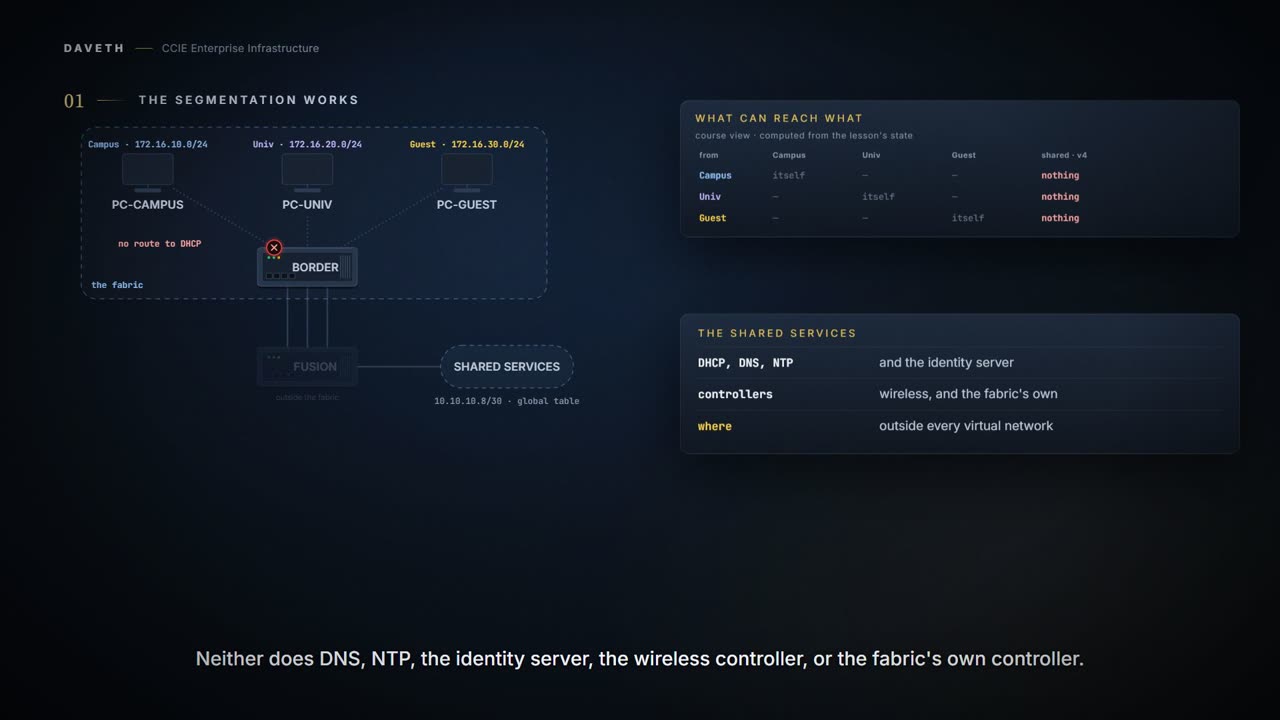
Campus is one virtual network, Univ is another, Guest is a third. A virtual network is a VRF, and VRFs do not reach each other. That is the point: it is the isolation the whole design exists to deliver.
Now an endpoint boots and needs DHCP. DHCP does not live in Campus. Neither does DNS, NTP, ISE, WLC, Catalyst Center. They sit in a shared services block outside every virtual network, because they serve all of them.
This course's reading, computed from the import lists; no device prints it
ipv4: can reach →  campus   univ     guest    global
campus              ·        ·        ·        ·
univ                ·        ·        ·        ·
guest               ·        ·        ·        ·
So the isolation has cut every endpoint off from the services that make the network function: including the ones the fabric itself depends on.
So something has to move routes between them, on purpose. VRFs do not leak by themselves. In the design this page follows, that job is done outside the fabric, by a device the border hands every virtual network to.
The answer sits outside the fabric
The fusion router is a device outside the fabric that peers with the border and performs controlled route leaking between the virtual networks and the services they need.
It runs no LISP and does not wrap traffic in VXLAN. It is not a fabric node and it does not know or care what a fabric is. It is an ordinary router doing ordinary VRF and BGP work, positioned precisely at the boundary.
And the name is doing this device no favours. Fusion sounds like something you pour three virtual networks into so they come out merged, and a fair number of first configurations are written as though that were the job. It is the opposite. Nothing fuses. This router holds the virtual networks apart exactly as the fabric did, and moves named prefixes between them one line at a time. Everything it joins, somebody typed.
Six flats over a shared laundry room have the arrangement you actually want here. Everybody reaches the machines, nobody reaches anybody's bedroom, and the fact that all six walk through the same room on laundry day joins nothing else about their lives. Shared services are the laundry room. The virtual networks keep their own front doors.
The laundry room stops being a room the moment you go looking for it, because there is no single place everyone walks to. What there is, is a list of named prefixes carried in one direction and another list carried back, typed by somebody, on this router. Which is why the rest of this page reads those lists rather than a diagram.
State 1 Three links where you might have drawn one
Why does each virtual network get its own link, its own tag and its own VRF on the far side?
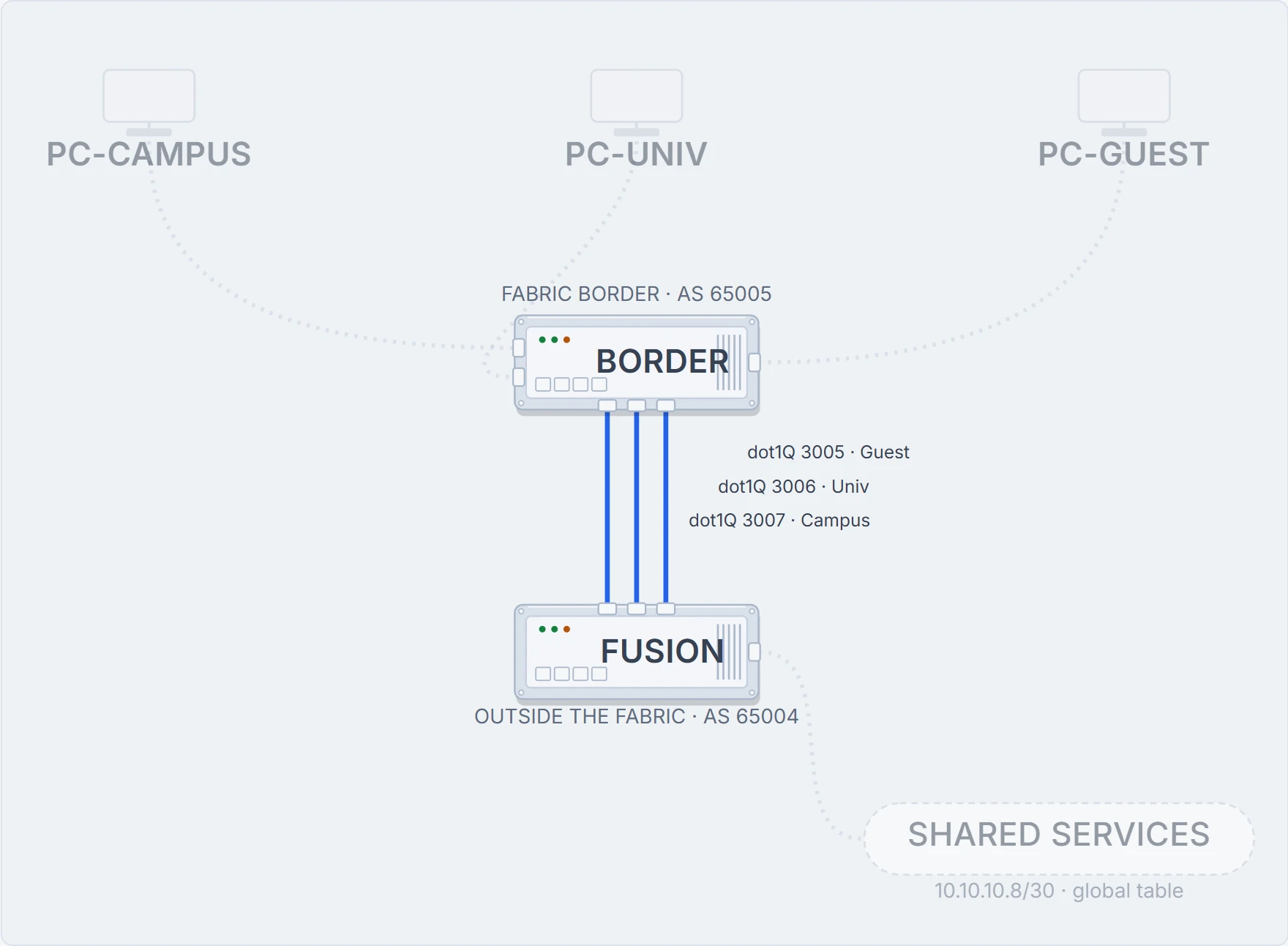
The border does not hand it a single merged connection. That would throw away the separation immediately. Instead the separation is carried across using VRFs connected by 802.1Q-tagged interfaces: VRF-lite.
On a Layer 3 switch that is an SVI per virtual network, and the VRF it goes into has to exist first. Here is Campus's VRF, exporting and importing its own route target, and its SVI:
FUSION# configure terminal
FUSION(config)# vrf definition Campus
FUSION(config-vrf)# rd 1:4099
FUSION(config-vrf)# address-family ipv4
FUSION(config-vrf-af)# route-target export 1:4099
FUSION(config-vrf-af)# route-target import 1:4099
FUSION(config-vrf-af)# exit-address-family
FUSION(config-vrf)# interface Vlan3007
FUSION(config-if)# vrf forwarding Campus
FUSION(config-if)# ip address 10.50.50.26 255.255.255.252
FUSION(config-if)# end
Univ and Guest repeat it with their own numbers: Vlan3006, 10.50.50.22 and 1:4100; Vlan3005, 10.50.50.18 and 1:4101.
On a router, the same idea as tagged subinterfaces:
FUSION# configure terminal
FUSION(config)# interface GigabitEthernet0/0/0.3007
FUSION(config-if)# encapsulation dot1Q 3007
FUSION(config-if)# vrf forwarding Campus
FUSION(config-if)# ip address 10.50.50.26 255.255.255.252
FUSION(config-if)# end
Two forms, one idea. A tag per virtual network, a VRF per tag, and no point at which two virtual networks share an interface.
How the routing crosses
Three virtual networks all need to reach the same shared services. Put a number on the routing before you read it.
Because the VRFs stay separate across the handoff, the routing does too.
FUSION# configure terminal
FUSION(config)# router bgp 65004
FUSION(config-router)# bgp log-neighbor-changes
FUSION(config-router)# address-family ipv4 vrf Campus
! Its own address family. Nothing here is visible to the other two.
FUSION(config-router-af)# neighbor 10.50.50.25 remote-as 65005
FUSION(config-router-af)# neighbor 10.50.50.25 update-source Vlan3007
FUSION(config-router-af)# neighbor 10.50.50.25 activate
FUSION(config-router-af)# exit-address-family
FUSION(config-router)# address-family ipv4 vrf Univ
FUSION(config-router-af)# neighbor 10.50.50.21 remote-as 65005
FUSION(config-router-af)# neighbor 10.50.50.21 update-source Vlan3006
FUSION(config-router-af)# neighbor 10.50.50.21 activate
FUSION(config-router-af)# exit-address-family
FUSION(config-router)# address-family ipv4 vrf Guest
FUSION(config-router-af)# neighbor 10.50.50.17 remote-as 65005
FUSION(config-router-af)# neighbor 10.50.50.17 update-source Vlan3005
FUSION(config-router-af)# neighbor 10.50.50.17 activate
FUSION(config-router-af)# exit-address-family
FUSION(config-router)# end
How many sessions came up, and which VRF is each one in?
This course's rendering of show bgp vpnv4 unicast all summary: computed from the scenario, not a Cisco sample
FUSION# show bgp vpnv4 unicast all summary
BGP router identifier 10.255.0.2, local AS number 65004

Neighbor        AS      VRF       Up/Down   State/PfxRcd
10.50.50.25     65005   Campus    02:14:07  0
! One per VRF, each sourced from that VRF's own interface.
10.50.50.21     65005   Univ      02:14:07  0
10.50.50.17     65005   Guest     02:14:07  0
The handoff is per-VRF at every layer: interface, VLAN tag, VRF and BGP session. Catalyst Center automates the border side of exactly this.
And now the part worth pausing on. Three sessions are established, and:
This course's reading, computed from the import lists; no device prints it
ipv4: can reach →  campus   univ     guest    global
campus              yes      ·        ·        ·
univ                ·        yes      ·        ·
guest               ·        ·        yes      ·
Nothing has been leaked. Every VRF imports exactly one route target: its own, so a session carries its own routes and nothing else. Building the handoff preserves the isolation; it does not relax it. Still 0 of the 3 virtual networks can reach DHCP.
The leak itself
The shared services sit in the global table on the fusion router. Reaching them is not a route target: it is an import and export map, with prefix lists naming exactly what moves.
FUSION# configure terminal
FUSION(config)# ip prefix-list Campus_Prefix seq 5 permit 172.16.10.0/24
FUSION(config)# ip prefix-list Global_Prefix seq 5 permit 10.10.10.8/30
FUSION(config)# route-map Campus_Map permit 10
FUSION(config-route-map)# match ip address prefix-list Campus_Prefix
FUSION(config-route-map)# route-map Global_Map permit 10
FUSION(config-route-map)# match ip address prefix-list Global_Prefix
FUSION(config-route-map)# exit
FUSION(config)# vrf definition Campus
FUSION(config-vrf)# address-family ipv4
FUSION(config-vrf-af)# import ipv4 unicast map Global_Map
FUSION(config-vrf-af)# export ipv4 unicast map Campus_Map
FUSION(config-vrf-af)# end
This course's reading, computed from the import lists; no device prints it
FROM     REACHES             BECAUSE
campus   10.10.10.8/30       import ipv4 unicast map admits 10.10.10.8/30
One prefix each way, named explicitly. Campus can reach 10.10.10.8/30 and nothing else outside itself; the other two virtual networks are untouched.
Look at why it took two maps rather than one, because leaking one direction is the commonest way to get this half-working. Import alone puts the services prefix into the virtual network, so the endpoint now has somewhere to send a request. The reply is the problem. The services side has to hold a route back to the endpoint, and it will not have one unless the endpoint's prefix was exported to it. Leak inwards only and the request leaves perfectly and the answer has nowhere to go, which looks nothing like a routing fault from the endpoint. It looks like the server is down.
Does Campus's own table on FUSION agree?
This course's rendering of show ip route vrf Campus: computed from the scenario, not a Cisco sample
FUSION# show ip route vrf Campus
Routing Table: Campus
Codes: C - connected, B - BGP

C        10.50.50.24/30 is directly connected, Vlan3007
B        172.16.10.0/24 [20/0] via 10.50.50.25, 02:14:07
B        10.10.10.8/30
! The only route in this VRF that did not start in it.
Two things about that table. The connected route is 10.50.50.24/30: the handoff link itself. 172.16.10.0/24 is not connected to this router at all; it sits behind the border and arrives over the session, which is why it carries a next hop of 10.50.50.25.
And the leaked route carries no next hop here, because this course has not verified how IOS XE renders one for a route that a map or a route target moved between tables. The prefix is the claim this page makes. A plausible-looking via would have been a guess, and a guess in a routing table is indistinguishable from a fact.
Apply the same pair of maps to the other two, and:
This course's reading, computed from the import lists; no device prints it
ipv4: can reach →  campus   univ     guest    global
campus              yes      ·        ·        yes
univ                ·        yes      ·        yes
guest               ·        ·        yes      yes
Every endpoint has DHCP, and no virtual network reaches another. This is macro segmentation doing exactly what it is for, and it is the state a design document describes. Each virtual network can reach 1 prefix outside itself: the one the map names.
Proves: The configuration proves exactly which prefixes move between which routing tables. Every map matches a prefix list, and every prefix list names a prefix.
Does not prove: that any of it matches what the security team thinks the design does. A working leak and an intended leak look identical in a routing table, and the routing table is the only place either of them is written down.
Continue the lesson
The whole lesson, with its drawings and its questions. 5 more sections after the ones above.