
vBond and overlay bring-up
On a working edge, show sdwan control connections lists vmanage, vsmart and vbond, all up. The vbond row shows system IP 0.0.0.0, site 0 and domain 0, and it is the healthiest line in the table. A new edge needs four things: a system IP, a site ID, an organisation name and the Validator's address, which it calls over DTLS first. show sdwan control local-properties covers the rest.
By Arif, founder of Daveth · Updated
The full 6 min walkthrough is in Daveth Pro (Network). See what the plan opens
What this page answers
How do you check SD-WAN control connections?
show sdwan control connections on the edge. A joined edge shows its vmanage, vsmart and vbond peers with STATE up. Read it in “What a working edge prints”
Why does the vBond row show 0.0.0.0 in show sdwan control connections?
System IP, site and domain are things the overlay tells an edge about its peers. The Validator is the one peer the edge knew before the overlay told it anything, because its address was typed in by hand, so its row shows zeros while the connection is up. Read it in “The row that looks broken and is not”
What does an SD-WAN edge need to join the overlay?
Four things: its system IP, its site ID, the organisation name, and the vBond Validator's address, which it contacts first over DTLS. Read it in “How an edge gets in”
What a working edge prints
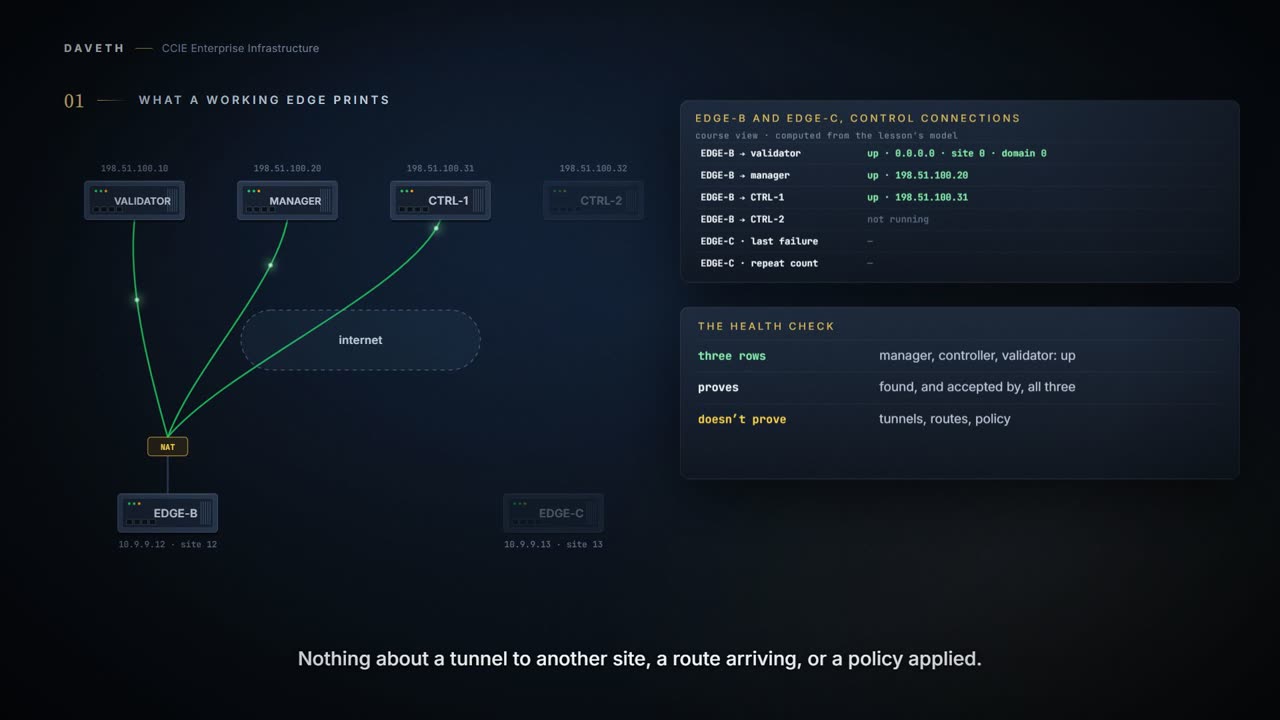
Start at the end. This is EDGE-B after it has joined the overlay, printing the one command you will type more than any other on an SD-WAN edge.
EDGE-B: show sdwan control connections
PEER    PEER PEER            SITE       DOMAIN PEER            PEER  LOCAL
TYPE    PROT SYSTEM IP       ID         ID     PRIVATE IP      PORT  COLOR          STATE UPTIME
------------------------------------------------------------------------------------------------
vmanage dtls 10.9.9.12       12         1      198.51.100.20   12346 biz-internet   up    0:00:00:23
vsmart  dtls 10.9.9.12       12         1      198.51.100.31   12346 biz-internet   up    0:00:00:24
vbond   dtls 0.0.0.0         0          0      198.51.100.10   12346 biz-internet   up    0:00:00:25
Scroll the block right and read the STATE column. vmanage up. vsmart up. vbond up. Three rows, all up, and the edge is in. That is the whole health check, and it is the one sentence to carry out of this section: if every control connection is up, this device has found the Validator, the Manager and the Controller, and they have all agreed to talk to it.
Now the part people skip. Those rows prove the edge can reach its controllers and that they accepted it. They prove nothing about a data plane tunnel to another site, nothing about a route arriving, nothing about a policy being applied. Control connections are the door, not the room. Each of those other things is read with its own command, somewhere else.
The row that looks broken and is not
Go back and look at the vbond row on its own. SYSTEM IP 0.0.0.0. SITE ID 0. DOMAIN ID 0. STATE up.
Every other row is full of real values, and that one is full of nothing, and it is up. It looks like the row you should open a ticket about. It is the healthiest line in the table.
Here is why the zeros are honest. A system IP, a site and a domain are things the overlay tells an edge about its peers. The Validator is the one peer the edge knew about before the overlay told it anything, because you typed its address in by hand. So the edge has an address for it and nothing else, and it prints what it has. The vbond row is identified by where it is, not by who it is.
How an edge gets in
A brand new edge comes out of the crate knowing nothing about your network. Before it can join, somebody has to tell it four things, and exactly four: who it is (a system IP), where it is (a site), who it works for (an organisation name), and one address to call. That last one is the Validator's.
Configured on EDGE-B
EDGE-B(config)# system
EDGE-B(config-system)# system-ip 10.9.9.12
EDGE-B(config-system)# site-id 12
EDGE-B(config-system)# admin-tech-on-failure
EDGE-B(config-system)# organization-name "DAVETH-LAB"
EDGE-B(config-system)# vbond 198.51.100.10
EDGE-B(config-system)# commit
EDGE-B boots and opens a DTLS connection to that address. It sits behind NAT, which normally makes an inbound anything impossible. The Validator handles that by writing down what it sees: the public address and port the packets arrived from, mapped to the private address inside them. The Validator is the only device in the overlay that gets to see both sides of an edge's NAT, which is most of the reason it exists.
Read from the state, not from a command: EDGE-B after reaching VAL-1
Validator address configured            198.51.100.10
DTLS to the Validator                   yes
NAT mapped by the Validator             yes
authenticated both ways                 no
Manager and Controller addresses sent   no
announced to                            no Controller
control connections                     none
Then the two of them frisk each other. Both directions, and they are checking different things.
The edge checks the Validator's name. It follows the chain of trust up from the certificate the Validator presented, pulls the organisation name out of it, and compares that to the organisation name configured on itself. Same name, or no deal. An edge will not take orders from a controller signed for somebody else's company.
The Validator checks the edge's papers. It sends a challenge, then takes the serial and chassis numbers off the edge and looks for them in its authorized device list. If the numbers are not on that list, it tears the DTLS connection down and that is the end of the conversation. No argument, no retry negotiation. The list is a guest list, and there is no talking your way in.
Read from the state, not from a command: EDGE-B after both checks
Validator address configured            198.51.100.10
DTLS to the Validator                   yes
NAT mapped by the Validator             yes
authenticated both ways                 yes
Manager and Controller addresses sent   no
announced to                            no Controller
control connections                     none
Only now does the edge find out where anything else is. The Validator sends it the addresses of the Manager and the Controller, and separately tells the Controller that a new edge has turned up in the domain. Two messages, in opposite directions, and after them everybody knows everybody.
Read from the state, not from a command: EDGE-B after the introduction
Validator address configured            198.51.100.10
DTLS to the Validator                   yes
NAT mapped by the Validator             yes
authenticated both ways                 yes
Manager and Controller addresses sent   198.51.100.20, 198.51.100.31
announced to                            CTRL-1
control connections                     none
An edge is given the Validator's address; the rest it is told. Count them on the last three blocks: one address went in by hand, every other address on that edge arrived because the Validator sent it. Notice who hears what, too. The Manager's and Controller's addresses go to the edge. The announcement goes the other way, to CTRL-1.
Which connections stay, and which one leaves
EDGE-B now connects to MGR-1 and CTRL-1. So what happens to the vBond connection it came in on? Look at the table from the first section again: there was a vbond row, and it was up.
With one Controller in the overlay and max-control-connections left at its default of 2, the edge has a spare slot, so it keeps the vBond connection running rather than throw away a working session for nothing.
Read from the state, not from a command: EDGE-B's connections, one Controller up
peer type  controller  address
vmanage    MGR-1       198.51.100.20
vsmart     CTRL-1      198.51.100.31
vbond      VAL-1       198.51.100.10

vSmarts up: 1; max-control-connections 2; vBond connection kept
in the overlay: yes
Now CTRL-2 comes up, and the edge has somewhere better to put that slot. Before you scroll: what happens to the vbond row?
With two Controllers, the edge builds a control connection to each of them, on every TLOC colour configured to carry control connections. The slots are spoken for. As soon as the Manager and Controller connections it actually needs are established, the edge tears down the vBond connection itself, from its own end.
Read from the state, not from a command: EDGE-B's connections, two Controllers up
peer type  controller  address
vmanage    MGR-1       198.51.100.20
vsmart     CTRL-1      198.51.100.31
vsmart     CTRL-2      198.51.100.32

vSmarts up: 2; max-control-connections 2; vBond connection torn down
in the overlay: yes
No vbond row, and the edge is fully in the overlay. This is the single most misread output on an SD-WAN edge, so say it to yourself in these words: a missing vbond row on a working edge is not a fault, it is graduation. The Validator got it in. It does not have to stay for the party.
What the edge can tell you about itself
Before you go blaming a controller you cannot log into, ask the edge about itself. It knows more than people expect, and it is the cheapest place to look.
EDGE-B: show sdwan control local-properties
personality                       vedge
organization-name                 DAVETH-LAB
root-ca-chain-status              Installed

certificate-status                Installed
certificate-validity              Valid

enterprise-cert-status            Installed
enterprise-root-installed         yes

system-ip                         10.9.9.12
site-id                           12
domain-id                         1
protocol                          dtls
number-vbond-peers                1

INDEX   IP                      PORT
--------------------------------------------
0       198.51.100.10           12346

number-active-wan-interfaces      1

INTERFACE                 PUBLIC IPv4      PORT   COLOR          STATE  MAX CNTRL
--------------------------------------------------------------------------------
GigabitEthernet0/0/0      198.51.100.112   12346  biz-internet   up     2
It prints a lot. Six lines of it decide whether this edge can ever come up, and they are worth knowing by heart, because every one of them has put an engineer on a two-hour call:
Is the organisation name right? It has to match what is in the certificates, character for character, and it is a free-text field somebody typed. Is the certificate actually valid right now? Not installed, not present: valid, today, at the moment you are reading the output. Certificates expire on ordinary Tuesdays. Is the vBond address right? Wrong address and the edge is calling a number that does not answer. Are the system IP and site right? And is MAX CNTRL something other than 0? That column is how many control connections the interface is allowed to build, and zero is a legal value that quietly guarantees failure.
One more, and it is the one that catches people using their own certificate authority. If your controllers use enterprise certificates, then the root certificate of that enterprise CA has to be installed on the edge. The edge cannot verify a signature from an authority it has never heard of, and it will not take your word for it.
Continue the lesson
The whole lesson, with its drawings and its questions. 5 more sections after the ones above.