
WAN Edge deployment, hardware
A hardware edge arrives with its certificate built in, and the controllers must know it before it arrives. It can learn where to call four ways: Plug and Play on IOS XE, called Zero-Touch Provisioning on vEdge; an on-site bootstrap file; a generic bootstrap; or the console. A bootstrap file on hardware must be named ciscosdwan.cfg exactly, and the device must be in its factory state.
By Arif, founder of Daveth · Updated
The full 5 min walkthrough is in Daveth Pro (Network). See what the plan opens
What this page answers
How do you onboard an SD-WAN edge router?
Four ways: Plug and Play, or Zero-Touch Provisioning on vEdge hardware; an on-site bootstrap configuration file; a generic bootstrap shared by many boxes; or manual configuration at the console. Read it in “Four ways to tell it where to call”
What must the SD-WAN bootstrap file be called?
On hardware, exactly ciscosdwan.cfg, loaded from a bootable USB drive or bootflash, and the device must be in its factory state with nothing configured. Read it in “A file, and the one it actually reads”
What do the SD-WAN device list states mean?
Valid lets the box build control and data connections and take its configuration; Invalid lets it build neither; Staging lets it build control connections and receive its configuration, but not data connections. Read it in “The list, and its three states”
What the box already has
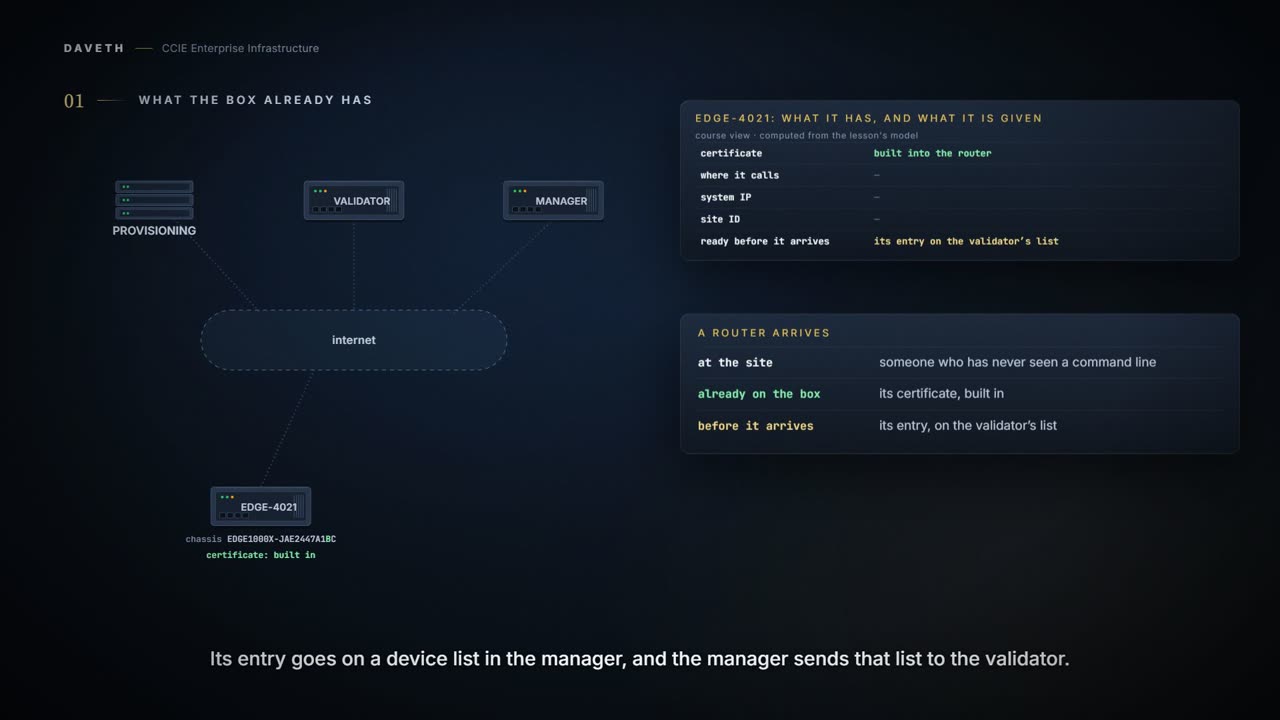
A router arrives at a branch. The person who signs for it runs a shop, a clinic or a warehouse, and has never seen a command line. What does EDGE-4021 already have when it is powered on?
Its certificate. On hardware edges the device certificate is built into the router: on the older vEdge boxes, into a trusted chip on the board itself. Nobody installs it and nobody can forget to.
And the controllers have to know the box before it arrives. That is the half of this lesson that never happens at the site: the device list is uploaded to the manager and pushed out to the validator, ahead of the box being plugged in anywhere.
So the question is narrower than how do we configure it. It is how the box learns where to call, and what has to be ready at the other end when it does.
Four ways to tell it where to call
How many paths are there, and what does each need at the site?
Four. Plug and Play, which is what zero-touch provisioning is called on an IOS XE edge; an on-site bootstrap file; a generic bootstrap shared by many boxes; and configuring the device by hand at its console.
Computed from the state: the four paths, what each needs at the site, and where the identity comes from. No command prints it.
path                      needs at the site
Plug and Play             DHCP; public DNS and a route to devicehelper.cisco.com
on-site bootstrap file    a factory-state box and ciscosdwan.cfg on USB or bootflash
generic bootstrap         a DHCP server in the branch
configured by hand        somebody at the console

path                      system IP and site ID come from
Plug and Play             vManage: the template carries system IP and site ID
on-site bootstrap file    the bootstrap file, generated from a template in vManage
generic bootstrap         a template attached when the unclaimed box is claimed
configured by hand        whoever types it
Look at the second half of that reading. Only one path has the site supply the system IP and site ID, and it is the one that needs a person at the console. The other three get identity from vManage, one way or another.
Which is the quiet cost of that path: it needs somebody standing next to the box. A console cable is the manual way in, and being physically present proves nothing to anybody. The serial still has to be authorised in the back office, and a person at the site cannot do that from the site.
So much for the idea that the box needs its identity delivered to it. On three of the four paths the identity is something the back office has to have ready, not something the site sends.
If the shape feels familiar, it should. LAN automation in 2.1.a.ii solves the same problem in the campus: a device with no configuration cannot be managed, so something has to reach it first. That parallel is ours, drawn because it is worth seeing; nobody else puts the two side by side.
Plug and Play, in the order it happens
What does the box do when it is powered on with nothing? That depends on which family it belongs to. The automated process is called Zero-Touch Provisioning on vEdge hardware and Plug and Play on an IOS XE edge. The two are close cousins, but they are not the same service, and they are not reached at the same place.
EDGE-4021 is an IOS XE edge, so this is Plug and Play. First it needs an address, and then a name to call. With a DHCP server on the WAN side it runs by itself: the box takes an address, resolves the provisioning service by name, and is configured once its control connections come up. So the site's gateway needs working DNS and a route out to that service.
And if the branch has no DHCP server? Then it depends on something most people never check. Some platforms have a fallback: with no DHCP offer, the router watches ARP on the subnet and infers an address from what it sees. It is gated twice: the software release has to be recent enough, and the platform family has to implement it at all.
EDGE-4021 is on a recent release, so the first gate is open. Does that settle it? No, and this is the trap. The release is necessary and not sufficient. This edge's family does not implement the fallback, so with no DHCP server it never finds an address, on any release. A box with no DHCP server on the WAN gets configured by hand at the console.
Check your own platform rather than a table in a course. Which families implement it changes, and the habit that survives is asking the question: is mine one of them?: before you promise a site it will onboard itself.
The published step-by-step sequence is the ZTP one, and it is not only for vEdge routers: it carries a line for IOS XE devices, and an IOS XE box that cannot reach the Plug and Play service is sent down it. Either way the site has to resolve the provisioning name.
Now the part that matters most for this lesson. When does the box learn its system IP?
It does not have one when it calls. At that point in the sequence the router has no system IP, so the connection is opened with a null one. The manager verifies the box and sends it the system IP afterwards.
Which is the moment to stop reading the system IP as an address. It is written like one and it works as a name: the identity this router answers to across the overlay. Nothing had to route to it for any of this to happen, because at this point in the story it does not have one yet.
After it has already called VBOND-1 and VMANAGE-1. So the site delivers nothing about who the box is. VMANAGE-1 does, which means VMANAGE-1 has to be holding something to give it. For either service, that something is a device template carrying the system IP and the site ID. Without it the process cannot finish.
Computed from the state: EDGE-4021 under Plug and Play, with the back office ready. No command prints it.
path                        Plug and Play
got as far as               overlay
control connections         up
data plane                  up
the fix is at               nowhere
code published for this     nothing failed

on the list, Valid, sent to the controllers, and every requirement of its path met
A file, and the one it actually reads
Where Plug and Play is not an option, a file does the same job. The box loads a bootstrap configuration from a bootable USB drive or from its own bootflash.
Two requirements before it is read at all. The device has to be in its factory state, with nothing configured on it; and on hardware the file has to be called ciscosdwan.cfg: exactly that, or the device does not read it.
Computed from the state: a file saved as CiscoSDWAN.cfg on the USB drive. No command prints it.
file found on             usb
named                     CiscoSDWAN.cfg
the device reads          nothing

a file not named exactly ciscosdwan.cfg is not read, so this box boots as if there
were none
Case matters. CiscoSDWAN.cfg is not ciscosdwan.cfg, so the box boots as if nothing were plugged in.
And with a copy in both places, which one wins? Bootflash. A file on internal flash takes priority over one on an inserted USB drive.
Computed from the state: renamed to ciscosdwan.cfg, with a copy on bootflash too. No command prints it.
file found on             both
named                     ciscosdwan.cfg
the device reads          bootflash

the copy on bootflash is used, because bootflash takes priority over USB
Read the consequence before you need it. A corrected file shipped on a USB drive loses to an old copy already on bootflash. Somebody drives to a branch, swaps the stick, and nothing changes.
Keep policy out of it. A bootstrap file is for getting the box admitted, not for configuring the service on it.
A box can also write its own. Once it has a working minimum configuration, one command saves it to the place a bootstrap is read from:
Output from elsewhere: saving the minimum bootstrap configuration. The values in it come from elsewhere, not from this scenario.
Device#request platform software sdwan bootstrap-config save
Saving bootstrap file 'bootflash:/ciscosdwan.cfg'...
Done
Notice the name it chooses. bootflash:/ciscosdwan.cfg: the file this section just said wins over USB.
And the generic bootstrap trades the per-device file for a step in VMANAGE-1. A box booted with it comes up as an unclaimed edge: somebody claims it and attaches a template that sets the system IP and site ID. It needs a DHCP server in the branch to get that far.
The list, and its three states
What does the back office actually upload, and what can it say about the box? A signed device file, or on newer manager releases a plain unsigned list. For an IOS XE edge the entry needs a serial or a secure device identifier alongside the chassis number.
Then every entry has a state, and the three are not simply on and off. Valid lets the box build control and data connections and take its configuration. Invalid lets it build neither. And Staging lets it build control connections and receive its configuration, but no data plane.
Read the third one twice. A box in Staging is allowed control connections and its configuration, and is not allowed a data plane. It will look healthy on every control-plane check.
And sending the list is a separate act. Marking an entry Valid in VMANAGE-1 changes nothing at VBOND-1 until it is pushed to the controllers. The two lists are not the same list until it is sent.
Is it on the list the controller holds? That is the question one command answers.
Continue the lesson
The whole lesson, with its drawings and its questions. The rest of this section and 4 more after it.