
OMP redistribution
Some routes enter OMP on their own: connected, static, and OSPF and OSPFv3 intra-area and inter-area routes. Others must be configured, BGP, EIGRP, LISP, IS-IS and OSPF external routes among them, because redistributing them automatically would risk loops and worse paths. Coming out of OMP nothing is automatic: routes learned from the overlay are not pushed into local routing protocols unless you say so.
By Arif, founder of Daveth · Updated
The full 7 min walkthrough is in Daveth Pro (Network). See what the plan opens
What this page answers
Which routes does OMP redistribute automatically?
Connected, static, OSPF intra-area and inter-area, and OSPFv3 intra-area and inter-area routes for IPv6. OSPF external routes, BGP, EIGRP, LISP and IS-IS need explicit configuration. Read it in “Into OMP by itself”
Are OMP routes redistributed into BGP by default?
No. Routes learned from the overlay are not redistributed into the local routing protocols by default, so a BGP neighbour on the service side hears nothing until you configure it. Read it in “Out of OMP only when configured”
Into OMP by itself
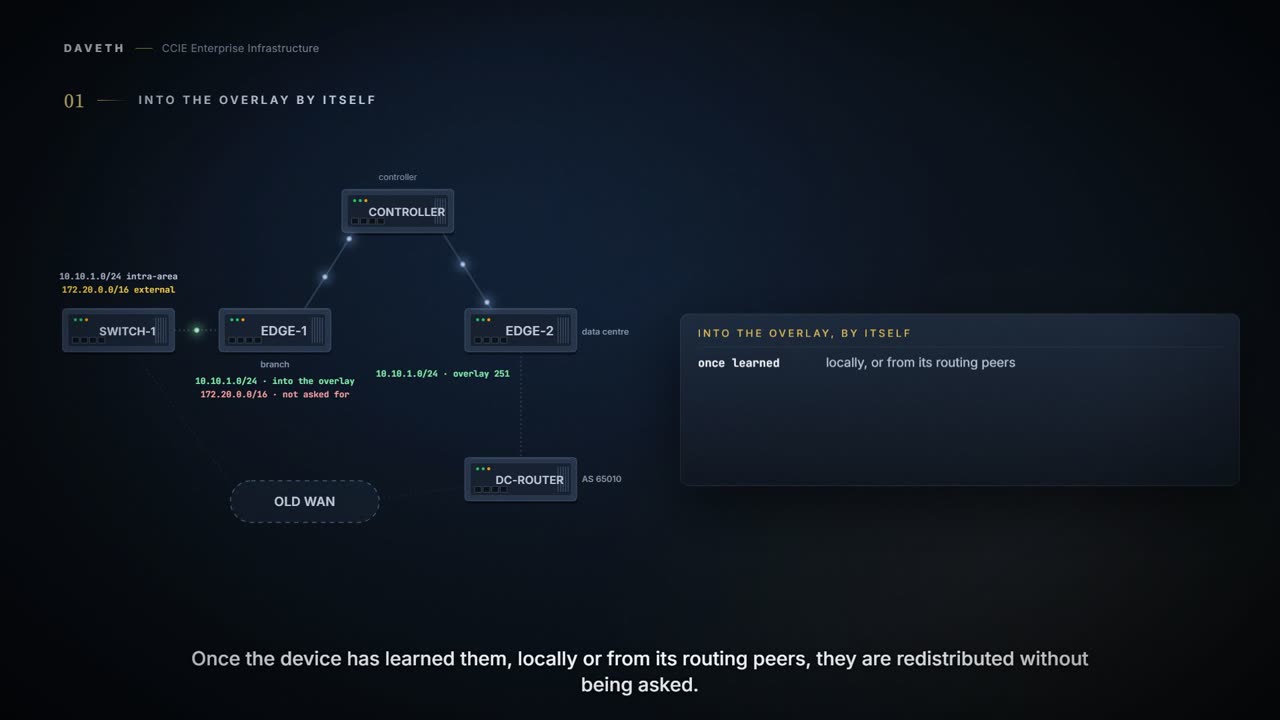
EDGE-1 learns two OSPF routes from SW-1: 10.10.1.0/24, intra-area, and 172.20.0.0/16, external. With nothing configured in OMP, which of them reach the overlay?
Some route types go into OMP on their own. Once the device has learned them, locally or from its routing peers, OMP redistributes them into the overlay without being asked:
The list: what OMP redistributes automatically.
Connected
Static
OSPF intra-area routes
OSPF inter-area routes
OSPFv3 intra-area routes (Address-Family IPv6)
OSPFv3 inter-area routes (Address-Family IPv6)
Read the OSPF row carefully. OSPF internal routes are redistributed into OMP by default. Internal. That word is doing a great deal of work, and the next section is about what it leaves out.
Computed from the state: what goes into OMP with nothing configured. No command prints it.
10.10.1.0/24 intra-area       into OMP
172.20.0.0/16 external        not into OMP
Look at the external row. It is not in the automatic list.
Into OMP when asked
Everything else has to be asked for, and the reason is given plainly: redistributing these automatically would risk routing loops and paths worse than the ones you already had. So they wait for a line of configuration:
The list: what needs explicit configuration.
BGP
EIGRP
LISP
IS-IS
OSPF external routes
OSPFv3 external route (Address-Family IPv6)
OSPFv3 all routes (Address-Family IPv4)
And one default worth knowing before you go looking for it. A device advertises its connected routes and its static routes into OMP by itself. Those you do not have to ask for.
So EDGE-1 is told to advertise OSPF externals. What does that one line bring?
There is one keyword here that does not mean what it looks like it means. Asking to advertise OSPF external routes with a route map applies that route map to both external and internal OSPF routes, not to the externals alone. If you were expecting the internals to carry on untouched, they do not.
Typed on EDGE-1: the advertise statement for OSPF externals, under the VRF. The VRF and AS are this course's own.
EDGE-1# config-transaction
EDGE-1(config)# sdwan
EDGE-1(config-sdwan)# omp
EDGE-1(config-omp)# address-family ipv4 vrf 10
EDGE-1(config-vrf-10)# advertise ospf external
EDGE-1(config-vrf-10)# commit
Proves: EDGE-1's configuration shows what it is configured to advertise into OMP for the VRF. Does not prove: that SW-1 sent an external route to advertise, or which route EDGE-2 put in its table for it.
Computed from the state: what goes into OMP now. No command prints it.
10.10.1.0/24 intra-area       into OMP
172.20.0.0/16 external        into OMP
And for IPv6 it is the same statement under the IPv6 address family, so the shape of what you type does not change with the address family: only where you type it.
One more form advertises a single prefix instead of a protocol. advertise network puts one prefix into OMP, provided a matching non-OMP route for it exists in the routing table. No route, nothing advertised, which is the failure people spend an afternoon on, because the command was accepted.
And OMP carries the original route's metric with it. A metric of 0 means a connected route, which is worth recognising on sight when you are reading what arrived at the far end.
Out of OMP only when configured
EDGE-2 has both routes in its table from OMP. Does DC-CE, its BGP neighbor, hear about them?
No. Coming out of OMP, nothing is automatic. Routes learned from the overlay are not pushed into the local routing protocols by default: deliberately, so that the edge does not flood the access network with everything the overlay knows. For BGP specifically: OMP routes are not redistributed into BGP unless you say so.
So the building has an automatic entrance and a locked exit. Routes walk in through the front door without being asked, and then discover on the way out that this particular door needs a key, and that nobody cut one. Hold that shape while you read the next three configurations, because all three look identical on the way in.
The door stops being one object here, which is where it is worth dropping. An entrance and an exit are two pieces of configuration on two different devices, and the second one is the line somebody forgets on the edge nobody was watching.
Computed from the state: EDGE-2's routes and what it passes to DC-CE. No command prints it.
10.10.1.0/24      in table: OMP         to DC-CE: no
172.20.0.0/16     in table: OMP         to DC-CE: no
Look at the last column. Both rows read no, and nothing on the overlay side is wrong.
Which is what makes this one hard to find the first time you meet it. The report you get is that a branch is unreachable. You check the overlay and the branch is there, learned, current and correct. You log into the edge and ping it successfully. Everything you look at says the route arrived, because it did. It arrived and then stopped, one protocol short of the device that actually needed it, and the only place the gap is visible is on the side you were not checking.
Continue the lesson
The whole lesson, with its drawings and its questions. The rest of this section and 3 more after it.