
System configuration
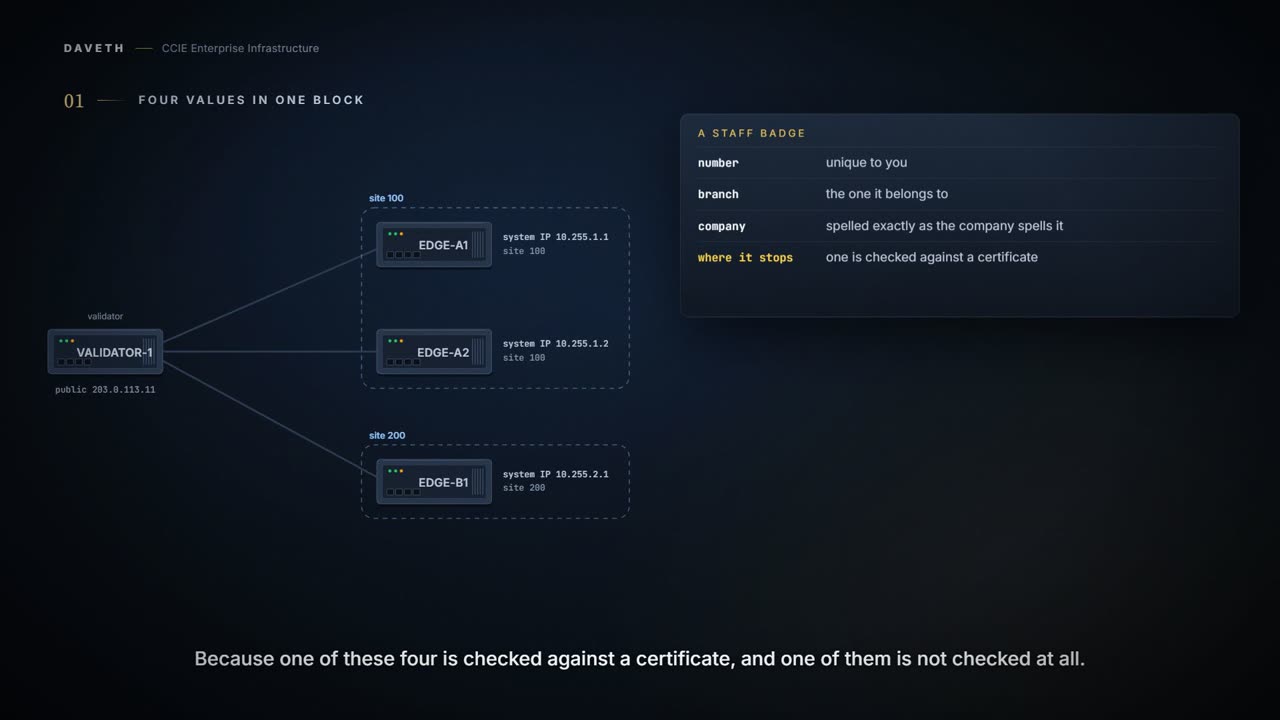
Four values in one system block decide whether an edge joins: the system IP, the site ID, the organization name and the validator's address. The system IP is a persistent address, like a router ID, used as the device's loopback in VPN 0, and it must be unique. The organization name is case-sensitive, must match on every device and must match the name in the certificates.
By Arif, founder of Daveth · Updated
The full 8 min walkthrough is in Daveth Pro (Network). See what the plan opens
What this page answers
What is the SD-WAN system IP?
A persistent IP address that identifies the device, similar to a router ID, used internally as its loopback address in the transport VPN, VPN 0. It is not an interface loopback you configure, and each device's must be unique. Read it in “The system IP is an address”
Is the SD-WAN organization name case-sensitive?
Yes. It must be identical on all devices in the overlay and match the name in each device's certificate, so changing one letter's case breaks the control connections. Read it in “The organization name, retyped”
How do you find a duplicate SD-WAN system IP?
If the required control connections are not up, read show sdwan control connection-history, whose error codes say why connections were refused. Read it in “Unique, and what a duplicate leaves”
Four values in one block
Four small fields, and a surprisingly large number of ways to have your afternoon ruined by one of them.
Think of a staff badge: a unique number, the branch it belongs to, and the company name spelled exactly as the company spells it. Get any one of those wrong and you are standing at reception explaining yourself. The comparison stops at reception, because one of these four is checked against a certificate and one of them is not checked at all, and knowing which is which is the point of this page.
EDGE-A1 is a new WAN Edge router. What does it have to say about itself before VBOND-1 will let it in?
Make sure the basic configurations are present on the router and that the device-specifc values are unique for each device in overlay
From elsewhere: the document's example system block. The values in it are the document's.
system
 system-ip 10.2.2.1
 site-id 2
 admin-tech-on-failure
 organization-name "TAC - 22201"
 vbond 10.106.50.235
Typed on EDGE-A1: the four values. The prompts start, as this command's do, at (config); the values are this course's own.
EDGE-A1(config)# system
EDGE-A1(config-system)# system-ip 10.255.1.1
EDGE-A1(config-system)# site-id 100
EDGE-A1(config-system)# organization-name "CCIE-COURSE-LAB"
EDGE-A1(config-system)# vbond 203.0.113.11
Computed from the state: EDGE-A1 with all four as required. No command prints it.
Validator answers     yes
org name matches cert yes
system IP unique      yes
error in history      none
joined                yes
Look at the example again. It also carries admin-tech-on-failure; this page is about the four values the document's checklist names.
The system IP is an address
Is the system IP an address anything uses, or a label written like one?
The system IP address is a persistent IP address that identifies the Cisco device. It’s similar to a router ID on a regular router, which is the address used to identify the router from which packets originated. The system IP address is used internally as the loopback address of the device in the transport VPN (VPN 0). This IP address isn’t the same as a loopback address that you configure for an interface.
From elsewhere: the command reference's example. The values in it are the document's.
Router(config)# system
Router(config-system)# system-ip 172.16.255.11
Enter the address, and the prefix length (/32) is implicit. The system IP address can be any IPv4 address except for 0.0.0.0/8, 127.0.0.0/8, 224.0.0.0/4, 240.0.0.0/4 and later.
Does anything actually send packets to it? The Getting Started guide:
Control traffic over secure DTLS or TLS connections between Cisco SD-WAN Controllers and vEdge routers and between Cisco SD-WAN Controllers and Cisco SD-WAN Validator is sent over the system interface identified by the system IP address. The system IP is a component of the device's TLOC address. Setting the system IP address for a device allows you to renumber interfaces as needed without affecting the reachability of the Cisco vEdge device. Cisco SD-WAN Manager uses the system IP address to identify the device so that the NMS can download the full configuration to the device.
Now turn on OSPF on EDGE-A1 and configure no router ID. Which address does it use?
On a router, the system IP address is used as the router ID for BGP or OSPF. If you configure a router ID for either of these protocols and it’s different from the system IP address, the router ID takes precedence.
Computed from the state: OSPF, no router ID configured. No command prints it.
system-ip             10.255.1.1
OSPF router ID        10.255.1.1
router-id configured  no
Unique, and what a duplicate leaves
Each device in the overlay network must have a unique system IP address. You can’t use the same address for another interface in VPN 0.
Someone configures EDGE-A2 with EDGE-A1's system IP. Where would you look first?
In the output of show sdwan control connections, if all the required control connections are not up, verify the output of show sdwan control connection-history.
From elsewhere: the start of the error legend. The values in it are the document's.
SD-WAN-Router#show sdwan control connection-history
Legend for Errors
CTORGNMMIS - Certificate Org name mismatch.            SSLNFAIL  - Failure to create new SSL context.
DCONFAIL   - DTLS connection failure.                  STNMODETD - Teardown extra vBond in STUN server mode.
DEVALC     - Device memory Alloc failures.             SYSIPCHNG - System-IP changed.
DUPSYSIPDEL- Duplicate System IP.                      UNAUTHEL  - Recd Hello from Unauthenticated peer.
Look at the fourth line of the legend. DUPSYSIPDEL is a duplicate system IP. The legend does not say which of the two devices records it, and this page does not claim which.
Computed from the state: EDGE-A2 with EDGE-A1's system IP. No command prints it.
Validator answers     yes
org name matches cert yes
system IP unique      no, EDGE-A2 has it
error in history      DUPSYSIPDEL
joined                not stated which device
Is a duplicate always visible as a failed connection, then?
If Cisco SD-WAN Controller and Cisco SD-WAN Validator have the same system IP addresses, they do not appear in Cisco SD-WAN Manager as devices or controllers. However, the control connections still successfully comes up.
So between a controller and a Validator the connections come up and the Manager loses sight of both. That is the guide's case; it is not a router's.
The organization name, retyped
EDGE-A2 is fixed. On EDGE-A1, someone retypes the organization name in lower case.
One capital letter. That is the whole change. Same company, same router, same everything else.
The name is case-sensitive. It must be identical on all the devices in your overlay network, and it must match the name in the certificates for all Cisco IOS XE Catalyst SD-WAN devices. The organization name is also included in the certificate for each device, which is created either by Cisco Catalyst SD-WAN or by an enterprise root CA. The Cisco vEdge router uses its chain of trust to extract the organization name from the certificate and compares it to the organization name that is configured on the router itself. If they do not match, the Cisco vEdge router tears down the DTLS connection.
Typed on EDGE-A1: the name, retyped in lower case. The prompts start, as this command's do, at (config); the values are this course's own.
EDGE-A1(config)# system
EDGE-A1(config-system)# organization-name "ccie-course-lab"
Computed from the state: the lower-case name. No command prints it.
Validator answers     yes
org name matches cert no
system IP unique      yes
error in history      CTORGNMMIS
joined                no
Look at the first line of the legend above. CTORGNMMIS, Certificate Org name mismatch.
Proves: show sdwan control connection-history proves which peer a control connection failed with, and the error recorded for it. Does not prove: which configured value to change, when the code is a transport failure such as DCONFAIL.
Continue the lesson
The whole lesson, with its drawings and its questions. 5 more sections after the ones above.