
OMP attributes and application-aware routing
In OMP a higher preference wins, the opposite of SD-Access border priority. OMP advertises a route with its TLOC, once per TLOC, and keeps several: send-path-limit and ecmp-limit both default to 4. Application-aware routing picks tunnels by SLA class, a maximum loss, latency and jitter, measured from the BFD Hellos every tunnel already sends, averaged over a poll interval.
By Arif, founder of Daveth · Updated
The full 7 min walkthrough is in Daveth Pro (Network). See what the plan opens
What this page answers
In OMP, does a higher or lower preference win?
Higher. In OMP a higher preference value is more preferred, the opposite of SD-Access border priority, where the lower number wins. Read it in “Higher wins here, and you have just learned the opposite”
What are the OMP send-path-limit and ecmp-limit defaults?
Both default to 4. send-path-limit sets how many route and TLOC tuples are advertised per prefix; ecmp-limit sets how many OMP paths are installed in the local route table. Both range from 1 to 16. Read it in “Selection narrows the field. It does not narrow it to one.”
How does SD-WAN application-aware routing measure tunnels?
With the BFD Hello packets every tunnel already sends for liveness: they measure loss, latency and jitter, and an SLA class sets the maximum of each a tunnel may have to be chosen. Read it in “The measurement is traffic you were already sending”
Higher wins here, and you have just learned the opposite
In OMP, a higher preference value is more preferred.
Earlier in this same domain you met border priority, where lower wins and the default is 10. That rule is fresh, it is from the same exam blueprint, and it points the other way. Two preference values, one domain, opposite directions. Get this one backwards and every path-selection prediction you make comes out backwards with it.
Which of the two were you about to apply?
State 1 Two sites, two transports, one controller
Each edge has two ways to reach the other. What makes them two rather than one?
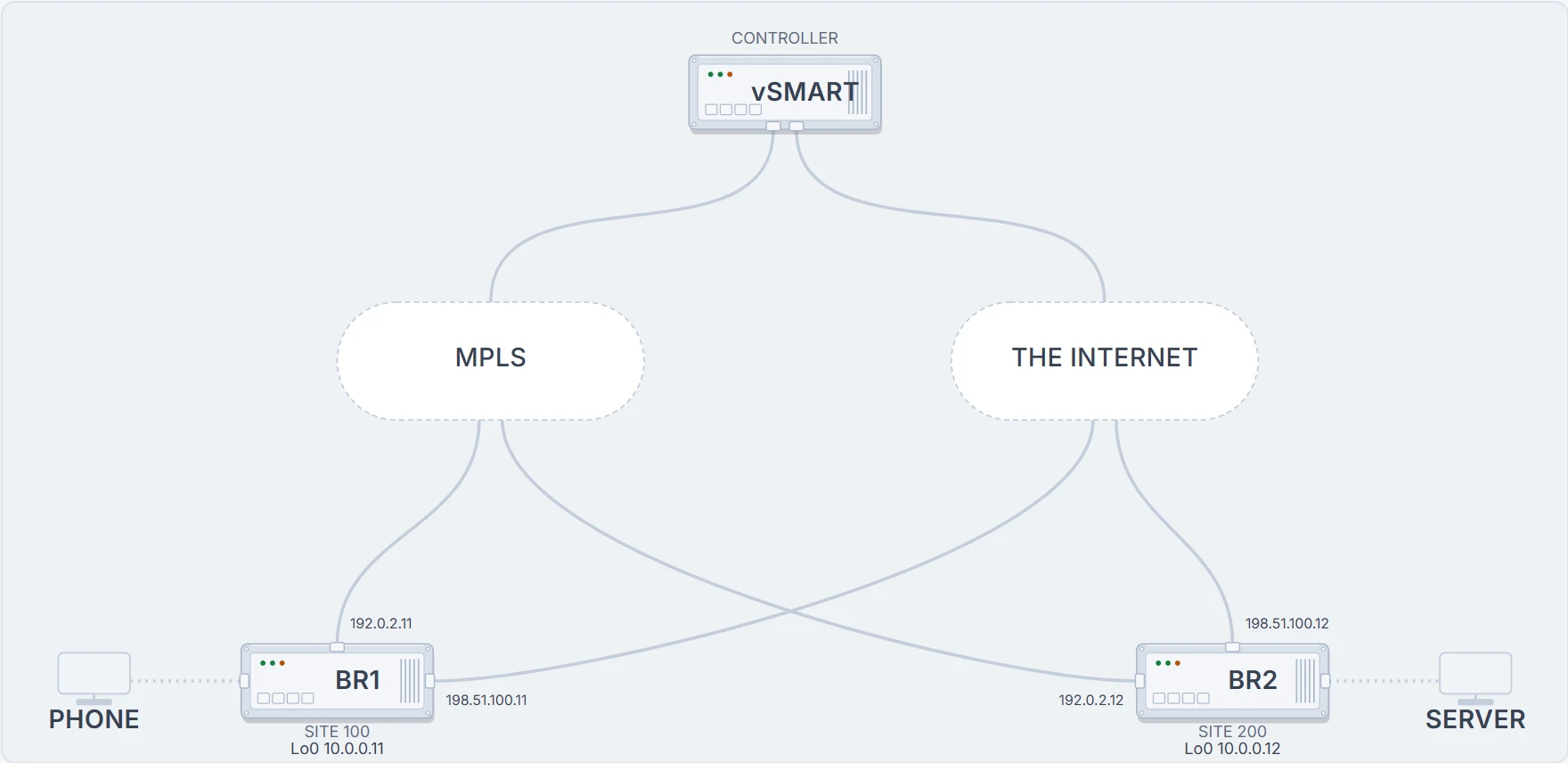
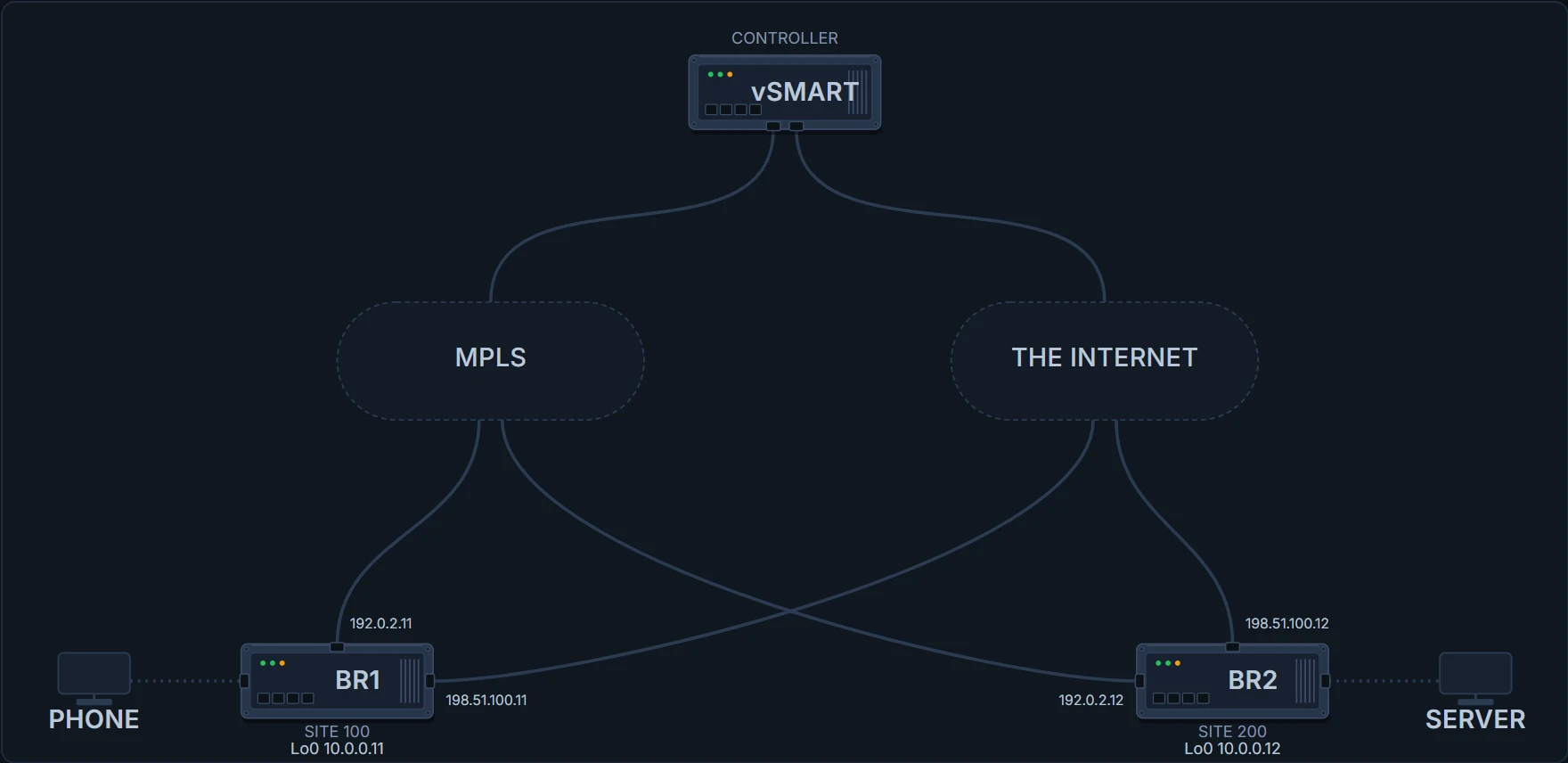
Each edge router has one link into an MPLS service and one into the internet, and a TLOC on each: a transport location, identified by the three-tuple system IP, colour and encapsulation. The controller reaches both edges over the same two transports everything else uses; it is not on a separate management network.
What OMP actually advertises
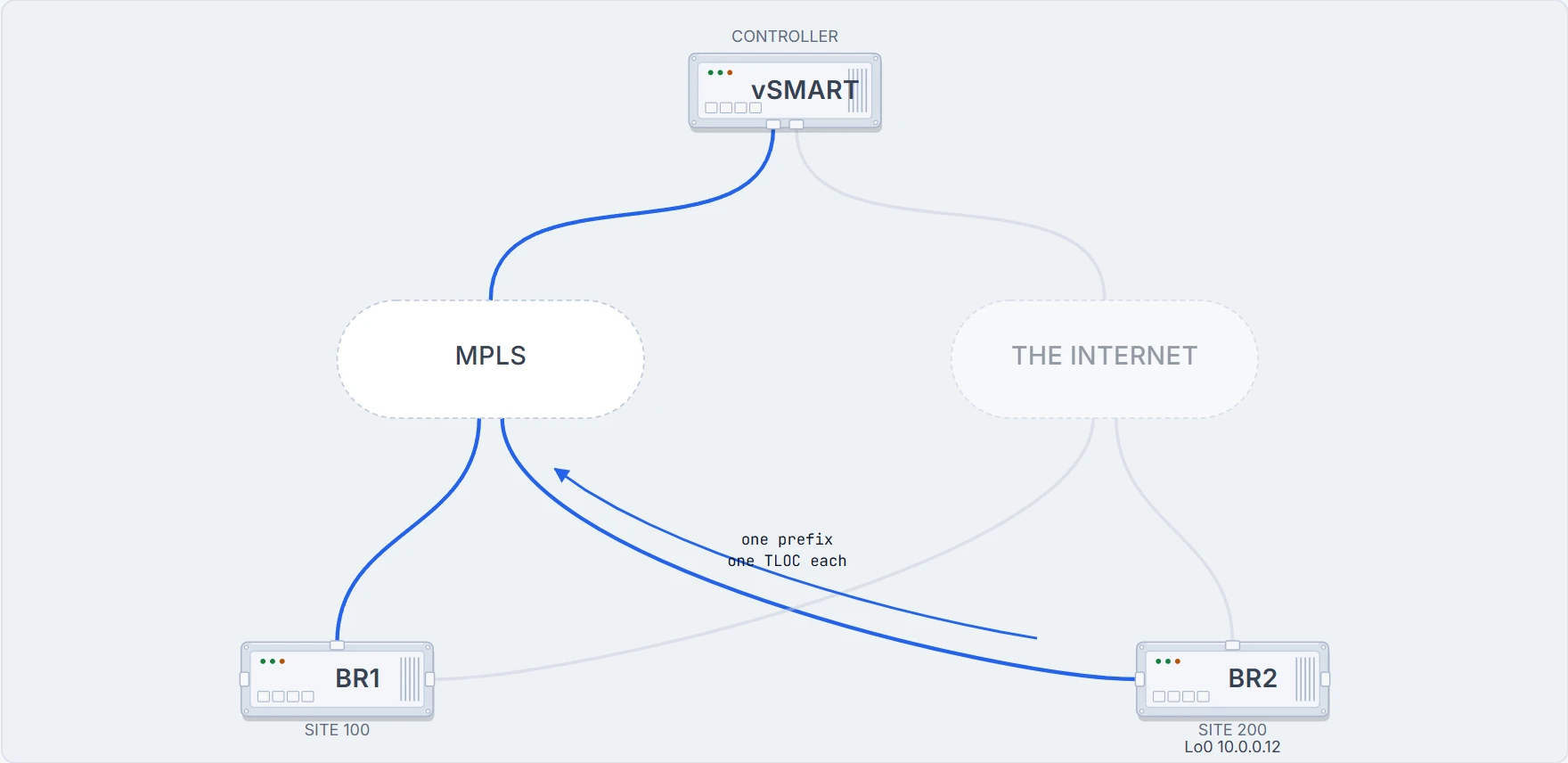
BR2 puts its LAN into the overlay, and BR1 receives two advertisements for it.
State 2 One prefix, advertised once per TLOC
Two rows, one prefix. What is different between them, and what is not?
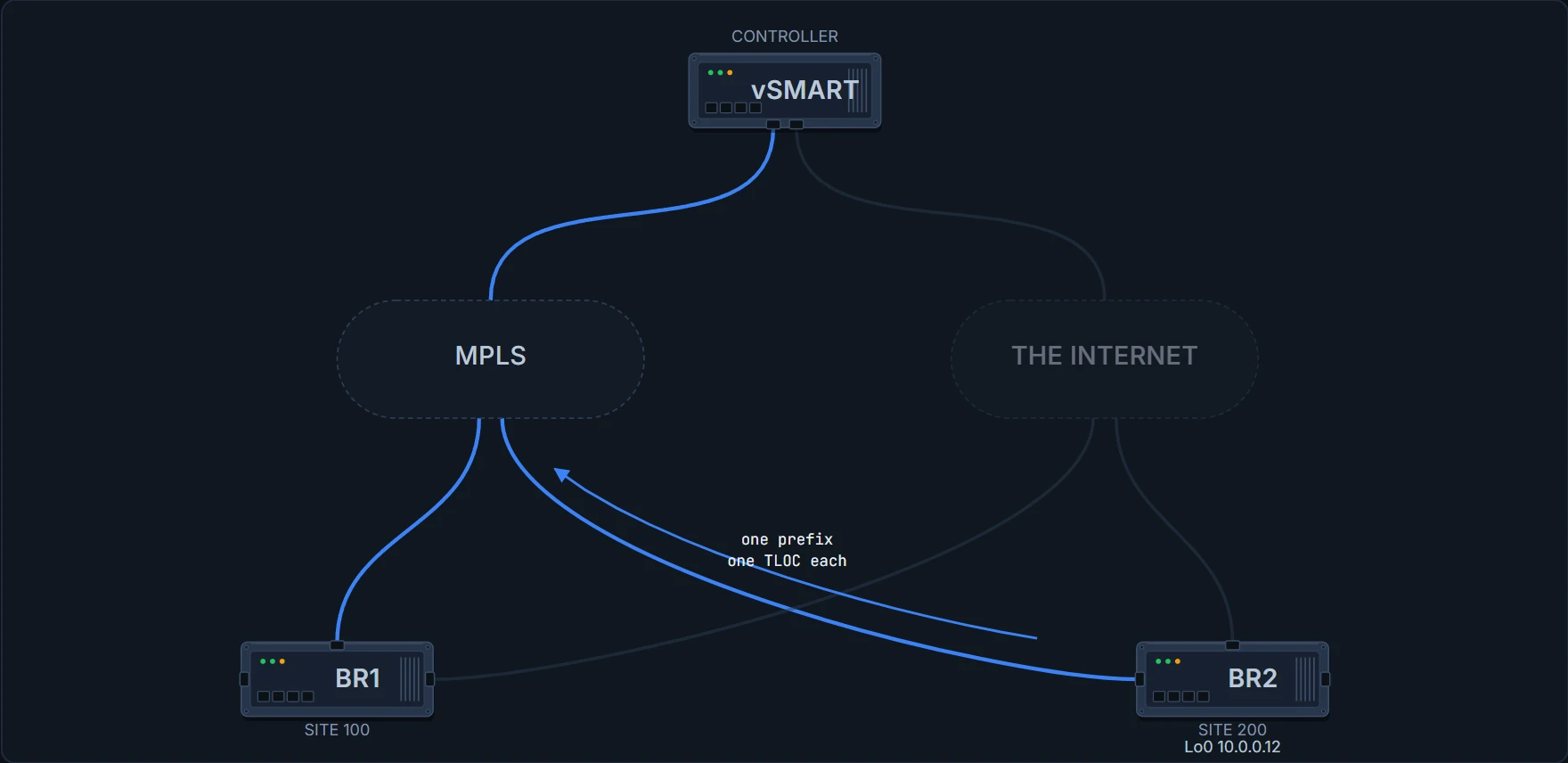
BR1# show sdwan omp routes
VPN  PREFIX           FROM PEER   ID  STATUS  TLOC IP    COLOR         ENCAP
10   10.2.10.0/24     10.0.0.1    1   C,I,R   10.0.0.12  mpls          ipsec
! same prefix, same peer, same system IP
10   10.2.10.0/24     10.0.0.1    2   C,I,R   10.0.0.12  biz-internet  ipsec
! and a different colour, which is the only thing that differs
What is advertised is not a prefix. It is a route and the TLOC associated with that route: two halves in one tuple, each carrying its own attributes:
| The route half | The TLOC half |
|---|---|
| prefix | system IP |
| preference | colour |
| origin, and the metric that came with it | encapsulation |
| TLOC preference |
Here is a prefix, and here is the way to reach it. If you model OMP as advertising prefixes, the existence of a second preference value makes no sense. Once the advertisement is a pair, it is obvious: one preference describes the route, the other describes the transport location it is reachable through.
And the other two route types? A TLOC route is a transport location itself, advertised so everyone knows it exists. A service route is a service advertised into the overlay. The rows above are the third kind, OMP routes, also called vRoutes, the prefixes that establish reachability between endpoints.
Proves: what this device received, from which peer, over which TLOC, and its selection state.
Does not prove: that traffic is flowing, or that the tunnel to that TLOC is healthy. A chosen route over a broken tunnel still shows as chosen, which is the whole of the second half of this page.
Selection narrows the field. It does not narrow it to one.
Best-path selection implies one winner. OMP does not work that way, and the numbers are worth knowing exactly, because there are two of them and they do different jobs.
| Controls | Default | |
|---|---|---|
send-path-limit | how many route-and-TLOC tuples are advertised per prefix | 4 |
ecmp-limit | how many OMP paths are installed into the local route table | 4 |
Both take a range of 1 to 16, and from Control Components Release 20.9 the send-path limit goes to 32 on the controllers, which is the release this course baselines against.
A path can be advertised and not installed, and a path that was never advertised cannot be installed no matter how the receiving device is configured. They are configured on different devices for different reasons. Watch which word changes when one of them moves:
BR1# show sdwan omp routes
VPN  PREFIX           FROM PEER   ID  STATUS  TLOC IP    COLOR         ENCAP
10   10.2.10.0/24     10.0.0.1    1   C,I,R   10.0.0.12  mpls          ipsec
10   10.2.10.0/24     10.0.0.1    2   C,R     10.0.0.12  biz-internet  ipsec
! still received, still resolved, no longer installed
That is ecmp-limit 1 on BR1 alone. Both tuples still arrive, nothing about the advertisement changed, and the status column is where the difference shows. C is chosen, I is installed, R is resolved, and "the route is there", "the route is chosen" and "the route is installed" are three different statements. When somebody says a prefix is advertised but traffic is not taking that path, this output is where the conversation should start.
Put the limit back and both are installed again. Everything after this depends on there being two of them.
Prefer MPLS, and find out what else you preferred
The requirement is that voice should use MPLS. The instrument that looks right is TLOC preference, which differentiates between TLOCs advertising the same route. Set it to 200 on one TLOC, leave the other at the default of 0, and higher wins.
State 3 One transport preferred
It worked. What else changed that nobody asked for?
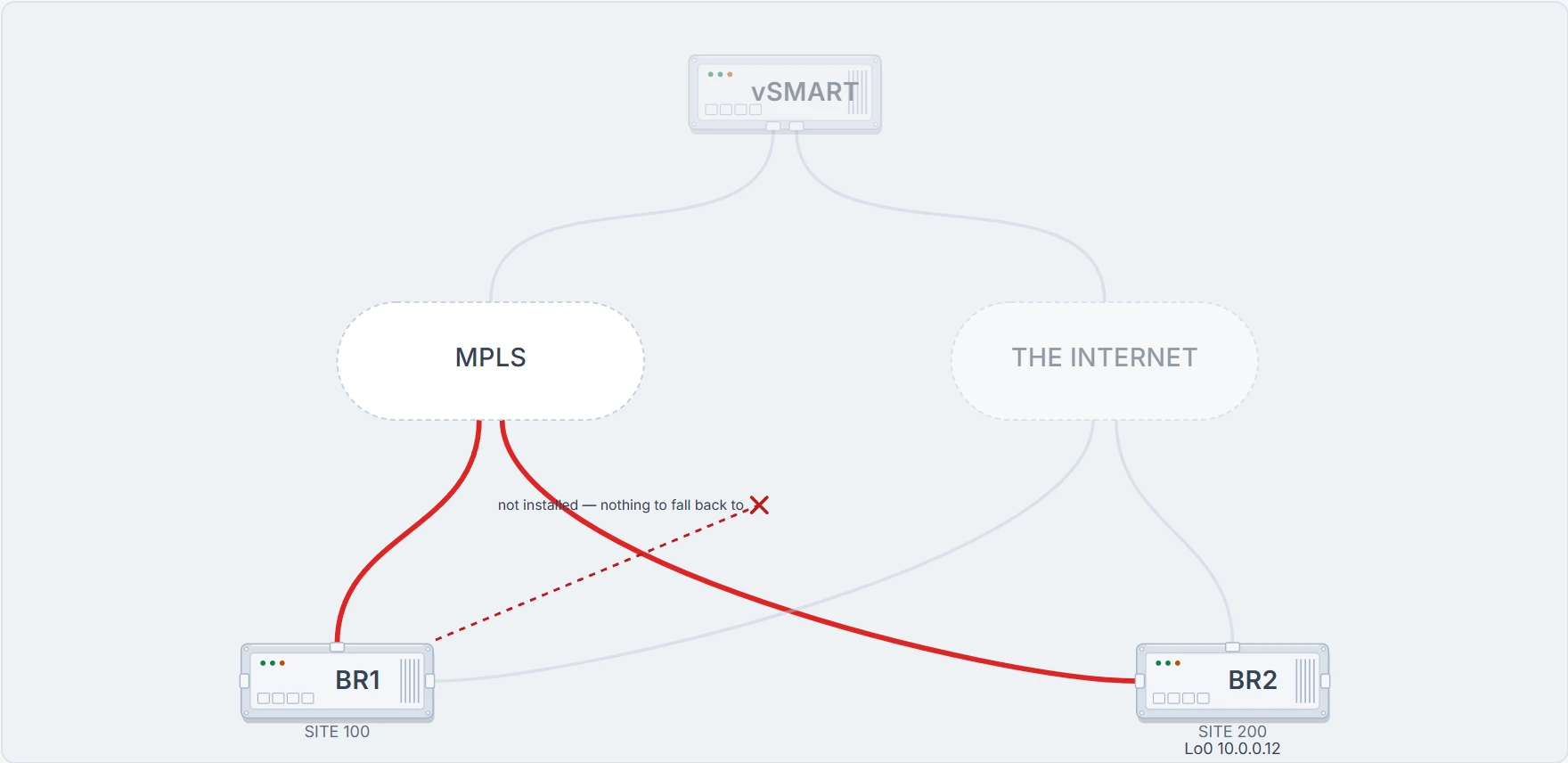
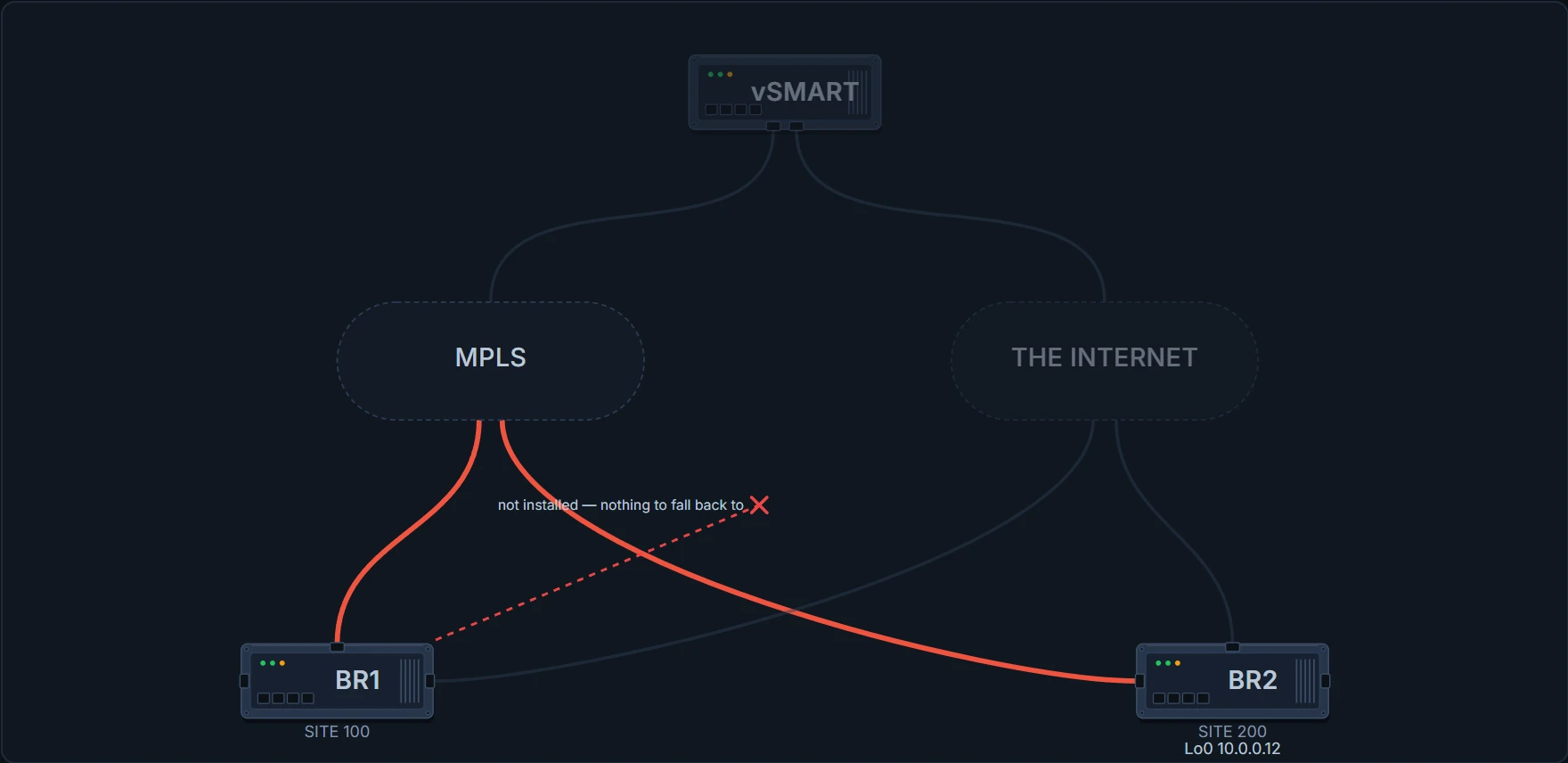
BR1# show sdwan omp routes
VPN  PREFIX           FROM PEER   ID  STATUS  TLOC IP    COLOR         ENCAP
10   10.2.10.0/24     10.0.0.1    1   C,I,R   10.0.0.12  mpls          ipsec
! chosen and installed
10   10.2.10.0/24     10.0.0.1    2   R       10.0.0.12  biz-internet  ipsec
! resolved only, not chosen, and not in the route table
Two things went with it.
Changing TLOC preference affects path selection for all VPNs. That is documented behaviour and it surprises people. You meant to steer voice; you steered everything using that TLOC.
And look at the second row. The other path is no longer installed, so there is nothing left to fall back to. Whatever you were going to do about a bad circuit, you have just removed the alternative you were going to do it with.
So when is TLOC preference the right instrument? When the intent really is this whole site prefers this transport, permanently, for everything. When the requirement is per-VPN or per-application steering, it is the wrong instrument and policy is the right one, and policy needs the second path to still be installed.
One command this page does not show. The written lesson names TLOC preference, ecmp-limit and send-path-limit, with their ranges and defaults, and does not print the commands that set them. Neither does this page, for the same reason: a plausible-looking command is worse than no command. The one configuration block below is quoted.
An SLA class is a maximum, not an aim
Take the preference back off, so both paths are installed again, and do it with policy instead.
An SLA class specifies the maximum loss, jitter and latency allowed in a tunnel for it to be selected to carry the data:
vSMART(config)# policy sla-class Voice_SLA loss 4 latency 150 jitter 20
Loss is a percentage from 0 to 100, latency is milliseconds from 0 to 1,000. Note the word: maximum. This is not a target the network aims at. It is a threshold a tunnel must stay under to remain eligible: the point at which this path becomes unacceptable for this traffic. You are not describing the quality you would like.
The class on its own does nothing. What binds traffic to it is an app-route policy:
vSMART(config)# policy
vSMART(config)#  app-route-policy Voice_Policy
vSMART(config)#   vpn-list vpn_10_list
vSMART(config)#    sequence 1
vSMART(config)#     match protocol 6
vSMART(config)#     action sla-class Voice_SLA strict
Note strict on the action. The class defines the threshold; the policy decides which traffic it applies to and how rigidly the threshold is enforced.
Proves: what thresholds this class defines and which traffic the policy binds to it.
Does not prove: that any tunnel currently satisfies the class, or that traffic has moved. The configuration states an intent; the measurement decides when it takes effect.
Not claimed. What strict does when no tunnel meets the class is not something this course could source, so this page does not say. The scenario below never needs it to: one transport is always inside the class.
The measurement is traffic you were already sending
Not dedicated probes. BFD Hello packets.
BFD sessions already exist on every tunnel, sending periodic Hellos to monitor liveness. Application-aware routing uses those same packets to measure loss, latency and jitter. That is an efficient piece of design, and it also explains the timing, because it ties measurement granularity to something built for liveness detection rather than for application steering.
It also tells you what the measurement is. AAR is not measuring your application. It is measuring the tunnel, using BFD Hellos, and inferring that your application experienced what the Hellos experienced.
Four minutes after the policy is pushed, ask what the SLA state is:
BR1# show sdwan app-route stats
% No completed poll interval yet: 240 of 600 seconds elapsed
! not yes, not no, not yet
There is no verdict at all. At each poll interval the router calculates the average loss, latency and jitter for each tunnel and recalculates each tunnel's SLA, and no poll interval has finished. That is a state people forget exists, and it is the state a freshly pushed policy is in.
Six hundred Hellos become three numbers
Put a number on this before you read it. A tunnel carrying voice starts losing packets badly enough to breach its class. How long before traffic moves, and what would you be trading if that number were much smaller?
With the defaults, a BFD Hello every second and a poll interval of ten minutes, about 600 Hello packets inform one poll interval's calculation, and they collapse into one mean loss, one mean latency and one mean jitter per tunnel.
Sit with that ratio for a moment, because it is where the whole behaviour comes from. Six hundred observations become three numbers. Everything that happened inside those ten minutes that was not typical of those ten minutes has just been averaged into invisibility, and no later command can get it back.
State 4 The first window closes
Two tunnels, six numbers. Which of them is the traffic on?
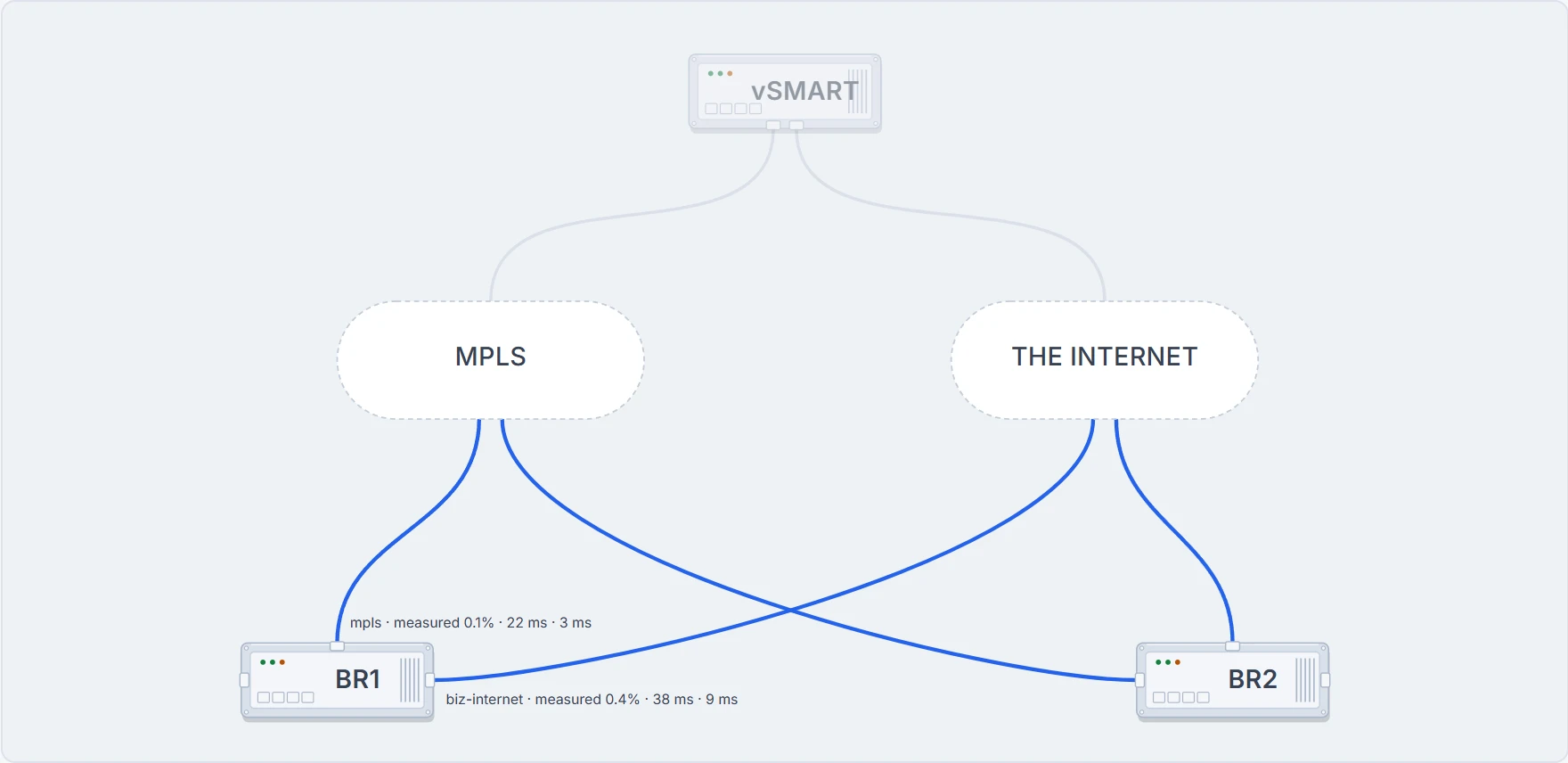
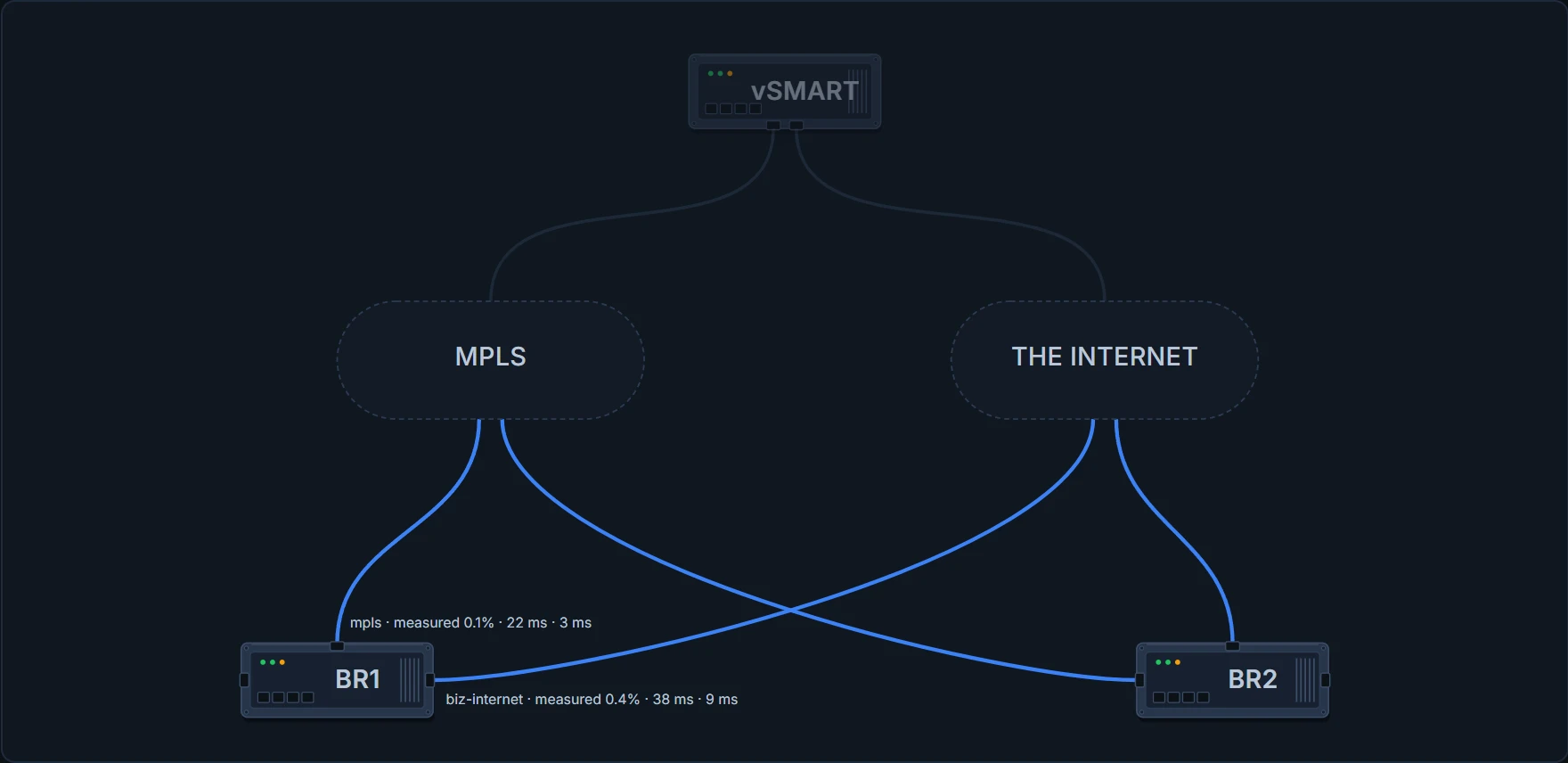
BR1# show sdwan app-route stats
Poll interval 600s, BFD hello 1s
Interval that produced these figures: 0s to 600s

TUNNEL                        MEAN LOSS %  MEAN LATENCY  MEAN JITTER
mpls -> mpls                  0.1          22            3
! inside the class on all three
biz-internet -> biz-internet  0.4          38            9
! and so is this one
Both, in the sense that both are eligible and a per-flow hash decides which one any particular flow takes. Selection narrowed the field to two, and the class did not narrow it further.
Proves: what this router measured on each tunnel over the measurement interval.
Does not prove: that an application saw those conditions, or that a policy acted on them. A tunnel can be measurably out of SLA and still be carrying your traffic, which is the next section.
Continue the lesson
The whole lesson, with its drawings and its questions. 6 more sections after the ones above.