
OMP route aggregation
An edge with 12 connected subnets puts them into OMP with advertise connected, per VRF and per address family. Aggregation advertises one prefix covering a range, so other routers need one entry. But by default an aggregating router advertises the summary and every individual route, so the count does not fall. Only the aggregate-only option advertises the summary alone.
By Arif, founder of Daveth · Updated
The full 6 min walkthrough is in Daveth Pro (Network). See what the plan opens
What this page answers
How do you aggregate routes in OMP?
Under sdwan omp, in the VRF's address family, advertise aggregate prefix. By default the summary and each individual route are advertised. Read it in “Telling EDGE-1 to aggregate”
What does aggregate-only do in OMP?
It advertises only the summary prefix and not each individual route, as in advertise aggregate 10.0.0.0/8 aggregate-only. Read it in “The keyword”
Twelve subnets, twelve routes
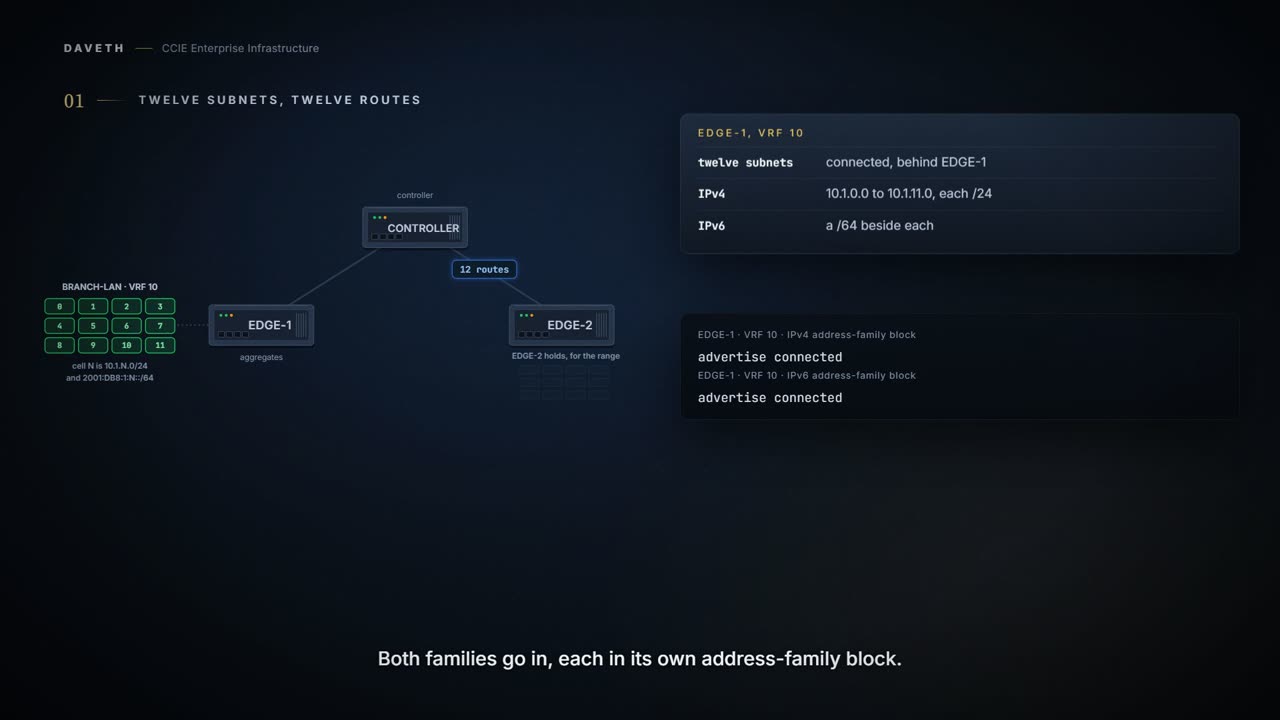
EDGE-1 has 12 connected subnets in VRF 10. How do they reach EDGE-2 at all?
You can use the advertise command to have the device advertise these routes to OMP, consequently to SD-WAN Controller.
Typed on EDGE-1: its connected routes into OMP, both families. The prompts and the closing commit follow this command's per-VRF example; the VRF and prefixes are this course's own.
EDGE-1# config-transaction
EDGE-1(config)# sdwan
EDGE-1(config-sdwan)# omp
EDGE-1(config-omp)# address-family ipv4 vrf 10
EDGE-1(config-vrf-10)# advertise connected
EDGE-1(config-vrf-10)# address-family ipv6 vrf 10
EDGE-1(config-vrf-10)# advertise connected
EDGE-1(config-vrf-10)# commit
Both families go in, each in its own block. The count below is the IPv4 range; IPv6 comes back in its own section.
Computed from the state: what EDGE-2 receives for 10.1.0.0/20. No command prints it.
components up               12 of 12
specifics received          12
aggregate 10.1.0.0/20       not received
routes for the range        12
Telling EDGE-1 to aggregate
Route aggregation is a method for reducing the number of entries that routers in a network must maintain in routing tables, for better scaling. Configure a router to advertise to the network a single prefix that represents a range of IP addresses. Other routers in the network only require a single routing table entry for this prefix, which aggregates a range of IP addresses.
So EDGE-1 is told to aggregate 10.1.0.0/20. Does EDGE-2's count fall?
For individual VRFs, routes from the specified prefix can be aggregated after advertising them into OMP using the advertise protocol config command. By default, the aggregated prefixes and all individual prefixes are advertised.
From elsewhere: the guide's per-VRF example, both families. The values in it come from elsewhere, not from this scenario.
config-transaction
 sdwan
  omp
   address-family ipv4 vrf 1
    advertise aggregate prefix 10.0.0.0/8
    advertise connected
  address-family ipv6 vrf 1
   advertise aggregate 2001:DB8::/32
   advertise connected
Look at the IPv4 line of that example. It writes the word prefix before the address; the guide's next example and the Multi-Region Fabric syntax line use prefix as the placeholder instead. This page follows the form without the word.
Typed on EDGE-1: the aggregate, no keyword; only the new line is typed. The prompts and the closing commit follow this command's per-VRF example; the VRF and prefixes are this course's own.
EDGE-1# config-transaction
EDGE-1(config)# sdwan
EDGE-1(config-sdwan)# omp
EDGE-1(config-omp)# address-family ipv4 vrf 10
EDGE-1(config-vrf-10)# advertise aggregate 10.1.0.0/20
EDGE-1(config-vrf-10)# commit
Computed from the state: with the aggregate. No command prints it.
components up               12 of 12
specifics received          12
aggregate 10.1.0.0/20       received
routes for the range        13
Notice the specifics row did not move. The routes-for-the-range row went up by one.
Twelve routes walked in. Thirteen walked out. The table you were shrinking got bigger, and the router did exactly what it was told with no complaint at all.
Because what you asked for was a summary, and a summary is something you add. Staple a one-page overview to the front of a twelve-page report and you have thirteen pages. Nobody threw the report away, and nobody said to. The router heard advertise a summary. It never heard and stop sending the rest.
Where the report stops: a reader can skip the twelve pages whenever they like, and a peer cannot ignore routes it has been sent. They are in its table, they cost memory, and they are exactly what aggregation was supposed to save. So there has to be a word that means only.
So when a peer table is unchanged or larger after someone aggregates, diagnose the keyword first. The default keeps every component, and EDGE-2 is where that shows.
The keyword
What removes the components?
This is where the word only finally earns its salary.
To advertise only the aggregated prefix, include the aggregate-only option:
From elsewhere: the guide's aggregate-only example. The values in it come from elsewhere, not from this scenario.
config-transaction
 sdwan
  omp
   address-family ipv4 vrf 1
    advertise aggregate 10.0.0.0/8 aggregate-only
    exit
By default, an aggregating router advertises each individual route and the summary prefix. You can use an aggregate-only option to advertise only the summary prefix and not each individual route.
Typed on EDGE-1: the same aggregate with aggregate-only. The prompts and the closing commit follow this command's per-VRF example; the VRF and prefixes are this course's own.
EDGE-1# config-transaction
EDGE-1(config)# sdwan
EDGE-1(config-sdwan)# omp
EDGE-1(config-omp)# address-family ipv4 vrf 10
EDGE-1(config-vrf-10)# advertise aggregate 10.1.0.0/20 aggregate-only
EDGE-1(config-vrf-10)# commit
Proves: EDGE-1's configuration shows what it is configured to advertise for the range, and whether the components go with the aggregate. Does not prove: that a component route is available for the aggregate to be advertised, or what EDGE-2 received.
Computed from the state: with aggregate-only. No command prints it.
components up               12 of 12
specifics received          0
aggregate 10.1.0.0/20       received
routes for the range        1
The specific VRF configuration doesn’t override global-VRF configuration in OMP.
So check both levels when a VRF behaves unlike its configuration: a VRF entry does not override a global one.
Continue the lesson
The whole lesson, with its drawings and its questions. 5 more sections after the ones above.