
Building and Verifying a Wireless LAN
A WLC is configured from a web browser once it has a management address. Its ports are physical links to the wired network, and its interfaces are logical ones inside it. A WLAN, defined on the controller, ties an SSID the APs advertise to one of the controller's interfaces, and so to a VLAN. A WPA2-Personal WLAN uses a pre-shared key.
By Arif, founder of Daveth · Updated
The full 17 min walkthrough is in Daveth Pro (Network). See what the plan opens
What this page answers
What is the difference between WLC ports and interfaces?
Ports are physical connections to the wired network, such as the service port and the distribution system port; interfaces are logical connections inside the controller, such as the management interface and dynamic interfaces for each VLAN. Read it in “WLC ports and interfaces”
What is a WLAN on a wireless LAN controller?
The configuration that completes the path between an SSID the AP advertises and a VLAN: the controller binds the WLAN to one of its interfaces and, by default, pushes it to all its APs. Read it in “Planning a WLAN”
How do you configure WPA2-PSK on a WLC?
In the WLAN's security settings choose WPA+WPA2, then only WPA2 Policy with AES, leaving WPA and TKIP off as legacy, and PSK under Authentication Key Management. PSK alone makes it WPA2-Personal. Read it in the lesson
Connecting an AP
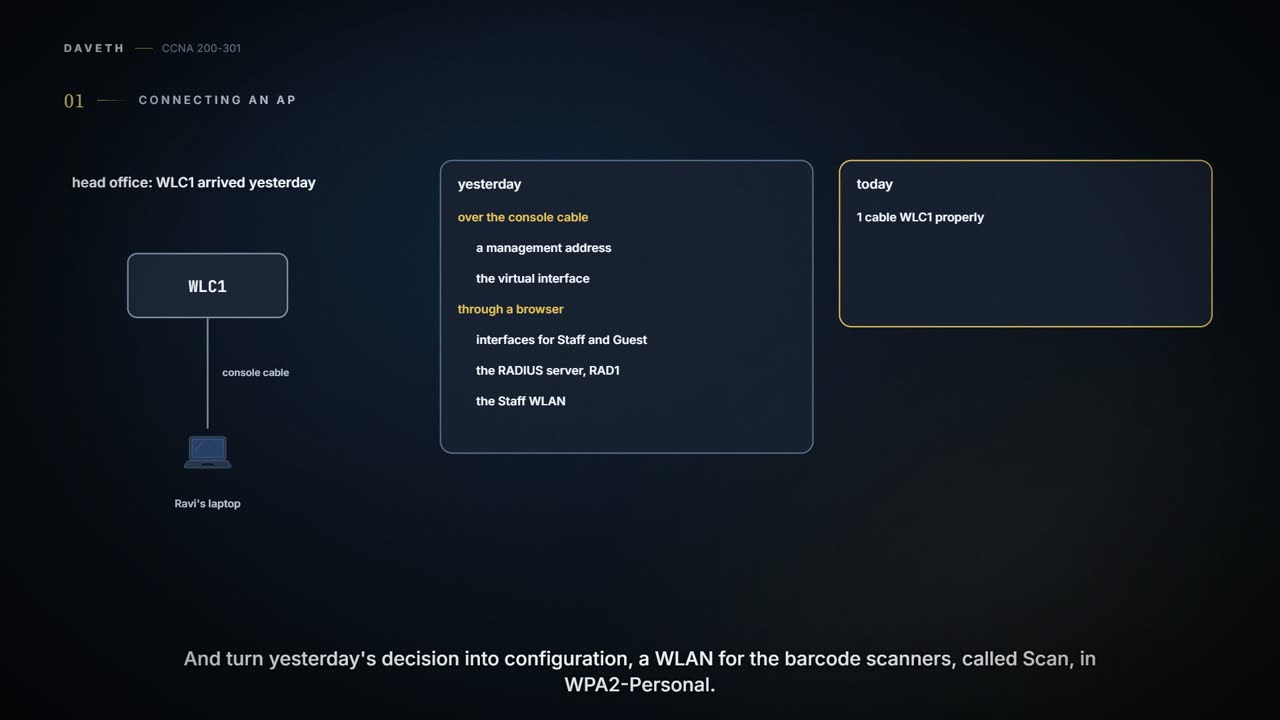
Thursday, month two. WLC1 arrived yesterday. In the afternoon Ravi gave it its initial configuration over the console cable, a management address and the virtual interface; then, over a temporary cable to HQD, the GUI was used to add interfaces for Staff and Guest, RAD1, and the Staff WLAN. Guest's WLAN is next week's job. Today WLC1 gets cabled properly, and one of yesterday's decisions becomes configuration: a WLAN for the barcode scanners, called Scan, in WPA2-Personal. First, the cables.
An AP's wired side depends on its type. An autonomous AP is a standalone device: nothing else is needed to forward frames between a wired VLAN and a WLAN, so it maps each VLAN to a WLAN and a BSS itself. It has a single wired Ethernet interface, so several VLANs have to reach it over a trunk link. A lightweight AP also has one Ethernet interface, but it has to be paired with a WLC. The VLANs that end at the WLC can be mapped to WLANs that appear at the AP, and all of them travel inside the CAPWAP tunnel, so the AP needs only an access link to reach the network and end its side of the tunnel (03.5.2).
The switch port facing an AP is in access mode or trunk mode, then. In trunk mode, 802.1Q tags each frame with its VLAN number. The AP's wireless side trunks inherently: it marks each 802.11 frame with the BSSID of the WLAN it belongs to.
To configure and manage an AP, you can connect a serial console cable from a PC to its console port. Once it's running with an IP address, Telnet or SSH reach its CLI over the wired network. Autonomous APs also offer browser sessions over HTTP and HTTPS; lightweight APs are managed from a browser session to the WLC.
Getting into the WLC
To configure a WLC, open a web browser to its management address, with HTTP or HTTPS. That only works once it has an initial configuration and a management IP address on its management interface; the exam's focus is the GUI after that point. The web GUI is an effective way to monitor, configure and troubleshoot the wireless network, and an SSH session reaches its CLI to monitor, configure and debug.
The first page is a login screen: click Login, then enter your credentials when asked. Both the GUI and the CLI need a login. Users can be checked against a local list of usernames, or against an authentication, authorization and accounting (AAA) server, such as TACACS+ or RADIUS.
After logging in, the WLC shows a monitoring dashboard, where nothing can be changed. The Advanced link, top right, opens the full GUI. Its tabs across the top pick a category, Monitor, WLANs, Controller, Wireless, Security and so on, and the list of functions down the left changes to match. The main area shows the fields to edit.
The dashboard is a shop window. Ravi wants the stockroom, which is behind the link marked Advanced.
WLC ports and interfaces
On routers and switches, port and interface mean much the same. On a WLC they don't: ports are physical connections to the wired network; interfaces are logical connections inside the controller.
| Port | Used for | The other end |
|---|---|---|
| Service port | Out-of-band management, system recovery and initial boot functions | Access mode (one VLAN only) |
| Distribution system port | All normal AP and management traffic, and client data | 802.1Q trunk (unconditional) |
| Console port | Out-of-band management, system recovery and initial boot functions | None: a terminal emulator, 9600 baud, 8 data bits, 1 stop bit by default |
| Redundancy port | A peer controller, for high availability | None: the peer controller |
A controller can have one service port, and it has to connect to the switched network. It's usually put in a management VLAN, so you can reach the controller with SSH or a browser for the initial configuration or maintenance. It supports only one VLAN, so the switch port facing it must be in access mode.
Controllers also have several distribution system ports, and they carry most of the data to and from the controller: the CAPWAP control and data tunnels to every AP, client data passing from WLANs to wired VLANs, and management traffic such as web sessions, SSH, SNMP and TFTP, which normally reaches the controller in-band through these ports. The name comes from 03.5.1's distribution system, the wired network joining APs; with split-MAC, the point where APs touch it moves up to the WLC. They carry many VLANs, so they always run as 802.1Q trunks, and the switch ports should be unconditional trunks too.
Distribution system ports can work independently, each carrying several VLANs to its own group of internal interfaces, or in redundant pairs, one used and one waiting. To get the most from them, they can be bundled into a link aggregation group (LAG), one logical link, much like an EtherChannel. Traffic can be load-balanced across the ports in it, and if one fails, traffic moves to the others.
Even though a LAG acts like a normal EtherChannel, these controllers don't support any link aggregation negotiation protocol, LACP or PAgP, at all. So the switch ports have to be an unconditional, always-on EtherChannel.
That's how WLC1 is cabled:
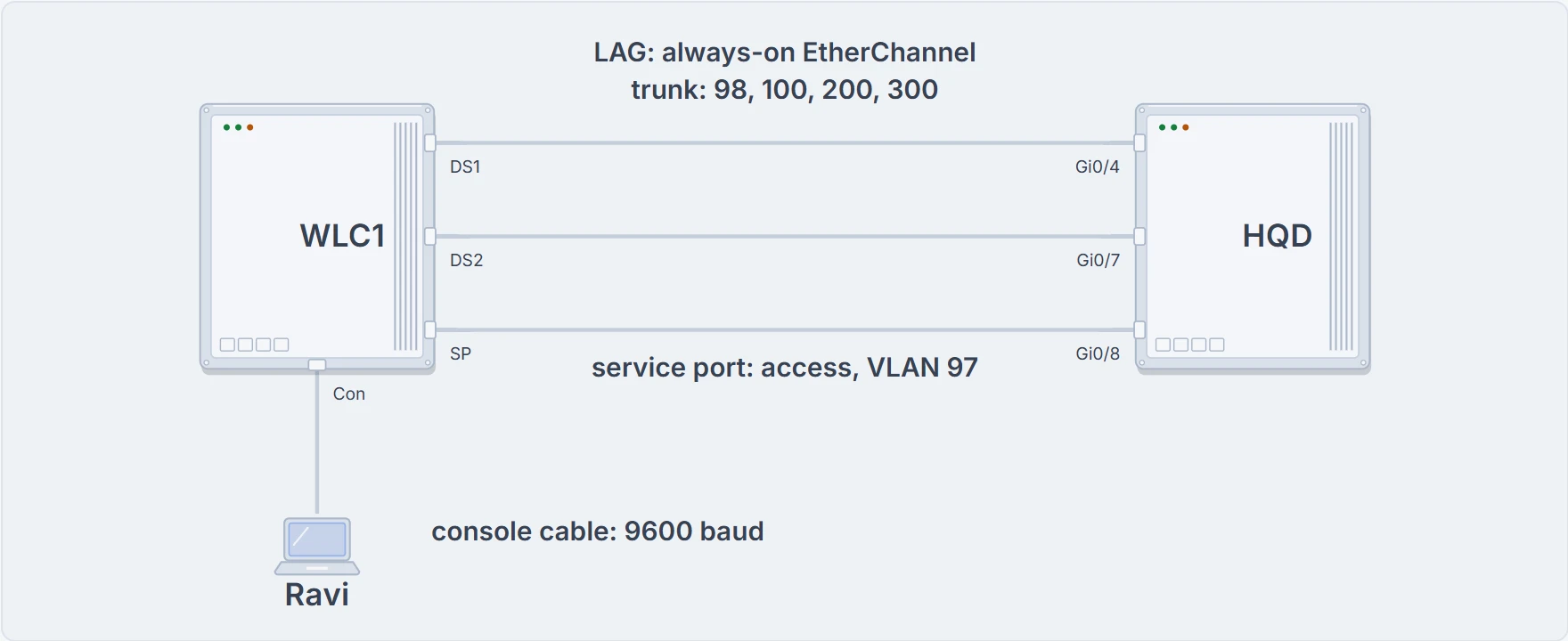
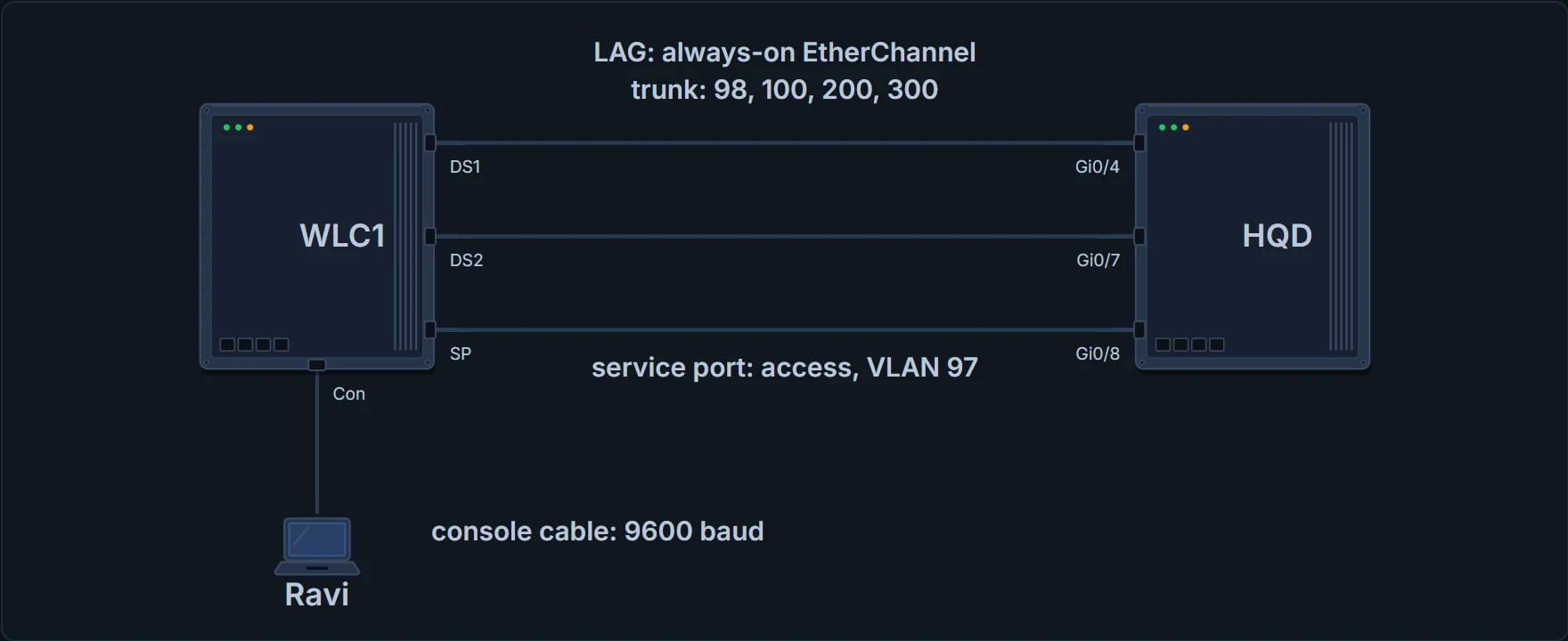
WLC1's cabling: DS1 and DS2 to HQD Gi0/4 and Gi0/7 as a LAG (always-on, trunk for VLANs 98, 100, 200 and 300); the service port to HQD Gi0/8, an access port in VLAN 97, head office's out-of-band management VLAN; the console port to Ravi's laptop, as for yesterday's initial setup.
Inside, the controller has to map those wired VLANs to wireless networks. It does it with interfaces, each configured with an IP address, subnet mask, default gateway and a DHCP server, and each assigned to a physical port and a VLAN ID. Take a dynamic interface, the kind a WLAN uses. You can think of it as a Layer 3 end point on its VLAN. (Where it stops: a router's interface usually routes traffic out of its VLAN. A WLC's dynamic interface mostly joins its VLAN to a WLAN, and its address is for things like DHCP relay.)
| Interface | Used for |
|---|---|
| Management | Normal management traffic (RADIUS, WLC-to-WLC, web and SSH sessions, SNMP, NTP, syslog), and the end of the CAPWAP tunnels to the APs |
| Redundancy management | In a high availability pair, the standby WLC's management address; the active WLC uses the management interface address |
| Virtual | The address clients see when the controller relays DHCP, does web authentication and supports mobility |
| Service port | Bound to the service port, for out-of-band management |
| Dynamic | Connects a VLAN to a WLAN |
The management interface faces the switched network, where management users and APs are. Its traffic usually consists of HTTPS, SSH, SNMP, NTP, TFTP and the like, plus the CAPWAP packets carrying the control and data tunnels. The virtual interface is only for certain client-facing jobs. When a client asks for an IP address, the controller relays the request to a real DHCP server, and to the client the DHCP server appears to be the virtual interface's address. Clients may see that address, but the controller never uses it to talk to other devices on the switched network.
So the virtual interface should have a unique, non-routable address. Traditionally many people used 1.1.1.1, but that address is routable and in use elsewhere on the Internet. Better practice is an unused or reserved private address from RFC 1918, or a documentation address from RFC 5737 (192.0.2.0/24), which is never used at all. WLC1's is 192.0.2.1. The virtual address also supports client mobility, so every controller in the same mobility group should have the identical virtual address, and they appear to work as a cluster as clients roam between them.
Dynamic interfaces map WLANs to VLANs. You configure one for each WLAN the controller's APs offer and map it to that WLAN. Each needs its own IP address and can act as a DHCP relay for its clients, and an optional access list can filter the traffic through it.
Planning a WLAN
The AP advertises an SSID for clients to join; the controller connects to a VLAN through one of its dynamic interfaces. A WLAN, defined on the controller, completes the path between the two. The controller binds the WLAN to one of its interfaces and, by default, pushes the WLAN's configuration to all its APs. From then on, clients hear its beacons and can probe for it and join the new BSS.
Like VLANs, WLANs separate users into logical networks. Users on one WLAN can't reach another unless their traffic is bridged or routed between the VLANs through the wired network. It's tempting to make a WLAN for every group or type of device.
Two limits get in the way. A controller supports at most 512 WLANs, but only 16 can be configured on an AP at once. And every WLAN costs airtime: each WLAN is a BSS, and each BSS is advertised with its own beacon management frames, normally ten a second, one every 100 ms, sent at the lowest mandatory data rate. The lower that rate, the longer each beacon takes. With too many WLANs, the channel is so busy with beacons that clients struggle to send their own data. The rule of thumb: five WLANs or fewer, and three is best.
A controller starts with only a limited configuration and no WLANs. Before creating one, decide its SSID, its controller interface and VLAN, and the type of security. Every step below happens in a browser session to the WLC's management address.
Head office asked for nine WLANs. Ravi has said three, twice, and drawn a diagram of the beacons.
Continue the lesson
The whole lesson, with its drawings and its questions. 3 more sections after the ones above.