
CDP and LLDP
Routers and switches announce themselves to whatever is on the other end of each cable, with CDP, one vendor's own protocol, or LLDP, the standard. From those messages a device learns each neighbour's hostname, addresses, port, capabilities and platform. The messages are never forwarded, so a device learns only about its directly connected neighbours. CDP is on by default; LLDP is off.
By Arif, founder of Daveth · Updated
The full 13 min walkthrough is in Daveth Pro (Network). See what the plan opens
What this page answers
What is CDP (Cisco Discovery Protocol)?
A protocol that discovers basic information about neighbouring routers and switches without their passwords: hostname, addresses, the neighbour's own port, its capabilities and platform. It is normally on, globally and on every interface. Read it in “What CDP learns”
How do you read show cdp neighbors?
One line per neighbour. Device ID is the neighbour's hostname, Local Intrfce is your own interface, and Port ID is the neighbour's interface at the other end of the cable. Read it in “Reading the neighbour table”
What is LLDP, and how does it differ from CDP?
The Link Layer Discovery Protocol, IEEE 802.1AB, does the same general job and uses mostly the same commands with lldp in place of cdp. The big difference: LLDP is off by default, and sending and receiving can be set separately. Read it in the lesson
Discovering your neighbours
Friday, month one. The auditor wants a map of what connects to what. The labels on the cables are in Sam's handwriting, and one of them says "LAB?" with the question mark. Maya would rather not trust a sticker.
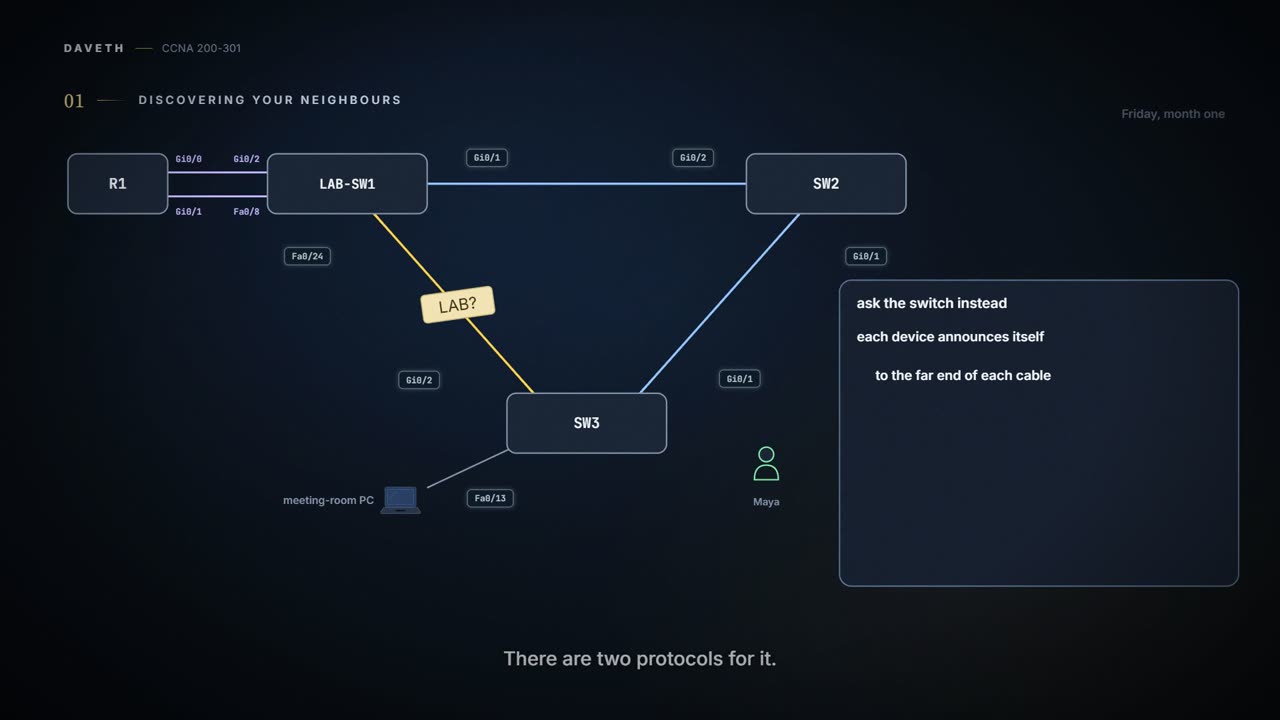
Standing at SW3 in the meeting room, she can ask the switch instead. Routers and switches can announce themselves to whatever is on the other end of each cable, with one of two protocols: CDP, one vendor's own, and LLDP, the standard.
The sticker made a guess. The switch at least knows what it heard.
What CDP learns
CDP discovers basic information about neighbouring routers and switches without needing their passwords. Each device sends CDP messages out each of its interfaces, announcing itself; the others listen. From those messages a device learns, about each neighbour:
- Device identifier: usually its hostname.
- Address list: its network and data-link addresses.
- Port identifier: the neighbour's own interface, the one on the other end of the link that sent the message.
- Capabilities: what kind of device it is, such as a router or a switch.
- Platform: its model and software.
CDP does two jobs. It gives information to devices that need it; 03.1.5's IP phone, for example, learns its data and voice VLANs from the switch this way. And it gives engineers show commands:
| Command | What it lists |
|---|---|
show cdp neighbors [type number] | One summary line per neighbour, or just the neighbour on one interface |
show cdp neighbors detail | A large set of details, about 15 lines, for every neighbour |
show cdp entry name | The same details, for the one named neighbour (the name is case sensitive) |
Routers and switches support the same CDP commands, with the same parameters and the same types of output. Here is how SW3 is cabled, as the office drawings record it; the rest of the page checks it from SW3's side:
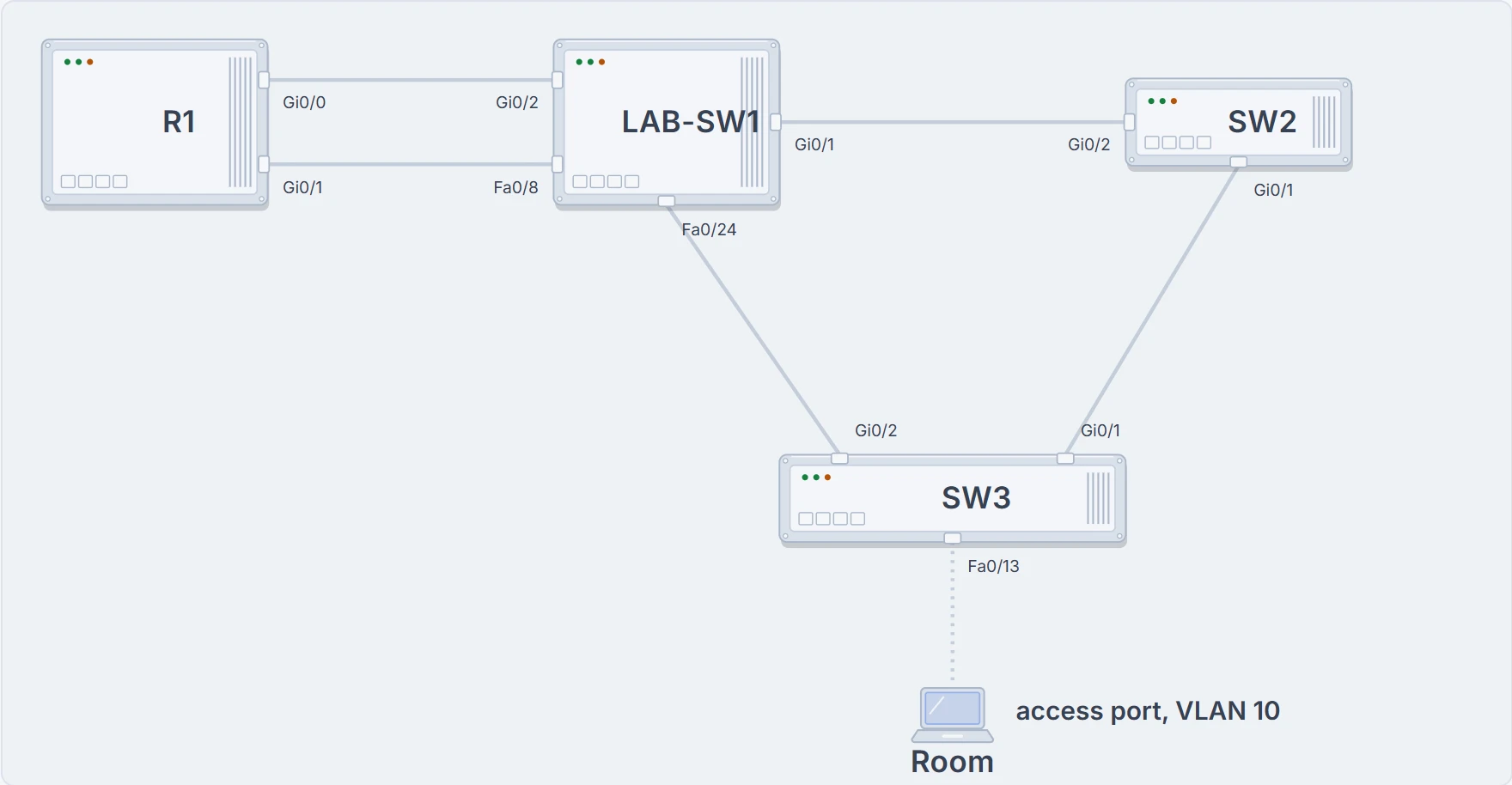
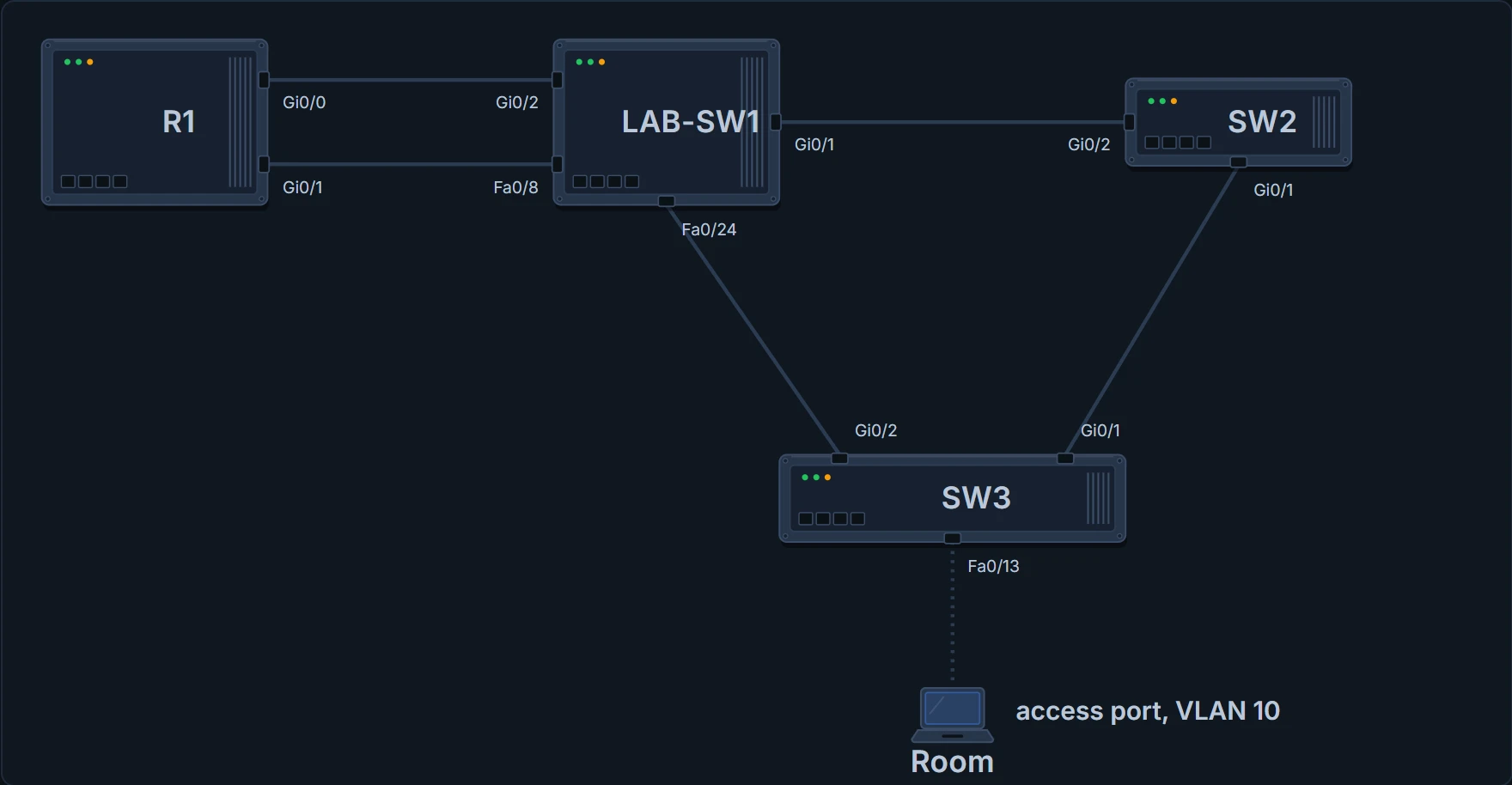
The office: SW3 in the meeting room, cabled to SW2 (Gi0/1) and to LAB-SW1 (Gi0/2, Sam's cable), with the meeting-room PC on Fa0/13. R1 is cabled to LAB-SW1 twice, on Gi0/2 and Fa0/8.
Reading the neighbour table
SW3# show cdp neighbors
Capability Codes: R - Router, T - Trans Bridge, B - Source Route Bridge
                  S - Switch, H - Host, I - IGMP, r - Repeater, P - Phone,
                  D - Remote, C - CVTA, M - Two-port Mac Relay

Device ID        Local Intrfce     Holdtme    Capability  Platform  Port ID
SW2              Gig 0/1           171              S I   WS-C2960- Gig 0/1
LAB-SW1          Gig 0/2           152              S I   WS-C2960- Fas 0/24

Total cdp entries displayed : 2
One line per neighbour. Three columns carry the map. Device ID is the neighbour's hostname. Local Intrfce is SW3's own interface, the one the message came in on. Port ID is the neighbour's interface at the other end of the cable. So Sam's cable, SW3's Gi0/2, ends on LAB-SW1's Fa0/24, and the meeting-room cable, SW3's uplink to SW2, joins SW3's Gi0/1 to SW2's Gi0/1.
You can think of it as tin-can telephones: each cable is one string, Local Intrfce is the can at your ear and Port ID is the can at the other end. (Where it stops: tin cans carry a conversation. CDP carries only announcements: each end tells the other who it is and which port it is using.)
Holdtme counts down the seconds before SW3 would forget the neighbour if its messages stopped. Capability uses the codes at the top: S for switch, and I for IGMP, a multicast feature you can ignore here. Platform is the model, cut short to fit the column.
- which devices sent SW3 CDP messages, on which of SW3's ports each arrived, and which of their ports each left by
- where the cable physically runs, or how the neighbours' ports are configured
The map needed one command and zero ladders.
How far CDP reaches
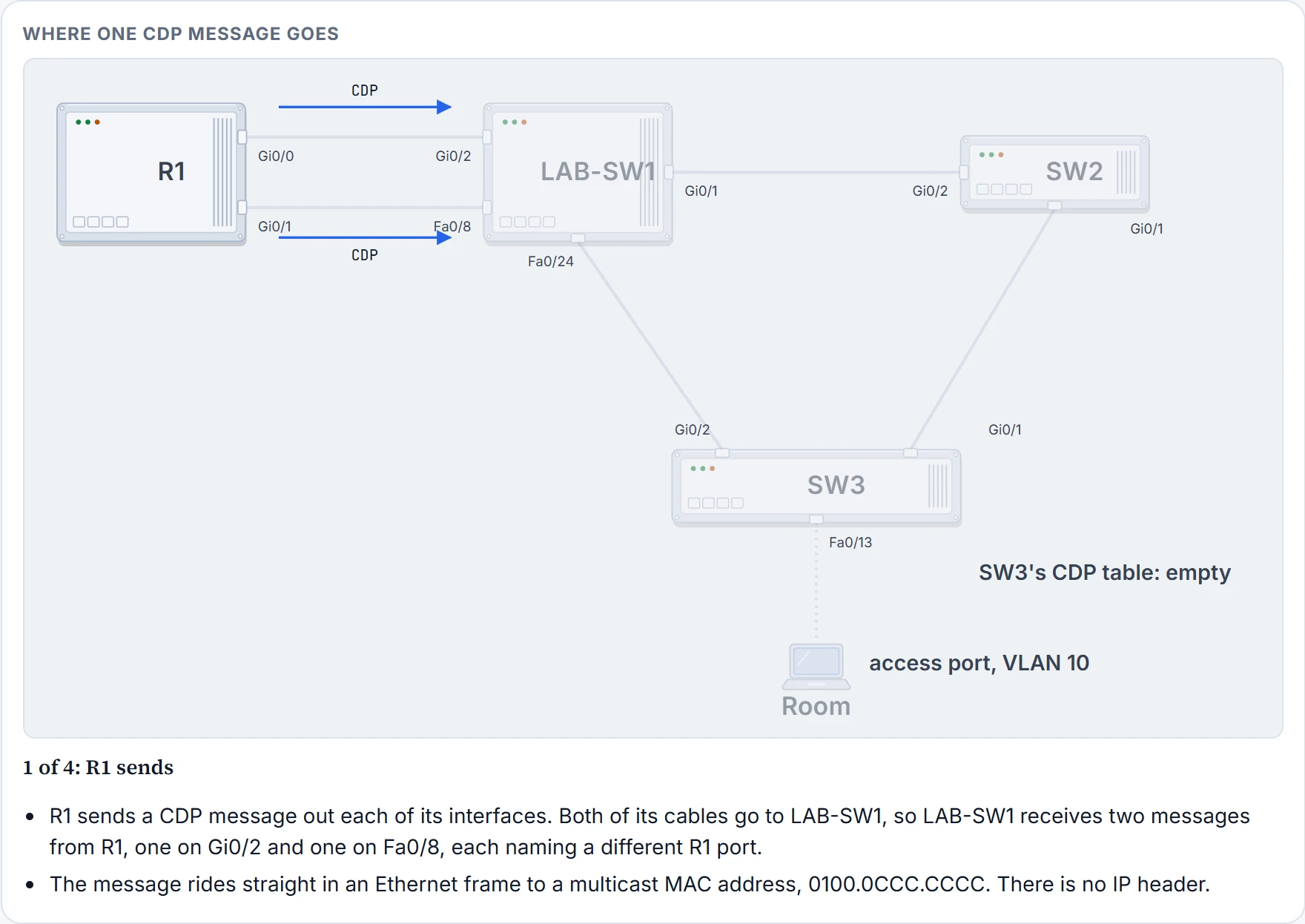
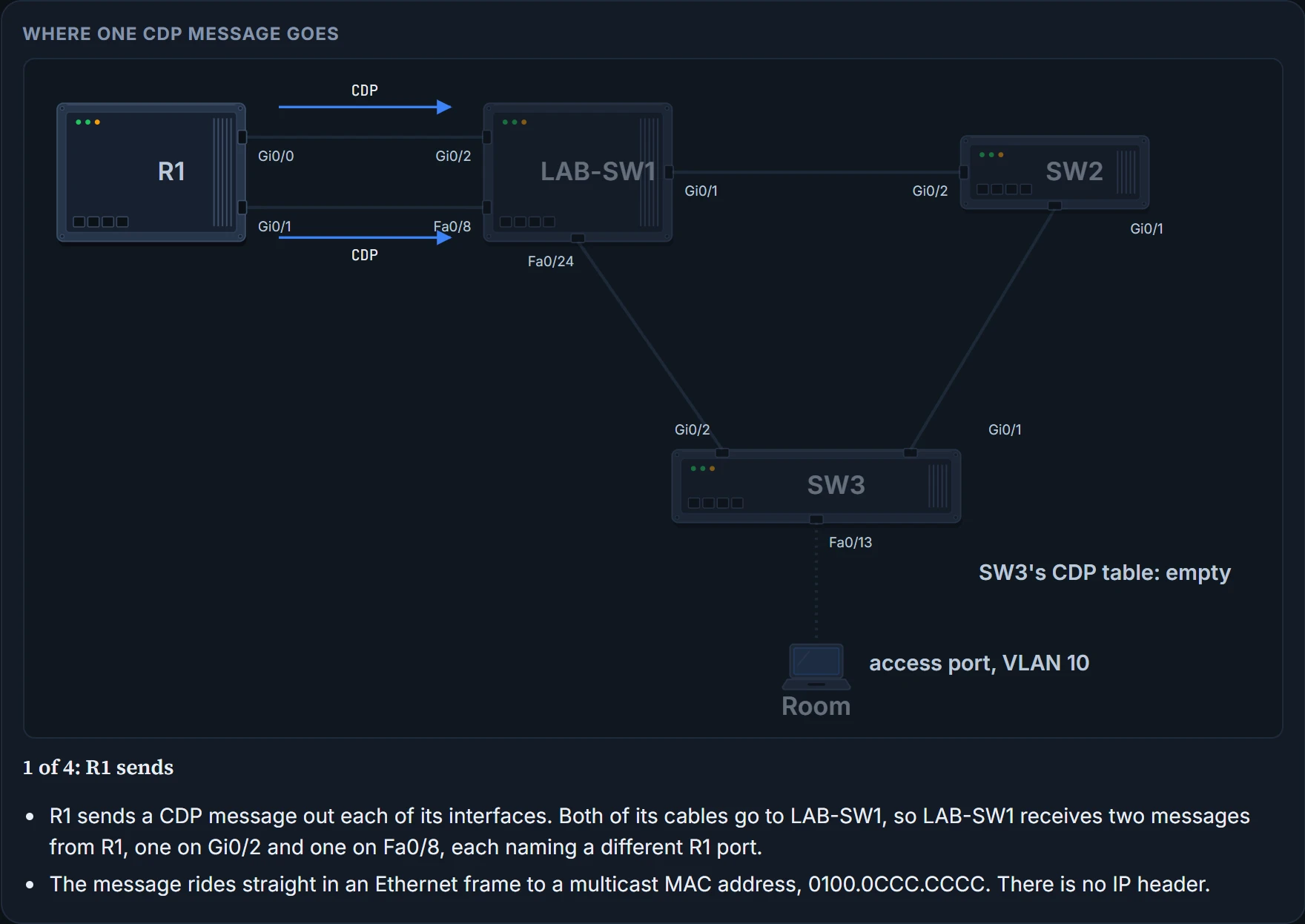
R1 isn't in SW3's list, although it's in the building. CDP messages ride directly in an Ethernet frame, with no IP header, sent to the multicast MAC address 0100.0CCC.CCCC so that every device on the link takes them in. A device that supports CDP and receives one processes it and then discards it; it never forwards it. So R1's messages reach LAB-SW1 and stop there. Here is how it goes: SW3 learns about the devices on the other ends of its own cables, and no further.
Step 1 of 4
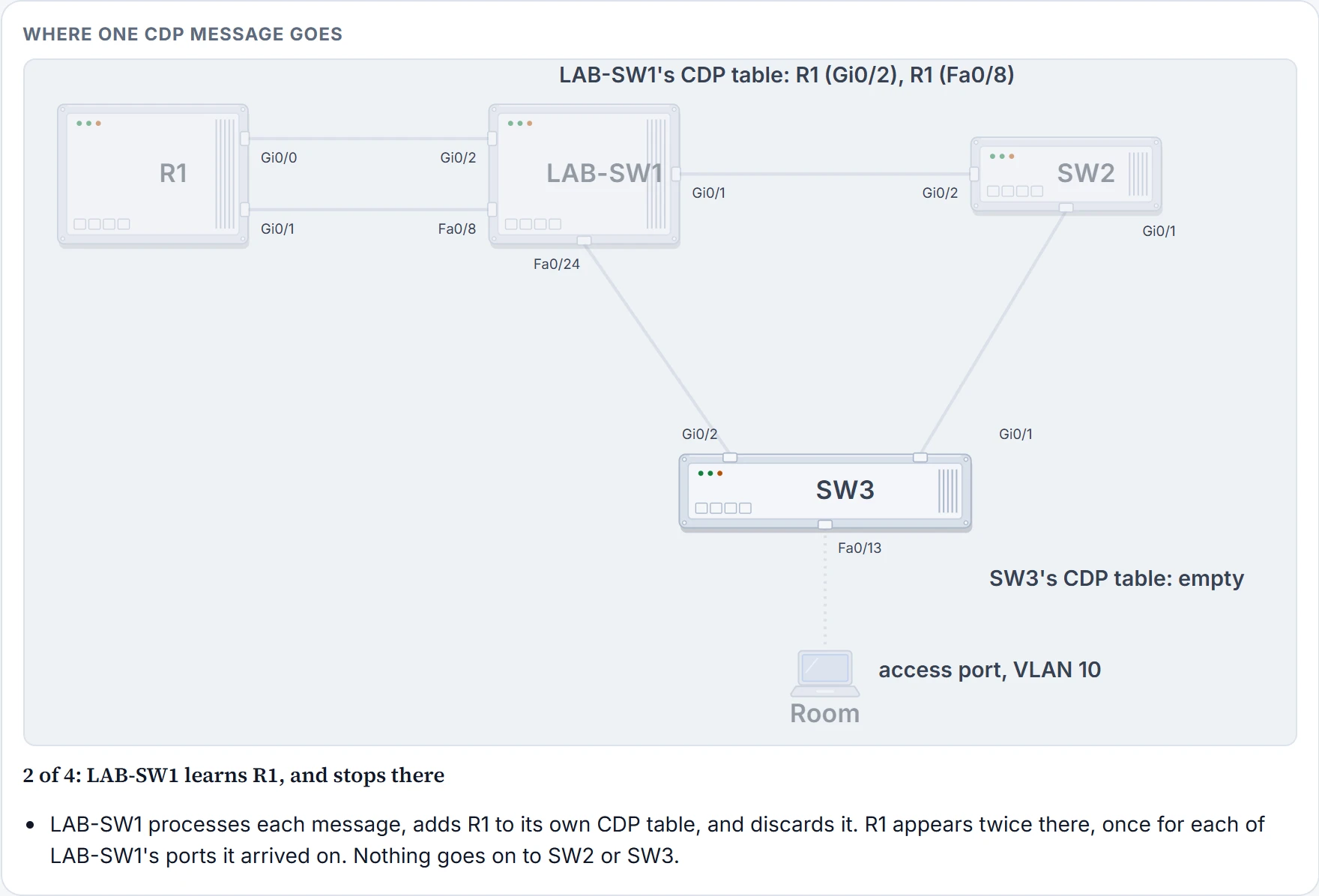
Step 2 of 4
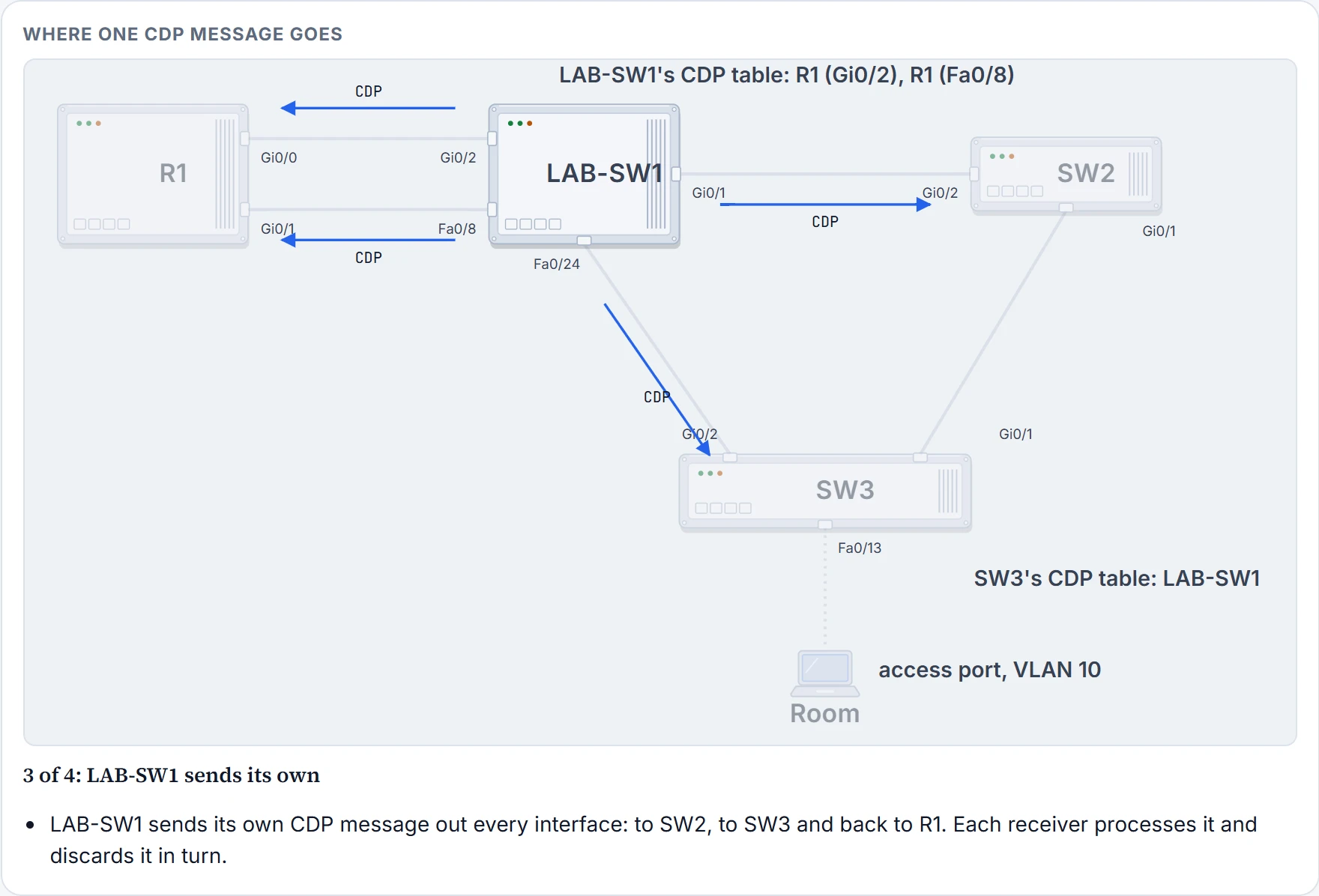
Step 3 of 4
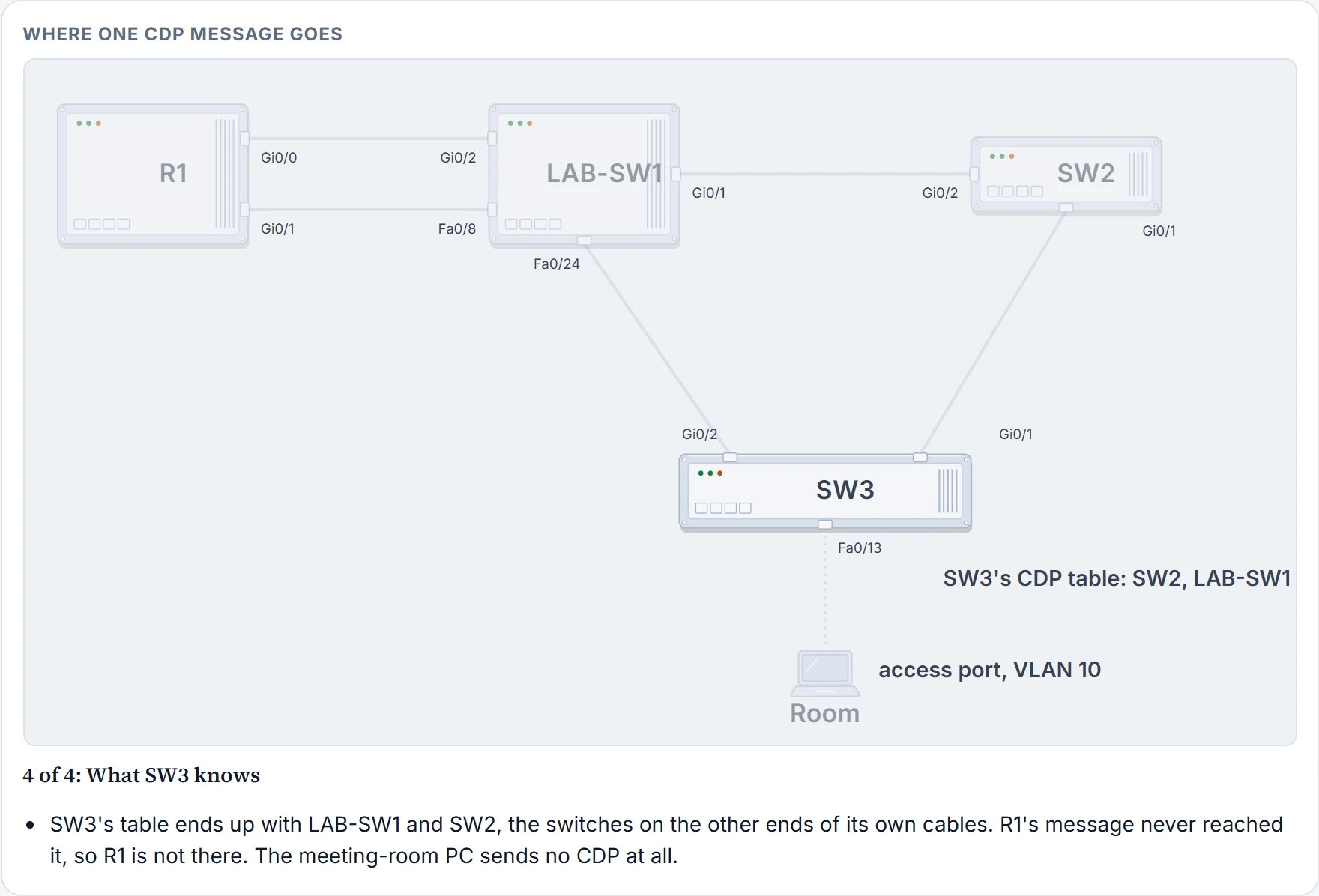
Step 4 of 4
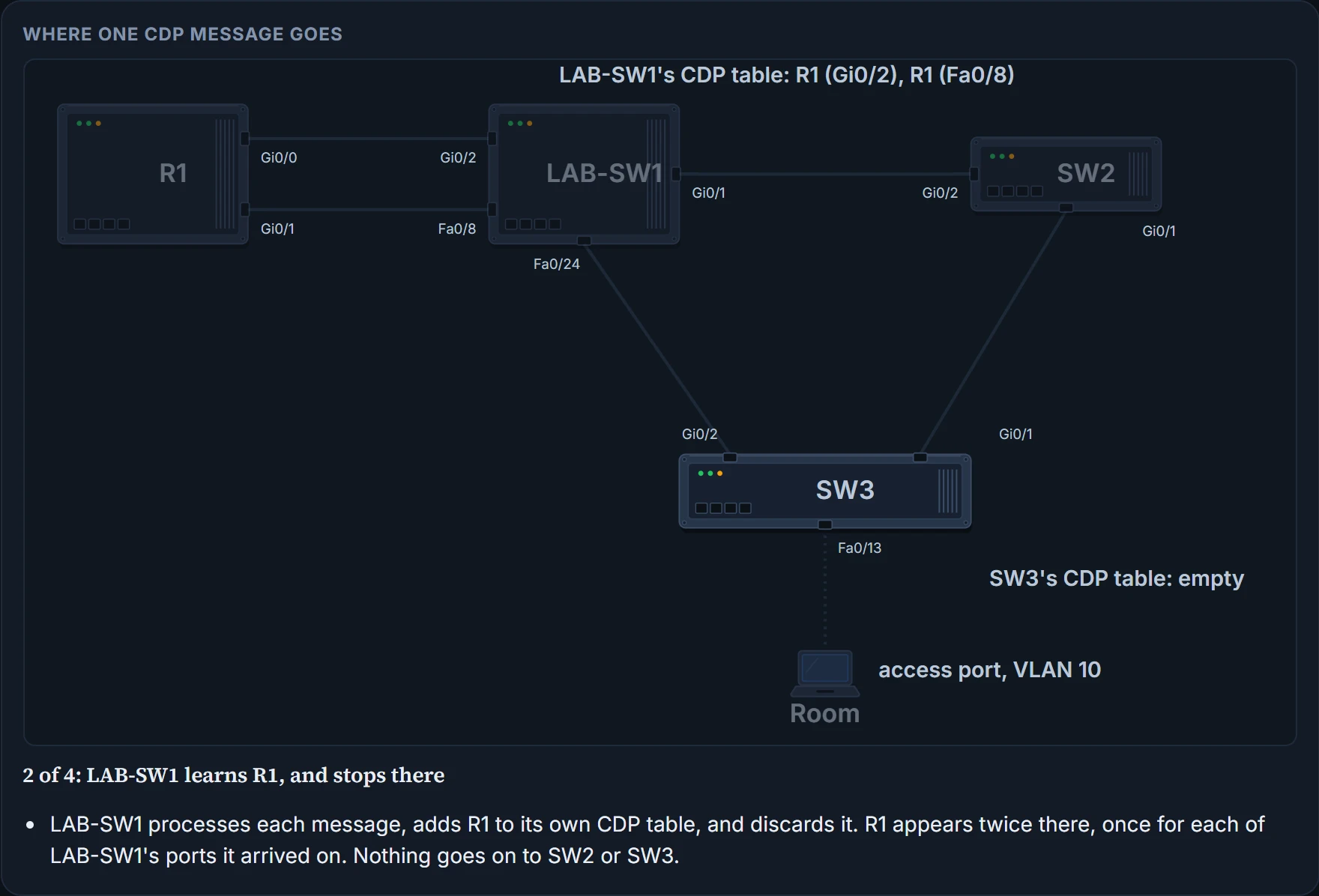
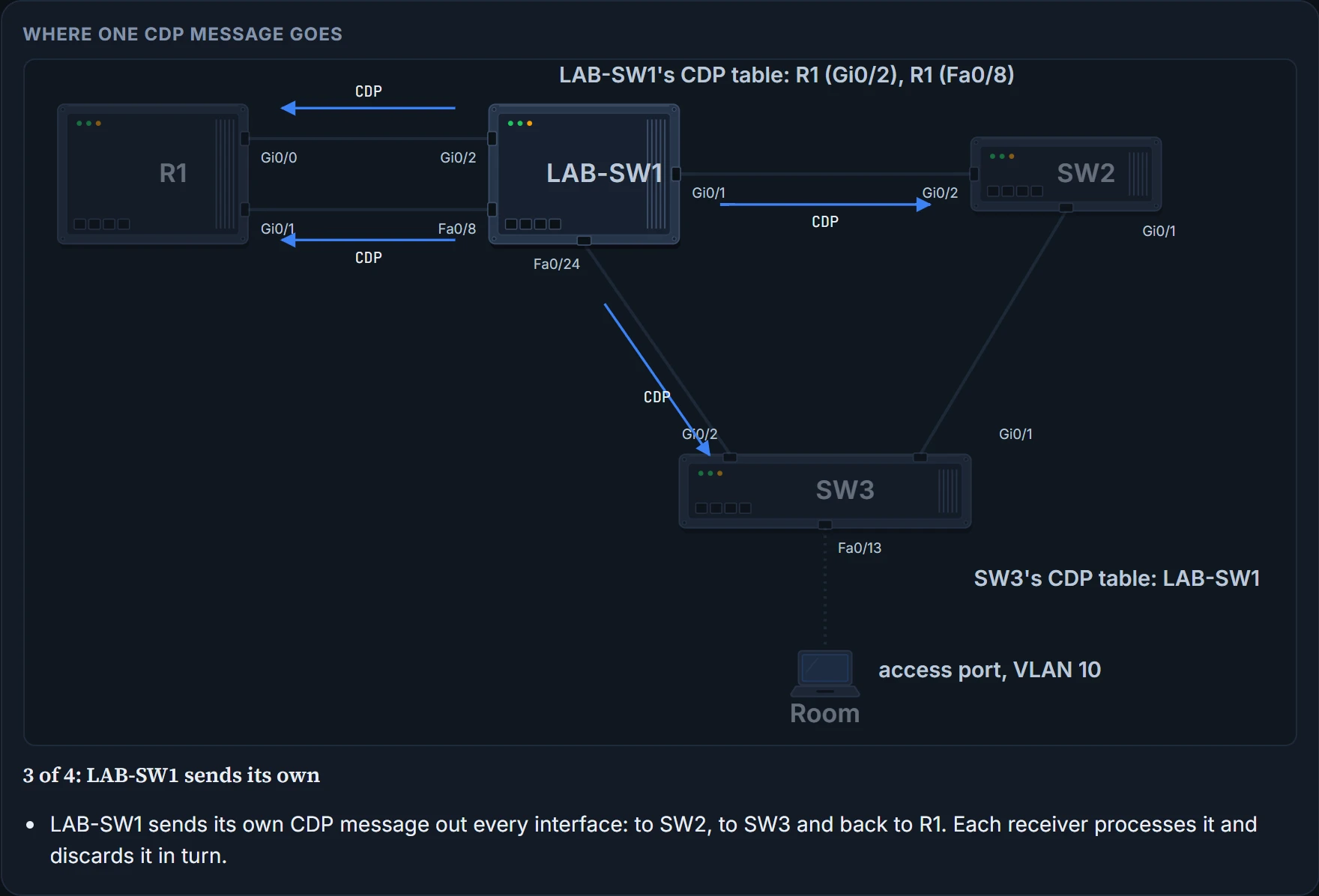
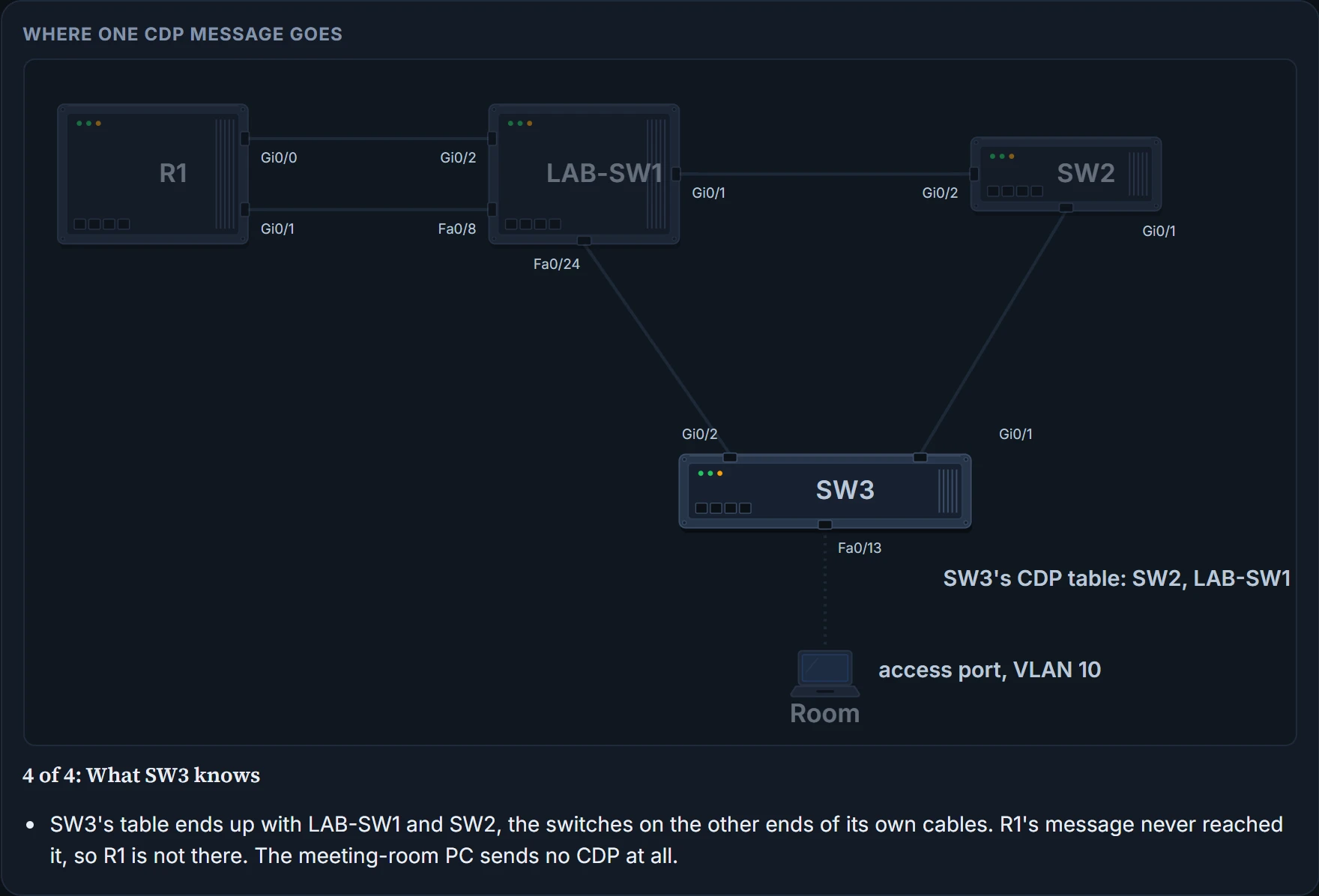
The meeting-room PC isn't listed either. It doesn't run CDP, so it never announces itself.
The detail
show cdp entry LAB-SW1 gives about 15 lines on one neighbour; show cdp neighbors detail gives the same for every neighbour. Here are the lines that matter most. The lines left out include the full model name, the neighbour's software name and version (which is how you would find out what a device runs without logging in to it), the VTP domain, the native VLAN and the duplex:
SW3# show cdp entry LAB-SW1
-------------------------
Device ID: LAB-SW1
Entry address(es):
  IP address: 192.0.2.2
! Lines omitted for brevity
Interface: GigabitEthernet0/2,  Port ID (outgoing port): FastEthernet0/24
Holdtime : 147 sec
! Lines omitted for brevity
Management address(es):
  IP address: 192.0.2.2
The detail adds what the summary leaves out, most usefully LAB-SW1's IP address, 192.0.2.2, listed both as an entry address and as a management address. It also spells the interfaces out in full: Interface is SW3's, and "Port ID (outgoing port)" is LAB-SW1's.
That much from a device you haven't logged into is also a security exposure. The recommendation is to disable CDP on any interface that might not need it. On switches, ports to other switches, to routers and to IP phones should keep it.
Configuring and verifying CDP
CDP is normally on, globally and on every interface. no cdp enable turns it off on one interface and cdp enable turns it back on; no cdp run and cdp run do the same for the whole device. Maya turns it off on Fa0/13: the meeting-room PC has no use for it, and guests plug laptops in there.
SW3# configure terminal
SW3(config)# interface fastEthernet 0/13
SW3(config-if)# no cdp enable
SW3(config-if)# end
To check CDP itself, rather than its neighbours:
| Command | What it lists |
|---|---|
show cdp | Whether CDP is enabled globally, and the default update and holdtime timers |
show cdp interface [type number] | Whether CDP is enabled on each interface (or one), with its timers |
show cdp traffic | Counts of CDP advertisements sent and received |
SW3# show cdp
Global CDP information:
        Sending CDP packets every 60 seconds
        Sending a holdtime value of 180 seconds
        Sending CDPv2 advertisements is enabled
SW3# show cdp interface GigabitEthernet0/2
GigabitEthernet0/2 is up, line protocol is up
  Encapsulation ARPA
  Sending CDP packets every 60 seconds
Holdtime is 180 seconds- CDP is running on SW3 and on Gi0/2, sending every 60 seconds with a holdtime of 180
- that anything is listening on the other end: that's what the neighbour table shows
show cdp traffic counts the CDP advertisements sent and received, split into version 1 and version 2.
CDP sends every 60 seconds by default, with a holdtime of 180 seconds: how long a device waits, after it stops hearing a neighbour, before removing it. cdp timer seconds and cdp holdtime seconds, both global commands, change them.
Continue the lesson
The whole lesson, with its drawings and its questions. 2 more sections after the ones above.