
IPv4 Addressing and Private Networks
Subnetting splits one network into smaller groups of addresses, subnets, and a plan comes first. Four questions start it: which hosts go together, how many subnets, how many hosts per subnet, and whether all subnets are the same size. Most companies then use a private network from RFC 1918, such as 10.0.0.0, with NAT at the Internet edge.
By Arif, founder of Daveth · Updated
The full 17 min walkthrough is in Daveth Pro (Network). See what the plan opens
What this page answers
What is subnetting?
Dividing one Class A, B or C network into smaller groups of addresses, called subnets, each used for one part of the internetwork, such as one VLAN or one link. Read it in “Subnetting, and why a plan comes first”
What are the private IP address ranges?
RFC 1918 sets aside three blocks: 10.0.0.0/8, 172.16.0.0/12 and 192.168.0.0/16. They are for addresses inside an organisation; NAT handles the connection to the Internet. Read it in the lesson
How do you plan an IPv4 addressing scheme?
Start from the needs: which hosts go together in a subnet, how many subnets are needed, how many host addresses each subnet needs, and whether every subnet will be the same size. Read it in “Analysing the needs”
Subnetting, and why a plan comes first
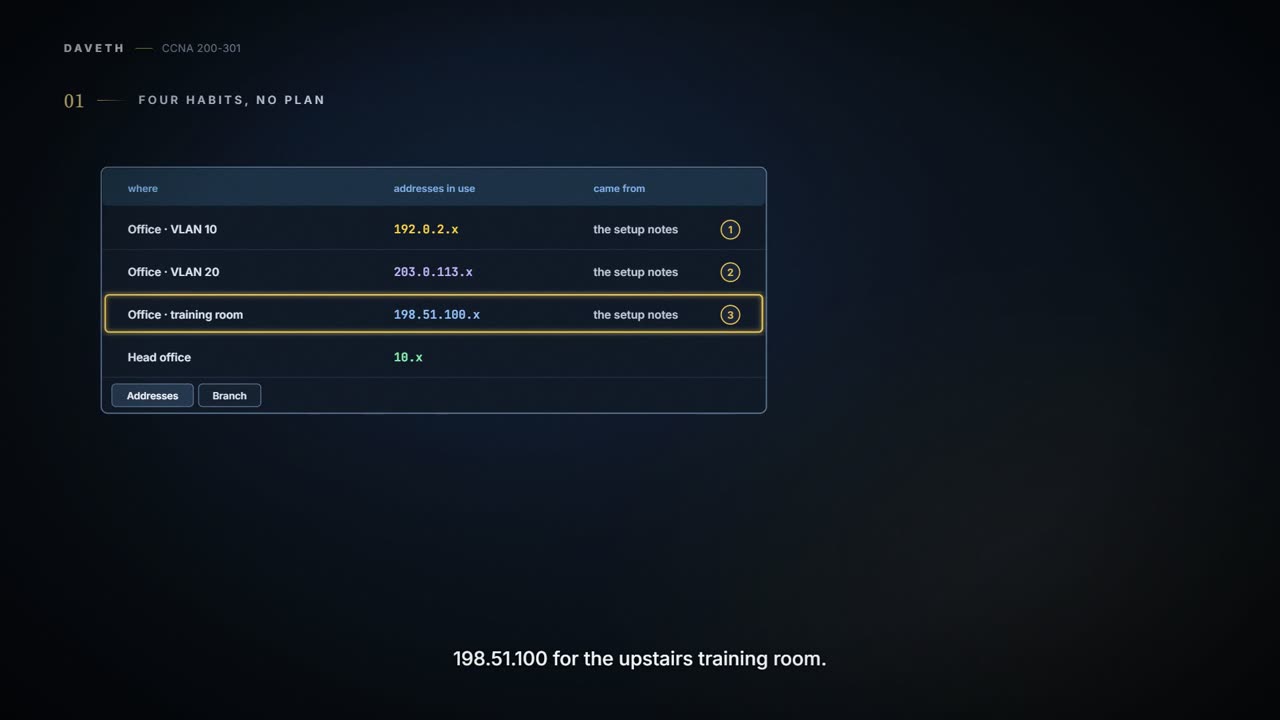
Friday, month two. Maya opens the address spreadsheet to add Scan's VLAN, and it doesn't hold together any more. The office uses whatever the setup notes said as each part went in: 192.0.2.x for VLAN 10, 203.0.113.x for VLAN 20, 198.51.100.x for the upstairs training room. Head office uses 10.x. The branch that opens next month has a tab with nothing on it. There's no plan, just four habits.
Most entry-level networking jobs start with somebody else's plan: you monitor the network, configure addresses for new parts, and troubleshoot, all within an addressing and subnetting design that already exists. But to ask "is the network working as designed?", and when something breaks, "what does it do normally, and what's different right now?", you need to know the design, and why it was chosen. This page walks through the design from the start, the way Maya has to now. (From here until IPv6 comes along, IP means IPv4 unless it says otherwise.)
An IP network, in the classic sense, is a Class A, B or C network, a classful IP network: a set of consecutively numbered addresses following preset rules. All the addresses in one network have the same value in some of their octets. Class B network 172.16.0.0, for example, is every address beginning 172.16, from 172.16.0.0 to 172.16.255.255; Class A network 10.0.0.0 is every address beginning 10. An IP subnet is a subset of one of those networks, and the word is short for subdivided network. One subnet of 172.16.0.0 could be every address beginning 172.16.1, another every address beginning 172.16.2.
It works kind of like cutting a sandwich two kilometres long into meal-size pieces and handing them round: one network, as one piece, might not be useful and is probably far too big, so you chop it into subnets and give them to different parts of the enterprise. (Where it stops: you can cut a sandwich wherever you like. Subnets come only in the sizes their masks allow, as you'll see.)
There are two views of subnetting. The operational view works with a design someone else made; the design view asks why it was chosen and what the alternatives were. The design itself has three steps: analyse the needs (how many subnets, how many hosts in each, one size or not), design the subnets (choose the network, choose the mask, list the subnets), and plan the implementation (which subnet goes where, and which addresses are static or come from DHCP).
Four habits is not a plan. It is four plans that have not met.
Analysing the needs
Four questions start any addressing plan: which hosts go together in a subnet, how many subnets are needed, how many host addresses each subnet needs, and whether every subnet will be the same size.
Every device that sends and receives IP packets needs an IP address: computers, servers, phones, laptops, IP phones, tablets, and networking devices like routers, switches and firewalls. (When "network" means a Class A, B or C network, a whole collection of hosts, routers and switches is better called an internetwork or an enterprise network.) Addresses are grouped into subnets by two rules, so that routing works efficiently:
- Addresses in the same subnet are not separated by a router.
- Addresses in different subnets are separated by at least one router.
If you've ever addressed a letter, you've used the same idea: every address in one town shares a postal code, and a town elsewhere has a different one, which lets the post office sort the mail. (Where it stops: the post office sets the postal codes. Subnets are chosen by a network engineer for each network, and a host learns which subnet it's in from the address and mask it's given.)
So hosts on the same LAN share a subnet (and each VLAN is its own LAN, so its own subnet), and hosts on different LANs are in different subnets. A point-to-point WAN link needs a subnet too: both routers have an address on it, in that one subnet. And because a router's job is to forward packets between subnets, it usually connects to several, with one address per interface, each in a different subnet.
To count the subnets, you need the network diagrams, the VLAN details and the WAN links. Plan one subnet for every VLAN, every point-to-point serial link, and every Ethernet WAN link (Ethernet Line Service). Other WAN technologies, beyond this exam, allow other options, but these each have one subnet per link between two routers. A drawing with only routers and links can't settle the count: each WAN link is certain, and each site needs at least one LAN subnet, but a site's switches may carry several VLANs, so you need the VLAN details too. Here is the company, with each site's LANs drawn as one shape. When the switches don't matter, drawings often simplify a LAN like this; a common style is one plain line with every device hanging off it, which copies the look of the original shared Ethernet cabling.
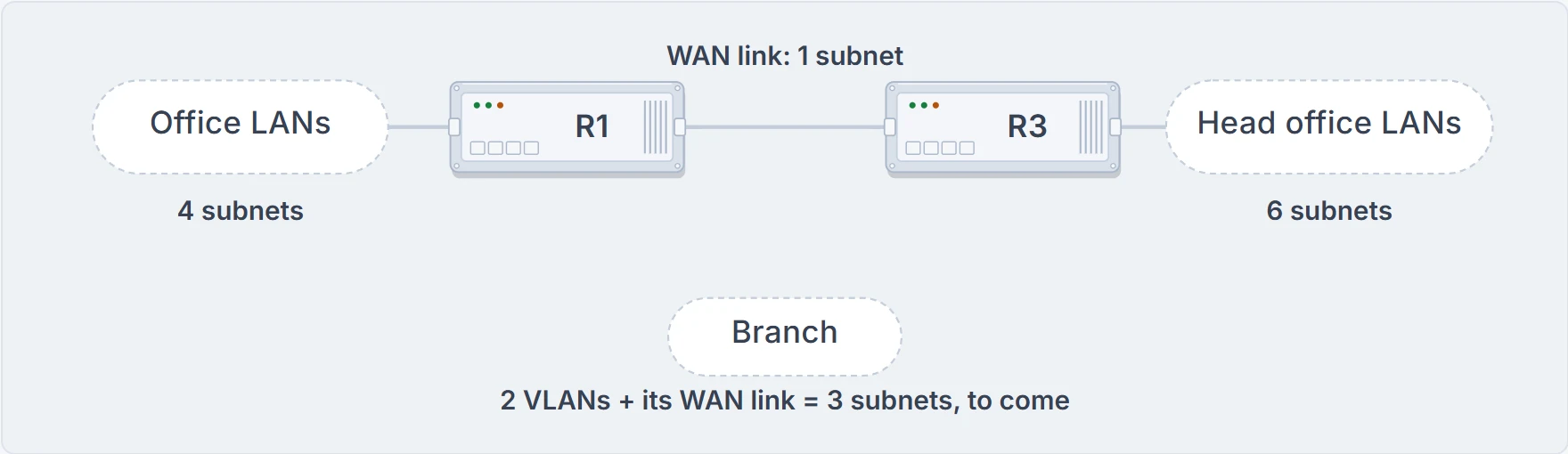
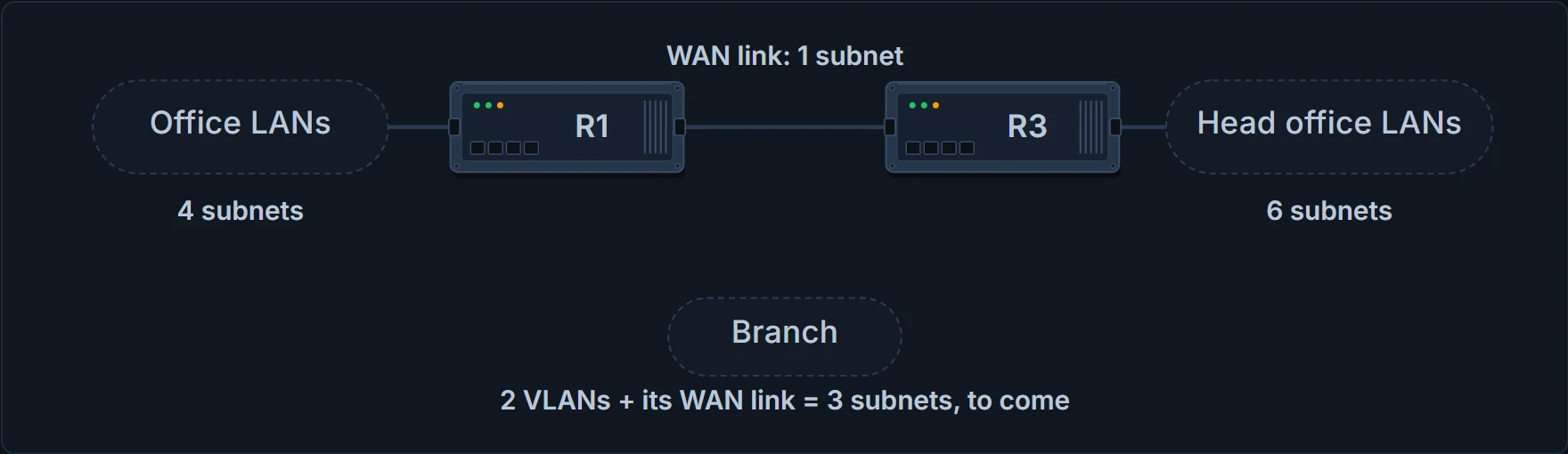
The company's subnets: the office's four behind R1 (three VLANs and the training room), the WAN link to head office, head office's six VLANs behind R3, and the branch's two VLANs plus its WAN link, still to come.
That's 11 subnets today and 14 once the branch opens with two VLANs and its own WAN link. A real plan also allows for growth, so Maya plans for 50.
Counting hosts takes research: business plans, headcounts and devices on order for a new network, or existing sites as a comparison when adding new ones. Don't forget the router's interface address in each subnet, and a switch's address for remote management. Planners often study just a few typical sites, a large one and a small one, and plan every similar subnet for the largest. Point-to-point links need only two addresses. At the company, the largest subnet is head office's Staff VLAN, at about 200 hosts.
One size fits all, or not?
A subnet's size is the number of usable addresses in it. The engineer gives each subnet a subnet mask, and the mask sets aside a number of host bits to number the hosts. With H host bits there are 2^H values, but the size is 2^H − 2, because every subnet reserves two numbers: the numerically lowest is the subnet number (also called the subnet ID or subnet address), and the highest is the subnet broadcast address. Once a network is subnetted, then, an address has three parts: network, subnet and host.
With one size for every subnet, every subnet uses the same mask, because the mask defines the size, and that one mask has to fit the largest subnet: 2^H − 2 must be at least the largest need.
For 200 hosts, 7 host bits aren't enough (2^7 − 2 = 126); 8 are (2^8 − 2 = 254). The big advantage is operational simplicity: everyone works with one mask, and the maths gets familiar.
The big disadvantage is waste: every subnet gets 254 addresses, even a WAN link that needs 2 or a branch LAN that needs 50. In most cases the waste doesn't cause a problem, because most organisations use a private network, and one private Class A or B network has plenty of addresses to spare.
The alternative is several masks, so several sizes, in one Class A, B or C network. For needs of 200, 50 and 2, three masks with 8, 6 and 2 host bits could give 254, 62 and 2 addresses, wasting less. Some addresses are still wasted, because a size can't be arbitrary: it is always 2^H − 2. A design with more than one mask in one classful network uses variable-length subnet masks (VLSM). VLSM does cause problems for some older routing protocols, but none for this exam: OSPF, the one routing protocol the exam includes, works the same with or without it. You still need to be ready to work with designs that use more than one mask. This page, like most of the course, uses one mask, which keeps learning simpler, and some kinds of analysis, like counting the subnets in a network, only make sense with one mask.
Choosing a network: public or private
Originally, a company connecting to the Internet had to use a registered public IP network. It did the paperwork, describing its internetwork, its hosts and its growth plans, and was assigned a Class A, B or C network. Only that company would use those addresses, which guaranteed unique addresses everywhere, so Internet routing worked: no duplicates. A packet sent to one of its addresses would arrive at that one host and no other.
By the mid-1990s, an alternative, private networks, had become more popular. The reason: by the early 1990s, the world was running out of public networks to assign. Hosts newly connected to the Internet were growing at a double-digit pace per month, and the number of Class A, B and C networks that IPv4's 32-bit address allows couldn't give one to every organisation. It has run out since: IANA, which assigns public IPv4 blocks to the five Regional Internet Registries, assigned the last of them in early 2011, and by 2015 ARIN, the registry for North America, had exhausted its supply, so companies must return unused public addresses before ARIN has more to assign.
The 1990s produced several solutions:
- a new version of IP, IPv6, with much larger, 128-bit addresses
- assigning a subset of a public network to each company instead of a whole one, to reduce waste: Classless Interdomain Routing (CIDR)
- Network Address Translation (NAT), which allows private IP networks
With NAT, many companies can use the same private network, even the same addresses, each subnetting it without discussing plans with the others, and still reach the Internet, and even each other through it. NAT translates the addresses in packets as they go from the enterprise to the Internet, using a small number of public addresses for tens of thousands of private ones. How it does that comes much later; for now, most companies use NAT, so they can use private networks. RFC 1918 lists them:
| Class of networks | Private IP networks | Number of networks |
|---|---|---|
| A | 10.0.0.0 | 1 |
| B | 172.16.0.0 through 172.31.0.0 | 16 |
| C | 192.168.0.0 through 192.168.255.0 | 256 |
Continue the lesson
The whole lesson, with its drawings and its questions. The rest of this section and 4 more after it.