
Troubleshooting VLANs and Trunks
Green link lights prove the cable, not the VLAN. First check that each access port is in the right VLAN; then, on both switches, that the VLAN exists and is active, that the link is trunking at both ends, and that each trunk's allowed list includes every VLAN that should cross. A VLAN missing or shut down on one switch stops its frames there.
By Arif, founder of Daveth · Updated
The full 13 min walkthrough is in Daveth Pro (Network). See what the plan opens
What this page answers
How do you troubleshoot VLANs and trunks?
Check both ends. First each access port's VLAN, with show vlan brief or show interfaces switchport; then whether the VLAN exists and is active on each switch; then whether both ends of the link are trunking. Read it in “Four checks, both ends”
Why would a trunk not form between two switches?
A misconfigured trunk fails one of two ways: neither end trunks, as with dynamic auto at both ends, or one end trunks and the other does not. Both cause problems. Read it in “Is it a trunk at both ends?”
Wednesday, 3 p.m.
The visitors have had the meeting room since lunch, and their desk on SW2 works fine. Sam, still pleased with the trial phone, leans round the screen: "If the meeting room gets a phone one day, does VLAN 11 work down there too?"
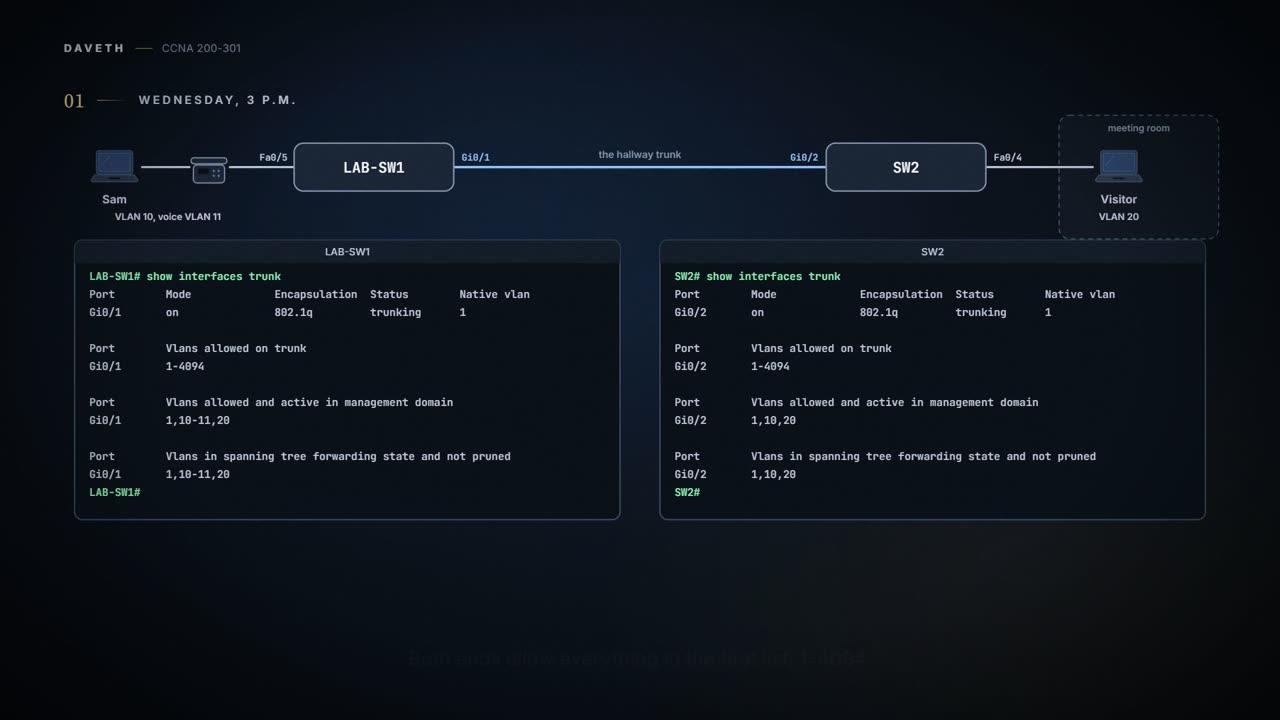
Here's the part of the office that question is about: Sam's desk on LAB-SW1, the hallway trunk, and the visitors' desk on SW2.


The office on Wednesday afternoon. The hallway trunk is the only cable between LAB-SW1 and SW2.
Maya finds out without touching the configuration. She asks both ends of the hallway trunk the same question:
LAB-SW1# show interfaces trunk
Port        Mode             Encapsulation  Status        Native vlan
Gi0/1       on               802.1q         trunking      1

Port        Vlans allowed on trunk
Gi0/1       1-4094

Port        Vlans allowed and active in management domain
Gi0/1       1,10-11,20

Port        Vlans in spanning tree forwarding state and not pruned
Gi0/1       1,10-11,20
LAB-SW1#
SW2# show interfaces trunk
Port        Mode             Encapsulation  Status        Native vlan
Gi0/2       on               802.1q         trunking      1

Port        Vlans allowed on trunk
Gi0/2       1-4094

Port        Vlans allowed and active in management domain
Gi0/2       1,10,20

Port        Vlans in spanning tree forwarding state and not pruned
Gi0/2       1,10,20
SW2#
Both ends allow everything in the first list, 1-4094. The second list, allowed and active, is where they differ: LAB-SW1 has 1,10-11,20, and SW2 has 1,10,20. VLAN 11 drops out at SW2's second list.
That list leaves out VLANs the switch doesn't know, or has shut down. SW2 has never had a vlan 11 command: Maya created VOICE on LAB-SW1 this morning, and only there. So VLAN 11 works on one switch and not on the other, just as 03.1.5's last question put it.
SW2 isn't being difficult. It has simply never been introduced to VLAN 11.
And that's fine for today: nobody behind SW2 needs VLAN 11. A VLAN missing from a list isn't automatically a problem. It's a question, and the list it went missing from tells you which one. If a phone ever goes in the meeting room, SW2 gets vlan 11 first.
Four checks, both ends
The link lights on the hallway cable are green at both ends. That proves the cable, not the VLAN.
The lights checked that the cable showed up for work. They didn't check the guest list.
Before any trunk check, one step you already know from 03.1.2: is each access port in the VLAN it should be? show vlan brief and show interfaces ... switchport answer that, and so does show mac address-table: if a port has one device on it, that device's entry shows the port's VLAN (you can't read a trunk that way). show vlan id lists a VLAN's trunk ports as well, as 03.1.3 showed. A port in the wrong VLAN gets switchport access vlan with the right number.
After that, four checks, each one run on both switches:
- Are all the VLANs defined and active?
- Do the allowed VLAN lists, at both ends of each trunk, include every VLAN that should cross?
- Is one end trunking while the other isn't?
- Do both ends use the same native VLAN?
This page takes check 3 before check 2. The allowed lists come from show interfaces trunk, and that command lists only operational trunks: until an end is trunking, it has no lists to read.
Maya wants to see each failure before she meets one at work, and the office network isn't for experiments. So at 8 p.m. she builds a copy of the hallway at home, on H1 and H2 from 03.1.4: H1's Gi0/1 to H2's Gi0/2, switchport mode trunk and switchport nonegotiate at both ends, native VLAN 1. Both switches get VLANs 10 and 20. Laptop A sits on H1's Fa0/2 and Laptop B on H2's Fa0/4, both in VLAN 20, like the visitors' desk. Then she breaks one thing at a time, and undoes it before the next.


Maya's home lab: a copy of the hallway, with a laptop in VLAN 20 at each end. It never connects to the office.
Is the VLAN there, and is it on?
A switch forwards frames only in VLANs it knows about. It knows a VLAN from a vlan command, or learns it through VTP (03.1.4), which these switches don't use. If a VLAN doesn't exist on a switch, the fix is simply to create it, as in 03.1.2.
A VLAN can also exist and be switched off. Shutting down a VLAN disables it on that switch only, and the switch won't forward frames in it, whether they arrive on access ports or on trunks. show vlan brief gives every VLAN a status: active, or act/lshut for one that's shut down. Fault one: Maya shuts down VLAN 20 on H2.
H2# configure terminal
Enter configuration commands, one per line. End with CNTL/Z.
H2(config)# shutdown vlan 20
H2(config)# end
H2# show vlan brief
VLAN Name                             Status    Ports
---- -------------------------------- --------- -------------------------------
1    default                          active    Fa0/1, Fa0/2, Fa0/3, Fa0/5
                                                Fa0/6, Fa0/7, Fa0/8, Gi0/1
10   OFFICE                           active
20   GUEST                            act/lshut Fa0/4
1002 fddi-default                     act/unsup
1003 token-ring-default               act/unsup
1004 fddinet-default                  act/unsup
1005 trnet-default                    act/unsup
H2# show interfaces trunk
Port        Mode             Encapsulation  Status        Native vlan
Gi0/2       on               802.1q         trunking      1

Port        Vlans allowed on trunk
Gi0/2       1-4094

Port        Vlans allowed and active in management domain
Gi0/2       1,10

Port        Vlans in spanning tree forwarding state and not pruned
Gi0/2       1,10
H2#
VLAN 20 is still listed, with Fa0/4 still in it. Only the Status column gives it away: act/lshut, where a working VLAN says active. Laptop A's frames reach H2 and go no further. H2's trunk lists show the same thing from the other side: VLAN 20 is still allowed, in the first list, and gone from the second, allowed and active. (The act/unsup lines at the bottom are the reserved VLANs, 1002 to 1005; unsup means unsupported.)
There are two ways to turn a VLAN off, and two matching ways back: the global command shutdown vlan 20 or no shutdown vlan 20, or vlan 20 and then shutdown or no shutdown inside it. Maya turns it back on the second way:
H2# configure terminal
Enter configuration commands, one per line. End with CNTL/Z.
H2(config)# vlan 20
H2(config-vlan)# no shutdown
H2(config-vlan)# end
H2# show vlan brief
VLAN Name                             Status    Ports
---- -------------------------------- --------- -------------------------------
1    default                          active    Fa0/1, Fa0/2, Fa0/3, Fa0/5
                                                Fa0/6, Fa0/7, Fa0/8, Gi0/1
10   OFFICE                           active
20   GUEST                            active    Fa0/4
1002 fddi-default                     act/unsup
1003 token-ring-default               act/unsup
1004 fddinet-default                  act/unsup
1005 trnet-default                    act/unsup
H2#
Shut down or not, VLAN 20 stays in show running-config too. That's because Maya runs H1 and H2 with VTP off: as 03.1.4's table showed, VTP off and transparent keep the vlan lines in the configuration, and server and client don't, so on those show vlan brief is the place to look. show vtp status tells you which mode a switch is in.
- every VLAN this switch knows, and each one's state: active, act/lshut or act/unsup
- which access ports are in each VLAN
- that a trunk carries the VLAN: operational trunks aren't in this list at all
- anything about the other switch
A shut-down VLAN acts kind of like a closed checkout lane at the supermarket: the lane's still there with its number over it, and nobody gets served in it. (Where it stops: a shop hangs a sign on a closed lane. A shut VLAN shows nothing until you read the Status column, and it's closed on that one switch only; H1's VLAN 20 was active the whole time.)
Is it a trunk at both ends?
A misconfigured trunk fails in one of two ways: neither end trunks, or one end trunks and the other doesn't. Both cause problems.
Neither end trunks
Fault two: switchport mode dynamic auto at both ends. First Maya removes switchport nonegotiate, because the dynamic modes work by negotiating. She does H1, then H2:
H2# configure terminal
Enter configuration commands, one per line. End with CNTL/Z.
H2(config)# interface GigabitEthernet0/2
H2(config-if)# no switchport nonegotiate
H2(config-if)# switchport mode dynamic auto
H2(config-if)# end
%LINEPROTO-5-UPDOWN: Line protocol on Interface GigabitEthernet0/2, changed state to down
%LINEPROTO-5-UPDOWN: Line protocol on Interface GigabitEthernet0/2, changed state to up
H2# show interfaces gigabit0/2 switchport
Name: Gi0/2
Switchport: Enabled
Administrative Mode: dynamic auto
Operational Mode: static access
Administrative Trunking Encapsulation: dot1q
Operational Trunking Encapsulation: native
! lines omitted for brevity
H2#
It's the most common configuration that leaves both ends not trunking, and the name invites it: "auto" sounds as if the link will trunk by itself. But auto is passive as well as automatic. Each end waits for the other to start the negotiation, and neither does. Administrative Mode is what the port was told, dynamic auto; Operational Mode is what it's doing, static access.
Both switches said "you decide". Neither did.
If you've ever waited for a friend to ring you while they waited for you to ring them, it's that. (Where it stops: one of you gives in eventually. Two auto ports just stay access ports.)
One end trunks, the other doesn't
Fault three is worse. Back to the working lab, then one change on H2: switchport mode dynamic desirable. H1 is still a static trunk with nonegotiate.
H1# show interfaces trunk
Port        Mode             Encapsulation  Status        Native vlan
Gi0/1       on               802.1q         trunking      1

Port        Vlans allowed on trunk
Gi0/1       1-4094

Port        Vlans allowed and active in management domain
Gi0/1       1,10,20

Port        Vlans in spanning tree forwarding state and not pruned
Gi0/1       1,10,20
H1#
H2# configure terminal
Enter configuration commands, one per line. End with CNTL/Z.
H2(config)# interface GigabitEthernet0/2
H2(config-if)# no switchport nonegotiate
H2(config-if)# switchport mode dynamic desirable
H2(config-if)# end
%LINEPROTO-5-UPDOWN: Line protocol on Interface GigabitEthernet0/2, changed state to down
%LINEPROTO-5-UPDOWN: Line protocol on Interface GigabitEthernet0/2, changed state to up
H2# show interfaces trunk

H2# show interfaces gigabit0/2 switchport
Name: Gi0/2
Switchport: Enabled
Administrative Mode: dynamic desirable
Operational Mode: static access
Administrative Trunking Encapsulation: dot1q
Operational Trunking Encapsulation: native
! lines omitted for brevity
H2#
H1, with DTP turned off, sends no negotiation messages, so H2's negotiation fails and H2 doesn't trunk. switchport mode trunk on its own still runs DTP; it's nonegotiate that turns it off. With dynamic auto at H2 instead, the result is the same: both dynamic modes rely on DTP. H1 lists Gi0/1 as trunking. H2 lists nothing, and its Operational Mode says static access. The link is still up at both ends, lights green.
So H1 tags Laptop A's VLAN 20 frames, and H2, treating Gi0/2 as an access port, sees an 802.1Q header on an access port and discards the frame. Frames in the native VLAN carry no tag, so those cross. Every other VLAN doesn't.
A link that works for exactly one VLAN is the kind of "working" that gets a problem closed too early.
The switches don't stop you configuring this. The defence is reading the configuration and the operational state at both ends, and the two best commands for it are show interfaces trunk and show interfaces switchport.
show interfaces switchport: this end's administrative and operational modeshow interfaces trunk: this end's operational trunks
- what the other end is doing: a static trunk trunks whatever its neighbour does
- which VLANs actually cross
One port that isn't this fault: 03.1.5's phone port, LAB-SW1's Fa0/5. It carries two VLANs and isn't in show interfaces trunk, because it's an access port with a voice VLAN, and its switchport output says static access, as it should.
Continue the lesson
The whole lesson, with its drawings and its questions. 4 more sections after the ones above.