
Cisco Wireless Architectures, AP Modes and WLC Deployments
An autonomous AP does everything itself, so forty of them are forty boxes to manage. A cloud-based architecture manages autonomous APs from the Internet. In the split-MAC architecture, a lightweight AP handles the real-time radio work and a wireless LAN controller, the WLC, handles management, with CAPWAP tunnels joining them across any subnet.
By Arif, founder of Daveth · Updated
The full 15 min walkthrough is in Daveth Pro (Network). See what the plan opens
What this page answers
What are the Cisco wireless architectures?
Autonomous APs, each configured and run on its own; cloud-based APs, still autonomous but managed centrally from the cloud; and split-MAC, where lightweight APs share the work with a wireless LAN controller. Read it in “Autonomous APs”
What is CAPWAP?
The Control and Provisioning of Wireless Access Points protocol. It wraps the data between a lightweight AP and its WLC in new IP packets, so the two can be on different subnets in different places. Read it in “CAPWAP: how an AP and its WLC stay joined”
What are the lightweight AP modes?
Local, the default, serves clients with its BSSs. FlexConnect is for remote sites: when the tunnel to the controller is down, the AP itself bridges each SSID to its VLAN. Monitor, sniffer, rogue detector and SE-Connect put the radios to other work, so the AP offers no BSS. Read it in the lesson
What are the WLC deployment models?
Unified, a central controller of its own; cloud, in a data centre; embedded, built into a stack of access switches for a small campus; and hosted on an AP for a branch. Each supports a typical maximum of APs and clients. Read it in the lesson
Autonomous APs
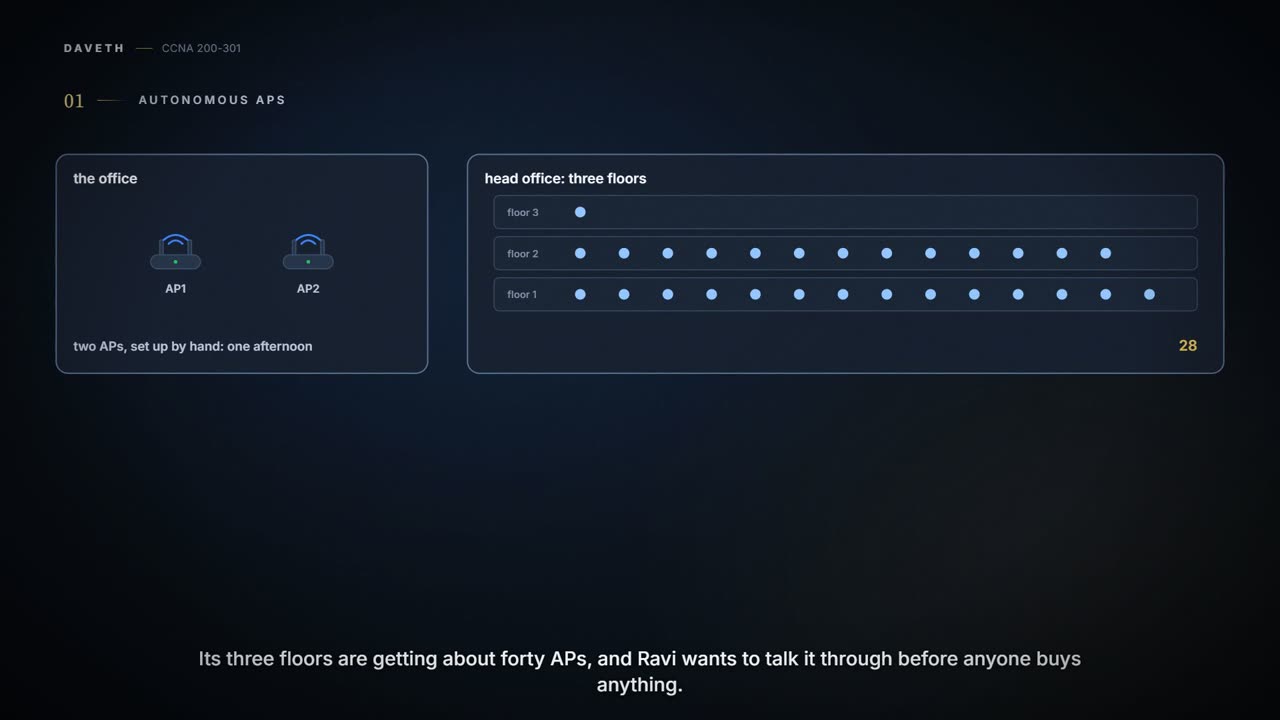
Tuesday, month two. The two new APs at the office took an afternoon. Then Ravi calls from head office: its three floors are getting about forty APs, and Ravi would like to talk it through before anyone buys anything. Maya goes over for the day, and her laptop joins head office's Staff network. How do you run forty APs as one wireless network?
Start with what an AP is for: it bridges wireless data from the air onto a normal wired network, so its clients become members of the LAN as if they were cabled. And it controls who gets on: it's the central point of access, hence the name.
AP1 and AP2 in 03.5.1 were autonomous APs. An autonomous AP is self-contained, with both wired and wireless hardware, so it ends each client's association on its own wired connection, locally. It offers one or more complete, standalone BSSs, and it's a natural extension of the switched network: it connects SSIDs to VLANs at the access layer. A typical enterprise network could have hundreds or thousands of them, spread across the coverage area and the network.
Here is head office as an autonomous design. One AP per floor stands in for all forty. Staff maps to VLAN 100 and Guest to VLAN 200, and the VLANs are trunked from HQD, the distribution switch, where the routing happens, down to each floor switch and on to each AP:
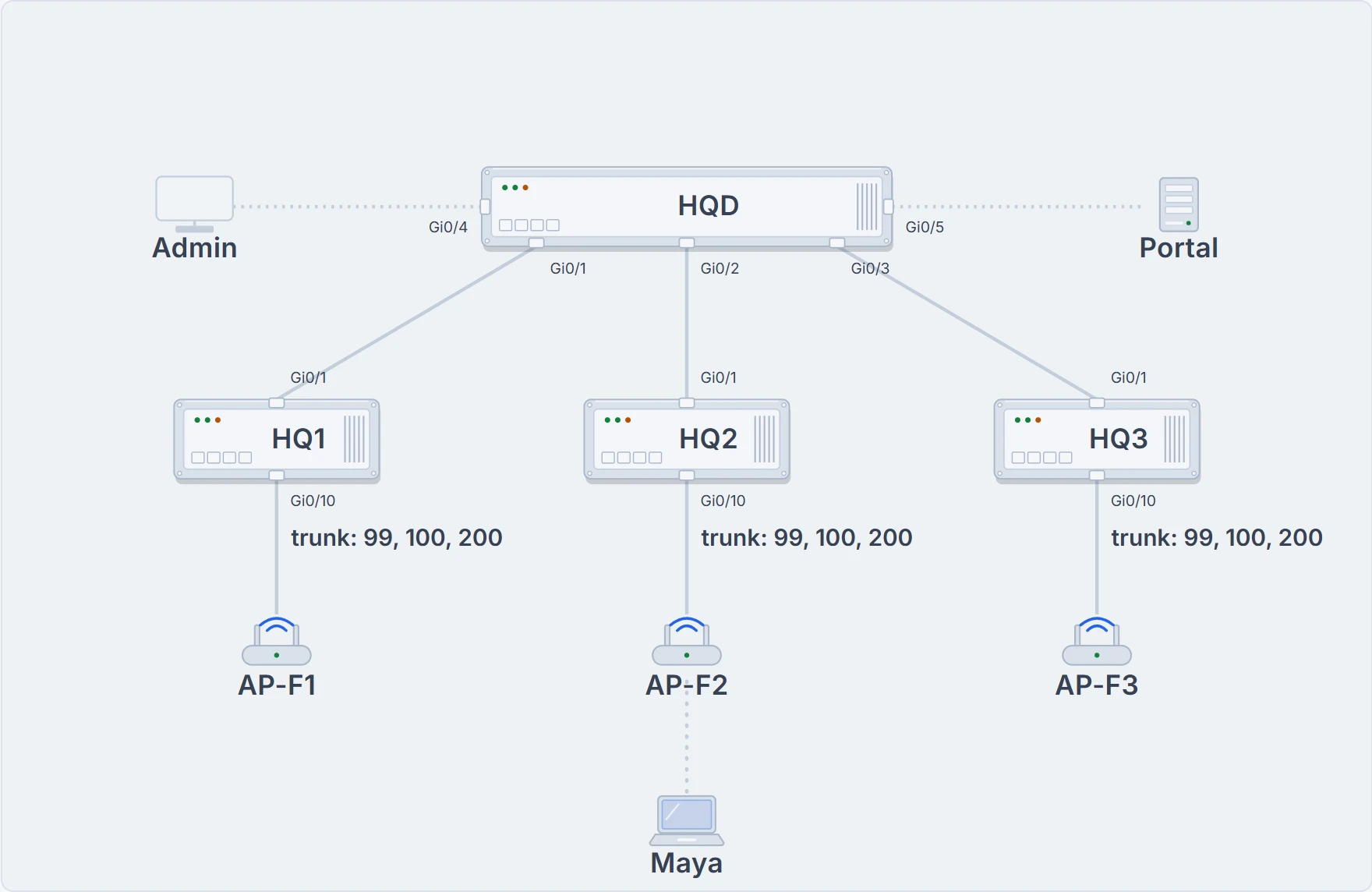
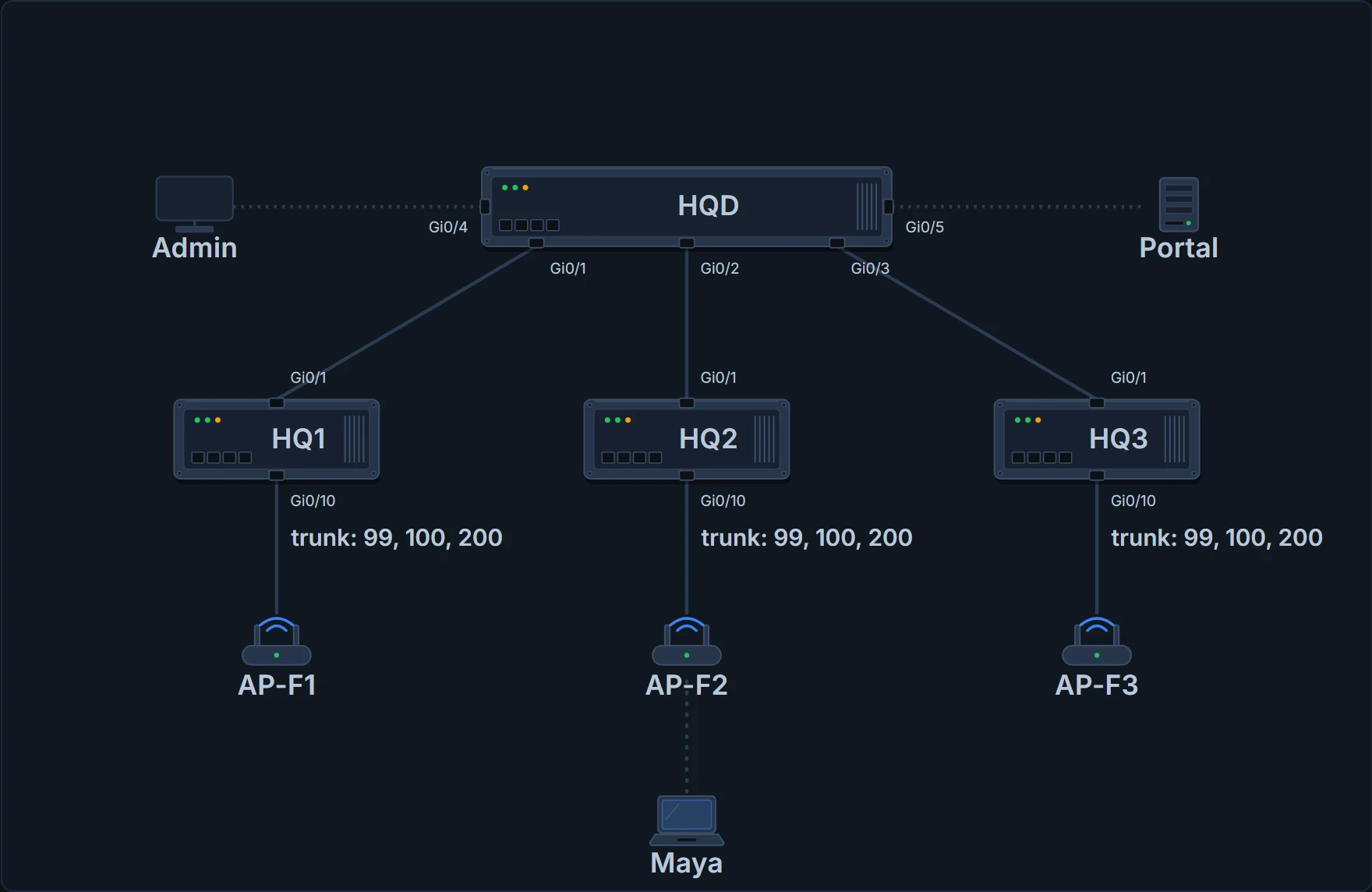
Head office, autonomous: HQD with Portal on its right and Ravi's admin PC on its left; floor switches HQ1-HQ3; one AP per floor on a trunk for VLANs 99, 100 and 200; Maya's laptop on AP-F2.
The data path is short and simple: a frame only has to cross the AP to reach the network on the other side. Two clients on the same autonomous AP can even reach each other through the AP without going up into the wired network.
Each AP also needs a management IP address, so someone can reach it to set its SSIDs, VLANs, channel, transmit power and the rest. That address normally isn't in any of the data VLANs, so a dedicated management VLAN, VLAN 99 here, is added to every trunk too. And each AP has to be configured and maintained on its own, unless a management platform does it for you.
You can think of it as forty shops, each with its own manager and its own copy of the rules. (Where it stops: shop managers can phone each other and agree. Each autonomous AP is set up and maintained by itself, unless a management platform does it for you.)
That gets cumbersome as the network grows. You'll likely want the same SSID on many APs, so clients can join almost anywhere and roam between any two, and you might want the matching VLAN, with its IP subnet, on every AP, so clients don't need a new IP address each time they associate somewhere new. Since SSIDs and VLANs are extended at Layer 2, VLAN 100 has to reach from HQD, over every trunk, to every AP: end to end across the whole infrastructure, which is usually considered bad practice. Adding a VLAN means configuring every switch and every AP. With redundant links between the layers, spanning tree (03.3.1) becomes vital to stop bridging loops. So roaming between autonomous APs is usually limited to one Layer 2 domain, a single VLAN's extent, and the bigger the network, the harder it is to configure correctly and the less efficient it becomes.
Forty APs, forty logins. Ravi did the maths and went quiet.
Cloud-based APs
One way to manage a growing number of autonomous APs is a management platform in a central place at head office. It would need to be bought, configured and maintained as well.
A simpler approach is a cloud-based AP architecture: the AP management function moves out of the enterprise and into the Internet cloud. One vendor's cloud service, for example, centrally manages wireless, switched and security networks built from its own products. Through it, Ravi could configure and manage the APs, monitor wireless performance and activity, and generate reports.
The APs can deploy themselves. Once they're registered with the service, each one contacts the cloud when it powers up and configures itself; from then on it's managed through the service's dashboard. The cloud pushes out code upgrades and configuration changes, works out which channel and transmit power each AP should use, and collects information from all the APs: RF interference, rogue or unexpected wireless devices they overheard, and usage statistics.
The wired network looks exactly like the autonomous one. That's because the APs are autonomous; the visible difference is that they're all managed, controlled and monitored centrally, from the cloud.
So the data path stays short: the AP links the wireless and wired networks itself, and clients' data doesn't travel up into the cloud and back. Only management does. That gives two distinct paths, for two functions:
- Control plane: the traffic that controls, configures, manages and monitors the AP itself.
- Data plane: end users' traffic passing through the AP.
That split matters for everything that follows.
The dashboard is far away. Maya's frame doesn't make the trip.
Split-MAC: the lightweight AP
Autonomous APs are, well, autonomous, so managing their RF is hard. Someone has to choose and set each AP's channel, find and deal with rogue APs that might interfere, and set transmit powers so that coverage is enough without too much overlap and without holes, even when an AP's radio fails. Security is hard too: each AP enforces its own policies, and there's no central point between the wireless and wired networks to watch traffic for intrusion detection and prevention, quality of service, bandwidth policing and so on.
The fix is to move many of an autonomous AP's functions to one central place. Divide its work into two groups:
| Stays on the lightweight AP (real time) | Moves to the WLC (management) |
|---|---|
| RF transmit and receive | RF management |
| MAC management | Association and roaming management |
| Encryption | Client authentication |
| Security management | |
| QoS |
The real-time work is sending and receiving 802.11 frames, beacons and probe messages, and encrypting 802.11 data packet by packet. It deals with clients at a low level, the Media Access Control (MAC) layer, so it has to stay on the AP hardware, nearest the clients. The management work isn't part of handling frames on the channel, and it's better run centrally, so it can move away from the AP.
Split like that, the AP hardware is a lightweight AP: its code image and local intelligence are stripped down compared with an autonomous AP, and it does only the real-time 802.11 work, the Layer 1 and Layer 2 jobs of moving frames into and out of the air. The management work usually goes to a wireless LAN controller (WLC), which controls many lightweight APs. The AP depends on the WLC for every other wireless LAN function: authenticating users, managing security policies, even choosing its channel and transmit power. If head office went this way, its WLC would be WLC1, a box of its own cabled to HQD.
That division is the split-MAC architecture: the normal MAC operations are pulled apart into two places. Every AP has to boot and bind itself to a WLC before it can support clients, and the WLC becomes the central hub for APs scattered around the network. A lightweight AP normally can't work on its own at all; the one exception is FlexConnect, below.
It works kind of like a restaurant: the waiters deal with the customers in real time, and the office behind the kitchen sets the menu, the rota and the rules. (Where it stops: a waiter can still take an order when the office phone is down. A lightweight AP normally can't operate on its own at all without its WLC.)
CAPWAP: how an AP and its WLC stay joined
To form one working access point, the lightweight AP and the WLC use a tunnelling protocol between them, carrying both the 802.11-related messages and client data. They can be in the same VLAN or IP subnet, but they don't have to be: they can be on entirely different subnets in entirely different places.
The Control and Provisioning of Wireless Access Points (CAPWAP) protocol makes that work by wrapping the data between the AP and the WLC in new IP packets, which can then be switched or routed across the campus. The relationship is really two tunnels:
| Tunnel | UDP port | Carries | Protection |
|---|---|---|---|
| Control | 5246 | Messages that configure the AP and manage its operation | Authenticated and encrypted |
| Data | 5247 | Packets to and from the AP's wireless clients | Not encrypted by default; DTLS when data encryption is enabled |
The control messages are authenticated and encrypted, so only the right WLC controls the AP. CAPWAP is defined in RFCs 5415, 5416, 5417 and 5418, and it's based on an older vendor-specific protocol, the Lightweight Access Point Protocol (LWAPP). The AP and the WLC also authenticate each other with digital certificates: each has an X.509 certificate installed when it's bought, so every device is authenticated before it joins, and it helps make sure nobody can add an unauthorised AP to the network.
The tunnels let the AP and the WLC be separated geographically and logically, and they break any dependence on Layer 2 between them. WLC1's own address is in VLAN 98, a different subnet from the APs' VLAN 99, and that's fine: the tunnels are routed. VLAN 100 exists at the WLC, which is connected to VLANs 100 and 200 itself, and in the air as SSID Staff, near the clients, but not in between the AP and the WLC: Staff traffic crosses the network inside the CAPWAP data tunnel, which runs between the WLC's IP address and the AP's, so all of it can be routed at Layer 3. The AP is known by just one IP address, used for management and for both tunnels. No trunk is needed, because every VLAN the AP supports travels as Layer 3 IP packets rather than as separate Layer 2 VLANs. As the network grows, the WLC simply builds more tunnels to more APs, and SSID Staff can be on every AP, with VLAN 100 reaching each one through the tunnels.
If you've ever sent a parcel inside a courier's bag, the depots along the way read only the bag's label, never the parcel's address. (Where it stops: a courier bag is sealed. The CAPWAP data tunnel isn't encrypted by default, so anyone on the path could look inside; and it's opened at the WLC, which then sends the frame on to where it is going.)
Continue the lesson
The whole lesson, with its drawings and its questions. The rest of this section and 3 more after it.