
Rapid PVST+ and RSTP
Rapid STP elects the root and picks root ports with STP's own rules, but lets a spare port take over far faster. It adds the alternate port, which replaces a failed root port, and the backup port; it merges disabled and blocking into one discarding state and has no listening state. Rapid PVST+ runs a separate rapid tree for each VLAN.
By Arif, founder of Daveth · Updated
The full 15 min walkthrough is in Daveth Pro (Network). See what the plan opens
What this page answers
What is RSTP (Rapid Spanning Tree)?
The newer version of spanning tree. It elects the root and picks root ports with the same rules as STP, but an alternate port can replace a failed root port with no wait, so the tree converges much faster. Read it in “Why a faster spanning tree”
What are the RSTP port roles?
Root port, alternate port (replaces the root port when it fails), designated port, backup port (replaces a designated port when it fails) and disabled port. Read it in “RSTP port roles”
What is PVST+ (Per-VLAN Spanning Tree)?
A separate spanning tree for each VLAN, so each VLAN can block a different port and traffic is balanced over more links. PVST+ and Rapid PVST+ are one vendor's protocols; MSTP is the standards body's answer. Read it in “One tree per VLAN”
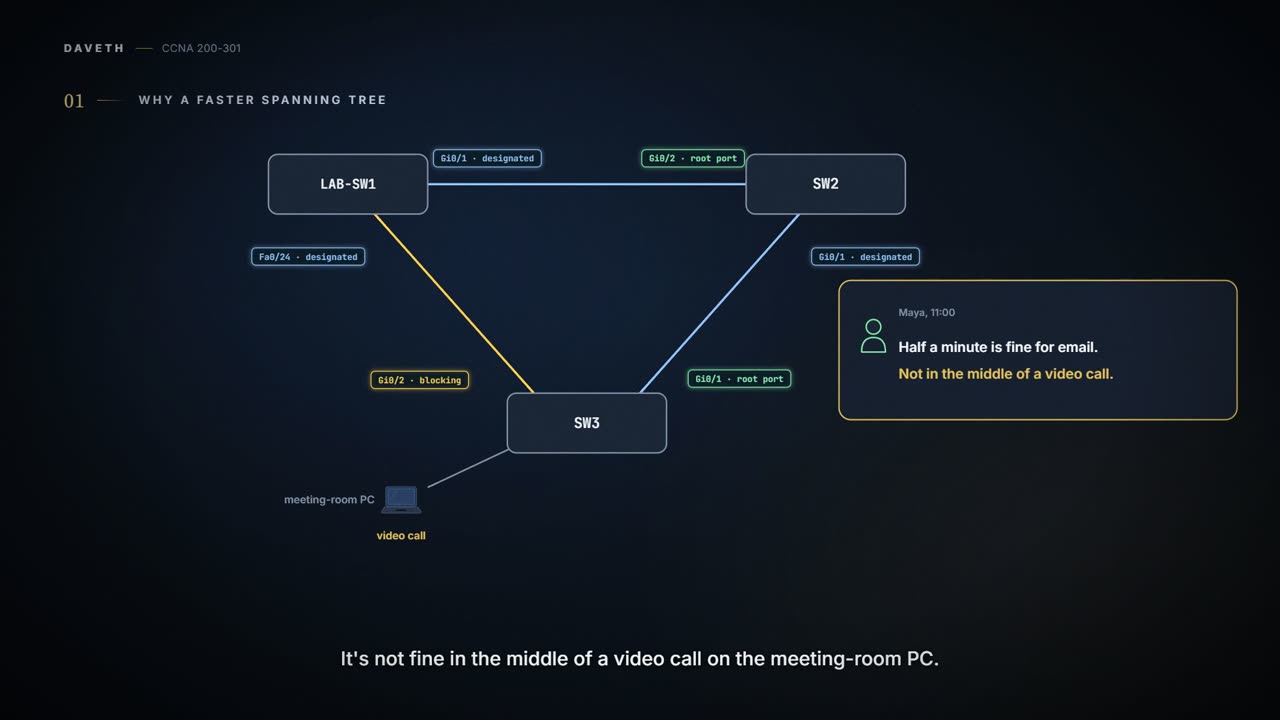
Why a faster spanning tree
Monday, 11 a.m., after 03.3.3's half minute. "Half a minute is fine for email," Maya says. "It's not fine in the middle of a video call on the meeting-room PC." The fix doesn't change the cables or the elections. It changes how quickly a spare port is allowed to take over.
The newer version of spanning tree is Rapid STP, RSTP. It works like STP in most ways:
- It elects the root switch with the same rules and tiebreakers.
- It picks each switch's root port with the same rules.
- It picks the designated port on each link with the same rules and tiebreakers.
- It puts each port in forwarding or blocking, though RSTP calls blocking discarding.
It works so much like STP that both can run in the same network: RSTP features on the switches that support them, STP on the rest. So why bother? Convergence. STP can take 50 seconds with its default timers when every wait applies, as 03.3.3 showed. RSTP usually converges within a few seconds, or about 10 in slow conditions.
It gets there by not waiting on timers where it can avoid it. It can replace a root port without any wait to reach forwarding, in some conditions, and do the same for a designated port. Where it still has to wait, the waits are shorter: its MaxAge is 3 times the Hello timer, not 10. And rather than wait, a switch can send its neighbour a message asking whether something has gone wrong. With RSTP each switch also creates its own Hellos, rather than only passing on the root's.
STP waits to see whether its neighbour is still there. RSTP just asks.
RSTP port roles
RSTP keeps the root port and the designated port, adds the alternate and backup roles for spares, and lists disabled ports too:
| Role | What it does |
|---|---|
| Root port | The port that begins a nonroot switch's best path to the root |
| Alternate port | Replaces the root port when the root port fails |
| Designated port | The switch port designated to forward onto a link |
| Backup port | Replaces a designated port when that designated port fails |
| Disabled port | A port that is administratively disabled |
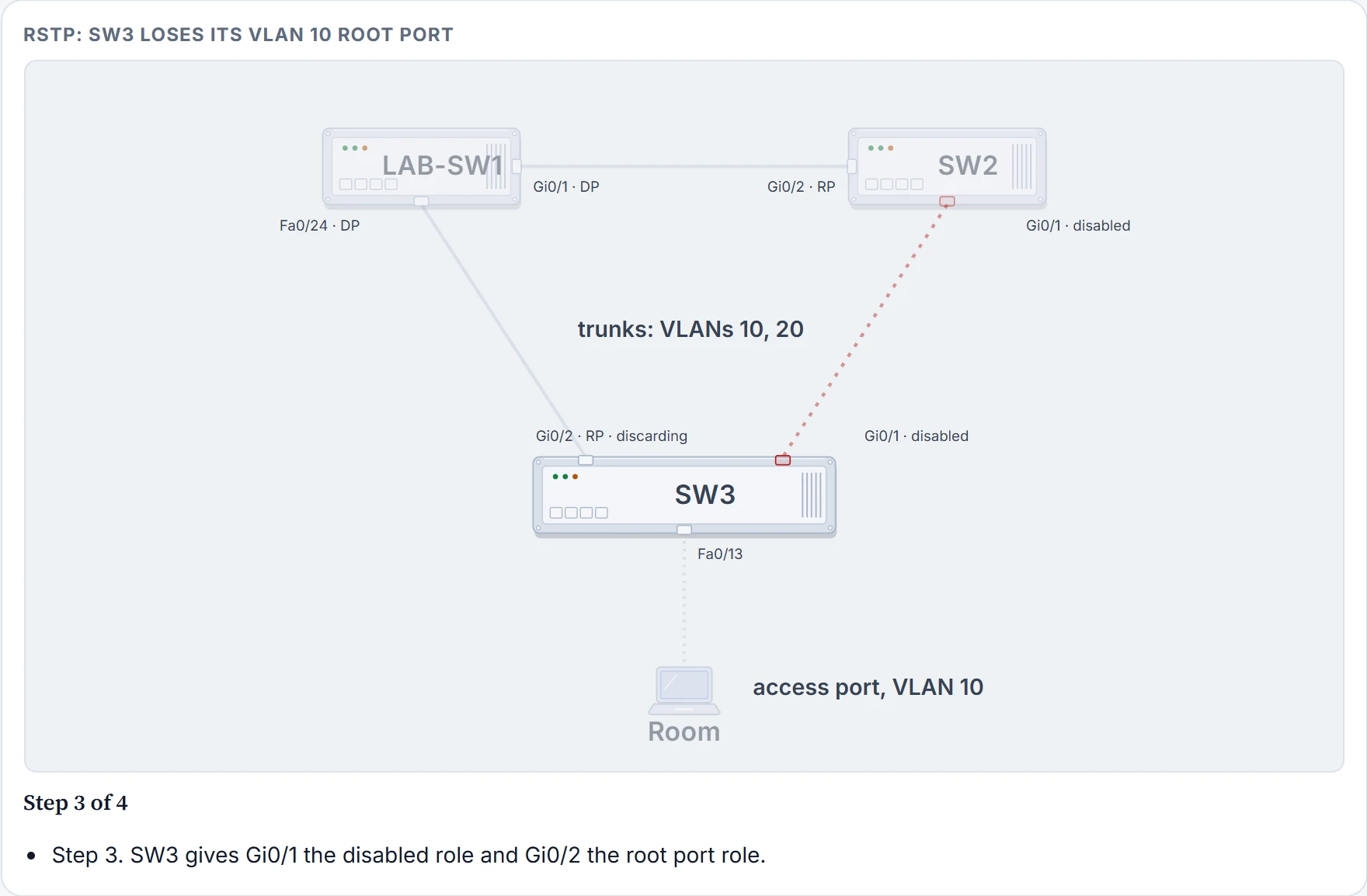
An alternate port is another way to the same root. To be one, a port must receive Hellos naming the same root switch as the root port does, and be neither the root port nor designated. It's the second-best choice for the root port, kept ready. In the office, SW3's Gi0/2, Sam's cable, hears Hellos naming LAB-SW1 as root, just as its root port Gi0/1 does, so in VLAN 10 Gi0/2 is SW3's alternate port. (Disabled covers a port that's been shut down, and also, as you'll see below, one whose cable has failed.)
It works kind of like a spare key already cut and hanging by the front of the house: nobody uses it, but nobody has to go and find a locksmith either. (Where it stops: anyone can pick up a spare key. An alternate port only takes over when the root port fails or its Hellos stop, and only for that switch.)
The alternate port in action
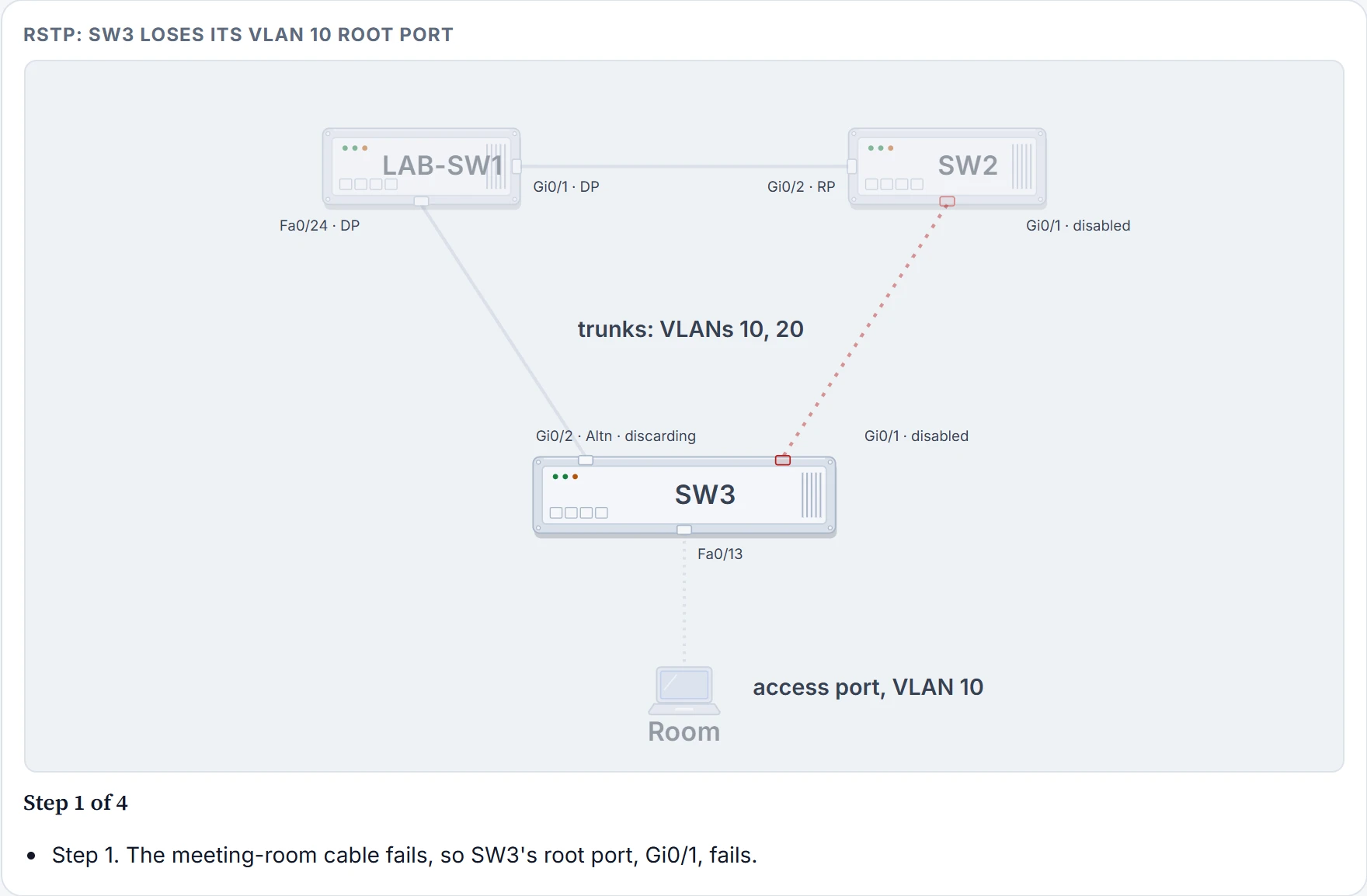
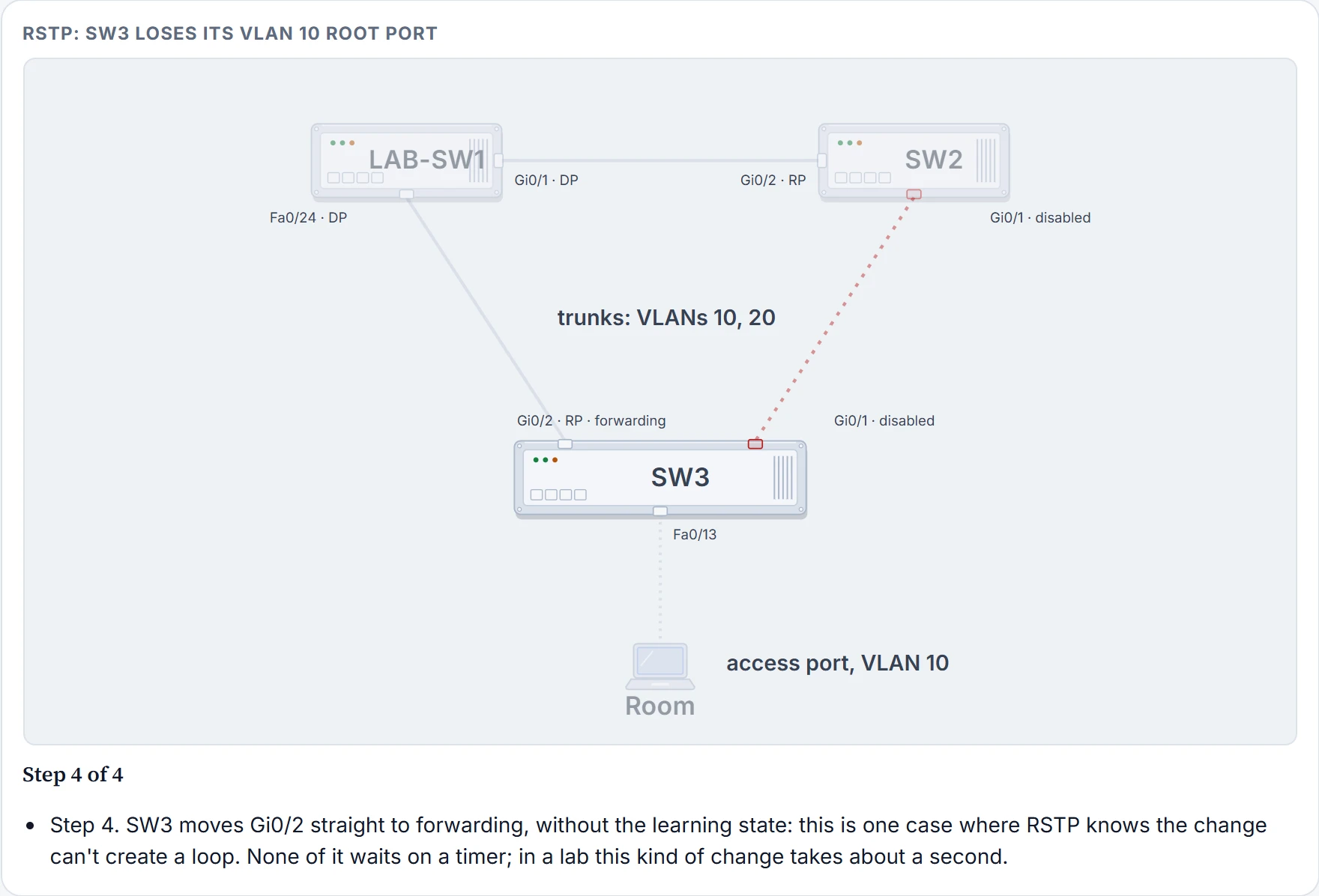
Here is the office. All three switch-to-switch cables are trunks carrying VLANs 10 and 20, and the meeting-room PC is on SW3's Fa0/13, an access port in VLAN 10. On Tuesday lunchtime, with every switch now running the rapid version (the configuration is further down this page), Maya pulls the meeting-room cable, SW2's Gi0/1 to SW3's Gi0/1, herself. Here is what SW3 does:
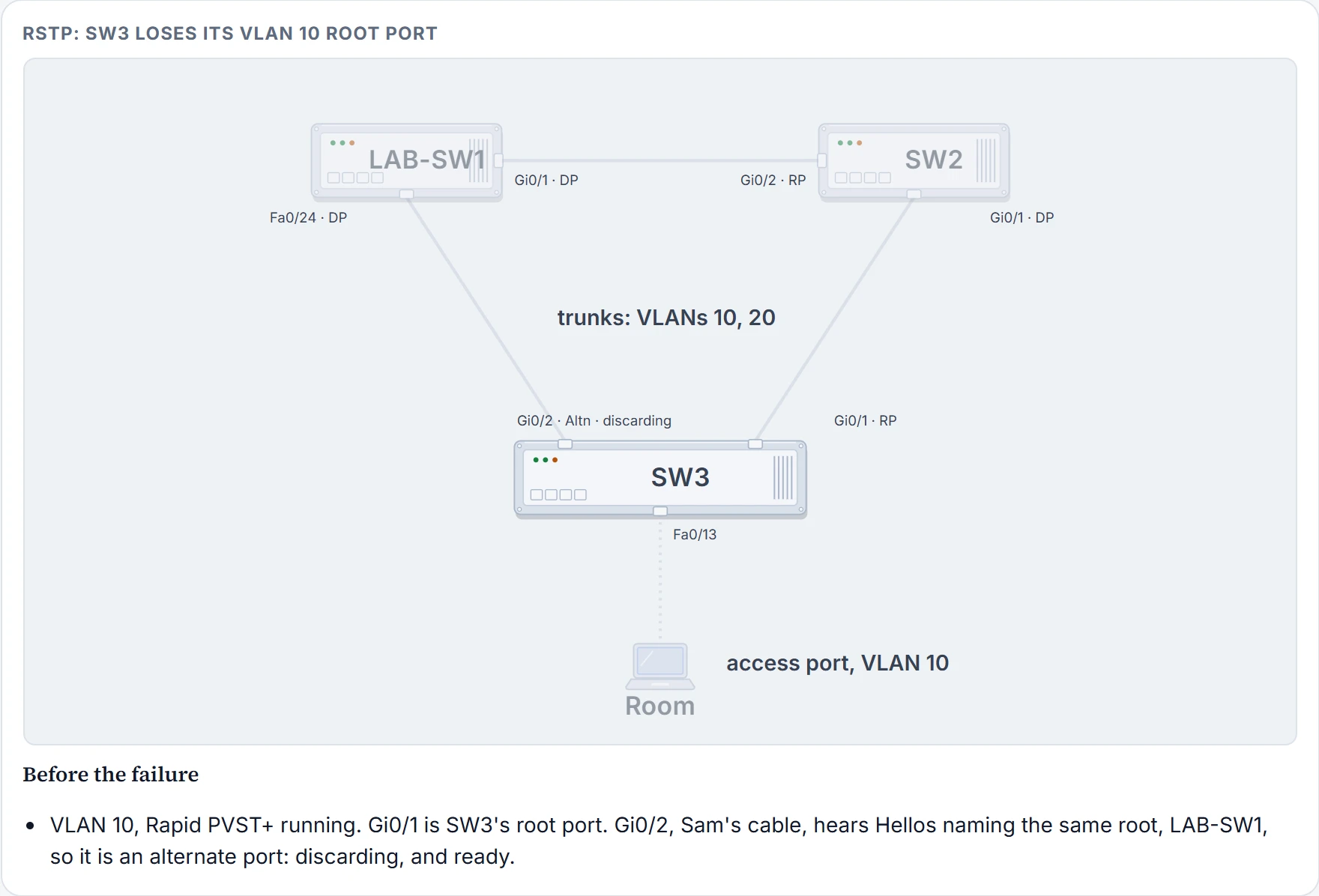
Step 1 of 5
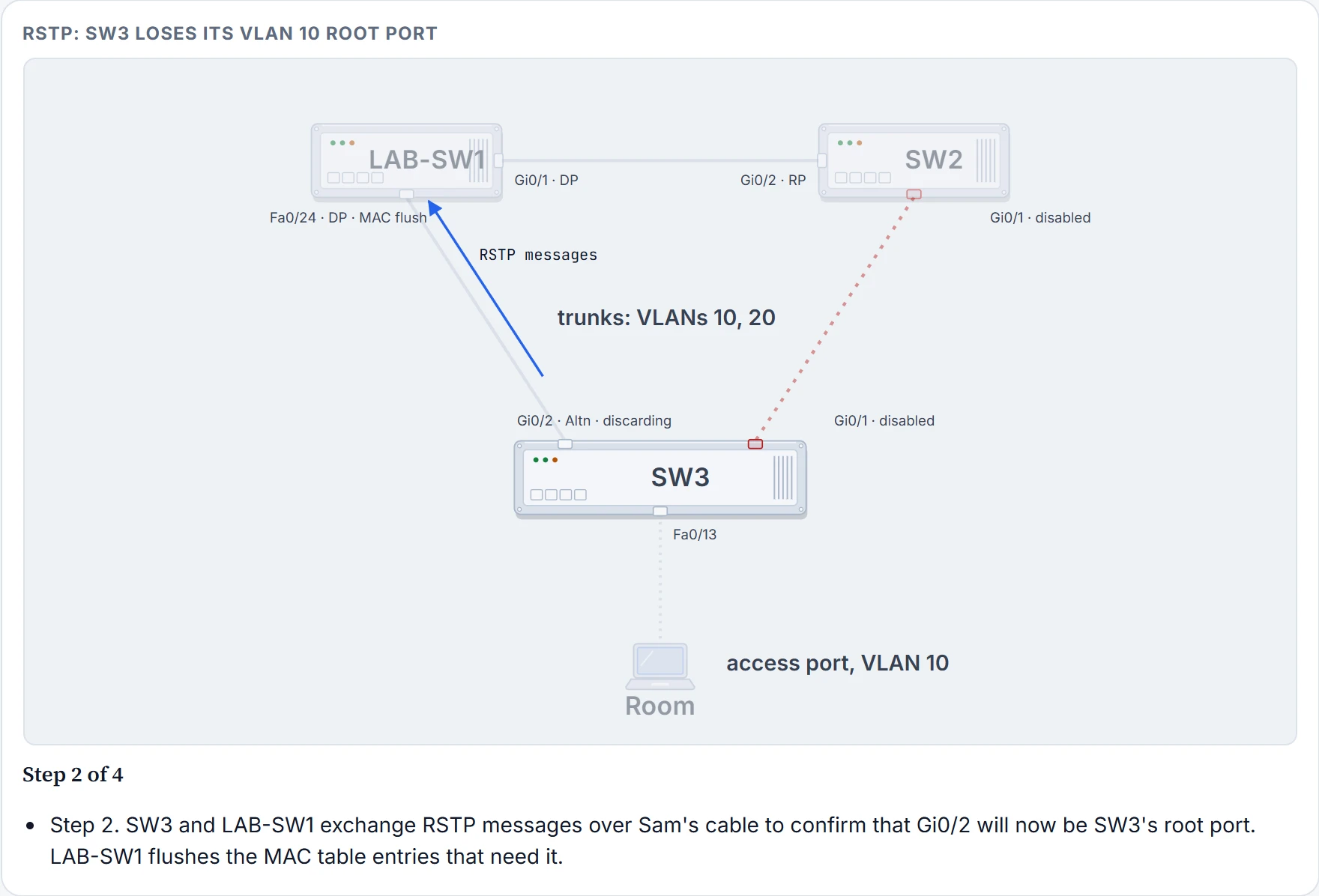
Step 2 of 5
Step 3 of 5
Step 4 of 5
Step 5 of 5
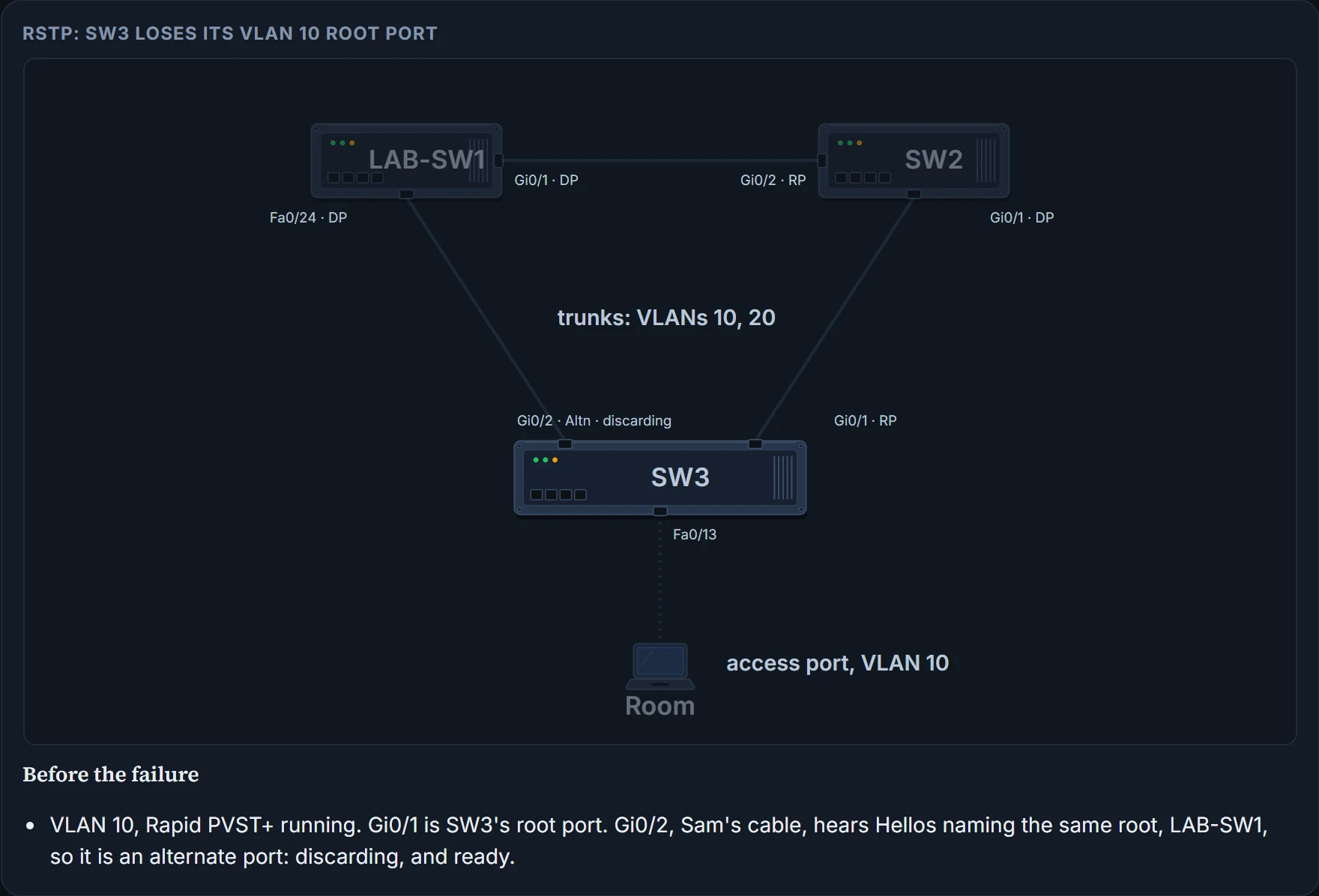
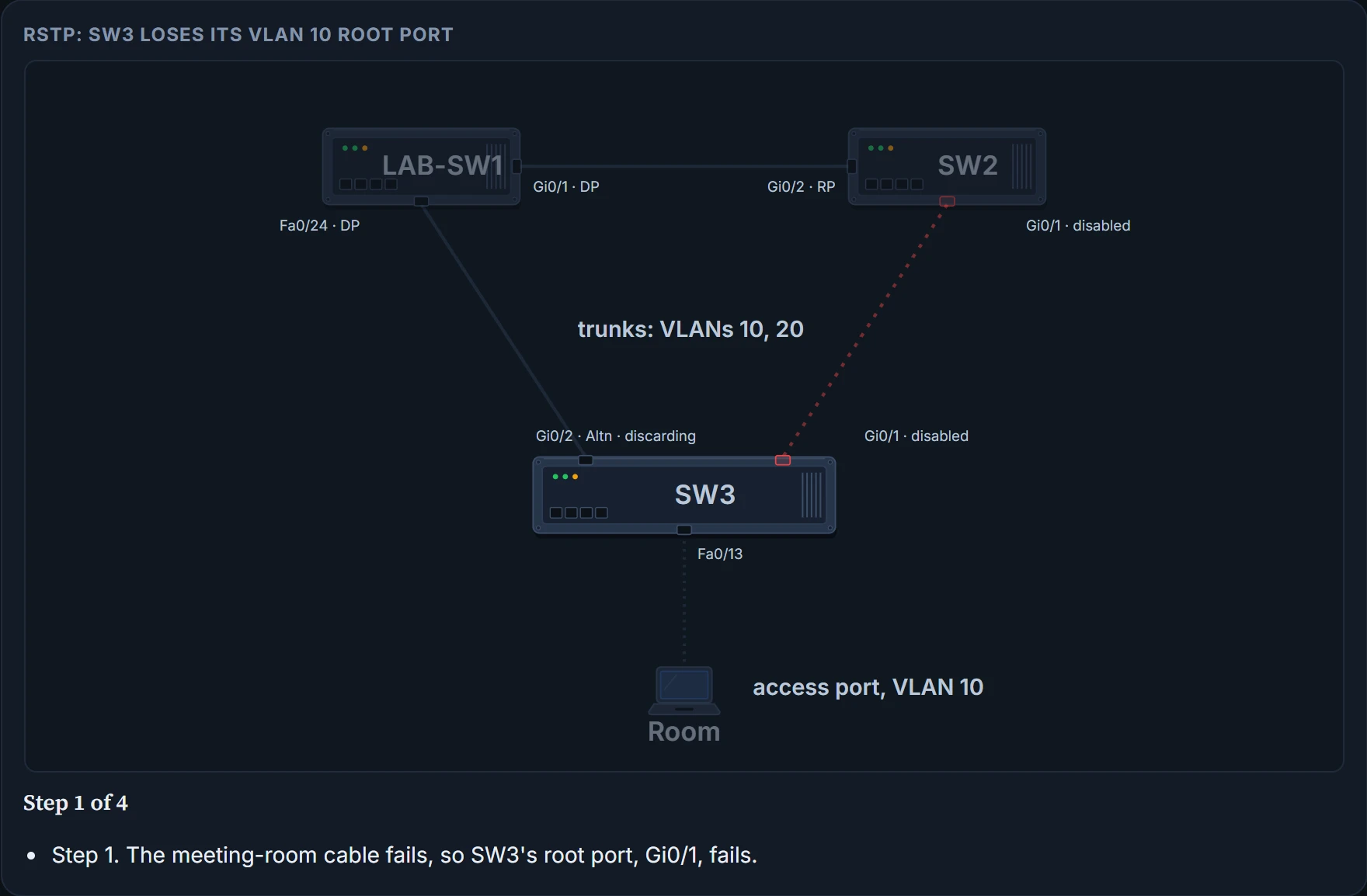
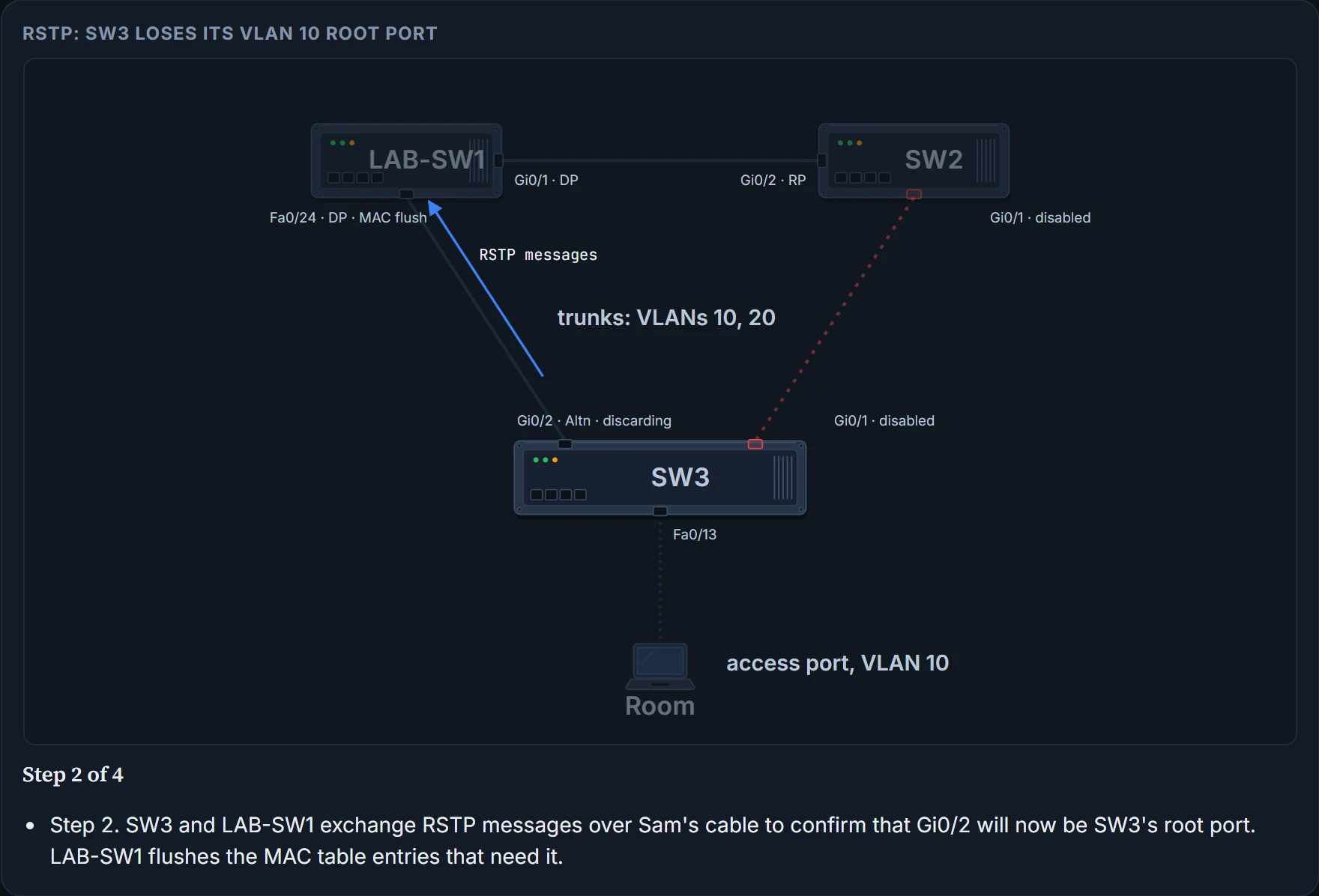
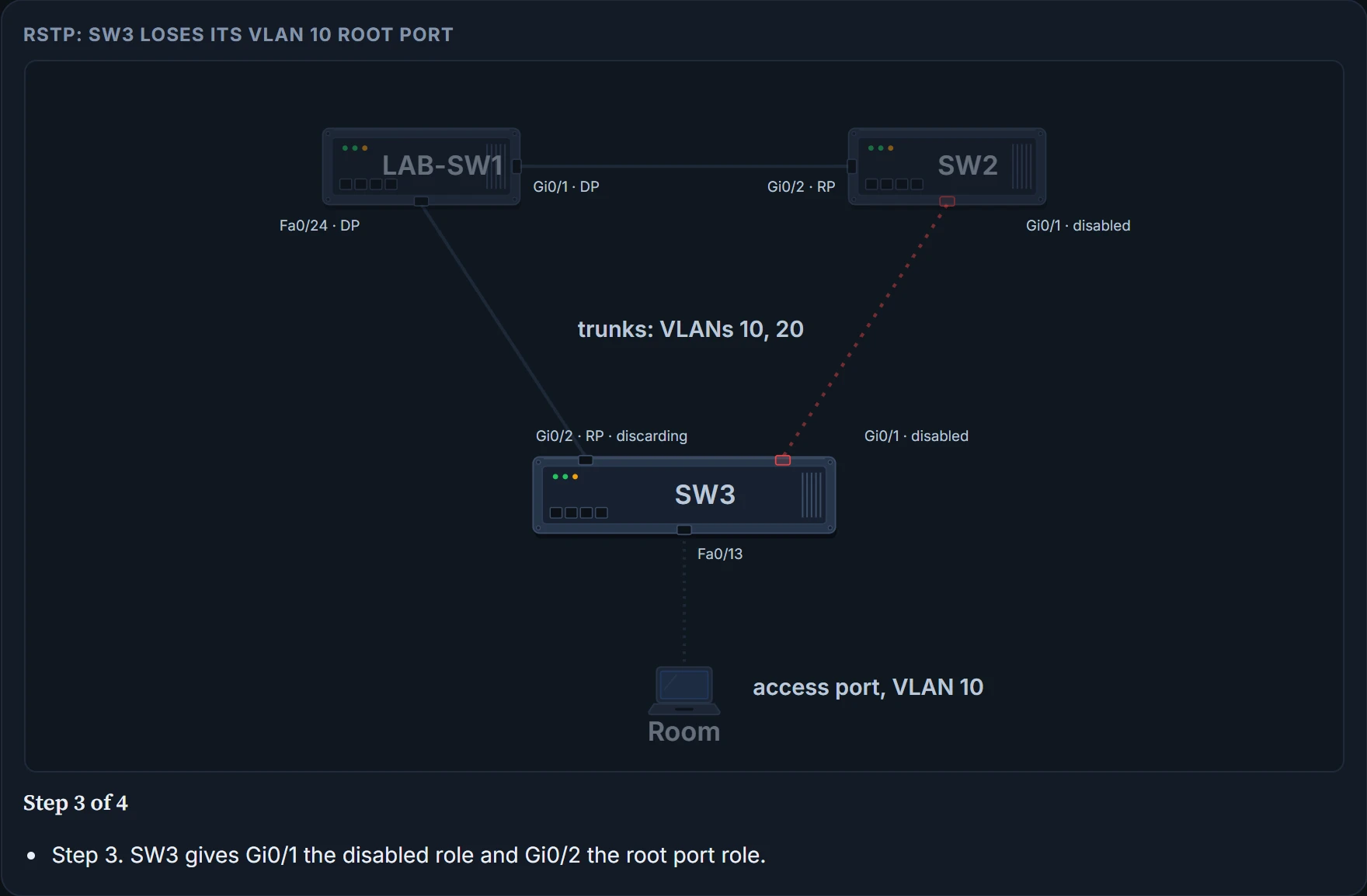
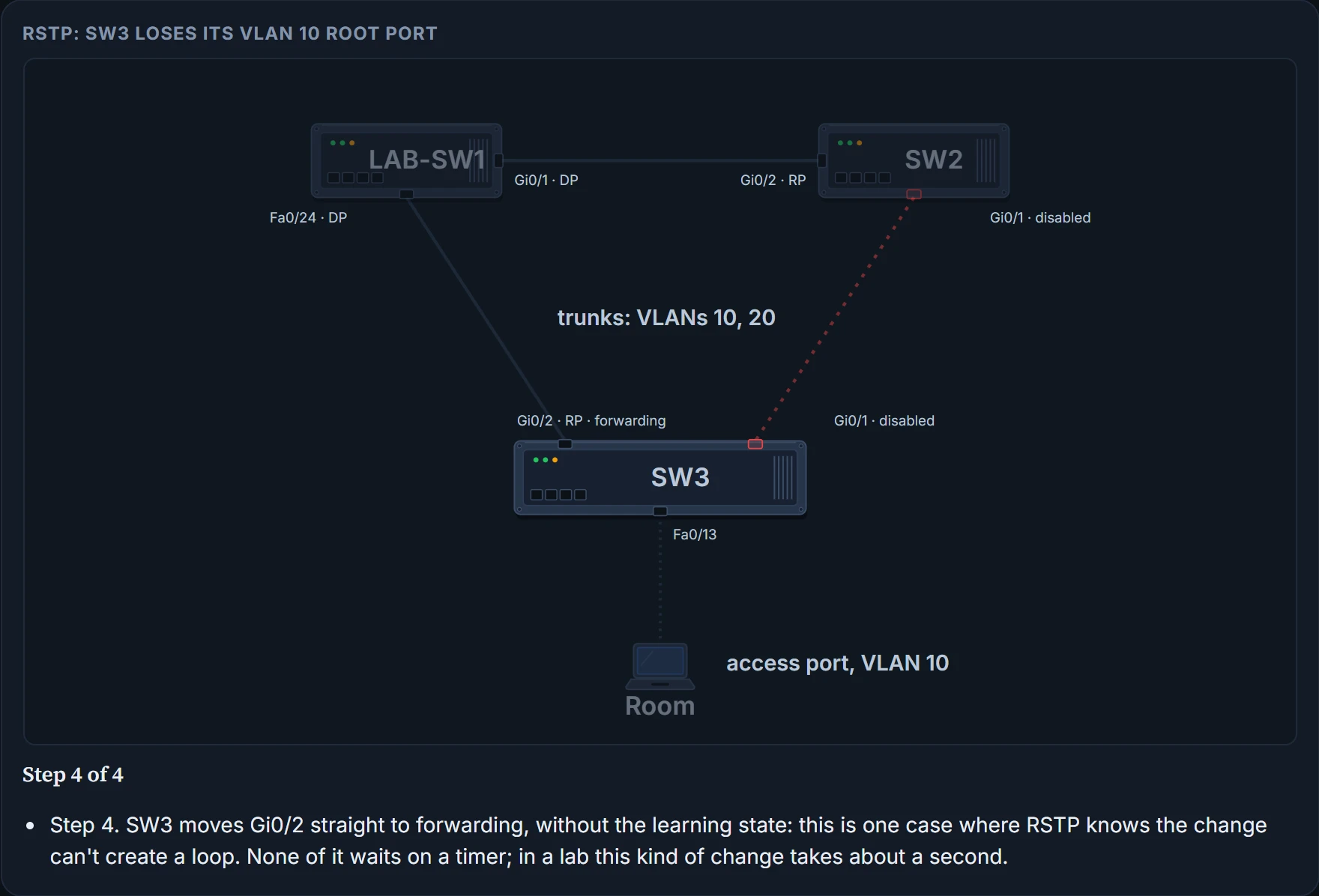
When the root port fails, or Hellos stop arriving on it, the switch changes the old root port's role to disabled and its state from forwarding to discarding. Then, without waiting on any timer, it makes the alternate port the root port and puts it straight into forwarding. It doesn't spend time in learning. In a lab, a change like this takes about a second: the meeting-room PC barely notices, where on Monday it lost half a minute.
The spare port already knew whose side it was on. It just needed a nod from LAB-SW1.
RSTP states and processes
RSTP keeps the learning and forwarding states, for the same purposes as STP. It doesn't define a listening state at all. And it uses one state, discarding, for what STP called two: disabled, where the interface is administratively down, and blocking, where it works but STP chooses not to forward to avoid loops.
| What the port does | STP state | RSTP state |
|---|---|---|
| Administratively disabled | Disabled | Discarding |
| Stable; ignores incoming data frames and doesn't forward them | Blocking | Discarding |
| Passing through; no MAC learning, no forwarding | Listening | Not used |
| Passing through; MAC learning, no forwarding | Learning | Learning |
| Stable; MAC learning and forwarding | Forwarding | Forwarding |
Why could STP never skip ahead? When the tree changes, old MAC table entries can cause a loop. STP's switches tell each other the topology has changed and to time those entries out using the forward delay, which is why a port has to sit in listening and then learning, 15 seconds each. RSTP's switches tell each other the topology has changed, and the same messages tell their neighbours to flush the entries that could cause a loop, straight away. That's the flush in step 2 above. So RSTP has more cases where a discarding port can go straight to forwarding, without waiting and without learning.
Just like when you clear out the risky things in the fridge rather than waiting for them to go off, the flush gets rid of the dangerous entries now. (Where it stops: a fridge clear-out is a guess. The switches remove every entry that could cause a loop.)
The backup port
The backup port does for a designated port what the alternate does for a root port. It only arises when one switch has two ports on the same link, which takes a hub: say a switch connects two ports to one hub. One of those ports wins the designated port election; the other becomes its backup. If the designated port fails, the backup takes over as designated, with no delay moving from discarding to forwarding.
Hubs are rare today, so you're unlikely to meet a backup port outside an exam. The office has none: every link is one cable between two devices.
RSTP port types
RSTP also names ports by what's on the other end of the cable:
- Point-to-point: the link connects exactly two devices. Between two switches, like all three of the office's trunks, the ports are simply point-to-point ports.
- Point-to-point edge, or just edge: the other end is a single end device, like a PC or server, at the edge of the network. SW3's Fa0/13, with only the meeting-room PC on it, is that kind of port by definition. The switch only treats it as an edge port once it's configured as one, which is the next topic.
- Shared: connected to a hub. Hubs make the switch port use half duplex, so RSTP treats every half-duplex port as shared. It converges more slowly on shared ports than on point-to-point ones.
An access VLAN tells you about the traffic. It doesn't tell you who is plugged into the far end.
One tree per VLAN
The first STP standard, 802.1D in 1990, came before VLANs and made one spanning tree for the whole LAN, a common spanning tree. Once LANs had VLANs, one tree meant every VLAN blocked the same port. With a separate tree per VLAN, each VLAN can block a different port, so traffic is balanced over more of the links.
Three ways to get more than one tree came out of that history. PVST+ and Rapid PVST+ are one vendor's own protocols; MSTP is the standards body's answer. These switches offer the three through the spanning-tree mode command; they don't offer STP or RSTP with a single common tree at all:
| Name | Based on | Trees | Original standard | spanning-tree mode |
|---|---|---|---|---|
| STP | STP | 1 (common spanning tree) | 802.1D | not available |
| PVST+ | STP | 1 per VLAN | 802.1D | pvst |
| RSTP | RSTP | 1 (common spanning tree) | 802.1w | not available |
| Rapid PVST+ | RSTP | 1 per VLAN | 802.1w | rapid-pvst |
| MSTP | RSTP | 1 or more, as the designer chooses | 802.1s | mst |
Rapid PVST+ is RSTP run once for each VLAN, and it's what the office will use. It works a little differently from standard RSTP:
| Standard RSTP | Rapid PVST+ | |
|---|---|---|
| Trees | One, the common spanning tree | One per VLAN |
| Messages (BPDUs) | One set, however many VLANs | One set per VLAN |
| Destination MAC | 0180.C200.0000 | 0100.0CCC.CCCD |
| On a trunk | In the native VLAN, untagged | Each VLAN's messages inside that VLAN, tagged |
| VLAN ID in the message | No | Yes, in an extra field |
| System ID extension | All zeros: no VLAN | The VLAN ID |
Continue the lesson
The whole lesson, with its drawings and its questions. 3 more sections after the ones above.