
EtherChannel, LACP, Layer 2 and Layer 3
An EtherChannel makes several parallel links between two switches one logical link: the switch learns, forwards and runs its loop prevention on the group as one, and shares traffic across every link. Build it statically with mode on, or let the switches negotiate with LACP, the IEEE standard, or PAgP, one vendor's own. At least one side has to start the negotiation.
By Arif, founder of Daveth · Updated
The full 12 min walkthrough is in Daveth Pro (Network). See what the plan opens
What this page answers
What is EtherChannel?
Two switches treating several parallel links between them as one logical link. Up to eight links of the same speed can be active in one channel, and the switch shares traffic across them. Read it in “One link made of two cables”
What is the difference between LACP and PAgP?
LACP is the IEEE standard, 802.3ad; PAgP is one vendor's own. They do the same job, but LACP allows up to 16 links in a channel, 8 active at a time, where PAgP allows 8. Read it in “Letting the switches negotiate”
Which LACP modes form a channel?
Active starts the negotiation and passive waits, so a channel forms with active at one or both ends. Two passive ports wait for good, and mode on uses no protocol at all, so it only bundles with on. Read it in “Letting the switches negotiate”
Thursday, 9 a.m.
Sam hasn't let go of yesterday's question: everything the visitors do goes over one hallway cable. "What if we add a second one, to be safe?"
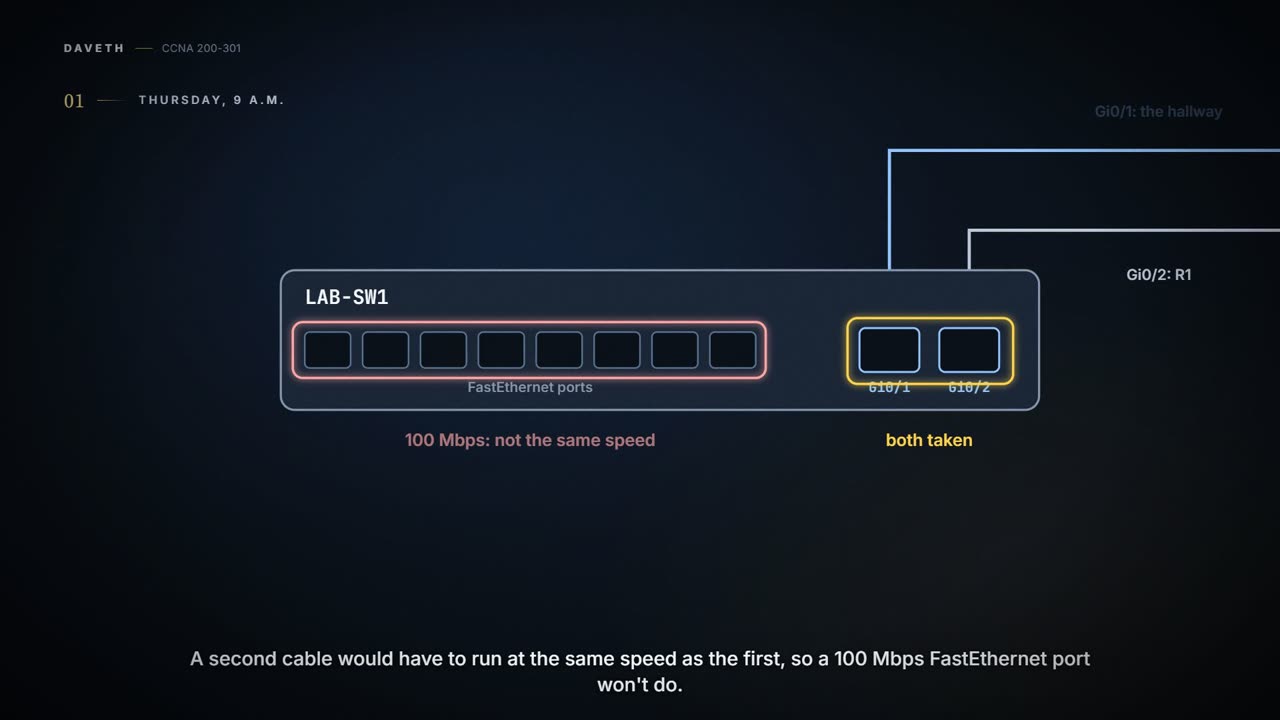
Maya checks LAB-SW1 before she answers. Its two gigabit ports are both taken: Gi0/1 is the hallway, Gi0/2 is R1. A second cable would have to run at the same speed as the first, so a 100 Mbps FastEthernet port won't do.
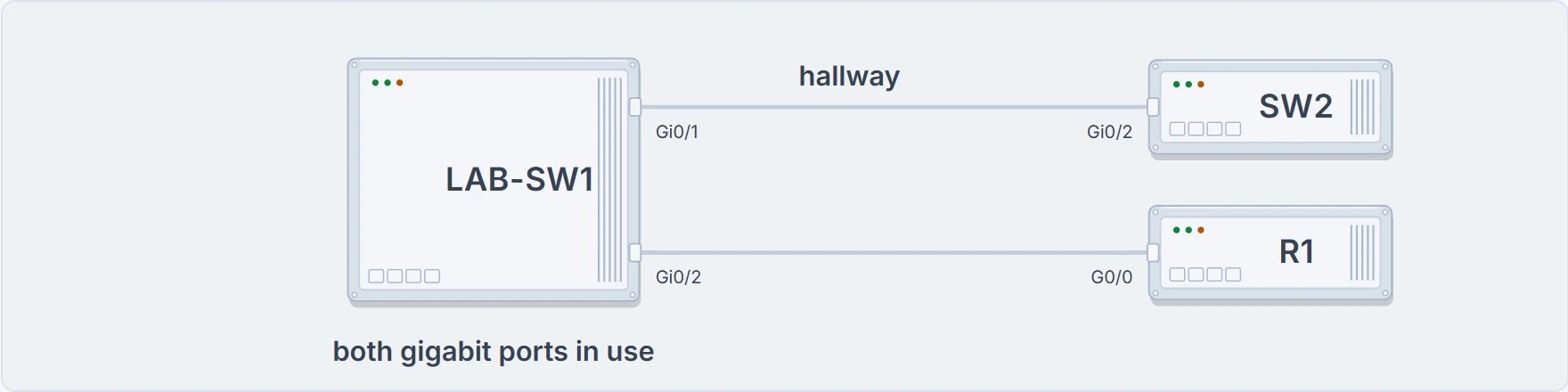
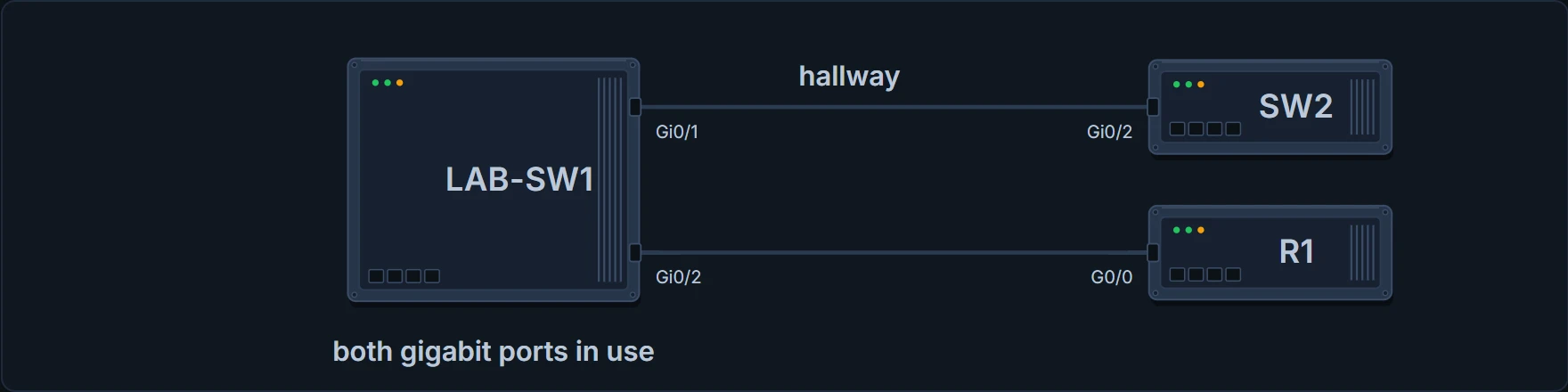
LAB-SW1 this morning: both gigabit ports are taken.
The office keeps one hallway cable for now, and a switch with more gigabit ports goes on the wish list.
But the idea is right, and Maya can try it tonight: her home lab has two free gigabit ports.
One link made of two cables
Two switches can treat several parallel links between them as one logical link, called an EtherChannel. Without it, a switch treats each physical port as independent: it learns MAC addresses, forwards frames and runs its loop prevention per port. With it, the switch does all of that to the group of ports as one thing, and uses every link in the group, sharing the traffic across them.
Up to eight links can be bundled this way, all the same speed, between the same two switches. If one fails and at least one other is still up, the channel carries on. Without EtherChannel, the switches' loop-prevention protocol, the next topic, would block all but one of the parallel links. With it, that protocol sees one interface, the Port-channel, and not the ports inside it.
The EtherChannel acts kind of like a road with several lanes and one name on the map. (Where it stops: a driver picks a lane. The switch picks the cable for each frame, from the frame's own header fields, as a later section shows.)
At 8 p.m., Maya runs a second cable in her home lab, H1's Gi0/2 to H2's Gi0/1, beside the first one from 03.1.6, H1's Gi0/1 to H2's Gi0/2. On each switch, both ports will belong to one logical interface, Po1.
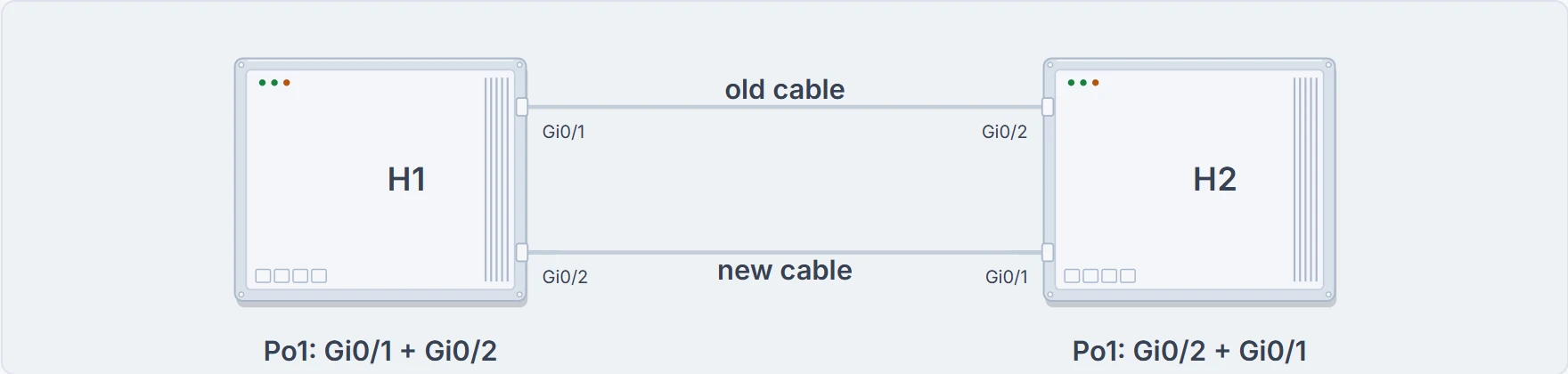
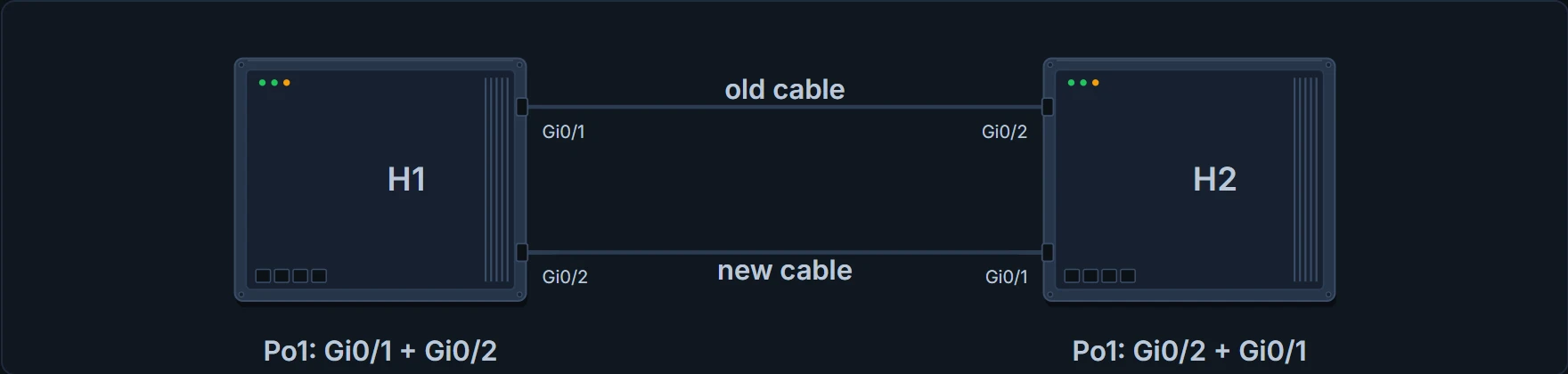
Maya's home lab on Thursday evening: the old cable and the new one, bundled as Po1 on each switch.
The switch uses three names for the same thing, which trips everybody up. The configuration command is channel-group. The show command is show etherchannel. And its output calls the result a Port-channel, Po for short. The number in channel-group 1 is the Port-channel's number: it creates Po1.
One idea, three names. At least the switch is consistent about being inconsistent.
On: no protocol at all
Every port in a channel has to look like the others, so Maya first gives the new cable's port the same trunk settings as the old cable's, switchport mode trunk and switchport nonegotiate, on H1 and on H2:
H1# configure terminal
Enter configuration commands, one per line. End with CNTL/Z.
H1(config)# interface GigabitEthernet0/2
H1(config-if)# switchport mode trunk
H1(config-if)# switchport nonegotiate
H1(config-if)# end
H1#
H2's Gi0/1 gets the same two lines.
The simplest way to build the channel is manual. Two steps:
- Add
channel-group number mode onunder each physical interface that should be in the channel, on each switch. - Use the same number for all of them on one switch. The neighbour's number can differ.
Maya types it on H2 first, then on H1, and asks for the summary:
H1# configure terminal
Enter configuration commands, one per line. End with CNTL/Z.
H1(config)# interface GigabitEthernet0/1
H1(config-if)# channel-group 1 mode on
H1(config-if)# interface GigabitEthernet0/2
H1(config-if)# channel-group 1 mode on
H1(config-if)# end
H1# show etherchannel 1 summary
Flags:  D - down        P - bundled in port-channel
        I - stand-alone s - suspended
        H - Hot-standby (LACP only)
        R - Layer3      S - Layer2
        U - in use      N - not in use, no aggregation
        f - failed to allocate aggregator
        M - not in use, minimum links not met
        m - not in use, port not aggregated due to minimum links not met
        u - unsuitable for bundling
        w - waiting to be aggregated
        d - default port
        A - formed by Auto LAG

Number of channel-groups in use: 1
Number of aggregators: 1

Group  Port-channel  Protocol    Ports
------+-------------+-----------+-----------------------------------------------
1      Po1(SU)          -        Gi0/1(P) Gi0/2(P)
H1#
Read the last line. The Port-channel is Po1, and its flags are S, Layer 2, and U, in use. Each port has a P: bundled in the port-channel, meaning it passed all the configuration checks and is valid in the channel. The Protocol column says -: with on, no protocol is running.
- this switch's channel: its Port-channel, whether it is in use, and which of its ports are bundled
- what the other switch shows: run it there too
- how the traffic is shared across the links
Letting the switches negotiate
Instead of on, a switch can use a protocol to negotiate with its neighbour: messages go back and forth, and only a link that passes every check is added to the channel. A link that fails is put in a down state and left unused until the settings are fixed.
Two protocols do this. PAgP, the Port Aggregation Protocol, is one vendor's own. LACP, the Link Aggregation Control Protocol, is the IEEE standard, 802.3ad. At this depth they do the same job. One difference: LACP allows up to 16 links in a channel, with only 8 active at a time and the rest waiting in case one fails; PAgP allows 8.
Each protocol has two keywords for channel-group ... mode: one that starts the negotiation, and one that waits for the other side to start.
- PAgP:
desirablestarts,autowaits. - LACP:
activestarts,passivewaits.
So at least one side has to start: desirable for PAgP, active for LACP. And on uses neither protocol, so it only works against on.
Here are all 25 pairs:
| H1 \ H2 | on | active | passive | desirable | auto |
|---|---|---|---|---|---|
on | channel, no protocol | no: on uses no protocol | no: on uses no protocol | no: on uses no protocol | no: on uses no protocol |
active | no: on uses no protocol | channel, LACP | channel, LACP | no: different protocols | no: different protocols |
passive | no: on uses no protocol | channel, LACP | no: neither side starts | no: different protocols | no: different protocols |
desirable | no: on uses no protocol | no: different protocols | no: different protocols | channel, PAgP | channel, PAgP |
auto | no: on uses no protocol | no: different protocols | no: different protocols | channel, PAgP | no: neither side starts |
If you've ever been at a party where two people each waited for the other to start talking, you know what passive against passive does. (Where it stops: at a party, somebody gets bored and speaks. Two passive ports wait for good.)
Two polite switches, each waiting to be asked. The channel never forms.
Maya wipes the channel off both switches, back to the start of the evening, trunks the new ports again, and tries LACP: passive on H2, active on H1.
H1# configure terminal
Enter configuration commands, one per line. End with CNTL/Z.
H1(config)# interface GigabitEthernet0/1
H1(config-if)# channel-group 1 mode active
H1(config-if)# interface GigabitEthernet0/2
H1(config-if)# channel-group 1 mode active
H1(config-if)# end
H1# show etherchannel 1 summary
Flags:  D - down        P - bundled in port-channel
        I - stand-alone s - suspended
        H - Hot-standby (LACP only)
        R - Layer3      S - Layer2
        U - in use      N - not in use, no aggregation
        f - failed to allocate aggregator
        M - not in use, minimum links not met
        m - not in use, port not aggregated due to minimum links not met
        u - unsuitable for bundling
        w - waiting to be aggregated
        d - default port
        A - formed by Auto LAG

Number of channel-groups in use: 1
Number of aggregators: 1

Group  Port-channel  Protocol    Ports
------+-------------+-----------+-----------------------------------------------
1      Po1(SU)          LACP     Gi0/1(P) Gi0/2(P)
H1#
Same result, Po1 in use with both ports bundled, and this time the Protocol column names LACP.
What does a wrong pair look like? One more reset, and Maya mixes the protocols on purpose: active on H2, desirable on H1.
H1# configure terminal
Enter configuration commands, one per line. End with CNTL/Z.
H1(config)# interface GigabitEthernet0/1
H1(config-if)# channel-group 1 mode desirable
H1(config-if)# interface GigabitEthernet0/2
H1(config-if)# channel-group 1 mode desirable
H1(config-if)# end
H1# show etherchannel 1 summary
Flags:  D - down        P - bundled in port-channel
        I - stand-alone s - suspended
        H - Hot-standby (LACP only)
        R - Layer3      S - Layer2
        U - in use      N - not in use, no aggregation
        f - failed to allocate aggregator
        M - not in use, minimum links not met
        m - not in use, port not aggregated due to minimum links not met
        u - unsuitable for bundling
        w - waiting to be aggregated
        d - default port
        A - formed by Auto LAG

Number of channel-groups in use: 1
Number of aggregators: 1

Group  Port-channel  Protocol    Ports
------+-------------+-----------+-----------------------------------------------
1      Po1(SD)          PAgP     Gi0/1(I) Gi0/2(I)
H1#
Now Po1 says SD: a Layer 2 channel that's down. Each port says I, stand-alone: it's working on its own, independently of the Port-channel, as if Po1 didn't exist. That's the telling part. The switch accepts the configuration, the ports stay connected, and nothing is bundled: show interfaces status would list both ports as connected while Po1 is notconnect. (For one channel's full detail, including its protocol, there's also show etherchannel 1 port-channel.)
There are far more wrong pairs than right ones, so learn the right ones and compare against them:
- On one switch, every port in the channel uses the same
channel-groupnumber; the neighbour's number can differ. onat one end needsonat the other.desirableat one end (PAgP) needsdesirableorautoat the other.activeat one end (LACP) needsactiveorpassiveat the other.
Continue the lesson
The whole lesson, with its drawings and its questions. 4 more sections after the ones above.