
Fundamentals of Wireless Networks
Wireless devices share one radio channel, so they take turns. 802.11 makes each service area a closed group around an access point, a basic service set: the AP advertises an SSID, the network's name, and clients associate with it. Its wired side is the distribution system. Several APs together form an extended service set, so clients can roam.
By Arif, founder of Daveth · Updated
The full 18 min walkthrough is in Daveth Pro (Network). See what the plan opens
What this page answers
What is a BSS, an ESS and an IBSS?
A BSS is one AP and its clients on one channel. An ESS is several APs connected through the switched network, offering the same SSIDs so clients can roam. An IBSS is an ad hoc network of clients talking directly, with no AP. Read it in “The basic service set”
What is a wireless LAN?
A LAN whose devices use radio signals instead of cable. An AP in infrastructure mode forms a basic service set on one channel and bridges it to the wired network, mapping a VLAN to an SSID. Read it in “The distribution system”
What are the 2.4 GHz and 5 GHz Wi-Fi channels?
The 5 GHz band's channels do not overlap. In the 2.4 GHz band only channels 1, 6 and 11 stay clear of each other, so neighbouring APs use only those three. Read it in the lesson
Comparing wired and wireless networks
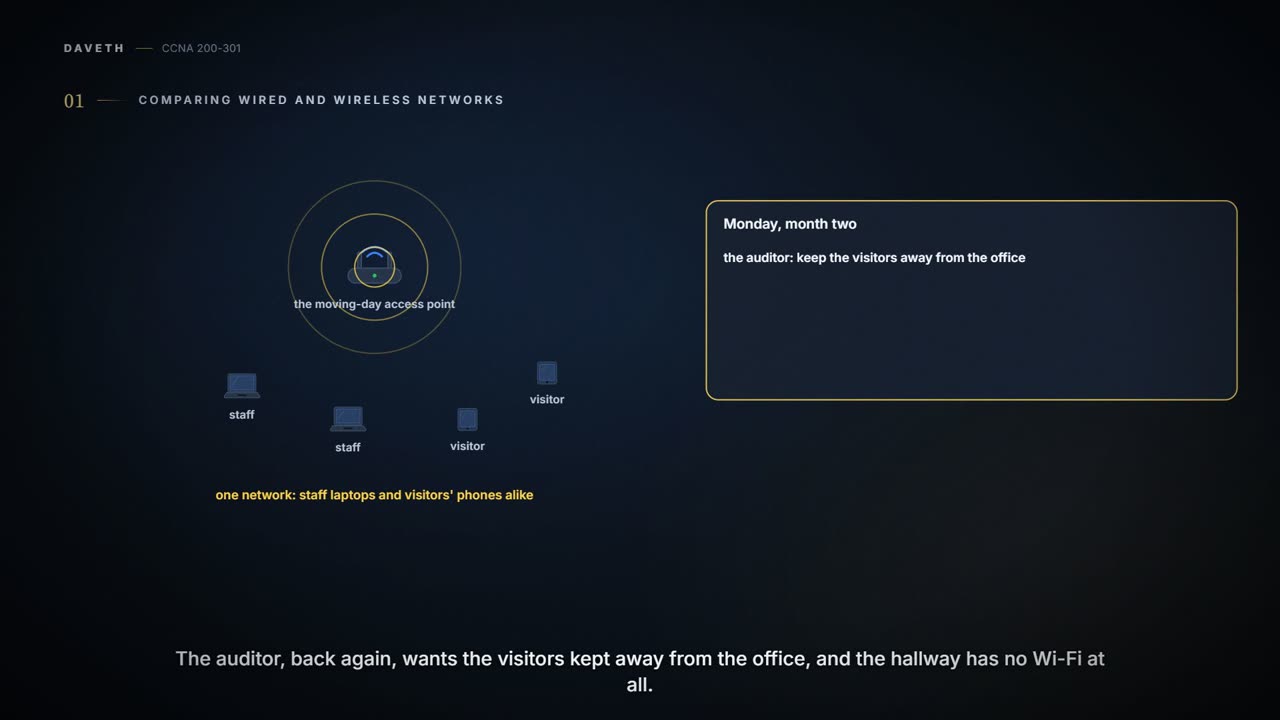
Monday, month two. The access point that went on the meeting-room ceiling on moving day, back in 02.1, puts everyone on one network: staff laptops and visitors' phones alike. The auditor, back again, wants the visitors kept away from the office, and the hallway has no Wi-Fi at all. Maya and Sam are replacing it with two new APs. Before any box goes on the wall, it's worth seeing what changes when the cable goes.
On a wired network, the wire, strands of metal or of fibre-optic material running unbroken from one end to the other, carries the data along whatever path the cable takes. If the cable goes round a corner, so does the signal. The IEEE 802.3 Ethernet standards pin down how devices connect, send and receive over that cable, and set strict guidelines for the cable itself: the type and size of the strands, how many twists they make over a distance, the maximum length. So a wire is a bounded medium with few variables. Only the two devices on its ends can send, and they can both send at once, because each has a private, direct path to the other.
The catch is that a wired device can't move far, and it needs a connector that fits. A wireless network removes the tether: people move around and stay connected, often with several devices each.
Wireless data crosses free space, with nothing to constrain or protect it, and many things can affect it on the way. To keep the variables down, two things have to hold. Every device follows a common standard, IEEE 802.11. And there has to be wireless coverage wherever people expect to use it.
The basic service set
802.11's answer is to make each wireless service area a closed group that forms around one fixed device. Before a device can take part, it advertises its capabilities and has to be granted permission to join. The standard calls the group a basic service set (BSS), and at its heart is a wireless access point (AP).
The AP runs in infrastructure mode: it offers the services that form the infrastructure of the wireless network. It sets up its BSS on a single channel, and the AP and every member of the BSS use that same channel. The BSS reaches only as far as the AP's signal is usable: that area is the basic service area (BSA), or cell. It's often drawn as a circle around the AP, but its real shape depends on the AP's antenna and on whatever around it affects the signal.
The AP is the single point of contact for every device that wants to use the BSS, and it advertises the BSS so devices can find it. It uses two names:
- BSSID, the BSS identifier: unique to the BSS, and based on the AP's own radio MAC address. Wireless devices need unique MAC addresses to send frames over the air, just as wired ones do.
- SSID, the Service Set Identifier: a text string, the logical name of the wireless network. It doesn't have to be unique.
The BSSID is a machine-readable name tag for this one BSS; the SSID is a human-readable name tag for the service. If you've ever seen two branches of a coffee chain on the same street, the name over both shops is the SSID and each shop's street address is its BSSID. (Where it stops: a café has one address. An AP offering two SSIDs has a BSSID for each, as the next section shows.)
Joining a BSS is called association. A device sends an association request to the AP, and the AP grants it or denies it. Once associated, the device is a client, or an 802.11 station (STA), of the BSS.
From then on, most traffic to and from the client passes through the AP. Frames use the BSSID as their source or destination, so the AP relays them. Why not let two clients send straight to each other? Because then there would be no point organising and managing a BSS at all. Sending data through the AP first keeps the BSS stable and under control.
Through the AP doesn't mean private, though. Frames aren't held inside a wire: any device nearby listening on the same channel can overhear them, and if they aren't encrypted, it can read them. Only the BSSID in the frame says that the AP is the intended sender or receiver.
The distribution system
A BSS on its own, one AP and its clients, is a standalone network. Sooner or later the clients need to reach devices that aren't in the BSS, so an AP also has a wired side, and it uplinks into an Ethernet network. 802.11 calls that upstream wired network the distribution system (DS).
The AP works as a translational bridge: it translates frames between the two different media, wireless and wired, and bridges them at Layer 2. Put simply, it maps a VLAN to an SSID. Clients associated with the SSID appear to be connected to that VLAN.
It can map several VLANs to several SSIDs. Then the AP needs a trunk to the switch carrying those VLANs, and it uses the 802.1Q tag to match each VLAN number to its SSID. That's Maya and Sam's plan: AP1 in the meeting room on SW3's Fa0/14, AP2 in the hallway on SW2's Fa0/6, each on a trunk carrying VLAN 10, the office, and VLAN 20, the guests from 03.1.1. SSID Office maps to VLAN 10 and SSID Guest to VLAN 20, on both APs.
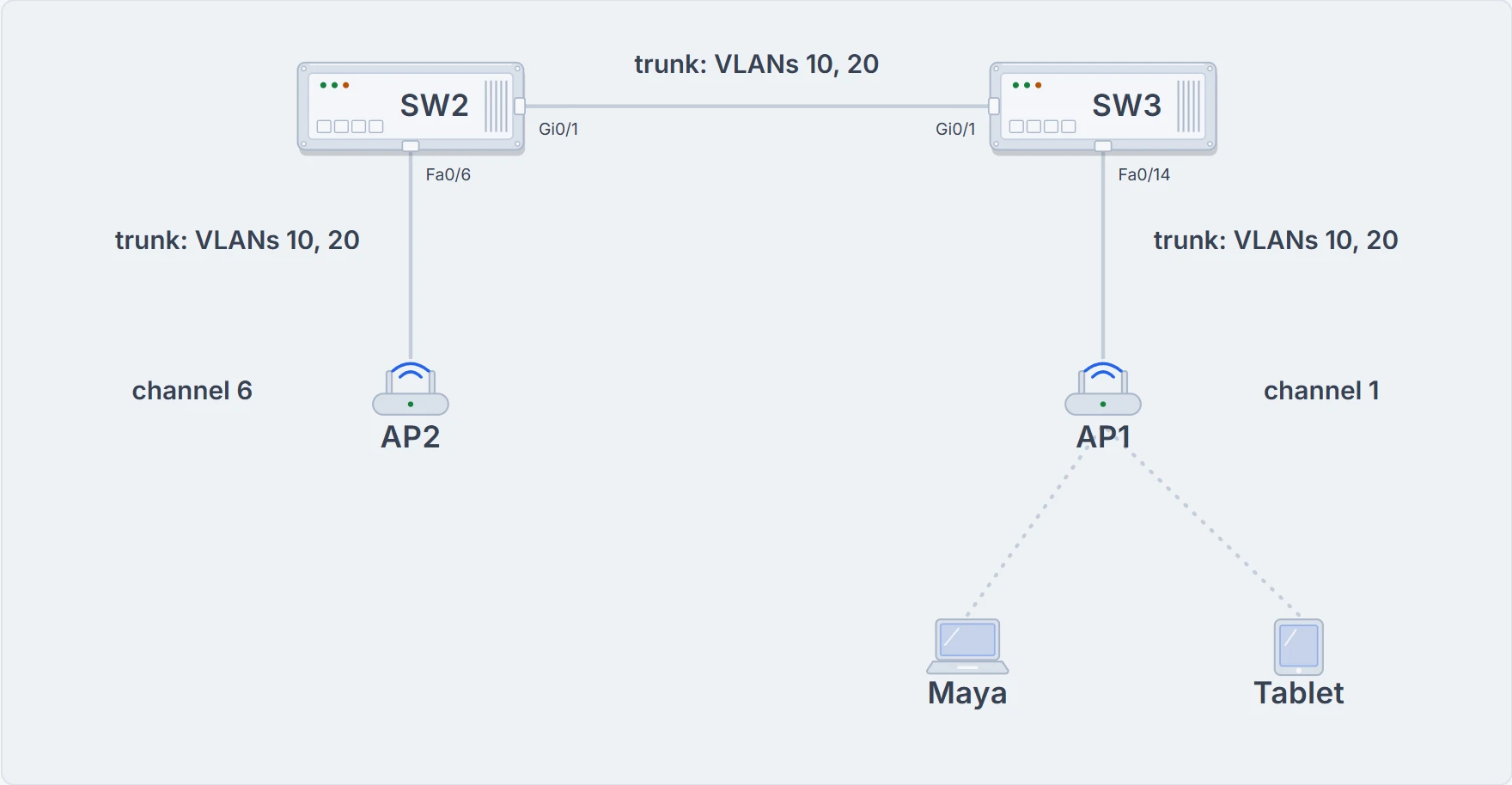
The office's wireless plan: AP1 on SW3 Fa0/14 and AP2 on SW2 Fa0/6, each on a trunk for VLANs 10 and 20. AP1 is on channel 1 and AP2 on channel 6. Maya's laptop and a guest's tablet are on AP1. The dotted lines are radio, not cables.
When an AP carries several SSIDs, it is in effect trunking VLANs over the air, on one channel, to its clients. Each client has to use the SSID mapped to the VLAN it should be in. And the AP appears as several logical APs, one per BSS, each with its own BSSID. These APs usually get that by adding one to the last digit of the radio's MAC address for each SSID. AP1's radio is 02:00:00:00:0a:10, so:
| AP | Channel | SSID | BSSID | VLAN |
|---|---|---|---|---|
| AP1 | 1 | Office | 02:00:00:00:0a:11 | 10 |
| AP1 | 1 | Guest | 02:00:00:00:0a:12 | 20 |
| AP2 | 6 | Office | 02:00:00:00:0b:21 | 10 |
| AP2 | 6 | Guest | 02:00:00:00:0b:22 | 20 |
The guest tablet associates with Guest on AP1, BSSID 02:00:00:00:0a:12, and lands in VLAN 20; Maya's laptop, on Office, is in VLAN 10. Once the frames reach the trunk, the VLANs keep the guests apart exactly as they did on the cables.
Every SSID an AP offers covers the same area, because the AP uses the same transmitter, receiver, antennas and channel for all of them. That's the misconception to watch: several SSIDs can give an illusion of scale. The clients may be spread across many SSIDs, but they all share one AP's hardware and contend for airtime on one channel.
Two names on the menu, one kitchen.
The extended service set and roaming
One AP rarely covers everywhere people will be: a whole floor of an office, a hotel or a hospital needs more. So you add APs and spread them out, and interconnect them through the switched network. 802.11 calls that an extended service set (ESS). AP1, AP2 and the switches between them are one.
The point is that the APs cooperate so the service looks consistent to a client. Ideally every SSID defined on one AP is defined on all of them; otherwise a client would need reconfiguring each time it moved into another AP's cell. So each cell has its own BSSID, and they share the SSID: a client sees the same network everywhere.
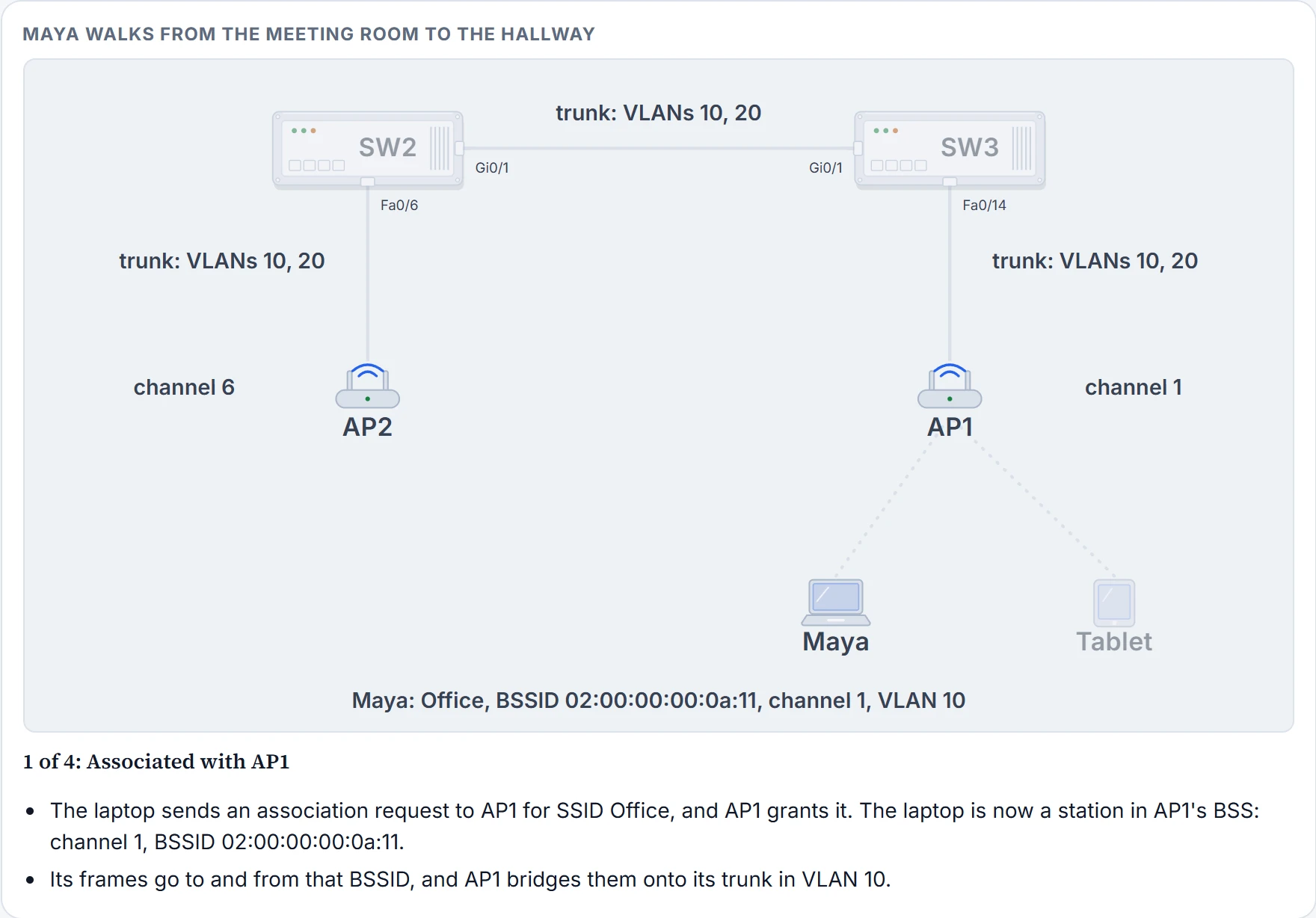
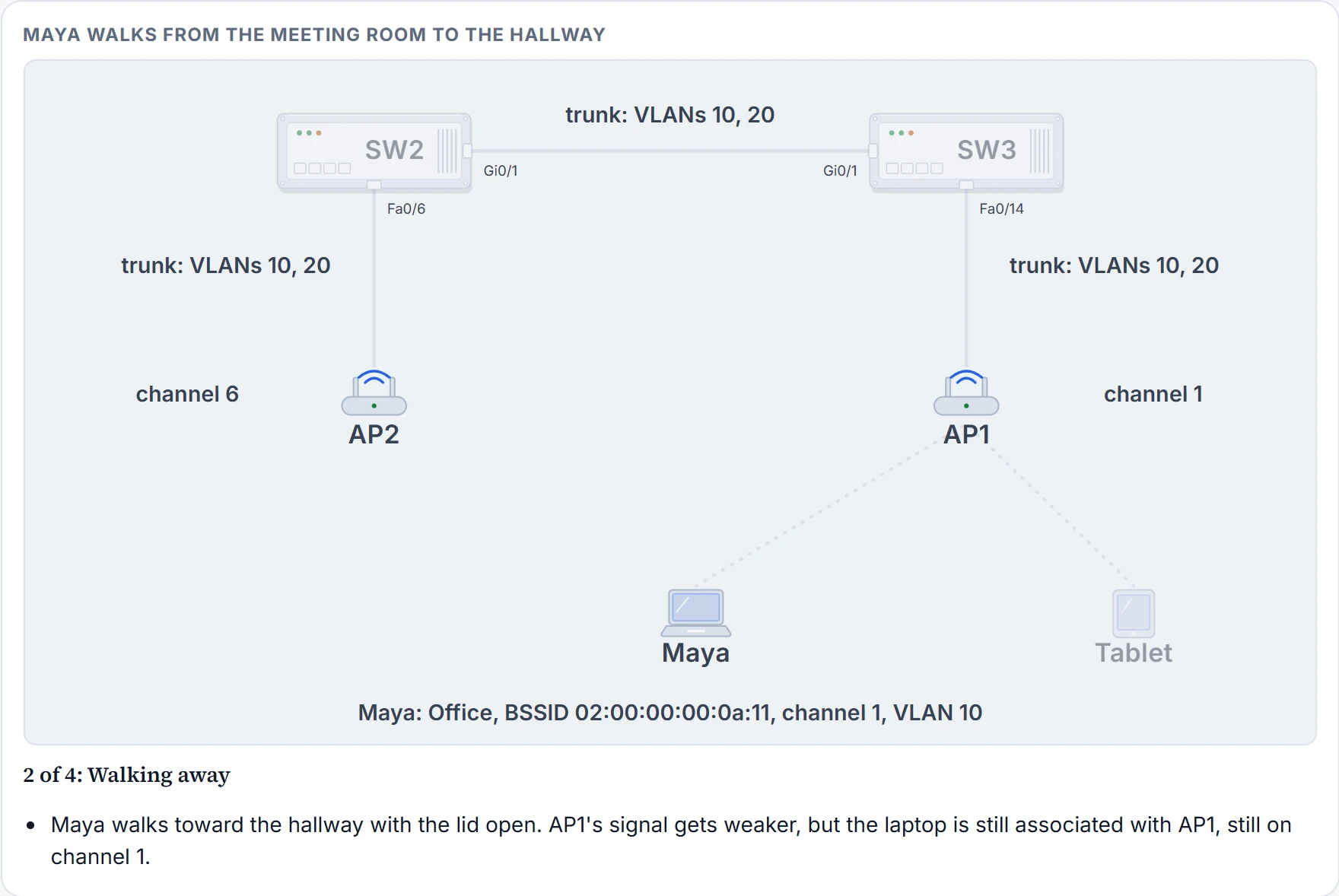
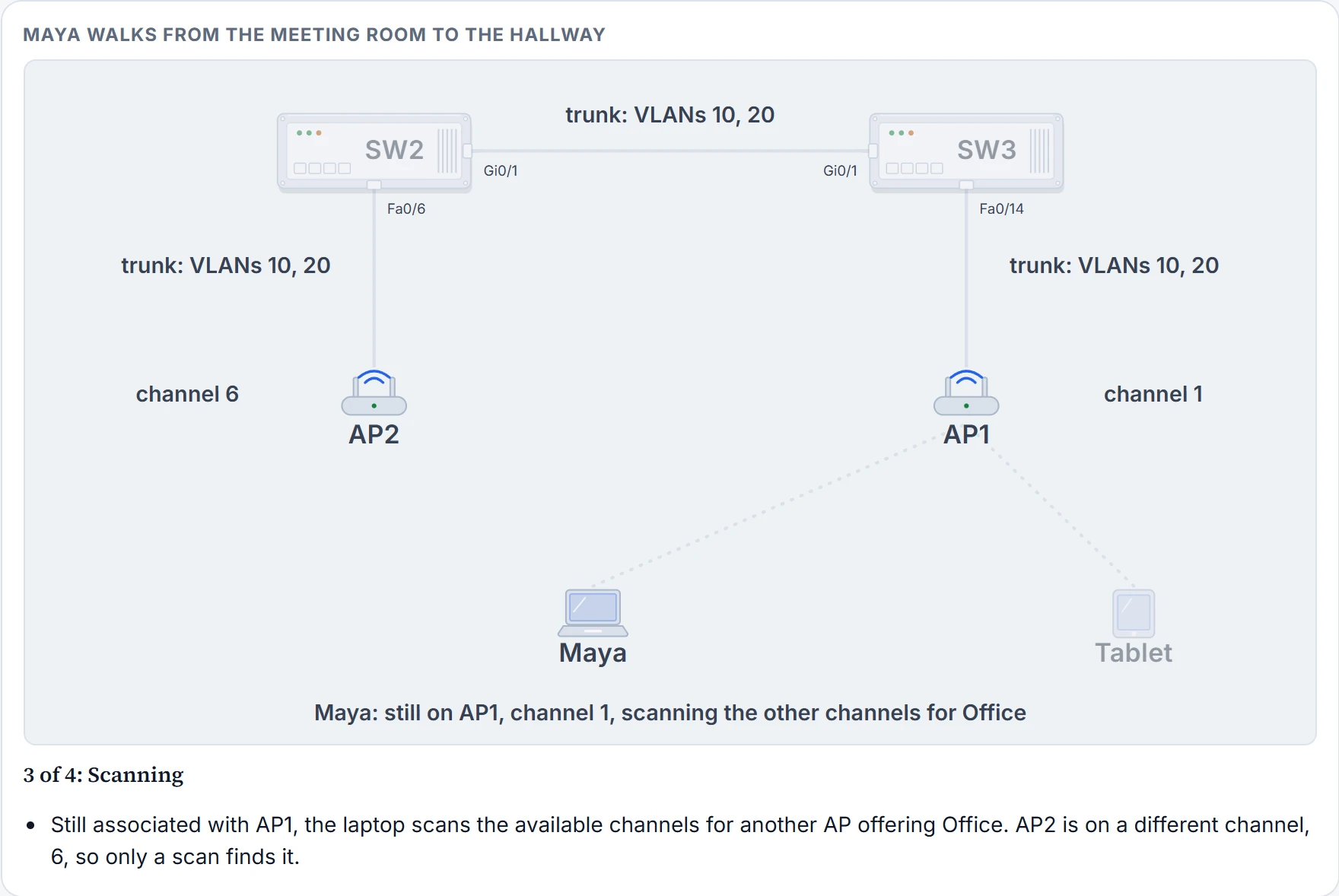
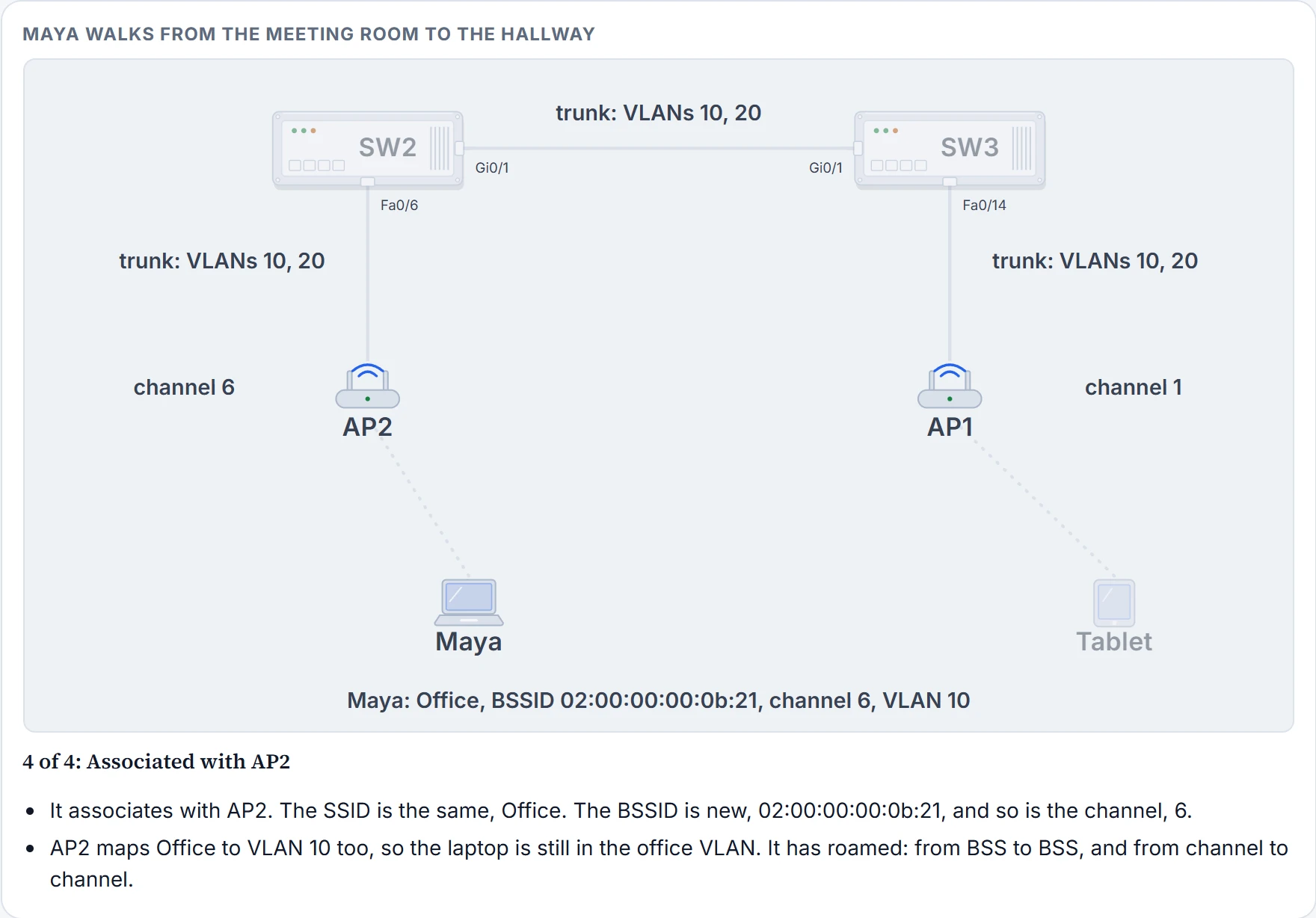
In an ESS, a client associates with an AP near where it is. If it moves, it can associate with another nearby AP automatically. Passing from one AP to another is roaming. Each AP runs its own BSS on its own channel, so the APs don't interfere with each other, and that means a roaming client has to scan the available channels to find the next AP. It roams from BSS to BSS, and from channel to channel. Here is Maya walking out of the meeting room:
Step 1 of 4
Step 2 of 4
Step 3 of 4
Step 4 of 4
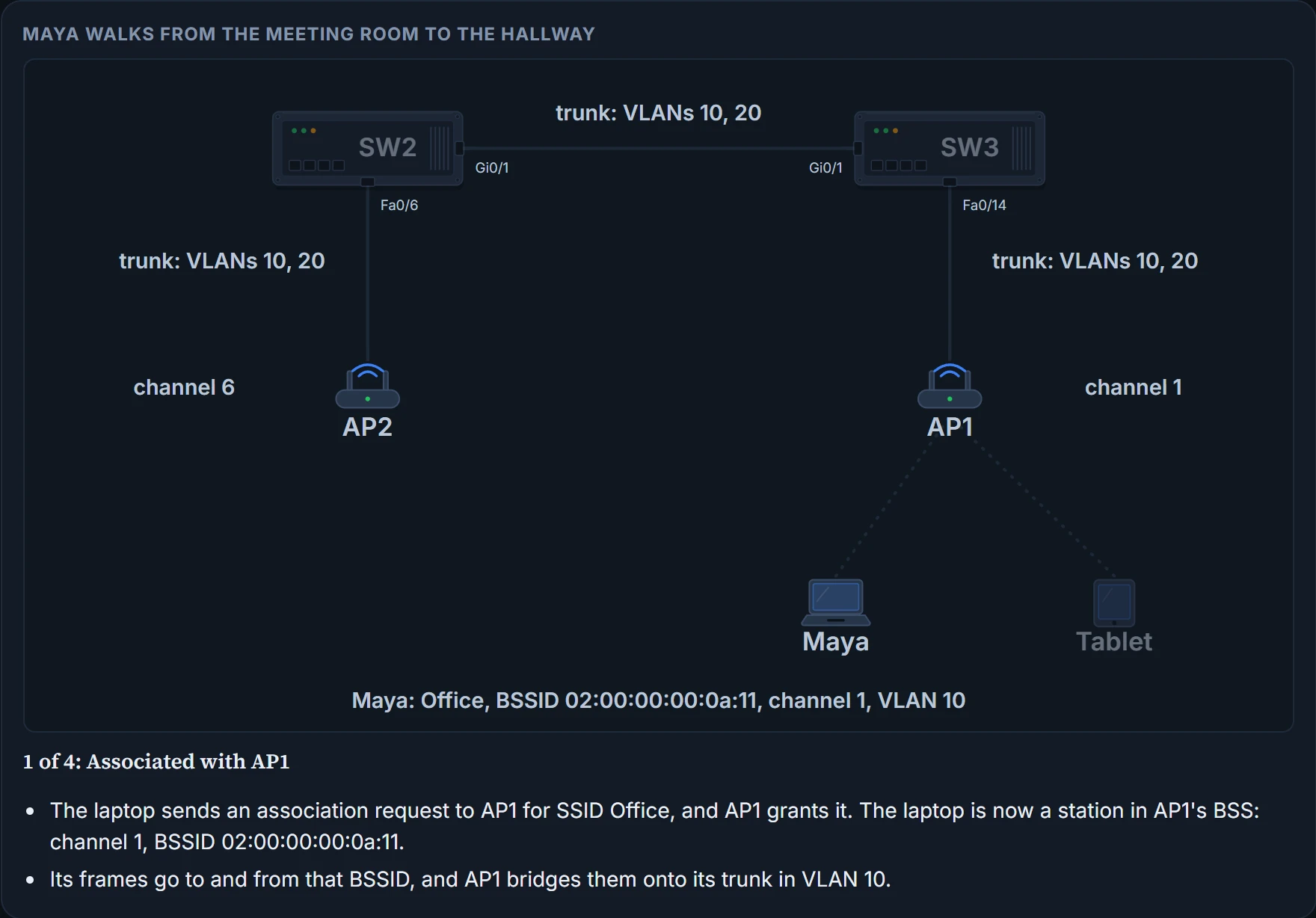
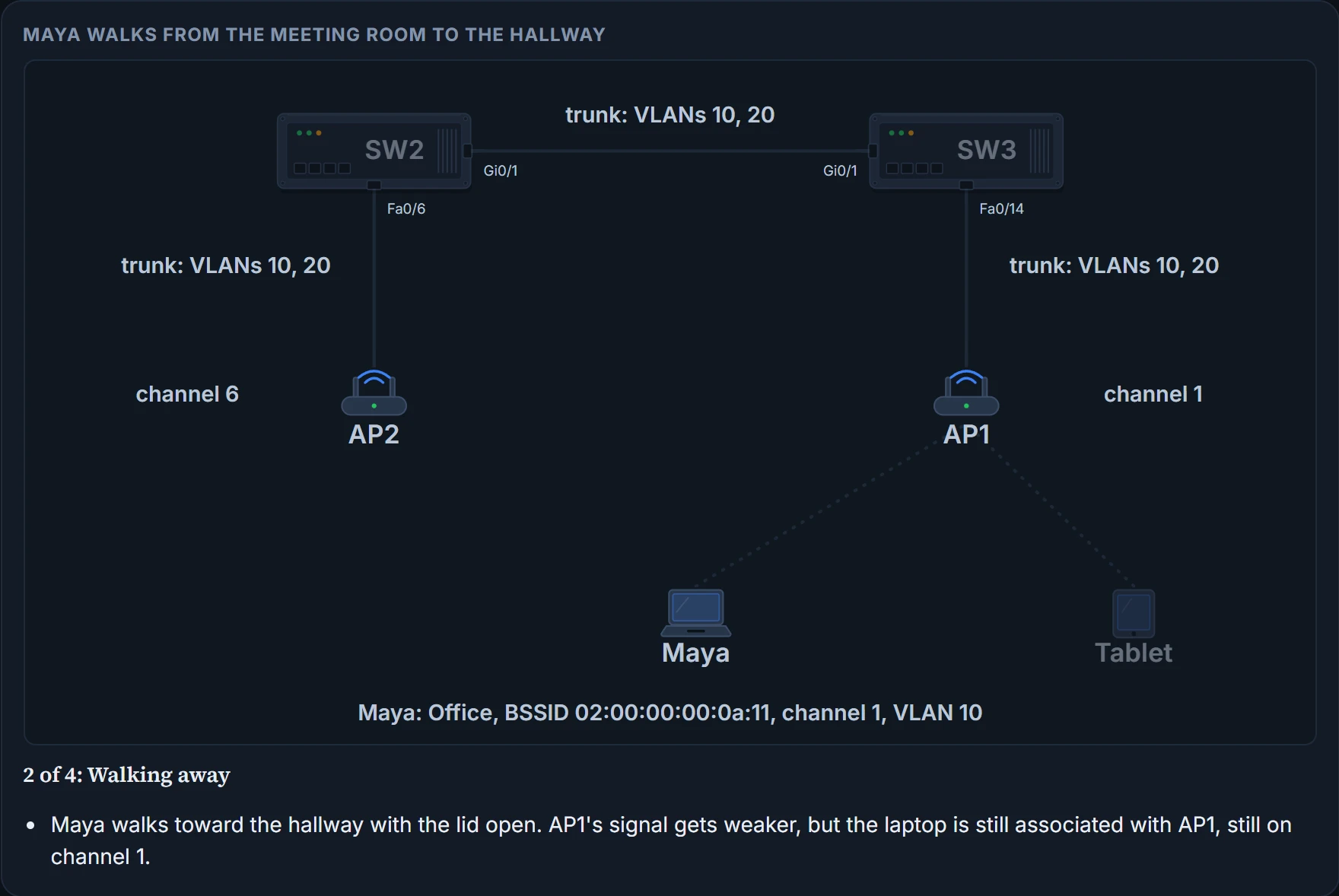
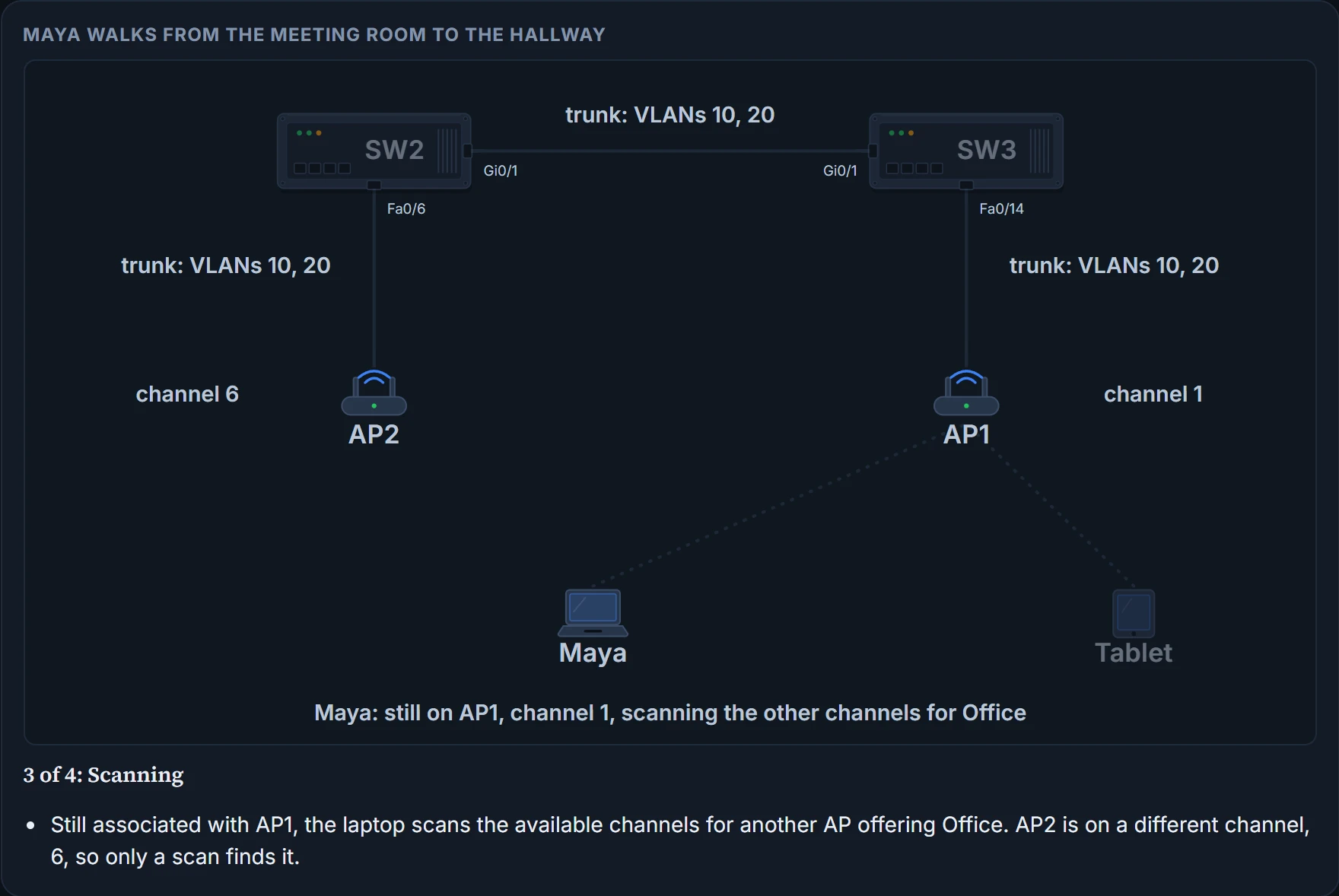
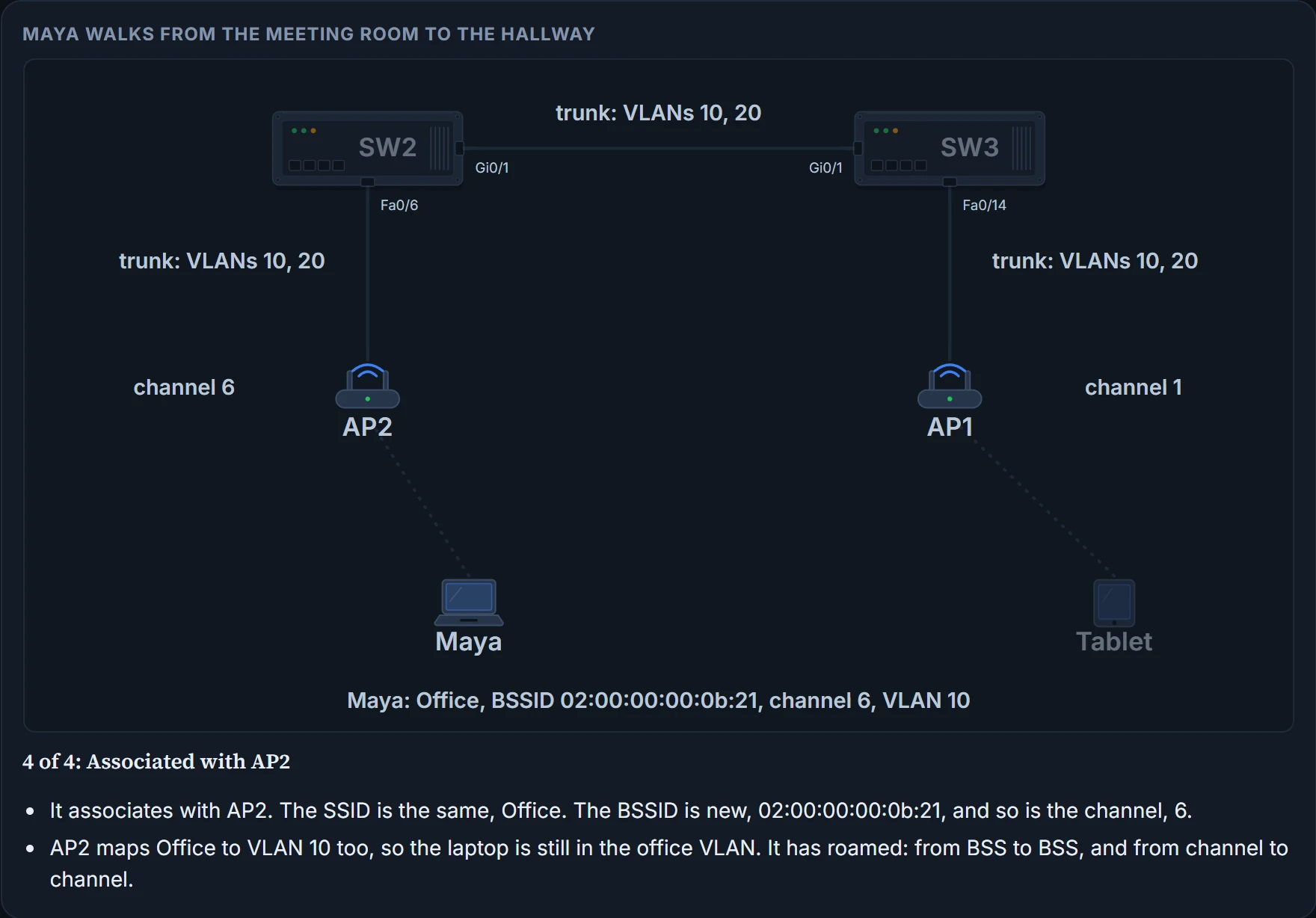
Nothing about the walk needed a cable or a call to Sam.
Without an AP: the independent BSS
Usually a wireless network uses APs for organisation, control and scalability. Sometimes there's no AP to use, or you'd rather not use one: two people at a meeting swapping documents without signing in to the production network, or a personal printer that prints wirelessly on its own. 802.11 lets two or more wireless clients talk directly to each other, with no other connectivity. That's an ad hoc wireless network, or an independent basic service set (IBSS).
One device takes the lead and starts advertising a network name and the radio parameters, much as an AP would, and the others join as they need. It's impromptu and distributed by design, so an IBSS doesn't scale well beyond eight to ten devices.
Other wireless topologies
An AP can also run in modes that aren't infrastructure mode, when a normal BSS can't do the job. The most common:
- Repeater. Normally every AP has a cable back to the DS. Where a cable would be too long for Ethernet, an AP in repeater mode retransmits the signal it receives into a new cell around itself. It sits where it can reach both the AP and the distant client. With a single transmitter and receiver, it has to use the AP's channel, and the AP may hear the repeated signal again, which halves the effective throughput because the channel is busy twice as long. Some repeaters use two transmitter and receiver pairs, one for the AP's cell and one for their own, on different channels.
- Workgroup bridge (WGB). Some devices have a wired Ethernet port and no wireless at all; some mobile medical devices, for example, are made with only a wired connection. Plugging one in whenever it's needed works, but wireless would be much more practical, and a WGB connects the device's wired adapter to the wireless network. It doesn't offer a BSS; it becomes a wireless client of one, in effect an external wireless adapter. A universal workgroup bridge (uWGB) bridges a single wired device; a WGB, one vendor's own version, bridges several.
- Outdoor bridge. An AP in bridge mode forms one wireless link between LANs over a long distance, between buildings or even cities. A point-to-point link has a bridge at each end, usually with special antennas that focus the signal toward the far end, which gets the most distance. A point-to-multipoint link joins a central site to several others: the central bridge uses an omnidirectional antenna that sends in all directions at once, and each other site can use a directional antenna aimed at the centre.
- Mesh. To cover a very large area without cabling every AP, APs in mesh mode bridge wireless traffic from AP to AP, daisy-chained, over another channel. Each mesh AP usually keeps a BSS on one channel for clients and carries their traffic over other channels as a backhaul; mesh APs can use dual radios, one in each range of frequencies. At the edge of the mesh, the backhaul is bridged onto the wired LAN. A mesh can be indoors or outdoors, and it runs its own dynamic routing protocol to pick the best path for backhaul traffic.
Continue the lesson
The whole lesson, with its drawings and its questions. 4 more sections after the ones above.