
Securing Wireless Networks
A wireless frame crosses free space, so a secure WLAN needs three things: authentication, so only trusted clients join; privacy, by encrypting each frame's payload; and integrity, a message integrity check that shows tampering. The Wi-Fi Alliance's WPA, WPA2 and WPA3 certifications limit which methods work together; WPA3 uses AES with GCMP.
By Arif, founder of Daveth · Updated
The full 21 min walkthrough is in Daveth Pro (Network). See what the plan opens
What this page answers
What makes a wireless connection secure?
Authentication of the client and the AP, privacy by encrypting each frame's payload just before it is sent, and integrity, a message integrity check that lets the receiver notice if anything changed on the way. Read it in “What a secure connection needs”
What is the difference between WPA, WPA2 and WPA3?
They are Wi-Fi Alliance certifications. WPA came while 802.11i was being developed and allows TKIP; WPA2 includes 802.11i in full, with AES and CCMP; WPA3 uses AES with GCMP and adds SAE, forward secrecy and protected management frames. Read it in the lesson
What are the wireless client authentication methods?
The original 802.11 offered only open authentication and WEP, both weak. Modern WLANs use a pre-shared key, called personal mode, or 802.1x with EAP and a server, called enterprise mode. Read it in “Client authentication methods”
What is a message integrity check (MIC)?
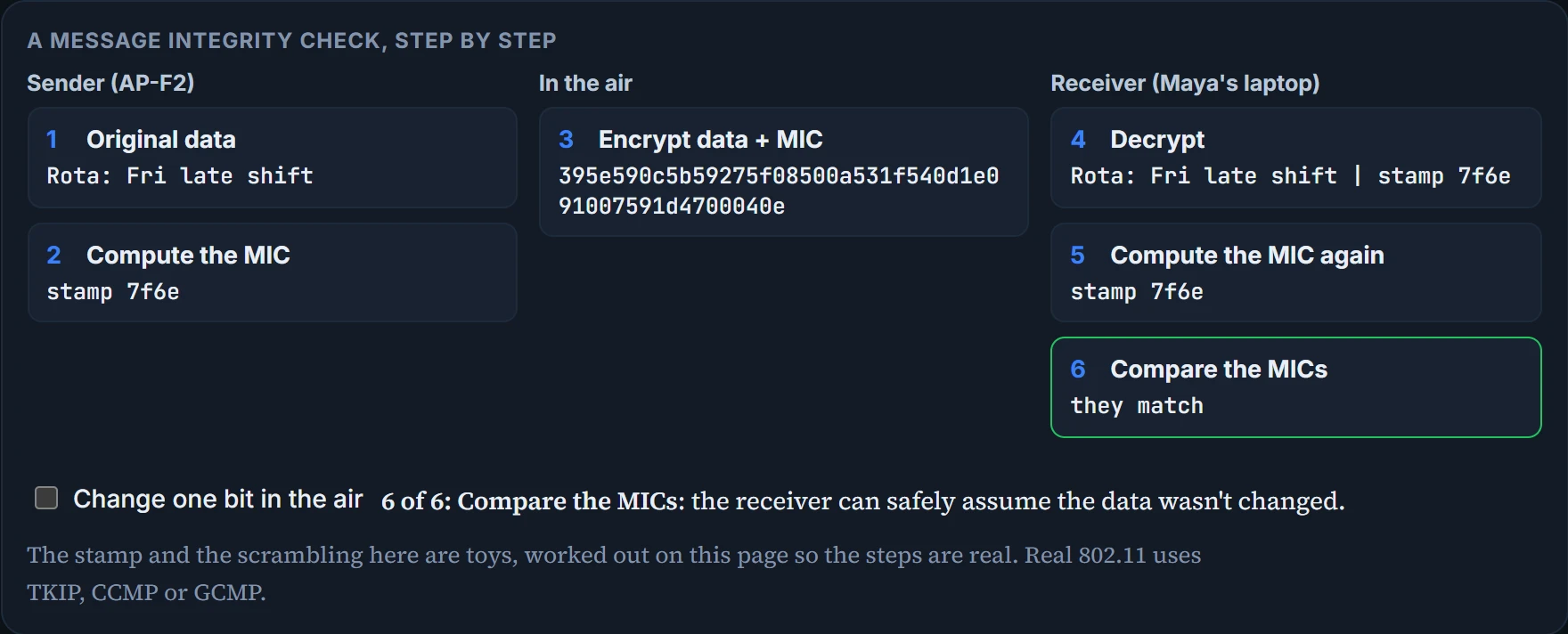
A secret stamp the sender adds inside the encrypted frame, worked out from the data. The receiver works the stamp out again after decrypting; if the two do not match, the frame was altered. Read it in “Message integrity”
What a secure connection needs
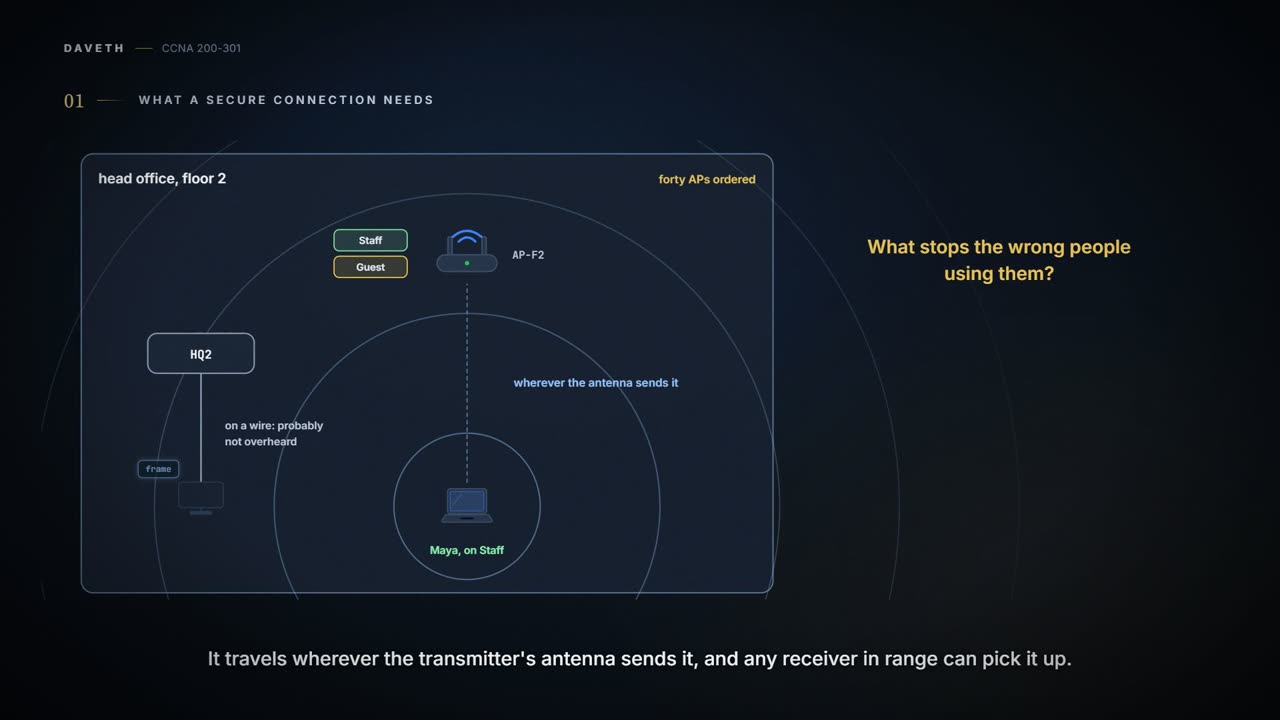
Wednesday, month two. Head office's forty APs are ordered, and Ravi has the next question ready: Staff and Guest are going to be out in the air. What stops the wrong people using them?
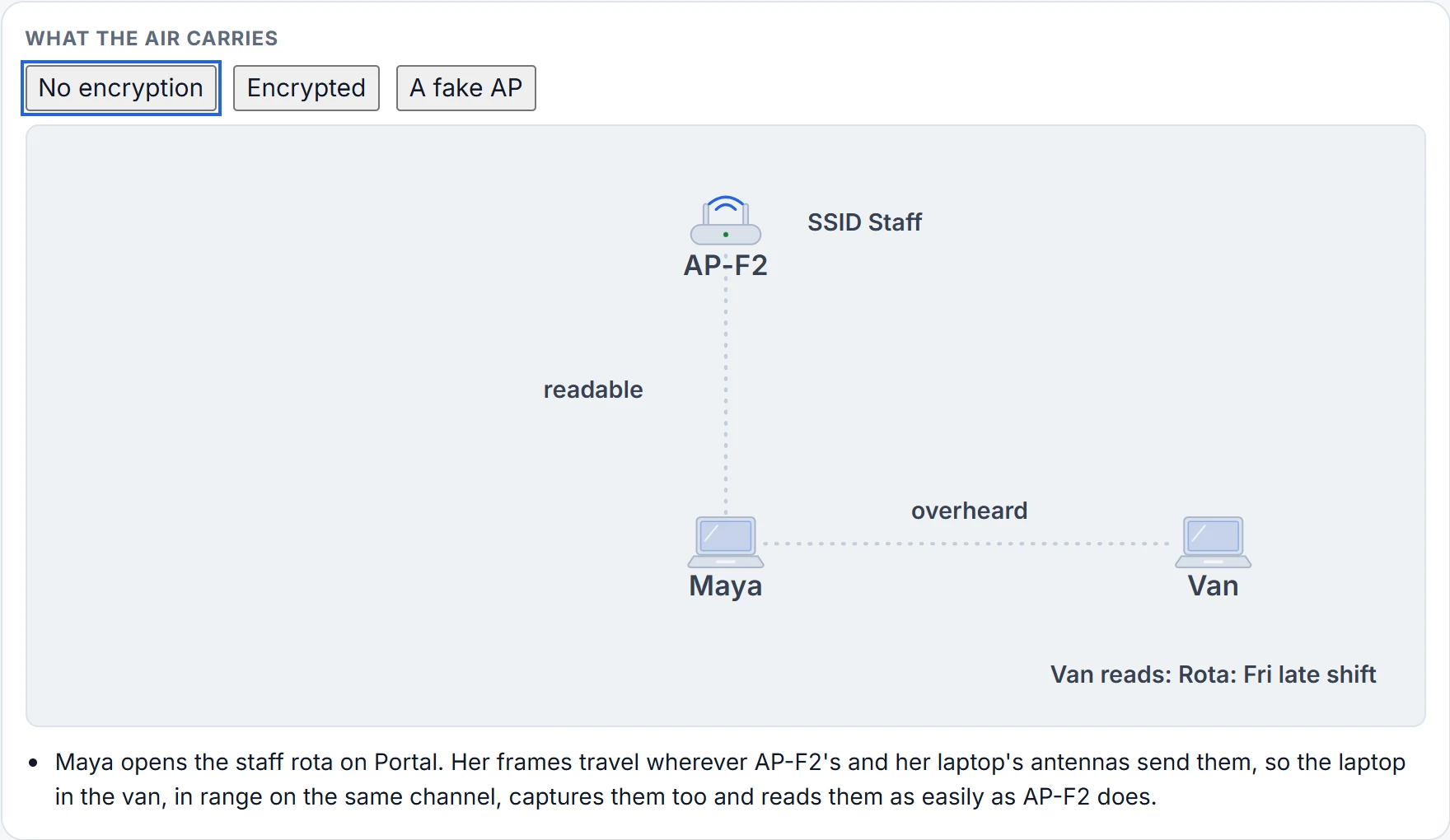
A wired connection feels secure: data on a wire probably won't be overheard. Wireless is different. As long as every client and AP follows 802.11, they can share the air, even the same channel, but not every 802.11 device is friendly. A frame doesn't go straight from sender to receiver: it travels wherever the transmitter's antenna sends it, and any receiver in range can pick it up. If Maya signs in to the staff portal over the air, anyone in range on that channel could capture her password.
So a complete approach to wireless security covers four things:
- identifying the endpoints of the wireless connection
- identifying the end user
- protecting the data from eavesdroppers
- protecting the data from tampering
The identifying is done by authentication. Protecting the data takes encryption and frame authentication, the checks later on this page that show a frame is genuine and unchanged. 802.11 offers a framework of security mechanisms that add trust, privacy and integrity.
A fair warning: this is a story about WEP, PSK, TKIP, MIC, AES, EAP, LEAP, PEAP, CCMP and GCMP. Some of them rhyme. None of them are a bedtime story.
Authentication: the client, and the AP
To use a wireless network, a client first finds a BSS and then asks to associate with it (03.5.1). It should be authenticated somehow before it becomes a working member of the WLAN. If the network reaches confidential resources, only devices known to be trusted should get in. Guests, if they're allowed at all, should join a different, guest WLAN with access to non-confidential or public resources only. And rogue clients, unexpected devices that just happen to be in range, shouldn't be allowed to associate at all.
So a WLAN can authenticate clients before they associate: the client presents some credentials to the AP. Some methods need only a static text string, common to every trusted client and AP, stored on the device and presented when needed. If the device is lost or stolen, whoever has it can probably still get on. Stricter methods check against a corporate user database, so the user has to enter a valid username and password, which a thief or an imposter wouldn't know.
Then there's the other direction. When you join a network, you probably trust the nearest AP without thinking about it: at work, in an airport, a hotel or at home, you expect the AP advertising the SSID to belong to whoever runs the place. But normally the only thing you have is the SSID, and your laptop may join a familiar one automatically.
It's basically like a shop sign: anyone can print one that says Staff. (Where it stops: you can walk into a shop and look around before you trust it. A laptop may join a familiar SSID automatically, before anyone looks at all, and a fake AP can behave just like the real one.)
A malicious user can pretend to be an AP. The fake AP sends beacons, answers probes and associates clients just like the real one, and once a client is associated with it, the attacker can intercept everything to and from that client. It can also send spoofed management frames that disassociate or deauthenticate real, active clients, just to disrupt the network. To prevent this man-in-the-middle attack, the client should authenticate the AP before the client itself is authenticated, and every management frame the client receives should be authenticated too, as proof it came from a legitimate AP.
The sign says Staff. The sign is not an ID card.
Message privacy
Even when the client and the AP have authenticated each other, Maya's data is still there for any eavesdropper on the same channel. To keep it private, it's encrypted for its trip through free space: the data payload of each frame is encrypted just before it's sent and decrypted as it's received, with a method the transmitter and receiver share.
Each WLAN may support only one authentication and encryption scheme, so every client on it uses the same encryption method.
The same method doesn't mean the same key. The AP should securely negotiate a unique encryption key with each associated client. Ideally, the AP and that client are the only two devices holding those keys, so nobody else can decrypt their data: AP-F2 decrypts Maya's frames before forwarding them onto the wired network, and other wireless devices can't. The AP also keeps a group key for encrypted data it sends to every client in its cell at once; each associated client uses that same group key to decrypt it.
Here are the three cases:
Message integrity
Encryption hides data while it crosses an untrusted network, and the intended receiver can decrypt it.
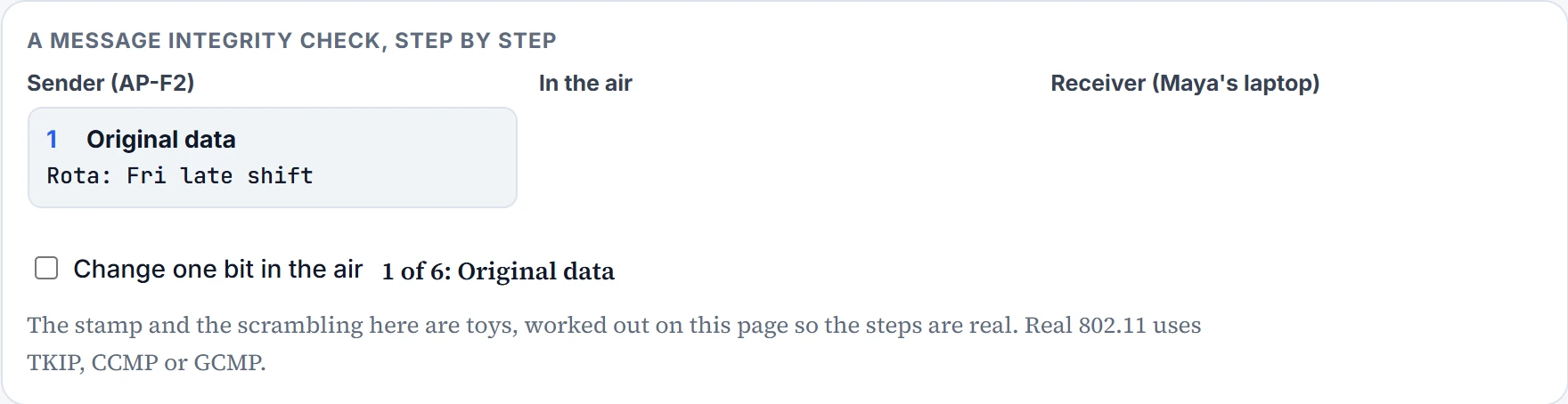
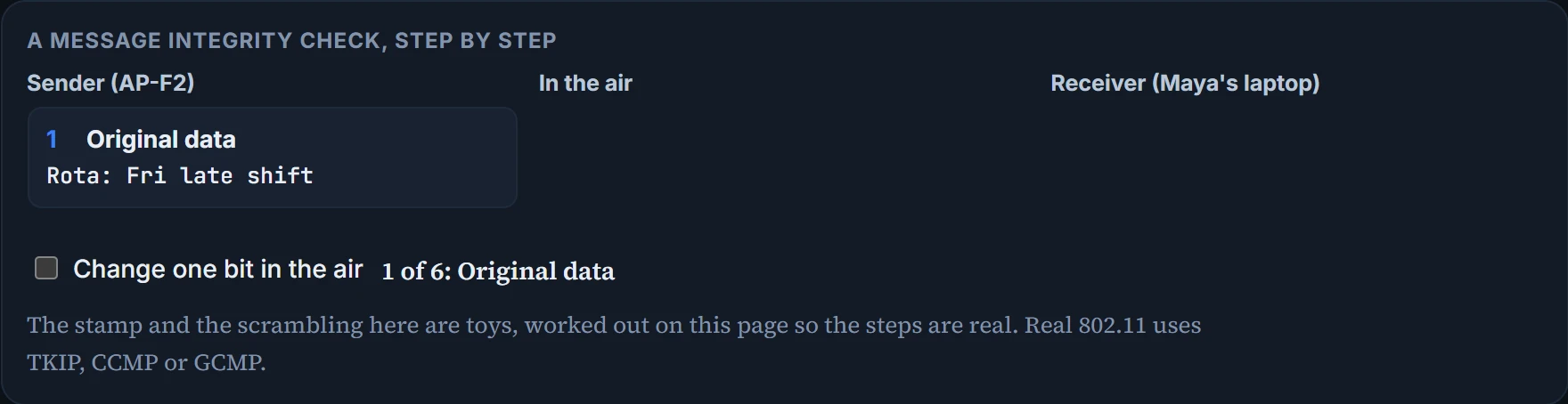
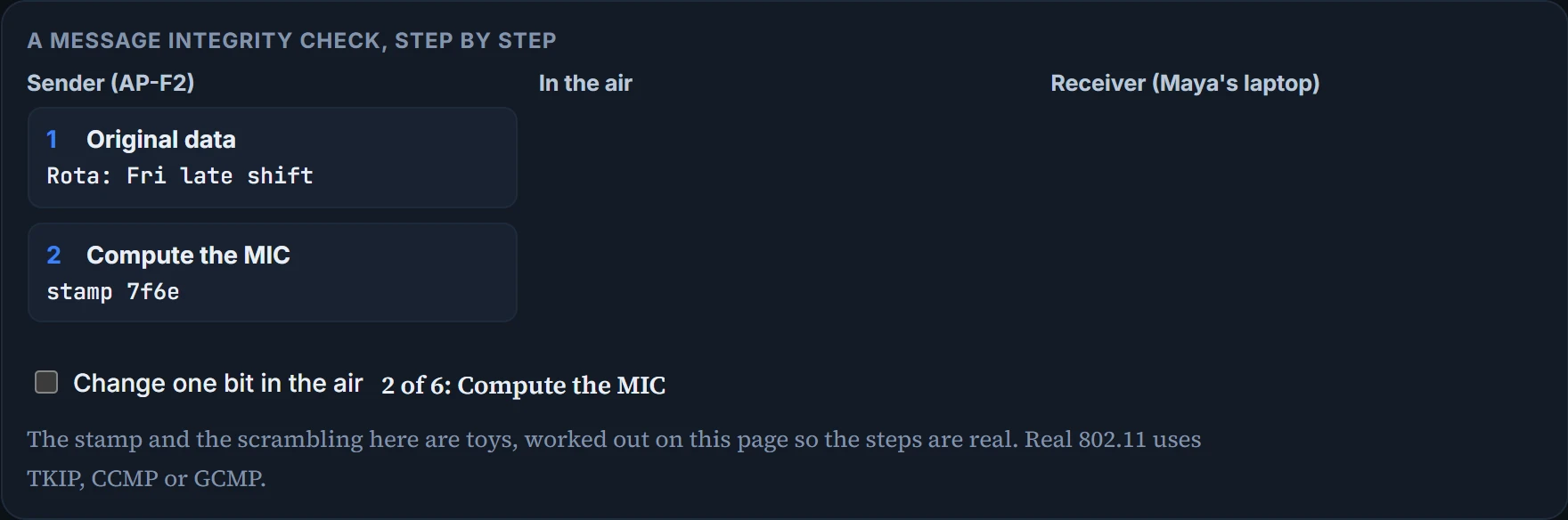
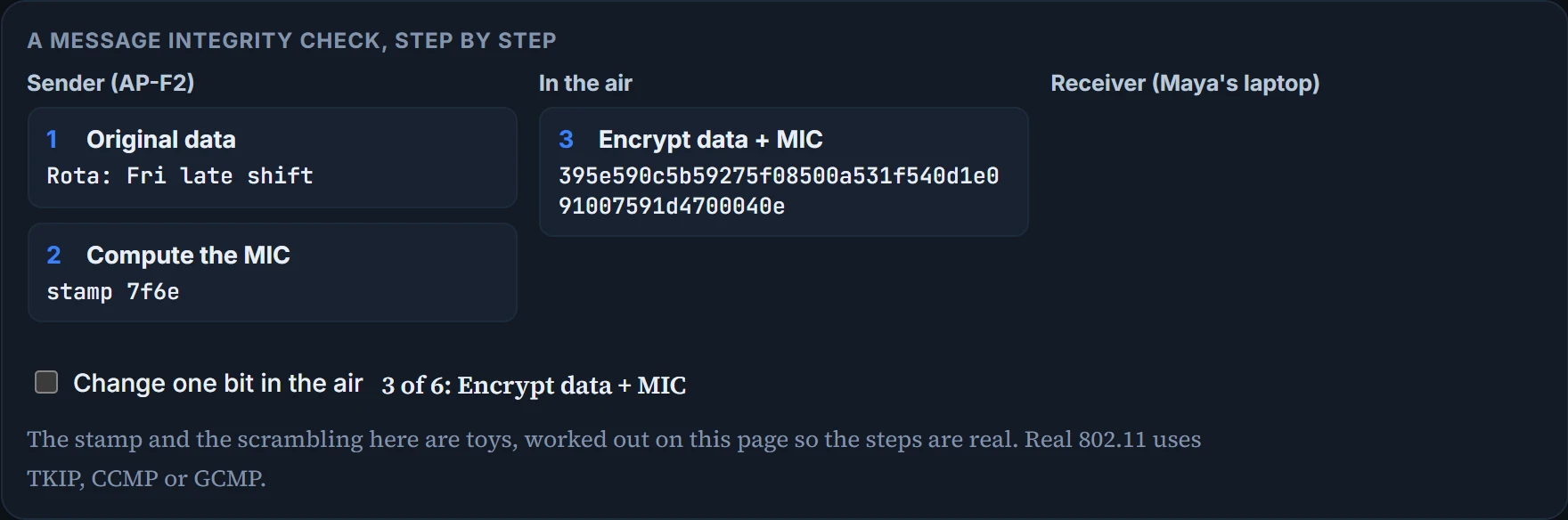
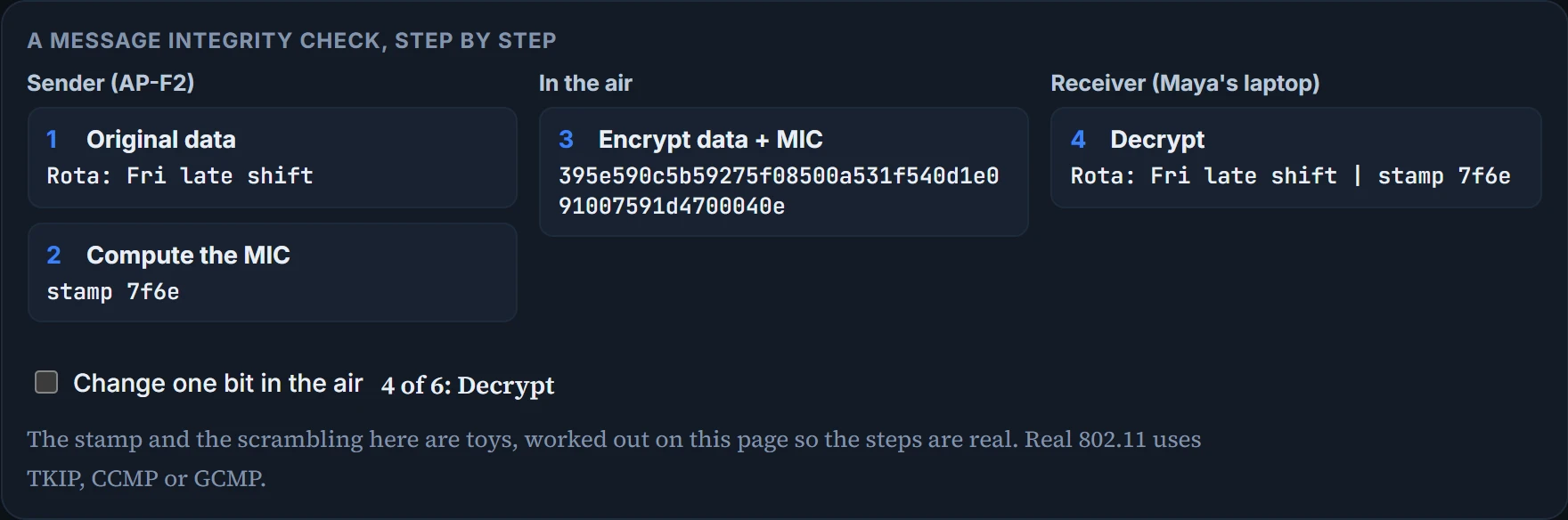
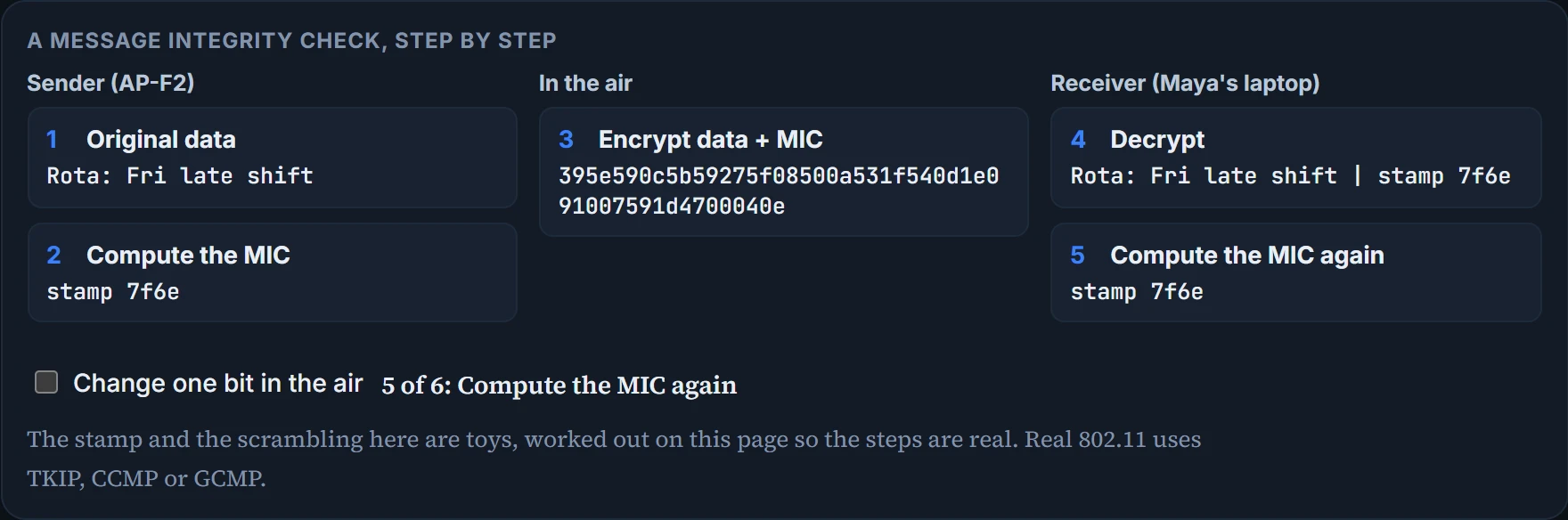
If someone altered the contents on the way, the receiver would have a very hard time noticing. A message integrity check (MIC) protects against that tampering. The sender adds a secret stamp inside the encrypted frame, worked out from the data bits being sent. After decrypting the frame, the receiver works out what the stamp should be from the bits it received and compares. If the two stamps match, it can safely assume the data wasn't changed.
You can think of it as the seal on a jar of jam. (Where it stops: anyone can see a broken jam seal from the outside. The MIC is inside the encrypted frame, and only a receiver with the key can check it.)
Step 1 of 6
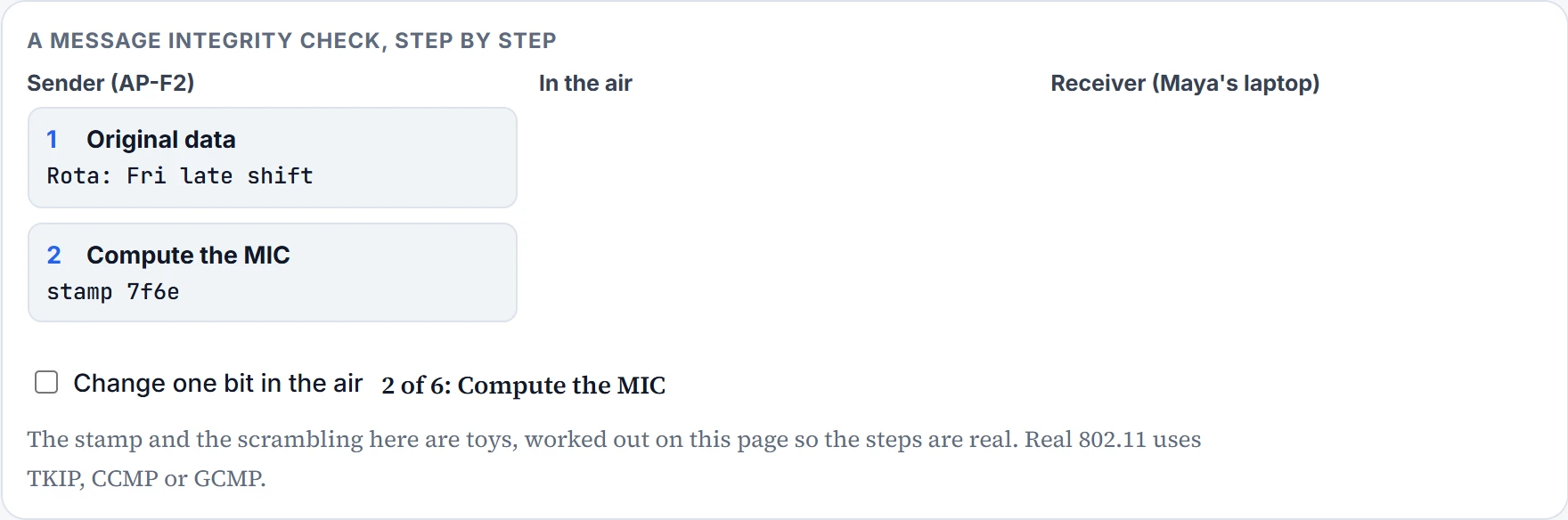
Step 2 of 6
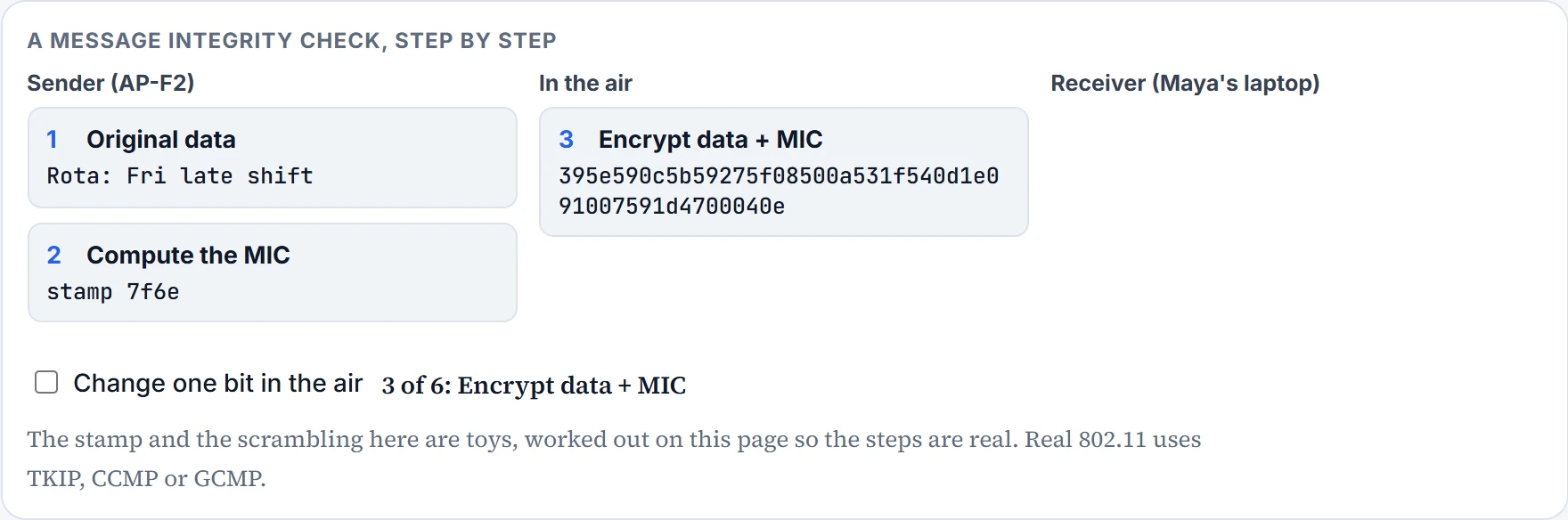
Step 3 of 6
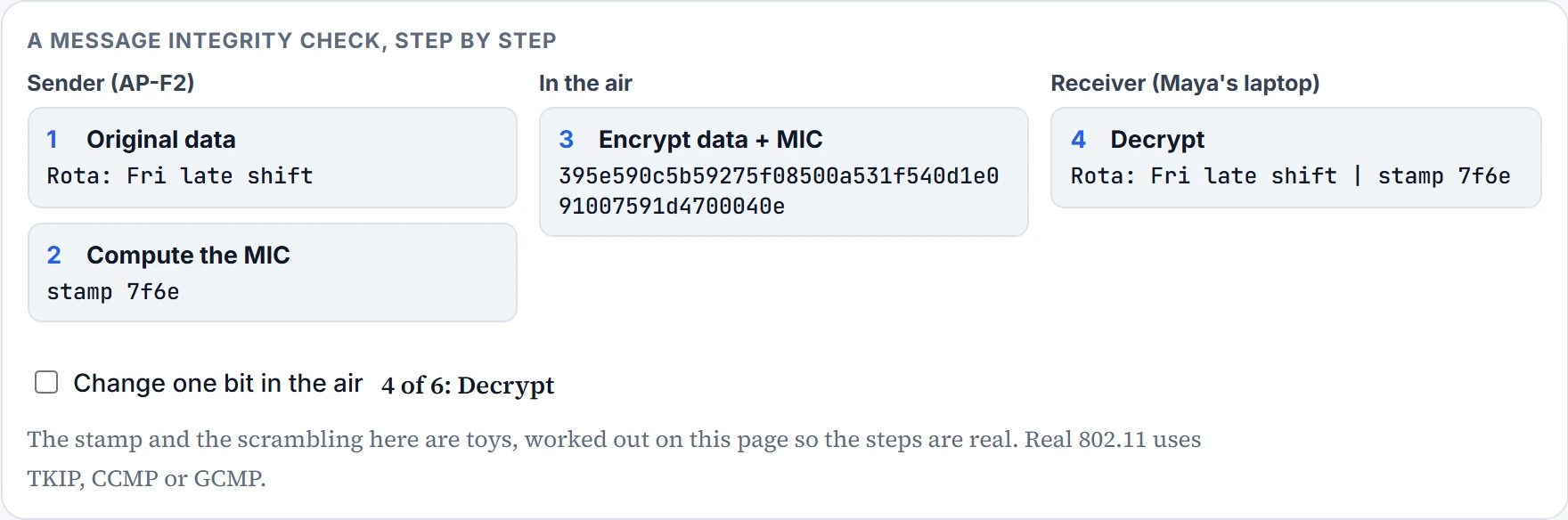
Step 4 of 6
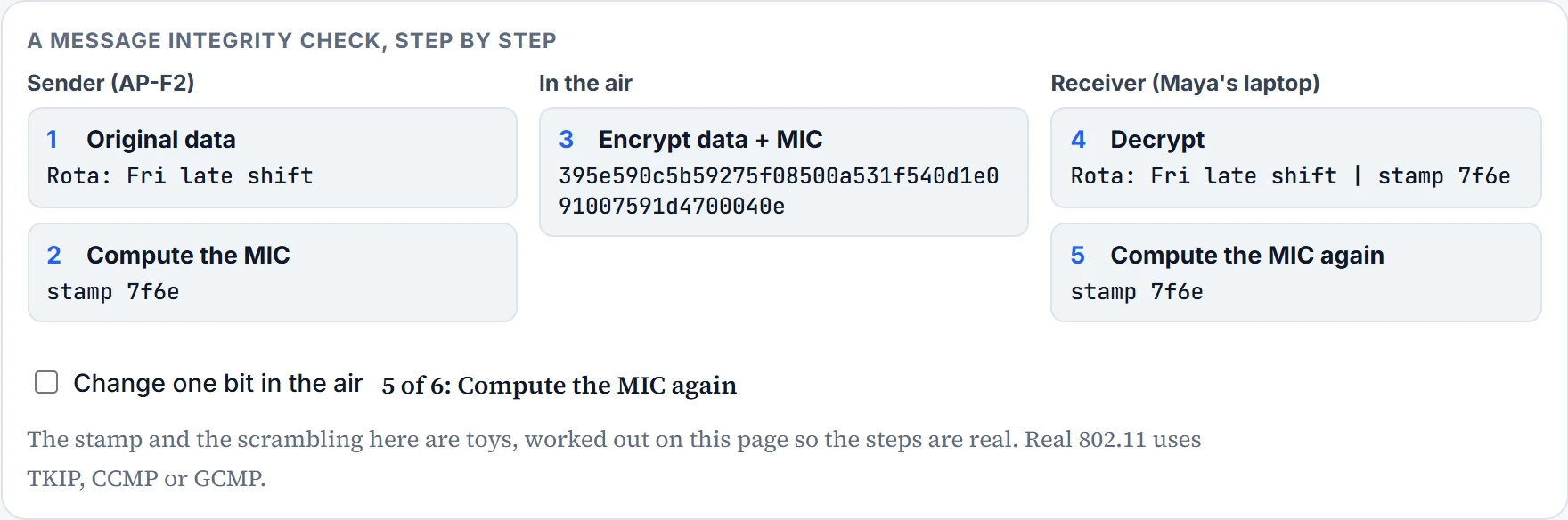
Step 5 of 6
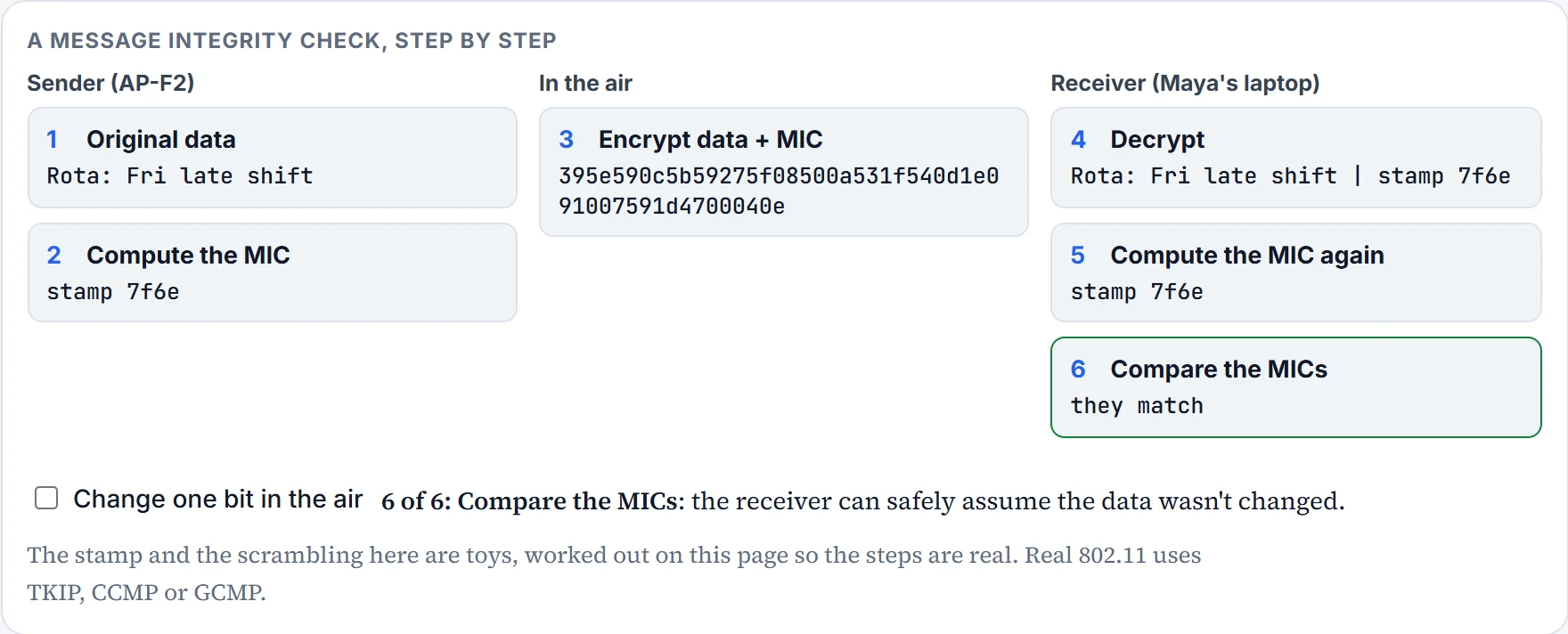
Step 6 of 6
Client authentication methods
The ways of authenticating wireless clients have changed over time, as weaknesses were exposed and hardware improved. The original 802.11 standard offered only two: open authentication and WEP.
Open authentication is true to its name. The only requirement is that the client sends an 802.11 authentication request before it tries to associate; no other credentials. That isn't secure, and it isn't meant to be: its whole purpose is to check that the client is a valid 802.11 device, using the protocol properly. Checking the user's identity is left to other means. You've probably met it in public places, where the only screening, if any, is web authentication: the client associates straight away, then has to open a browser, accept the terms of use and maybe enter basic credentials before it gets further. Most client operating systems warn that data on such a network won't be secured at all.
Wired Equivalent Privacy (WEP) was 802.11's way to make a wireless link more like a wired one. It uses the RC4 cipher algorithm, at both sender and receiver, with a WEP key from which it derives other keys, one per frame. It's a shared-key method with static keys: every client and AP has to share the same key ahead of time. The key can also serve as an optional authentication method: unless a client can use the correct WEP key, it can't associate. The AP sends a random challenge phrase, the client encrypts it with WEP and sends it back, and the AP checks that its own encryption gives the same result. WEP keys are 40 or 104 bits long, written as 10 or 26 hex digits.
WEP came with the original 802.11 standard in 1999, so every wireless adapter had encryption hardware built for it. In 2001, a number of weaknesses were revealed, so work began on better methods; by 2004, the 802.11i amendment was ratified and WEP was officially deprecated. Both WEP encryption and WEP shared-key authentication are widely considered weak.
Longer keys usually mean stronger encryption. WEP is the exception: its extra bits didn't save it.
802.1x and EAP
Client authentication generally involves a challenge, a response and a decision, and behind the scenes perhaps an exchange of session or encryption keys too. Rather than build more methods into 802.11 itself, a flexible framework was chosen: the Extensible Authentication Protocol (EAP). Each authentication method might have its own requirements for passing information between the client and the AP. EAP isn't one authentication method; it defines common functions that real methods use. Notice how many methods have EAP in their names: each is different, but each follows the framework.
EAP acts kind of like a standard envelope size: all sorts of letters fit inside, and the post office handles every one the same way. (Where it stops: a posted letter goes one way. EAP carries a conversation: challenges and responses go back and forth before the server decides.)
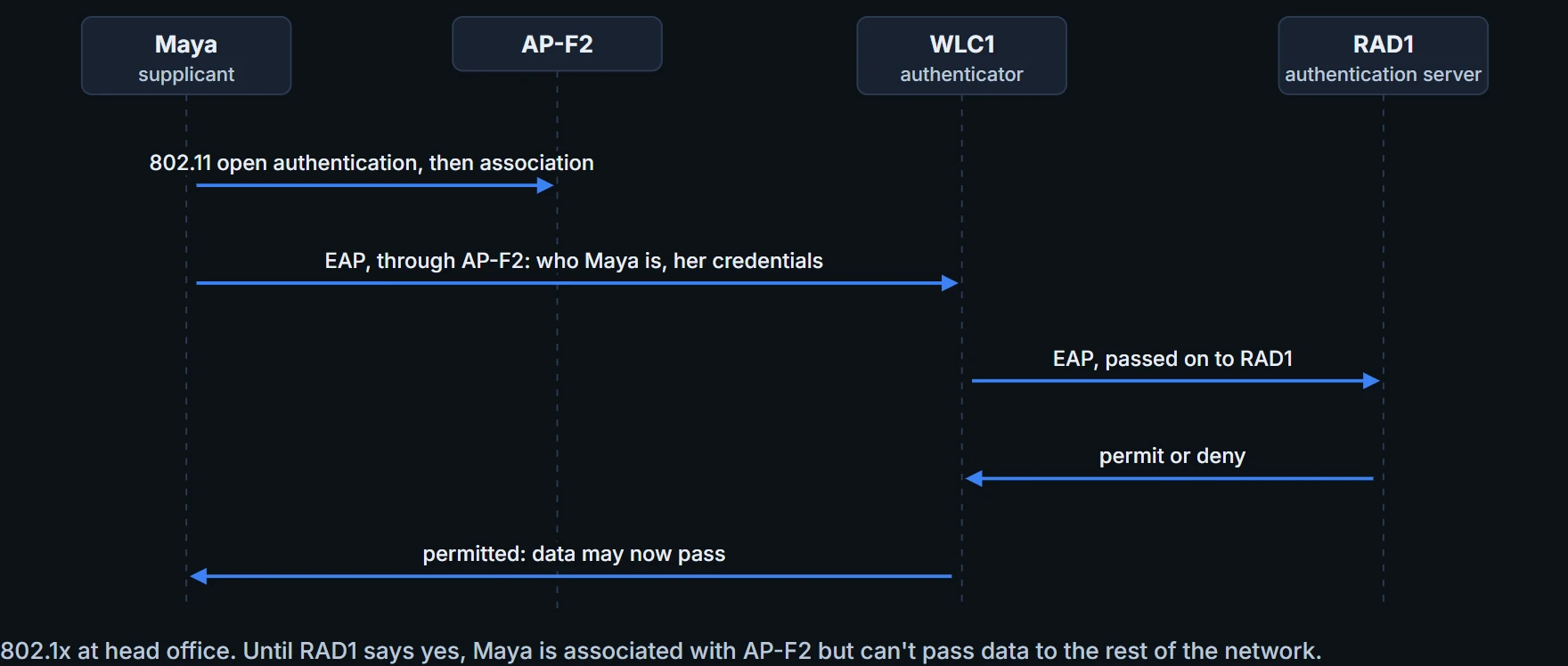
EAP also integrates with the IEEE 802.1x port-based access control standard. With 802.1x enabled, a client can associate with an AP but can't pass data to any other part of the network until it has authenticated. With open and WEP authentication, clients are authenticated locally at the AP. With 802.1x, the client uses open authentication to associate, and the real authentication happens at a dedicated server. There are three parties:
- Supplicant: the client device asking for access.
- Authenticator: the network device that gives access to the network, usually a WLC.
- Authentication server (AS): the device that takes the credentials and permits or denies access, from a user database and policies; usually a RADIUS server, a central server that network devices ask whether a user may connect.
At head office, that's Maya's laptop, WLC1, and RAD1, a RADIUS server Ravi runs beside Portal, the staff portal server. WLC1 becomes the middleman: it controls access with 802.1x and talks to RAD1 using the EAP framework.
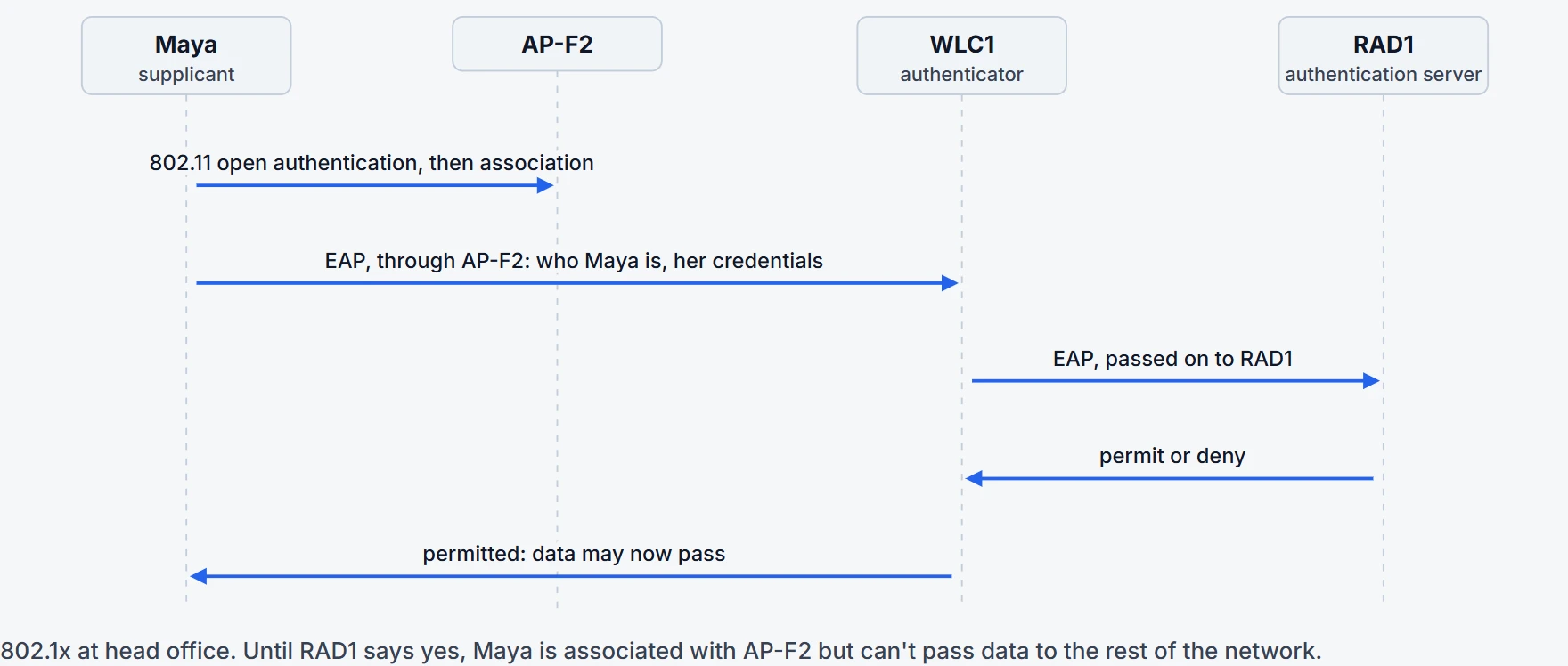
You don't have to pick a specific EAP method on the WLC. You select 802.1x, so the WLC can handle a variety of EAP methods, and it's up to the client and the authentication server to use a compatible one. The ones to recognise:
- LEAP (Lightweight EAP), one vendor's own, proprietary early attempt to address WEP's weaknesses. The client gives a username and password; the AS and the client exchange challenges, encrypt them and return them, so each authenticates the other. WEP-based hardware was still widely used at the time, so LEAP worked with dynamic WEP keys that changed often, but the way it encrypted the challenges was found vulnerable, so it's deprecated. Clients and controllers may still offer it; don't use it.
- EAP-FAST (EAP Flexible Authentication by Secure Tunneling), the same vendor's more secure method. The AS generates a protected access credential (PAC), a kind of shared secret, one per user, used for mutual authentication. Phase 0 provisions the PAC on the client. In phase 1, the supplicant and the AS authenticate each other and set up a Transport Layer Security (TLS) tunnel. In phase 2, the user is authenticated inside that tunnel. So there are two authentications, nested: an outer one, outside the tunnel, and an inner one, inside it. Like the other EAP methods, it needs a RADIUS server, and that server has to be an EAP-FAST server as well, to generate the PACs.
- PEAP (Protected EAP) also has an outer and an inner authentication, but in the outer one the AS proves itself with a digital certificate. If the supplicant is satisfied, the two build a TLS tunnel for the inner client authentication and the key exchange. The certificate identifies its owner in a standard format and is signed by a certificate authority (CA) that both sides trust; the supplicant needs the CA's own certificate to check it. The certificate also carries a public key, in plain view, which can be used to help decrypt messages from the AS. Only the AS has a certificate, so the supplicant can readily authenticate the AS; the client has no certificate of its own, so it is authenticated inside the tunnel with MSCHAPv2 (a Challenge Authentication Protocol, version 2) or GTC (Generic Token Card: a hardware device that generates one-time passwords, or a manually generated password).
- EAP-TLS (EAP Transport Layer Security) goes one step further: certificates on the AS and on every client. They exchange certificates and authenticate each other, then build a TLS tunnel to exchange encryption key material securely. It's considered the most secure wireless authentication method, but it can be complex to run. A certificate on one server is easy; installing certificates by hand on hundreds or thousands of clients can be impractical, so it usually means a Public Key Infrastructure (PKI), your own CA or a trusted third-party one, to supply certificates and revoke them when someone should lose access. And it's practical only if the clients can accept and use certificates at all; many devices, such as communicators, medical devices and RFID tags, can't.
Continue the lesson
The whole lesson, with its drawings and its questions. The rest of this section and 3 more after it.