
Voice VLANs and IP Phone Interfaces
An IP phone has a small switch inside it, so one cable from the wall serves both the phone and the PC behind it. The switch port then carries two VLANs: a data VLAN for the PC, configured exactly like an access VLAN, and a voice VLAN for the phone, added with switchport voice vlan.
By Arif, founder of Daveth · Updated
The full 7 min walkthrough is in Daveth Pro (Network). See what the plan opens
What this page answers
What is a voice VLAN?
The VLAN for the IP phone on a port that also serves a PC. The vendor's recommended design puts phones in one VLAN and PCs in another, so the port behaves a little like an access port for the PC and a little like a trunk for the phone. Read it in “Data and voice VLANs”
How do you configure a voice VLAN?
Create the data and voice VLANs if they do not exist, configure the data VLAN like any access VLAN with switchport access vlan and switchport mode access, then add the voice VLAN with switchport voice vlan. Read it in “Configuring the port”
Wednesday, 10 a.m.
At 7:30 Maya added switchport nonegotiate to both ends of the hallway trunk, as her notebook said. At 10 a courier brings the office's first IP phone, a trial from the phone provider, for Sam's window desk. It runs from its own power adapter for now.
Sam's desk has one network cable to the wall, into LAB-SW1's Fa0/5, and Sam's laptop is already using it. Sam holds up the phone's cable in one hand and the laptop's in the other: "Which one gets the socket?"
One cable, two devices
An IP phone sends and receives voice as IP packets, and it plugs into the network over Ethernet (or Wi-Fi) like most other end-user devices. Before IP phones, a desk had two separate cables: the phone's to a voice switch in the closet, often called a PBX (private branch exchange), and the PC's to the Ethernet switch. IP phones need no PBX cable: they talk over the IP network to software that took over the call setup and the other jobs the PBX used to do.
Moving to IP phones raised real problems. The old phone cabling often couldn't carry 100 or 1000 Mbps Ethernet. Most offices had a single Ethernet cable from the closet to each desk, and now two devices needed one. And running a second cable to every desk costs money, and needs more switch ports.
The answer is built into the phone: a small three-port switch. The cable from the wall plugs into one port, the PC plugs into another with a short patch cable, and the third port is internal, for the phone itself.
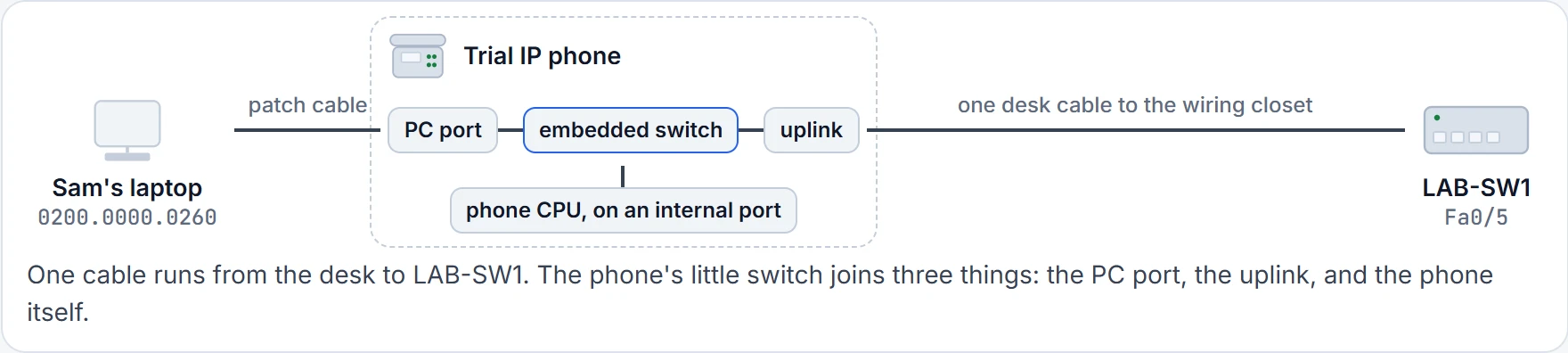
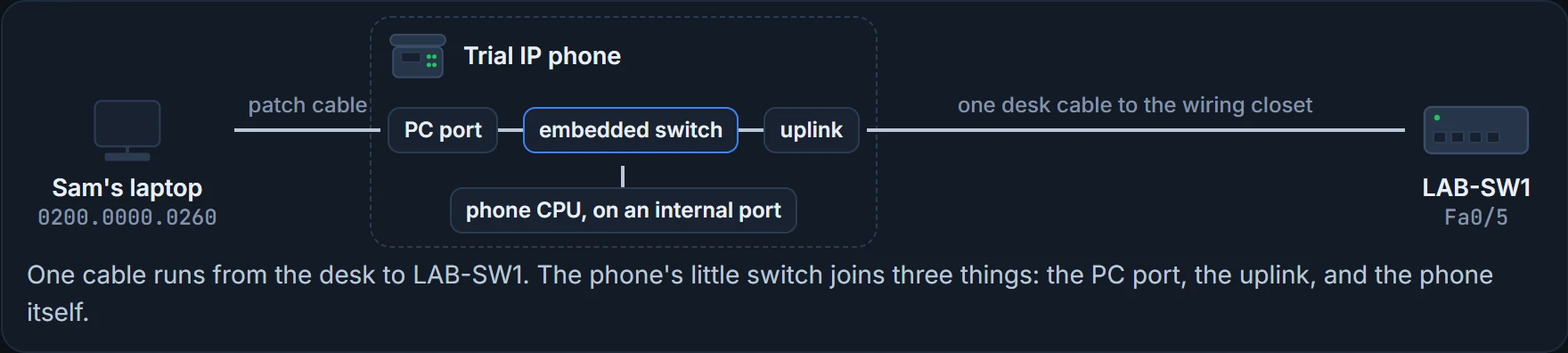
The phone's switch acts kind of like a power strip at the desk: one socket in the wall, several things plugged in. (Where it stops: a power strip doesn't label anything. The phone marks its own frames, so LAB-SW1 can tell them apart from the laptop's, as the next section shows.)
The phone has a second job nobody mentions on the box: a tiny switch built into its underside.
Data and voice VLANs
Now Fa0/5 has two devices behind it. The vendor's recommended design puts the phones in one VLAN and the PCs in a different VLAN. So the port acts a little like an access port, for the laptop's traffic, and a little like a trunk, for the phone's. It has two VLANs:
- The data VLAN: a VLAN for ordinary data devices, like PCs and servers. On a phone port it's the same idea, and the same configuration, as the access VLAN on any access port, for the device plugged in behind the phone, typically the user's PC. At Sam's desk, VLAN 10.
- The voice VLAN: for the phone's own traffic. Traffic in it is typically tagged with an 802.1Q header, the same header 03.1.3 put on the hallway trunk. For the office, Maya picks VLAN 11.
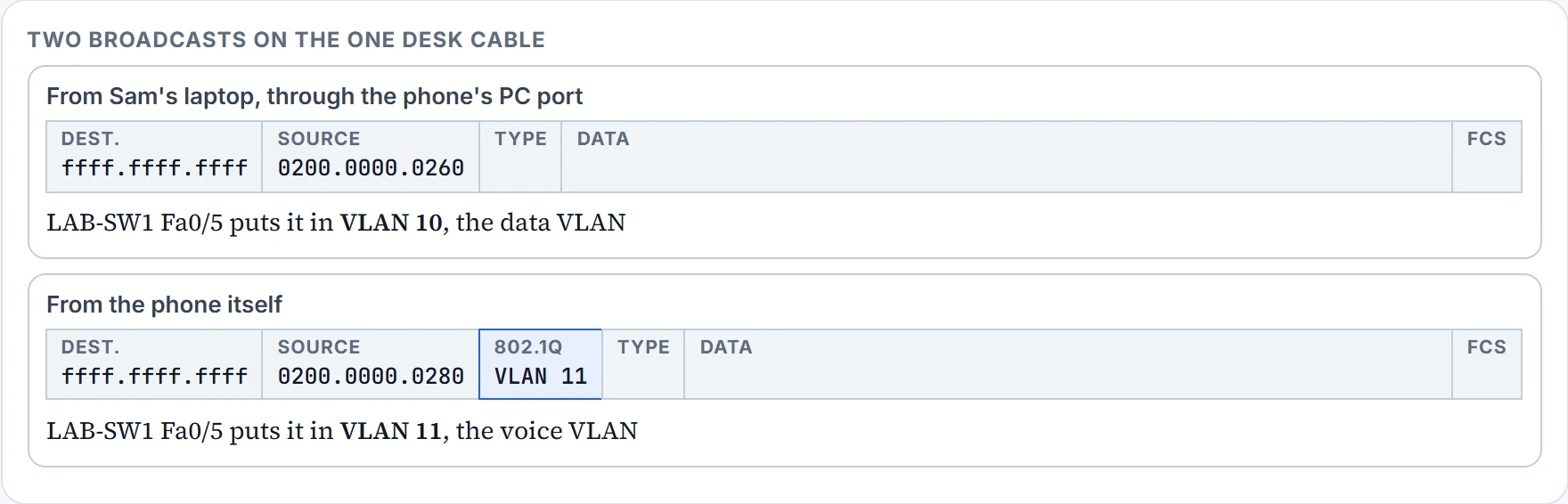
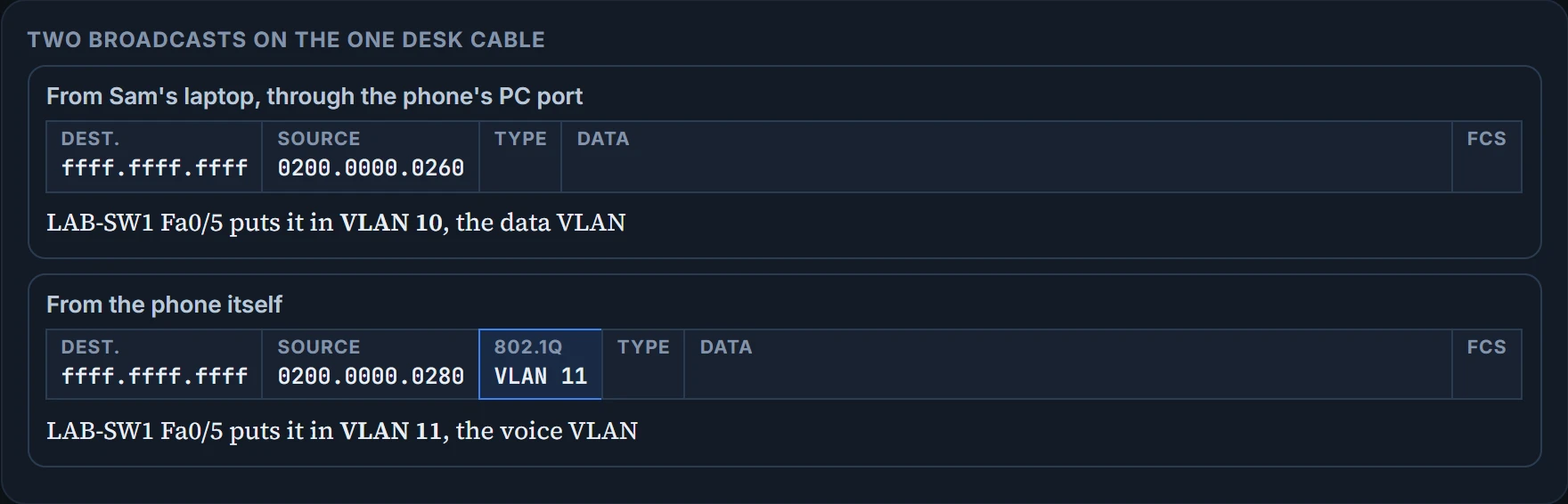
Same destination, same cable, different VLANs. The phone's broadcast arrives with an 802.1Q header saying VLAN 11, and LAB-SW1 keeps it in the voice VLAN.
If you've ever shared a desk and had two in-trays on it, one for you and one for the person on the other shift, it's that. (Where it stops: the in-trays sit side by side. On the cable, the frames share one wire, and the tag, or its absence, is what sorts them.)
The laptop's frame went through the phone. It didn't apply for a job in the voice VLAN.
Configuring the port
Once you know the two VLAN numbers, the configuration takes a few easy commands:
- Create the data and voice VLANs with
vlan, if they don't exist yet. - Configure the data VLAN exactly like an access VLAN: go into the interface, then
switchport access vlan, andswitchport mode accessso it never trunks. - Add the voice VLAN with
switchport voice vlan.
VLAN 10 already exists, so step 1 needs only VLAN 11. Fa0/5 was already an access port in VLAN 10, but Maya types steps 2 and 3 in full anyway, so the port's configuration reads as one piece:
LAB-SW1# configure terminal
Enter configuration commands, one per line. End with CNTL/Z.
LAB-SW1(config)# vlan 11
LAB-SW1(config-vlan)# name VOICE
LAB-SW1(config-vlan)# interface FastEthernet0/5
LAB-SW1(config-if)# switchport mode access
LAB-SW1(config-if)# switchport access vlan 10
LAB-SW1(config-if)# switchport voice vlan 11
LAB-SW1(config-if)# end
LAB-SW1#
One more thing has to be true, and it already is. The switch tells the phone which VLAN is its voice VLAN, and for a phone like this one to work on the port, a discovery protocol has to be enabled there. LAB-SW1 has it on by default. It's a later topic.
Continue the lesson
The whole lesson, with its drawings and its questions. 2 more sections after the ones above.