
Routing Table Components and Route Sources
A router adds routes by itself: a connected route for each interface's subnet and a local /32 route for its own address, but only while the interface is up/up. Every route has a matching part, the prefix and length, and a forwarding part, the outgoing interface or next hop. Administrative distance decides between sources: lower is more believable.
By Arif, founder of Daveth · Updated
The full 14 min walkthrough is in Daveth Pro (Network). See what the plan opens
What this page answers
What is administrative distance?
A number for how believable a whole source of routes is on that router; the lower, the more believable. When sources disagree about the same subnet, the route from the source with the lowest distance goes in the table: connected 0, static 1. Read it in the lesson
What are connected and local routes?
Routes a router adds by itself once an interface is up/up with an address: a connected route for the interface's subnet and a local route, a /32, for the interface's own address. Read it in “The fibre arrives”
Why is a configured interface's route missing from the routing table?
The table lists only what the router can use right now. An interface with an address but down/down gets no connected route until its link comes up. Read it in “Configured isn't installed”
Routes nobody typed
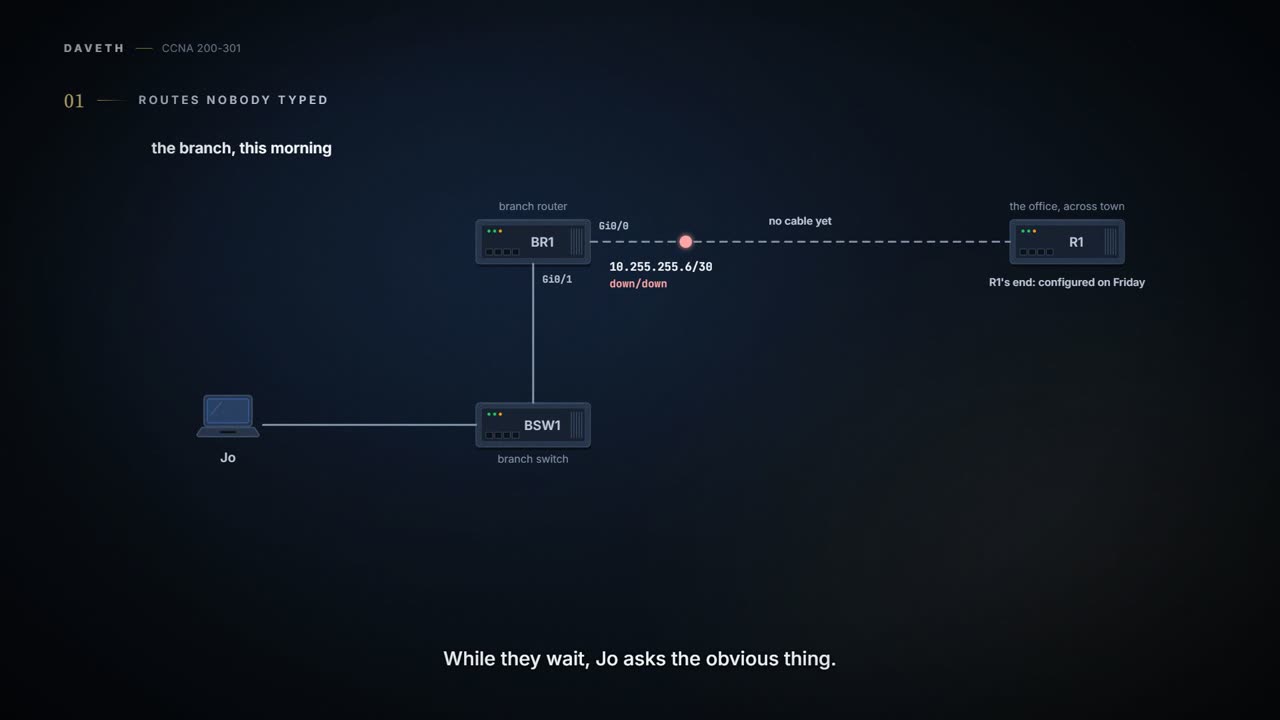
Monday of week two, month three. The provider's engineer is due at the branch to light the fibre, and Maya configured R1's end of the link, 10.255.255.5/30, on Friday. While they wait, Jo asks the obvious thing: "Does BR1 know where anything is? We never told it."
It knows a little. Routers enable IPv4 routing globally by default, so once an interface is up/up with an address, BR1 will route packets in and out of it. And a router can add routes to its routing table in three ways:
- Connected routes, added because of the
ip addressinterface subcommand on the router itself. - Static routes, added because an engineer configured them with the
ip routeglobal command (a later page). - Routing protocols, where routers tell each other about the network so that they all learn routes (OSPF, later in this domain).
Most networks use a routing protocol to learn the routes to remote subnets, and static routes much less often. Connected routes come free. The router adds one for the subnet on each interface, as long as two things are true: the interface is up/up, and it has an address from ip address. The router does the maths itself, taking the interface's address and mask and working out the subnet ID (04.3).
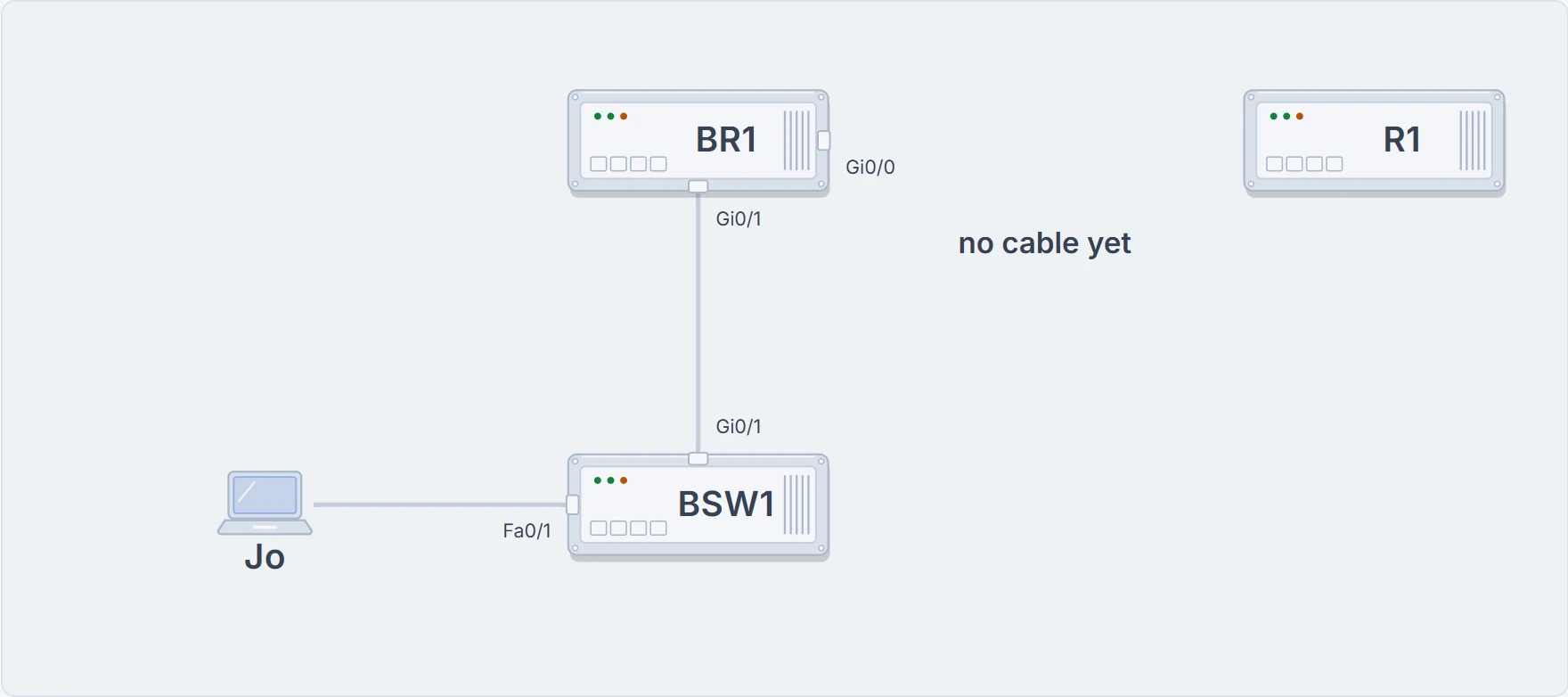
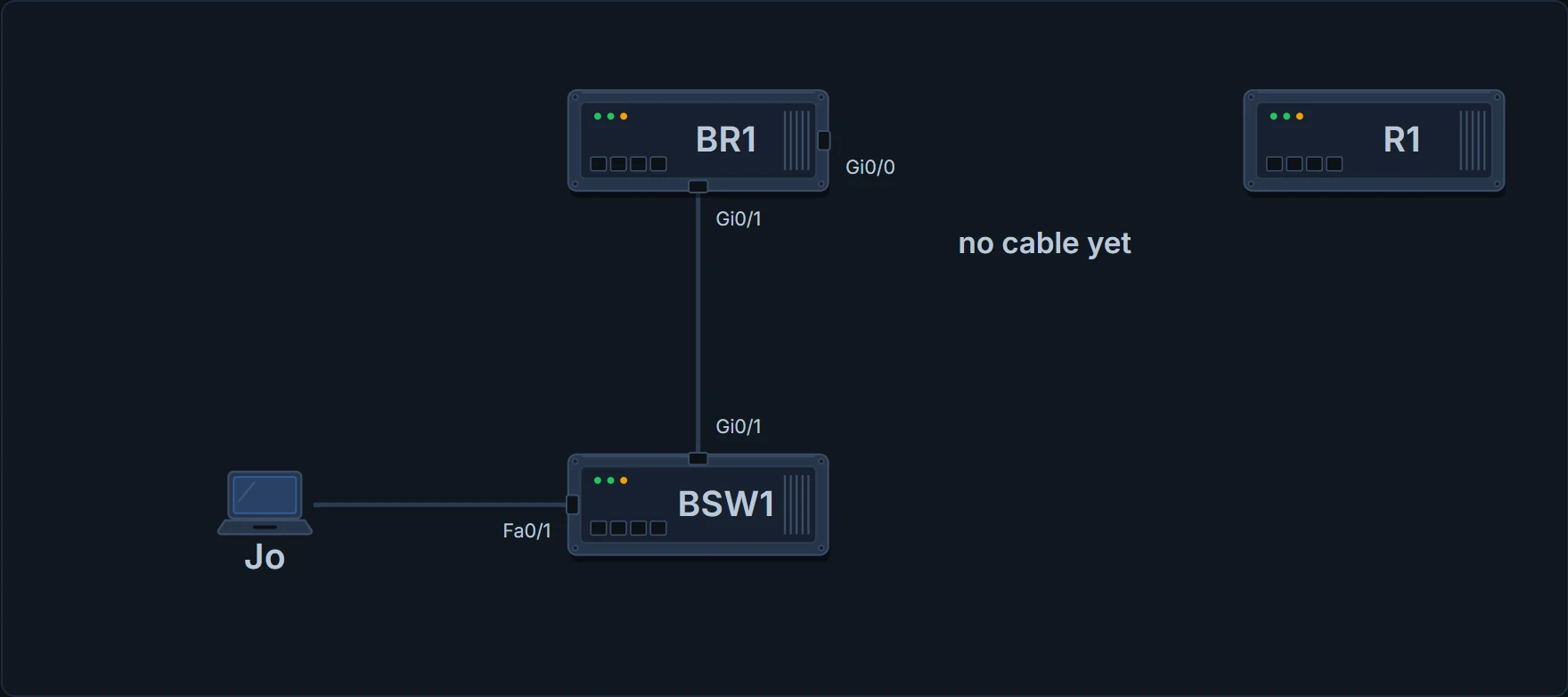
The branch this morning: BR1 Gi0/1 up/up on 10.50.0.1/24; Gi0/0 addressed as 10.255.255.6/30, with no cable yet.
BR1# show ip route
Codes: L - local, C - connected, S - static, R - RIP, M - mobile, B - BGP
       D - EIGRP, EX - EIGRP external, O - OSPF, IA - OSPF inter area
       N1 - OSPF NSSA external type 1, N2 - OSPF NSSA external type 2
       E1 - OSPF external type 1, E2 - OSPF external type 2
       i - IS-IS, su - IS-IS summary, L1 - IS-IS level-1, L2 - IS-IS level-2
       ia - IS-IS inter area, * - candidate default, U - per-user static route
       o - ODR, P - periodic downloaded static route, H - NHRP, l - LISP
       a - application route
       + - replicated route, % - next hop override, p - overrides from PfR

Gateway of last resort is not set

      10.0.0.0/8 is variably subnetted, 2 subnets, 2 masks
C        10.50.0.0/24 is directly connected, GigabitEthernet0/1
L        10.50.0.1/32 is directly connected, GigabitEthernet0/1
BR1#
Two routes, and one of them is a surprise. The C line is the connected route: subnet 10.50.0.0/24 "is directly connected" out GigabitEthernet0/1. The L line is a local route: a /32, a host route matching exactly one address, 10.50.0.1, BR1's own. Routers add a local route for each interface address, while that interface is up/up, and use them to handle packets sent to the router itself more efficiently.
The block at the top is the legend: every code the table could use. This course needs four of them: C connected, L local, S static and O OSPF. Two more words from the exam topics: a route's prefix is just another name for its subnet ID, and its mask is shown in prefix format, /24.
Jo, reading the L line: "So it wrote down its own address." It did, and it didn't need a label maker.
Configured isn't installed
Nothing in that table mentions Gi0/0 at all, and its address is definitely there:
BR1# show running-config
! (lines omitted: an excerpt)
interface GigabitEthernet0/0
 description WAN to R1 at the office
 ip address 10.255.255.6 255.255.255.252
!
BR1# show ip interface brief
Interface                  IP-Address      OK? Method Status                Protocol
GigabitEthernet0/0         10.255.255.6    YES manual down                  down
GigabitEthernet0/1         10.50.0.1       YES manual up                    up
BR1#
The routing table lists what the router can use right now, not everything written in its configuration. Gi0/0 has its address, but it's down/down, so the router leaves its connected route out. When an interface comes up, its connected route appears; when it goes down again, the route goes. You can think of it as a departures board that shows only the trains running today, not the whole timetable. (Where it stops: a train can be cancelled for a hundred reasons; a connected route comes and goes with one thing, its interface's status.)
The fibre arrives
The provider's engineer arrives, the fibre goes into Gi0/0's SFP, and the link comes up at both ends. Nobody touches BR1's configuration.
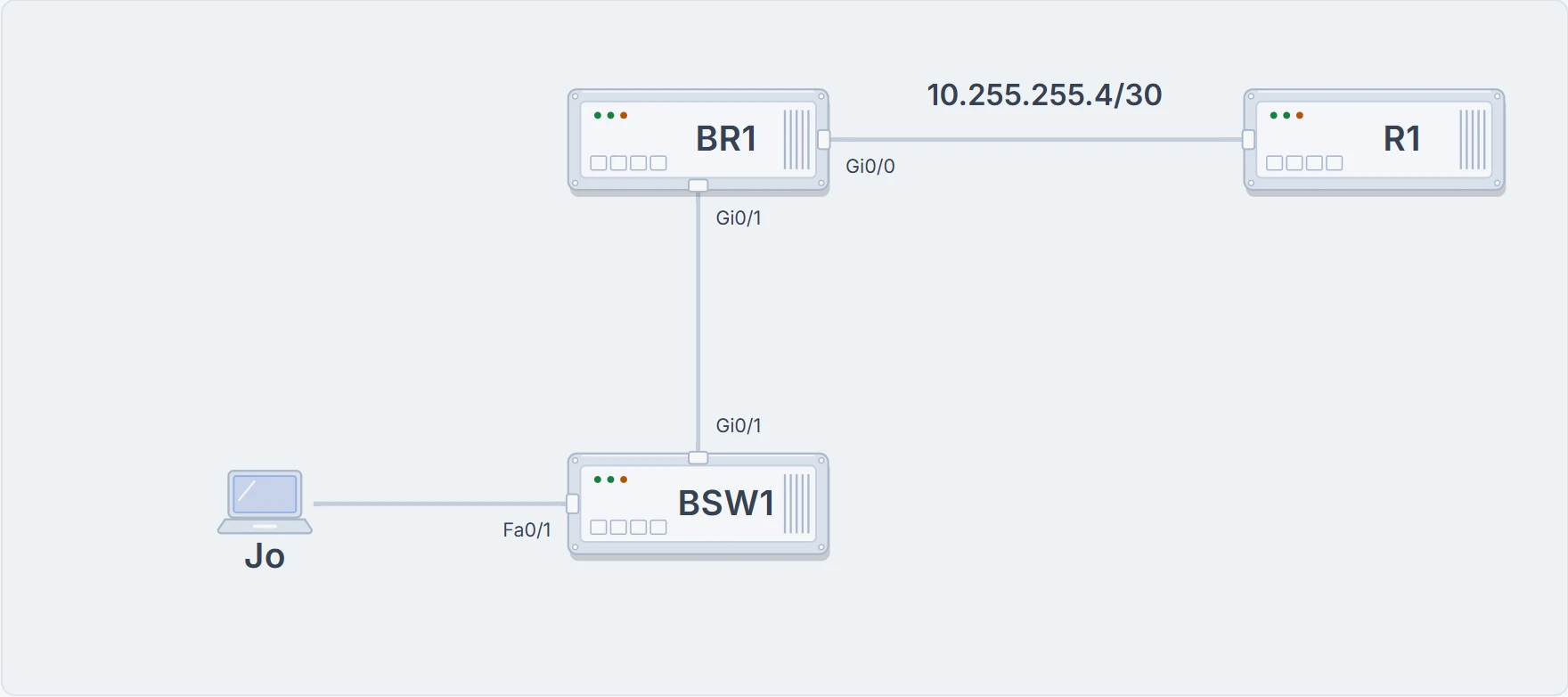
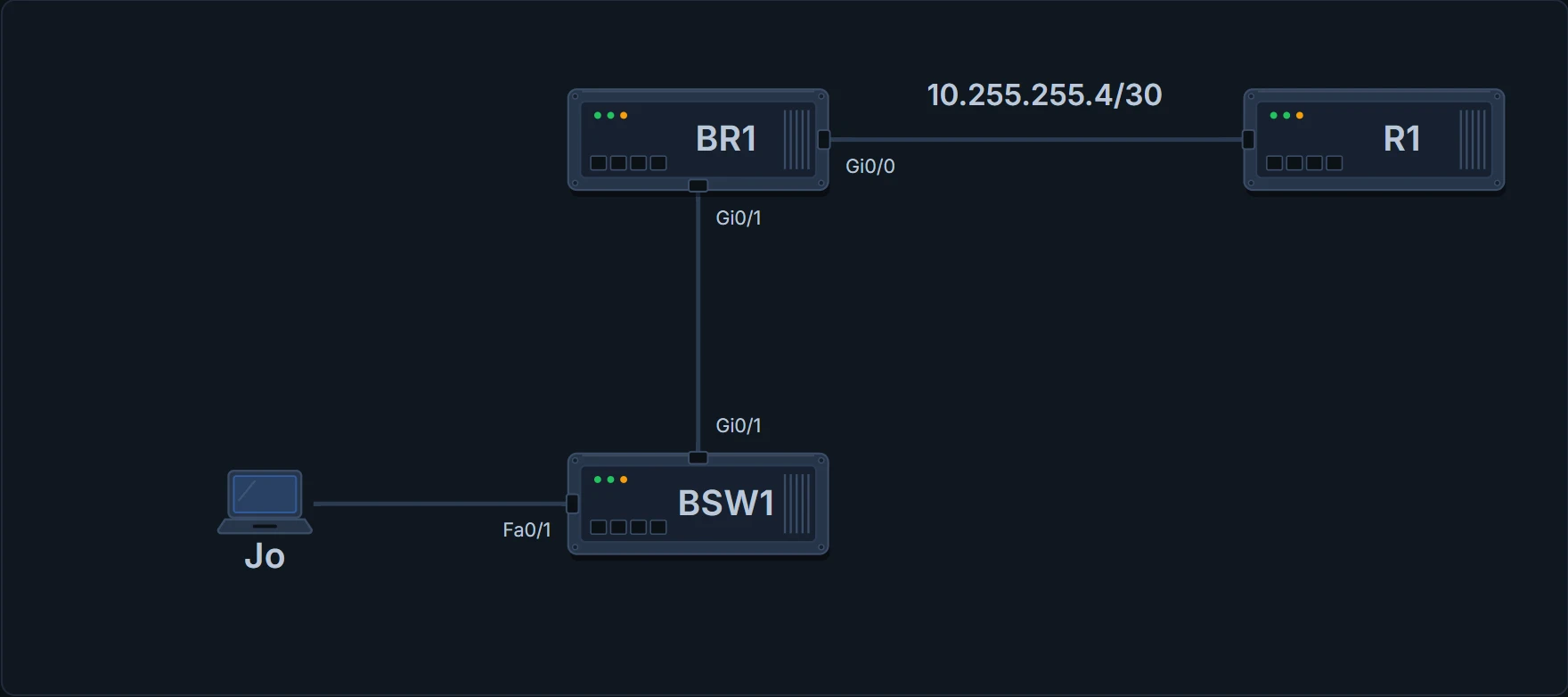
The branch with the fibre live: BR1 Gi0/0 (.6) to R1 (.5) on 10.255.255.4/30.
BR1# show ip interface brief
Interface                  IP-Address      OK? Method Status                Protocol
GigabitEthernet0/0         10.255.255.6    YES manual up                    up
GigabitEthernet0/1         10.50.0.1       YES manual up                    up
BR1# show ip route
! (the legend of codes is left out)
Gateway of last resort is not set

      10.0.0.0/8 is variably subnetted, 4 subnets, 3 masks
C        10.50.0.0/24 is directly connected, GigabitEthernet0/1
L        10.50.0.1/32 is directly connected, GigabitEthernet0/1
C        10.255.255.4/30 is directly connected, GigabitEthernet0/0
L        10.255.255.6/32 is directly connected, GigabitEthernet0/0
BR1#
Gi0/0 is up/up, so its connected route, 10.255.255.4/30, and its local route, 10.255.255.6/32, appear by themselves (the legend is left out this time). Look at the line above them: "10.0.0.0/8 is variably subnetted, 4 subnets, 3 masks". The routing table is organised by classful network (04.2), and this heading line opens the routes inside 10.0.0.0, a Class A network, shown with its default mask, /8. It counts the routes inside it from every source, local routes included (4), and the different masks they use (3: /24, /30 and /32). Before the fibre it said 2 subnets, 2 masks.
Reading one route
Every route has two halves. The matching part, the prefix and its length, defines which destination addresses the route covers. The forwarding part says where to send a matching packet: the outgoing interface, the next-hop router (the next router's IP address), or, typically for a route to a remote subnet, both. Connected routes list only the outgoing interface, because their destinations are on the link itself and no other router is needed.
BR1's table is too small to show everything a route line can say. So Maya pulls out a practice sheet from a study notebook, the table of a bigger router that isn't part of the company's network. One of its lines:
O 172.20.2.0/24 [110/2] via 172.20.9.6, 00:12:31, GigabitEthernet0/2
- O, the legend code: learned from OSPF.
- 172.20.2.0, the prefix (subnet ID), and /24, the prefix length (mask): together, the destinations it matches.
- [110/2]: the first number is the administrative distance, a number for how believable the route's source is (more on it below); the second is the metric, the route's cost as its routing protocol measures it.
- via 172.20.9.6: the next-hop router.
- 00:12:31, the timer: for OSPF and EIGRP routes, the time since the route was first learned.
- GigabitEthernet0/2: the outgoing interface.
Static routes show the same brackets, and in this form stop after the next hop.
Here's the whole sheet.


Which source to believe
A router can hear about the same subnet from more than one source. When two companies connect their networks, for example, one might run OSPF and the other EIGRP, and a router between them can pass routes from one protocol into the other (route redistribution); it can then learn the same subnet from both. Inside one routing protocol, the metric decides which route is best. But two different routing protocols measure their metrics in different ways, so the numbers can't be compared: OSPF might offer 10.1.1.0 with metric 101 and EIGRP the same subnet with metric 2,195,416, and either could be the better path. There's no basis for comparing them.
So the router ranks the sources themselves. Administrative distance is a number for how believable a whole source of routes is on that router; the lower the number, the more believable. When sources disagree about the same subnet, the route from the source with the lowest administrative distance goes in the table. The values are set on each router and never sent to other routers, and they can be changed, for a whole routing protocol, for one particular route, or for a static route.
| Where the route came from | Administrative distance |
|---|---|
| Connected | 0 |
| Static | 1 |
| BGP (external routes [eBGP]) | 20 |
| EIGRP (internal routes) | 90 |
| IGRP | 100 |
| OSPF | 110 |
| IS-IS | 115 |
| RIP | 120 |
| EIGRP (external routes) | 170 |
| BGP (internal routes [iBGP]) | 200 |
| DHCP default route | 254 |
| Unusable | 255 |
If you've ever asked two strangers for directions and followed the one in the bus driver's uniform, that's administrative distance: trust decided by who's talking, not by how confident they sound. (Where it stops: the uniform is a guess about who knows best; the router's ranking is a number per source, written down on that router, which an engineer can change.)
Connected routes score 0. Nobody out-argues the router about its own cables.
When nothing matches
A router that finds no route matching a packet's destination normally just discards the packet. A default route prevents that: 0.0.0.0/0 matches every address, so a packet that matches no other route can still be forwarded using it. A default route can be configured as a static route or learned from a routing protocol.
On the sheet it's the first route, S*: S for static, and the star for a candidate default. A router can learn more than one default route and has to choose; the star means this one is at least a candidate. The line above the routes, "Gateway of last resort is 172.20.9.2 to network 0.0.0.0", names the default route the router chose.
BR1's said "Gateway of last resort is not set": no default route at all. And none of its four routes covers head office. Giving BR1 routes it can't learn from its own cables is the work ahead; first comes exactly how a router chooses a route for a packet.
Maya's to-do list, updated: "Fibre: done. Routes: BR1 knows its own cables and nothing else."
Five lines to keep
- Routes come from three sources: connected (
ip address, while up/up), static (ip route) and routing protocols. - Each up/up interface with an address adds a C route for its subnet and an L /32 route for its own address; configured isn't installed.
- A route line: code, prefix and length (matching), [distance/metric], next hop, timer, outgoing interface (forwarding).
- Administrative distance picks between sources for the same subnet, lowest wins; metrics only compare routes from one protocol.
- 0.0.0.0/0 matches everything; S* is a candidate default; the gateway of last resort is the chosen one; with no match, the packet is discarded.
Next, 05.1.3: Jo's print job reaches BR1 and gets thrown away. What exactly does a router do with each packet, step by step, and how does it choose a route?
The interactive lesson
The whole lesson, with its drawings and its questions. Free with a Daveth account.