
OSPF Router ID, Passive Interfaces, Default Routes and Cost
Every OSPF router needs a router ID: the router-id command, or else the highest up loopback address, or else the highest address of any other up interface. A passive interface still has its subnet advertised but sends no Hellos. One router with the Internet link advertises a default route to the others, so they learn it dynamically.
By Arif, founder of Daveth · Updated
The full 11 min walkthrough is in Daveth Pro (Network). See what the plan opens
What this page answers
How is the OSPF router ID chosen?
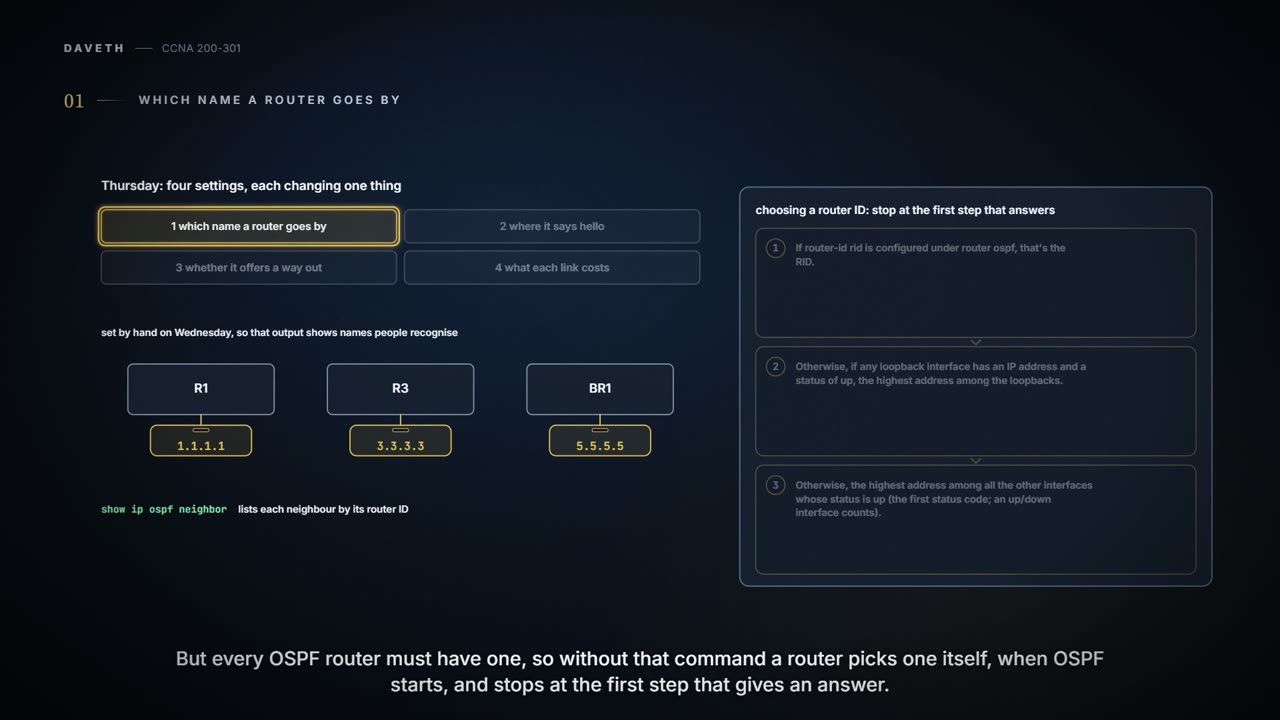
The router-id command if configured; otherwise the highest address among loopback interfaces that are up; otherwise the highest address among the other up interfaces. A change only takes effect after OSPF restarts. Read it in “Which name a router goes by”
What is an OSPF passive interface?
An interface where OSPF still advertises the connected subnet but sends no Hellos and forms no neighbours: the right choice for a LAN with no other router on it. Read it in “Where it says hello”
How do you advertise a default route in OSPF?
On the router with the Internet link and its own default route, the classic design has OSPF advertise a default route, with default-information originate, so every other router learns one pointing to it dynamically. Read it in “Offering a way out”
Which name a router goes by
Thursday, month three, week three. OSPF has run overnight without a murmur, and Ravi has a short list of settings to look at: four of them, each changing one thing. First, the router ID. Most enterprise networks that use OSPF set each router's RID, as Maya did on Wednesday, so that output like show ip ospf neighbor shows names people recognise. But every OSPF router must have one, so without router-id a router picks one itself, when it reloads and brings up OSPF, and stops at the first step that gives an answer:
- If
router-idrid is configured underrouter ospf, that's the RID. - Otherwise, if any loopback interface has an IP address and a status of up, the highest address among the loopbacks.
- Otherwise, the highest address among all the other interfaces whose status is up (the first status code; an up/down interface counts).
A loopback interface is a virtual interface, created with interface loopback number and given an address with ip address, like interface loopback 0 then ip address 2.2.2.2 255.255.255.255. It doesn't depend on any hardware, so it's up and up whenever the router is running, unless someone shuts it down. That makes it a steady thing to base a RID on.
One more thing about timing: OSPF chooses its RID when the process starts, which happens when the router boots or when someone restarts it with clear ip ospf process. Change the router-id or add a loopback while OSPF is running, and the RID stays as it was until the next restart. show ip ospf shows the RID in use: "Routing Process "ospf 1" with ID 5.5.5.5" on BR1.
You can think of a router ID as a name badge rather than a postal address: it tells the other routers who's talking, and nobody sends packets to BR1's 5.5.5.5. (Where it stops: a RID taken from a loopback's address is a real address too, and can be reachable.)
Where it says hello
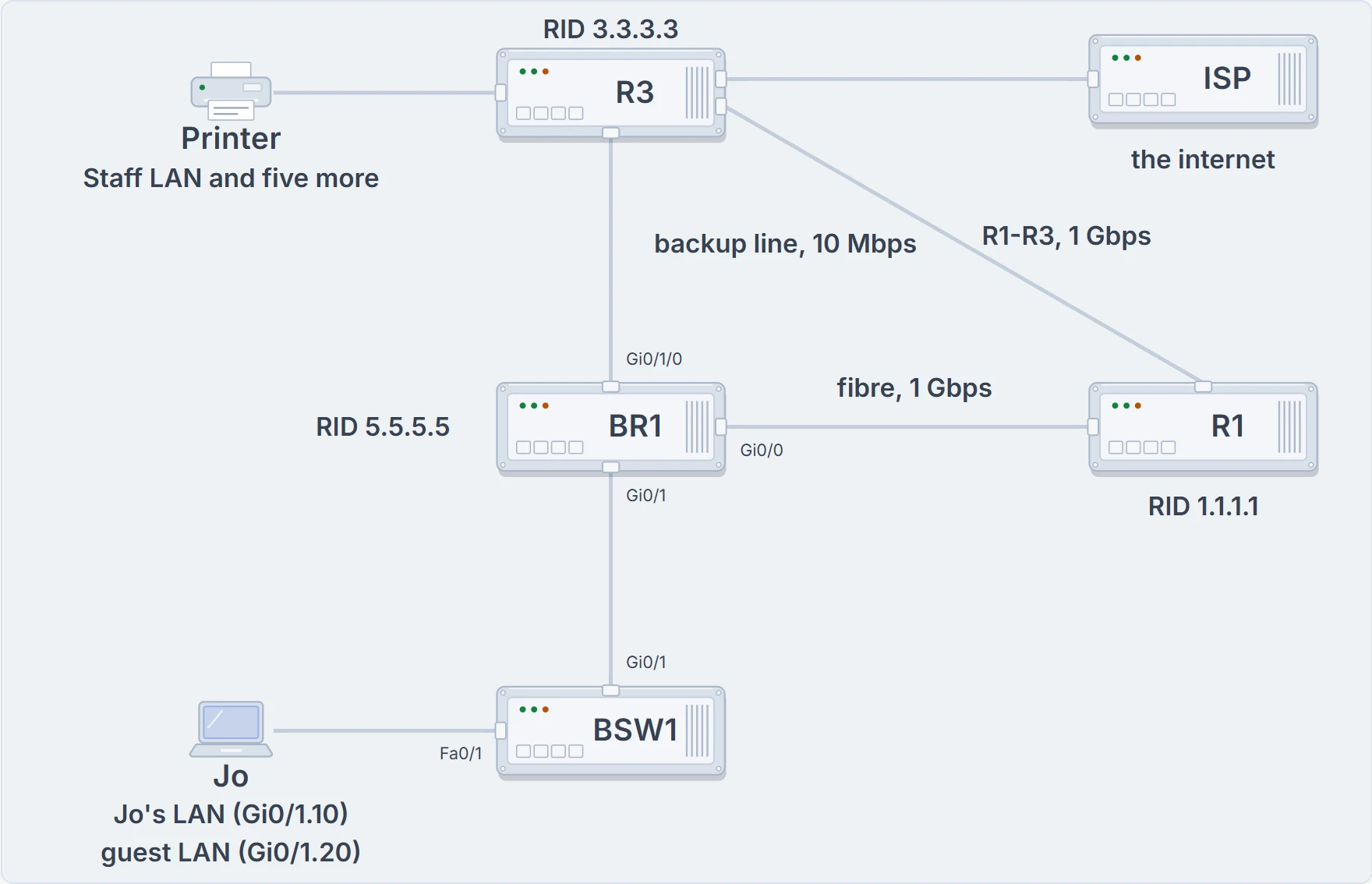
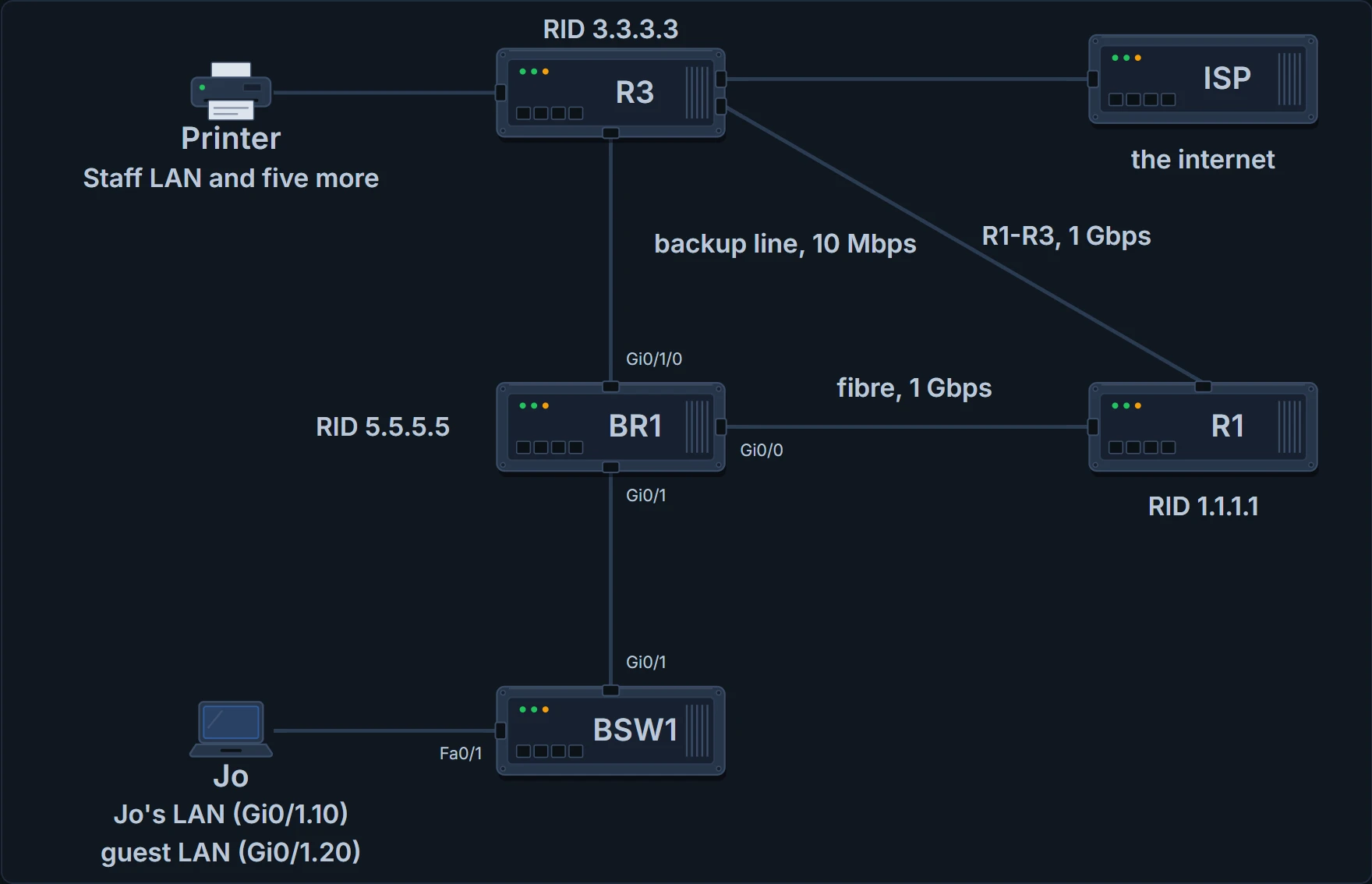
The company on Thursday. New today: R3's link to the ISP. BR1's two LAN subinterfaces lead only to BSW1 and the laptops: no router there to meet.
Once OSPF is enabled on an interface, the router sends Hellos there every Hello Interval and listens for Hellos back. On BR1's two LAN subinterfaces that's wasted effort: the only router on those LANs is BR1 itself. So Maya makes them passive. On a passive interface:
- OSPF still advertises the connected subnet.
- OSPF no longer sends Hellos there.
- OSPF no longer processes any Hellos it receives there.
So every router still learns the subnet, and no neighbour can form on that interface. There are two ways to configure it, both under router ospf: passive-interface type number for each interface that should be passive, or passive-interface default to make every interface passive, then no passive-interface type number for each one that needs neighbours. Use whichever takes fewer commands: two passive LANs out of four interfaces means naming the two.
BR1# configure terminal
Enter configuration commands, one per line.  End with CNTL/Z.
BR1(config)# router ospf 1
BR1(config-router)# passive-interface GigabitEthernet0/1.10
BR1(config-router)# passive-interface GigabitEthernet0/1.20
BR1(config-router)# end
BR1# show ip ospf interface g0/1.10
GigabitEthernet0/1.10 is up, line protocol is up
  Internet Address 10.50.0.1/24, Area 0, Attached via Network Statement
  Process ID 1, Router ID 5.5.5.5, Network Type BROADCAST, Cost: 1
  Topology-MTID    Cost    Disabled    Shutdown      Topology Name
        0           1         no          no            Base
  Transmit Delay is 1 sec, State DR, Priority 1
  Designated Router (ID) 5.5.5.5, Interface address 10.50.0.1
  No backup designated router on this network
  Timer intervals configured, Hello 10, Dead 40, Wait 40, Retransmit 5
    oob-resync timeout 40
    No Hellos (Passive interface)
! (the rest is left out)
BR1#
Nobody on Jo's LAN was ever going to say hello back.
Spotting a passive interface takes some care. show running-config shows the command, if you have enable mode. show ip ospf interface brief still lists passive interfaces, since OSPF is still enabled on them, so it can't tell you. show ip ospf interface for that interface can: one line near the end says "No Hellos (Passive interface)". (The State DR in that output is BR1 being the designated router on a LAN where it's alone; how DRs are chosen is 05.2.5's.)
Offering a way out
A new fact: head office's internet connection is on R3, which learns its own default route from the ISP by DHCP (a DHCP default route has an administrative distance of 254, 05.1.2). The classic design for a company's internet link goes like this: every router learns specific routes for the company's own subnets; one router connects to the internet and has a default route pointing there; and every other router learns a default route pointing to that one router, dynamically.
OSPF does the last part with one router subcommand on the edge router, the one with the internet link: default-information originate. It tells OSPF to advertise a default route while the router's own default route works, and to advertise it as down if that route fails. (With default-information originate always, the router advertises a default route whether its own works or not.) R3 needs a default of its own first: a static one, one learned from the ISP by DHCP, or one learned from the ISP with a routing protocol such as BGP (05.2.1).
router ospf 1
 router-id 3.3.3.3
 network 10.0.0.0 0.255.255.255 area 0
 default-information originate
So Maya removes BR1's typed default route. The floating static via R3, with administrative distance 200, stays configured, and stays out of the table while OSPF offers a default at 110.
BR1# configure terminal
Enter configuration commands, one per line.  End with CNTL/Z.
BR1(config)# no ip route 0.0.0.0 0.0.0.0 10.255.255.5
BR1(config)# end
BR1# show ip route ospf
! (the legend of codes is left out)
Gateway of last resort is 10.255.255.5 to network 0.0.0.0

O*E2  0.0.0.0/0 [110/1] via 10.255.255.5, 00:00:41, GigabitEthernet0/0
      10.0.0.0/8 is variably subnetted, 16 subnets, 3 masks
O        10.30.0.0/24 [110/3] via 10.255.255.5, 00:26:02, GigabitEthernet0/0
O        10.97.0.0/24 [110/3] via 10.255.255.5, 00:26:02, GigabitEthernet0/0
O        10.98.0.0/24 [110/3] via 10.255.255.5, 00:26:02, GigabitEthernet0/0
O        10.99.0.0/24 [110/3] via 10.255.255.5, 00:26:02, GigabitEthernet0/0
O        10.100.0.0/24 [110/3] via 10.255.255.5, 00:26:02, GigabitEthernet0/0
O        10.200.0.0/24 [110/3] via 10.255.255.5, 00:26:02, GigabitEthernet0/0
O        10.255.255.0/30 [110/2] via 10.255.255.5, 00:26:02, GigabitEthernet0/0
BR1#
The default route's code is O*E2: learned by OSPF, a default route (the asterisk), and specifically an external OSPF route. Its metric shows 1; how external routes are measured is beyond this course.
The gateway of last resort is the default route the router is using right now (05.1.2), and it now uses the OSPF one, next hop R1 at 10.255.255.5. R1 learns the same default, pointing towards R3, so every router in the company now has a way out.
R3 can offer the way out only while it knows the way out itself.
Continue the lesson
The whole lesson, with its drawings and its questions. 3 more sections after the ones above.