
Layer 3 Switch, Routed Ports and Layer 3 EtherChannel
On a switch that can route, no switchport turns a physical port into a routed port: it acts like a router port and takes the IP address itself. Routed ports suit point-to-point links between devices that route, such as core and distribution switches. A Layer 3 EtherChannel bundles parallel routed links, with the address on the port-channel interface.
By Arif, founder of Daveth · Updated
The full 10 min walkthrough is in Daveth Pro (Network). See what the plan opens
What this page answers
What is a routed port on a switch?
A switch port made to act like a router port with no switchport, so the IP address goes on the physical port itself. It suits any point-to-point link between two devices that route. Read it in “Making one”
What is a Layer 3 EtherChannel?
Parallel routed links bundled into one, so the switches keep one routed link and one neighbour relationship instead of two. The bundle is a PortChannel, configured with the keyword port-channel. Read it in “Two cables, one routed link”
Should inter-VLAN routing use a routed port or an SVI?
Routed ports for point-to-point links between routing switches; SVIs for VLANs that reach many access and trunk ports. Read it in “Where each fits”
A port that routes
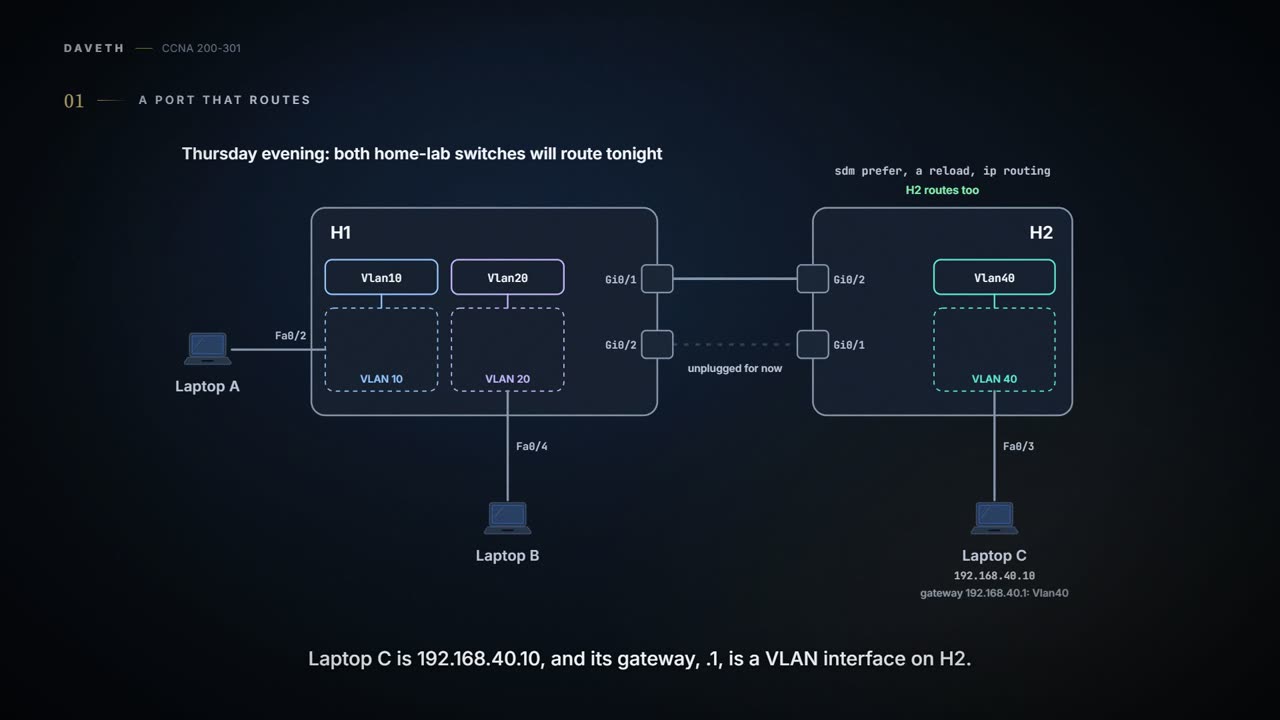
Thursday evening, and both home-lab switches will route tonight. Maya starts from a clean slate: the Layer 2 channel from 03.2.1 comes off, and the second cable between H1 and H2 is unplugged for now. H2 gets the same treatment H1 had yesterday (sdm prefer, a reload, ip routing) and a VLAN of its own, VLAN 40 (vlan 40, and Fa0/3 as its access port, 03.1.2), for Laptop C on Fa0/3: 192.168.40.10, gateway 192.168.40.1, a VLAN interface on H2.
With SVIs, a Layer 3 switch's physical ports still act as Layer 2 ports: they learn source MAC addresses and forward frames by destination MAC, and only frames addressed to a VLAN interface's MAC reach the routing logic. There's a second option. A physical port can be made to act like a router interface instead: a routed port.
A frame arriving on a routed port gets no Layer 2 switching at all. It gets routing:
- Strip off the incoming frame's Ethernet header and trailer.
- Compare the destination IP address with the routing table.
- Add a new Ethernet header and trailer.
- Forward the packet in its new frame.
Which to use depends on how many physical ports connect to the subnet. When only one does, a routed port works (an SVI with that one port as an access port in its own VLAN would work too). When many do, it has to be an SVI, because an SVI forwards traffic into its VLAN, and the Layer 2 logic can then send it out any port in that VLAN; a routed port can't. The link between H1 and H2 is one cable carrying one subnet, 192.168.30.0/30: a routed port at each end. The laptops' VLANs keep their SVIs.
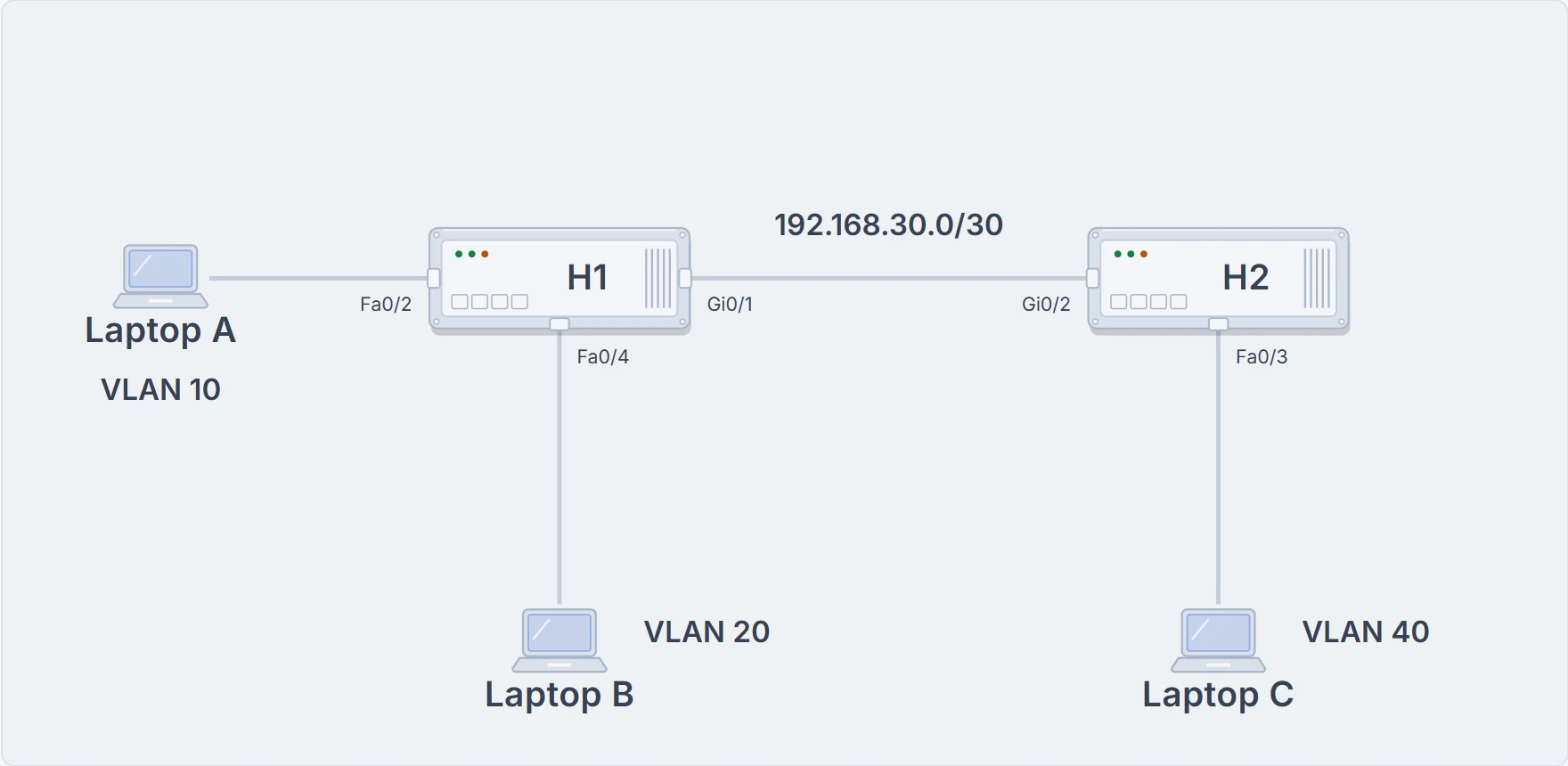
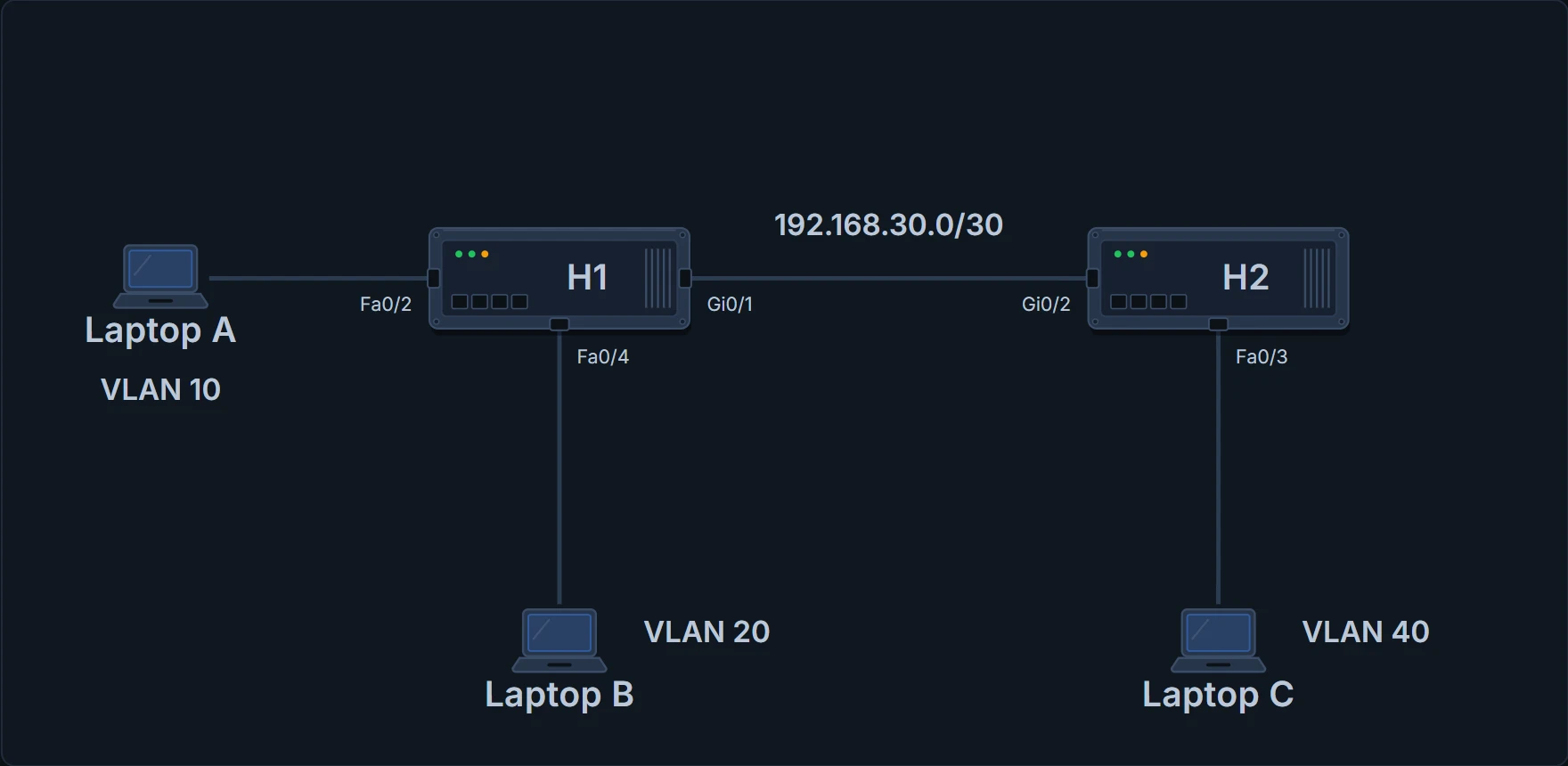
Tonight's home lab: H1 with Laptops A (VLAN 10) and B (VLAN 20), H2 with Laptop C (VLAN 40), and one cable between them as a routed link.
Making one
On a switch that can route, every physical port starts with the switchport command, which tells the switch to treat it as a port on a switch: a Layer 2 port. no switchport makes it stop acting like a switch port and act like a router port instead, and then the IP address goes on the physical port itself. Each switch also needs a route to the other's LAN. H1 gets a static route to 192.168.40.0/24 via H2; H2, with only one way out, gets a default route via H1 (05.1.4):
H1# configure terminal
Enter configuration commands, one per line. End with CNTL/Z.
H1(config)# interface GigabitEthernet0/1
H1(config-if)# no switchport
H1(config-if)# ip address 192.168.30.1 255.255.255.252
H1(config-if)# exit
H1(config)# ip route 192.168.40.0 255.255.255.0 192.168.30.2
H1(config)# end
H1#
H2# configure terminal
Enter configuration commands, one per line. End with CNTL/Z.
H2(config)# ip routing
H2(config)# interface vlan 40
H2(config-if)# ip address 192.168.40.1 255.255.255.0
H2(config-if)# no shutdown
H2(config-if)# interface GigabitEthernet0/2
H2(config-if)# no switchport
H2(config-if)# ip address 192.168.30.2 255.255.255.252
H2(config-if)# exit
H2(config)# ip route 0.0.0.0 0.0.0.0 192.168.30.1
H2(config)# end
H2#
H1# show interfaces g0/1
GigabitEthernet0/1 is up, line protocol is up (connected)
! (the hardware line is left out)
 Internet address is 192.168.30.1/30
! (more lines left out)
H1# show interfaces status
! (only the ports in this example are shown)
Port      Name               Status       Vlan       Duplex  Speed Type
Fa0/2                        connected    10         a-full  a-100 10/100BaseTX
Fa0/4                        connected    20         a-full  a-100 10/100BaseTX
Gi0/1                        connected    routed     a-full a-1000 10/100/1000BaseTX
H1# show ip route
! (the legend of codes is left out)
Gateway of last resort is not set

      192.168.10.0/24 is variably subnetted, 2 subnets, 2 masks
C        192.168.10.0/24 is directly connected, Vlan10
L        192.168.10.1/32 is directly connected, Vlan10
      192.168.20.0/24 is variably subnetted, 2 subnets, 2 masks
C        192.168.20.0/24 is directly connected, Vlan20
L        192.168.20.1/32 is directly connected, Vlan20
      192.168.30.0/24 is variably subnetted, 2 subnets, 2 masks
C        192.168.30.0/30 is directly connected, GigabitEthernet0/1
L        192.168.30.1/32 is directly connected, GigabitEthernet0/1
S     192.168.40.0/24 [1/0] via 192.168.30.2
H1# show interfaces g0/1 switchport
Name: Gi0/1
Switchport: Disabled
H1#
Four commands show the change. show interfaces lists an IP address for Gi0/1, as it would for a router interface, which it doesn't for a switch port. show interfaces status shows routed in the Vlan column where a switch port would show its VLAN or the word trunk. show ip route lists Gi0/1 as the outgoing interface for 192.168.30.0/30. And show interfaces g0/1 switchport is short: the port isn't a switch port.
Gi0/1 used to sort frames by MAC address. Now it reads IP addresses and has opinions about routes.
Where each fits
A routed port works well for any point-to-point link (a link with exactly two devices on it) between two devices that route. Larger campuses often split their switches into layers: access switches for the end devices, distribution switches that gather the access switches, and core switches that join the distribution switches together. The core and distribution switches do the Layer 3 switching: every link directly between two of those can be a routed port, while the VLANs that reach many access and trunk ports use SVIs. In a design like that, the core switches can have only routed ports, and each distribution switch has some routed ports and some SVIs. H1 is the same mix in miniature: SVIs for its two VLANs, a routed port towards H2.
Two cables, one routed link
Most designs use at least two links between each pair of distribution and core switches. Each link could be its own routed port, and that works, but once a routing protocol runs (the way routers tell each other about routes, coming later in this domain; each pair of routers exchanging routes has a neighbour relationship), each switch learns two routes per destination with the same neighbour as next hop, one over each link, and keeps two neighbour relationships. A Layer 3 EtherChannel bundles the parallel links into one routed link instead: one neighbour relationship, one route per destination, and traffic balanced across the members, often better than with two routes to the same subnet. The configuration term for the bundle is PortChannel, with the keyword port-channel; treat it as another name for the EtherChannel.
So Maya plugs the second cable back in, H1 Gi0/2 to H2 Gi0/1, and turns the pair into a routed Po1.
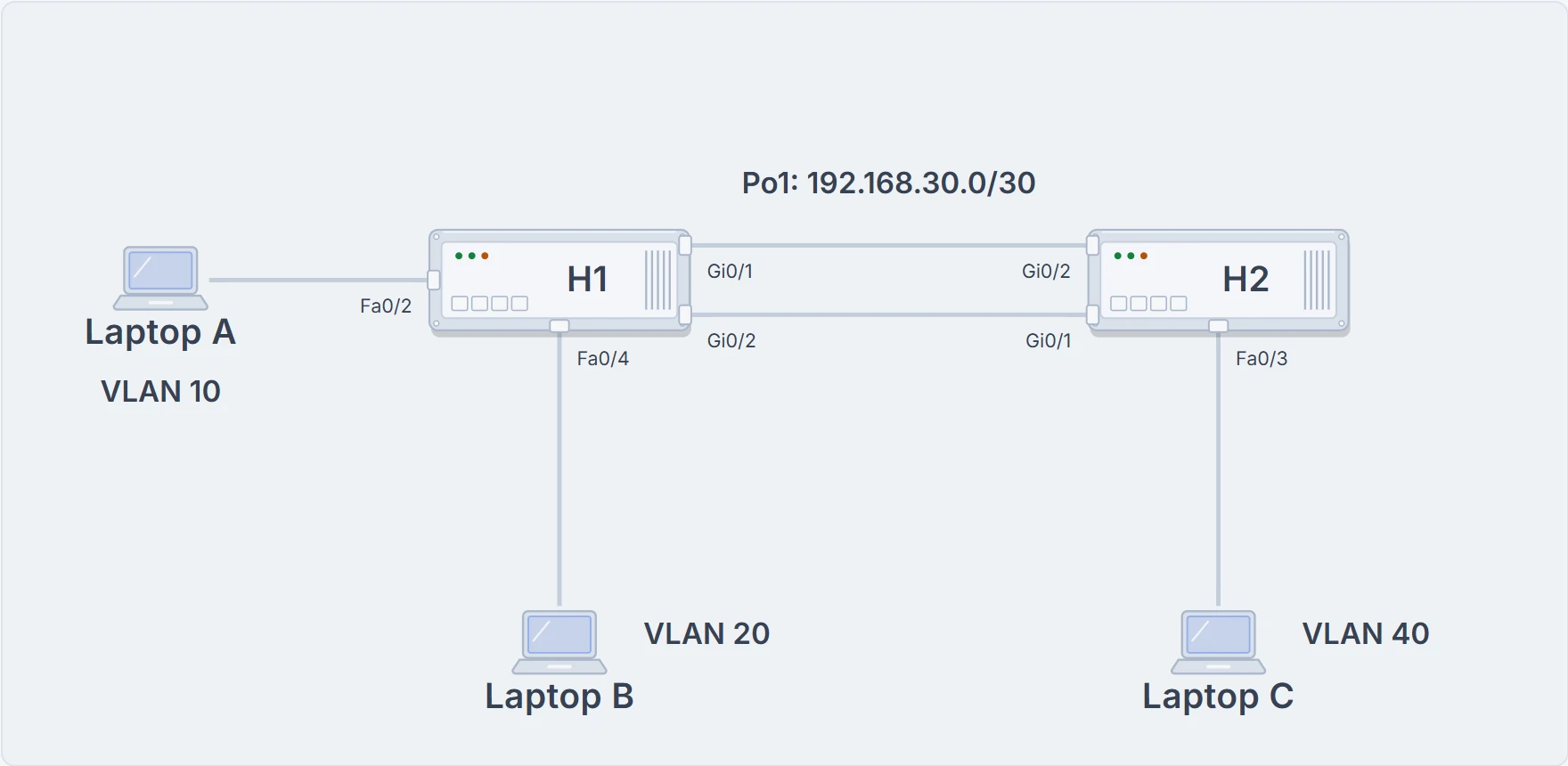
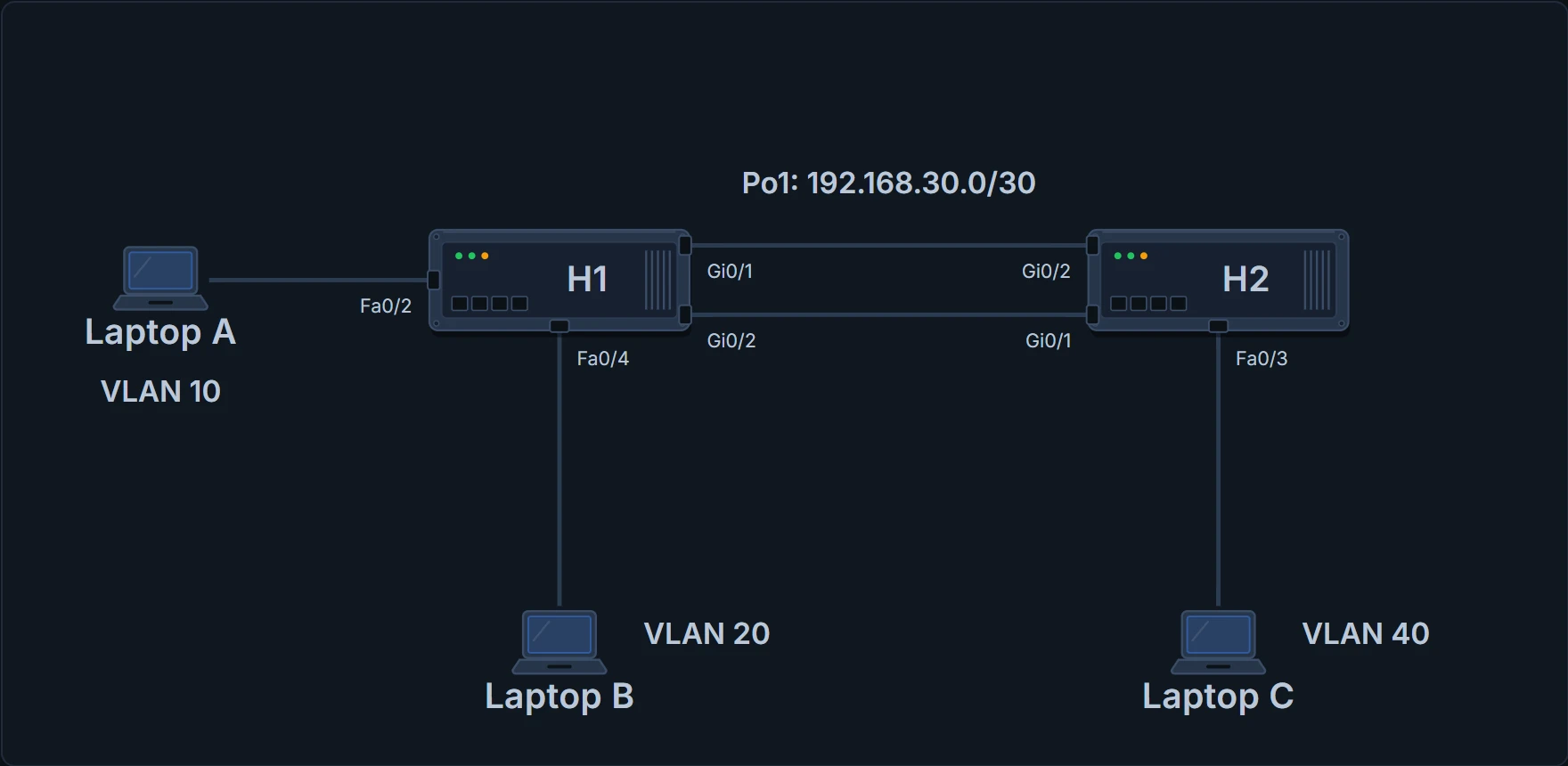
Both cables back in: Po1 on each switch, one routed link, 192.168.30.0/30.
Two steps. On each physical member: channel-group number mode (the same modes as a Layer 2 channel, 03.2.1; the same number on every member of one switch, though the neighbour may use another number) and no switchport. Then interface port-channel number, no switchport (the switch may already have added it) and ip address. The address goes on the port-channel interface only; no switchport on a member also adds the command no ip address to it. Gi0/1 is the exception tonight: it became a routed port earlier, with its own address, so it doesn't get no switchport again, and Maya removes its address with no ip address. H1 uses LACP active, as in 03.2.1.
Continue the lesson
The whole lesson, with its drawings and its questions. The rest of this section and 2 more after it.