
Troubleshooting IPv4 Routing with Ping and Traceroute
When a remote host stops answering, ping from the router nearest the user. A router's ping sends 5 echo requests and prints ! for each reply and . for each timeout. A standard ping uses the router's outgoing address as the source; an extended ping with the LAN address as the source also tests the route back to the user's subnet.
By Arif, founder of Daveth · Updated
The full 11 min walkthrough is in Daveth Pro (Network). See what the plan opens
What this page answers
How do you read a ping on a Cisco router?
It sends 5 echo requests with a 2-second timeout and prints ! for each reply and . for each timeout, then a success rate. A first . followed by !!!! is common and normal: some device on the path was still waiting on ARP. Read it in “Pinging from the router”
What is an extended ping?
A ping that lets the router use a different source address, such as ping 10.100.0.80 source 10.50.0.1. With the LAN address as the source, the replies have to come back to that LAN, so the route back is tested too. Read it in “Testing the way back”
What does a ping to a host on the router's LAN prove?
If it works, the host replied, the LAN passes frames both ways, and both ends have done ARP. It does not test the host's default gateway, because the reply goes to the router's address on the host's own subnet. Read it in “Neighbours, names, and the evidence desk”
"The printer doesn't work"
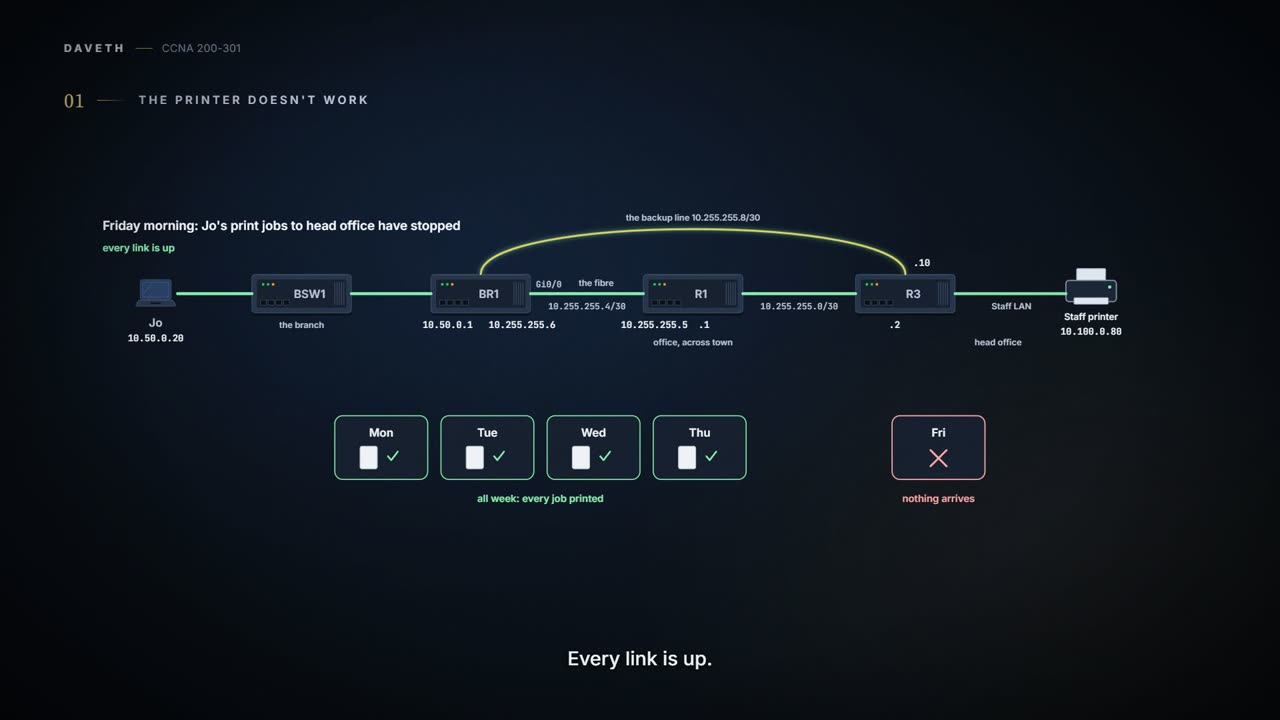
Friday morning, month three. Jo's print jobs to head office's Staff printer, 10.100.0.80, went through all week; since this morning, nothing arrives. Every link is up. Ravi mentions, in passing, that R3's configuration got a tidy-up last night.
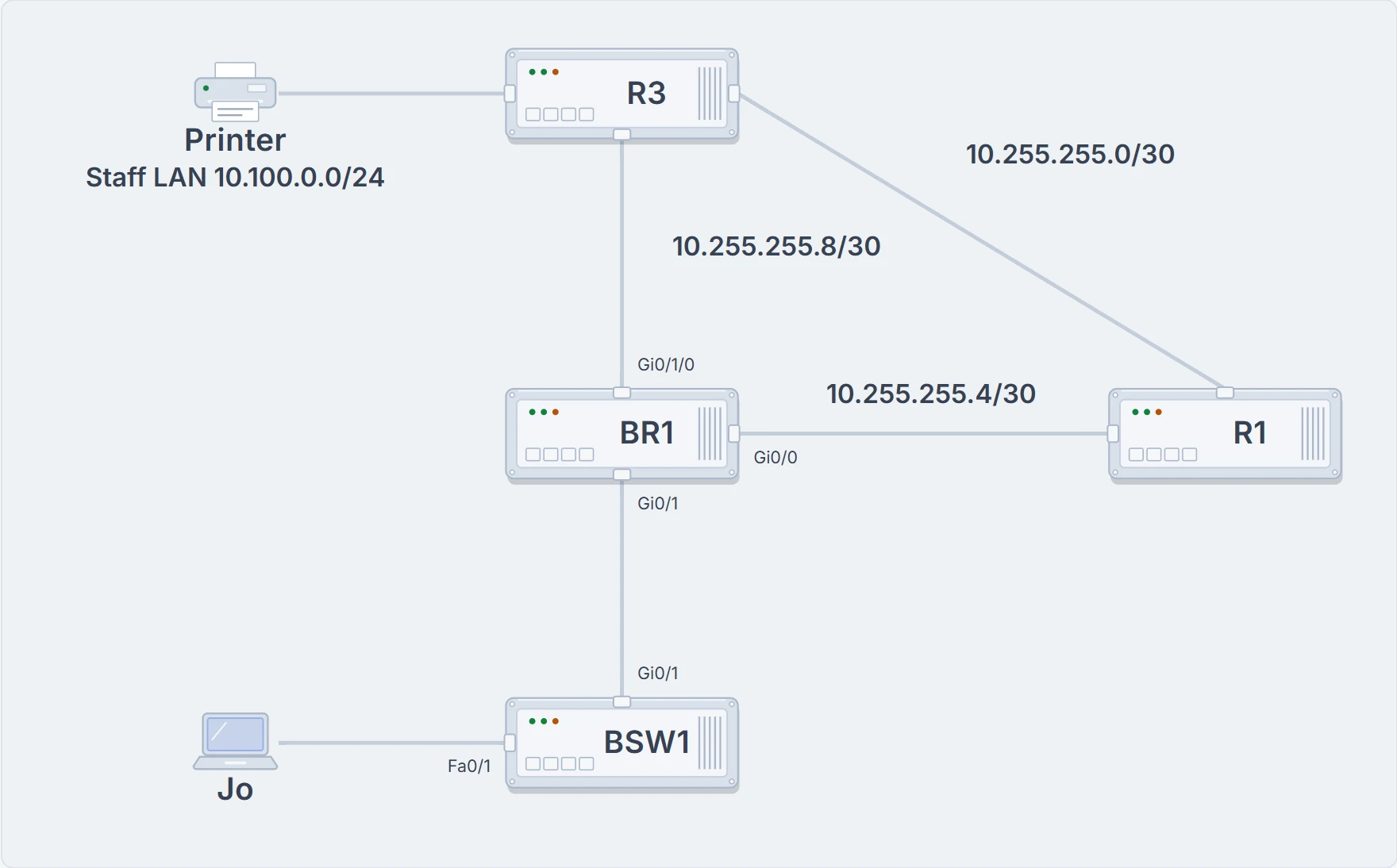
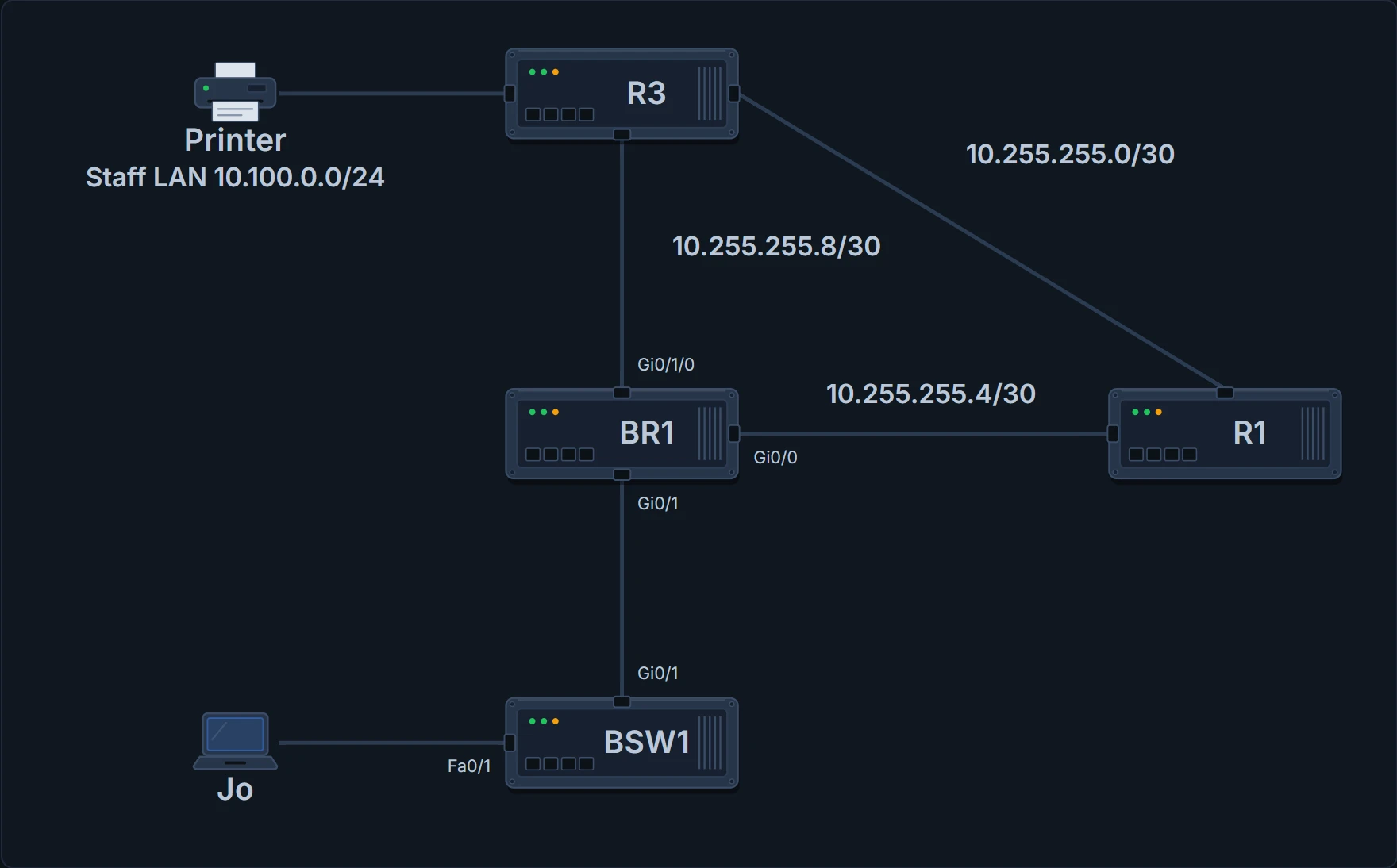
The path of Jo's print jobs: BSW1, BR1, the fibre to R1, R1 to R3, and the printer on head office's Staff LAN. The backup line joins BR1 to R3 directly.
The first tool is ping (01.8). It sends packets that mean "if you receive this and it's addressed to you, send a reply back": an ICMP echo request, answered by an ICMP echo reply. ICMP doesn't use TCP or UDP or any application; it works as part of Layer 3, a control protocol that helps IP. Each reply that comes back proves a packet made it from the source to the destination and back again. Ping, and traceroute later on this page, test the data plane: whether the devices can actually forward packets.
Jo's laptop tells a quick story: a ping to its gateway, 10.50.0.1, gets replies, and a ping to 10.100.0.80 times out. That narrows nothing down very far. It says something on the round trip between Jo and the printer is broken; the failed ping alone doesn't say which device, or even which direction.
Pinging from the router
Often the person looking into a problem can't use the user's own device, so ping from the router nearest the user instead: here, Jo's gateway, BR1. On a router, ping sends 5 echo requests with a 2-second timeout, and prints a ! for each reply and a . for each timeout, then a success rate. A first . followed by !!!! is common and normal: usually some device on the path was still waiting on ARP.
BR1# ping 10.100.0.80
Type escape sequence to abort.
Sending 5, 100-byte ICMP Echos to 10.100.0.80, timeout is 2 seconds:
!!!!!
Success rate is 100 percent (5/5), round-trip min/avg/max = 4/5/8 ms
BR1#
That's the trap. A router's standard ping uses its outgoing interface's address as the source: BR1 sends towards head office out Gi0/0, so the echo requests come from 10.255.255.6, and the printer's replies go back to 10.255.255.6. A success does prove a lot: BR1 has a route to the printer; every router on the way does; the printer's gateway works; every router on the way back has a route to 10.255.255.6; the interfaces are up; the LAN at head office is passing frames (switch ports connected, STP forwarding, port security not filtering); no ACL filtered the pings (ACLs and port security come later in the course; an outbound ACL on BR1 wouldn't have touched them anyway, since it doesn't filter packets the router creates itself); and ARP worked at head office, with the switches there learning the MAC addresses involved. What it can't prove is the one thing Jo's jobs need: a way back to 10.50.0.0. The route towards the destination is the forward route; the one the replies use is the reverse route, and a standard ping from a router tests the reverse route to its own address only.
If you've ever posted a letter with a stamped addressed envelope for the answer, ping works the same way: the reply goes to whatever return address was on the request, and a good reply to the office says nothing about the post to your home. (Where it stops: you choose the address you write on the envelope; a router's standard ping picks its outgoing interface's address unless you tell it otherwise.)
Testing the way back
An extended ping lets the router use a different source address. Type ping alone and the router asks for each setting in turn (protocol, target, repeat count, size, timeout, "Extended commands", then "Source address or interface"), or type it in one line: ping 10.100.0.80 source 10.50.0.1. With BR1's LAN address as the source, the replies have to come back to the branch's LAN:
BR1# ping 10.100.0.80 source 10.50.0.1
Type escape sequence to abort.
Sending 5, 100-byte ICMP Echos to 10.100.0.80, timeout is 2 seconds:
Packet sent with a source address of 10.50.0.1
.....
Success rate is 0 percent (0/5)
BR1#
Five dots. The requests reach the printer (the standard ping proved that path for packets from 10.255.255.6, and routers forward by destination), so it's the replies to 10.50.0.1 that don't make it back. Somewhere on the way back, a router has no route to the branch's LAN. Even an extended ping can't mimic Jo's laptop exactly, because a router can't send packets from Jo's own address. So neither kind of router ping can test:
- ACLs that discard packets from Jo's address but allow the router's.
- Port security filtering Jo's frames by Jo's MAC address.
- Routes that happen to match Jo's address but not 10.50.0.1.
- Jo's laptop's own default gateway setting.
The printer did reply every time. The replies just had nowhere to go.
Neighbours, names, and the evidence desk
Pings to neighbours narrow things down quickly. A standard ping from BR1 to a host on its LAN, if it works, shows the host replied, the LAN passes frames both ways, and both ends have done ARP; if it fails, suspect the host's address, DHCP, a trunking mismatch between router and switch, or the LAN itself. It doesn't test the host's default gateway: the reply goes to BR1's LAN address, on the host's own subnet. An extended ping to the same host, sourced from an address in another subnet, does test it. If the standard ping works and the extended one fails, look at the host's gateway setting.
A ping to the router at the other end of a WAN link shows both ends' interfaces are up/up, Layers 1 and 2 of the link work, the routers agree on the link's subnet, neither router's inbound ACL filtered the pings, and the far router has the expected address. It tests nothing beyond the link. And pinging by name adds DNS to the test: the host first checks its own cache of names it has already resolved, then asks a DNS server, and only then sends the ping. If a ping to a name fails and a ping to its address works, the problem is usually DNS.
The evidence desk
BR1# ping 10.100.0.80
Type escape sequence to abort.
Sending 5, 100-byte ICMP Echos to 10.100.0.80, timeout is 2 seconds:
!!!!!
Success rate is 100 percent (5/5), round-trip min/avg/max = 4/5/8 ms
- A success proves
- BR1's route to the printer, the printer's gateway, and the way back to 10.255.255.6.
- It doesn't prove
- The way back to the branch's LAN, 10.50.0.0: that reply went to BR1's WAN address.
Continue the lesson
The whole lesson, with its drawings and its questions. 3 more sections after the ones above.