
First Hop Redundancy Protocols
A host has one default gateway setting, so if that router fails, the LAN loses everything beyond it. A first hop redundancy protocol lets two or more routers share a virtual IP address that hosts use as their gateway. With HSRP, one active router handles the traffic and a standby waits, taking over the virtual IP and MAC if the active fails.
By Arif, founder of Daveth · Updated
The full 11 min walkthrough is in Daveth Pro (Network). See what the plan opens
What this page answers
What is first hop redundancy?
Routers sharing a virtual IP address in the subnet, which hosts use as their one default router. The routers exchange FHRP messages so they agree which one forwards, and another takes over if it fails, with no change on the hosts. Read it in “What any FHRP does”
How does HSRP work?
With an active/standby model: only the active router handles the hosts' traffic, using the virtual IP address and a virtual MAC address; the standby routers wait to take over. Read it in “HSRP: active and standby”
One router, one way out
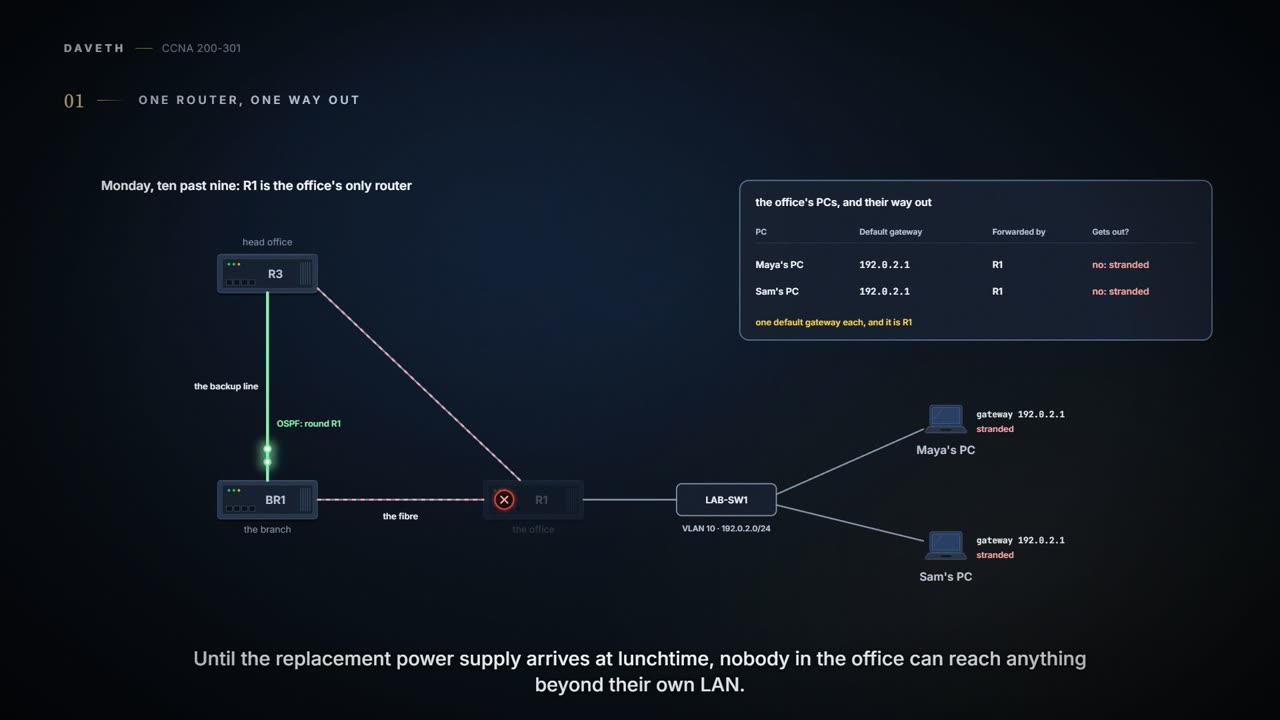
Monday, month four, week one. At ten past nine, R1's power supply dies. OSPF does its job: the branch and head office route around R1 over the backup line by themselves. The office itself is another story. Every PC there has one default gateway, R1, and until the replacement power supply arrives at lunchtime, nobody in the office can reach anything beyond their own LAN.
Two ways out of the building would have helped. The PCs only ever knew about one.
Redundancy often needs another protocol to make use of it. Two WAN links can use a routing protocol to pick the best one and switch when it fails (05.2). A LAN with redundant links and switches needs STP or RSTP to stop frames looping (03.3). And two routers on the same subnet need a third kind: a First Hop Redundancy Protocol (FHRP), so the hosts can make use of both.
Something in a network eventually fails: a power supply, a cable, a switch. WAN links, drawn as simple lines, are the most complicated physical parts of all, with many pieces that can fail. Any one part whose failure takes down part of the network is a single point of failure. To improve availability (how much of the time the network works), the engineer finds them and chooses where to add redundancy: redundant devices and links, plus whatever function takes advantage of them. A second WAN link is often first: it adds a monthly charge, but WAN links are statistically the most likely part to fail. The company did that with the backup line. What's left is a calculated risk: many outages end with a quick reload, but a hardware failure means waiting for a replacement, like this morning's power supply. R1 was one of those risks for the office.
R1 picked a Monday morning. Of course it did.
Two routers, one gateway setting
Ravi installs R2 on the office LAN, VLAN 10, next to R1. But a PC's logic doesn't change: it has one default-router setting. Without anything more, the options for using two routers are all manual:
- Every PC uses R1, and people reconfigure their gateway to R2 if R1 fails.
- Every PC uses R2, and people switch to R1 if R2 fails.
- Half use R1 and half use R2, and whichever half loses its router reconfigures.
Every one of those needs the users to act: to know an outage happened, know how to change their default router setting, and know when to change it back. An FHRP makes the two routers look like a single default router instead, so the users never have to do anything. Their default router setting stays the same, and so does their ARP table.
What any FHRP does
First hop means the default router: the first router, or first router hop, a packet from a host passes through. Whichever FHRP is used, it makes five things happen:
- The hosts behave as they always have, with one default router setting that never has to change.
- The default routers share a virtual IP address in the subnet, defined by the FHRP.
- The hosts use that virtual IP address as their default router.
- The routers exchange FHRP messages so they agree which router does what at any moment.
- When a router fails or has a problem, the routers use the FHRP to choose which one takes over.
The name doesn't belong to one protocol. It's a family, and a network picks one member:
| Protocol | Full name | Origin | Redundancy | Load balancing per |
|---|---|---|---|---|
| HSRP | Hot Standby Router Protocol | one vendor's own | active/standby | subnet |
| VRRP | Virtual Router Redundancy Protocol | an open standard, RFC 5798 | active/standby | subnet |
| GLBP | Gateway Load Balancing Protocol | one vendor's own | active/active | host |
HSRP came first, then a similar open standard, VRRP, from the Internet Engineering Task Force (IETF, the body that writes the internet's standards, its RFCs), and then GLBP, which spreads hosts across routers. The exam asks what an FHRP does, and HSRP, still a popular choice in many networks, is the example here.
HSRP: active and standby
HSRP uses an active/standby model (also called active/passive). Two or more routers cooperate, all willing to be the default router, but at any one time only one, the active router, handles the hosts' traffic; the others, in the standby state, wait to take over. The active router uses a virtual IP address that's part of the HSRP configuration, alongside each router's usual interface address, and a matching virtual MAC address the router creates by itself. Every HSRP router in the group (the set of routers sharing that virtual address) knows both; only the active one uses them. The virtual IP is in the same subnet as the routers' interface addresses, but it's a different address.
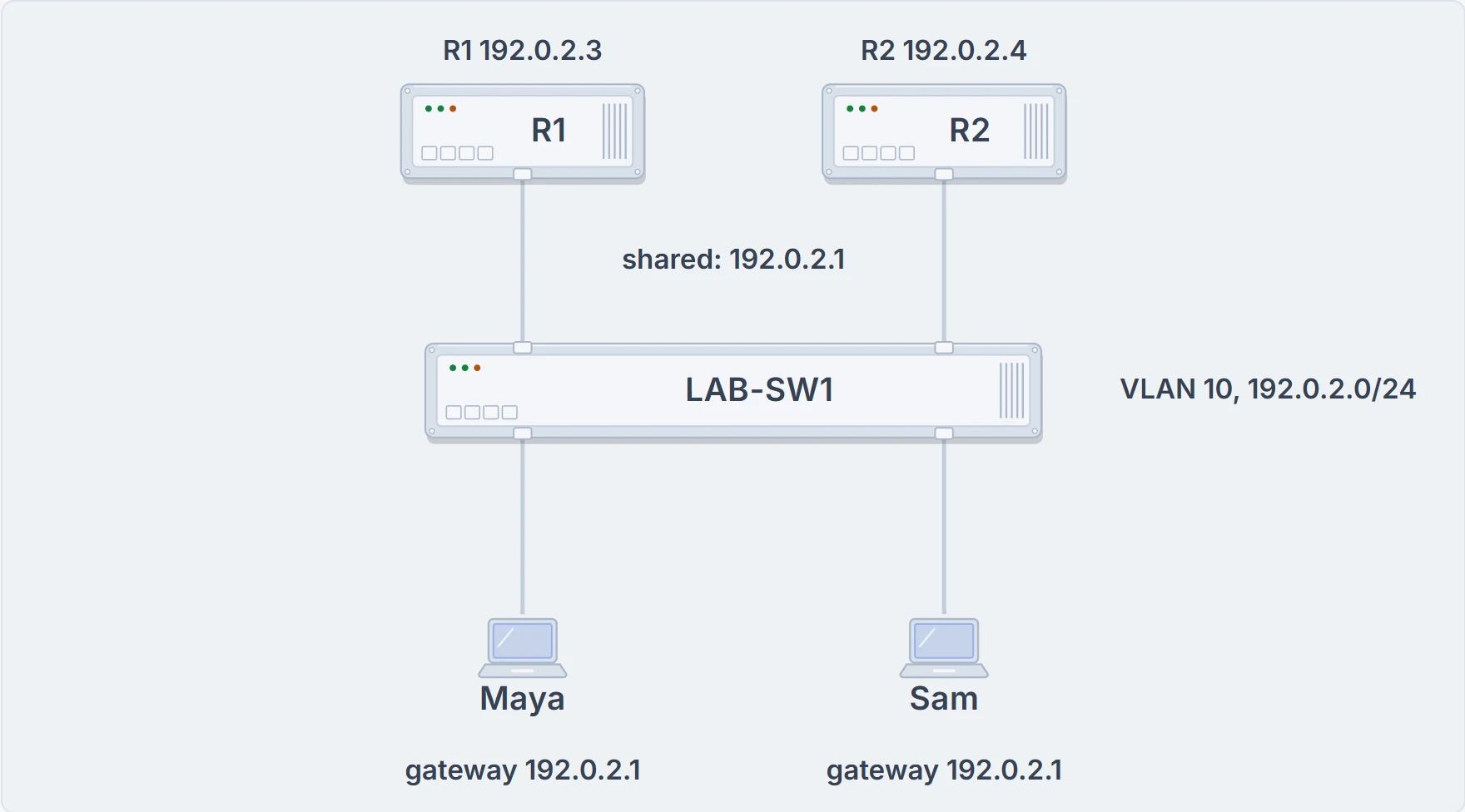
The office LAN after Ravi's change: R1 at 192.0.2.3 and R2 at 192.0.2.4 share the virtual address 192.0.2.1, and the PCs keep 192.0.2.1 as their gateway.
By Tuesday evening it's done: the virtual address is 192.0.2.1, R1 moves to 192.0.2.3 and R2 takes 192.0.2.4 (LAB-SW1 already has .2). R1 is active, R2 is standby. Changing R1's LAN address touches nothing else: its OSPF runs on its WAN links. And R2 gets its own link into the company network, running OSPF, because a standby router is only useful if it has a way on. When a PC sends a packet off its subnet, it ARPs for 192.0.2.1 and gets the virtual MAC (written VMAC here), and R1, as the active router, receives those frames and routes the packets inside.
The virtual address works kind of like the number on a help desk's sign rather than the name of whoever is sitting there: the sign stays the same when the person changes. (Where it stops: at a desk, the next person is chosen when the first one leaves; HSRP has the standby chosen in advance, already watching, and some packets may still be lost while it takes over.)
Continue the lesson
The whole lesson, with its drawings and its questions. 3 more sections after the ones above.