
Troubleshooting OSPF Neighbors and Route Selection
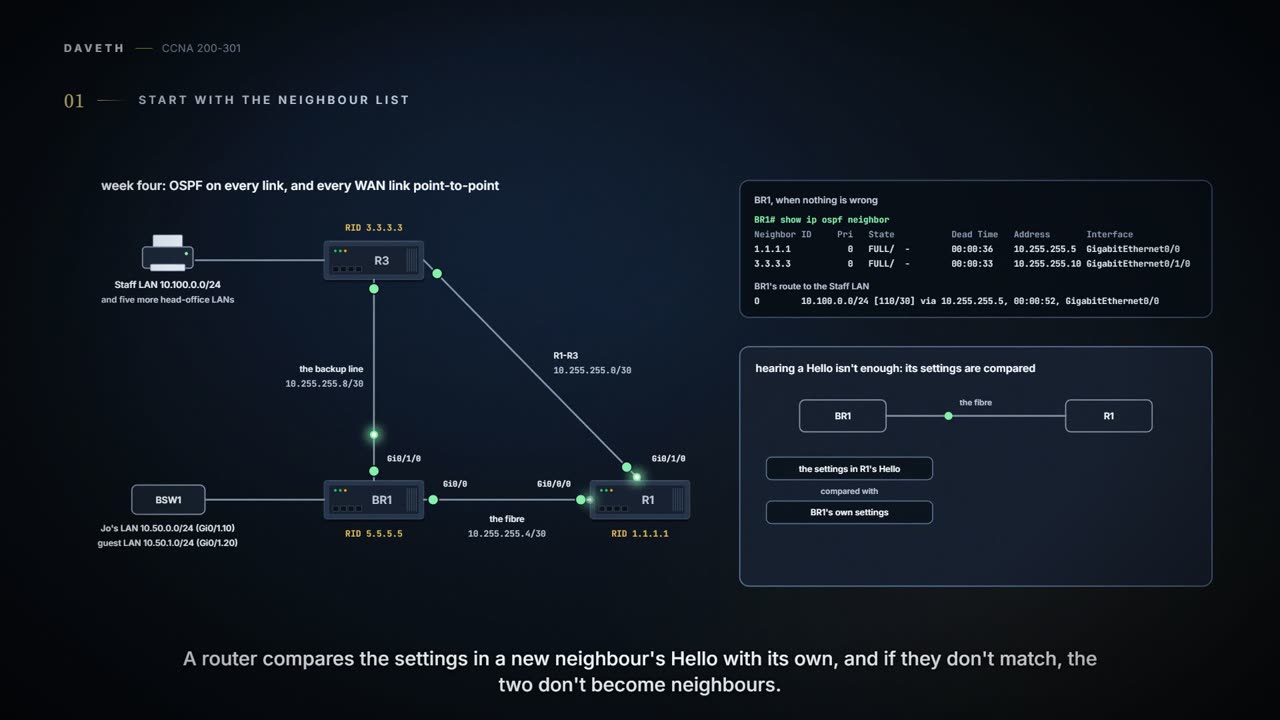
Start with the neighbour list. Two OSPF routers become neighbours only if their interfaces are up, in the same subnet and area, with matching Hello and Dead timers, unique router IDs, passing authentication, and no ACL in the way. A mismatched MTU or network type is different: the neighbour is listed, but LSAs do not flow properly.
By Arif, founder of Daveth · Updated
The full 10 min walkthrough is in Daveth Pro (Network). See what the plan opens
What this page answers
Why are two OSPF routers not neighbours?
Check the requirements: interfaces up/up, same subnet, same area, matching Hello and Dead timers, unique router IDs, authentication passing, no ACL filtering OSPF, and the OSPF process not shut down. Read it in “Start with the neighbour list”
What happens when OSPF Hello timers do not match?
Routers list their Hello and Dead intervals in their Hellos and refuse to become neighbours if they differ. show ip ospf interface on both ends is the fastest proof. Read it in “When the neighbour is missing”
Start with the neighbour list
Month three, week four. OSPF has settled in, and so have the small mistakes: this week brought one on most days. Each broke something different, and each left its own evidence on BR1. Here's the company as it stands: every WAN link point-to-point, R1's two WAN ports now named on the drawing.
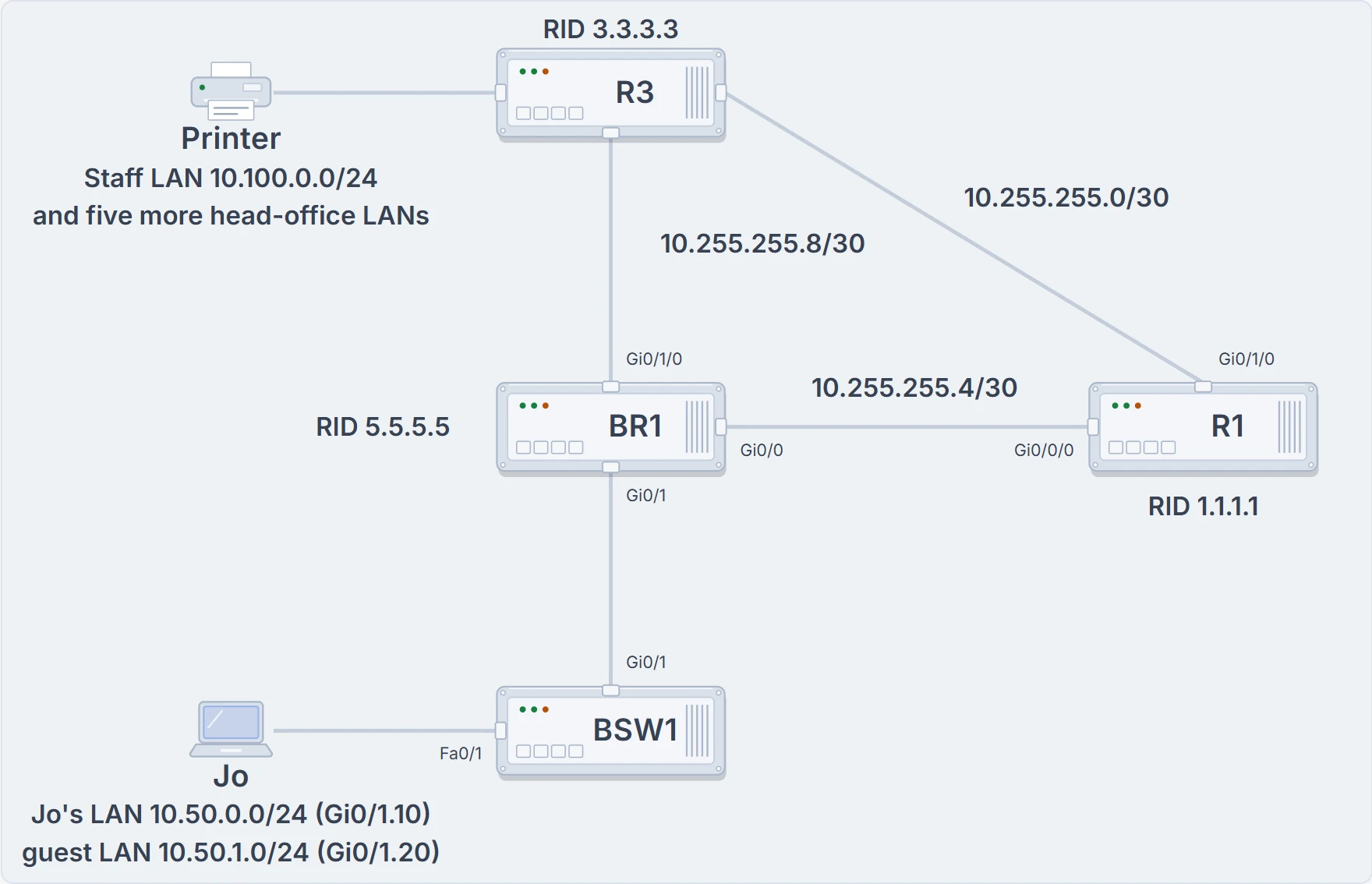
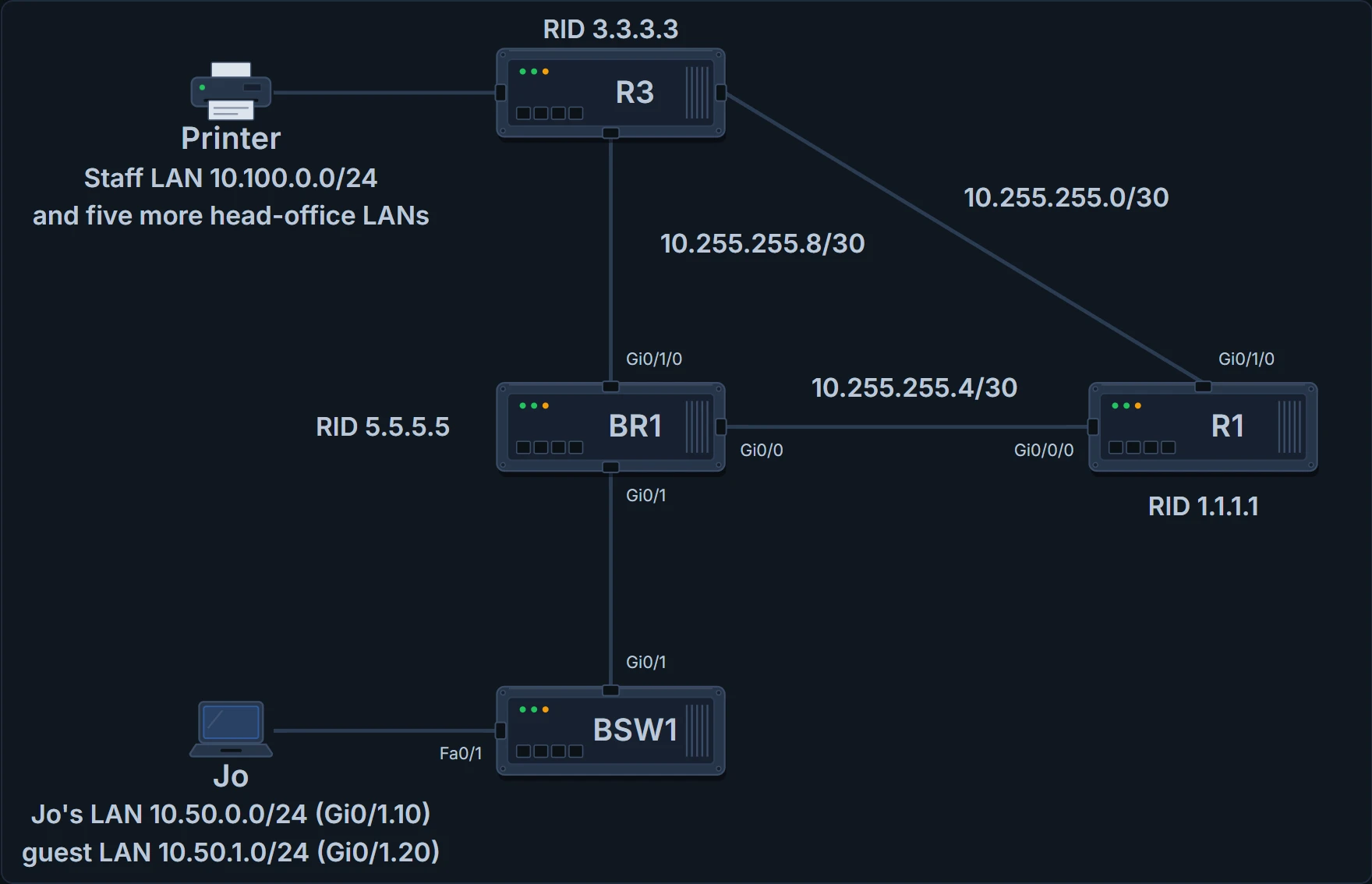
The company in week four: BR1's Gi0/0 to R1's Gi0/0/0 over the fibre, BR1's Gi0/1/0 to R3 over the backup line, and R1's Gi0/1/0 to R3.
OSPF routers can't exchange LSAs until they're neighbours, and hearing a Hello isn't enough. A router compares the settings in a new neighbour's Hello with its own, and if they don't match, the two don't become neighbours. These are OSPF's neighbour requirements:
| Requirement | Needed | Neighbour missing if wrong |
|---|---|---|
| Interfaces up/up | Yes | Yes |
| No ACL filtering the routing protocol's messages | Yes | Yes |
| Interfaces in the same subnet | Yes | Yes |
| Neighbour authentication passes (if configured) | Yes | Yes |
| Hello and dead timers match | Yes | Yes |
| Router IDs unique | Yes | Yes |
| Same area | Yes | Yes |
| OSPF process not shut down | Yes | Yes |
| Same MTU on both interfaces | Yes | No: listed, but not working |
| Same OSPF network type | Yes | No: listed, but not working |
The last column is the useful part. For every row but the last two, a mistake means the neighbour simply isn't in show ip ospf neighbor. The first rows are about the link itself: an interface that isn't up/up can't send OSPF messages at all. The middle rows are OSPF settings. The last two are different: with a mismatched MTU or network type, the router does list the other as a neighbour, but the relationship doesn't work properly and LSAs don't flow as they should. So show ip ospf neighbor is the place to start: if the neighbour you expect is there, good; if not, the table is your checklist. (An ACL is a packet filter, later in the course; authentication, where it's configured, is a shared secret both ends must agree on.)
If you've ever checked that a lamp is plugged in before blaming the bulb, the table works the same way: the link first, then the settings. (Where it stops: a lamp has one plug; here both ends of the link need checking, and often the fault is on the other router.)
For each of the "missing" settings, one command answers fastest:
| Requirement | Best show command |
|---|---|
| Hello and dead timers match | show ip ospf interface |
| Same area | show ip ospf interface brief |
| Router IDs unique | show ip ospf |
| Neighbour authentication passes | show ip ospf interface |
| Process not shut down | show ip ospf, show ip ospf interface |
One setting people often suspect, and shouldn't: the process ID in router ospf. Neighbours can use the same process ID or different ones; it makes no difference to whether they become neighbours (05.2.3).
When the neighbour is missing
Tuesday. Someone testing faster failure detection set R1's fibre port to a Hello of 5 and a Dead of 20, on R1's end only. Routers list their Hello and Dead intervals in their Hellos and refuse to become neighbours if they don't match, so R1 dropped off BR1's list and BR1's routes moved to the backup line. The fastest proof is show ip ospf interface on both ends:
BR1# show ip ospf neighbor
Neighbor ID     Pri   State           Dead Time   Address       Interface
3.3.3.3           0   FULL/  -        00:00:33    10.255.255.10 GigabitEthernet0/1/0
BR1# show ip ospf interface g0/0
GigabitEthernet0/0 is up, line protocol is up
  Internet Address 10.255.255.6/30, Area 0, Attached via Network Statement
  Process ID 1, Router ID 5.5.5.5, Network Type POINT_TO_POINT, Cost: 10
! (lines left out)
  Timer intervals configured, Hello 10, Dead 40, Wait 40, Retransmit 5
! (the rest is left out)
BR1#
R1# show ip ospf interface g0/0/0
GigabitEthernet0/0/0 is up, line protocol is up
  Internet Address 10.255.255.5/30, Area 0, Attached via Network Statement
  Process ID 1, Router ID 1.1.1.1, Network Type POINT_TO_POINT, Cost: 10
! (lines left out)
  Timer intervals configured, Hello 5, Dead 20, Wait 20, Retransmit 5
! (the rest is left out)
R1#
10 and 40 against 5 and 20. Both are per-interface timers: the Hello Interval sets how often Hellos go out on that interface; the Dead Interval, four times it by default, how long a silent neighbour is trusted. Setting R1 back to the defaults brought the neighbour back.
Wednesday. A copy-and-paste from BR1's configuration gave R1 router-id 5.5.5.5, and someone restarted OSPF on R1 so it took effect. Two routers with one RID can't be neighbours. Both routers log a message about it, and show ip ospf on each shows the same ID:
*Sep 30 09:12:44.301: %OSPF-4-DUP_RTRID_NBR: OSPF detected duplicate router-id
5.5.5.5 from 10.255.255.5 on interface GigabitEthernet0/0
BR1# show ip ospf
 Routing Process "ospf 1" with ID 5.5.5.5
! (the rest is left out)
BR1#
R1# show ip ospf
 Routing Process "ospf 1" with ID 5.5.5.5
! (the rest is left out)
R1#
The fix is on R1: router-id 1.1.1.1, then clear ip ospf process, since a new RID only takes effect when the OSPF process restarts, by that command or a reload (05.2.4).
Two routers answering to the same name. OSPF won't seat them at the same table.
Thursday. Ravi had typed shutdown under router ospf 1 on R1 late on Wednesday to test something, and forgot to undo it. It works like shutting down an interface, but for the whole OSPF process, with no shutdown to bring it back. Shutting down the OSPF process brings down every neighbour relationship and clears the neighbour table, clears the LSDB, and removes every OSPF-learned route. It keeps the whole OSPF configuration, though, and still lists the OSPF interfaces, in a DOWN state:
R1(config-router)# shutdown
*Oct  2 08:05:11.402: %OSPF-5-ADJCHG: Process 1, Nbr 5.5.5.5 on GigabitEthernet0/0/0
  from FULL to DOWN, Neighbor Down: Interface down or detached
*Oct  2 08:05:11.403: %OSPF-5-ADJCHG: Process 1, Nbr 3.3.3.3 on GigabitEthernet0/1/0
  from FULL to DOWN, Neighbor Down: Interface down or detached
! (the next morning)
R1# show ip ospf interface brief
Interface    PID   Area            IP Address/Mask    Cost  State Nbrs F/C
Gi0/0/0      1     0               10.255.255.5/30    10    DOWN  0/0
Gi0/1/0      1     0               10.255.255.1/30    10    DOWN  0/0
R1# show ip ospf
 Routing Process "ospf 1" with ID 1.1.1.1
 Routing Process is shutdown
! (the rest is left out)
R1# show ip ospf neighbor
R1# show ip ospf database

            OSPF Router with ID (1.1.1.1) (Process ID 1)
R1#
Each neighbour went from FULL to DOWN, with a log message apiece. Afterwards, show ip ospf interface [brief] and show ip ospf still give output: DOWN as R1's own state on each interface, and "Routing Process is shutdown" outright. Everything else lists nothing: show ip ospf neighbor is empty, and show ip ospf database prints only its heading. no shutdown under router ospf 1 brought it back.
And an area mismatch, the week's one near miss: a change that would have put R1's fibre port in area 1. The command is valid, so the router accepts it, and the symptom is the missing neighbour (and, here, routes moving to the backup line). Look for the area in the running-config (ip ospf process-id area area-number under an interface, or the network commands) or in show ip ospf interface brief, on both ends.
Continue the lesson
The whole lesson, with its drawings and its questions. 3 more sections after the ones above.