
IP Routing in the LAN: Router on a Stick and SVIs
Layer 2 switches do not forward frames between VLANs, so each VLAN's subnet needs a router. With router on a stick, the router trunks to the switch over one cable and creates a subinterface for each VLAN, with encapsulation dot1q and its own IP address. A Layer 3 switch can route between VLANs on SVIs instead.
By Arif, founder of Daveth · Updated
The full 13 min walkthrough is in Daveth Pro (Network). See what the plan opens
What this page answers
How do you configure router on a stick?
On the router's LAN interface, create a subinterface per VLAN with interface type number.subint, tag it with encapsulation dot1q vlan-id, and give it an IP address. The switch end must be an 802.1Q trunk. Read it in “One cable, two VLANs”
How do you troubleshoot router on a stick?
Check both ends, because if only the router or only the switch is misconfigured, the other cannot know. Start from what was intended: is each non-native VLAN on a router subinterface with encapsulation dot1q, and do those VLANs exist on the switch's trunk? Read it in “When ROAS fails quietly”
Two VLANs need a router
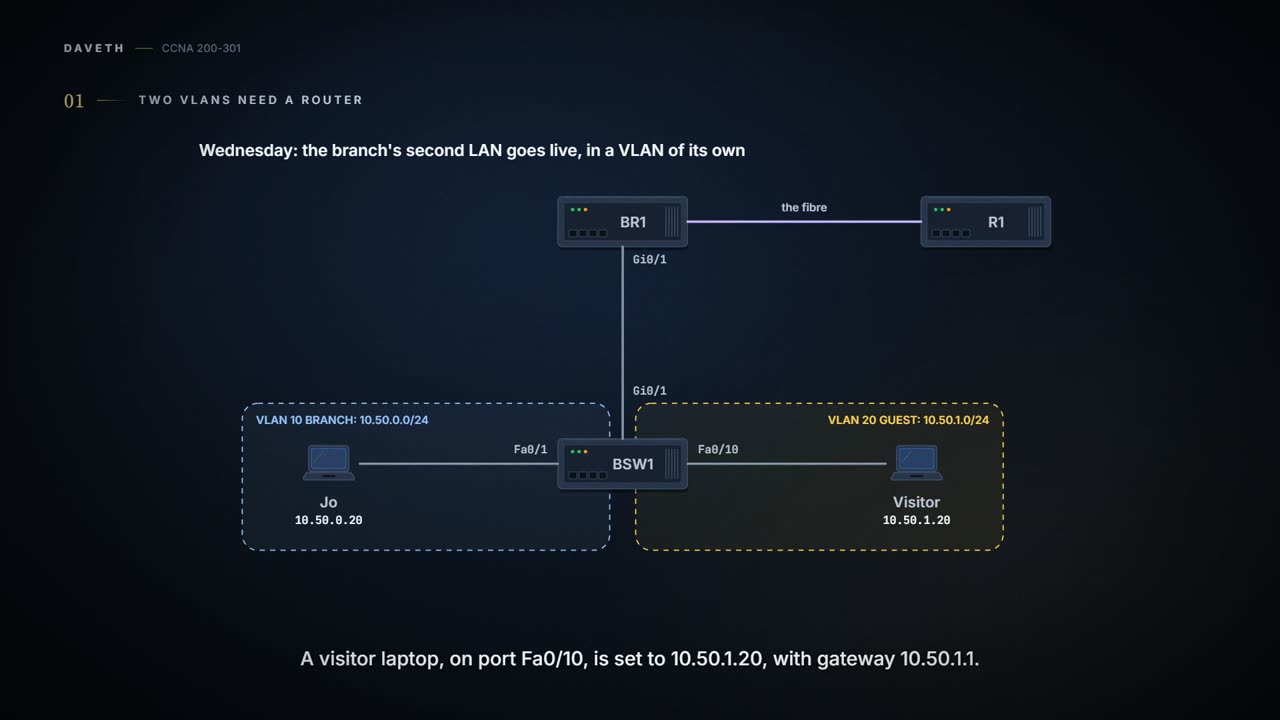
Wednesday, month three. The branch's second LAN goes live: visitors' laptops get a VLAN of their own, away from the staff. BSW1 gets VLAN 10, named BRANCH, for Jo's LAN, 10.50.0.0/24, and VLAN 20, named GUEST, for 10.50.1.0/24, the subnet 04.7 set aside. A visitor laptop on BSW1 Fa0/10 is set to 10.50.1.20 with gateway 10.50.1.1, until the branch has DHCP.
Layer 2 switches don't forward frames between VLANs (03.1.1). A VLAN is an Ethernet idea and a subnet is an IP idea, so they aren't the same thing, but the devices in one VLAN are typically in one subnet, and devices in two VLANs are normally in two subnets. For them to talk, something has to route: a router, or a Layer 3 switch (a switch that can also route, more on it below), with an IP address in each subnet and a connected route to each. Those addresses are then the default gateways for the hosts in each subnet. There are four ways to arrange it:
| Option | What routes | Notes |
|---|---|---|
| One router interface per VLAN | a router, one cable per VLAN | works, but needs far too many interfaces; typically not used |
| Router on a stick (ROAS) | a router, over one 802.1Q trunk | the classic choice for a small site with a router and a Layer 2 switch |
| Layer 3 switch with SVIs | the switch itself, one VLAN interface per VLAN | larger LANs; this page |
| Layer 3 switch with routed ports | the switch, on ports that act like router interfaces | the next page (05.1.6) |
The branch has a router with a WAN link and a Layer 2 switch, the classic case for router on a stick.
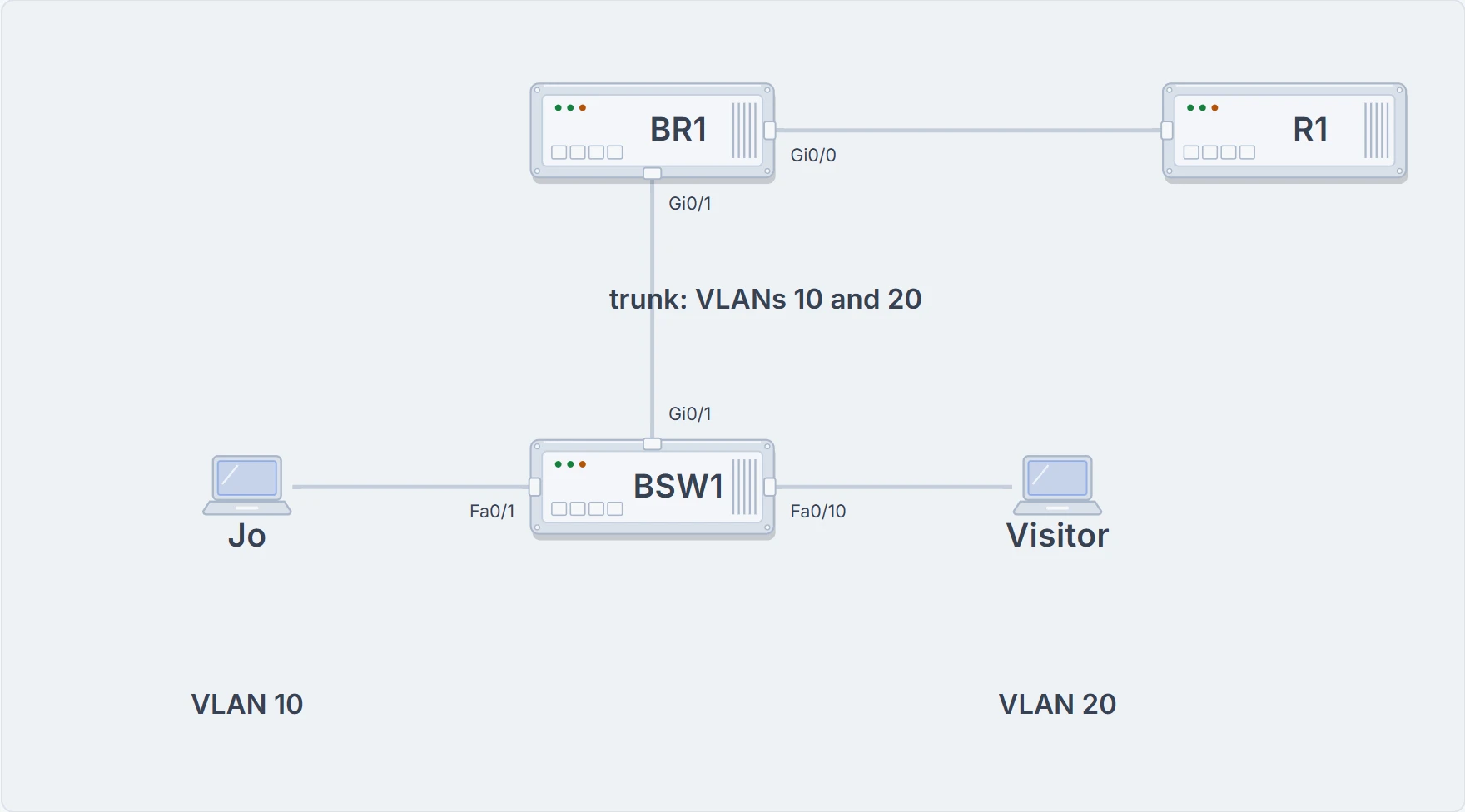
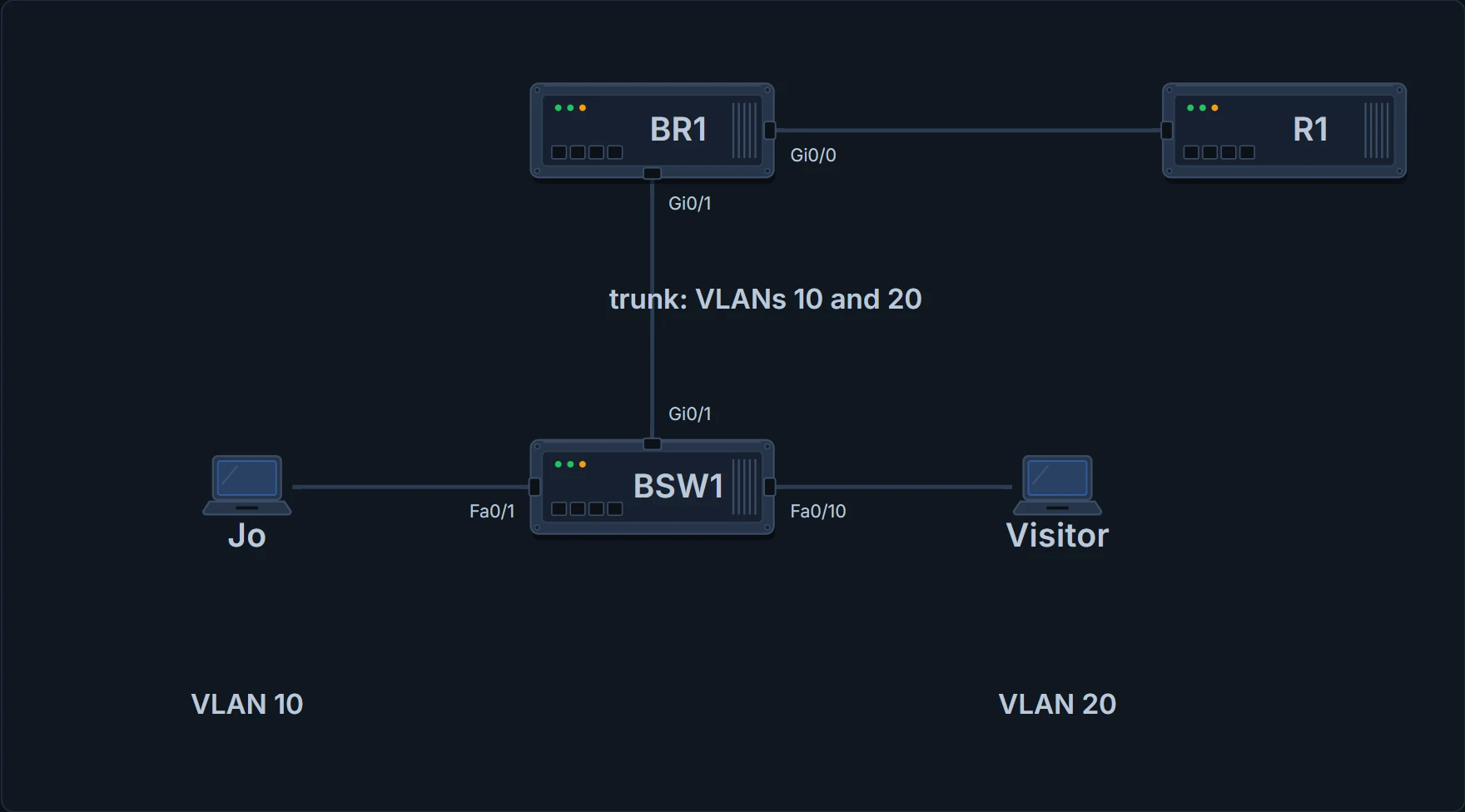
The branch with two VLANs: the BR1-BSW1 cable becomes a trunk; Jo in VLAN 10 on Fa0/1, the visitor laptop in VLAN 20 on Fa0/10.
One cable, two VLANs
With router on a stick (ROAS), the router uses 802.1Q trunking on its LAN interface. It has only one physical interface there, so it creates subinterfaces: virtual interfaces, one for each VLAN on the trunk, each with its own IP address. BR1 treats frames tagged VLAN 10 as if they came in or went out of Gi0/1.10, and frames tagged VLAN 20 as Gi0/1.20. Three steps per VLAN:
interfacetype number.subint, in global configuration mode, creates the subinterface.encapsulation dot1qvlan-id, in subinterface configuration mode, enables 802.1Q and ties the subinterface to one VLAN.ip addressaddress mask sets its address, which becomes that VLAN's gateway.
Gi0/1's own address has to go first, with no ip address: from now on the physical interface carries no address and no encapsulation, and each VLAN's gateway lives on a subinterface.
BR1# configure terminal
Enter configuration commands, one per line. End with CNTL/Z.
BR1(config)# interface GigabitEthernet0/1
BR1(config-if)# no ip address
BR1(config-if)# interface GigabitEthernet0/1.10
BR1(config-subif)# encapsulation dot1q 10
BR1(config-subif)# ip address 10.50.0.1 255.255.255.0
BR1(config-subif)# interface GigabitEthernet0/1.20
BR1(config-subif)# encapsulation dot1q 20
BR1(config-subif)# ip address 10.50.1.1 255.255.255.0
BR1(config-subif)# end
BR1#
The number after the dot can be anything from 1 up to over 4 billion, as long as it's unique on that physical interface. It doesn't even have to match the VLAN: the encapsulation command sets the VLAN. Most sites match them anyway, to avoid confusion. And most routers don't negotiate trunking, so the switch end has to be a trunk by configuration, switchport mode trunk (03.1.3):
BSW1# configure terminal
Enter configuration commands, one per line. End with CNTL/Z.
BSW1(config)# vlan 10
BSW1(config-vlan)# name BRANCH
BSW1(config-vlan)# vlan 20
BSW1(config-vlan)# name GUEST
BSW1(config-vlan)# interface FastEthernet0/1
BSW1(config-if)# switchport mode access
BSW1(config-if)# switchport access vlan 10
BSW1(config-if)# interface FastEthernet0/10
BSW1(config-if)# switchport mode access
BSW1(config-if)# switchport access vlan 20
BSW1(config-if)# interface GigabitEthernet0/1
BSW1(config-if)# switchport mode trunk
BSW1(config-if)# end
BSW1#
You can think of it as one lift serving two floors, with the floor number on every trip. (Where it stops: a lift's floor number lives on a panel inside it; a trunk's is written into each frame as a tag, and it's the router, not the cable, that decides which VLAN a packet leaves on.)
One thing BR1 doesn't need here is the native VLAN. Every 802.1Q trunk has one, and if the router had to route for a subnet in it, there are two ways: put the ip address on the physical interface with no encapsulation, or use encapsulation dot1q vlan-id native on a subinterface. BR1 routes nothing in the native VLAN, VLAN 1, so neither is needed.
R1's route to 10.50.0.0/23, typed on Tuesday, already covers 10.50.1.0/24. 04.7's planning finally pays rent.
Checking it
BR1 treats subinterfaces like any physical interface: while one is up/up with an address, it gets a connected route and a local route. show ip route connected lists just those:
BR1# show ip route connected
! (the legend of codes is left out)
      10.0.0.0/8 is variably subnetted, 9 subnets, 3 masks
C        10.50.0.0/24 is directly connected, GigabitEthernet0/1.10
L        10.50.0.1/32 is directly connected, GigabitEthernet0/1.10
C        10.50.1.0/24 is directly connected, GigabitEthernet0/1.20
L        10.50.1.1/32 is directly connected, GigabitEthernet0/1.20
C        10.255.255.4/30 is directly connected, GigabitEthernet0/0
L        10.255.255.6/32 is directly connected, GigabitEthernet0/0
C        10.255.255.8/30 is directly connected, GigabitEthernet0/1/0
L        10.255.255.9/32 is directly connected, GigabitEthernet0/1/0
BR1#
The heading counts 9 routes in 10.0.0.0: the 8 lines shown, plus the static host route to 10.100.0.50/32 (05.1.4), which this filtered view leaves out.
| Link | The frame on it | IP packet |
|---|---|---|
| Visitor laptop to BSW1 Fa0/10 | untagged (an access port in VLAN 20); destination MAC: BR1 Gi0/1's, the gateway | 10.50.1.20 to 10.50.0.20 |
| BSW1 Gi0/1 to BR1 (the trunk) | tagged VLAN 20: arrives on Gi0/1.20 | 10.50.1.20 to 10.50.0.20 |
| Inside BR1 | no frame: BR1 matches 10.50.0.0/24, out Gi0/1.10 | 10.50.1.20 to 10.50.0.20, TTL one lower |
| BR1 to BSW1 Gi0/1 (the same trunk) | a new frame, tagged VLAN 10; destination MAC: Jo's laptop's | 10.50.1.20 to 10.50.0.20 |
| BSW1 Fa0/1 to Jo's laptop | untagged (an access port in VLAN 10) | 10.50.1.20 to 10.50.0.20 |
The packet crossed the same trunk twice: up to BR1 in VLAN 20, back down in VLAN 10. That's the "stick".
A subinterface's state can't be better than its physical interface's. Unplug the cable, and Gi0/1 and both subinterfaces go down/down; shut down Gi0/1, and the subinterfaces show administratively down too. Each subinterface can also be shut down or enabled on its own, with shutdown and no shutdown in its own configuration mode. One more command, show vlans, lists which subinterface uses which VLAN, which VLAN is native, each subinterface's address, and packet counters: counters that keep going up are a sign that traffic is really flowing.
When ROAS fails quietly
The awkward part of ROAS: if only the router or only the switch is misconfigured, the other one has no way to know. BR1 can show up/up subinterfaces, the right connected routes and a tidy show vlans while the switch is dropping one VLAN, or isn't trunking at all. So checking ROAS means checking both ends, starting from what was intended:
- Is each non-native VLAN on a router subinterface with
encapsulation dot1qvlan-id? - Do those VLANs exist on the switch's trunk (
show interfaces trunk), in its allowed list, not pruned by VTP and not blocked by STP? - Does each subinterface have the planned address and mask?
- If the native VLAN is routed, is it set on the router, on a subinterface with
nativeor implied on the physical interface? - Is the native VLAN the same on the switch's trunk as on the router?
- Is
shutdownconfigured on the physical interface or a subinterface?
Continue the lesson
The whole lesson, with its drawings and its questions. 3 more sections after the ones above.