
IPv4 Static, Default, Host and Floating Static Routes
A static route is one an engineer types with ip route. A default route, 0.0.0.0 0.0.0.0, suits a site with one way out. Every router on the path back also needs a route, or replies are discarded. A floating static route has a higher administrative distance, so it enters the table only while the better route is missing.
By Arif, founder of Daveth · Updated
The full 13 min walkthrough is in Daveth Pro (Network). See what the plan opens
What this page answers
How do you configure a static route?
With ip route in global configuration mode: the destination prefix, its mask, then a next-hop address or outgoing interface. For a default route, the prefix and mask are 0.0.0.0 0.0.0.0, as in ip route 0.0.0.0 0.0.0.0 10.255.255.5. Read it in “The branch's way out”
What is a floating static route?
A static route typed with a larger administrative distance at the end, such as 200. It floats into the routing table only while no route for the same prefix with a better distance exists, and back out when one does. Read it in “A second line, and a spare route”
Why does a static route need a route back?
A route only gets packets one way. Every router on the path back needs a route that covers the source, its own or a default route, or the replies are discarded. Read it in “The way back”
Routes you type
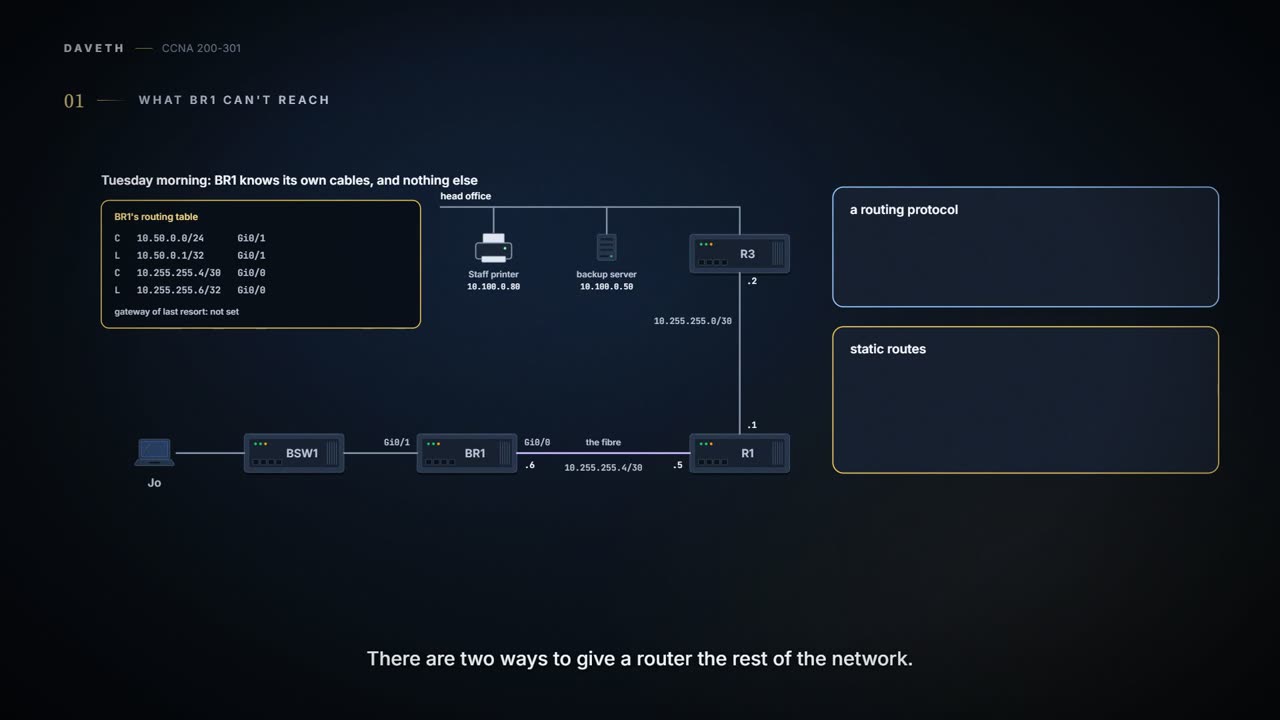
Tuesday, month three. Jo wants to print a test page on head office's Staff printer, and BR1 still knows only its own cables (05.1.2). There are two ways to give a router the rest. A routing protocol lets routers tell each other about the network; most networks use one to learn their remote routes, and one is coming later in this domain. Or an engineer types static routes: used much less often than routing protocols, but useful at times, and a very good way to learn what a route really is.
A static route is one ip route global configuration command. It lists a destination to match, usually a subnet ID and its mask, and a forwarding instruction: either the router's own outgoing interface or the next-hop router's IP address. The router then puts that route in its routing table. Out an Ethernet interface, LAN or WAN, use the next-hop address: an Ethernet interface can reach any number of devices in its subnet, and naming the next hop says which one. A static route typed with an outgoing interface instead shows up in show ip route as "is directly connected" out that interface, with no brackets, even though it's static: a quirk of the display. And show ip route static lists only the static routes, above a heading line that still counts every route.
What the destination covers gives the route its kind. A network route names a subnet, or a whole Class A, B or C network. A default route matches every destination address. A host route matches one address.
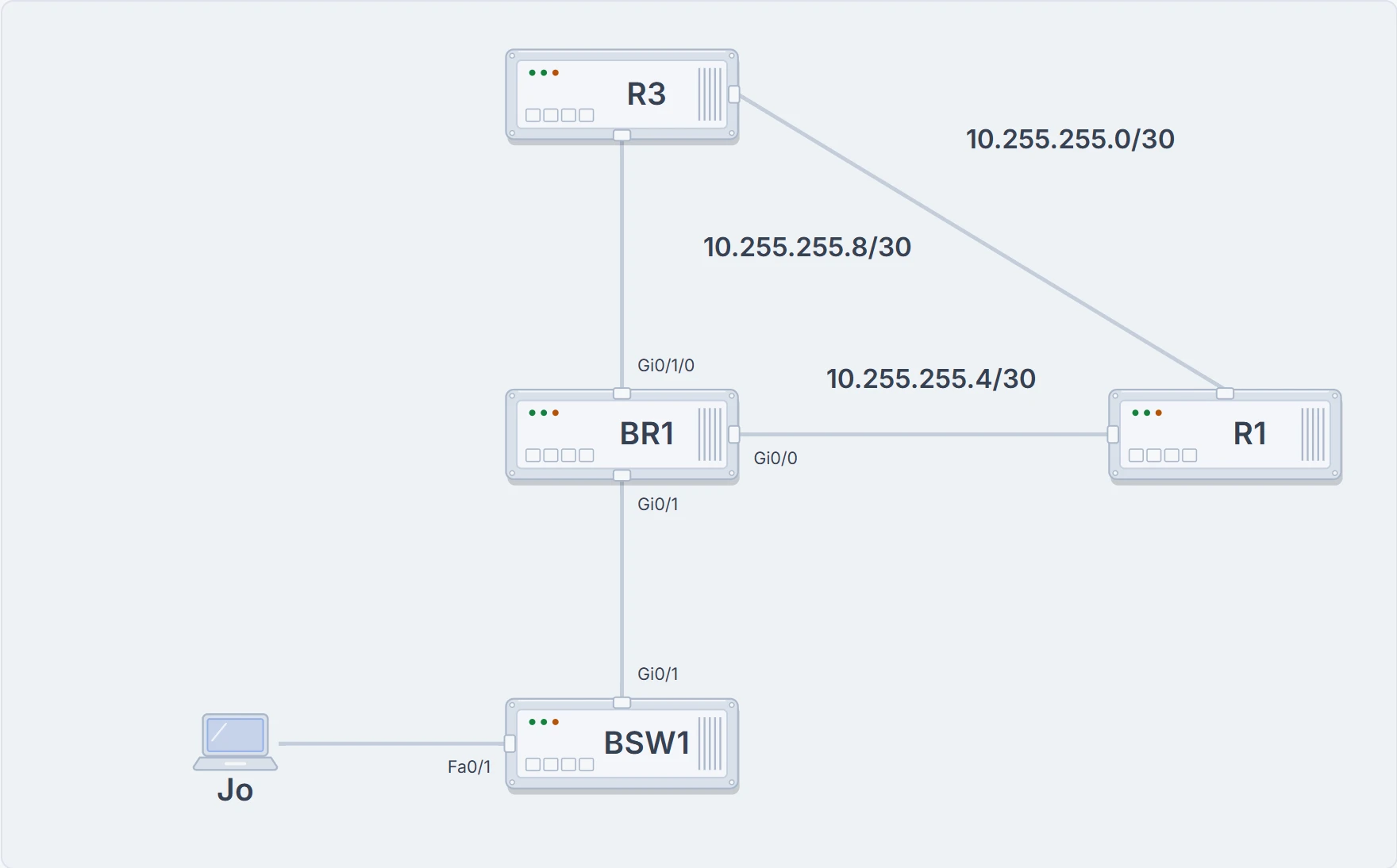
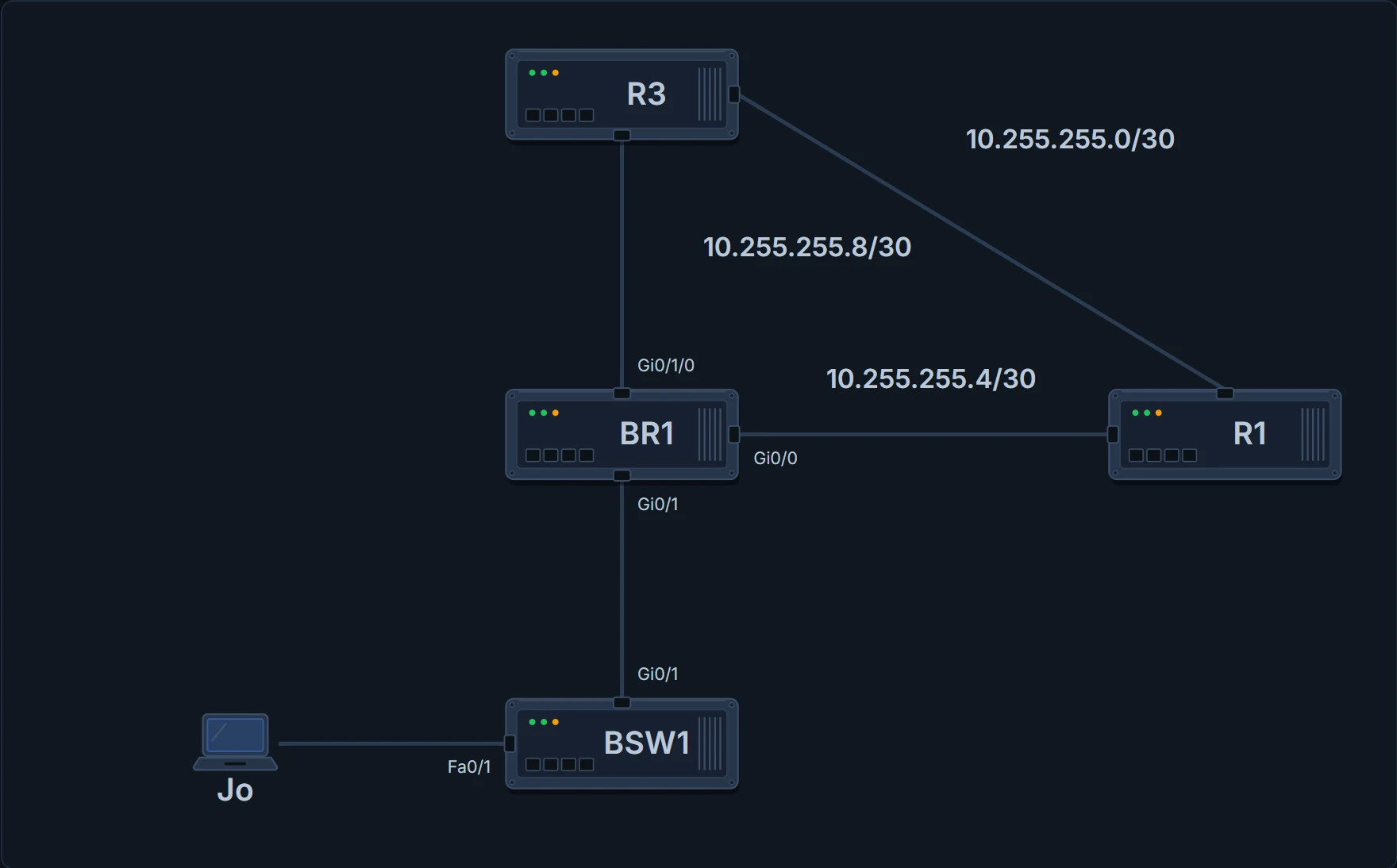
Where the routes go: BR1 to R1 over the fibre, BR1 to R3 over a backup line (from this afternoon), and R1 to R3 over their own link.
The branch's way out
A default route is the classic choice for a site like the branch. A company with many remote sites, each with one path back to the centre, can give each remote router a default route to the central site instead of running a routing protocol whose messages use up the WAN link. The branch has one way out, through R1, so BR1 gets a default route. (A default route can also be learned from a routing protocol instead of typed.)
BR1# configure terminal
Enter configuration commands, one per line. End with CNTL/Z.
BR1(config)# ip route 0.0.0.0 0.0.0.0 10.255.255.5
BR1(config)# end
BR1# show ip route
! (the legend of codes is left out)
Gateway of last resort is 10.255.255.5 to network 0.0.0.0

S*    0.0.0.0/0 [1/0] via 10.255.255.5
      10.0.0.0/8 is variably subnetted, 4 subnets, 3 masks
C        10.50.0.0/24 is directly connected, GigabitEthernet0/1
L        10.50.0.1/32 is directly connected, GigabitEthernet0/1
C        10.255.255.4/30 is directly connected, GigabitEthernet0/0
L        10.255.255.6/32 is directly connected, GigabitEthernet0/0
BR1#
For a default route, ip route uses two special values: 0.0.0.0 for the subnet and 0.0.0.0 for the mask. The new line starts S*: S for static, and the star for a candidate default route. A router can learn more than one default route and has to choose one; the star marks each candidate, and the gateway of last resort names the one chosen. [1/0] is the administrative distance, 1 for a static route (05.1.2), and the metric. The gateway of last resort is now 10.255.255.5. Any packet that matches no other route goes to R1.
The way back
A route only gets packets one way. Every router on the path back needs a route that covers the branch, its own or a default route, or the replies are discarded. R1 has routes to head office's LANs and no default route, and R3 has no route to the branch either. So both need one. Maya uses 04.7's plan: one route, 10.50.0.0/23, covers both of the branch's LANs, including the second one when it goes live. On R1 the next hop is BR1, 10.255.255.6:
R1# configure terminal
Enter configuration commands, one per line. End with CNTL/Z.
R1(config)# ip route 10.50.0.0 255.255.254.0 10.255.255.6
R1(config)# end
R1# show ip route 10.50.0.20
Routing entry for 10.50.0.0/23
  Known via "static", distance 1, metric 0
! (the rest of the entry is left out)
R1#
show ip route 10.50.0.20 confirms that a packet for Jo's laptop now matches the static /23, and its second line gives the source, distance and metric. Ravi adds the same route on R3, with R1 as the next hop across their link: ip route 10.50.0.0 255.255.254.0 10.255.255.1. Jo's test page comes out of the Staff printer at head office.
Ravi pinned the test page up by the printer: "HELLO FROM THE BRANCH". Jo sent a label for the pin.
A second line, and a spare route
Tuesday afternoon, the provider delivers the backup line: slower and cheaper than the fibre, and running to R3 at head office instead of R1. It takes 04.5's next /30, 10.255.255.8/30. It ends on a card in one of BR1's empty module slots (05.1.1), so its interface has three numbers, GigabitEthernet0/1/0: BR1 is .9 and R3 is .10. Maya gives it two jobs.
First, a host route. Ravi wants the branch's nightly backups to go to the backup server Ravi runs, 10.100.0.50, over the second line, leaving the fibre for everyone else. A host route uses the mask 255.255.255.255, so it matches that one address and nothing else. Packets for 10.100.0.50 will then match two of BR1's routes, and 05.1.3's rule decides between them. It decides only BR1's direction, though: the server's replies come back however R3's routes say, which is via R1 and the fibre.
Second, a spare default. If the fibre fails, everything leaving the branch should use the backup line. A second default route via R3 would compete with the one via R1 for the same prefix, 0.0.0.0/0. So Maya types it with a larger administrative distance at the end of the command: ip route 0.0.0.0 0.0.0.0 10.255.255.10 200.
That makes a floating static route: it floats into the routing table only while no route for the same prefix with a better distance exists, and back out when one does. The distance only has to be larger than that of the route it backs up; here that's another static route, at 1. The more usual case backs up a route learned by a routing protocol: a static route's default of 1 would beat OSPF's 110, so a floating static behind an OSPF route needs a distance above 110.
BR1# configure terminal
Enter configuration commands, one per line. End with CNTL/Z.
BR1(config)# interface GigabitEthernet0/1/0
BR1(config-if)# ip address 10.255.255.9 255.255.255.252
BR1(config-if)# no shutdown
BR1(config-if)# exit
BR1(config)# ip route 10.100.0.50 255.255.255.255 10.255.255.10
BR1(config)# ip route 0.0.0.0 0.0.0.0 10.255.255.10 200
BR1(config)# end
BR1# show ip route
! (the legend of codes is left out)
Gateway of last resort is 10.255.255.5 to network 0.0.0.0

S*    0.0.0.0/0 [1/0] via 10.255.255.5
      10.0.0.0/8 is variably subnetted, 7 subnets, 3 masks
C        10.50.0.0/24 is directly connected, GigabitEthernet0/1
L        10.50.0.1/32 is directly connected, GigabitEthernet0/1
S        10.100.0.50/32 [1/0] via 10.255.255.10
C        10.255.255.4/30 is directly connected, GigabitEthernet0/0
L        10.255.255.6/32 is directly connected, GigabitEthernet0/0
C        10.255.255.8/30 is directly connected, GigabitEthernet0/1/0
L        10.255.255.9/32 is directly connected, GigabitEthernet0/1/0
BR1#
The backup line's connected and local routes are there, and so is the host route, S 10.100.0.50/32. There's still only one default route, the one via R1. The route via R3 is in the running-config, and out of the table. Here are the four kinds side by side:
| Kind | Destination and mask | On BR1 or R1 |
|---|---|---|
| Network route | a subnet (or a whole Class A, B or C network) | R1: ip route 10.50.0.0 255.255.254.0 10.255.255.6 |
| Default route | 0.0.0.0 0.0.0.0: every address | BR1: ip route 0.0.0.0 0.0.0.0 10.255.255.5 |
| Host route | one address, mask 255.255.255.255 | BR1: ip route 10.100.0.50 255.255.255.255 10.255.255.10 |
| Floating static | any of the above, with a larger administrative distance typed at the end | BR1: ip route 0.0.0.0 0.0.0.0 10.255.255.10 200 |
It's basically like the spare wheel in a car boot: carried all the time, used only when the main one can't be. (Where it stops: you can decide to swap early; the router uses the spare only when the main route has left its table, by the router's own checks.)
Continue the lesson
The whole lesson, with its drawings and its questions. 2 more sections after the ones above.