
CCNA Enterprise Capstone
The CCNA capstone brings every lab together on one small school network: staff and lab VLANs, a guest WLAN, a management VLAN, a gateway router, a second router across a /30 and a server LAN. It is built in five stages, and each stage is predicted first and proved with its own evidence, never letting one stage's proof stand in for the next.
By Arif, founder of Daveth · Updated
The full 11 min walkthrough is in Daveth Pro (Network). See what the plan opens
The requirement
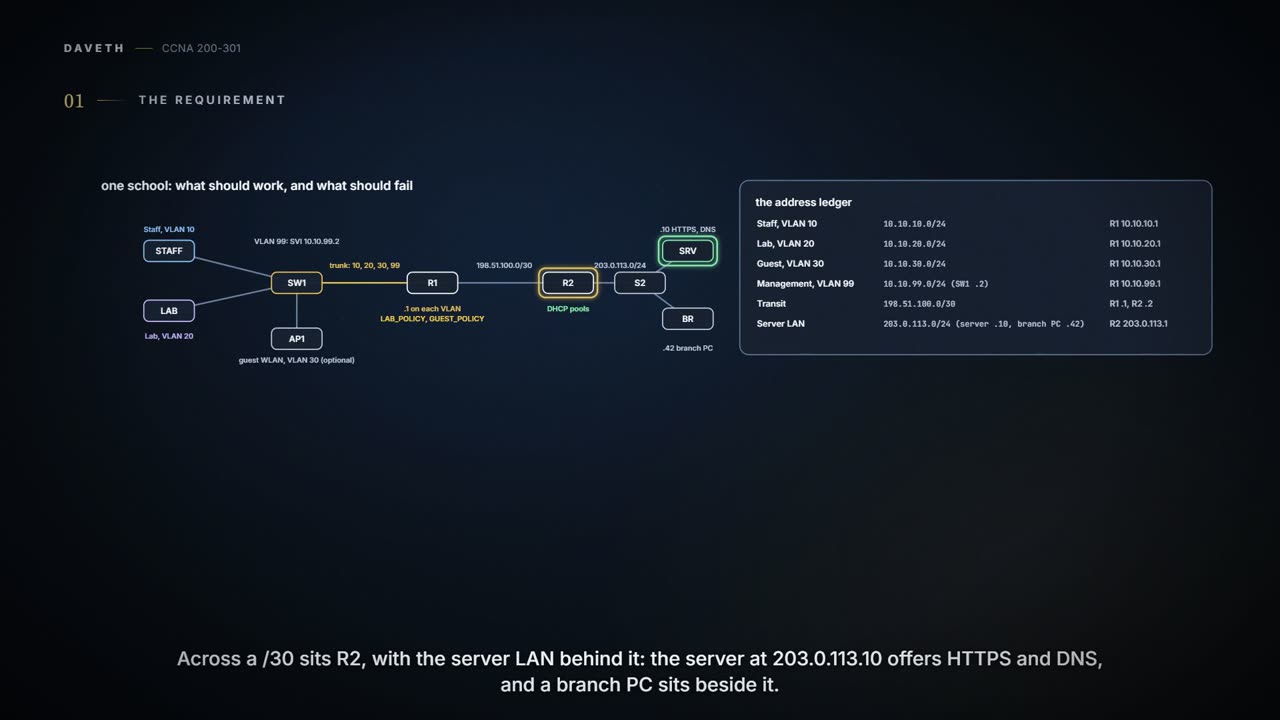
The capstone: everything from 11.1 to 11.11 on one small school network. Staff have VLAN 10 and Lab has VLAN 20, both on SW1; guests have a WLAN in VLAN 30; switch management lives in VLAN 99. R1 is every VLAN's gateway. R2 sits across a /30 with the server LAN, where the server offers HTTPS and DNS and a branch PC sits beside it; both use R2, 203.0.113.1, as their gateway, and the PCs in this lab answer pings. The policy, in plain words: Staff may use HTTPS to the server; Lab may use DNS but not SSH; both need working DHCP and a path off site; guests stay out of the management VLAN; R2 learns the campus subnets with OSPF.
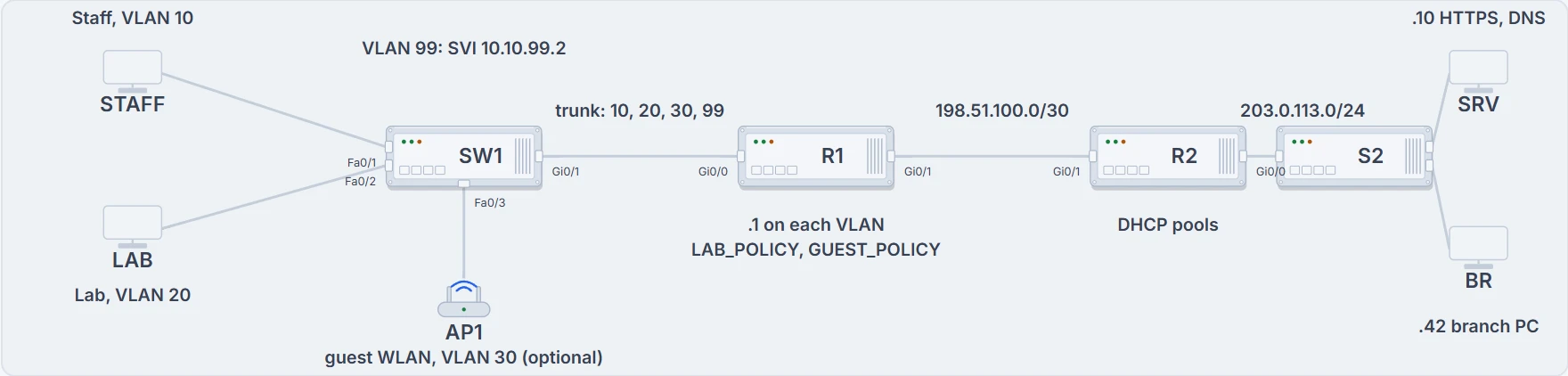
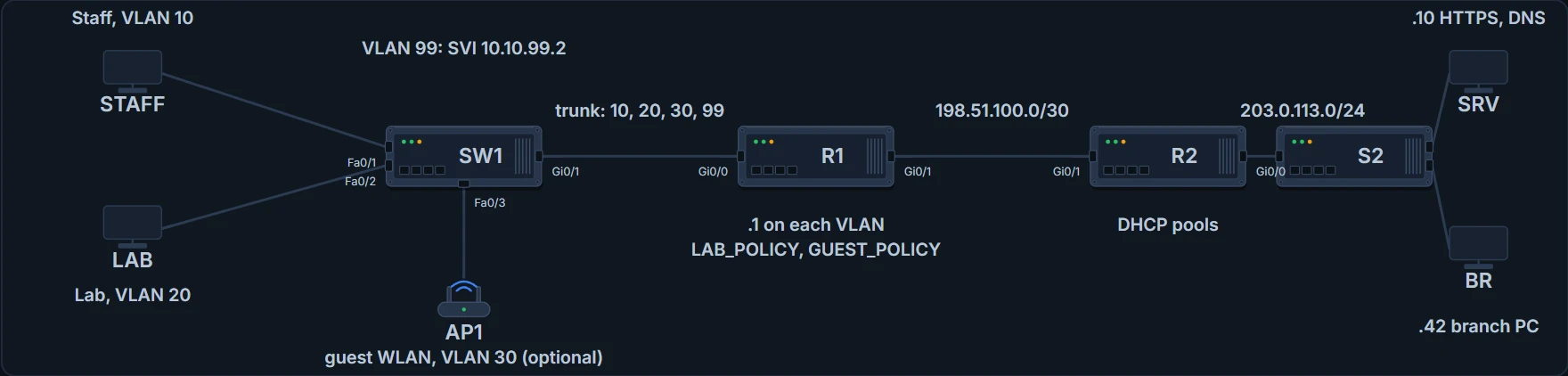
The school: SW1 with Staff, Lab and the optional guest AP; R1 on a trunk; R2 across the /30; the server and a branch PC behind R2.
| Segment | Subnet | Gateway |
|---|---|---|
| Staff, VLAN 10 | 10.10.10.0/24 | R1 10.10.10.1 |
| Lab, VLAN 20 | 10.10.20.0/24 | R1 10.10.20.1 |
| Guest, VLAN 30 | 10.10.30.0/24 | R1 10.10.30.1 |
| Management, VLAN 99 | 10.10.99.0/24 (SW1 .2) | R1 10.10.99.1 |
| Transit | 198.51.100.0/30 | R1 .1, R2 .2 |
| Server LAN | 203.0.113.0/24 (server .10, branch PC .42) | R2 203.0.113.1 |
Build only what the policy needs. Before you type anything, sketch where each VLAN's first hop is, where routing happens, and where each ACL sits. Then compare your sketch with the client report:
| Test | Expected | Why |
|---|---|---|
| Staff PC to the server, HTTPS | works (green) | Staff may use HTTPS to the server |
| Lab PC to the server, DNS | works (green) | Lab may use DNS |
| Lab PC to the server, SSH | fails (red, on purpose) | Lab may not SSH to the server |
| Guest client to SW1's management address | fails (red, on purpose) | guests stay out of the management VLAN |
| Branch PC to a Staff PC | works (green) | the branch has to reach Staff |
Probably nothing is wrong. The policy asks for Lab SSH to fail, so a red result there is the right answer, as long as it failed for the right reason: at LAB_POLICY line 10, with that line's counter rising. The same goes for the guest test.
A red test is sometimes the happiest green result on the page.
Five stages, each proved and no more
Predict each stage before you build it, prove it with its own evidence, and don't let one stage's proof stand in for the next. The configurations below are this course's draft for the design, not output captured from real gear: check your lab's interface names before you type, and collect your own outputs.
| Stage | Predict first | Evidence | Proves | Doesn't prove |
|---|---|---|---|---|
| 1 Switching | four VLANs; Fa0/1 in 10, Fa0/2 in 20; the trunk carries 10, 20, 30, 99 | show vlan brief, show interfaces trunk | which ports are in which VLAN, and what the trunk carries | that any gateway answers |
| 2 Gateways | four subinterfaces up, .1 in each VLAN | show ip interface brief on R1; a PC pings its .1 | the first hop works | any route past R1 |
| 3 Transit and OSPF | R1 and R2 FULL; R1 learns 203.0.113.0/24, R2 learns the four 10.10 subnets | show ip ospf neighbor, show ip route ospf on both | the adjacency, then the routes | that a host answers, or that an ACL allows it |
| 4 DHCP relay | each VLAN leases from its own pool, with its own .1 as gateway | the PCs' leases; show ip dhcp binding on R2 | an address was assigned | that anything past the gateway works |
| 5 ACLs | Lab SSH denied at line 10; DNS permitted; guests kept out of VLAN 99 | show ip interface GigabitEthernet0/0.20, show ip access-lists, a test for each rule | where each ACL sits, and which line each test hit | traffic the tests didn't try |
SW1# configure terminal
Enter configuration commands, one per line.  End with CNTL/Z.
SW1(config)# vlan 10
SW1(config-vlan)# name STAFF
SW1(config-vlan)# vlan 20
SW1(config-vlan)# name LAB
SW1(config-vlan)# vlan 30
SW1(config-vlan)# name GUEST
SW1(config-vlan)# vlan 99
SW1(config-vlan)# name MANAGEMENT
SW1(config-vlan)# interface FastEthernet0/1
SW1(config-if)# switchport mode access
SW1(config-if)# switchport access vlan 10
SW1(config-if)# spanning-tree portfast
SW1(config-if)# interface FastEthernet0/2
SW1(config-if)# switchport mode access
SW1(config-if)# switchport access vlan 20
SW1(config-if)# spanning-tree portfast
SW1(config-if)# interface GigabitEthernet0/1
SW1(config-if)# switchport mode trunk
SW1(config-if)# switchport trunk allowed vlan 10,20,30,99
SW1(config-if)# interface Vlan99
SW1(config-if)# ip address 10.10.99.2 255.255.255.0
SW1(config-if)# no shutdown
SW1(config-if)# exit
SW1(config)# ip default-gateway 10.10.99.1
SW1(config)# end
Stage 1 is SW1: four VLANs, the two access ports, and a trunk to R1 carrying 10, 20, 30 and 99. The management SVI only comes up once VLAN 99 has an active path. The guest AP's own port is a separate module, and nothing here proves it works.
R1# configure terminal
Enter configuration commands, one per line.  End with CNTL/Z.
R1(config)# interface GigabitEthernet0/0
R1(config-if)# no ip address
R1(config-if)# no shutdown
R1(config-if)# interface GigabitEthernet0/0.10
R1(config-subif)# encapsulation dot1Q 10
R1(config-subif)# ip address 10.10.10.1 255.255.255.0
R1(config-subif)# ip helper-address 198.51.100.2
R1(config-subif)# interface GigabitEthernet0/0.20
R1(config-subif)# encapsulation dot1Q 20
R1(config-subif)# ip address 10.10.20.1 255.255.255.0
R1(config-subif)# ip helper-address 198.51.100.2
R1(config-subif)# ip access-group LAB_POLICY in
R1(config-subif)# interface GigabitEthernet0/0.30
R1(config-subif)# encapsulation dot1Q 30
R1(config-subif)# ip address 10.10.30.1 255.255.255.0
R1(config-subif)# ip helper-address 198.51.100.2
R1(config-subif)# ip access-group GUEST_POLICY in
R1(config-subif)# interface GigabitEthernet0/0.99
R1(config-subif)# encapsulation dot1Q 99
R1(config-subif)# ip address 10.10.99.1 255.255.255.0
R1(config-subif)# interface GigabitEthernet0/1
R1(config-if)# ip address 198.51.100.1 255.255.255.252
R1(config-if)# no shutdown
R1(config-if)# exit
R1(config)# ip access-list extended LAB_POLICY
R1(config-ext-nacl)# 10 deny tcp 10.10.20.0 0.0.0.255 host 203.0.113.10 eq 22
R1(config-ext-nacl)# 20 permit udp 10.10.20.0 0.0.0.255 host 203.0.113.10 eq 53
R1(config-ext-nacl)# 30 permit tcp 10.10.20.0 0.0.0.255 host 203.0.113.10 eq 53
R1(config-ext-nacl)# 40 permit ip any any
R1(config-ext-nacl)# ip access-list extended GUEST_POLICY
R1(config-ext-nacl)# 10 deny ip 10.10.30.0 0.0.0.255 10.10.99.0 0.0.0.255
R1(config-ext-nacl)# 20 permit ip any any
R1(config-ext-nacl)# exit
R1(config)# router ospf 1
R1(config-router)# router-id 1.1.1.1
R1(config-router)# passive-interface default
R1(config-router)# no passive-interface GigabitEthernet0/1
R1(config-router)# network 10.10.0.0 0.0.255.255 area 0
R1(config-router)# network 198.51.100.0 0.0.0.3 area 0
R1(config-router)# end
Stage 2 is R1's router-on-a-stick: the physical Gi0/0 has no address and is simply enabled, and each subinterface tags one VLAN with encapsulation dot1Q and gives it its .1. A PC with a static address, for now, pings its .1. The helper on the three user subinterfaces is stage 4; the two ACLs are stage 5. Stage 3 is the /30 and OSPF, each router with its own router ID: passive-interface default keeps Hellos off the user LANs, and only the transit sends them.
R2# configure terminal
Enter configuration commands, one per line.  End with CNTL/Z.
R2(config)# interface GigabitEthernet0/1
R2(config-if)# ip address 198.51.100.2 255.255.255.252
R2(config-if)# no shutdown
R2(config-if)# interface GigabitEthernet0/0
R2(config-if)# ip address 203.0.113.1 255.255.255.0
R2(config-if)# no shutdown
R2(config-if)# exit
R2(config)# router ospf 1
R2(config-router)# router-id 2.2.2.2
R2(config-router)# passive-interface default
R2(config-router)# no passive-interface GigabitEthernet0/1
R2(config-router)# network 198.51.100.0 0.0.0.3 area 0
R2(config-router)# network 203.0.113.0 0.0.0.255 area 0
R2(config-router)# end
R2# show running-config
! (lines left out)
ip dhcp excluded-address 10.10.10.1 10.10.10.20
ip dhcp excluded-address 10.10.20.1 10.10.20.20
ip dhcp excluded-address 10.10.30.1 10.10.30.20
!
ip dhcp pool STAFF
 network 10.10.10.0 255.255.255.0
 default-router 10.10.10.1
 dns-server 203.0.113.10
ip dhcp pool LAB
 network 10.10.20.0 255.255.255.0
 default-router 10.10.20.1
 dns-server 203.0.113.10
ip dhcp pool GUEST
 network 10.10.30.0 255.255.255.0
 default-router 10.10.30.1
 dns-server 203.0.113.10
! (the rest is left out)
R2's pools are shown already set up, as in 11.8. Each pool hands out its own VLAN's .1 as the default router and the server as the DNS server. Those options don't create the services: the server's DNS and HTTPS have to be running and tested on their own.
R1# show ip route ospf
! (the legend and the heading omitted)
O        203.0.113.0/24 [110/2] via 198.51.100.2, 00:02:14, GigabitEthernet0/1
! (00:02:14 is how long the route has been known: yours will differ)
That's stage 3 working: R1 learned the server LAN from R2, with cost 2. A FULL neighbour on its own would only have proved the two routers talk; the O route proves R2 described the network. If it were missing, R2's own network statements would be the place to look.
Stage 4's lease proves an address and the options it carries, such as the gateway; nothing past the gateway. Stage 5 is the policy, and every rule in it is written for a stated purpose: a vague blanket deny at the end would block things nobody meant to block, and hide why. LAB_POLICY denies SSH to the server, permits DNS over UDP and TCP, and permits everything else, because this lab's policy only closes SSH; a stricter school would edit that last line. GUEST_POLICY keeps guests out of 10.10.99.0/24 at the guest ingress only; it isn't complete segmentation. Both are inbound on the client side, so they see the clients' requests; the replies come back through other interfaces, and what happens to them depends on the rest of the path.
R1# show ip access-lists LAB_POLICY
Extended IP access list LAB_POLICY
    10 deny tcp 10.10.20.0 0.0.0.255 host 203.0.113.10 eq 22 (3 matches)
    20 permit udp 10.10.20.0 0.0.0.255 host 203.0.113.10 eq domain (8 matches)
    30 permit tcp 10.10.20.0 0.0.0.255 host 203.0.113.10 eq domain
    40 permit ip any any (57 matches)
! (the counts are this lab's; they count packets, and yours will differ)
Line 10's counter is the proof that the SSH tests were denied by the rule meant for them. Put together: HTTPS working and SSH denied prove the two goals only for the sources, destinations and policy you tested.
Continue the lesson
The whole lesson, with its drawings and its questions. The rest of this section and 5 more after it.