
IPv6 Lab
A hands-on CCNA IPv6 lab: two routers, two LANs and a transit link, each with its own /64 from 2001:DB8::/32. Turn on ipv6 unicast-routing, address each interface, and add a static route each way. Then check in order: interfaces up with link-local and global addresses, the routes installed, and pings that prove the path and the way back.
By Arif, founder of Daveth · Updated
The full 11 min walkthrough is in Daveth Pro (Network). See what the plan opens
The requirement
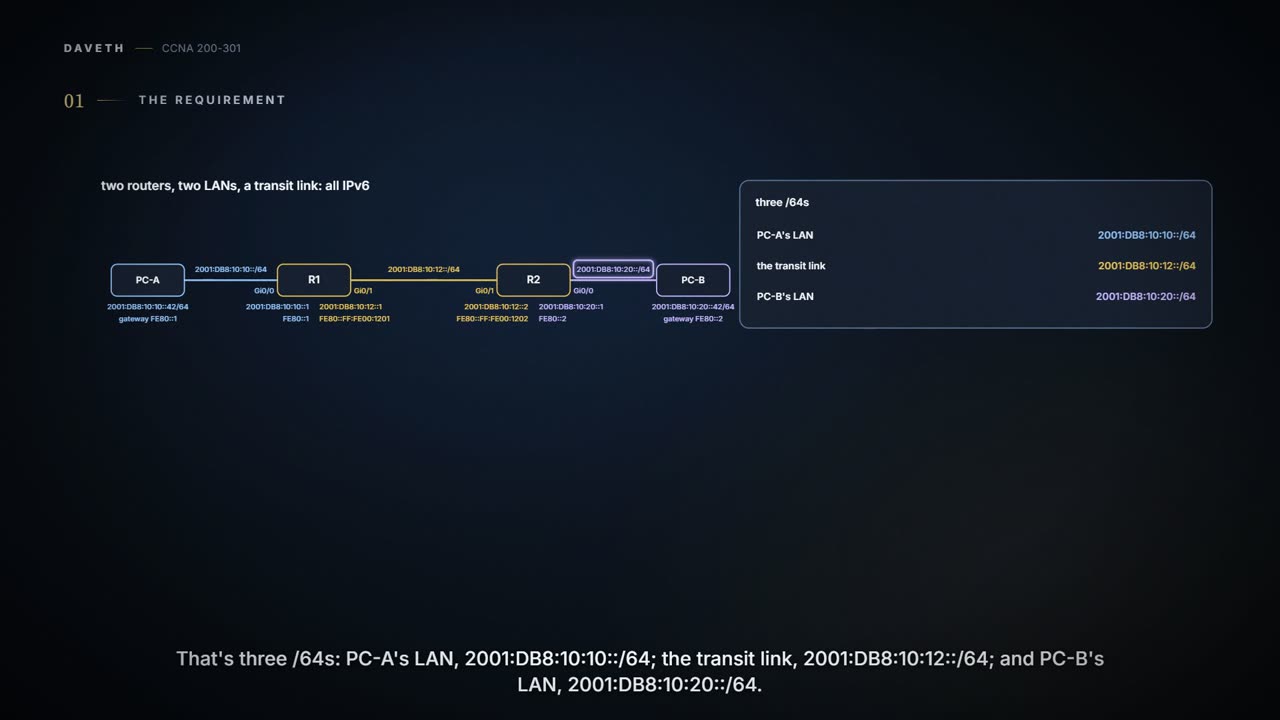
A lab page; the outputs follow the command line used throughout this course. Two routers, two LANs and a link between the routers, all IPv6 this time, with addresses from the documentation range 2001:DB8::/32. PC-A must reach PC-B, and PC-B must be able to answer. Each LAN gets its own /64 and so does the transit link: three /64s, all on the drawing. Each router interface carries two addresses, the global one on top and the link-local one below it.


PC-A, R1, R2 and PC-B on three /64s. Under each router interface: its global address, then its link-local address.
Start with IPv6 routing on and the addresses in place, but no routes added yet.
Neither router can help yet. R1 knows 2001:DB8:10:10::/64 and 2001:DB8:10:12::/64 because it has an interface in each; it knows nothing about 2001:DB8:10:20::/64. PC-A's packet for PC-B reaches R1 and stops there. And a route out isn't enough on its own: R2 will need a route back.
The address got longer. The router didn't become psychic.
Two hosts, two gateways, two different links
The hosts are set by hand for this lab, so every run starts from the same addresses. In a real network a host usually learns its default router from router advertisements, and its address by SLAAC or DHCPv6, the ways 06.6 and 06.7 showed; that's a separate path, and this lab doesn't rely on it. The routers still send their advertisements, though, and many hosts will build an extra address of their own in the LAN's /64. Turn that off on the hosts for this lab, or at least check which address each ping uses.
| Host | Address | Default router | Which link that gateway lives on |
|---|---|---|---|
| PC-A | 2001:DB8:10:10::42/64 | FE80::1 | its own Ethernet link, to R1 Gi0/0 |
| PC-B | 2001:DB8:10:20::42/64 | FE80::2 | its own Ethernet link, to R2 Gi0/0 |
Look at the default router column, and at the last one.
FE80::1 is R1 Gi0/0, but only on PC-A's LAN. A link-local address only means something on its own link: it has to be unique there and nowhere else, so another link could have its own FE80::1 on a different device. That's why the table pairs each gateway with its link. Write a link-local gateway down with its link, every time.
You can think of a link-local address as a nickname at one family dinner: everyone at that table knows who Sam is, and the name means nothing at the next table. (Where it stops: before using an address, a host checks that nobody else on its link has it already; families don't check nicknames that way.)
Addresses, then a route each way
R1# configure terminal
Enter configuration commands, one per line.  End with CNTL/Z.
R1(config)# ipv6 unicast-routing
R1(config)# interface GigabitEthernet0/0
R1(config-if)# ipv6 address 2001:DB8:10:10::1/64
R1(config-if)# ipv6 address FE80::1 link-local
R1(config-if)# no shutdown
R1(config-if)# interface GigabitEthernet0/1
R1(config-if)# ipv6 address 2001:DB8:10:12::1/64
R1(config-if)# no shutdown
R1(config-if)# exit
R1(config)# ipv6 route 2001:DB8:10:20::/64 2001:DB8:10:12::2
R1(config)# end
R2# configure terminal
Enter configuration commands, one per line.  End with CNTL/Z.
R2(config)# ipv6 unicast-routing
R2(config)# interface GigabitEthernet0/1
R2(config-if)# ipv6 address 2001:DB8:10:12::2/64
R2(config-if)# no shutdown
R2(config-if)# interface GigabitEthernet0/0
R2(config-if)# ipv6 address 2001:DB8:10:20::1/64
R2(config-if)# ipv6 address FE80::2 link-local
R2(config-if)# no shutdown
R2(config-if)# exit
R2(config)# ipv6 route 2001:DB8:10:10::/64 2001:DB8:10:12::1
R2(config)# end
What each line does, and what it doesn't. ipv6 unicast-routing turns on IPv6 routing, which is off by default. Each ipv6 address line gives an interface a global address in its link's /64. The two link-local lines replace each LAN interface's automatic link-local address with a short one, FE80::1 and FE80::2, so the hosts' gateways are easy to type. The transit interfaces keep their automatic link-local addresses, built from their MACs with EUI-64. Each ipv6 route names a remote /64 and the other router's global address on the transit link as the next hop.
Two routes, one each way: R1's covers the trip out and R2's the trip back. Neither router needs a default route here. If you ever add one, its prefix is ::/0, which matches every destination; that's not the same thing as the address ::, which is the unspecified address.
Four steps, each proving one thing
Check in this order, and let each command prove only its own step:
| Command | Proves | Doesn't prove |
|---|---|---|
show ipv6 interface brief | each interface is up/up, with a link-local and a global address | that any route exists past this router |
show ipv6 route | C and L routes for each global address; the static is installed | that the next hop answers, or that a route back exists |
a ping to 2001:DB8:10:12::2, then show ipv6 neighbors | the transit link works; which neighbours' MAC addresses were resolved, after traffic | anything about routes beyond the link |
show ipv6 route 2001:DB8:10:20::42, then PC-A to PC-B | the route one destination uses; then delivery both ways | every other destination |
R1# show ipv6 interface brief
GigabitEthernet0/0     [up/up]
    FE80::1
    2001:DB8:10:10::1
GigabitEthernet0/1     [up/up]
    FE80::FF:FE00:1201
    2001:DB8:10:12::1
Both interfaces are up/up with two addresses each: the link-local one above, the global one below, the other way round from the drawing. Gi0/0 shows FE80::1 because it was typed; Gi0/1 shows FE80::FF:FE00:1201, built from its MAC. The brief prints no prefix lengths, and it says nothing about routes.
R1# show ipv6 route
IPv6 Routing Table - default - 6 entries
! (the code list is left out)
C   2001:DB8:10:10::/64 [0/0]
     via GigabitEthernet0/0, directly connected
L   2001:DB8:10:10::1/128 [0/0]
     via GigabitEthernet0/0, receive
C   2001:DB8:10:12::/64 [0/0]
     via GigabitEthernet0/1, directly connected
L   2001:DB8:10:12::1/128 [0/0]
     via GigabitEthernet0/1, receive
S   2001:DB8:10:20::/64 [1/0]
     via 2001:DB8:10:12::2
L   FF00::/8 [0/0]
     via Null0, receive
Two routes for each global address: C for the /64 and L for the address itself, as a /128. There's nothing for FE80::1 or FE80::FF:FE00:1201, because routers don't create connected or local routes for link-local addresses. The S line is the static route, with administrative distance 1. show ipv6 route connected and show ipv6 route local list just the C or just the L lines, if you'd rather check them one kind at a time. Being in the table proves the route was accepted and that R1 had a route to its next hop; it doesn't prove the next hop answers, or that R2 has a route back.
Next, the transit link. From R1, ping ipv6 2001:DB8:10:12::2; on many platforms plain ping with the address works too, so the target address is what matters. Then, with some traffic behind it, the neighbour table:
R1# show ipv6 neighbors
IPv6 Address                              Age Link-layer Addr State Interface
2001:DB8:10:10::42                          0 0200.0000.1042  REACH Gi0/0
2001:DB8:10:12::2                           0 0200.0000.1202  REACH Gi0/1
! (which entries appear depends on the traffic so far: yours may list link-local ones too)
After the pings, R1 has resolved two neighbours: PC-A on Gi0/0 and R2's transit address on Gi0/1. To find each MAC, R1 sent a Neighbor Solicitation to that address's solicited-node multicast group, and those groups have link-local scope. So a Neighbor Solicitation stays on its own link; no router forwards it. R1 never learns PC-B's MAC, and doesn't need to: R2 does that on its own LAN.
R1# show ipv6 route 2001:DB8:10:20::42
Routing entry for 2001:DB8:10:20::/64
  Known via "static", distance 1, metric 0
  Route count is 1/1, share count 0
  Routing paths:
    2001:DB8:10:12::2
      ! (the last-updated timer is left out)
Last, one destination. 2001:DB8:10:20::42 matches the static /64, next hop 2001:DB8:10:12::2. Then a ping from PC-A to PC-B checks the whole trip, out and back. Along the way, the source and destination addresses stay the same end to end, and each router lowers the Hop Limit by one: two routers, two fewer.
Continue the lesson
The whole lesson, with its drawings and its questions. 4 more sections after the ones above.