
ACL and Layer 2 Security Lab
A hands-on CCNA security lab. An extended named ACL lets PC-A reach the server by HTTPS but not SSH, applied where the packets actually pass. Port security with a maximum of one MAC in restrict mode guards PC-A's port. DHCP snooping, with the uplink as the only trusted port, comes first, and Dynamic ARP Inspection builds on its records.
By Arif, founder of Daveth · Updated
The full 11 min walkthrough is in Daveth Pro (Network). See what the plan opens
The requirement
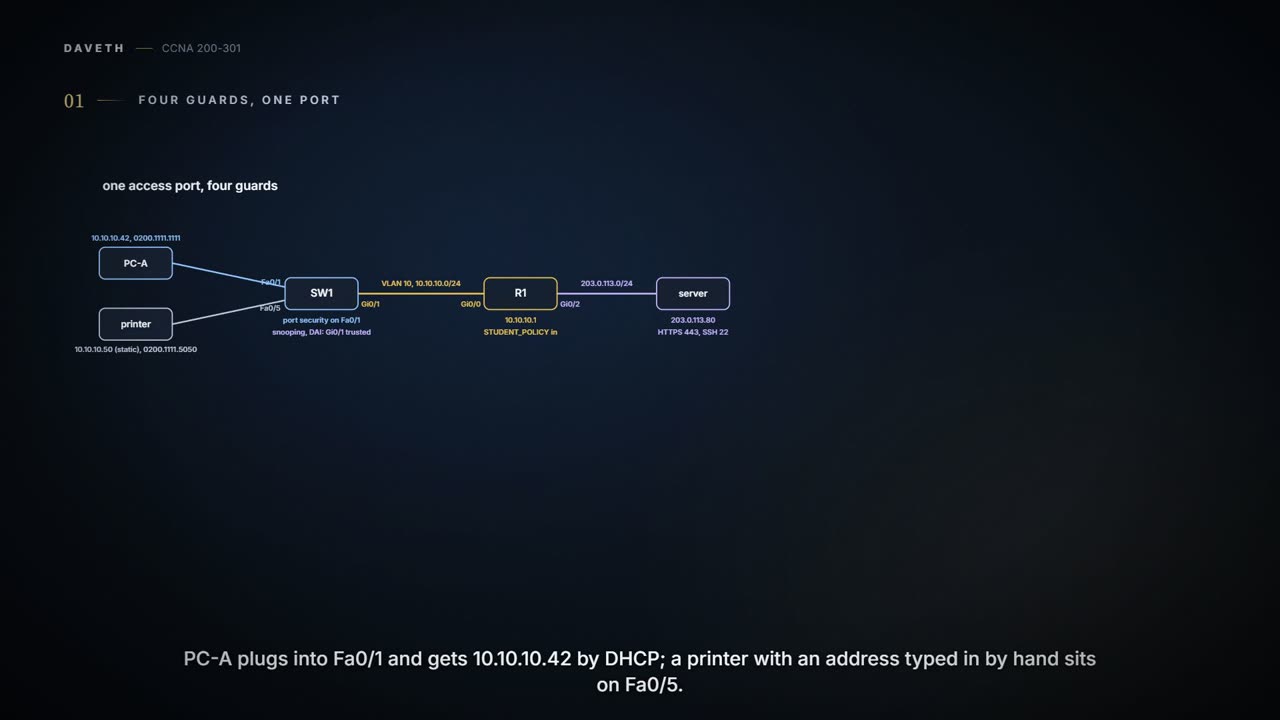
A lab page; the outputs follow the command line used throughout this course. SW1 holds VLAN 10, 10.10.10.0/24. PC-A is on Fa0/1 and leases 10.10.10.42; a printer with a static address sits on Fa0/5. SW1's uplink, Gi0/1, goes to R1, the gateway, and it's the only way the real DHCP messages arrive (R1 relays them, as in 11.8). Behind R1 is the server 203.0.113.80. The policy: PC-A may reach the server by HTTPS but not by SSH; Fa0/1 accepts one device; only the uplink may hand out leases; and an ARP on a user port has to match a real lease.
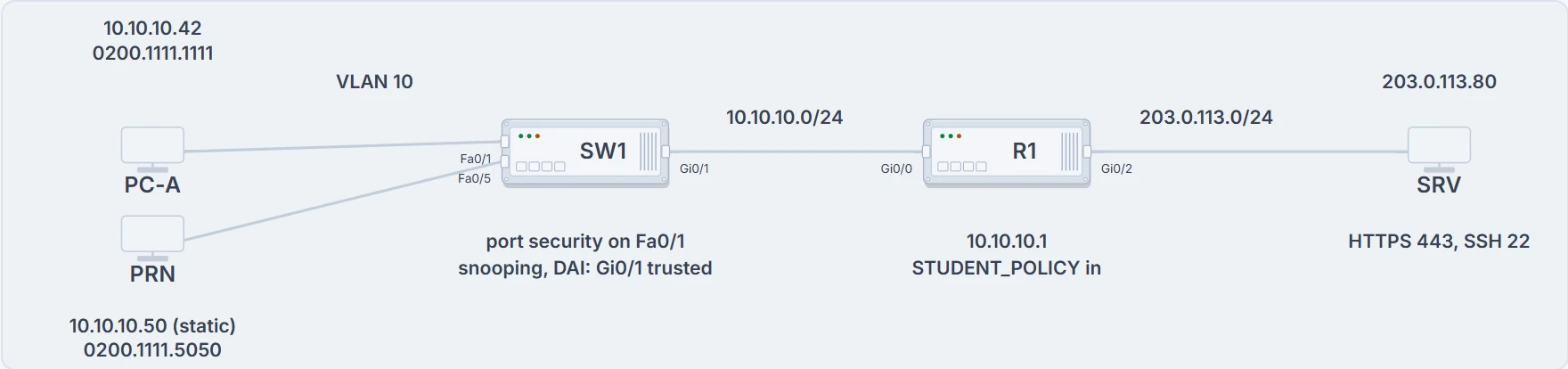
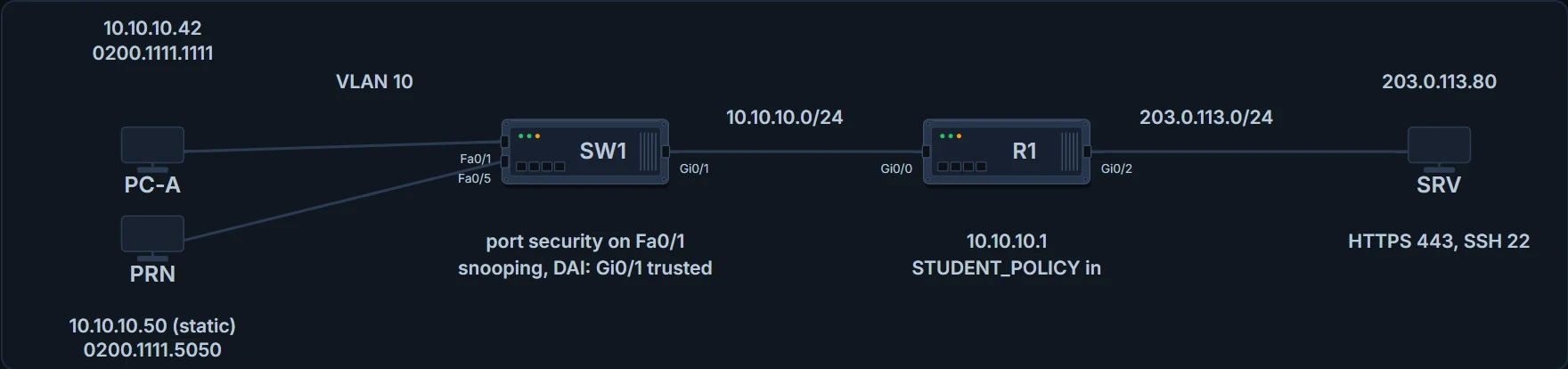
PC-A and the printer on SW1; SW1's uplink to R1; R1 to the server. Under each device, the guard it runs.
The faults in this lab are labelled test cards, sent on purpose to see which guard reacts. None of it is a recipe for doing anything to a real network.
Start with the puzzle. Three different messages arrive on Fa0/1: a TCP packet for SSH, a DHCP Offer from something pretending to be a server, and an ARP naming the wrong MAC. Each is stopped by a different guard, because each guard reads a different field. Place all three before any command appears: the first one is below, and the other two are answered right after it.
The ACL reads the envelope: source and destination addresses, protocol and port. Port security reads the sender's badge, the source MAC. Snooping asks who's allowed to hand out room keys, meaning DHCP server messages. DAI checks whether the badge matches the key ledger: an ARP's IP and MAC against the leases snooping recorded. (Where it stops: none of them reads a message's intent; each checks one field against one list.)
The ACL, on the interface the packets use
R1# configure terminal
Enter configuration commands, one per line.  End with CNTL/Z.
R1(config)# ip access-list extended STUDENT_POLICY
R1(config-ext-nacl)# 10 deny tcp 10.10.10.0 0.0.0.255 host 203.0.113.80 eq 22
R1(config-ext-nacl)# 20 permit tcp 10.10.10.0 0.0.0.255 host 203.0.113.80 eq 443
R1(config-ext-nacl)# 30 permit ip any any
R1(config-ext-nacl)# interface GigabitEthernet0/0
R1(config-if)# ip access-group STUDENT_POLICY in
R1(config-if)# end
R1# show ip interface GigabitEthernet0/0 | include access list
  Outgoing Common access list is not set
  Outgoing access list is not set
  Inbound Common access list is not set
  Inbound access list is STUDENT_POLICY
! (after the tests)
R1# show ip access-lists STUDENT_POLICY
Extended IP access list STUDENT_POLICY
    10 deny tcp 10.10.10.0 0.0.0.255 host 203.0.113.80 eq 22 (2 matches)
    20 permit tcp 10.10.10.0 0.0.0.255 host 203.0.113.80 eq 443 (14 matches)
    30 permit ip any any (63 matches)
! (the counts are this lab's; yours will differ)
Line 10 denies SSH from the VLAN to the server, and line 20 permits HTTPS. Line 30, permit ip any any, is a lab requirement: it keeps everything else working. A real policy would need a review before a line like that went in. Order matters, because the first match wins: an SSH packet never gets as far as line 30.
Two outputs, two different proofs. show ip interface proves where the ACL is applied, and in which direction: inbound on Gi0/0, where PC-A's packets arrive. show ip access-lists proves which line each packet matched: line 10 took the SSH packets and line 20 the HTTPS ones, counting packets, not attempts, so a retried opening packet counts again. A list that exists but isn't applied filters nothing, however right its lines look. And the server's replies enter R1 on Gi0/2, so this inbound ACL on Gi0/0 never sees them. The replies get through because nothing on their path filters them, not because this ACL allows them.
The rulebook has to hang where the packet actually walks in.
Port security on Fa0/1
Fa0/1 is an access port in VLAN 10 that should only ever carry PC-A. Port security with a maximum of 1 and PC-A's MAC configured does that, and restrict decides what happens to anything else.
SW1# configure terminal
Enter configuration commands, one per line.  End with CNTL/Z.
SW1(config)# interface FastEthernet0/1
SW1(config-if)# switchport mode access
SW1(config-if)# switchport access vlan 10
SW1(config-if)# switchport port-security
SW1(config-if)# switchport port-security maximum 1
SW1(config-if)# switchport port-security mac-address 0200.1111.1111
SW1(config-if)# switchport port-security violation restrict
SW1(config-if)# end
! (after card B: three frames from a second MAC)
SW1# show port-security interface FastEthernet0/1
Port Security               : Enabled
Port Status                 : Secure-up
Violation Mode              : Restrict
Aging Time                  : 0 mins
Aging Type                  : Absolute
SecureStatic Address Aging  : Disabled
Maximum MAC Addresses       : 1
Total MAC Addresses         : 1
Configured MAC Addresses    : 1
Sticky MAC Addresses        : 0
Last Source Address:Vlan    : 0200.2222.2222:10
Security Violation Count    : 3
Restrict discards the second device's frames, counts every one and sends log messages, and the port stays Secure-up, so PC-A carries on. The violation count says how many frames, and the last source address names the offender. One MAC is this lab's design: a PC plugged in behind a phone, for instance, needs a higher maximum. And how a switch displays the MAC and the counters can differ a little from model to model, so check yours.
| Mode | Offending frames | Port | Evidence |
|---|---|---|---|
| protect | discarded | stays Secure-up | none: no messages, the counter stays at 0 |
| restrict | discarded | stays Secure-up | the counter rises with every frame; log messages |
| shutdown (the default) | discarded | err-disabled: nothing gets through | the counter rises once per err-disable; log messages |
Snooping first, then DAI
SW1# configure terminal
Enter configuration commands, one per line.  End with CNTL/Z.
SW1(config)# ip dhcp snooping
SW1(config)# ip dhcp snooping vlan 10
SW1(config)# no ip dhcp snooping information option
SW1(config)# interface GigabitEthernet0/1
SW1(config-if)# ip dhcp snooping trust
SW1(config-if)# end
! (after PC-A renews its lease)
SW1# show ip dhcp snooping binding
MacAddress          IpAddress        Lease(sec)  Type           VLAN  Interface
------------------  ---------------  ----------  -------------  ----  --------------------
02:00:11:11:11:11   10.10.10.42      86302       dhcp-snooping  10    FastEthernet0/1
Total number of bindings: 1
! (the lease time counts down; yours will differ)
Snooping is on for VLAN 10, and Gi0/1, the uplink, is the one trusted port; every other port is untrusted by default. SW1 is a Layer 2 switch that doesn't relay, so option 82 insertion is turned off, as in 08.3.2; option 82 and rate-limit defaults vary, so check them on the gear you use. When PC-A renews its lease, snooping records the binding: MAC, IP, VLAN and port. That row is what DAI will check against.
SW1# configure terminal
Enter configuration commands, one per line.  End with CNTL/Z.
SW1(config)# ip arp inspection vlan 10
SW1(config)# interface GigabitEthernet0/1
SW1(config-if)# ip arp inspection trust
SW1(config-if)# end
! (after cards D and E)
SW1# show ip arp inspection statistics
 Vlan      Forwarded        Dropped     DHCP Drops      ACL Drops
 ----      ---------        -------     ----------      ---------
  10              41              2              2              0

 Vlan   DHCP Permits    ACL Permits  Probe Permits   Source MAC Failures
 ----   ------------    -----------  -------------   -------------------
  10              41              0              0                     0
! (the rest is left out; the counts are this lab's)
DAI on VLAN 10 checks every ARP on an untrusted port: its origin IP and MAC have to match a binding or an ARP ACL. Gi0/1 is trusted, so ARPs from R1 pass unchecked. After cards D and E, the statistics show two drops, both DHCP drops: two ARPs that matched no binding.
Continue the lesson
The whole lesson, with its drawings and its questions. The rest of this section and 3 more after it.