
OSPF Configuration and Troubleshooting Lab
A hands-on CCNA OSPF lab: two routers, two LANs and a /30. Start from a clean baseline with no leftover static routes, which would win on administrative distance. Configure router ospf with router IDs and network statements in area 0, then climb the evidence ladder, interface, neighbour, database, route, and break one thing at a time.
By Arif, founder of Daveth · Updated
The full 9 min walkthrough is in Daveth Pro (Network). See what the plan opens
What this page answers
How do you verify OSPF step by step?
show ip ospf interface brief proves which interfaces OSPF selected; show ip ospf neighbor proves the adjacency; show ip ospf database shows what each router described; the routing table shows what was installed. Each proves its own step only. Read it in “Climb the evidence ladder”
The requirement
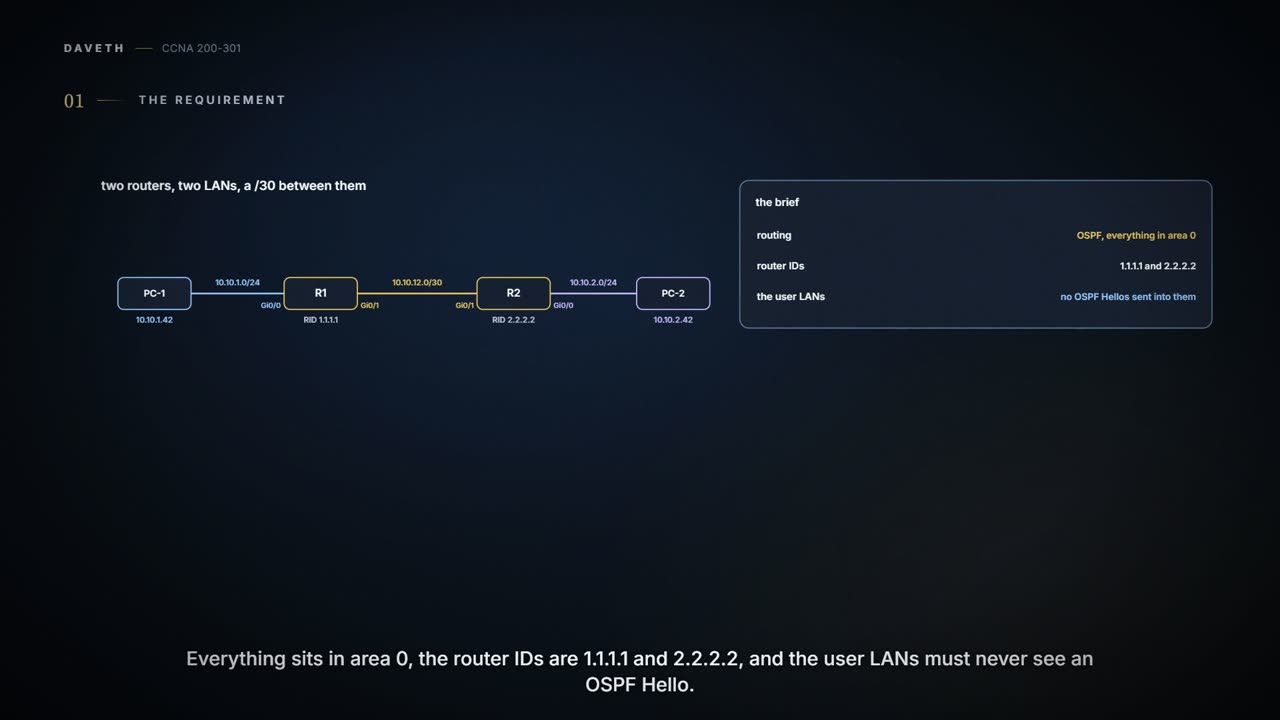
A lab page; the outputs follow the command line used throughout this course. Two routers, two LANs and a /30 between them. R1 and R2 must learn each other's LAN with OSPF, all in area 0, with router IDs 1.1.1.1 and 2.2.2.2, and without sending OSPF Hellos into the user LANs. Think of the two LANs as two classrooms, one behind each router. Every subnet is on the drawing; each router is .1 on its LAN, and R1 is .1 and R2 .2 on the /30.


R1 and R2 on a /30, each with a LAN and a test PC.
No. The transit ping works because 10.10.12.0/30 is connected at both ends. Neither router knows anything about the other's LAN, so PC-1's packets to PC-2 have nowhere to go past R1.
The routers know each other's front step; the classrooms are still missing from the map. (Where it stops: a LAN is just a subnet a router has to advertise; nobody walks anywhere.)
A clean baseline first
Start from a clean lab state: both transit interfaces up/up in show ip interface brief, a ping to the neighbour's transit address working, and show ip route holding only connected and local routes. Remove any static routes left over from an earlier lab. A static route has a lower administrative distance than OSPF, so a lingering one would win and hide whatever OSPF is doing. Then write down what you expect OSPF to add.
O 10.10.2.0/24 via 10.10.12.2 on R1, and O 10.10.1.0/24 via 10.10.12.1 on R2. The /30 stays connected on both, so it never shows up as an O route.
Turn on OSPF
R1# configure terminal
Enter configuration commands, one per line.  End with CNTL/Z.
R1(config)# router ospf 1
R1(config-router)# router-id 1.1.1.1
R1(config-router)# network 10.10.1.0 0.0.0.255 area 0
R1(config-router)# network 10.10.12.0 0.0.0.3 area 0
R1(config-router)# passive-interface GigabitEthernet0/0
R1(config-router)# end
R2# configure terminal
Enter configuration commands, one per line.  End with CNTL/Z.
R2(config)# router ospf 1
R2(config-router)# router-id 2.2.2.2
R2(config-router)# network 10.10.2.0 0.0.0.255 area 0
R2(config-router)# network 10.10.12.0 0.0.0.3 area 0
R2(config-router)# passive-interface GigabitEthernet0/0
R2(config-router)# end
A few things each line does, and doesn't. The process number, 1 here, is local to each router and never has to match a neighbour's. The router ID names the router in OSPF, and the two must differ. Each network command's wildcard selects the router's own interfaces by address: 0.0.0.255 matches the LAN interface, 0.0.0.3 the transit one, and a matched interface joins area 0. The command text alone doesn't prove anything is advertised; the interfaces it matches do. passive-interface stops Hellos on the LAN, yet the LAN is still advertised. And on an Ethernet link, OSPF elects a DR and a BDR even with only two routers, so the neighbour shows FULL with a /DR or /BDR after it, depending on the election.
Climb the evidence ladder
Start at the first row and work down, and let each command prove only its own step:
| Command | Proves | Doesn't prove |
|---|---|---|
show ip ospf interface brief | which interfaces OSPF selected, and in which area | that a neighbour exists |
show ip ospf neighbor | the adjacency over the transit link | that the other LAN was advertised |
show ip ospf database | what each router described | which route was installed |
show ip route ospf | the remote LAN route is installed | that a host there answers |
ping 10.10.2.42 source 10.10.1.1, then PC to PC | delivery both ways, between those subnets | every other destination |
R1# show ip route ospf
! (the legend and the heading omitted)
O        10.10.2.0/24 [110/2] via 10.10.12.2, 00:00:31, GigabitEthernet0/1
! (00:00:31 is how long the route has been known: yours will differ)
The route is there, with cost 2: 1 for R1's own gigabit transit interface plus 1 for R2's LAN interface. Then the last rung: from R1, ping 10.10.2.42 source 10.10.1.1, and a ping from PC-1 to PC-2. Each rung depends on the one below, but proves only itself.
A handshake says the routers met. It doesn't say they mentioned every classroom.
Two faults, different layers
Break one thing at a time and reset in between. Fault 1 changes R2's transit network statement to area 1. Fault 1b, a variation, makes R2's transit interface passive instead. Fault 2 removes R2's LAN network statement and leaves the transit alone. Predict which drawer goes empty first for each, then look.
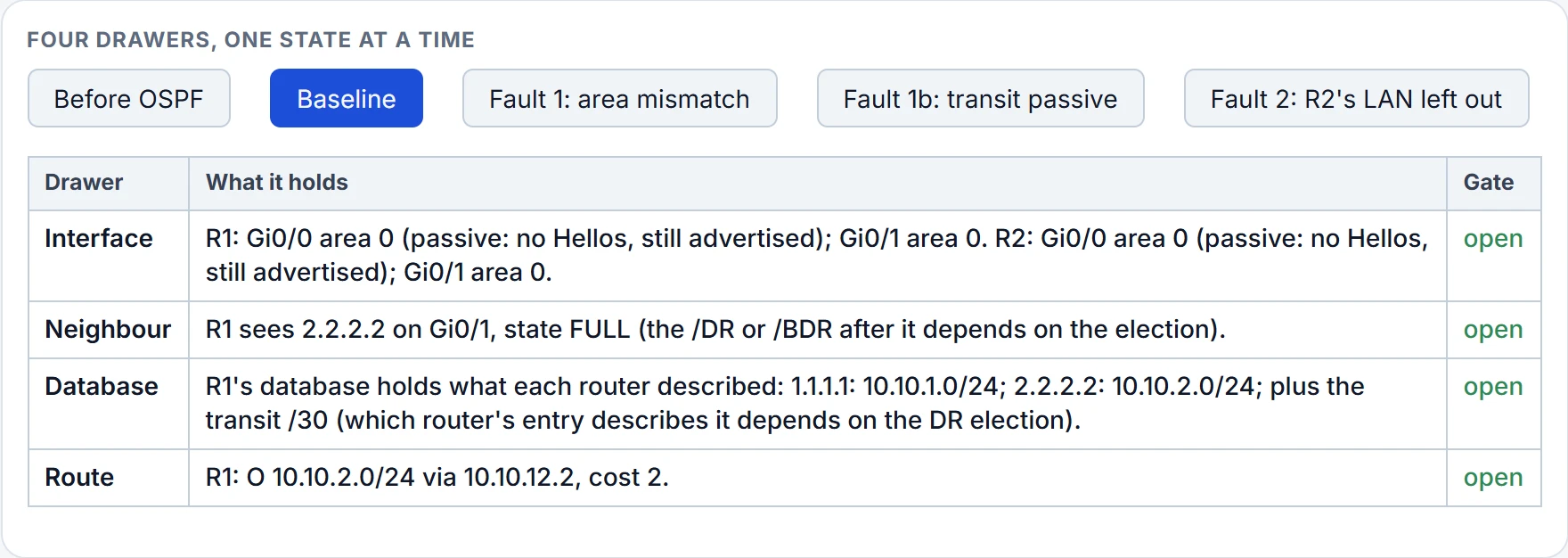
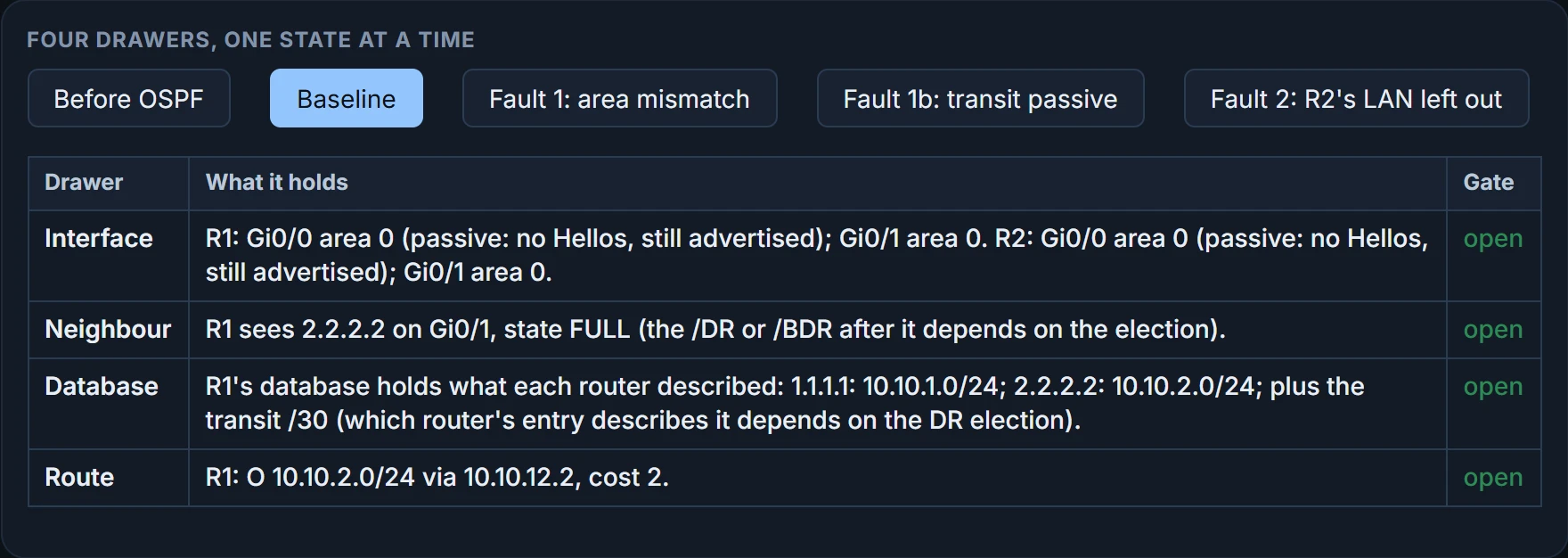
Fault 1 shuts the neighbour drawer: the two ends' Hellos disagree about the area, so no adjacency forms, and nothing from R2 reaches R1's database or routes. show ip ospf interface brief on each router shows it straight away, in the Area column. The fix is R2's transit back in area 0, then the ladder again from the first row. Fault 1b shuts the same drawer for a different reason: a passive transit sends no Hellos at all, and show ip ospf interface GigabitEthernet0/1 on R2 says so in a line reading No Hellos (Passive interface). Same symptom, different cause, so read the evidence rather than the symptom.
Continue the lesson
The whole lesson, with its drawings and its questions. The rest of this section and 2 more after it.