
Static Routing and Inter-VLAN Routing Lab
A hands-on CCNA lab starting from two failed pings. First make both gateways real: two VLANs on the switch, a trunk to the router, and one subinterface per VLAN with encapsulation dot1q and the gateway address. Then route out and back: a static route to the server's LAN on R1, and routes back to both VLANs on R2.
By Arif, founder of Daveth · Updated
The full 10 min walkthrough is in Daveth Pro (Network). See what the plan opens
The ticket: two red pings
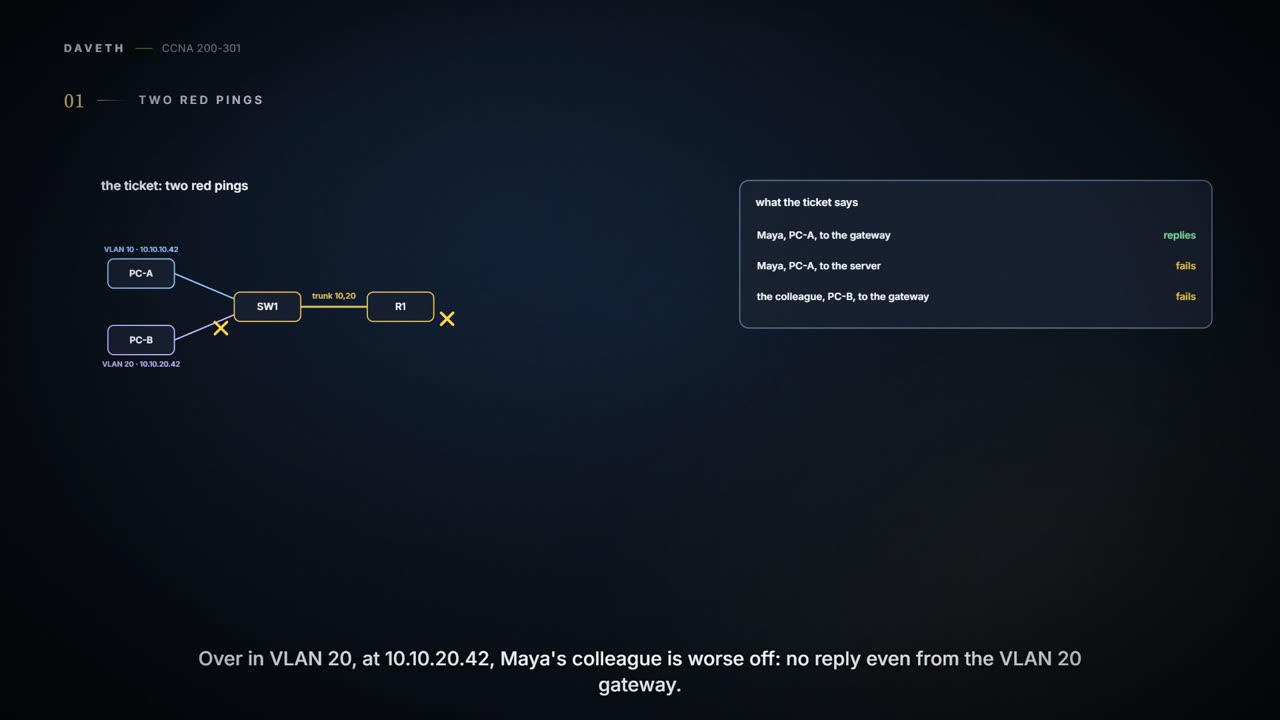
A lab page again; the outputs follow the command line used throughout this course. Maya, in VLAN 10 at 10.10.10.42, can reach the gateway, 10.10.10.1, but not the finance server, 203.0.113.10, behind R2. Maya's colleague, in VLAN 20 at 10.10.20.42, can't even reach the VLAN 20 gateway. (All the addresses are lab values.)
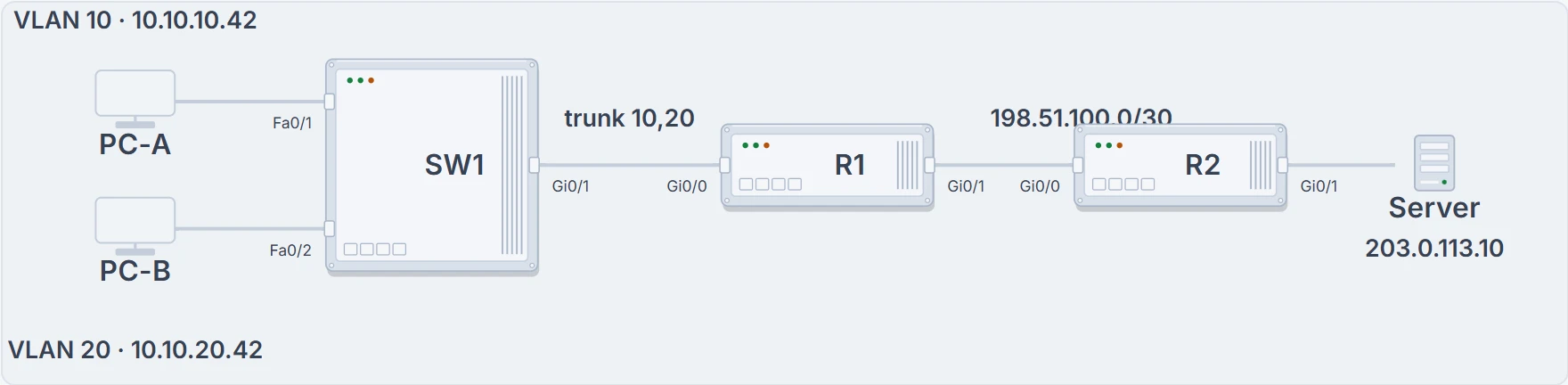
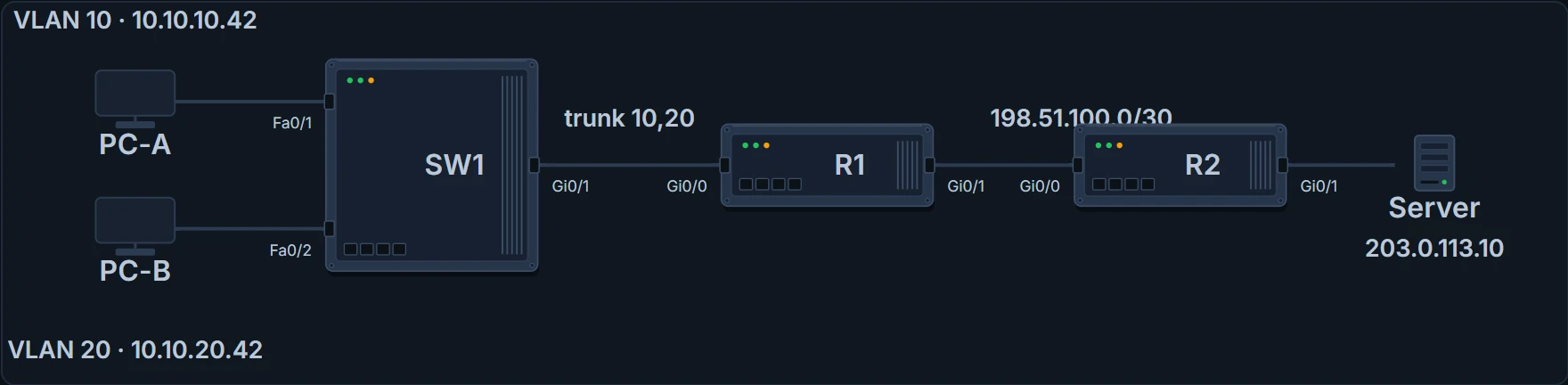
SW1 with both VLANs, a trunk to R1, R1 to R2 on a /30, and the server behind R2.
Before touching anything, mark where each failure could be. VLAN 10 and VLAN 20 are separate networks, separate broadcast domains; R1 makes the turn between them, and on to R2.
Two faults. PC-B fails at its very first hop, so its problem is local: the switch, the trunk, or R1's VLAN 20 subinterface. PC-A gets past its gateway, so its problem lies beyond R1: a route out, or a route back.
Two red pings can be two different broken links. Don't spray static routes at a trunk.
Make both gateways real
First the local half, rebuilt from a clean start. SW1 needs both VLANs, each PC's port in the right one, and a trunk to R1 that carries both. R1 then needs a subinterface per VLAN on the one physical port: each tied to its VLAN by encapsulation dot1q, each with that VLAN's gateway address. The physical interface itself carries no address, just no shutdown.
SW1# configure terminal
Enter configuration commands, one per line.  End with CNTL/Z.
SW1(config)# vlan 10
SW1(config-vlan)# name USERS
SW1(config-vlan)# vlan 20
SW1(config-vlan)# name STAFF
SW1(config-vlan)# interface FastEthernet0/1
SW1(config-if)# switchport mode access
SW1(config-if)# switchport access vlan 10
SW1(config-if)# interface FastEthernet0/2
SW1(config-if)# switchport mode access
SW1(config-if)# switchport access vlan 20
SW1(config-if)# interface GigabitEthernet0/1
SW1(config-if)# switchport mode trunk
SW1(config-if)# switchport trunk allowed vlan 10,20
SW1(config-if)# end
SW1# show vlan brief
VLAN Name                             Status    Ports
---- -------------------------------- --------- -------------------------------
1    default                          active    Fa0/3, Fa0/4, ...
10   USERS                            active    Fa0/1
20   STAFF                            active    Fa0/2
! (VLANs 1002-1005 omitted; Gi0/1 is a trunk, so no VLAN lists it)
SW1# show interfaces trunk
Port        Mode             Encapsulation  Status        Native vlan
Gi0/1       on               802.1q         trunking      1

Port        Vlans allowed on trunk
Gi0/1       10,20

Port        Vlans allowed and active in management domain
Gi0/1       10,20

Port        Vlans in spanning tree forwarding state and not pruned
Gi0/1       10,20
R1# configure terminal
Enter configuration commands, one per line.  End with CNTL/Z.
R1(config)# interface GigabitEthernet0/0
R1(config-if)# no shutdown
R1(config-if)# interface GigabitEthernet0/0.10
R1(config-subif)# encapsulation dot1q 10
R1(config-subif)# ip address 10.10.10.1 255.255.255.0
R1(config-subif)# interface GigabitEthernet0/0.20
R1(config-subif)# encapsulation dot1q 20
R1(config-subif)# ip address 10.10.20.1 255.255.255.0
R1(config-subif)# end
R1# show ip interface brief
Interface                  IP-Address      OK? Method Status                Protocol
GigabitEthernet0/0         unassigned      YES manual up                    up
GigabitEthernet0/0.10      10.10.10.1      YES manual up                    up
GigabitEthernet0/0.20      10.10.20.1      YES manual up                    up
GigabitEthernet0/1         198.51.100.1    YES manual up                    up
! (other interfaces omitted)
Both subinterfaces are up/up with their addresses, and the trunk carries 10 and 20. Now go back to the ticket: before this rebuild, PC-B couldn't reach 10.10.20.1.
SW1's trunk. A subinterface only answers frames that arrive tagged for its VLAN, and a trunk that doesn't allow VLAN 20 never sends any. Gi0/0.20 can be up/up and perfectly addressed and still hear nothing from PC-B. That was PC-B's fault: the trunk had been left allowing VLAN 10 only.
The router has a way in marked 20. The switch forgot to put floor 20 in the lift. (Where it stops: a lift has one shaft, while a trunk carries each allowed VLAN as its own tagged stream.)
Route out, and route back
Now PC-A's half. R1 knows 10.10.10.0/24, 10.10.20.0/24 and the /30 to R2, because they're connected; it knows nothing about 203.0.113.0/24. The /30 and the server's LAN are already addressed and up. So R1 gets a static route to the server's LAN via R2. And R2, which knows only its own two networks, needs routes back to both VLAN subnets via R1. The server's own gateway is R2, 203.0.113.1.
R1# configure terminal
Enter configuration commands, one per line.  End with CNTL/Z.
R1(config)# ip route 203.0.113.0 255.255.255.0 198.51.100.2
R1(config)# end
R1# show ip route 203.0.113.10
Routing entry for 203.0.113.0/24
  Known via "static", distance 1, metric 0
! (the rest of the entry is left out)
R2# configure terminal
Enter configuration commands, one per line.  End with CNTL/Z.
R2(config)# ip route 10.10.10.0 255.255.255.0 198.51.100.1
R2(config)# ip route 10.10.20.0 255.255.255.0 198.51.100.1
R2(config)# end
R2# show ip route 10.10.10.42
Routing entry for 10.10.10.0/24
  Known via "static", distance 1, metric 0
! (the rest of the entry is left out)
R1's entry proves the outward choice; R2's proves the return choice. Test in separate steps, so each result means one thing: ping 198.51.100.2 from R1 tests the /30 link. ping 203.0.113.10 source 10.10.10.1 from R1 tests the whole way to the server and back to the VLAN 10 subnet. And a ping from PC-A tests the path a user actually takes.
It arrives; the reply doesn't come back. The request only needed routes towards the server. The reply is a brand-new packet, from 203.0.113.10 to 10.10.10.42, and R2 needs a route of its own for that.
The parcel arrived. The reply still needs a route to Maya's subnet in R2's own route list. (Where it stops: a parcel's return address is enough for the post office; a reply also needs a route to get there.)
Continue the lesson
The whole lesson, with its drawings and its questions. 5 more sections after the ones above.