
UDLD
A link can be up with one direction dead, and every protocol over it assumes that if you can hear someone, they can hear you. UDLD checks: each port expects to see its own device and port ID echoed back by the neighbour, and a port that stops seeing it treats the link as unidirectional. Normal mode is the default; aggressive mode catches more failures.
By Arif, founder of Daveth · Updated
The full 5 min walkthrough is in Daveth Pro (Network). See what the plan opens
What this page answers
How does UDLD detect a unidirectional link?
Neighbouring ports see their own device and port ID echoed in the UDLD packets from the other side. If a port does not see its own ID for a specific time, the link is considered unidirectional. Read it in “A protocol that expects to hear itself”
What is the difference between UDLD normal and aggressive mode?
Normal mode, the default, detects unidirectional links caused by misconnected fibre ports. Aggressive mode also detects one-way traffic on fibre and twisted-pair links, as well as misconnected fibre ports. Read it in “Normal and aggressive, accurately”
A link that works in one direction
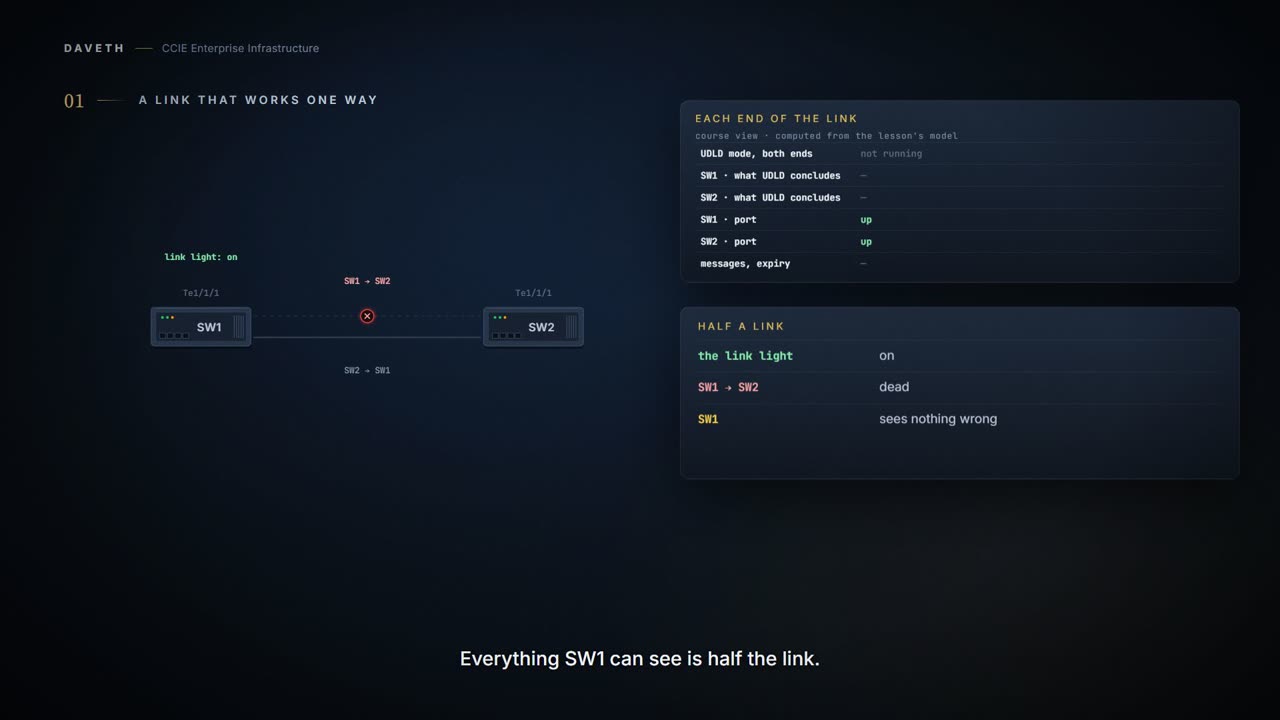
The link light is on. One direction is dead.
Every protocol running over a link is built on an assumption nobody states: if you can hear someone, they can hear you.
A unidirectional link occurs whenever traffic sent by a local device is received by its neighbor but traffic from the neighbor is not received by the local device.


SW1 still receives everything. Its port is up, its neighbor is transmitting, and nothing it can see is wrong. SW2 receives nothing, while still transmitting into a strand that carries it fine.
Everything SW1 can see says the link is fine. Everything SW1 can see is half the link.
Here are the two directions of that link separately. This is a reading, not device output: each switch can only see the half that reaches it.
direction                 carrying  so
SW1 transmitting to SW2   NO        SW2 hears nothing
SW2 transmitting to SW1   yes       SW1 hears SW2

SW1   believes the link is up and the neighbor is there
SW2   believes nothing is arriving
Why is that worse than a broken link? A broken link goes down and everything above it reroutes. A half-working link lets the layer above keep believing. Spanning tree is built on each switch hearing the other; how it misbehaves is 1.1.e.
A protocol that expects to hear itself
Neighboring ports see their own device/port ID (echo) in the packets received from the other side. If the port does not see its own device/port ID in the incoming UDLD packets for a specific duration of time, the link is considered unidirectional.
If your neighbor is echoing your ID, the link is bidirectional by demonstration, not by assumption.
Which is exactly the assumption an interface state makes. A port reporting up has established that something is arriving. Whether anything is leaving successfully is a separate fact it never checked, so up was only ever half the answer and nothing on the switch said so.
SW1# configure terminal
SW1(config)# interface TenGigabitEthernet1/1/1
SW1(config-if)# udld port
SW1(config-if)# end
The same on SW2. That's normal mode, the default. The global udld enable does the same for fibre ports only, and an interface's own setting overrides it.
The range is from 1 to 90 seconds; the default value is 15.
So, standing at SW2, how do you know its own ID is really coming back from SW1?
SW2# show udld TenGigabitEthernet1/1/1

Interface Te1/1/1
---
Port enable administrative configuration setting: Enabled
Port enable operational state: Enabled
Current bidirectional state: Bidirectional
! Bidirectional: SW2 sees its own ID echoed.
Current operational state: Advertisement - Single neighbor detected
Message interval: 15000 ms
Time out interval: 5000 ms

Port fast-hello configuration setting: Disabled
Port fast-hello interval: 0 ms
Port fast-hello operational state: Disabled
Neighbor fast-hello configuration setting: Disabled
Neighbor fast-hello interval: Unknown

    Entry 1
    ---
    Expiration time: 37500 ms
    Cache Device index: 1
    Current neighbor state: Bidirectional
    Device ID: F87A41A8C180
    Port ID: Te1/1/1
    Neighbor echo 1 device: F87A41A8CA00
    ! Its own device ID, in what SW1 sends. That's the echo.
    Neighbor echo 1 port: Te1/1/1

    TLV Message interval: 15 sec
    No TLV fast-hello interval
    TLV Time out interval: 5
    TLV CDP Device name: SW1
Proves: that UDLD is enabled on this port, its mode, its message interval, and that this end currently sees its ID echoed by the neighbor it names.
Does not prove: what mode the far end is configured in. That's configuration on a device you may not be looking at, and the two ends must match.
This output follows the layout in Cisco's UDLD tech note sample for a Catalyst 9300 on IOS XE 17.x. The device IDs, expiration time and names are this scenario's own.
Normal and aggressive, accurately
UDLD supports two modes of operation: normal (the default) and aggressive. In normal mode, UDLD can detect unidirectional links due to misconnected ports on fiber-optic connections. In aggressive mode, UDLD can also detect unidirectional links due to one-way traffic on fiber-optic and twisted-pair links and to misconnected ports on fiber-optic links.
State 1 The same one-way failure, in normal mode
SW1 → SW2 stops again. The strands are on the right ports. Both ends run normal mode.
If the fiber strands connect to the correct ports but traffic flows in only one direction, UDLD normal mode marks the logical link as undetermined and does not disable the port.
switch  UDLD mode             concludes       port
SW1     normal (the default)  undetermined    up
SW2     normal (the default)  undetermined    up
So in normal mode, the very condition the protocol is named after leaves the port up. Normal mode relies on Layer 1 for one-way traffic, and here Layer 1 didn't catch it.
Now a different fault: the strands carry light both ways, but SW2's receive strand is patched to a different port on SW1.
In normal mode, UDLD detects a unidirectional link when fiber strands in a fiber-optic port are misconnected and the Layer 1 mechanisms do not detect this misconnection. When UDLD detects a unidirectional link, it disables the affected port and alerts you.
switch  UDLD mode             concludes       port
SW1     normal (the default)  not claimed     not claimed
SW2     normal (the default)  unidirectional  err-disabled
Normal mode isn't a log-only mode. It disables a misconnected port. What it doesn't act on is correctly connected one-way traffic.
Continue the lesson
The whole lesson, with its drawings and its questions. 6 more sections after the ones above.