
PVST+, Rapid PVST+, MST
PVST+ is based on IEEE 802.1D, Rapid PVST+ is the same with rapid convergence based on 802.1w, and MST is based on 802.1s. The first two run one instance per VLAN, and from IOS XE 17.2.1 a switch supports up to 300 instances while you can configure 4094 VLANs. MST maps many VLANs to a few instances, and a map you type stays pending, not running, until it is applied.
By Arif, founder of Daveth · Updated
The full 5 min walkthrough is in Daveth Pro (Network). See what the plan opens
What this page answers
What is the difference between PVST+, Rapid PVST+ and MST?
PVST+ is based on IEEE 802.1D with Cisco extensions; Rapid PVST+ is the same with rapid convergence based on 802.1w; MST, based on 802.1s, maps many VLANs to the same spanning-tree instance. Read it in “Three modes, and two ways of counting”
How many spanning tree instances does a Catalyst switch support?
From Cisco IOS XE Amsterdam 17.2.1, up to 300 in PVST+ or Rapid PVST+ mode. With more active VLANs than that, spanning tree runs only on the supported number and is disabled on the rest. Read it in “The number that decides it”
What is MST instance 0?
A special instance: every VLAN not mapped to another instance belongs to it. You design the rest of the map, grouping VLANs into numbered instances. Read it in “What MST does instead”
The mode nobody chose
We ran extra links for redundancy. Then we ran a protocol to stop using some of them. The link is healthy and spanning tree still says no, on purpose, and every mode on this page is a different answer to how much bookkeeping that is worth.
Two things you already hold. Spanning tree blocks ports to stop a loop, which 1.1.b.ii made concrete. And a switch lets you configure a lot of VLANs:
You can configure up to 4094 VLANs on the device.
300 instances against 4094 configurable VLANs. Keep that pair in view; the rest of the page is what it costs. First, which mode is the switch in before anybody chooses?
Rapid PVST+ is the default STP mode on your device. PVST+ and MSTP are disabled.
Straightforward enough. Now hold on. Somewhere else in the same body of material, the default is given as the other mode, in an example that spells it out:
This example shows how to return to the default mode (PVST+):
Two published defaults, for the same switch. So which one is right?
That is the wrong question, and seeing why is worth more than the answer. You will not be standing in front of a switch that came out of its box five minutes ago. You will be standing in front of one that has been upgraded twice, configured by somebody who has left, and quite possibly shipped in from another site. Whatever the default is, it is a fact about a switch nobody has touched yet.
So stop asking what the default is, and go and read the mode. One command answers it, on its first line. Here it is on a switch that is not ours: read the first line and leave the rest alone for now.
Not from this scenario: a published sample, from a switch that is not one of ours: show spanning-tree summary
Device#
show spanning-tree summary
Switch is in rapid-pvst mode
Root bridge for: VLAN0001
Extended system ID                      is enabled
Portfast Default                        is disabled
PortFast BPDU Guard Default            is disabled
Portfast BPDU Filter Default           is disabled
Loopguard Default                      is disabled
EtherChannel misconfig guard            is enabled
UplinkFast                              is disabled
BackboneFast                            is enabled but inactive in rapid-pvst mode
Configured Pathcost method used is long

Name                   Blocking Listening Learning Forwarding STP Active
---------------------- -------- --------- -------- ---------- ----------
VLAN0001                     1         0        0         26         27
---------------------- -------- --------- -------- ---------- ----------
1 vlan                       1         0        0         26         27
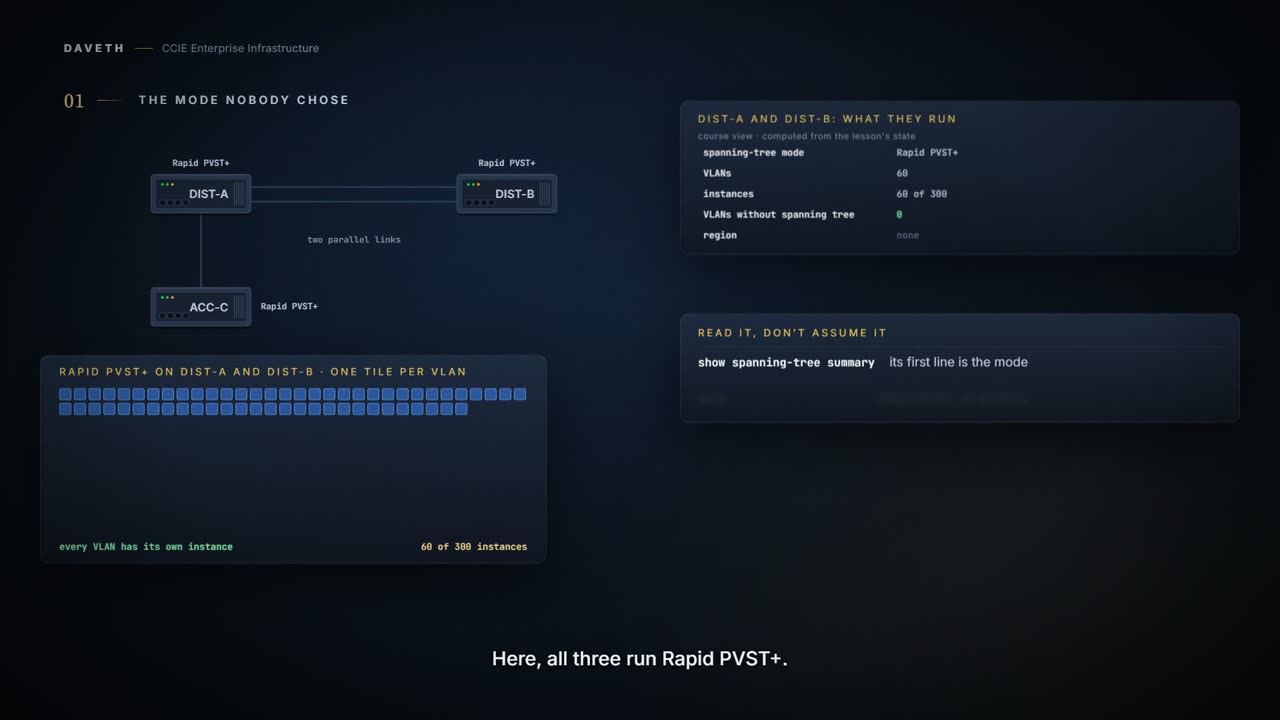
Read its first line: rapid-pvst. That is the sample device's mode, not proof of a default, and the rest of the block is that device's features and port counts. On your own switch, read the first line rather than assume either page. The walk on this page starts DIST-A and DIST-B in Rapid PVST+.
Three modes, and two ways of counting
This spanning-tree mode is based on the IEEE 802.1D standard and Cisco proprietary extensions. This spanning-tree mode is the same as PVST+ except that is uses a rapid convergence based on the IEEE 802.1w standard. The multiple spanning-tree (MST) implementation is based on the IEEE 802.1s standard.
Notice what the first two share. Rapid PVST+ is the same as PVST+ apart from how quickly ports get back to forwarding after a change, which is what the guide means by rapid convergence, so choosing between them is choosing speed. MST is based on a different standard, and choosing it is choosing how instances are counted.
So rapid describes the speed of the behaviour, not a lighter set of rules. The same topology is worked out, the same ports end up blocking, and the same loop would form if any of it were skipped. Only the waiting is shorter.
The number that decides it
In Rapid PVST+ mode, each VLAN runs its own spanning-tree instance up to the maximum supported. Starting with Cisco IOS XE Amsterdam 17.2.1 release, in PVST+ or Rapid PVST+ mode, the device or device stack supports up to 300 spanning-tree instances.
One VLAN, one instance. Now DIST-A and DIST-B grow to 320 VLANs. What happens to spanning tree?
If the device has more active VLANs than the supported number of spanning tree instances, spanning tree is still enabled only on the supported number of VLANs and disabled on all remaining VLANs.
This course's reading: instances and spanning-tree coverage at 320 VLANs
switch  mode         VLANs  instances  max  with STP    without
DIST-A  Rapid PVST+  320    300        300  300         20
DIST-B  Rapid PVST+  320    300        300  300         20
Look at the last column: 20 VLANs with no spanning tree, and nothing refused them. 300 instances against 4094 configurable VLANs. Which VLANs lose it, the guide does not say.
Read the words nothing refused them again, because that is the whole danger in this number. No command was rejected, no VLAN failed to be created and no message was logged. The switch went on doing what it was asked until it ran out of instances, and the VLANs past that point are carrying traffic with nothing preventing a loop on them.
What MST does instead
Multiple Spanning-Tree Protocol (MSTP), which uses Rapid Spanning-Tree Protocol (RSTP) for rapid convergence, enables multiple VLANs to be grouped into and mapped to the same spanning-tree instance, reducing the number of spanning-tree instances that are needed to support many VLANs.
Read it for its verbs: grouped, mapped. The instance count stops following the VLAN count. The map is yours to design:
| instance | VLANs |
|---|---|
| 0 | every VLAN not listed below |
| 1 | 10, 20, 30, 40 |
| 2 | 50, 60, 70, 80 |
Instance 0 is a special instance for a region, known as the internal spanning tree (IST). By default, all VLANs are assigned to the IST. The switch stack supports up to 65 MST instances.
So how many VLANs can one instance carry? Two chapters of the same guide answer differently, and the VLAN guide caps the whole mode:
The number of VLANs that can be mapped to a particular MST instance is unlimited. The number of VLANs that can be mapped to a particular MST instance is the maximum active VLAN supported by a given switch. In the MSTP mode, you can configure 1000 active VLANs at any point in time.
Unlimited, the maximum active VLANs, and 1000 active VLANs in MSTP mode. 320 is under all three, so the reading below does not have to choose; a design near 1000 would.
This course's reading: the same 320 VLANs against all three modes, with this map
mode         instances  max  with STP    without
PVST+        300        300  300         20
Rapid PVST+  300        300  300         20
MST          3          65   320         0
When does the map take effect?
Type the region on DIST-B:
This course's configuration: DIST-B
DIST-B# configure terminal
DIST-B(config)# spanning-tree mst configuration
DIST-B(config-mst)# instance 1 vlan 10, 20, 30, 40
DIST-B(config-mst)# instance 2 vlan 50, 60, 70, 80
DIST-B(config-mst)# name CAMPUS
DIST-B(config-mst)# revision 1
DIST-B(config-mst)# show pending
Verifies your configuration by displaying the pending configuration.
Is DIST-B running that region yet?
This course's reading: pending against running on DIST-B
          region configuration
pending   CAMPUS, rev 1, 2 instance(s) mapped
running   none
No: pending, not running. The guide prints no sample of show pending, so none is drawn; what it shows is the pending configuration, which is exactly what is not running. Then:
This course's configuration: DIST-B
DIST-B(config-mst)# exit
DIST-B(config)# end
Applies all changes, and returns to global configuration mode.
This course's reading: and after exit
          region configuration
pending   none
running   CAMPUS, rev 1, 2 instance(s) mapped
One keystroke applies the map. The map is running; MST is not. DIST-B is still in Rapid PVST+, where each VLAN runs its own instance, so no VLAN is on instance 1 or 2 yet: that waits for the mode change below. Read show pending before exit on a production switch, every time. The same four lines then go onto DIST-A.
Continue the lesson
The whole lesson, with its drawings and its questions. 6 more sections after the ones above.