
Access ports, trunk ports, native VLAN and manual VLAN pruning
show interfaces trunk prints three lists, and they say different things: the VLANs allowed, the VLANs allowed and active on this switch, and the VLANs forwarding and not pruned. Allowed does not mean active. An access port supplies a frame's VLAN; a trunk relies on tags, and the native VLAN answers which VLAN an untagged frame belongs to. Pruning narrows the allowed list.
By Arif, founder of Daveth · Updated
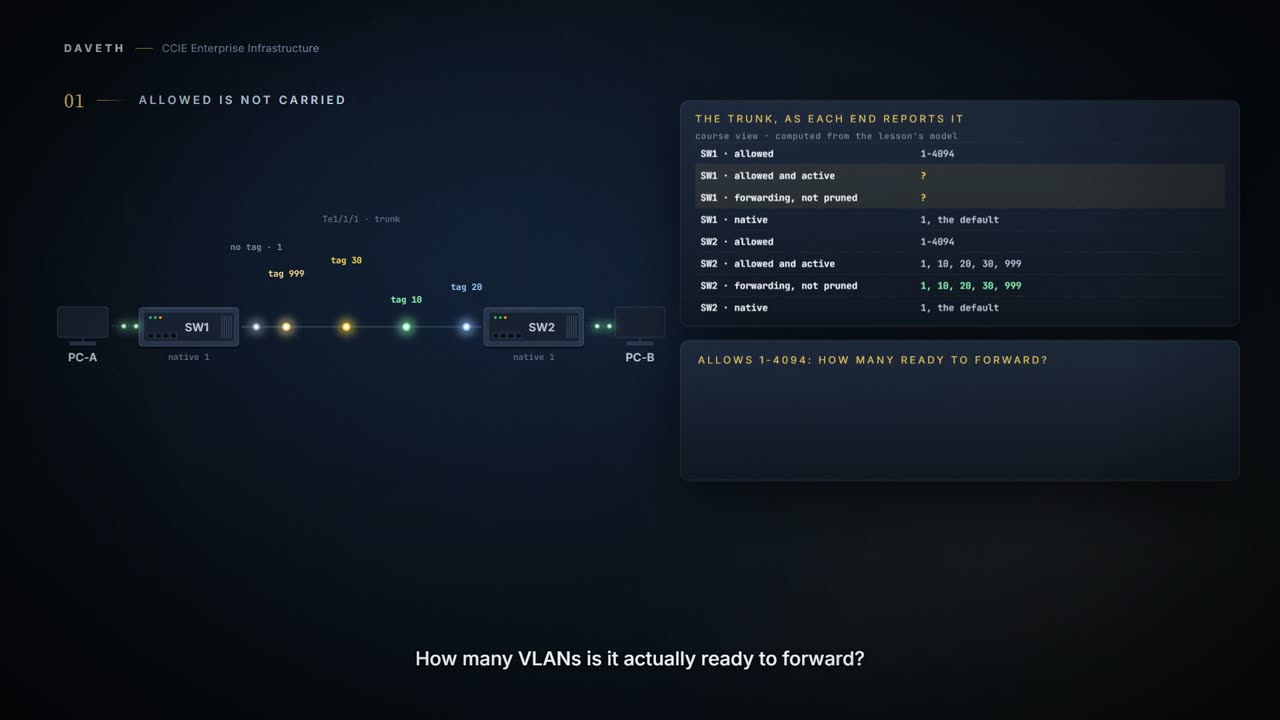
The full 6 min walkthrough is in Daveth Pro (Network). See what the plan opens
What this page answers
Which VLANs does a trunk allow by default?
All of them, 1 to 4094. Being allowed is only the first condition: show interfaces trunk also lists the VLANs allowed and active on the switch, and those forwarding and not pruned. Read it in “A trunk's three lists”
What is the native VLAN on a trunk?
The VLAN an untagged frame belongs to. It is a separate setting from the allowed list, which asks whether a VLAN is permitted on the trunk at all. Read it in “The native VLAN answers a different question”
How do you manually prune VLANs from a trunk?
Restrict the trunk's allowed list to the VLANs the link is for, at both ends, with switchport trunk allowed vlan followed by the list, then read show interfaces trunk to see which VLANs actually left. Read it in “Manual pruning, and what it does not remove”
An allowed list is not a traffic report
Two switches, one trunk, and nobody has typed anything about VLANs on it. So which VLANs is it carrying? Read what SW1 says:
SW1# show interfaces trunk
Port        Mode             Encapsulation  Status        Native vlan
Te1/1/1     on               802.1q         trunking      1

Port        Vlans allowed on trunk
Te1/1/1     1-4094

Port        Vlans allowed and active in management domain
Te1/1/1     1,10,20,999

Port        Vlans in spanning tree forwarding state and not pruned
Te1/1/1     1,10,20,999
Four. The command has been telling you three different things the whole time. 1-4094 is the permission. 1,10,20,999 is the permission narrowed to the VLANs that exist on SW1: VLAN 30 exists on SW2, not here. The last list would narrow again if spanning tree were blocking any of those; here it is not.
Hold on to that before anything else: a trunk that allows every VLAN is not carrying every VLAN. That single distinction prevents a lot of bad trunk troubleshooting.
An access port supplies the VLAN
Start with one host.
SW1# configure terminal
SW1(config)# interface GigabitEthernet1/0/10
SW1(config-if)# switchport mode access
SW1(config-if)# switchport access vlan 10
SW1(config-if)# end
A static-access port can belong to one VLAN and is manually assigned to that VLAN.
PC-A does not need to know its frames belong to VLAN 10. It sends ordinary untagged Ethernet. Gi1/0/10 belongs to VLAN 10, so every frame arriving on it becomes a VLAN 10 frame inside SW1. The port answers the question which VLAN is this?
A trunk cannot answer it that way. One link carries VLAN 10, 20, 30 and 999 at once, so the frame has to carry its VLAN across: in an 802.1Q tag.
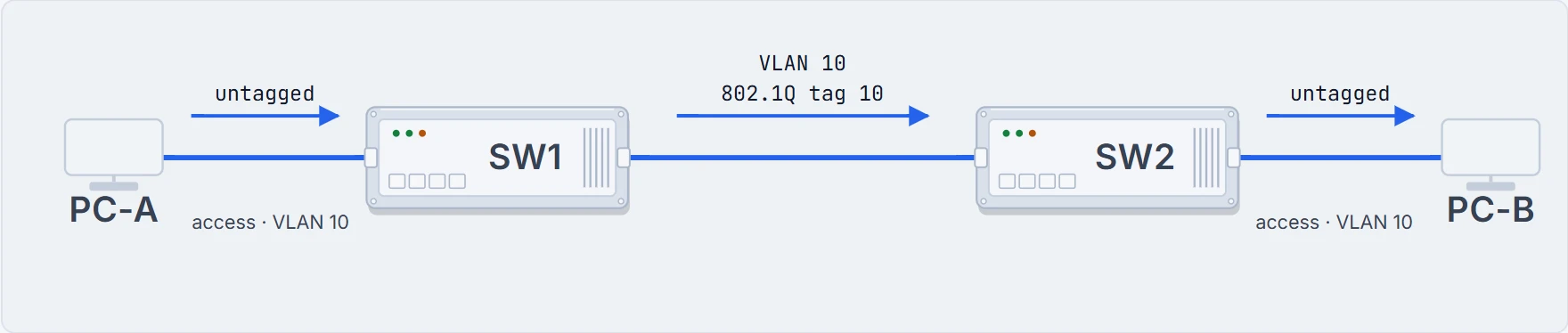
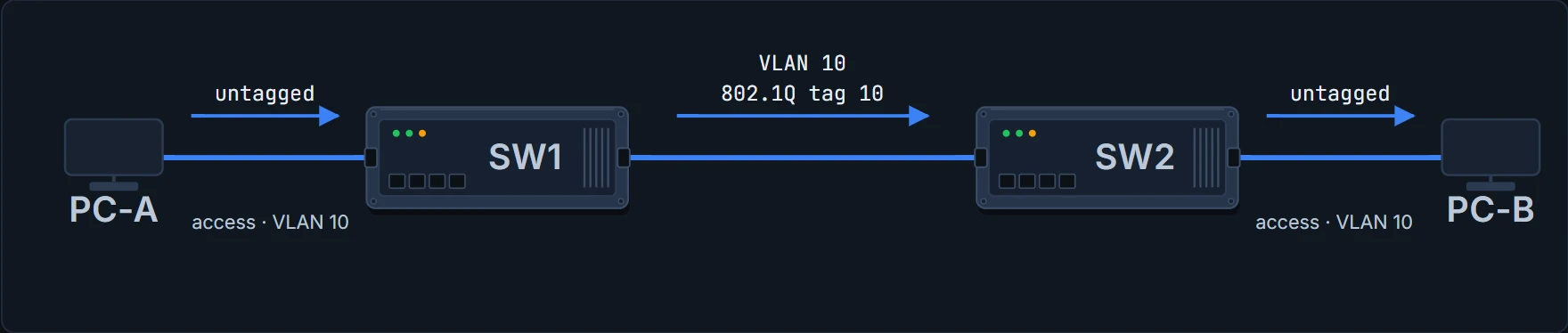
Access port: the port supplies the VLAN. Trunk: the frame usually carries it. Usually, because one VLAN on a trunk crosses without a tag, and that is where this lesson ends up.
A trunk's three lists
SW1# configure terminal
SW1(config)# interface TenGigabitEthernet1/1/1
SW1(config-if)# switchport mode trunk
SW1(config-if)# end
SW2# configure terminal
SW2(config)# interface TenGigabitEthernet1/1/1
SW2(config-if)# switchport mode trunk
SW2(config-if)# end
All VLAN IDs, 1 to 4094, are allowed on each trunk.
You configured trunk mode. You did not permit 4094 VLANs: you inherited the default. And being permitted is only the first condition for a VLAN to use a trunk:
A trunk port can become a member of a VLAN if the VLAN is enabled, if VTP knows of the VLAN, and if the VLAN is in the allowed list for the port.
So read the output as three narrowing questions, one per list.
SW1# show interfaces trunk
Port        Mode             Encapsulation  Status        Native vlan
Te1/1/1     on               802.1q         trunking      999

Port        Vlans allowed on trunk
Te1/1/1     1-4094   ! Is this VLAN permitted? Configuration.

Port        Vlans allowed and active in management domain
Te1/1/1     1,10,20,999
! Is it permitted and does it exist on this switch?

Port        Vlans in spanning tree forwarding state and not pruned
Te1/1/1     1,10,20,999
! Of those, which is spanning tree forwarding on this port?
Proves: what this switch permits, which of those VLANs exist on it, and which of those it is forwarding on this port.
Does not prove: anything about the far end. SW2 has its own allowed list, its own VLANs and its own spanning-tree state, and none of them prints here.
The native VLAN answers a different question
The allowed list asks: is this VLAN permitted on this trunk? The native VLAN asks: which VLAN does an untagged frame belong to? Two separate settings for two separate questions.
And underneath both questions is the thing the tag is for. One cable carries traffic from every VLAN on the trunk, and the only reason those VLANs stay separate networks at the far end is that each frame arrives labelled. Take the label away and the receiving switch has no way to tell them apart, which is exactly why one VLAN travelling untagged has to be agreed in advance by both ends.
SW1# configure terminal
SW1(config)# interface TenGigabitEthernet1/1/1
SW1(config-if)# switchport trunk native vlan 999
SW1(config-if)# end
SW2# configure terminal
SW2(config)# interface TenGigabitEthernet1/1/1
SW2(config-if)# switchport trunk native vlan 999
SW2(config-if)# end
If a packet has a VLAN ID that is the same as the outgoing port native VLAN ID, the packet is sent untagged; otherwise, the device sends the packet with a tag. All untagged traffic received on an IEEE 802.1Q trunk port is forwarded with the native VLAN configured for the port.
Leaving the trunk: VLAN 10 gets tag 10, VLAN 20 gets tag 20, VLAN 30 gets tag 30, VLAN 999 goes untagged. Arriving: tag 10 means VLAN 10, tag 20 means 20, tag 30 means 30, and no tag means VLAN 999. Both ends are set to 999 here.
Platform note. Everything here assumes the default, where the native VLAN is sent untagged. There is also a global option that changes that:
When enabled, native VLAN packets going out of all IEEE 802.1Q trunk ports are tagged.
That is vlan dot1q tag native, and it is outside this lesson's flow.
Manual pruning, and what it does not remove
Manual VLAN pruning means restricting a trunk's allowed list to the VLANs the link is for. Both ends:
SW1# configure terminal
SW1(config)# interface TenGigabitEthernet1/1/1
SW1(config-if)# switchport trunk allowed vlan 10,20,999
SW1(config-if)# end
SW2# configure terminal
SW2(config)# interface TenGigabitEthernet1/1/1
SW2(config-if)# switchport trunk allowed vlan 10,20,999
SW2(config-if)# end
Did VLAN 1 actually leave SW1's trunk?
SW1# show interfaces trunk
Port        Mode             Encapsulation  Status        Native vlan
Te1/1/1     on               802.1q         trunking      999

Port        Vlans allowed on trunk
Te1/1/1     10,20,999   ! VLAN 1 is off the list.

Port        Vlans allowed and active in management domain
Te1/1/1     10,20,999

Port        Vlans in spanning tree forwarding state and not pruned
Te1/1/1     10,20,999
Look at what that removed: VLAN 1 data traffic from this trunk. It does not mean every protocol associated with VLAN 1 has left the wire:
When you remove VLAN 1 from a trunk port, the interface continues to send and receive management traffic, for example, Cisco Discovery Protocol (CDP), Port Aggregation Protocol (PAgP), Link Aggregation Control Protocol (LACP), DTP, and VTP in VLAN 1.
The allowed list is not a universal frame filter. Say exactly what changed: ordinary VLAN 1 forwarding over this trunk stopped; CDP, PAgP, LACP, DTP, VTP did not.
VLAN 1 is the default VLAN and is created during system initialization.
One word of terminology, before it collides. There is also switchport trunk pruning vlan, which is not manual pruning:
Sets the list of VLANs that are eligible for VTP pruning when in trunking mode.
VTP is out of the v1.1 blueprint. Manual pruning is the allowed list.
The command that empties a list
Guest access is moving onto SW1, so VLAN 30 is created there:
SW1# configure terminal
SW1(config)# vlan 30
SW1(config-vlan)# end
VLAN 30 exists on SW1 now. Does that put it on the trunk?
SW1# show interfaces trunk
Port        Mode             Encapsulation  Status        Native vlan
Te1/1/1     on               802.1q         trunking      999

Port        Vlans allowed on trunk
Te1/1/1     10,20,999

Port        Vlans allowed and active in management domain
Te1/1/1     10,20,999
! VLAN 30 exists now, and still is not here: it fails the first list.

Port        Vlans in spanning tree forwarding state and not pruned
Te1/1/1     10,20,999
Now the engineer allows VLAN 30 on the trunk. Before you read the next block, commit to an answer.
SW1# configure terminal
SW1(config)# interface TenGigabitEthernet1/1/1
SW1(config-if)# switchport trunk allowed vlan 30
SW1(config-if)# end
SW1# show interfaces trunk
Port        Mode             Encapsulation  Status        Native vlan
Te1/1/1     on               802.1q         trunking      999

Port        Vlans allowed on trunk
Te1/1/1     30   ! Not 10,20,30,999. The list is 30.

Port        Vlans allowed and active in management domain
Te1/1/1     30

Port        Vlans in spanning tree forwarding state and not pruned
Te1/1/1     30
VLANs 10, 20 and 999 are gone from SW1's trunk, and PC-A cannot reach PC-B. The syntax is state-changing configuration, not a conversational sentence. The reference describes the keyword that was missing: add:
adds the defined list of VLANs to those currently set instead of replacing the list.
SW1# configure terminal
SW1(config)# interface TenGigabitEthernet1/1/1
SW1(config-if)# switchport trunk allowed vlan add 10,20,999
SW1(config-if)# end
Is everything back, and did 30 survive the repair?
Continue the lesson
The whole lesson, with its drawings and its questions. The rest of this section and 6 more after it.