
Multichassis EtherChannel use cases
An access switch with an uplink to each distribution switch uses only one: spanning tree blocks the other, because two distribution switches are two bridges. No knob on the access switch changes that. StackWise Virtual pairs the two into one virtual switch, so spanning tree sees one bridge, and the two uplinks become one multichassis EtherChannel that forwards over local links.
By Arif, founder of Daveth · Updated
The full 6 min walkthrough is in Daveth Pro (Network). See what the plan opens
What this page answers
What is multichassis EtherChannel (MEC)?
An EtherChannel whose member ports are distributed across both switches of a StackWise Virtual pair. The pair shares a common device identifier, so the attached switch sees one partner; each MEC can run PAgP, LACP or on mode. Read it in “The bundle that spans them”
Why does spanning tree block one of two uplinks?
Two paths between the same places form a loop, and the two distribution switches are two bridges, so spanning tree blocks one port on the access switch. Only making the pair one bridge, as StackWise Virtual does, removes the block. Read it in “The uplink you paid for”
Does MEC traffic cross the StackWise Virtual link?
MEC forwards over the local link whatever the hash result, so packets for a local adjacency stay on the ingress switch. Traffic crosses the StackWise Virtual Link when a connection is single-homed, which is why dual-homed connections are recommended. Read it in “The link between them”
The uplink you paid for
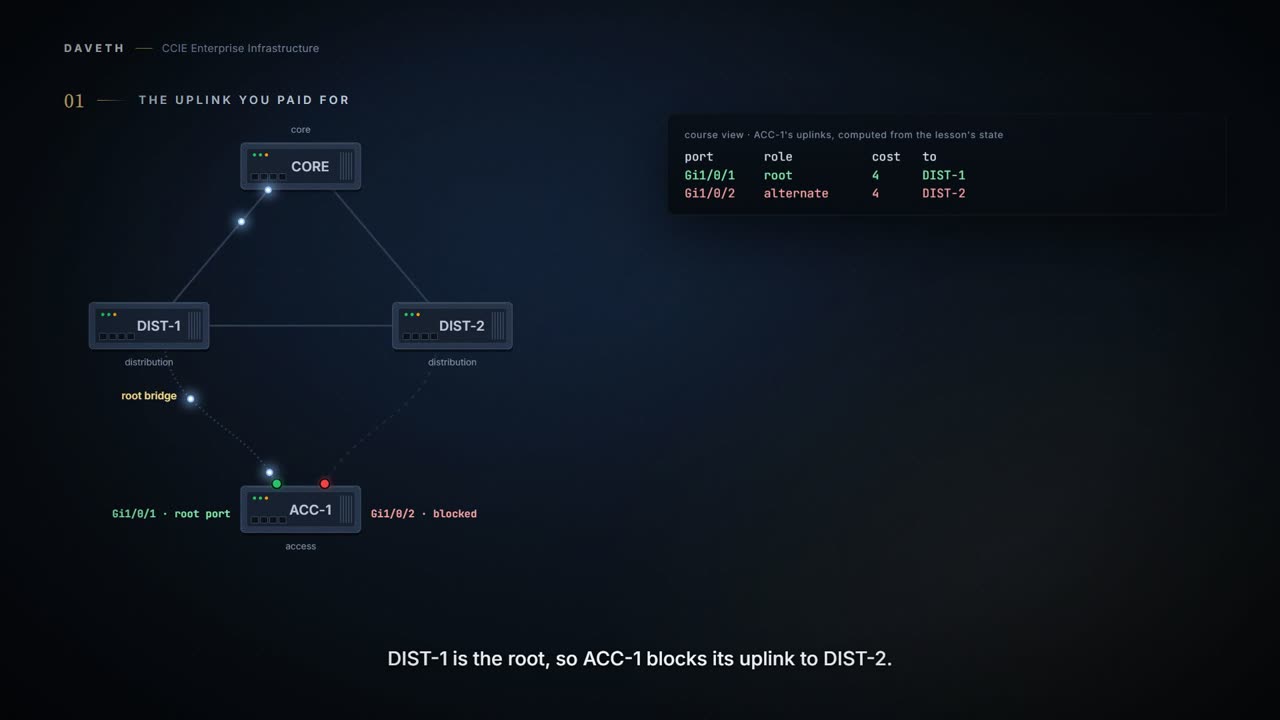
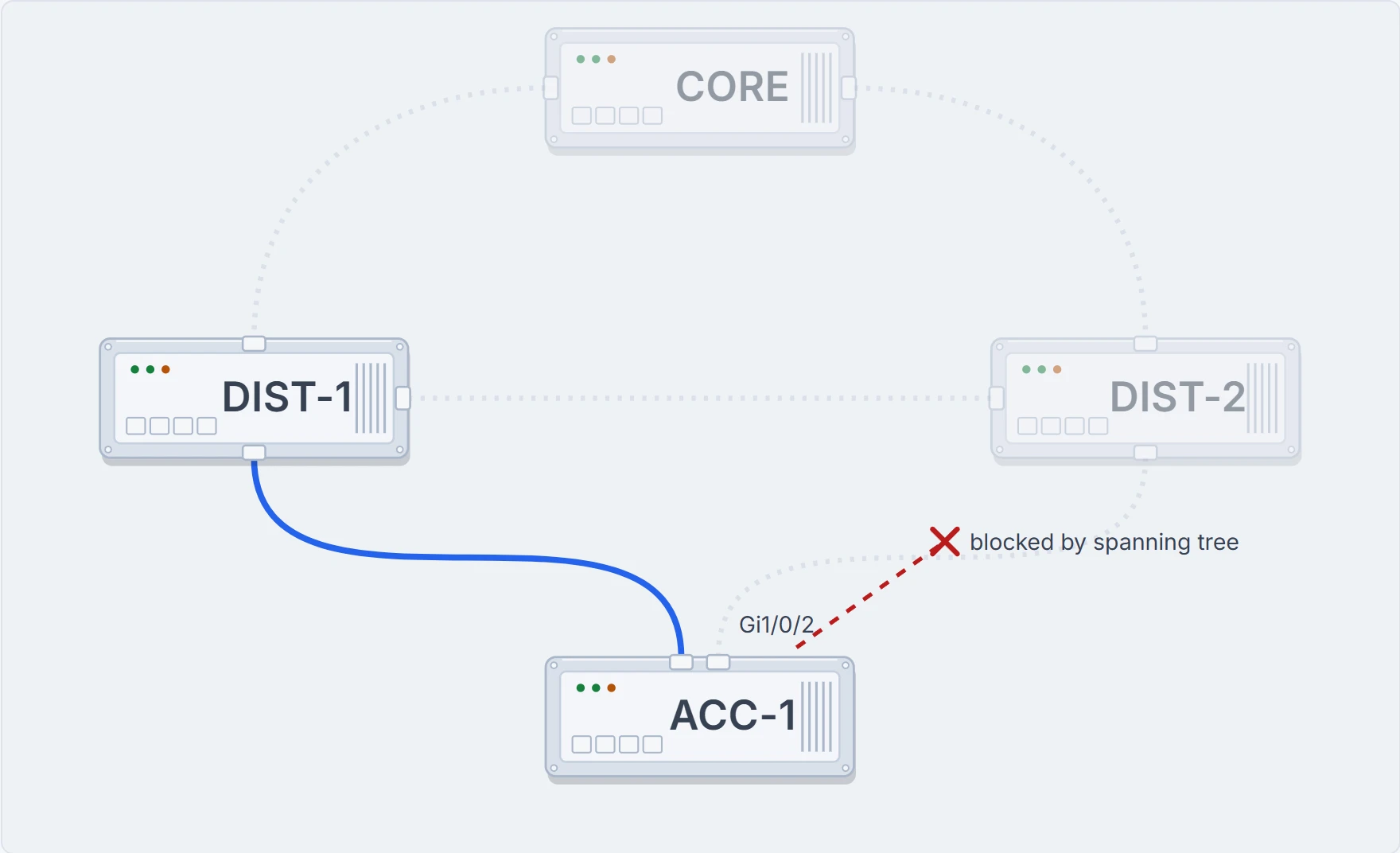
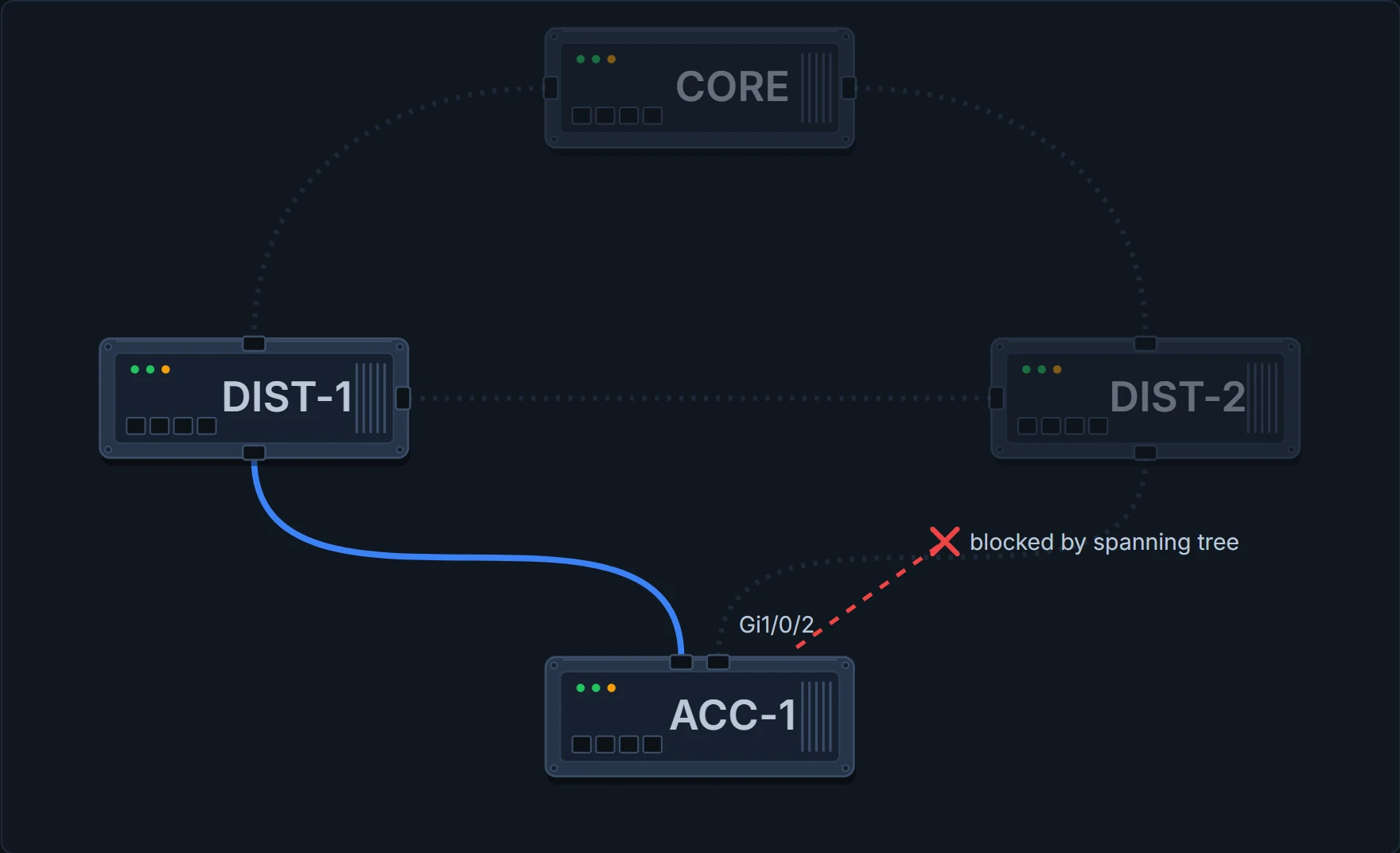
An access switch with two uplinks, one to each distribution switch. Textbook redundancy. Somebody paid for both. Look at what one of them carries: nothing.
Note that STP keeps one of the ports connected to the distribution switches blocked on the access switches. As a result of this, an active link failure causes STP convergence and the network suffers from traffic loss, flooding, and a possible transient loop in the network.
That is not a fault. Two paths between the same two places is a loop, and spanning tree, which you met blocking ports in 1.1.b.ii, blocks one of them. The redundancy is real; on an ordinary day, half the uplinks are switched off on purpose.
Before: the walk's network: DIST-1 is the root, so ACC-1 blocks its uplink to DIST-2.
You cannot fix it where you are looking
The instinct is to fix it at the access switch: raise a cost, find the setting that lets both uplinks forward. Try the obvious one first.
The block moves; it does not go away. Every knob you can reach from ACC-1 changes which port blocks. None of them changes whether one does, because the loop is made of the two distribution switches being two bridges. The problem is upstream, and it is not a setting. It is that there are two of them.
What has to change
Cisco StackWise Virtual is a network system virtualization technology that pairs two directly connected switches into one virtual switch. One of the most significant changes is that StackWise Virtual enables the creation of a loop-free topology because the two switches operate as one. Thus, the spanning-tree domain treats the StackWise Virtual pair as one bridge node instead of two.
Spanning tree is not disabled or tuned. It is told the truth about a topology that is now different: there is one bridge up there. Notice what exactly was merged:
The virtualization of multiple physical switches into a single logical switch is from a control and management plane perspective only.
One control plane, and one of the two switches runs spanning tree for both:
The Cisco StackWise Virtual active switch runs the STP.
But pairing alone does not unblock anything. ACC-1 still has two separate links to that one bridge, and two links to one bridge are still two paths, so one still blocks. That step is spanning tree reasoning, not a sentence on either page. The fix needs one more thing.
The bundle that spans them
With one device at the top, the two uplinks can be one EtherChannel. The chapter's definition, in the words after its opening, is an ordinary bundle:
bundled with physical ports having common characteristics such as speed and duplex, that are distributed across each Cisco StackWise Virtual system.
Speed and duplex: the same rules as any bundle in 1.1.d.i. What lets ACC-1 treat two chassis as one partner is that they announce themselves as one:
Cisco StackWise Virtual defines a common device identifier for both the switches. Each MEC can optionally be configured to support either Cisco PAgP, IEEE LACP, or Static ON mode. We recommend that you implement EtherChannel using Cisco PAgP or LACP with a compatible neighbor.
And to spanning tree, the bundle is one port, so there is nothing left to block:
This makes it possible to apply a single IP address for Layer 3 EtherChannel links or for Spanning Tree Protocol to view an EtherChannel interface as a single logical port. As a result, multichassis EtherChannel links allow for implementation of new network designs in which true Layer 2 multipathing can be implemented, without relying on Layer 2 redundancy protocols such as Spanning Tree Protocol.
After: the same cables: one virtual switch, one bundle, nothing blocked.
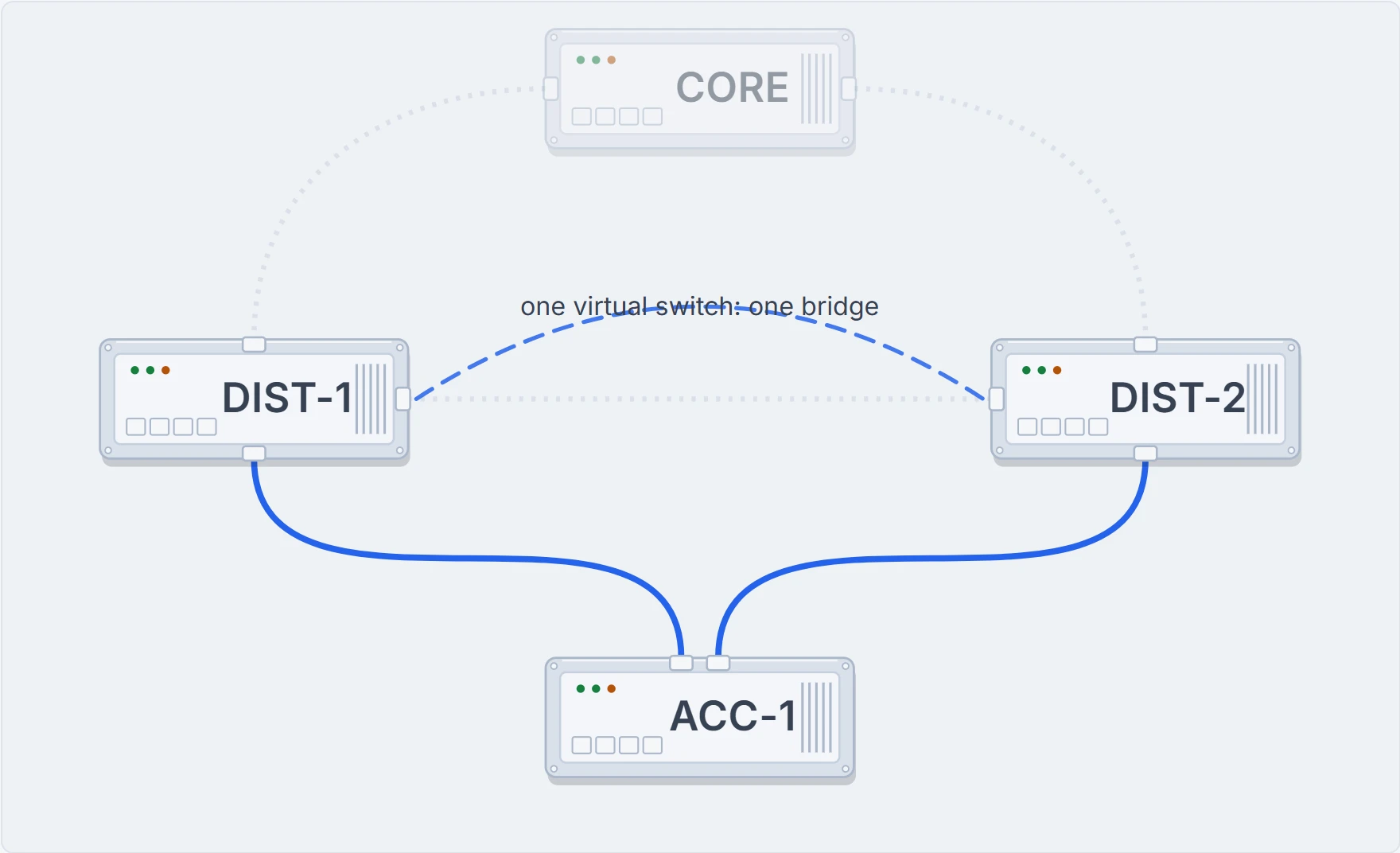
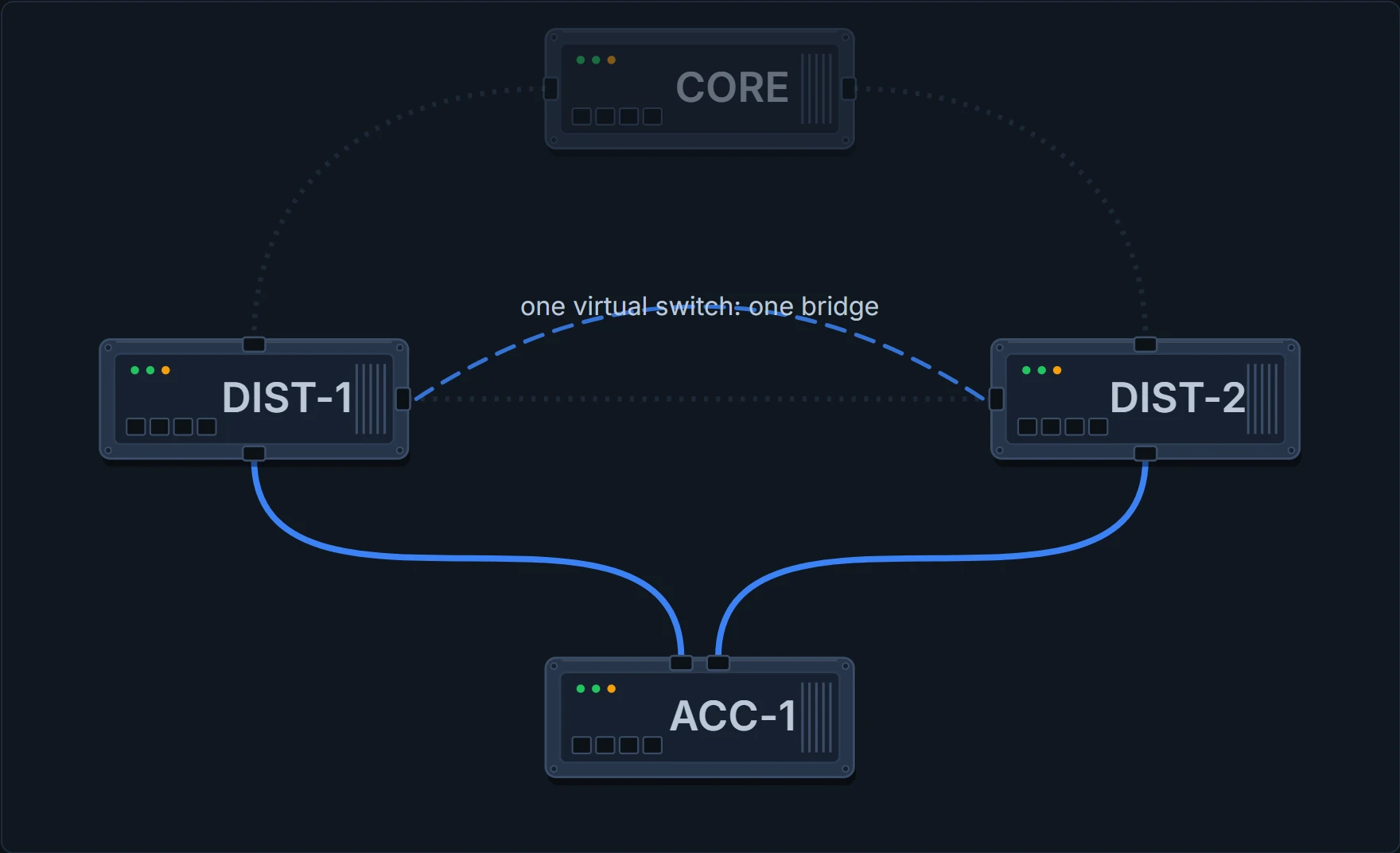
Nobody touched a cable. The switches started describing themselves differently, and the uplink that was switched off came back.
In the walk, 2 flows go up through DIST-1 and 2 through DIST-2. The chapter's placement advice follows directly:
We recommend that you distribute the MEC ports across both switches evenly.
The link between them
An obvious objection: if the two chassis are one switch, the link between them could become the busiest thing in the building. Watch where a flow that arrives on DIST-2 goes:
Keep both readings of the diagram in your head at once, because you will need each of them. To everything attached, this is one neighbour: one bundle, one set of protocol relationships, one device to configure. To you, standing in the room, it is two chassis that can fail separately. Neither reading is wrong and neither is sufficient.
MEC is designed to forward the traffic over the local link irrespective of the hash result. A multichassis EtherChannel link reduces the amount of traffic that requires transmission across the SVL by populating the index port only with the ports local to the physical switch. Packets intended for a local adjacency (reachable by local ports) are forwarded locally on the ingress switch.
It leaves on DIST-2. So the link between the pair carries none of the walk's four flows. It is not idle, though, and reading it as a health gauge would mislead you: the chapter lists what legitimately crosses it, starting with
Layer 2 traffic flooded over a VLAN (even for dual-homed links).
and the white paper names the other big one:
Traffic will be forwarded over the StackWise Virtual Links only if there is a single homed connection and hence it is always recommended to use the dual homed connections to avoid unnecessary traffic over the SVL.
Continue the lesson
The whole lesson, with its drawings and its questions. The rest of this section and 5 more after it.