
Switch priority, port priority, path cost, timers
Four knobs change spanning tree: switch priority, path cost, port priority and timers, and the one with port in its name is the least likely to do anything. Left at the default 32768 everywhere, the switch with the lowest MAC address becomes root. Priority moves in steps of 4096, because the field also carries the VLAN. root primary checks before it sets; root secondary sets 28672.
By Arif, founder of Daveth · Updated
The full 6 min walkthrough is in Daveth Pro (Network). See what the plan opens
What this page answers
Why must STP bridge priority be a multiple of 4096?
The 2 bytes once used for the priority were split into a 4-bit priority and a 12-bit extended system ID equal to the VLAN, so priority runs 0 to 61440 in increments of 4096, with a default of 32768. Read it in “Why the priority list looks so strange”
What does spanning-tree vlan root primary do?
It checks the priority of the current root for each VLAN and sets this switch's priority low enough to become root. root secondary simply changes the priority from 32768 to 28672. Read it in “Two commands that do the arithmetic, and one of them has a condition in it”
Which switch becomes STP root by default?
With every switch at the default priority of 32768, the switch with the lowest MAC address in the VLAN, which may be an access switch in a wiring closet. Read it in “One: switch priority, which decides what everything points at”
Four knobs, and you only need one of them
Traffic between two of your switches is taking the long way round. You want it on the other link. You have four things you could change: switch priority, path cost, port priority, timers.
Pick one, before you read on.
Most people pick port priority. It is the one with "port" in the name, and the problem is on a port. It is also, of the four, the one least likely to do anything at all, and this page is going to prove that on a running network rather than assert it.
These are not four ways to do one job. They act at different points in the algorithm and they have wildly different reach, so the useful way to hold them is as a ranking, strongest first.
One: switch priority, which decides what everything points at
Before anything else, look at what happens when nobody sets it. Four switches, every one at the default, and the election has already happened: If all devices are configured with the default priority (32768), the devices with the lowest MAC address in the VLAN becomes the root device.
State 1 Nobody configured anything, and there is still a root
Which switch ended up at the centre of this campus?
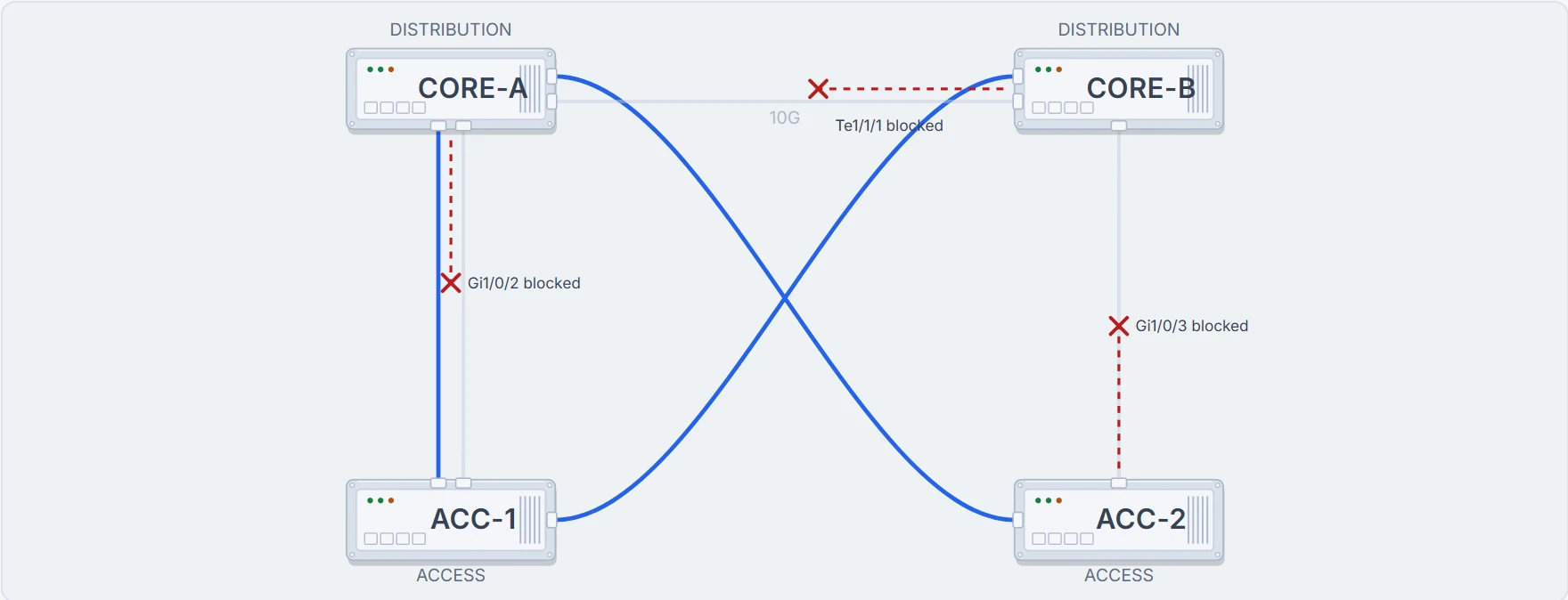
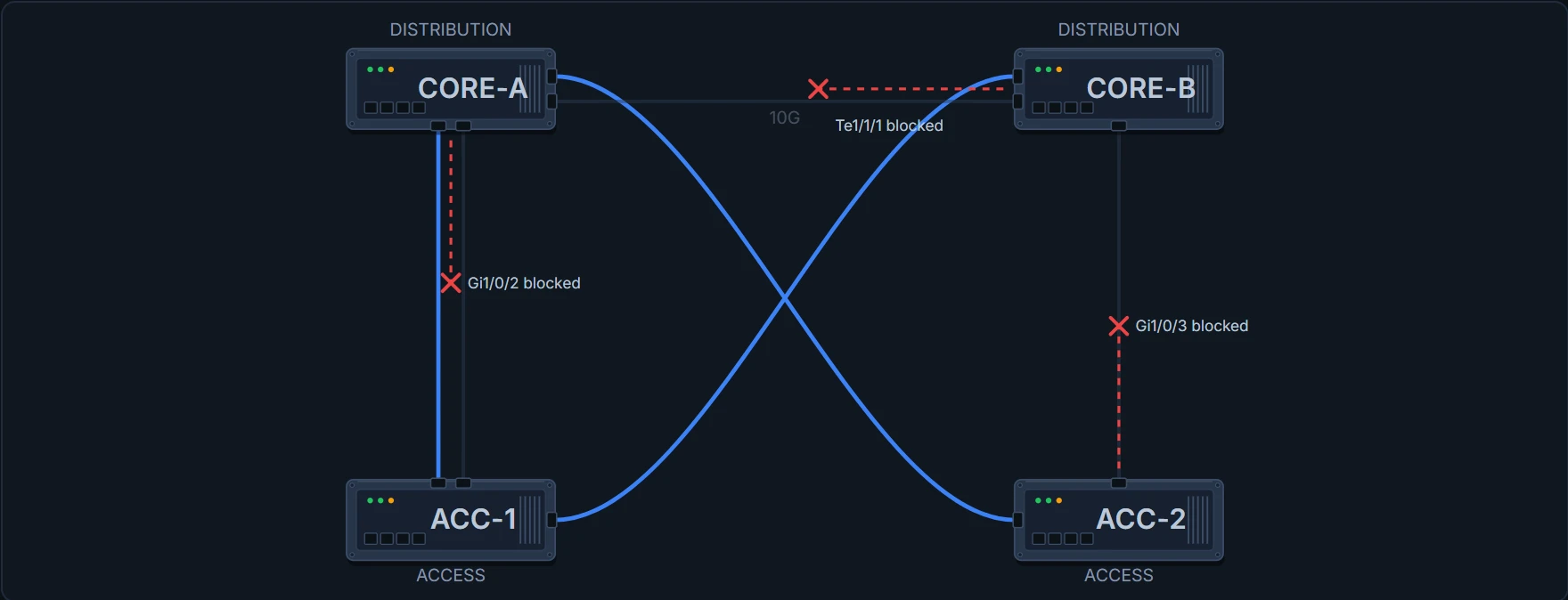
An access switch. The lowest MAC address in this VLAN belongs to a wiring-closet switch, so every path points there, and the two distribution switches reach each other through it. Nothing is broken. Nothing is logged. The switches are entirely confident about the answer, and nobody asked you.
CORE-A# show spanning-tree vlan 10
VLAN0010
  Spanning tree enabled protocol rstp
  Root ID    Priority    32778
             Address     0021.1bcd.0001
             ! the root, and it is not a distribution switch
             Cost        20000
             Port        1 (Gi1/0/1)
             Hello Time  2 sec  Max Age 20 sec  Forward Delay 15 sec

  Bridge ID  Priority    32778  (priority 32768 sys-id-ext 10)
             Address     0021.1bcd.00aa
             ! this switch, at the default, losing on a MAC address
             Hello Time  2 sec  Max Age 20 sec  Forward Delay 15 sec

Interface     Role  Sts  Cost       Prio.Nbr  Type
----------    ----  ---  ---------  --------  ----
Gi1/0/1       Root  FWD  20000      128.1     P2p
Gi1/0/2       Altn  BLK  20000      128.2     P2p
Gi1/0/3       Desg  FWD  20000      128.3     P2p
Te1/1/1       Desg  FWD  2000       128.4     P2p
Read the two blocks in that output against each other, because the rest of this page depends on telling them apart. Root ID is what this switch believes about the election. Bridge ID is what this switch is. When they describe the same device, it is the root.
Why the priority list looks so strange
Give the distribution switch a better number, and meet the rule most people meet the hard way:
CORE-A(config)# spanning-tree vlan 10 priority 100
% Bridge Priority must be in increments of 4096.
"For priority, the range is 0 to 61440 in increments of 4096; the default is 32768." Fifteen values and a zero, which looks arbitrary until you see where it came from.
The 2 bytes previously used for the device priority are reallocated into a 4-bit priority value and a 12-bit extended system ID value equal to the VLAN ID.
Twelve of the sixteen bits were taken away and handed to the VLAN number. Four bits are left, which is sixteen settings, and 65536 divided by 16 is 4096. The increment is not a rule somebody chose. It is the remainder. The CLI is not being fussy: there is physically nowhere for 100 to go.
And this is why the output looks the way it does. Look again at the Bridge ID line above: a switch at the default in VLAN 10 reports 32778, not 32768. That is not an off-by-one. It is 32768 in the priority bits plus 10 in the extended system ID, and the 10 is the VLAN. Once you have seen it once you can read the VLAN number straight out of the priority.
Two commands that do the arithmetic, and one of them has a condition in it
CORE-A(config)# spanning-tree vlan 10 root primary
State 2 The same network, two lines later
Compare this with State 1. How many paths changed?
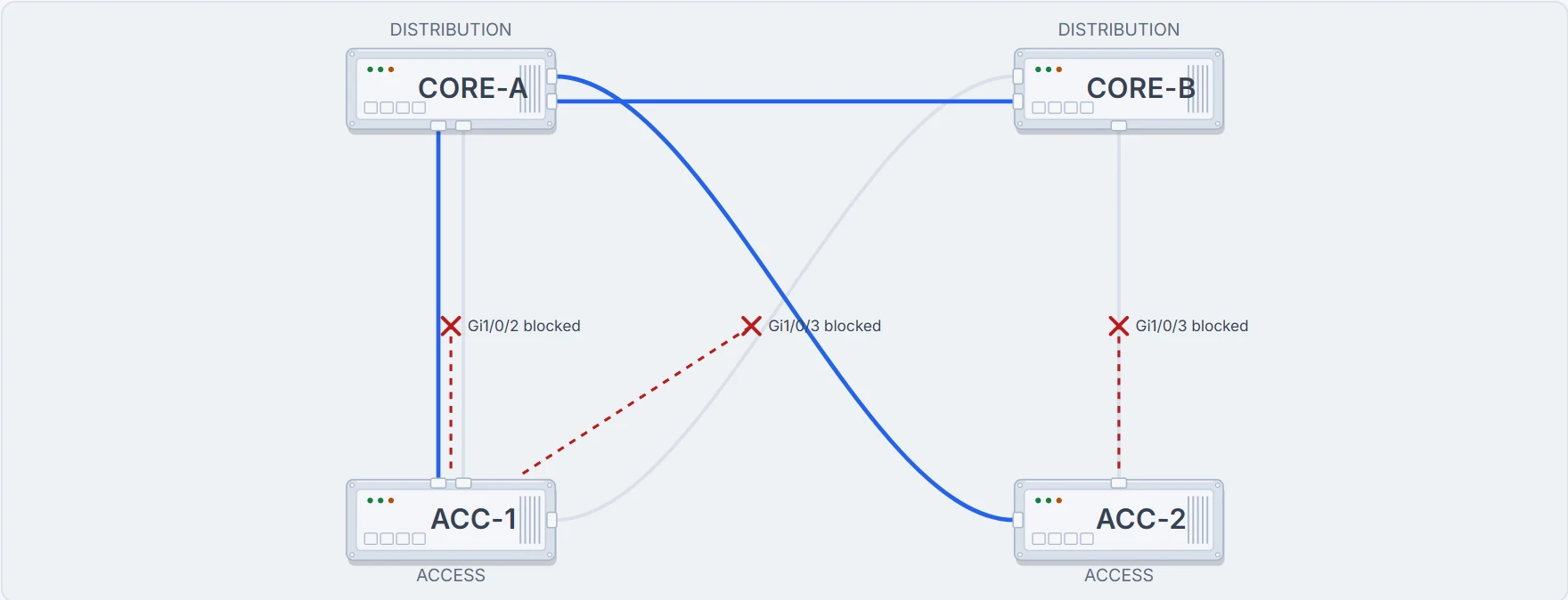
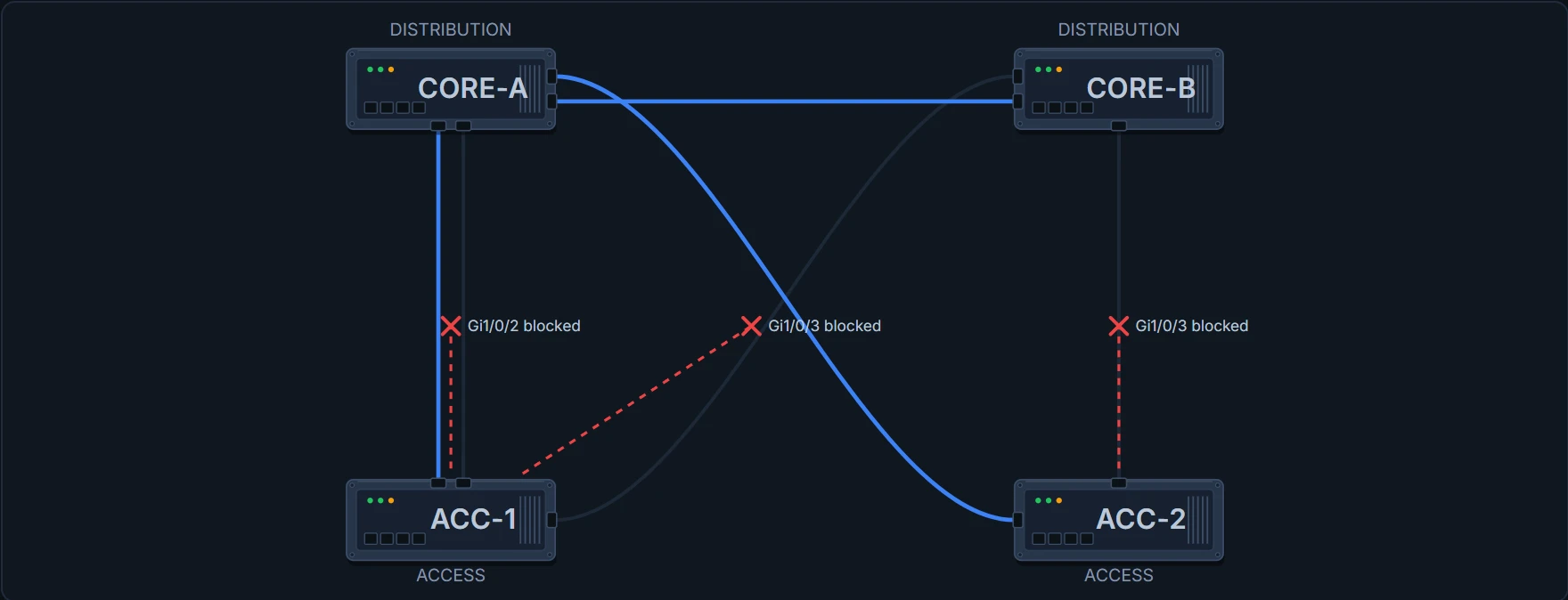
All of them. Nothing else on this page is that powerful: switch priority decides what every other switch is pointing at, so changing it changes every path in the topology at once. That is why it is knob one and why it is the one to set deliberately rather than inherit.
CORE-B(config)# spanning-tree vlan 10 root secondary
root secondary is the simple one: "the switch priority is modified from the default value (32768) to 28672." A fixed, predictable step down, no conditions. CORE-B is now better than every access switch and worse than CORE-A, so a failure moves the root to the other distribution switch rather than back into a wiring closet. That is the whole design, in two lines on two devices.
root primary is the one worth reading carefully:
"When you enter this command, the software checks the switch priority of the root switches for each VLAN. Because of the extended system ID support, the switch sets its own priority for the specified VLAN to 24576 if this value causes this switch to become the root for the specified VLAN."
If this value causes. It is not a command that seizes the root role. It looks at what is out there and sets one fixed value when that value would be enough. Read it as a request that usually succeeds rather than an instruction that always does, and hold on to that, because the next section is what happens six months later.
Six months later, on a completely different change
Somebody is making an access switch deterministic for a lab VLAN. They set its priority to 16384: a reasonable number, in the list, accepted without comment.
ACC-2(config)# spanning-tree vlan 10 priority 16384
16384 is better than 24576. The root leaves the distribution layer and goes back into a wiring closet, and nothing announces it. The topology simply is what it now is.
CORE-A# show spanning-tree vlan 10
VLAN0010
  Spanning tree enabled protocol rstp
  Root ID    Priority    16394
             Address     0021.1bcd.0002
             ! the root is an access switch again
             Cost        20000
             Port        3 (Gi1/0/3)
             Hello Time  2 sec  Max Age 20 sec  Forward Delay 15 sec

  Bridge ID  Priority    24586  (priority 24576 sys-id-ext 10)
  ! and CORE-A still holds exactly what root primary gave it
             Address     0021.1bcd.00aa
             Hello Time  2 sec  Max Age 20 sec  Forward Delay 15 sec

Interface     Role  Sts  Cost       Prio.Nbr  Type
----------    ----  ---  ---------  --------  ----
Gi1/0/1       Desg  FWD  20000      128.1     P2p
Gi1/0/2       Desg  FWD  20000      128.2     P2p
Gi1/0/3       Root  FWD  20000      128.3     P2p
Te1/1/1       Desg  FWD  2000       128.4     P2p
So run the command that fixed it last time.
CORE-A(config)# spanning-tree vlan 10 root primary
% 24576 would not make CORE-A the root for VLAN 10; the command sets that value only if it would.
CORE-A already holds 24576, and 24576 does not beat 16384, so the condition is not met and the command does nothing. The fix is an explicit value:
CORE-A(config)# spanning-tree vlan 10 priority 8192
CORE-A# show spanning-tree vlan 10
VLAN0010
  Spanning tree enabled protocol rstp
  Root ID    Priority    8202
             Address     0021.1bcd.00aa
             This bridge is the root
             ! now the two blocks describe the same switch
             Hello Time  2 sec  Max Age 20 sec  Forward Delay 15 sec

  Bridge ID  Priority    8202  (priority 8192 sys-id-ext 10)
             Address     0021.1bcd.00aa
             Hello Time  2 sec  Max Age 20 sec  Forward Delay 15 sec

Interface     Role  Sts  Cost       Prio.Nbr  Type
----------    ----  ---  ---------  --------  ----
Gi1/0/1       Desg  FWD  20000      128.1     P2p
Gi1/0/2       Desg  FWD  20000      128.2     P2p
Gi1/0/3       Desg  FWD  20000      128.3     P2p
Te1/1/1       Desg  FWD  2000       128.4     P2p
Proves: what this switch has configured, and what it currently believes about the root: the Bridge ID block answers the first and the Root ID block answers the second.
Does not prove: that your intent succeeded, unless you read both. A switch that accepted priority 24576 and still shows a different bridge as root has applied your command exactly and lost the election anyway. "Did it apply" and "did it work" are two different lines of one output, and root primary is exactly the command that can pass the first and fail the second.
Three: path cost, which decides how each switch gets there
Root election is one decision for the whole topology. After it, every other switch has its own: A root port is selected for each device (except the root switch). This port provides the best path (lowest cost) when the device forwards packets to the root switch.
"For cost, the range is 1 to 200000000; the default value is derived from the media speed of the interface." ACC-2 reaches the root directly over a gigabit port at 20000, and the requirement is to move it onto its other uplink.
CORE-A(config)# interface GigabitEthernet1/0/3
CORE-A(config-if)# spanning-tree cost 200000
That is the port at the far end of exactly the right cable. Now read ACC-2:
ACC-2# show spanning-tree vlan 10
VLAN0010
  Spanning tree enabled protocol rstp
  Root ID    Priority    8202
             Address     0021.1bcd.00aa
             Cost        20000
             Port        1 (Gi1/0/1)
             ! unchanged: ACC-2 has not moved at all
             Hello Time  2 sec  Max Age 20 sec  Forward Delay 15 sec

  Bridge ID  Priority    16394  (priority 16384 sys-id-ext 10)
             Address     0021.1bcd.0002
             Hello Time  2 sec  Max Age 20 sec  Forward Delay 15 sec

Interface     Role  Sts  Cost       Prio.Nbr  Type
----------    ----  ---  ---------  --------  ----
Gi1/0/1       Root  FWD  20000      128.1     P2p
Gi1/0/3       Altn  BLK  20000      128.2     P2p
Nothing. spanning-tree cost is an interface command, and cost belongs to a port rather than to the link between two ports. Set it on one end and the other end still has its own; two switches on one cable can hold different numbers for it and neither of them is wrong, because each is describing its own side.
A switch works out its distance to the root from the ports it receives on. So the number that decides where ACC-2 sends traffic is a number on ACC-2.
ACC-2(config)# interface GigabitEthernet1/0/1
ACC-2(config-if)# spanning-tree cost 200000
State 3 One number, on the near end
Which switch moved, and which did not?
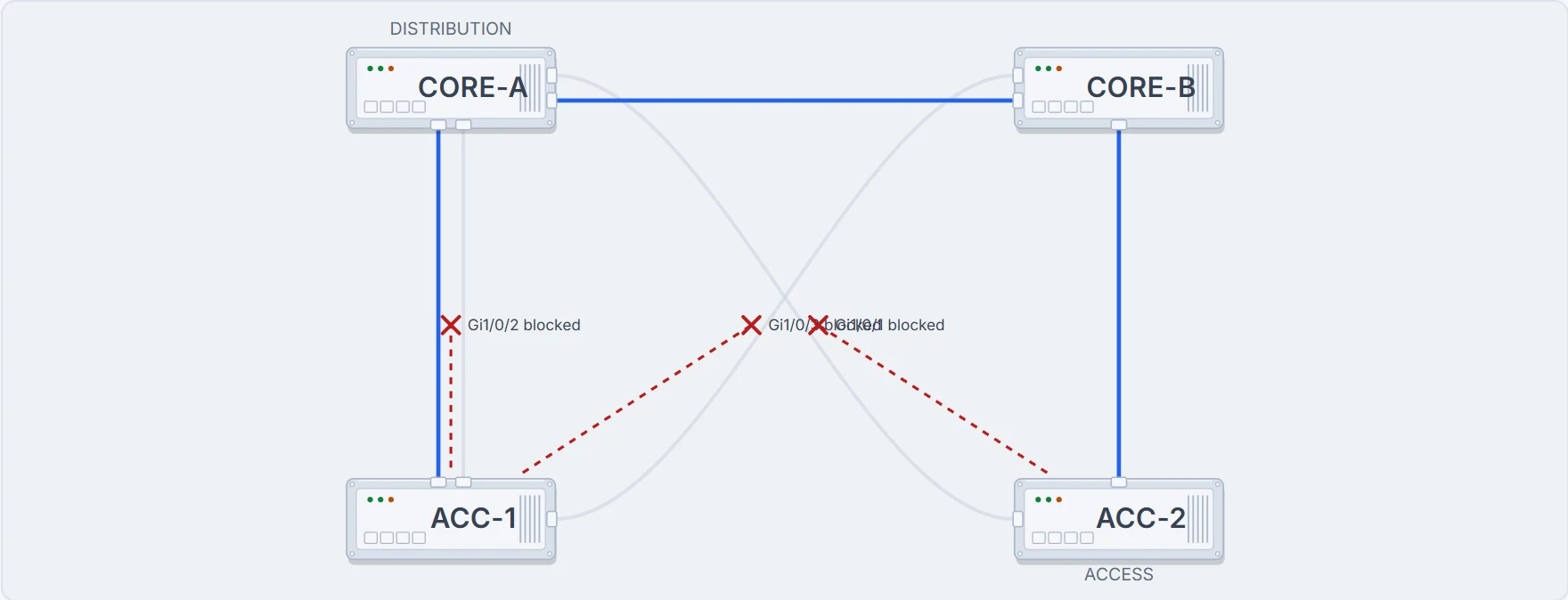
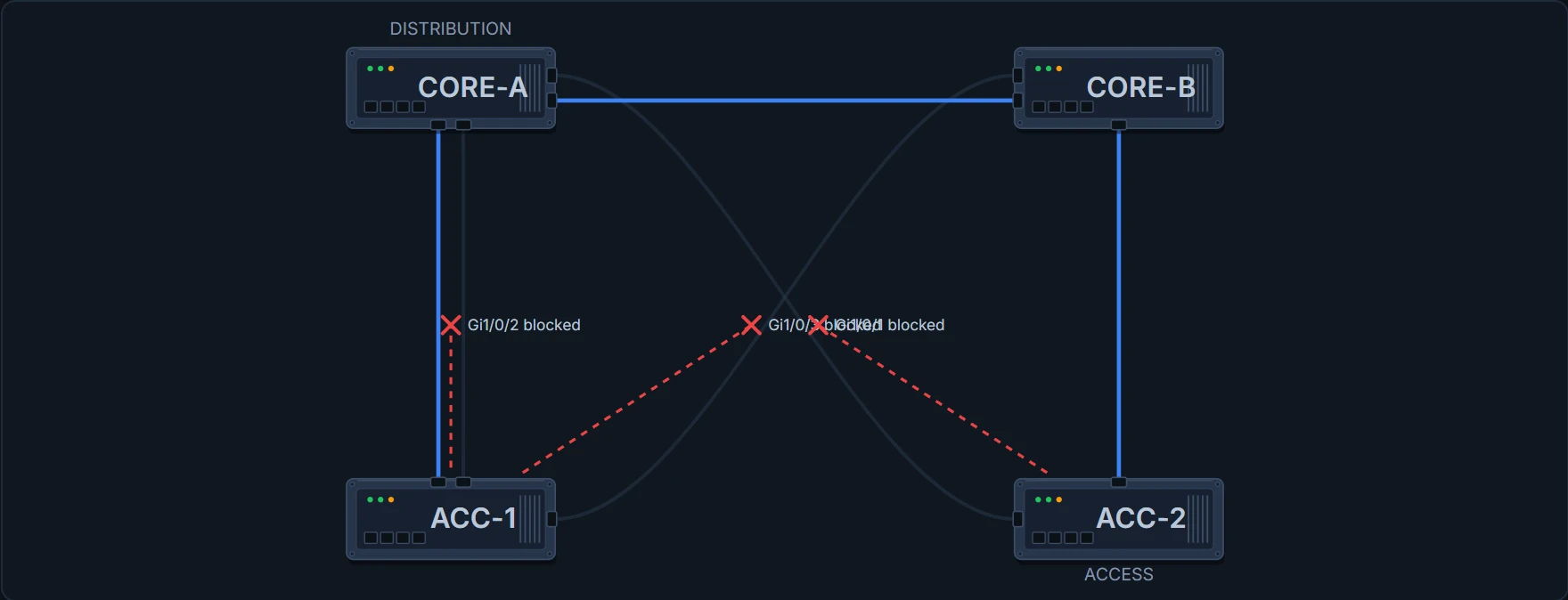
ACC-2# show spanning-tree vlan 10
VLAN0010
  Spanning tree enabled protocol rstp
  Root ID    Priority    8202
             Address     0021.1bcd.00aa
             Cost        22000
             Port        2 (Gi1/0/3)
         ! a different port, and a longer way round, chosen deliberately
             Hello Time  2 sec  Max Age 20 sec  Forward Delay 15 sec

  Bridge ID  Priority    16394  (priority 16384 sys-id-ext 10)
             Address     0021.1bcd.0002
             Hello Time  2 sec  Max Age 20 sec  Forward Delay 15 sec

Interface     Role  Sts  Cost       Prio.Nbr  Type
----------    ----  ---  ---------  --------  ----
Gi1/0/1       Altn  BLK  200000     128.1     P2p
Gi1/0/3       Root  FWD  20000      128.2     P2p
Continue the lesson
The whole lesson, with its drawings and its questions. The rest of this section and 5 more after it.