
PortFast, BPDU guard, BPDU filter
A BPDU on a wall port means a switch is plugged in where a laptop should be, and three features answer differently. PortFast moves a port straight to forwarding, skipping listening and learning; it does not turn spanning tree off. BPDU guard, enabled globally on PortFast ports, error-disables a port that receives a BPDU. BPDU filter behaves differently globally and per interface.
By Arif, founder of Daveth · Updated
The full 5 min walkthrough is in Daveth Pro (Network). See what the plan opens
What this page answers
What does PortFast do?
It brings an access or trunk port straight from blocking to forwarding, bypassing listening and learning, so a single workstation or server connects at once. It does not turn spanning tree off, so it belongs only on ports where nothing behind can make a loop. Read it in “PortFast: a promise about the port”
What does BPDU guard do?
Enabled globally with spanning-tree portfast bpduguard default, it shuts down ports in a PortFast operational state if they receive any BPDU, putting them in the error-disabled state. Read it in “BPDU guard: the port goes down”
A BPDU where a laptop should be
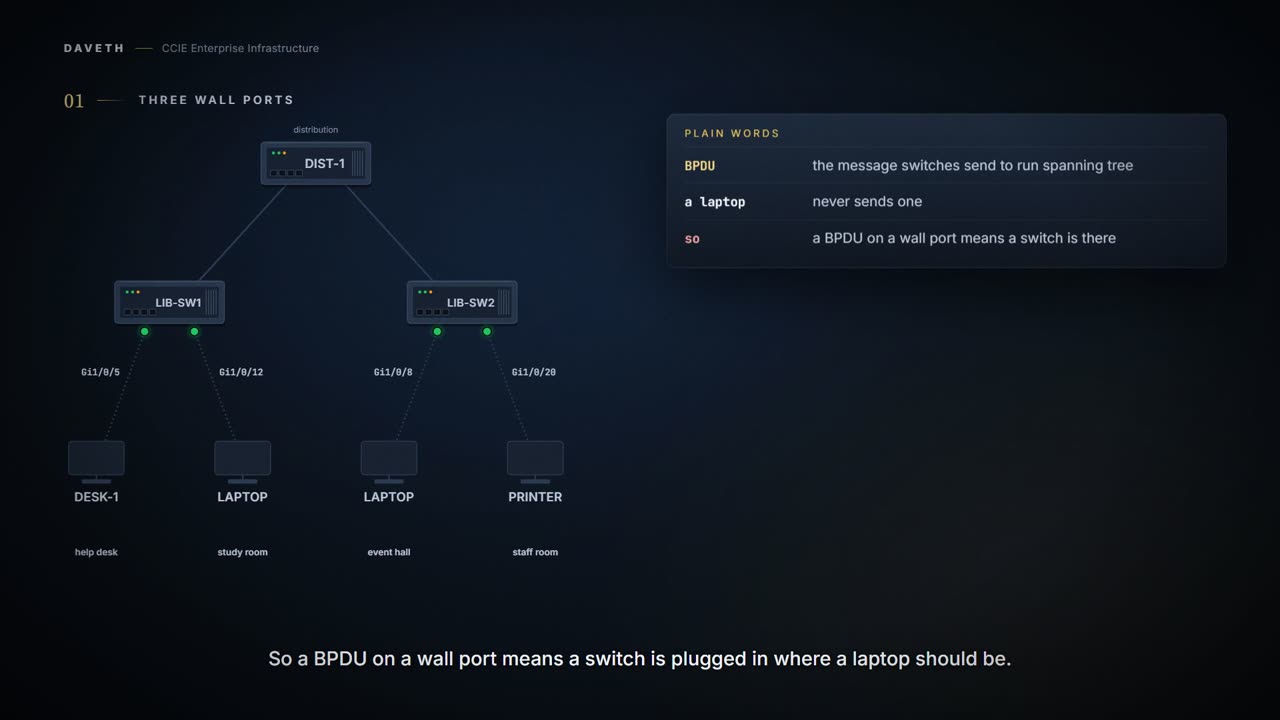
A public library has two access switches. On the ground floor, LIB-SW1 serves the help desk phone and the study room wall port. On the first floor, LIB-SW2 serves the event hall wall port and the staff room.
Plain words first. A BPDU is the message switches send each other to run spanning tree, the protocol that stops loops. A laptop never sends one. So a BPDU arriving on a wall port means a switch is plugged in where a laptop should be.
Today that happens three times, once on each wall port. What should the switch do about it? PortFast, BPDU guard and BPDU filter each give a different answer, and one of them gives no answer at all.
PortFast: a promise about the port
What does PortFast actually change?
PortFast immediately brings an interface that is configured as an access or trunk port to the forwarding state from a blocking state, bypassing the listening and learning states. You can use PortFast on interfaces that are connected to a single workstation or server to allow those devices to immediately connect to the network, rather than waiting for the spanning tree to converge.
So PortFast doesn't turn spanning tree off. It skips the wait, which only makes sense if nothing behind the port can make a loop.
So read it as a statement about start-up speed, not a certificate of safety. It says this port may begin forwarding immediately. It does not say the port is safe, does not check whether it is, and grants nothing about what happens once a frame arrives.
And the promise it rests on is yours, not the switch's. Naming a port as an edge port does not stop somebody plugging a switch into it; it only records what you expected to be there.
Interfaces connected to a single workstation or server should not receive bridge protocol data units (BPDUs). Use PortFast only when connecting a single end station to an access or trunk port. Enabling this feature on an interface that is connected to a switch or hub could prevent spanning tree from detecting and disabling loops in your network, which could cause broadcast storms and address-learning problems. By default, PortFast is disabled on all interfaces.
Configuration: LIB-SW1 on the ground floor, with the voice VLAN command from the voice VLAN lesson (1.1.c.vi), in the forms these commands take.
LIB-SW1# configure terminal
LIB-SW1(config)# spanning-tree portfast bpduguard default
LIB-SW1(config)# interface GigabitEthernet1/0/5
LIB-SW1(config-if)# switchport voice vlan 110
! PortFast comes on with this; nothing else typed
LIB-SW1(config-if)# interface GigabitEthernet1/0/12
LIB-SW1(config-if)# spanning-tree portfast
LIB-SW1(config-if)# end
Look at Gi1/0/5: nobody typed spanning-tree portfast there.
If you enable the voice VLAN feature, the PortFast feature is automatically enabled. When you disable voice VLAN, the PortFast feature is not automatically disabled.
Computed from the state: the ground floor's edge ports. No command prints it in this form.
port      plugged in      PortFast     filtering  link
Gi1/0/5   phone and PC    operational  no         up
Gi1/0/12  laptop          operational  no         up
Both ports read operational. Two more details from the same page: a trunk needs its own keyword, and one global command covers every nontrunking port.
To enable PortFast on trunk ports, you must use the spanning-tree portfast trunk interface configuration command. The spanning-tree portfast command will not work on trunk ports.
From elsewhere: PortFast on a trunk. The names, numbers and addresses come from elsewhere, not from this scenario.
Device(config-if)# spanning-tree portfast trunk
You can use the spanning-tree portfast default global configuration command to globally enable the PortFast feature on all nontrunking ports.
Notice what this section doesn't say: what PortFast on its own does when a BPDU arrives. The PortFast section of the page doesn't say, so this lesson doesn't either.
BPDU guard: the port goes down
On LIB-SW1, the global command is on. What happens when a patron plugs a travel switch into the study room port?
From elsewhere: global BPDU guard. The names, numbers and addresses come from elsewhere, not from this scenario.
Device(config)# spanning-tree portfast bpduguard default
When you enable BPDU guard at the global level on PortFast enabled ports, spanning tree shuts down ports that are in a PortFast operational state if any BPDU is received on them. Receiving a BPDU on a PortFast enabled port means an invalid configuration, such as the connection of an unauthorized device, and the BPDU guard feature puts the port in the error-disabled state. When this happens, the switch shuts down the entire port on which the violation occurred.
Computed from the state: the ground floor's edge ports after the travel switch. No command prints it in this form.
port      plugged in      PortFast     filtering  link
Gi1/0/5   phone and PC    operational  no         up
Gi1/0/12  travel switch   enabled      no         err-disabled (bpduguard)
Read the Gi1/0/12 row: err-disabled. Error-disabled means the switch has shut the port down itself, and one reminder from the errdisable lesson (1.1.a) says what that costs:
When a port is error-disabled, it is effectively shut down, and no traffic is sent or received on the port.
So which ports has LIB-SW1 shut down, and for what cause? That is the question show interfaces status err-disabled answers, for the whole switch at once:
Computed from the state, in the layout of the page's sample: the error-disabled ports. The values are this scenario's, not printed by a device.
LIB-SW1# show interfaces status err-disabled
Gi1/0/12             err-disabled   bpduguard
Published, excerpted: the command reference's sample, without its tab-aligned header line. The lines are the page's, in its order.
Device# show interfaces status err-disabled
Gi1/0/2              err-disabled   gbic-invalid
Gi2/0/3              err-disabled   dtp-flap
By this course's reading, the reason column says bpduguard, the cause name the command reference uses; the sample itself shows two other causes.
Proves: show interfaces status err-disabled proves which ports on this switch are error-disabled right now, and for what cause. Does not prove: what is plugged in now, or whether the device that caused it is still there. The study room port reads bpduguard until someone bounces it, even after the travel switch is gone.
The interface form is not a copy of the global one. Look at which ports each covers:
When you enable BPDU guard at the interface level on any port without also enabling the PortFast feature, and the port receives a BPDU, it is put in the error-disabled state.
Global guard covers PortFast-operational ports; interface guard covers the one port you type it on, PortFast or not. Both end with the port error-disabled.
How does the study room get its port back?
The BPDU guard feature provides a secure response to invalid configurations because you must manually put the interface back in service. Recovery is disabled for all causes. If you do not enable the recovery for the cause, the interface stays in the error-disabled state until you enter the shutdown and the no shutdown interface configuration commands.
Computed from the state: the ground floor's edge ports after the travel switch is removed and the port bounced. No command prints it in this form.
port      plugged in      PortFast     filtering  link
Gi1/0/5   phone and PC    operational  no         up
Gi1/0/12  laptop          operational  no         up
By this course's reading, the port comes back PortFast-operational because the laptop is back and spanning-tree portfast is still configured.
A timer exists, and it is off unless someone configures it:
From elsewhere: the recovery timer for BPDU guard. The names, numbers and addresses come from elsewhere, not from this scenario.
Device(config)# errdisable recovery cause bpduguard
Enables the timer to recover from the bridge protocol data unit (BPDU) guard error-disabled state.
The error-disabled port is the feature working, not spanning tree failing. By this course's reading, a timer on its own would only bring the port back to meet the same travel switch, so find the switch first.
Continue the lesson
The whole lesson, with its drawings and its questions. 6 more sections after the ones above.