
EtherChannel modes and types
On mode forces a port into an EtherChannel without negotiation, so a usable channel exists only when both ends are on, and nothing checks. It still suspends ports whose speed or duplex do not match. LACP asks: an active port sends LACP packets, a passive port only answers, so two passive ends never form a channel. A port with no LACP response is suspended by default.
By Arif, founder of Daveth · Updated
The full 4 min walkthrough is in Daveth Pro (Network). See what the plan opens
What this page answers
What is the difference between LACP active and passive?
An active port starts negotiation by sending LACP packets; a passive port responds to LACP packets but does not start. Active forms a channel with active or passive; two passive ends never do. Read it in “LACP asks”
What does EtherChannel mode on do?
It forces a port to join the channel without negotiation, so the channel works only when both ends are on. Ports in the group with incompatible speed or duplex are still suspended. Read it in “The mode that does not check”
The mode that does not check
Four links between SW1 and SW2, and both switches put all four into channel group 1 in on mode. Does anything pass between them to agree on that?
This course's configuration: SW1, and the same on SW2
SW1# configure terminal
SW1(config)# interface range gigabitethernet1/0/1 -4
SW1(config-if-range)# switchport mode trunk
SW1(config-if-range)# channel-group 1 mode on
SW1(config-if-range)# end
The on mode forces a port to join an EtherChannel without negotiations. In the on mode, a usable EtherChannel exists only when the devices at both ends of the link are configured in the on mode.
This course's reading: both ends of each link
link      SW1, on           SW2, on
Gi1/0/1   bundled (P)       bundled (P)
Gi1/0/2   bundled (P)       bundled (P)
Gi1/0/3   bundled (P)       bundled (P)
Gi1/0/4   bundled (P)       bundled (P)

a usable channel between them: yes
Look at the last line: usable, because both ends are on. Nothing was negotiated to get there, and the guide's caution is about exactly that:
This is a manual configuration, and ports on both ends of the EtherChannel must have the same configuration. If the group is misconfigured, packet loss or spanning-tree loops can occur.
on is named for what it does, not for what it checks. What it gives up is any check that the far end agrees.
And what would show etherchannel summary print here? This page does not draw it. The guide's sample shows one LACP group, and this group is in on mode.
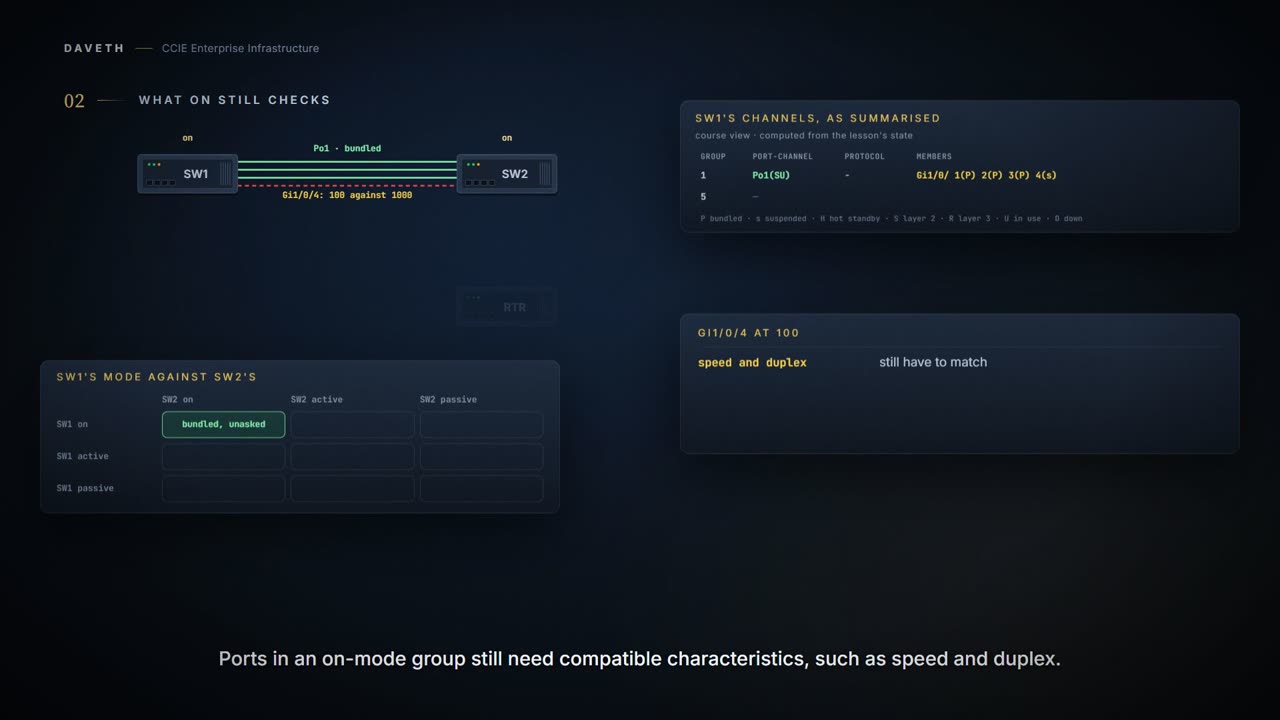
What on still checks
Gi1/0/4 at both ends is set to 100 Mb/s, and the other three stay at 1000. Does on mode bundle it anyway?
Ports that are configured in the on mode in the same channel group must have compatible port characteristics, such as speed and duplex. Ports that are not compatible are suspended, even though they are configured in the on mode.
This course's reading: both ends, with Gi1/0/4 at 100 Mb/s
link      SW1, on           SW2, on
Gi1/0/1   bundled (P)       bundled (P)
Gi1/0/2   bundled (P)       bundled (P)
Gi1/0/3   bundled (P)       bundled (P)
Gi1/0/4   suspended (s)     suspended (s)

a usable channel between them: yes
Notice the fourth row: suspended at both ends, and the other three still bundled. So on does check the ports on its own side. Which member counts as the mismatched one is this course's reading.
So skipping the negotiation is not skipping the requirements. Every member still has to match the others in the ways the guidelines list; on mode simply removes the conversation that would have told the far end about it. The checks that remain are local, and the ones you lost were the ones that compared the two ends.
Which is why cabling four links is not the same as having four members. Three of them agreeing and one of them not is the normal way this goes wrong, and the group carries on working at three-quarters of what somebody paid for.
And speed is not the whole list. The Layer 2 guidelines go on:
Configure all ports in an EtherChannel to operate at the same speeds and duplex modes. All ports in an EtherChannel must be assigned to the same VLAN or they must be configured as trunk port. Ports with different native VLANs cannot form an EtherChannel.
LACP asks
active Places a port into an active negotiating state in which the port starts negotiations with other ports by sending LACP packets. passive Places a port into a passive negotiating state in which the port responds to LACP packets that it receives, but does not start LACP packet negotiation. A port in the active mode can form an EtherChannel with another port that is in the active or passive mode.
Active starts the conversation. Passive will answer one. Which means the arrangement everybody tries once is two passive ends: both of them waiting to be asked, forever. A very polite way to achieve nothing.
And read active for exactly what it says, because the word oversells itself. It describes which end is willing to open the negotiation, and nothing else. It does not mean that end carries more traffic, becomes primary, or has any standing once the bundle is up.
Gi1/0/4 goes back to 1000, and the two switches change modes:
This course's configuration: SW1
SW1# configure terminal
SW1(config)# interface range gigabitethernet1/0/1 -4
SW1(config-if-range)# channel-group 1 mode active
SW1(config-if-range)# end
This course's configuration: SW2
SW2# configure terminal
SW2(config)# interface range gigabitethernet1/0/1 -4
SW2(config-if-range)# channel-group 1 mode passive
SW2(config-if-range)# end
Now ask SW1. Here is a published sample of that command:
Not from this scenario: the IOS XE 17.9 Catalyst 9300 Layer 2 configuration guide, Configuring EtherChannels: show etherchannel summary
Device# show etherchannel summary
Switch# show etherchannel summary
Flags:  D - down        P - bundled in port-channel
        I - stand-alone s - suspended
        H - Hot-standby (LACP only)
        R - Layer3      S - Layer2
        U - in use      f - failed to allocate aggregator
        M - not in use, minimum links not met
        u - unsuitable for bundling
        w - waiting to be aggregated
        d - default port
        A - formed by Auto LAG

Number of channel-groups in use: 1
Number of aggregators:           1

Group  Port-channel  Protocol    Ports
------+-------------+-----------+-----------------------------------------------
1      Po1(SU)         LACP      Gi1/0/45(P) Gi2/0/21(P) Gi3/0/21(P)
Is SW1's group 1 bundled?
SW1# show etherchannel summary
Flags:  D - down        P - bundled in port-channel
        I - stand-alone s - suspended
        H - Hot-standby (LACP only)
        R - Layer3      S - Layer2
        U - in use      f - failed to allocate aggregator
        M - not in use, minimum links not met
        u - unsuitable for bundling
        w - waiting to be aggregated
        d - default port
        A - formed by Auto LAG

Number of channel-groups in use: 1
Number of aggregators:           1

Group  Port-channel  Protocol    Ports
------+-------------+-----------+-----------------------------------------------
1      Po1(SU)         LACP      Gi1/0/1(P) Gi1/0/2(P) Gi1/0/3(P) Gi1/0/4(P)
! Proves which members this switch has bundled in each port-channel, whether each port-channel is Layer 2 or Layer 3 and in use, and the protocol. Does not prove what the far end shows for the same links: that takes the same command there.
Read the group row: Po1(SU), LACP, and every member (P). By the legend above, S is Layer 2 and U is in use.
And PAgP? The other negotiation protocol has two modes of the same shape. auto Places a port into a passive negotiating state, in which the port responds to PAgP packets it receives but does not start PAgP packet negotiation. desirable Places a port into an active negotiating state, in which the port starts negotiations with other ports by sending PAgP packets. This page walks LACP and on.
Now make SW1 passive as well. Which end starts the negotiation?
A port in the passive mode cannot form an EtherChannel with another port that is also in the passive mode because neither port starts LACP negotiation.
This course's reading: both ends, both passive
link      SW1, passive      SW2, passive
Gi1/0/1   suspended (s)     suspended (s)
Gi1/0/2   suspended (s)     suspended (s)
Gi1/0/3   suspended (s)     suspended (s)
Gi1/0/4   suspended (s)     suspended (s)

a usable channel between them: no
No channel, and every member suspended by this course's reading. The guide says the channel does not form; the state comes from its sentence on a peer that does not respond:
With CSCtn96950, by default, standalone mode is enabled. When no response is received from an LACP peer, ports in the port channel are moved to suspended state.
Notice the name. The guide calls that default standalone mode, yet the ports go to suspended (s), not to stand-alone (I); the legend has both. It also has port-channel standalone-disable, whose effect this page does not claim.
LACP and on, compared on what each verifies
| LACP | on | |
|---|---|---|
| Negotiates with the far end | yes: an active port sends LACP packets, a passive one responds | no: the port joins without negotiations |
| What the far end must run | active or passive, and one of the two ends active | on |
| A port unlike its group | not stated | suspended |
| No LACP response | suspended, by default | no usable EtherChannel, and no flag given |
| What a misconfiguration costs | not stated | packet loss or spanning-tree loops |
on never asks the far end what it is running.
Continue the lesson
The whole lesson, with its drawings and its questions. 7 more sections after the ones above.