
EtherChannel misconfiguration guard
A channel in on mode at one end, and nothing at the other, can loop or drop traffic. EtherChannel guard detects that misconfiguration, or channel parameters that differ between the ends, and error-disables the switch's own ports. It is enabled with spanning-tree etherchannel guard misconfig and works with PVST+, Rapid PVST+ or MSTP. The mistake lives on the other device.
By Arif, founder of Daveth · Updated
The full 5 min walkthrough is in Daveth Pro (Network). See what the plan opens
What this page answers
What does spanning-tree etherchannel guard misconfig do?
It detects an EtherChannel misconfiguration with a connected device, ports channelled here and not there, or parameters that differ, and places the switch's ports in the error-disabled state with an error message. Read it in “What happens when it fires”
How do you find the cause after EtherChannel guard fires?
show interfaces status err-disabled shows which local ports are down and why. The configuration to check is on the remote device, with show etherchannel summary. Read it in “The evidence lives on two devices”
The thing 1.1.d.i left open
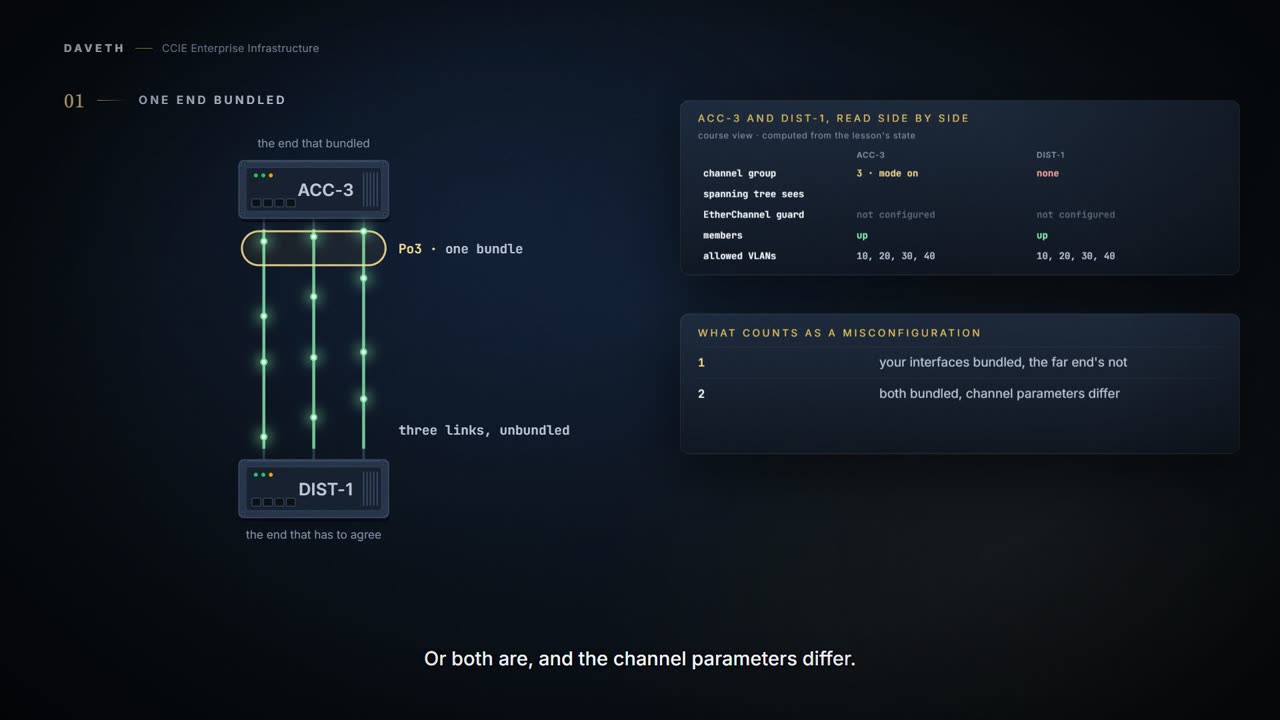
1.1.d.i ended on a warning: a usable channel in on mode needs on at both ends, and nothing negotiates to check. So take an access switch, ACC-3, and put its three uplinks into channel group 3 in on mode, with nothing typed on DIST-1 above it:
This course's configuration: ACC-3
ACC-3# configure terminal
ACC-3(config)# interface range gigabitethernet1/0/21 -23
ACC-3(config-if-range)# switchport mode trunk
ACC-3(config-if-range)# channel-group 3 mode on
ACC-3(config-if-range)# end
This course's reading: what each end has configured
                      ACC-3               DIST-1
channel-group         group 3, on         none
allowed VLANs         10,20,30,40         10,20,30,40
spanning-tree mode    Rapid PVST+         Rapid PVST+
EtherChannel guard    not configured      not configured
members err-disabled  no                  no
Look at the channel-group row: a bundle at one end and nothing at the other. The guide's warning for on mode is about exactly this:
This is a manual configuration, and ports on both ends of the EtherChannel must have the same configuration. If the group is misconfigured, packet loss or spanning-tree loops can occur.
Is anything on either switch configured to notice? Not yet.
What it is watching for
You can use EtherChannel guard to detect an EtherChannel misconfiguration between the switch and a connected device. A misconfiguration can occur if the switch interfaces are configured in an EtherChannel, but the interfaces on the other device are not. A misconfiguration can also occur if the channel parameters are not the same at both ends of the EtherChannel.
This course's reading: which situation holds, seen from each end
seen from  situation                                      guard
ACC-3      configured in an EtherChannel here, not there  nothing: no guard
DIST-1     configured in an EtherChannel there, not here  nothing: no guard
Read the first row: the first situation, from ACC-3's side. The second needs both ends in an EtherChannel, and it comes at the end of this page.
Why this is filed under spanning tree
You turn it on with a spanning-tree command, and the guide documents it beside root guard and loop guard. For a feature about EtherChannel, that looks like the wrong drawer.
You can enable EtherChannel guard to detect an EtherChannel misconfiguration if your device is running PVST+, Rapid PVST+, or MSTP.
So count what spanning tree is handed.
An EtherChannel consists of individual Ethernet links that are bundled into a single logical link, and each EtherChannel can consist of up to eight compatibly configured Ethernet ports. After grouping the links into an EtherChannel, LACP adds the group to the spanning tree as a single device port.
This course's reading: ports each end hands spanning tree, before the far end is configured
switch    links   ports handed to spanning tree
ACC-3     3       1
DIST-1    3       3
One against three, over the same three cables. That is documented for LACP; that an on-mode bundle is also one port to spanning tree is this course's reading of a single logical link. Put beside the caution's spanning-tree loops, the drawer is the right one. How spanning tree then treats those ports is 1.1.e.
What happens when it fires
One line, on ACC-3, which runs Rapid PVST+:
This course's configuration: ACC-3
ACC-3# configure terminal
ACC-3(config)# spanning-tree etherchannel guard misconfig
ACC-3(config)# end
If the switch detects a misconfiguration on the other device, EtherChannel guard places the switch interfaces in the error-disabled state, and displays an error message. When a port is error-disabled, it is effectively shut down, and no traffic is sent or received on the port.
The guide gives the local command to see it. The command reference prints this sample of its output:
Not from this scenario: the IOS XE 17.9 Catalyst 9300 command reference, Interface and Hardware Commands: show interfaces status err-disabled
Device# show interfaces status err-disabled

Port               Name       Status         Reason
Gi1/0/2              err-disabled   gbic-invalid
Gi2/0/3              err-disabled   dtp-flap
Which of ACC-3's ports did it take down, and why?
This course's output: ACC-3, drawn from the state in this command's own columns
ACC-3# show interfaces status err-disabled

Port               Name       Status         Reason
Gi1/0/21             err-disabled   channel-misconfig
Gi1/0/22             err-disabled   channel-misconfig
Gi1/0/23             err-disabled   channel-misconfig
! Proves which of this switch's ports are error-disabled, and the cause. Does not prove what the far end has configured: that is on the far end. The Reason text is this course's reading, from the name the command reference's show errdisable detect sample gives this cause.
Read the Reason column: channel-misconfig. That word is the cause's name in the command reference's detection sample, and it is the word you will type if you ever put this cause on a recovery list:
Not from this scenario: the IOS XE 17.9 Catalyst 9300 command reference, Interface and Hardware Commands: show errdisable detect
Device> show errdisable detect
ErrDisable Reason    Detection    Mode
-----------------    ---------    ----
arp-inspection       Enabled      port
bpduguard            Enabled      vlan
channel-misconfig    Enabled      port
community-limit      Enabled      port
dhcp-rate-limit      Enabled      port
dtp-flap             Enabled      port
gbic-invalid         Enabled      port
inline-power         Enabled      port
invalid-policy       Enabled      port
l2ptguard            Enabled      port
link-flap            Enabled      port
loopback             Enabled      port
lsgroup              Enabled      port
pagp-flap            Enabled      port
psecure-violation    Enabled      port/vlan
security-violatio    Enabled      port
sfp-config-mismat    Enabled      port
storm-control        Enabled      port
udld                 Enabled      port
vmps                 Enabled      port
And notice what the guard actually prevented, because it is easy to resent it at the time. One end believed it had a bundle. The other end believed it had separate links. Two devices looking at one diagram and reading it differently is how a campus goes down, and the guard took the ports off the table before the disagreement could do it.
Notice two things the guide does not give, so this page does not either. It does not say whether EtherChannel guard is on by default: the chapter states defaults for PortFast, BPDU filtering, root guard and loop guard, and none for this. And it says an error message is displayed without printing one. Check both on your platform.
The evidence lives on two devices
You arrive afterwards: three uplinks down on ACC-3, and a floor complaining. The local command told you which ports and which cause. Where is the mistake?
You can use the show interfaces status err-disabled privileged EXEC command to show which device ports are disabled because of an EtherChannel misconfiguration. On the remote device, you can enter the show etherchannel summary command in privileged EXEC mode to verify the EtherChannel configuration.
The guide sends you to the remote device. DIST-1's show etherchannel summary is not drawn here: the 17.9 guide's sample of it shows an LACP group, and DIST-1 has no group at all. What it has configured, this course reads for you:
This course's reading: what each end has configured, with the guard fired
                      ACC-3               DIST-1
channel-group         group 3, on         none
allowed VLANs         10,20,30,40         10,20,30,40
spanning-tree mode    Rapid PVST+         Rapid PVST+
EtherChannel guard    configured          not configured
members err-disabled  yes                 no
What does ACC-3's output leave out? The mistake. It names the victims and the cause; the missing channel group is a line of configuration on DIST-1. Nobody typed anything wrong on either switch: the change stopped halfway, and it took two logins to find out.
Continue the lesson
The whole lesson, with its drawings and its questions. 6 more sections after the ones above.