
Switch administration
A port is error-disabled when the switch itself shuts it down for a problem it detected, and it stays down: recovery is off by default for every cause, and removing the cause changes nothing. Recovery is enabled per cause, with errdisable recovery cause, and one interval of 300 seconds by default serves them all. The MAC address table is learned from source addresses, per VLAN.
By Arif, founder of Daveth · Updated
The full 6 min walkthrough is in Daveth Pro (Network). See what the plan opens
What this page answers
Does an error-disabled port recover by itself?
Not by default. Recovery is off for every cause, so the port stays error-disabled even after the problem is removed, until someone bounces it or recovery is enabled for that cause. Read it in “Recovery is off”
What is the default errdisable recovery interval?
300 seconds, set once for every cause you have enabled. The switch varies the wait by up to fifteen percent, so the port returns within a window rather than at an exact moment. Read it in “Turning recovery on, and why it is late”
What does show errdisable recovery show?
Which causes have recovery enabled, the interval in force, and the ports waiting to come back with the time left on each. Read it in “Turning recovery on, and why it is late”
The desk port that won't come up
A public library's reading room runs on one access switch, LIB-SW1. On a Saturday morning a patron plugs a small travel switch, MINI-SW, into the study desk port Gi1/0/12, to share the desk's one cable with a laptop and a tablet. The desk loses its network entirely.
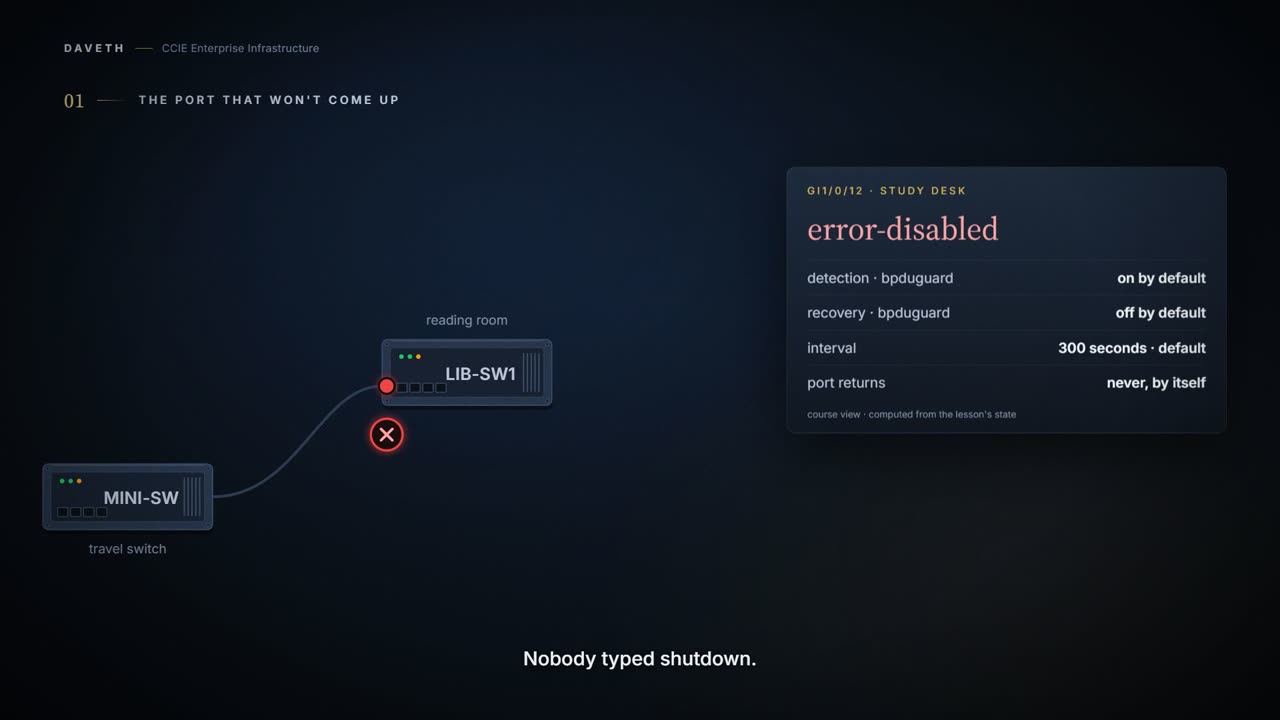
Plain words first. A port is error-disabled, or errdisabled, when the switch itself shuts it down because it detected a problem on it. Nobody typed shutdown. The console says so at the time, and then says nothing further.
Example output: the console messages for a BPDU guard errdisable. The ports, names and numbers in it belong to the example, not to this network; read it for its shape.
%SPANTREE-SP-2-BLOCK_BPDUGUARD: Received BPDU on port GigabitEthernet4/1 with BPDU Guard enabled. Disabling port.

%PM-SP-4-ERR_DISABLE: bpduguard error detected on Gi4/1, putting Gi4/1 in err-disable state
What errdisable does is simple and total. The switch puts the port into an error-disabled state and stops passing traffic on it: no data, in either direction, until something brings it back. The port is not negotiating, not learning, not forwarding. It is off, and the switch turned it off on purpose.
Look at the first message: the port had BPDU guard on, and it received a BPDU. That feature is the cause here, and it has its own lesson. This one doesn't teach any of the causes. It teaches what happens after, which is the part that generates the phone calls.
Computed from the state: the study desk port after MINI-SW is plugged in. No command prints it in this form.
port                  Gi1/0/12
state                 error-disabled
bpduguard recovery    disabled
interval              300 seconds (default)
actual timeout        none: nothing recovers the port
Notice the two words the switch uses for this, detection and recovery. Detection is the switch noticing the problem and shutting the port, and it is on by default for every cause. That half needs no configuration and is why ports go down without anybody typing anything.
Recovery is off
Library staff find MINI-SW and ask the patron to unplug it. The problem is gone; nothing is sending BPDUs into Gi1/0/12 any more. LIB-SW1 has no recovery configured. Before you read on, decide what the port does next.
Recovery is the other half, and it is off by default for every cause. A port put into the error-disabled state stays there. Removing what caused it changes nothing on its own: the switch is not watching for the problem to go away, and nothing is counting down.
Computed from the state: the study desk port after MINI-SW is unplugged. No command prints it in this form.
port                  Gi1/0/12
state                 error-disabled
bpduguard recovery    disabled
interval              300 seconds (default)
actual timeout        none: nothing recovers the port
Read the state row: still error-disabled. An hour later, still error-disabled. Detection is on for every cause, and recovery is off for every cause, so a port can go down by itself but can't come back by itself.
Recovery is off until you turn it on, cause by cause.
So when a user says the desk port has been dead since the morning, the first question isn't what broke. Ask yourself whether anyone ever enabled recovery for that cause. On a switch with none, somebody has to bounce the port with shutdown and no shutdown, after the cause is gone.
Turning recovery on, and why it is late
The network team decides the study desks should heal themselves once a patron unplugs whatever they brought. Recovery is enabled per cause, with a fixed keyword for each one: bpduguard, link-flap, psecure-violation and the rest. Turning it on for one cause says nothing about any other.
Configuration: recovery for bpduguard, on this network.
LIB-SW1# configure terminal
LIB-SW1(config)# errdisable recovery cause bpduguard
LIB-SW1(config)# end
Read what recovery actually promises. After the interval, the switch brings the port back up to try again. That is all it does. Nothing checks whether the problem has gone; the port is simply returned to service and the cause gets another chance to fire. Hold that thought, because the last section turns on it.
How long does it wait? The interval is set once and applies to every cause you have enabled, with a default of 300 seconds.
And it is deliberately not exact. The switch varies the wait by up to fifteen percent, so a 300-second timer returns the port somewhere in a window rather than at a moment you can name. Notice what that description leaves out: it gives the size of the variation, not its direction, so the window runs both ways.
Computed from the state: the study desk port with recovery on. No command prints it in this form.
port                  Gi1/0/12
state                 up
bpduguard recovery    enabled
interval              300 seconds (default)
actual timeout        255 to 345 seconds
Read the actual timeout row: 255 to 345 seconds. By this course's reading, that window is what a 300-second timer with fifteen percent of give actually means. Nothing states exactly when the timer starts counting either, so do not promise a user a minute.
That makes LIB-SW1's recovery timer the one thing in the library that is allowed to come back late. Why the timer varies at all is not something this lesson will guess at. And treat the size of the variation as worth confirming on the release you run, rather than carrying this window to a switch you have not checked.
How do you see the recovery policy on a switch? show errdisable recovery prints which causes have recovery enabled, the interval in force, and the ports waiting to come back with the time left on each.
Example output: what show errdisable recovery prints. The ports, names and numbers in it belong to the example, not to this network; read it for its shape.
cat6k#show errdisable recovery
ErrDisable Reason    Timer Status
-----------------    --------------
udld                 Enabled
bpduguard            Enabled
security-violatio    Enabled
channel-misconfig    Enabled
pagp-flap            Enabled
dtp-flap             Enabled
link-flap            Enabled
l2ptguard            Enabled
psecure-violation    Enabled
gbic-invalid         Enabled
dhcp-rate-limit      Enabled
mac-limit            Enabled
unicast-flood        Enabled
arp-inspection       Enabled

Timer interval: 300 seconds

Interfaces that can be enabled at the next timeout:

Interface      Errdisable reason      Time left(sec)
---------    ---------------------    --------------
  Fa2/4                bpduguard          273
Look at the bottom block: a port, its cause, and 273 seconds left. That is the queue, and it is the most useful part of the output. Look at the list above it too, and then check it against your own switch. A printed example carries whatever causes that switch supported, which is not necessarily the set yours has; read the list your switch prints, not the one in an example.
Proves: show errdisable recovery proves which causes will be recovered, the timer interval, and which interfaces are waiting to be enabled at the next timeout, with the time left. Does not prove: that the port will stay up. If the cause is still there when the port comes back, it errdisables again.
The MAC address table, and what an entry proves
Monday. KIOSK-3, a self-checkout kiosk on Gi1/0/5 in VLAN 30, is switched on. The MAC address table is the switch's list of which device address was last seen on which port, kept per VLAN.
It fills itself by listening. The switch reads the source address of every frame it receives and records it against the port it arrived on. When it later has a frame for that address, it sends it out that one port. When it has no entry, it floods the frame out every port in the VLAN except the one it came in on, and an address learned in one VLAN is still unknown in all the others.
Computed from the state: KIOSK-3's entry after its first frame. No command prints it in this form.
vlan  mac address     type     port     KIOSK-3 plugged in
30    0050.56a1.3c05  dynamic  Gi1/0/5  yes
since its last frame  0 seconds, aging time 300
Look at the vlan column: 30. By the last of those sentences, KIOSK-3's address is still unknown in every other VLAN until it is learned there.
So what makes an entry go away?
Entries age out. A learned entry is discarded if no frame from that address arrives for the aging time, which defaults to 300 seconds. The aging time can be set for the whole switch or for one VLAN, and an address configured statically does not age at all.
At 10:00 a cleaner unplugs KIOSK-3 to vacuum behind it. At 10:02 a staff member, told the kiosk is broken, checks the switch. Before you look at the table, ask yourself whether KIOSK-3 is still in it.
Computed from the state: KIOSK-3's entry two minutes after it was unplugged. No command prints it in this form.
vlan  mac address     type     port     KIOSK-3 plugged in
30    0050.56a1.3c05  dynamic  Gi1/0/5  no
since its last frame  120 seconds, aging time 300
Read the last column: still in the table on Gi1/0/5, and not plugged in. 120 seconds is below the 300-second aging time, so the entry stays. By this course's reading of the aging description, an entry says a frame from that address arrived on that port recently enough not to have aged out, and nothing more.
The interactive lesson
The whole lesson, with its drawings and its questions. Free with a Daveth account.