
Static RP, Auto-RP and BSR
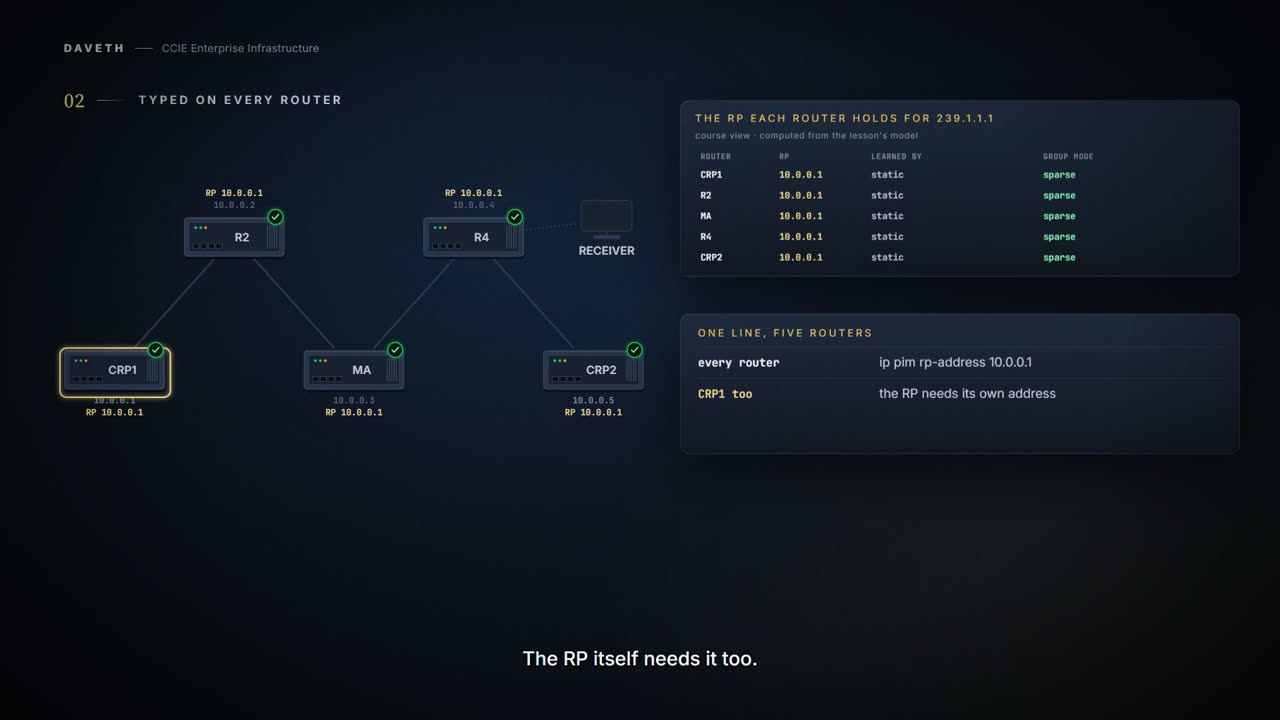
Every PIM router must know the RP's address, and there are three ways to get it there: type it, Auto-RP or BSR. A static RP must be configured on every router, the RP included. Auto-RP candidate RPs announce to 224.0.1.39, and a mapping agent arbitrates and sends the mappings on. Until a router has an RP for a group, it treats the group as dense and floods it.
By Arif, founder of Daveth · Updated
The full 4 min walkthrough is in Daveth Pro (Network). See what the plan opens
What this page answers
How do you configure a static RP?
ip pim rp-address address on every router and multilayer switch, including the RP itself. show ip pim rp mapping then lists the group range and the RP as Static. Read it in “One: type it everywhere”
How does Auto-RP work?
Candidate RPs send announcements, with ip pim send-rp-announce, to 224.0.1.39. A mapping agent, ip pim send-rp-discovery, receives them, arbitrates conflicts and sends consistent group-to-RP mappings to all other routers. Read it in “Two: Auto-RP”
What does a router do for a group with no RP?
It treats the group as dense and uses dense-mode techniques, so the traffic is flooded rather than dropped. A missing RP is not an error, and show ip pim rp mapping prints the heading with nothing under it. Read it in “A group with no RP”
One address, three mechanisms
1.6.c.i needed every PIM router to hold the RP's address. Here are three ways of getting it there: type it, have Auto-RP send it, or have BSR send it.
Two things make that harder than it sounds. The address has to reach every router, and a router that has not got it yet still has to do something with the groups it forwards.
A group with no RP
The receiver behind R4 joins 239.1.1.1, and nobody has configured an RP. What does R4 hold?
This course’s output: show ip pim rp mapping on R4, drawn from the state in the layout of the samples reproduced on this page.
R4# show ip pim rp mapping
PIM Group-to-RP Mappings

! Proves which group-to-RP mappings this router holds, and on the Info source line how each was learned. Does not prove the RP is reachable, that any other router holds the same, or which mapping wins when a router holds two (1.6.c.iii). The uptime and expiry values are this page's own.
The heading, and nothing under it. That a router holding no mapping prints the heading alone is this course's reading of the samples. And the group itself:
If there is no RP configured for a group, the multilayer switch responds to the group as dense and uses the dense-mode PIM techniques.
This course's reading: what each router holds, and how it treats the group
router  RP for 239.1.1.1    learned via  the group is
CRP1    none                -            treated as dense
R2      none                -            treated as dense
MA      none                -            treated as dense
R4      none                -            treated as dense
CRP2    none                -            treated as dense
A missing RP is not an error. The group is treated as dense, so its traffic is flooded rather than dropped. That consequence is this course's reading of the sentence above.
One: type it everywhere
This course's configuration: every router, R4 shown
R4# configure terminal
R4(config)# ip pim rp-address 10.0.0.1
R4(config)# end
You must configure the IP address of RPs on all routers and multilayer switches (including the RP).
What does R4 hold now?
This course’s output: show ip pim rp mapping on R4, drawn from the state in the layout of the samples reproduced on this page.
R4# show ip pim rp mapping
PIM Group-to-RP Mappings

Group(s): 224.0.0.0/4, Static
    RP: 10.0.0.1 (?)
A Static block, in the layout of the command reference's vrf * sample, whose default VRF prints one:
Not from this scenario: the IOS XE 17.9 command reference, IP Multicast Routing Commands: show ip pim vrf * rp mapping, the default VRF
VRF IPv4 default
PIM Group-to-RP Mappings
This system is an RP (Auto-RP)

Group(s) 224.0.0.0/4
  RP 3.3.3.3 (?), v2v1
    Info source: 2.2.2.2 (?), elected via Auto-RP
         Uptime: 4w3d, expires: 00:02:27
Group(s): 224.0.0.0/4, Static
    RP: 1.2.3.4 (?)
Acl: abc, Static
    RP: 1.1.1.1 (?)
Now the RP moves to CRP2, and R2 is missed. What does the domain hold?
This course's reading: which RP each router holds
RP held     routers holding it
10.0.0.5    CRP1, MA, R4, CRP2
10.0.0.1    R2

2 answers in one domain
Two answers. R2 has an RP; it is just not everybody else's. None of the pages this course cites says a router notices the difference.
Configuring static RPs is relatively easy in a small network, but it can be laborious in a large, complex network. Auto-RP avoids inconsistent, manual RP configurations that can cause connectivity problems.
And if a router holds a static RP and a learned one? Which wins, and the override keyword, are 1.6.c.iii. This page is about how a mapping arrives.
Two: Auto-RP
The static RPs come off every router first, so whatever each router learns from here on, it learns from the mechanism.
To make Auto-RP work, a router must be designated as an RP mapping agent, which receives the RP announcement messages from the RPs and arbitrates conflicts. The RP-mapping agent then sends the consistent group-to-RP mappings to all other routers.
This course's configuration: CRP1, the candidate
CRP1# configure terminal
CRP1(config)# ip pim send-rp-announce Loopback0 scope 16
CRP1(config)# end
When you are using Auto-RP to distribute group-to-RP mappings, this command causes the router to send an Auto-RP announcement message to the well-known group CISCO-RP-ANNOUNCE (224.0.1.39). The Internet Assigned Numbers Authority (IANA) has assigned two group addresses, 224.0.1.39 and 224.0.1.40, for Auto-RP.
This course's configuration: MA, the mapping agent
MA# configure terminal
MA(config)# ip pim send-rp-discovery Loopback0 scope 16
MA(config)# end
Finds a device whose connectivity is not likely to be interrupted, and assigns it the role of RP-mapping agent. All devices within the hop count from the source device receive the Auto-RP discovery messages.
Both commands take a scope in hops, and the candidate's has to be large enough:
Enter a hop count that is high enough to ensure that the RP-announce messages reach all the mapping agents in the network. The total hold time of the RP announcements is automatically set to three times the value of the interval. The default interval is 60 seconds.
Now look at the transport. The announcement is multicast, sent to 224.0.1.39. Every interface here is in sparse mode, and no router has an RP for any group, 224.0.1.39 included.
This course's reading: who passes on the Auto-RP groups, and how far CRP1's announcement gets
router  passes on Auto-RP groups?  because of
CRP1    no                         none
R2      no                         none
MA      no                         none
R4      no                         none
CRP2    no                         none

from CRP1, an announcement to 224.0.1.39 reaches R2
the mapping agent never receives it
What does the mapping agent hold?
This course’s output: show ip pim rp mapping on MA, drawn from the state in the layout of the samples reproduced on this page.
MA# show ip pim rp mapping
PIM Group-to-RP Mappings
This system is an RP-mapping agent
It says it is a mapping agent, and it has nothing to send. Auto-RP delivers the RP by multicast, and the routers need an RP, or something else, before they will pass that multicast on. A protocol standing on its own shoulders.
The guide names three ways off them:
If routed interfaces are configured in sparse mode, Auto-RP can still be used if all devices are configured with a manual RP address for the Auto-RP groups. If routed interfaces are configured in sparse mode and you enter the ip pim autorp listener global configuration command, Auto-RP can still be used even if all devices are not configured with a manual RP address for the Auto-RP groups. A prerequisite of Auto-RP is that all interfaces must be configured in sparse-dense mode using the ip pim sparse-dense-mode interface configuration command. If a multicast group has a known RP, the interface is treated in sparse mode. If a group has no known RP, by default the interface is treated in dense mode and data will be flooded over this interface.
The third sentence calls sparse-dense mode a prerequisite, and the first two say sparse mode works without it. The guide's own example is titled Sparse Mode with Auto-RP, so this page reads the prerequisite as one of the three ways rather than a requirement. That reading is this course's.
Between sparse-dense mode and the listener, the guide prefers the listener:
When you configure sparse-dense mode, dense mode failover may result in a network dense-mode flood. To avoid this condition, use PIM sparse mode with the Auto-RP listener feature.
This course's configuration: every router, R2 shown
R2# configure terminal
R2(config)# ip pim autorp listener
R2(config)# end
With the listener on R2 alone, how far does the mapping get?
This course's reading: who passes on the Auto-RP groups, and how far MA's mapping gets, with the listener on R2 only
router  passes on Auto-RP groups?  because of
CRP1    no                         none
R2      yes                        the Auto-RP listener
MA      no                         none
R4      no                         none
CRP2    no                         none

from MA, the mapping reaches CRP1, R2, R4
To R4 and no further: R4 receives it as the first hop from MA, and cannot pass it on. With the listener on every router:
This course's reading: who passes on the Auto-RP groups, and how far MA's mapping gets, with the listener everywhere
router  passes on Auto-RP groups?  because of
CRP1    yes                        the Auto-RP listener
R2      yes                        the Auto-RP listener
MA      yes                        the Auto-RP listener
R4      yes                        the Auto-RP listener
CRP2    yes                        the Auto-RP listener

from MA, the mapping reaches CRP1, R2, R4, CRP2
What does R4 hold now?
This course’s output: show ip pim rp mapping on R4, drawn from the state in the layout of the samples reproduced on this page.
R4# show ip pim rp mapping
PIM Group-to-RP Mappings

Group(s) 224.0.0.0/4
  RP 10.0.0.1 (?), v2v1
    Info source: 10.0.0.3 (?), elected via Auto-RP
         Uptime: 00:01:00, expires: 00:02:30
Elected via Auto-RP, with MA's address as the Info source. That the Info source is the mapping agent on a router that is not the agent is this course's reading of the vrf * sample above, where the RP and the Info source differ. The guide's own sample, and what it checks:
Not from this scenario: the IOS XE 17.9 configuration guide, Configuring PIM
Device# show ip pim rp mapping
PIM Group-to-RP Mappings

Group(s) 224.0.0.0/4
  RP 172.16.0.1 (?), v2v1
    Info source: 172.16.0.1 (?), elected via Auto-RP
         Uptime: 00:09:11, expires: 00:02:47
Confirms that the group-to-RP mappings are being populated correctly on the last hop router. When you enter the show ip pim rp mapping command, the version of the RP displayed in the output is determined only by the method through which an RP is learned.
And the guide's own example puts the listener, the two Auto-RP commands and no ip pim dm-fallback together:
Not from this scenario: the IOS XE 17.9 configuration guide, Configuring PIM: Sparse Mode with Auto-RP
Device(config)# ip multicast-routing
Device(config)# ip pim autorp listener
Device(config)# ip pim send-rp-announce Loopback0 scope 16 group-list 1
Device(config)# ip pim send-rp-discovery Loopback1 scope 16
Device(config)# no ip pim dm-fallback
Device(config)# access-list 1 permit 239.254.2.0 0.0.0.255
Device(config)# access-list 1 permit 239.254.3.0 0.0.0.255
What no ip pim dm-fallback does is not quoted on this page: the guide refers it to another module.
And what does 224.0.1.40 carry? No page consulted says. The guide assigns both groups to Auto-RP, and the command reference names 224.0.1.39 for announcements. The command reference's show ip pim autorp sample shows 224.0.1.40 joined on an interface, and counts announcements and discoveries separately:
Not from this scenario: the IOS XE 17.9 command reference, IP Multicast Routing Commands: show ip pim autorp
# show ip pim autorp

AutoRP Information:
  AutoRP is enabled.
  RP Discovery packet MTU is 0.
  224.0.1.40 is joined on GigabitEthernet1/0/1.

PIM AutoRP Statistics: Sent/Received
  RP Announce: 0/0, RP Discovery: 0/0
This page does not draw that command for its own routers, because nothing consulted says how its counters move.
Continue the lesson
The whole lesson, with its drawings and its questions. 6 more sections after the ones above.