
PIM sparse mode
A sender doesn't know who is listening, and a receiver knows only the group. PIM sparse mode solves that with a rendezvous point whose address everyone is told in advance. It is a pull model: nothing is forwarded until a receiver asks. Multicast routing is disabled by default. The last-hop router joins toward the RP, the first-hop router registers the source, and traffic flows source, RP, receiver.
By Arif, founder of Daveth · Updated
The full 6 min walkthrough is in Daveth Pro (Network). See what the plan opens
What this page answers
How does PIM sparse mode work?
It uses a pull model: traffic is forwarded only toward networks whose receivers explicitly asked. The last-hop router builds a (*,G) shared tree toward the RP, the first-hop router registers the source with the RP, and the RP joins toward the source. Read it in “The address both ends are told in advance”
Is multicast routing enabled by default on Cisco?
No. By default multicast routing is disabled; enable it with ip multicast-routing, and ipv6 multicast-routing for IPv6, then enable PIM on the interfaces. Read it in “Two switches, in two configuration modes, and neither reports the other”
Which router is the PIM designated router?
On a segment with more than one PIM router, one is elected: the device with the highest IP address. It registers sources and joins for receivers on that segment's behalf. Read it in “Which router is doing this on the host's behalf?”
A server sending to nobody, and a receiver who cannot ask
SERVER is about to start transmitting to 239.1.1.1. It does not know whether anybody is listening, who they are, or where they are.
RECEIVER wants that same group. It knows the group. That is the whole of what it knows, not the sender's address, not its location, and it has no way to find out, because a group address is not a location and nothing resolves it.
Sit with how hard that actually is before reaching for a mechanism. The receiver cannot ask for the source because it cannot name it. The source cannot send to the receiver because it has never heard of it. Everything on this page is the answer to that one problem.
State 1 The network they are both on
Two paths run between the first-hop and last-hop routers. What is different about them?
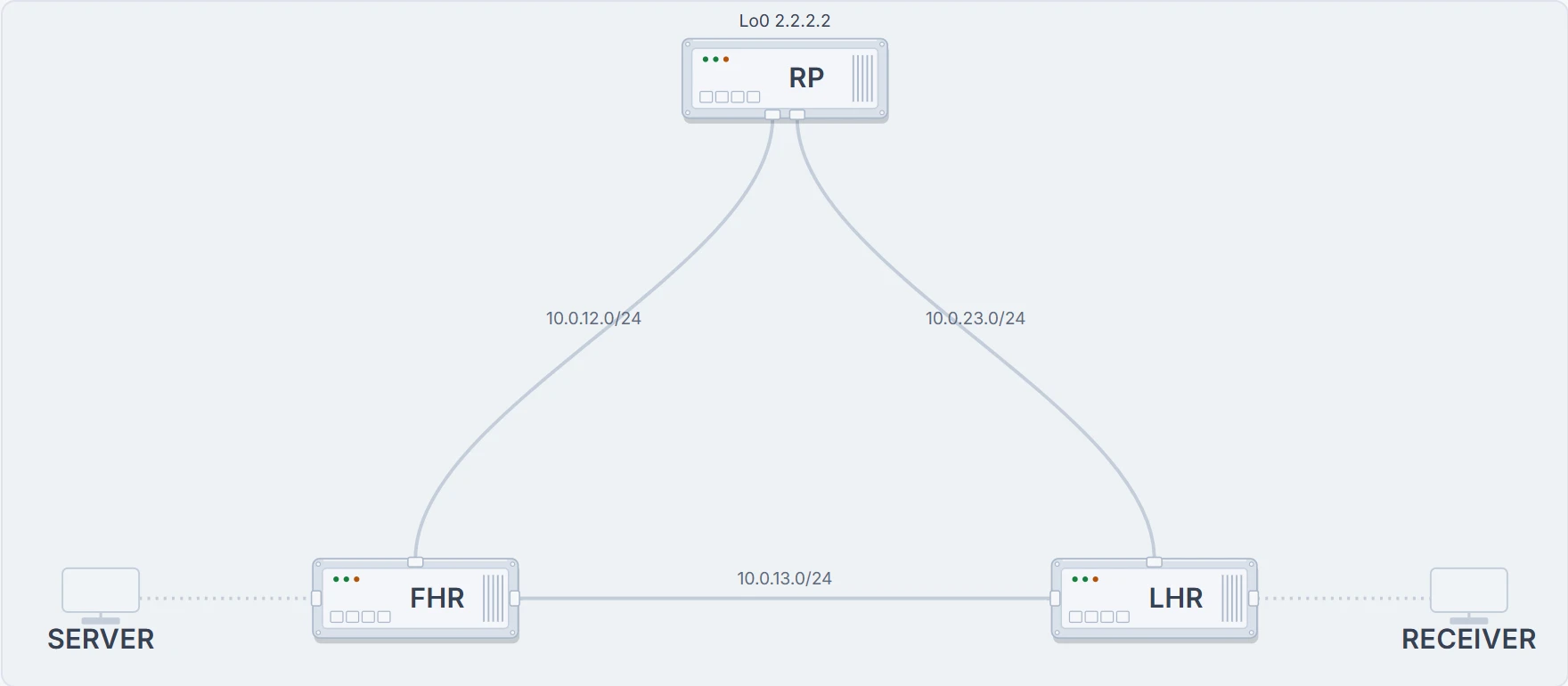
Three routers. The one in the middle sits above both of the others and is joined to each of them; the outer two are also joined directly to each other. So there is a two-hop path between FHR and LHR through the top, and a one-hop path across the bottom, and every link costs the same.
Hold on to that shape. By the end of the page the stream will have used both paths, in that order, for reasons that are entirely mechanical.
Two switches, in two configuration modes, and neither reports the other
Nothing below can be shown until multicast is turned on, and turning it on is where most multicast faults are born. The documentation is blunt about the starting point: By default, multicast routing is disabled, and there is no default mode setting. To enable multicast routing, use the ip multicast-routing command.
FHR> enable
FHR# configure terminal
FHR(config)# ip multicast-routing
FHR(config)# ipv6 multicast-routing
FHR(config)# end
Now predict the result before reading on. What does a router do with ip multicast-routing enabled globally and no ip pim on any interface?
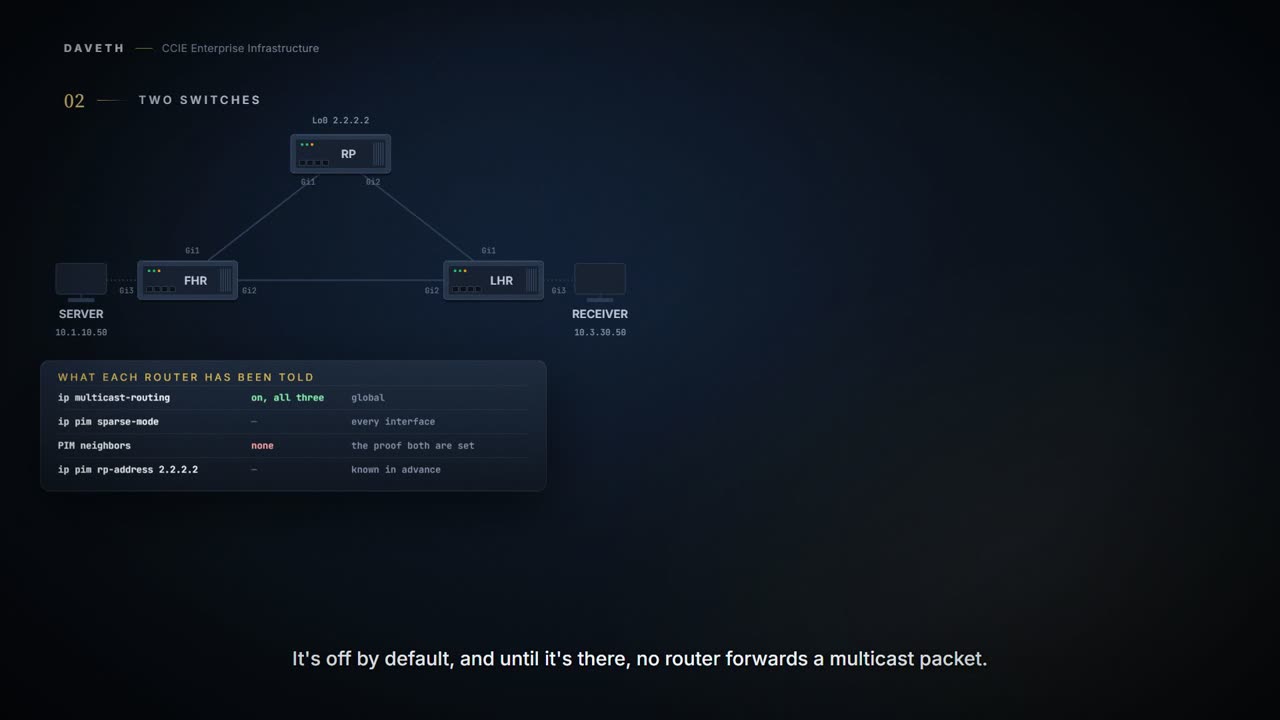
Nothing. It is willing to route multicast and has no interface participating in PIM, so it forms no neighbours, builds no trees and forwards nothing. Here is that state, on a router where the global command has just been typed:
FHR# show ip pim neighbor
PIM Neighbor Table
Neighbor          Interface           Uptime/Expires
Address
An empty table with a heading on it. The second switch is per interface:
FHR(config)# interface GigabitEthernet1
FHR(config-if)# ip pim sparse-mode
FHR(config-if)# interface GigabitEthernet2
FHR(config-if)# ip pim sparse-mode
FHR(config-if)# interface GigabitEthernet3
FHR(config-if)# ip pim sparse-mode
FHR(config-if)# end
FHR# show ip pim neighbor
PIM Neighbor Table
Neighbor          Interface           Uptime/Expires
Address
10.0.12.2         GigabitEthernet1    00:00:11/00:01:37
! the RP's interface: this line only exists because both switches are set on both routers
10.0.13.3         GigabitEthernet2    00:00:11/00:01:37
And the reverse combination is equally inert: ip pim sparse-mode on every interface with multicast routing disabled globally does nothing at all. Two switches, both required, in different configuration modes, neither of which reports the absence of the other. Check both before anything else, and check them on both ends of the link: a neighbour is the only thing that proves all four conditions at once.
Proves: PIM is running on this router's interfaces and has found peers on them, which is the direct check on the two-switch problem.
Does not prove: that any group is being forwarded. A router with perfect neighbours and no receivers anywhere forwards nothing, correctly.
A wording difference worth having met. The blueprint item is "Sparse mode". The 17.9 configuration guide says of the third option: "sparse-dense-mode: Causes the interface to be treated in the mode in which the group belongs. Sparse-dense mode is the recommended setting." These are not in conflict, the blueprint names a topic and the guide recommends an interface setting, but you will meet both, and the difference is better met here than in an exam.
The address both ends are told in advance
The delivery model rules out the easy answer. PIM Sparse Mode (PIM-SM) uses a pull model to deliver multicast traffic. Only networks with active receivers that have explicitly requested the data are forwarded the traffic.
Explicitly requested. So the network does not flood the stream everywhere and let receivers keep what they want. It sends nothing, anywhere, until a request arrives. And notice what the word "sparse" is describing, because it misleads almost everybody once: it is not about bandwidth or traffic volume. It is an assumption about receivers (that they are scattered, and that most of the network does not want the stream) and the whole mode is built around that assumption being true.
Hold that against the opening and it sharpens the problem rather than solving it. If nothing is sent until somebody asks, and the receiver cannot name what to ask for, the request has nowhere to go.
PIM-SM's answer is a rendezvous point: a router whose address every PIM router in the domain knows in advance. Read the job description carefully, because it is two jobs and they arrive from opposite directions.
The RP address is used by first hop devices to send PIM register messages on behalf of a host sending a packet to the group. The RP address is also used by last hop devices to send PIM join and prune messages to the RP to inform it about group membership.
First hop → register. The router nearest the source sees traffic for a group and tells the RP: there is a sender for this, here. Last hop → join. The router nearest the receiver is told by its host that somebody wants the group, and tells the RP: there is a listener for this, here. Neither end had to know about the other. Both only had to know one address.
LHR(config)# ip pim rp-address 2.2.2.2
LHR(config)# ipv6 pim rp-address 2001:DB8::2
LHR(config)# end
LHR# show ip pim rp mapping
PIM Group-to-RP Mappings

Group(s): 224.0.0.0/4, Static
    RP: 2.2.2.2 (?)
    ! typed, not learned, which is why every router has to be given it
That address is a loopback on the middle router, and the same two lines are typed on all three. Nothing has been built. LHR now knows where to send a join it has no reason to send yet, and that is the entire state of the domain.
The server starts, and the network does nothing
SERVER begins transmitting to 239.1.1.1 at about 4.2 Mbps. The traffic is real, it is arriving on a segment FHR is connected to, and FHR does create state for it.
FHR# show ip mroute
IP Multicast Routing Table
Flags: S - Sparse, C - Connected,
       T - SPT-bit set, P - Pruned
Timers: Uptime/Expires
Interface state: Interface, Next-Hop or VCD, State/Mode

(10.1.10.50, 239.1.1.1), 00:00:11/00:02:59, flags: S
  Incoming interface: GigabitEthernet3, RPF nbr 0.0.0.0
  Outgoing interface list: Null
  ! Null: the traffic exists and there is nowhere to send it
Read the outgoing interface list. Null. The router knows about the stream, has an entry for it, and forwards it to nobody, which is not a fault, it is the pull model doing exactly what it says. And on the router at the other end of the network, where the person who wants this stream is sitting:
LHR# show ip mroute
IP Multicast Routing Table
Flags: S - Sparse, C - Connected,
       T - SPT-bit set, P - Pruned
Timers: Uptime/Expires
Interface state: Interface, Next-Hop or VCD, State/Mode
A heading and nothing under it. Two routers, one with traffic it cannot deliver and one with a host that wants it, and no relationship between them of any kind.
The receiver asks, and a tree is built toward an address
RECEIVER reports membership of 239.1.1.1 on its own segment. Now LHR has a reason to build something, and what it builds is (*, 239.1.1.1): any source, this group, because a source is precisely the thing nobody has told it about.
State 2 A tree with nothing on it
The shared tree now exists. How much of this network is carrying the stream?
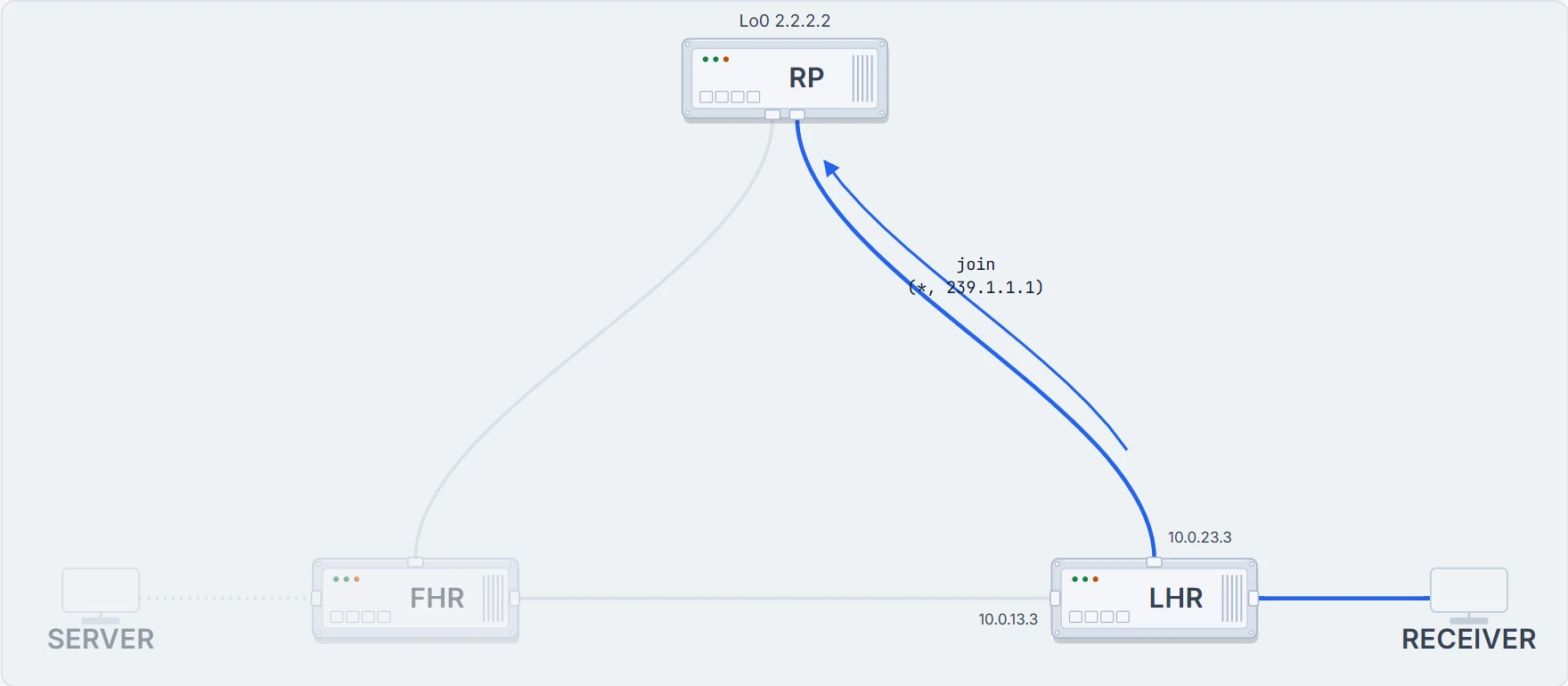
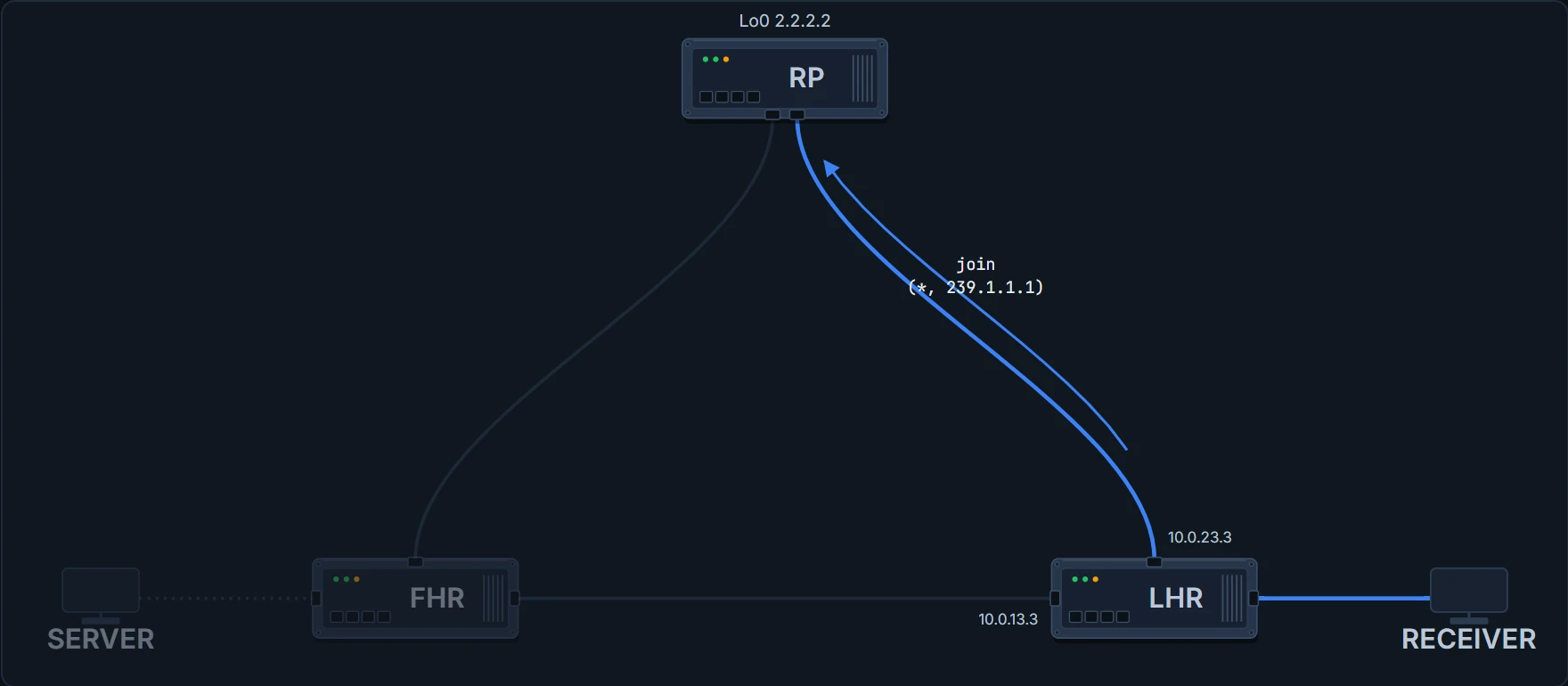
None of it. Look at what the drawing shows and what it does not: a branch from the RP down to the receiver, a first-hop router entirely uninvolved, and a source whose traffic is still going nowhere.
The interesting part is the one field you might read past. That entry has an incoming interface, and PIM did not choose it. It was read out of the unicast routing table, the RPF interface toward 2.2.2.2, which is 1.6.b's point arriving in a place you can act on it. Here is the lookup that decided it:
LHR# show ip route 2.2.2.2
Routing entry for 2.2.2.2/32
  Known via "ospf 1", distance 110, metric 1, type intra area
  Routing Descriptor Blocks:
  * 10.0.23.2, from 10.0.23.2, via GigabitEthernet1
  ! the RP is that way, says OSPF
      Route metric is 1, traffic share count is 1
LHR# show ip mroute
IP Multicast Routing Table
Flags: S - Sparse, C - Connected,
T - SPT-bit set, P - Pruned
Timers: Uptime/Expires
Interface state: Interface, Next-Hop or VCD, State/Mode
(*, 239.1.1.1), 00:00:11/00:02:59, RP 2.2.2.2, flags: SC
! C: a member is on a directly connected segment, which is what makes this a last-hop router
Incoming interface: GigabitEthernet1, RPF nbr 10.0.23.2
! the same interface the unicast lookup returned
Outgoing interface list:
GigabitEthernet3, Forward/Sparse, 00:00:11/00:02:59C--Connected. A member of the multicast group is present on the directly connected interface. That flag is the difference between a router that is forwarding a group and a router that is the reason the group is being forwarded at all.
And at the other end of the join, the RP now has the other half of the branch:
RP# show ip mroute
IP Multicast Routing Table
Flags: S - Sparse, C - Connected,
       T - SPT-bit set, P - Pruned
Timers: Uptime/Expires
Interface state: Interface, Next-Hop or VCD, State/Mode

(*, 239.1.1.1), 00:00:11/00:02:59, RP 2.2.2.2, flags: S
  Incoming interface: Null, RPF nbr 0.0.0.0
  ! Null, because there is nothing upstream of the root of a shared tree
  Outgoing interface list:
    GigabitEthernet2, Forward/Sparse, 00:00:11/00:02:59
Proves: there is a shared tree for 239.1.1.1 from the RP to the receiver's segment, and a member reported on it.
Does not prove: that anybody is sending. A (*,G) entry with no (S,G) means the tree was built because somebody joined and no source has been seen, which is exactly the state here, and exactly what you would also see if the source had failed.
Which router is doing this on the host's behalf?
Both halves of the RP's job say a router does X on behalf of hosts. In this network the answer is trivial, because each segment has exactly one router on it. Segments in real networks often have two. Work out what goes wrong before reading on: what if both of them register the same source, or both join for the same receiver?
One is elected. In this case, the DR is the device with the highest IP address. And the designated router does the work at both ends: With PIM-SM operation, the DR is the device that is directly connected to the multicast source. It sends PIM register messages to notify the RP that multicast traffic from a source needs to be forwarded down the shared tree. At the other end, The DR sends IGMP host-query messages to all hosts on the directly connected LAN.
One device, two jobs that look unrelated, at opposite ends of the network. Now hold that against the querier election, because the pair is a trap.
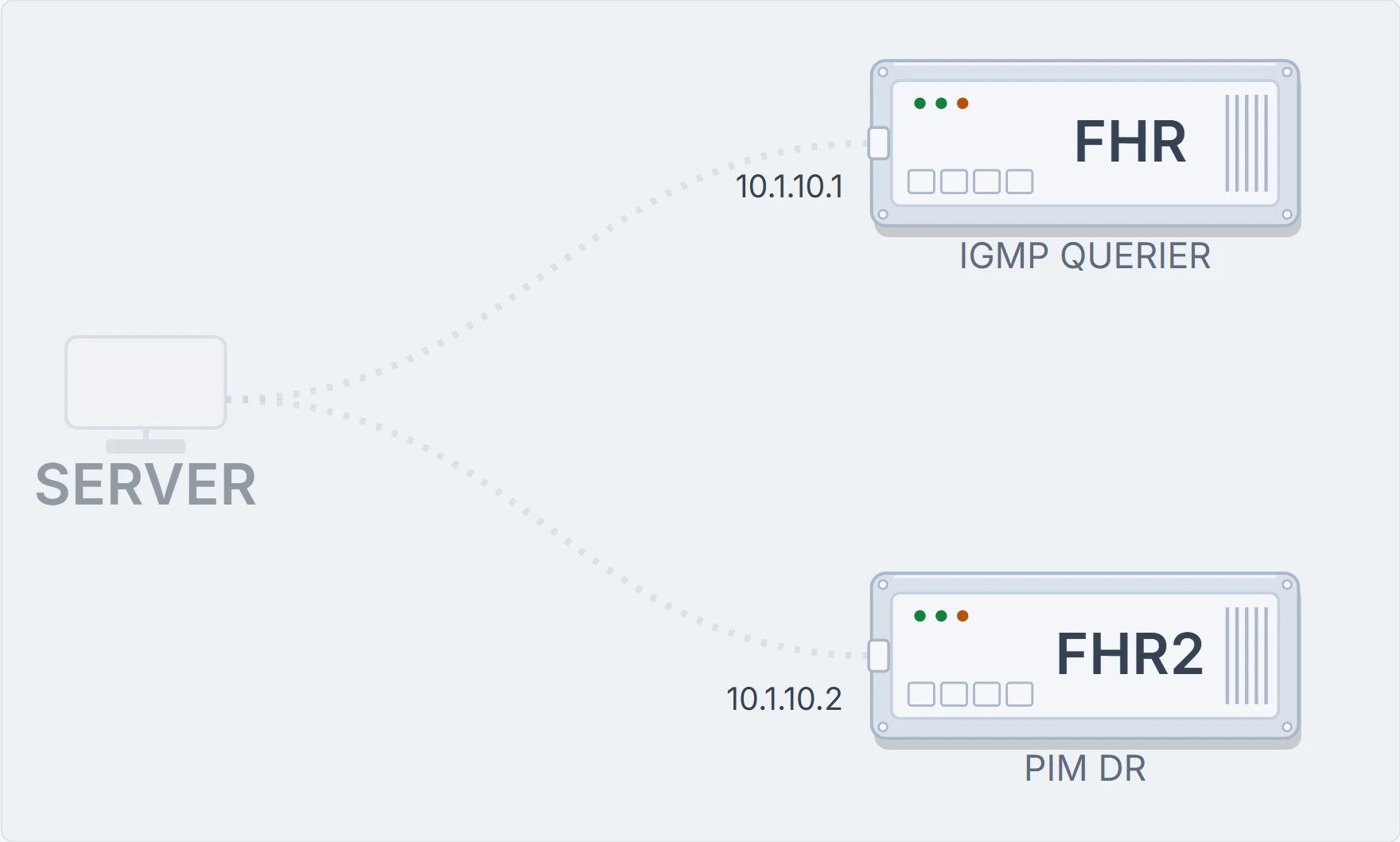
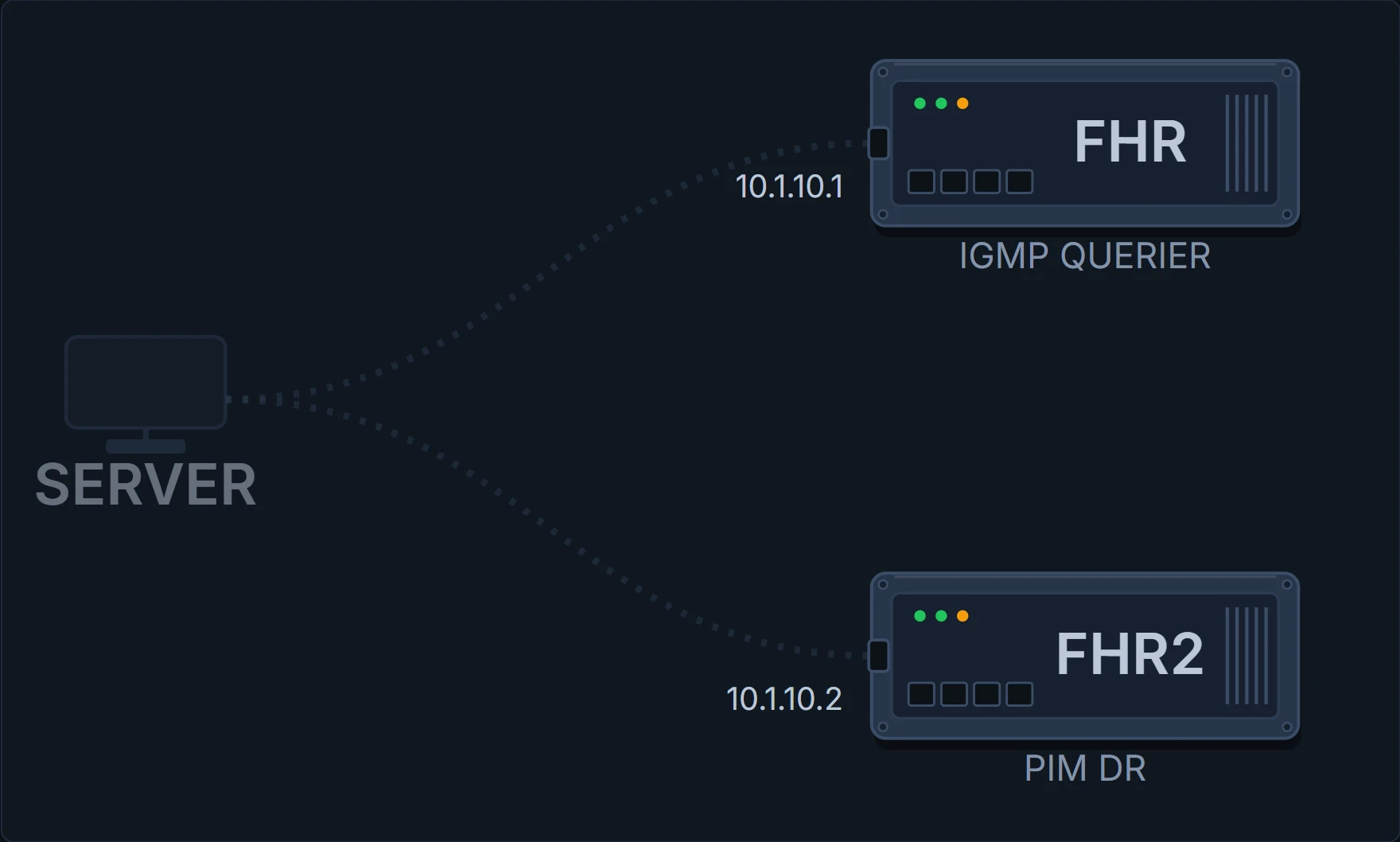
That is this page's own source segment with one more router on it, and it is worth reading against everything above. FHR holds 10.1.10.1 and the new router holds 10.1.10.2, so the router you have been watching would stop being the one that registers, and would become the one that queries the hosts instead.
The IGMP querier is the device with the lowest IP address on the subnet. The PIM DR is the device with the highest. Two elections, one segment, opposite tie-breaks, so on a segment where both run they frequently land on different routers, and the router that queries the hosts and the router that registers the source become two different boxes you have to check separately.
There is one case where they collapse into one device: With PIM DM operation, the DR has meaning only if IGMPv1 is in use. IGMPv1 does not have an IGMP querier election process, so the elected DR functions as the IGMP querier. Note the conditions on that: dense mode, and version 1.
Two boundaries, stated. The election sentence quoted above opens with "In this case" on the page it comes from, and this course could not establish which case it refers to, so read it as the documented rule with that caveat attached. And ip pim dr-priority, which exists and is how you influence the election, is absent from both PIM pages consulted. This course names it and does not give you its syntax or its default. The command output on this page omits the DR priority column for the same reason.
The register, and the moment both halves are in one place
FHR sends a PIM register to 2.2.2.2 on behalf of the host that is sending. That is the second half of the job description, arriving from the opposite direction to the join, and it is the whole introduction.
The RP now holds two facts that nobody else had together: there is a sender for this group at 10.1.10.50, and there is a listener for it down that interface. So it does the obvious thing and joins toward the source.
RP# show ip mroute
IP Multicast Routing Table
Flags: S - Sparse, C - Connected,
       T - SPT-bit set, P - Pruned
Timers: Uptime/Expires
Interface state: Interface, Next-Hop or VCD, State/Mode

(*, 239.1.1.1), 00:00:11/00:02:59, RP 2.2.2.2, flags: S
  Incoming interface: Null, RPF nbr 0.0.0.0
  Outgoing interface list:
    GigabitEthernet2, Forward/Sparse, 00:00:11/00:02:59

(10.1.10.50, 239.1.1.1), 00:00:11/00:02:59, flags: ST
! a specific source, learned from a register
  Incoming interface: GigabitEthernet1, RPF nbr 10.0.12.1
! RPF toward the source, which is a different interface from the (*,G) above
  Outgoing interface list:
    GigabitEthernet2, Forward/Sparse, 00:00:11/00:02:59
Two entries on one router, and the difference between them is the whole notation. (*,G) is the shared tree, rooted at this device, incoming interface Null. (S,G) names one source, and its incoming interface points at that source. The RP is the only place in this network where both trees meet, and it is about to stop being interesting.
It works, and it is going the long way round
State 3 The shared tree, carrying traffic
Trace the path. Which link is doing nothing?
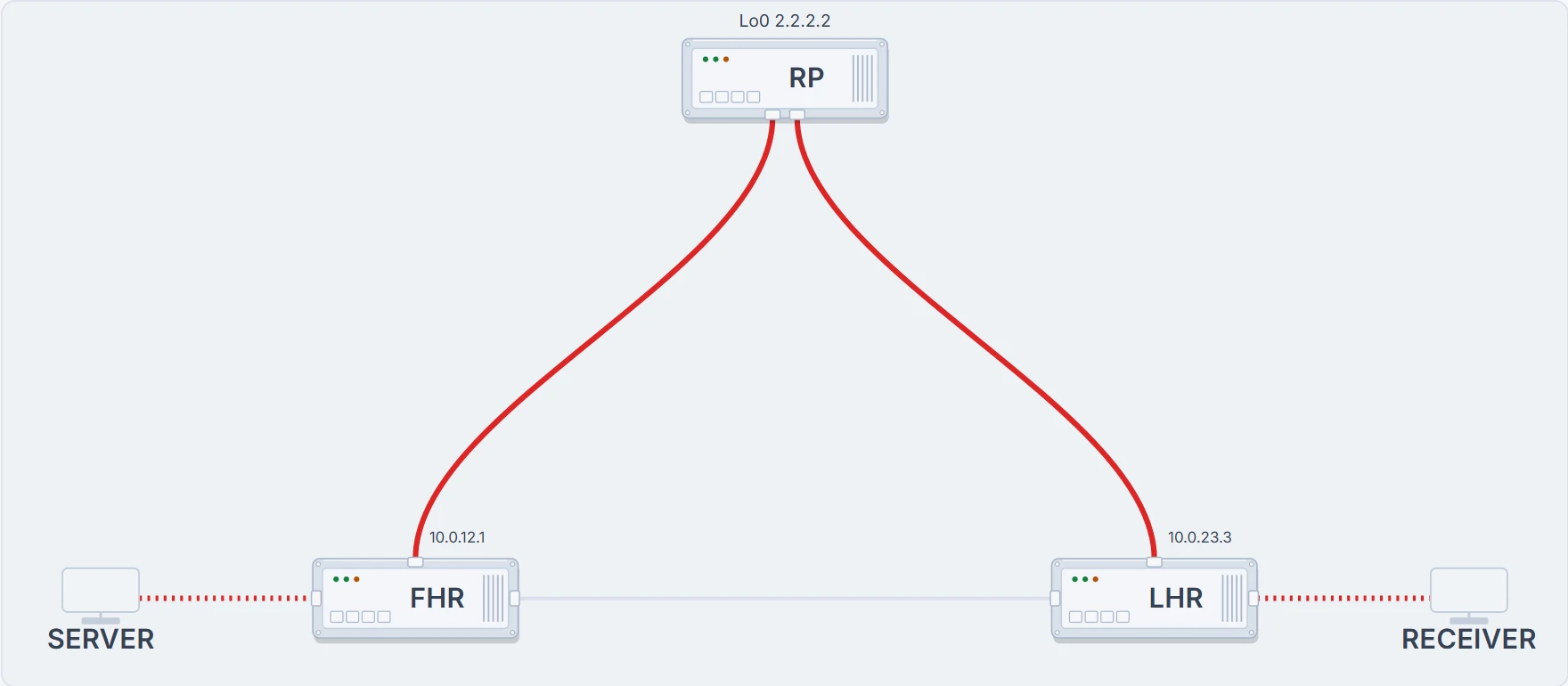
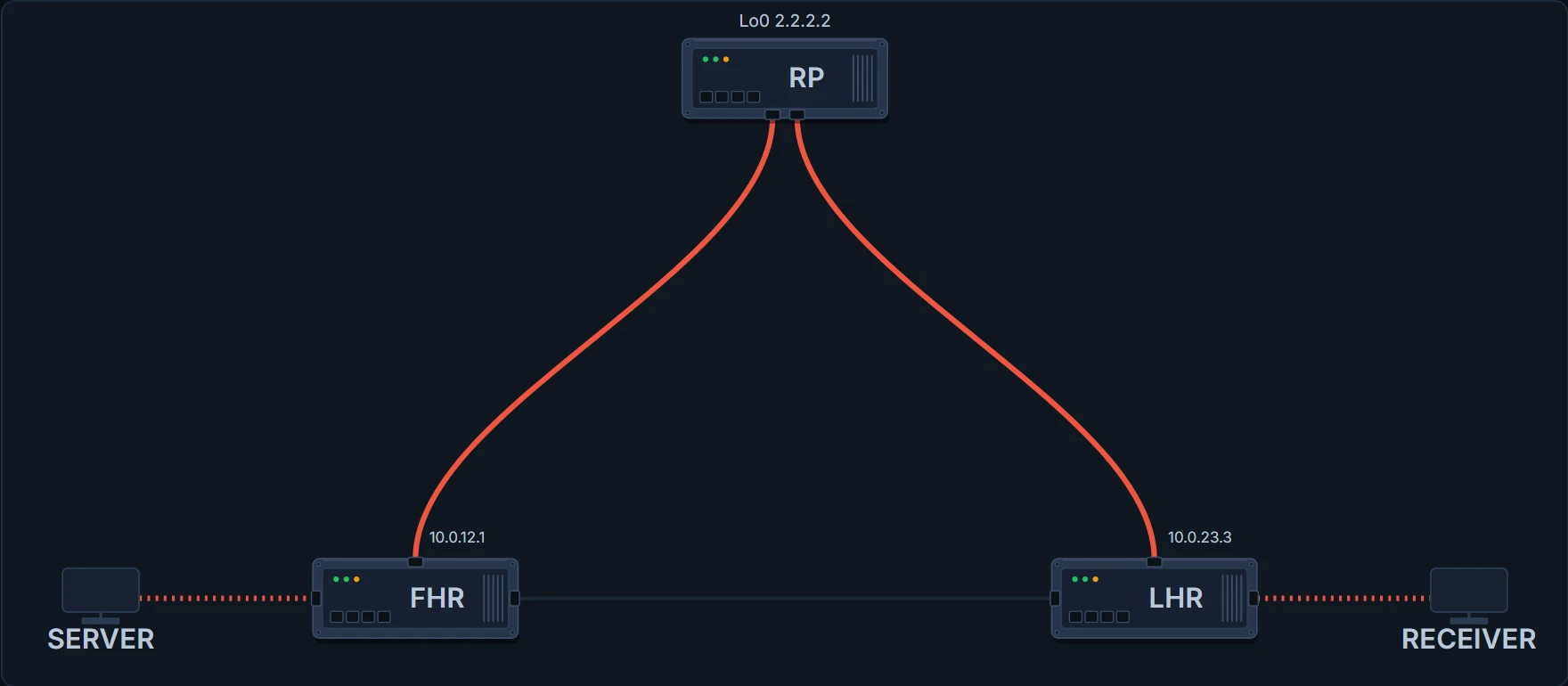
SERVER → FHR → RP → LHR → RECEIVER. Every hop matched an mroute entry, checked that the packet arrived on that entry's incoming interface, and copied it to the outgoing list. Nothing is broken, nothing is slow enough to complain about, and the direct link between the two outer routers is carrying nothing at all.
Traffic on the shared tree flows source → RP → receivers. Look at that path and ask whether it is the best one. It usually is not, and the reason is structural rather than accidental: the RP is wherever somebody put it, and the direct path from a source to a receiver has no obligation to pass anywhere near it. The shared tree can be arbitrarily worse than the network is capable of.
So the next thing to look at is what LHR already knows without being told anything new. These are two ordinary unicast lookups on the same router:
LHR# show ip route 2.2.2.2
Routing entry for 2.2.2.2/32
  Known via "ospf 1", distance 110, metric 1, type intra area
  Routing Descriptor Blocks:
  * 10.0.23.2, from 10.0.23.2, via GigabitEthernet1
  ! toward the RP: one way
      Route metric is 1, traffic share count is 1
LHR# show ip route 10.1.10.50
Routing entry for 10.1.10.0/24
Known via "ospf 1", distance 110, metric 1, type intra area
Routing Descriptor Blocks:
* 10.0.13.1, from 10.0.13.1, via GigabitEthernet2
! toward the source: the other way, and one hop shorter
Route metric is 1, traffic share count is 1Two different interfaces. The router has had both answers the entire time. What it did not have was a source address to look up.
Continue the lesson
The whole lesson, with its drawings and its questions. 6 more sections after the ones above.