
IGMP snooping, PIM snooping and IGMP filtering
A switch sits between the host and the router, and on its own it floods multicast. IGMP snooping watches IGMP between hosts and routers and forwards each group only to ports with members. With no router on the VLAN, nothing queries, so a snooping querier can ask instead. PIM snooping does the same for routers on a shared switch, such as an Internet exchange.
By Arif, founder of Daveth · Updated
The full 7 min walkthrough is in Daveth Pro (Network). See what the plan opens
What this page answers
What is IGMP snooping?
The switch snoops on IGMP between hosts and routers and tracks groups and member ports: a report adds the host's port to the group's forwarding entry, and a leave removes it, so multicast goes only to ports that want it. Read it in “Reading somebody else’s mail”
Do you need an IGMP querier without a multicast router?
Yes. Without a router on the VLAN nothing sends queries, so hosts stop reporting and entries age out. An IGMP snooping querier on the switch can send them instead. Read it in “A VLAN with no router”
What is PIM snooping?
Where a Layer 2 switch connects several routers, as at an Internet exchange, it floods multicast to all multicast router ports by default. PIM snooping restricts each group to the router ports with downstream receivers. Read it in “The same idea, aimed at routers”
The device every chain skipped
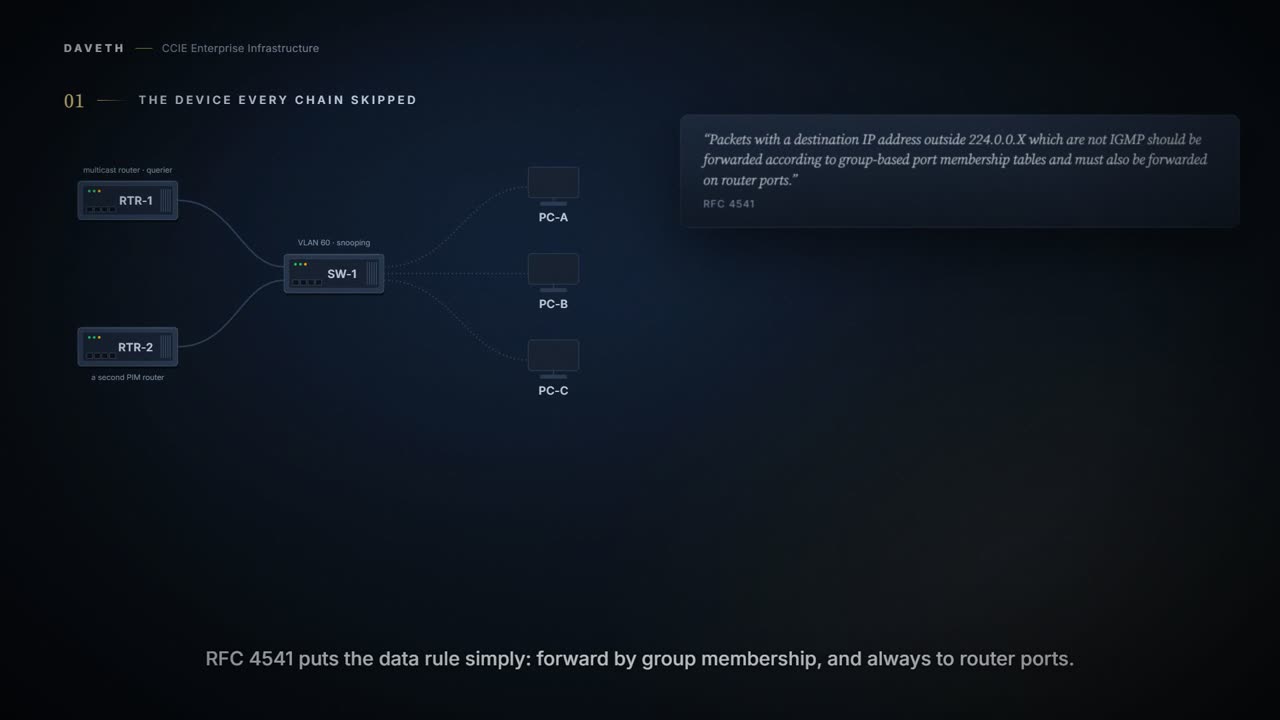
1.6.a.i-iii ended with a host reporting, a router hearing it, and a stream arriving. Two devices in that story. How many were in the path?
Three at least: a switch sits between them, carrying the query, the report and the stream. What does SW-1 do with a multicast stream on its own?
Layer 2 can use IGMP snooping to constrain the flooding of multicast traffic by dynamically configuring Layer 2 interfaces so that multicast traffic is forwarded to only those interfaces associated with IP multicast devices.
Read the verb: constrain the flooding. Flooding is what snooping stops.
The device supports IP multicast group-based bridging, instead of MAC-addressed based groups.
Notice that last sentence before reaching for a MAC-table explanation. This switch bridges multicast by IP group, and the chapter does not say why unconstrained traffic floods, so this course does not either.
Reading somebody else’s mail
As the name implies, IGMP snooping requires the LAN device to snoop on the IGMP transmissions between the host and the router and to keep track of multicast groups and member ports.
Between the host and the router. The switch is not a party to IGMP. So what can it learn by watching?
When the receives an IGMP report from a host for a particular multicast group, the device adds the host port number to the forwarding table entry; when it receives an IGMP Leave Group message from a host, it removes the host port from the table entry. It also periodically deletes entries if it does not receive IGMP membership reports from the multicast clients.
When the receives is printed that way on the page, a word missing after the; it is quoted as printed.
Is any of this on before you touch it? The chapter’s default table gives IGMP snooping as:
Enabled globally and per VLAN
Computed from the state, where 239.10.20.30 goes after RTR-1’s query. No command prints it in this form.
group          host  port      gets
239.10.20.30   A     Gi1/0/11  receives
239.10.20.30   B     Gi1/0/12  nothing
239.10.20.30   C     Gi1/0/13  receives
Multicast-capable router ports are added to the forwarding table for every Layer 2 multicast entry.
Both reports passed through SW-1 on their way to RTR-1. Did both arrive?
The device uses IGMP report suppression to forward only one IGMP report per multicast router query to multicast devices. When IGMP report suppression is enabled (the default), the device sends the first IGMP report from all hosts for a group to all the multicast routers. The device does not send the remaining IGMP reports for the group to the multicast routers.
Computed from the state: the reports for 239.10.20.30 passed on to the multicast routers. No command prints it in this form.
reports passed to the routers for 239.10.20.30: PC-A
If the multicast router query also includes requests for IGMPv3 reports, the device forwards all IGMPv1, IGMPv2, and IGMPv3 reports for a group to the multicast devices.
Look at what RTR-1 heard: one report. Its group table can say the group was reported on the VLAN; it cannot say which hosts asked.
So the router sees a report. It does not see an audience. One report can stand for one host or for twenty, and the router has no way to tell the difference and no reason to care. If you ever go looking for how many receivers a group has, this is not the device that knows.
Turning it off to see
A stream is misbehaving, and someone takes snooping off the VLAN to rule the switch out. What changes?
Configuration: snooping off on VLAN 60, in the forms these commands take; ports, VLAN, groups and profile number are this course’s own.
SW-1# configure terminal
SW-1(config)# no ip igmp snooping vlan 60
SW-1(config)# end
Computed from the state, where 239.10.20.30 goes with snooping off. No command prints it in this form.
group          host  port      gets
239.10.20.30   A     Gi1/0/11  flooded
239.10.20.30   B     Gi1/0/12  flooded
239.10.20.30   C     Gi1/0/13  flooded
Look at PC-B’s row. It never asked, and it receives.
Which is why turning snooping off to rule the switch out is a worse test than it feels like. The stream starts working, everybody relaxes, and what you have actually proved is that flooding reaches the host. It reaches every host. Any fault in the subscription itself is now invisible, because nothing needs a subscription any more.
Put it back on before you conclude anything. A diagnosis that ends with it works when we flood has answered a different question from the one that was asked.
By this course’s reasoning, this always looks like a fix. Taking the constraint off can only add recipients, so every receiver keeps working, and the cost lands on devices nobody was watching.
You can configure the number of general queries by which multicast data traffic is flooded after a topology change notification (TCN) event.
The default, the flooding query count is 2.
Flooding also returns after a topology change notification, for two general queries by default, with snooping still on.
A VLAN with no router
RTR-1 is moved off VLAN 60. Snooping is back on. Who asks the hosts to report now?
Computed from the state, where 239.10.20.30 goes once the entries age out. No command prints it in this form.
group          host  port      gets
239.10.20.30   A     Gi1/0/11  not stated
239.10.20.30   B     Gi1/0/12  not stated
239.10.20.30   C     Gi1/0/13  not stated
Not stated. The chapter says entries without reports are deleted, and says nothing about the group’s traffic after that, so this course does not either.
You can configure an IGMP snooping querier to support IGMP snooping in subnets without multicast interfaces because the multicast traffic does not need to be routed.
Configuration: the snooping querier, in the forms these commands take; ports, VLAN, groups and profile number are this course’s own.
SW-1# configure terminal
SW-1(config)# ip igmp snooping querier
SW-1(config)# end
VLAN 60 has no address on SW-1. Does the querier stay silent?
If there is no IP address configured on the VLAN interface, the IGMP snooping querier tries to use the configured global IP address for the IGMP querier. If there is no global IP address specified, the IGMP querier tries to use the VLAN device virtual interface (SVI) IP address (if one exists). If there is no SVI IP address, the device uses the first available IP address configured on the device.
Computed from the state: the querier and its address list. No command prints it in this form.
querier          enabled
VLAN address     none
querier address  none
SVI address      none
device address   10.255.0.1
state            querying from 10.255.0.1
Computed from the state, where 239.10.20.30 goes once the querier has queried. No command prints it in this form.
group          host  port      gets
239.10.20.30   A     Gi1/0/11  receives
239.10.20.30   B     Gi1/0/12  nothing
239.10.20.30   C     Gi1/0/13  receives
The IGMP snooping querier does not generate an IGMP general query if it cannot find an available IP address on the device.
Silent only when the whole device has no address. Here it queried from 10.255.0.1.
The IGMP snooping querier supports IGMP Versions 1 and 2.
Carry that to an IGMPv3 design: a VLAN served only by the snooping querier gets version 1 or 2 queries.
RTR-1 comes back. Do two queriers run?
When administratively enabled, the IGMP snooping querier moves to the nonquerier state if it detects the presence of a multicast router in the network.
Computed from the state: the querier after RTR-1 returns. No command prints it in this form.
querier          enabled
VLAN address     none
querier address  none
SVI address      none
device address   10.255.0.1
state            nonquerier
When it is administratively enabled, the IGMP snooping querier moves to the operationally disabled state under these conditions: IGMP snooping is disabled in the VLAN. PIM is enabled on the SVI of the corresponding VLAN.
The same idea, aimed at routers
IGMP snooping watches hosts talking to routers. What watches routers talking to routers?
In networks where a Layer 2 switch interconnects several routers, such as an Internet exchange point (IXP), the switch floods IP multicast packets on all multicast router ports by default, even if there are no multicast receivers downstream. With PIM snooping enabled, the switch restricts multicast packets for each IP multicast group to only those multicast router ports that have downstream receivers joined to that group.
When you enable PIM snooping, the switch learns which multicast router ports need to receive the multicast traffic within a specific VLAN by listening to the PIM hello messages, PIM join and prune messages, and bidirectional PIM designated forwarder election messages.
PIM snooping is disabled by default. You do not have to configure an IP address or IP PIM in order to run PIM snooping
Configuration: PIM snooping on VLAN 60, in the forms these commands take; ports, VLAN, groups and profile number are this course’s own.
SW-1# configure terminal
SW-1(config)# ip pim snooping
SW-1(config)# ip pim snooping vlan 60
SW-1(config)# end
Is PIM snooping actually running now, and on which VLANs? The chapter answers that with this reading:
From elsewhere: show ip pim snooping after enabling it. The values in it come from elsewhere, not from this scenario.
Device(config)#ip pim snooping
Device(config)#end
Device#show ip pim snooping
Global runtime mode: Enabled
Global admin mode : Enabled
DR Flooding status : Disabled
SGR-Prune Suppression: Enabled
Number of user enabled VLANs: 1
User enabled VLANs: 1001
Proves: whether PIM snooping is enabled globally and on which VLANs, and the designated router flooding status. Does not prove: which router ports any group is actually sent to.
Look at DR Flooding status: Disabled, in an example that only enabled PIM snooping. The chapter says flooding to the designated router is the default; this course does not explain the sample.
By default, switches that have PIM snooping enabled will flood multicast traffic to the designated router.
Computed from the state: RTR-2, the designated router, with PIM snooping on. No command prints it in this form.
PIM snooping             enabled
DR flooding              enabled
designated router        RTR-2
RTR-2 gets 239.10.20.30  designated router flooding
So which router does the switch take as the designated router on the VLAN? The per-VLAN reading names it:
From elsewhere: show ip pim snooping vlan. The values in it come from elsewhere, not from this scenario.
Device(config)#ip pim snooping vlan 1001
Device(config)#end
Device#show ip pim snooping vlan 1001
4 neighbors (0 DR priority incapable, 4 Bi-dir incapable)
5000 mroutes, 0 mac entries
DR is 10.10.10.4
RP DF Set:
QinQ snooping : Disabled
Proves: how many PIM neighbors and mroutes the VLAN holds, and which router is the designated router. Does not prove: which of those routers receives a given group, or whether local receivers get it.
Continue the lesson
The whole lesson, with its drawings and its questions. The rest of this section and 5 more after it.