
IPv4 anycast RP using MSDP
IPv4 has no PIM mechanism for anycast RP members to share sources, so it borrows MSDP, built to discover sources in other PIM domains. Each member has the shared RP address on a loopback with a /32 mask and a unique address of its own, and all the RPs are MSDP peers. A member that registers a source sends a Source-Active message; SAs pass an RPF check against loops.
By Arif, founder of Daveth · Updated
The full 5 min walkthrough is in Daveth Pro (Network). See what the plan opens
What this page answers
How do you configure anycast RP with MSDP?
Configure the same RP address on a loopback with a 32-bit mask on every RP, give each a unique address of its own, and make all the RPs MSDP peers of each other, so a source registered at one RP is announced to the others. Read it in “Borrowing it: two addresses on every member”
What is an MSDP Source-Active message?
The message an RP sends to its MSDP peers when it learns of an active source, so RPs elsewhere can join toward it. MSDP was developed to discover sources in other PIM-SM domains. Read it in “What MSDP is for”
What is the MSDP SA RPF check?
SA messages are accepted only from the MSDP RPF peer in the best path back toward the originator; the same SA from other peers is ignored, or SA loops can occur. Read it in “A third member”
The exchange IPv4 has no PIM mechanism for
1.6.c.vi shared one RP address between routers, and the members had to pass sources to each other or a source and a receiver could land on different members. IPv6 does that inside PIM. IPv4 does not:
Anycast RP can be used in IPv4 as well as IPv6, but it does not depend on the Multicast Source Discovery Protocol (MSDP), which runs only on IPv4.
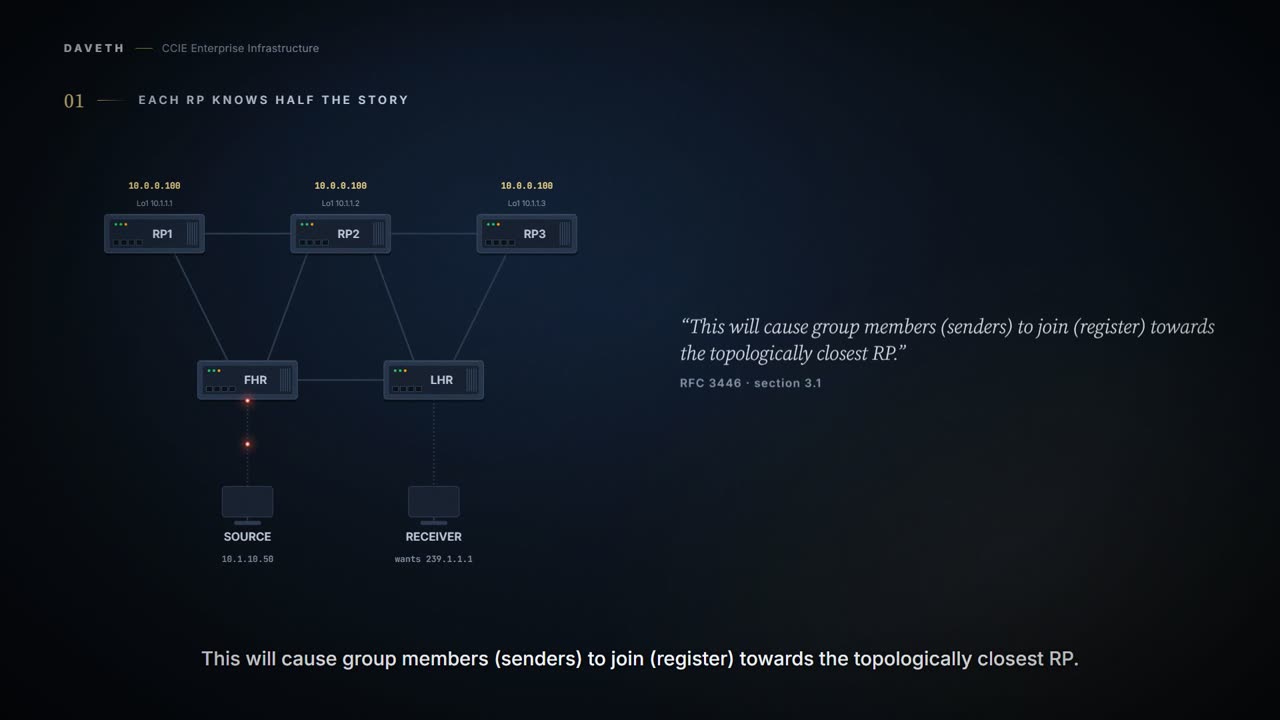
Three members answer to 10.0.0.100 here, and nothing passes anything between them yet. A source behind FHR sends to 239.1.1.1; a receiver behind LHR joins it.
IP routing will automatically select the topologically closest RP for each source and receiver.
This course's reading: the cost from FHR to each member
member  cost from FHR to 10.0.0.100
RP1     1
RP2     2
RP3     3

FHR reaches RP1
This course's reading: the cost from LHR to each member
member  cost from LHR to 10.0.0.100
RP1     3
RP2     2
RP3     1

LHR reaches RP3
So where does each end land, and is the stream delivered?
This course's reading: where each end lands
group      source registers at  receiver joins at  delivered
239.1.1.1  RP1                  RP3                no
Both ends did the right thing, and nothing is delivered. Look at RP3: it has a receiver and has never heard of the source.
Say the failure in one line and it stays with you: the receiver joined one RP, and the source introduced itself to another. Neither end made a mistake. Each went to the nearest router answering that address, exactly as the design intends, and nearest is not the same direction for both of them.
Which is why sharing the address was only ever half a design. One address made every member reachable. Nothing in that made any member aware of what the others had been told, and awareness is the part that has to be built separately.
What MSDP is for
MSDP is a mechanism to connect multiple PIM-SM domains. The purpose of MSDP is to discover multicast sources in other PIM domains.
Other domains. Hold on to that: MSDP is not an anycast RP feature; anycast RP borrows it, and the guide for anycast RP says so:
Anycast RP is a useful application of MSDP. Originally developed for interdomain multicast applications, MSDP used for Anycast RP is an intradomain feature that provides redundancy and load-sharing capabilities.
What it carries is the Source-Active message, and who sends one:
SA messages contain the IP address of the originating RP and one or more (S, G) pairs being advertised. An RP originates SA messages only for local sources in its PIM-SM domain; that is, for local sources that register with it. The originating RP continues to send periodic SA messages for the (S, G) state every 60 seconds for as long as the source is sending packets to the group.
And what a receiving RP does with it, from the guide's processing steps:
If the (*, G) entry is found and its outgoing interface list is not null, then there are active receivers in the PIM-SM domain for the source advertised in the SA message. If the (S, G) entry did not already exist, the MSDP peer immediately triggers an (S, G) join toward the source in order to join the source tree.
The peering between them is TCP:
MSDP peers connect using TCP port 639.
Borrowing it: two addresses on every member
In anycast RP, two or more RPs are configured with the same IP address on loopback interfaces. The anycast RP loopback address should be configured with a 32-bit mask, making it a host address. Because a source may register with one RP and receivers may join to a different RP, a method is needed for the RPs to exchange information about active sources. This information exchange is done with MSDP. In anycast RP, all the RPs are configured to be MSDP peers of each other. When a source registers with one RP, an SA message will be sent to the other RPs informing them that there is an active source for a particular multicast group. The MSDP peering address must be different from the anycast RP address.
The shared address goes on Loopback0 and each member's own on Loopback1. One more reason to keep them apart:
Many routing protocols choose the highest IP address on loopback interfaces for the router ID. A problem may arise if the router selects the anycast RP address for the router ID.
The guide recommends setting the router ID by hand to the MSDP peering address, so each member here takes its Loopback1:
This course's configuration: RP1, and the same on each member with its own Loopback1
RP1# configure terminal
RP1(config)# interface Loopback0
RP1(config-if)# ip address 10.0.0.100 255.255.255.255
RP1(config-if)# interface Loopback1
RP1(config-if)# ip address 10.1.1.1 255.255.255.255
RP1(config-if)# router ospf 1
RP1(config-router)# router-id 10.1.1.1
RP1(config-router)# end
All the downstream routers should be configured so that the anycast RP loopback address is the IP address of their local RP.
This course's configuration: every router, FHR shown
FHR# configure terminal
FHR(config)# ip pim rp-address 10.0.0.100
FHR(config)# end
The guide's own example, one of its two RPs:
Not from this scenario: the IOS XE 17.x configuration guide, Configuring Basic IP Multicast: Sparse Mode with Anycast RP, RP1
ip pim rp-address 10.0.0.1
interface loopback 0
 ip address 10.0.0.1 255.255.255.255
!
interface loopback 1
 ip address 10.1.1.1. 255.255.255.255
!
 ip msdp peer 10.1.1.2 connect-source loopback 1
 ip msdp originator-id loopback 1
Yes, the dot after 10.1.1.1 is in the guide as printed. It is not part of the address, so do not copy it.
Now peer RP1 and RP3 only, on Loopback1, and leave RP2 out for a step:
This course's configuration: RP1, and the mirror on RP3
RP1# configure terminal
RP1(config)# ip msdp peer 10.1.1.3 connect-source Loopback1 remote-as 65000
RP1(config)# end
Use this command to display the (S, G) state learned from MSDP peers.
What has RP3 stored?
This course's output: RP3, drawn from this page's state in the layout of the guide's sample
RP3# show ip msdp sa-cache
MSDP Source-Active Cache - 1 entries
(10.1.10.50, 239.1.1.1), RP 10.0.0.100, BGP/AS 65000, 00:02:10/00:05:50, Peer 10.1.1.1
! Proves which (S, G) entries this member stores from its MSDP peers, the RP address each SA carried, and the peer each was stored from. Does not prove that a receiver wants the group, that a join was sent toward the source, or that traffic arrives. The timers are this page's own.
Read the line left to right: the source, the group, the RP address the SA carried, and the peer it came from. The RP address is 10.0.0.100, the shared one; that an SA carries the RP address when no originator ID is configured is this course's reading of the originator ID's heading, Configuring an Originating Address Other Than the RP Address. The layout is the guide's:
Not from this scenario: the IOS XE 17.9 configuration guide, Configuring MSDP: show ip msdp sa-cache
Device# show ip msdp sa-cache
MSDP Source-Active Cache - 8 entries
(10.44.44.5, 239.232.1.0), RP 192.168.4.4, BGP/AS 64512, 00:01:20/00:05:32, Peer 192.168.4.4
(10.44.44.5, 239.232.1.1), RP 192.168.4.4, BGP/AS 64512, 00:01:20/00:05:32, Peer 192.168.4.4
(10.44.44.5, 239.232.1.2), RP 192.168.4.4, BGP/AS 64512, 00:01:19/00:05:32, Peer 192.168.4.4
(10.44.44.5, 239.232.1.3), RP 192.168.4.4, BGP/AS 64512, 00:01:19/00:05:32, Peer 192.168.4.4
(10.44.44.5, 239.232.1.4), RP 192.168.4.4, BGP/AS 64512, 00:01:19/00:05:32, Peer 192.168.4.4
(10.44.44.5, 239.232.1.5), RP 192.168.4.4, BGP/AS 64512, 00:01:19/00:05:32, Peer 192.168.4.4
(10.44.44.5, 239.232.1.6), RP 192.168.4.4, BGP/AS 64512, 00:01:19/00:05:32, Peer 192.168.4.4
(10.44.44.5, 239.232.1.7), RP 192.168.4.4, BGP/AS 64512, 00:01:19/00:05:32, Peer 192.168.4.4
And is the session up?
This course's output: RP3, drawn from this page's state in the layout of the guide's sample
RP3# show ip msdp summary
MSDP Peer Status Summary
Peer Address     AS    State    Uptime/  Reset SA    Peer Name
                                Downtime Count Count
10.1.1.1         65000 Up       00:05:00 0     1     ?
! Proves each peer's session state and how many SAs from it are stored in the cache. Does not prove that a peer with a count of 0 sent nothing, or which sources the entries are. The uptimes are this page's own.
The output of this command displays a per-peer “SA Count” field that displays the number of SAs stored in the cache.
Not from this scenario: the IOS XE 17.9 configuration guide, Configuring MSDP: show ip msdp summary
Device# show ip msdp summary
MSDP Peer Status Summary
Peer Address     AS    State    Uptime/  Reset SA    Peer Name
                                Downtime Count Count
192.168.4.4      4     Up       00:08:05 0     8     ?
Notice the AS column: it prints 65000, the AS given with remote-as on every peer here. The guide's summary sample prints 4 where its SA cache sample prints 64512, and its show ip msdp peer sample marks the value as configured, so this page reads the column as the configured AS. That reading is this course's.
Not from this scenario: the IOS XE 17.9 configuration guide, Configuring MSDP: show ip msdp peer, its first two lines
Device# show ip msdp peer 192.168.4.4
MSDP Peer 192.168.4.4 (?), AS 64512 (configured AS)
RP3 knows the source now. Is the stream delivered?
This course's reading: where each end lands
group      source registers at  receiver joins at  delivered
239.1.1.1  RP1                  RP3                yes
A third member
SA messages are only accepted from the MSDP RPF peer that is in the best path back toward the originator. The same SA message arriving from other MSDP peers must be ignored or SA loops can occur. The rules that apply to RPF checks for SA messages are dependent on the BGP peerings between the MSDP peers: Rule 3: Applied when the sending MSDP peer is not an (M)BGP peer.
This domain runs no BGP, so every sending peer here falls under Rule 3. But the guide skips the check in three cases. Read them before the prediction below:
RPF checks are not performed in the following cases: If the sending MSDP peer is the only MSDP peer, which would be the case if only a single MSDP peer or a default MSDP peer is configured. If the sending MSDP peer is a member of a mesh group. If the sending MSDP peer address is the RP address contained in the SA message.
This course's reading: every SA sent for 239.1.1.1, with RP1 and RP3 peered
from  to   RP in SA    RPF check
RP1   RP3  10.0.0.100  not performed: the only MSDP peer

SA messages sent for 239.1.1.1: 1
Now RP2 is peered with both, as the guide asks, and there is no mesh group and no originator ID.
This course's configuration: RP2, and a matching peer on RP1 and RP3
RP2# configure terminal
RP2(config)# ip msdp peer 10.1.1.1 connect-source Loopback1 remote-as 65000
RP2(config)# ip msdp peer 10.1.1.3 connect-source Loopback1 remote-as 65000
RP2(config)# end
This course's reading: every SA sent for 239.1.1.1, with all three peered and no mesh group
from  to   RP in SA    RPF check
RP1   RP3  10.0.0.100  Rule 3, outcome not described
RP1   RP2  10.0.0.100  Rule 3, outcome not described

SA messages sent for 239.1.1.1: 2
And how does Rule 3 come out? The guide decides it by autonomous systems:
If the first autonomous system in the best path to the RP is the same as the autonomous system of the sending MSDP peer, then the RPF check succeeds; otherwise it fails.
There is no BGP path here to take an autonomous system from, and the guide does not say what happens then. So this page does not decide it, and draws neither command on a member whose SA is waiting on it. The member that sent it can still be asked, since nothing arrives there. Are its sessions up?
This course's output: RP1, drawn from this page's state in the layout of the guide's sample
RP1# show ip msdp summary
MSDP Peer Status Summary
Peer Address     AS    State    Uptime/  Reset SA    Peer Name
                                Downtime Count Count
10.1.1.3         65000 Up       00:05:00 0     0     ?
10.1.1.2         65000 Up       00:05:00 0     0     ?
And BGP? The guide makes it a prerequisite, except where this page is going next:
With the exception of a single MSDP peer, default MSDP peer, and MSDP mesh group scenarios, all MSDP peers must be configured to run BGP prior to being configured for MSDP. In many BGP topologies, the MSDP peering address and the BGP peering address must be the same in order to pass the RPF check.
Continue the lesson
The whole lesson, with its drawings and its questions. 7 more sections after the ones above.