
Multicast boundary and RP announcement filter
Nothing in Auto-RP or BSR checks whether a device claiming to be an RP is entitled to. Without ip pim rp-announce-filter, every incoming RP announcement is accepted. The filter pairs two lists: which devices may announce, and for which groups. The filter never touches the data, though: a multicast boundary, ip multicast boundary with a standard access list, stops matching group traffic crossing an interface.
By Arif, founder of Daveth · Updated
The full 7 min walkthrough is in Daveth Pro (Network). See what the plan opens
What this page answers
What does ip pim rp-announce-filter do?
It filters incoming Auto-RP announcements on a mapping agent: rp-list names the candidate RP addresses to accept, and group-list the group ranges they may announce for. Without it, all announcements are accepted. Read it in “Whose claim do I accept?”
How do you configure a multicast boundary?
Create a standard access list, 1 to 99, where deny entries match the groups to stop, then apply it to the interface with ip multicast boundary access-list-number. Read it in “Where may this traffic go?”
Who verified any of it?
Look back at the last three lessons and ask one question none of them asked. Auto-RP announcements arrive at a mapping agent. BSR advertisements arrive at a BSR. Mappings are republished and resolved, and at no point did anything check whether the device making the claim was entitled to make it.
The default answers the question, in one sentence:
Without this command, all incoming RP-announce messages are accepted by default.
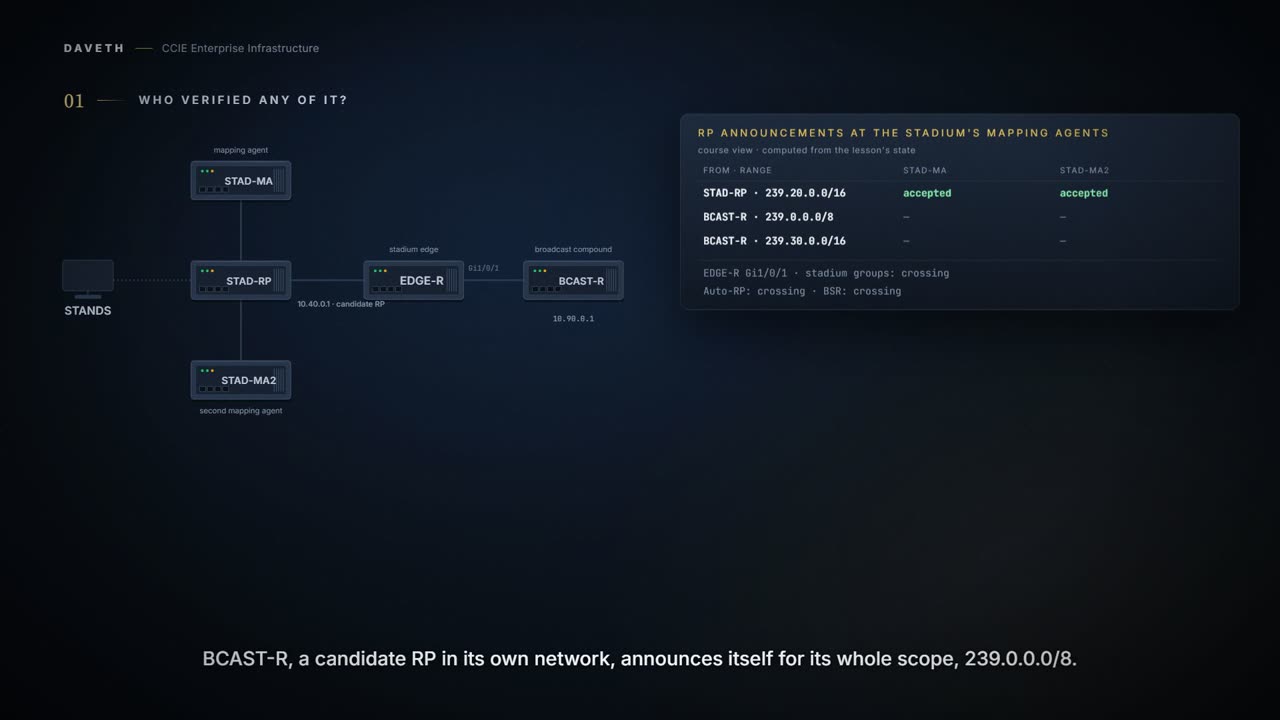
Nobody verified any of it. A stadium finds that out on a match day. The broadcaster's truck compound is cabled to EDGE-R, PIM is enabled across the link so that a few groups can be shared, and BCAST-R, a candidate RP in its own network, announces itself for its whole scope, 239.0.0.0/8. That contains the stadium's own video range.
Computed from the state: the announcements, and what each mapping agent does with them. No command prints it in this form.
candidate RP  announces       STAD-MA                  STAD-MA2
STAD-RP       239.20.0.0/16   accepted                 accepted
BCAST-R       239.0.0.0/8     accepted                 accepted
Read the second row: accepted, by both agents. By this course's reading of what a mapping agent then does, an accepted announcement covering 239.20.0.0/16 supplies the RP for those groups, and the outside claim takes them, so the walls in the concourse go dark, because the stadium's own groups now resolve to a router in somebody else's network:
Computed from the state: what each agent republishes. No command prints it in this form.
group range     STAD-MA says  STAD-MA2 says
239.20.0.0/16   BCAST-R       BCAST-R
239.30.0.0/16   BCAST-R       BCAST-R
Nothing was misconfigured and nothing broke. An announcement was believed. Before you read the next sentence, ask yourself who the documentation thinks is sending these:
You can add configuration commands to the mapping agents to prevent a maliciously configured router from masquerading as a candidate RP and causing problems.
Masquerading, not misconfigured. A configuration guide describing an attacker rather than an accident is worth taking at face value.
Whose claim do I accept?
Look at the two access-list numbers in the command below before you read what they do.
ip pim rp-announce-filter rp-list access-list-number group-list access-list-number Filters incoming RP announcement messages.
Two access lists, and the pairing is the feature. One names which devices may announce; the other names which groups they may announce for.
For rp-list access-list-number , configure an access list of candidate RP addresses that, if permitted, is accepted for the group ranges supplied in the group-list access-list-number variable. Create an access list that specifies from which routers and multilayer switches the mapping agent accepts candidate RP announcements (rp-list ACL). Create an access list that specifies the range of multicast groups from which to accept or deny (group-list ACL).
Notice what the second variable does when you leave it out, because it is easy to type half this command and think you have bounded it:
If this variable is omitted, the filter applies to all multicast groups.
Before you read on, decide where this command goes. Every router? The candidate RPs? The answer follows from what a mapping agent is for:
Enter this command on each mapping agent in the network. Filters incoming RP announcement messages sent from candidate RPs (C-RPs) to the RP mapping agent. Perform this step on the RP mapping agent only.
Configuration: the filter and its two access lists, typed on STAD-MA. The commands are in the forms they take.
STAD-MA# configure terminal
STAD-MA(config)# ip pim rp-announce-filter rp-list 10 group-list 20
STAD-MA(config)# access-list 10 permit host 10.40.0.1
STAD-MA(config)# access-list 20 permit 239.20.0.0 0.0.255.255
STAD-MA(config)# end
From elsewhere: the PIM chapter's own filtering example, on a mapping agent. The names, numbers and addresses come from elsewhere, not from this scenario.
Device(config)# ip pim rp-announce-filter rp-list 10 group-list 20
Device(config)# access-list 10 permit host 172.16.5.1
Device(config)# access-list 10 permit host 172.16.2.1
Device(config)# access-list 20 deny 239.0.0.0 0.0.255.255
Device(config)# access-list 20 permit 224.0.0.0 15.255.255.255
Look at that example's group-list: a deny for 239.0.0.0 0.0.255.255 and then a permit for the rest. The access lists do the deciding; the command only says which two to use.
Computed from the state: the announcements once STAD-MA is filtering. No command prints it in this form.
candidate RP  announces       STAD-MA                  STAD-MA2
STAD-RP       239.20.0.0/16   accepted                 accepted
BCAST-R       239.0.0.0/8     no rp-list match         accepted
Read the verdict column, and notice that only one of the two agents has an opinion yet.
Two agents, two answers
The stadium runs a second mapping agent for resilience, and only the first was configured. Half the stadium works. Before you read the table, think about which half.
Computed from the state: what each agent republishes now. No command prints it in this form.
group range     STAD-MA says  STAD-MA2 says
239.20.0.0/16   STAD-RP       BCAST-R
239.30.0.0/16   no mapping    BCAST-R
Read the two columns. Routers nearer STAD-MA resolve the video groups to STAD-RP; routers nearer STAD-MA2 still resolve them to BCAST-R. Each agent's configuration is valid read on its own, so there is no single device to log into and find the fault. The pages ask for the obvious discipline:
If more than one mapping agent is used, the filters must be consistent across all mapping agents to ensure that no conflicts occur in the group-to-RP mapping information.
Configuration: the same filter, on the second agent, typed on STAD-MA2. The commands are in the forms they take.
STAD-MA2# configure terminal
STAD-MA2(config)# ip pim rp-announce-filter rp-list 10 group-list 20
STAD-MA2(config)# access-list 10 permit host 10.40.0.1
STAD-MA2(config)# access-list 20 permit 239.20.0.0 0.0.255.255
STAD-MA2(config)# end
Computed from the state: both agents filtering. No command prints it in this form.
group range     STAD-MA says  STAD-MA2 says
239.20.0.0/16   STAD-RP       STAD-RP
239.30.0.0/16   no mapping    no mapping
Where may this traffic go?
The broadcaster mentions, politely, that they can see the stadium's internal camera groups in their compound. The filter never touched the data. It works on control messages, at a mapping agent; the packets are crossing the edge interface because nothing there stops them.
Computed from the state: what crosses Gi1/0/1 before any boundary. No command prints it in this form.
at Gi1/0/1                  crosses
data in 239.20.0.0/16       yes, both directions
data in 239.30.0.0/16       yes, both directions
Auto-RP messages            yes, unexamined
announcement 239.30.0.0/16  yes, unexamined
announcement 239.0.0.0/8    yes, unexamined
PIMv2 BSR messages          yes: no bsr-border
The second control asks nothing about identity. It asks about location:
If you configure an administratively-scoped boundary on a routed interface, multicast traffic whose multicast group addresses fall in this range cannot enter or exit this interface, which provides a firewall for multicast traffic in this address range. When a boundary is defined, no multicast data packets are allowed to flow across the boundary from either direction.
Read the direction words: cannot enter or exit. Both ways, on one interface, so a boundary is something you put at the edge of a scope rather than something you turn on for a device. Which range would you scope? Look at the block the addresses were set aside for:
The IANA has designated the multicast address range 239.0.0.0 to 239.255.255.255 as the administratively-scoped addresses. The boundary allows the same multicast group address to be reused in different administrative domains.
And the page says where to put it, in its own figure and in the Catalyst 9000 guide's step:
The following figure shows that Company XYZ has an administratively-scoped boundary set for the multicast address range 239.0.0.0/8 on all routed interfaces at the perimeter of its network. Configures an administratively scoped boundary. Perform this step on the interfaces that are boundaries to other devices.
So count the interfaces at the edge of the scope, because that is how many boundaries you need. There is also a scoping method this platform does not give you:
TTL thresholds are not supported by the device. You should use multicast boundaries instead of TTL thresholds to limit the forwarding of multicast traffic outside of a domain or a subdomain.
Notice which part of the next four sentences does the deciding.
ip multicast boundary access-list-number Configures the boundary, specifying the access list you created in Step 2. For access-list-number , the range is 1 to 99. An access list entry that uses the deny keyword creates a multicast boundary for packets that match that entry.
From elsewhere: the boundary step as the PIM chapter prints it. The names, numbers and addresses come from elsewhere, not from this scenario.
Device(config-if)# ip multicast boundary 12
Configuration: access list 12 and the boundary on the compound-facing interface, typed on EDGE-R. The commands are in the forms they take.
EDGE-R# configure terminal
EDGE-R(config)# access-list 12 deny 239.0.0.0 0.255.255.255
EDGE-R(config)# interface Gi1/0/1
EDGE-R(config-if)# ip multicast boundary 12
EDGE-R(config-if)# end
Computed from the state: what crosses Gi1/0/1 with the boundary on. No command prints it in this form.
at Gi1/0/1                  crosses
data in 239.20.0.0/16       no, neither direction
data in 239.30.0.0/16       no, neither direction
Auto-RP messages            yes, unexamined
announcement 239.30.0.0/16  yes, unexamined
announcement 239.0.0.0/8    yes, unexamined
PIMv2 BSR messages          yes: no bsr-border
Read the data rows: stopped, both directions. Then read the Auto-RP row: still crossing. A boundary is an access list over group addresses, and Auto-RP messages are addressed to 224.0.1.39 and 224.0.1.40, which this access list says nothing about. The blunt fix for that is documented:
You define a multicast boundary to prevent Auto-RP messages from entering the PIM domain. You create an access list to deny packets destined for 224.0.1.39 and 224.0.1.40, which carry Auto-RP information. Auto-RP uses these two well-known groups to collect and distribute RP-mapping information.
From elsewhere: the boundary example that denies Auto-RP information. The names, numbers and addresses come from elsewhere, not from this scenario.
Device(config)# access-list 1 deny 224.0.1.39
Device(config)# access-list 1 deny 224.0.1.40
Device(config)# access-list 1 permit all
Device(config)# interface gigabitethernet1/0/1
Device(config-if)# ip multicast boundary 1
That works and it is all or nothing: neither side learns anything from the other's Auto-RP. Hold that against what you would want if the two sides did agree to share one range.
The keyword where the two controls meet
The stadium and the broadcaster agree to share one range, 239.30.0.0/16, for the broadcaster's feeds into the stadium. So access list 12 permits that range before it denies the rest, and the boundary is told to examine Auto-RP messages rather than ignore them:
You can configure the filter-autorp keyword to examine and filter Auto-RP discovery and announcement messages at the administratively scoped boundary. Any Auto-RP group range announcements from the Auto-RP packets that are denied by the boundary access control list (ACL) are removed.
ip multicast boundary access-list [filter-autorp ]
From elsewhere: the Catalyst 9000 guide's boundary step, with the keyword. The names, numbers and addresses come from elsewhere, not from this scenario.
Device(config-if)# ip multicast boundary 10 filter-autorp
Configuration: rebuilding access list 12 and adding filter-autorp, typed on EDGE-R. The commands are in the forms they take.
EDGE-R# configure terminal
EDGE-R(config)# no access-list 12
EDGE-R(config)# access-list 12 permit 239.30.0.0 0.0.255.255
EDGE-R(config)# access-list 12 deny 239.0.0.0 0.255.255.255
EDGE-R(config)# interface Gi1/0/1
EDGE-R(config-if)# no ip multicast boundary 12
EDGE-R(config-if)# ip multicast boundary 12 filter-autorp
EDGE-R(config-if)# end
Look at the order of the two access-list lines, because an access list is read top down. The list is rebuilt from no access-list 12 so that the permit can be its first line.
Now the case that decides whether any of this is useful. BCAST-R is still announcing 239.0.0.0/8, which contains the permitted 239.30.0.0/16 and the denied rest. Before you read on, decide what reaches the stadium's mapping agents.
An Auto-RP group range announcement is permitted and passed by the boundary only if all addresses in the Auto-RP group range are permitted by the boundary ACL. If any address is not permitted, the entire group range is filtered and removed from the Auto-RP message before the Auto-RP message is forwarded. The boundary permits and passes an Auto-RP group range announcement only if all addresses in the Auto-RP group range are allowed by the boundary ACL.
Continue the lesson
The whole lesson, with its drawings and its questions. The rest of this section and 5 more after it.