
VLAN maps and port ACLs
A VLAN map filters traffic moving inside one VLAN, so hosts in the same subnet can be kept apart without moving them. Its entries are tested in order, and the first match decides. It is bound with vlan filter map vlan-list, and it takes no direction. A port ACL applies to a Layer 2 interface, and when both apply, the port ACL takes precedence over the VLAN map.
By Arif, founder of Daveth · Updated
The full 9 min walkthrough is in Daveth Pro (Network). See what the plan opens
What this page answers
How do you filter traffic between hosts in the same VLAN?
With a VLAN map: entries tested in order, each matching an access list with a forward or drop action, bound to the VLAN with vlan filter name vlan-list. Read it in “The map that locked out the teacher”
Does a VLAN map have a direction?
No. vlan filter binds the map to a list of VLANs and takes no in or out keyword. Read it in “Binding it, and the missing direction”
What happens when a port ACL and a VLAN map both apply?
The port ACL takes precedence over the VLAN map on a Layer 2 interface whose VLAN has a map applied. Read it in “The port ACL that opened the door”
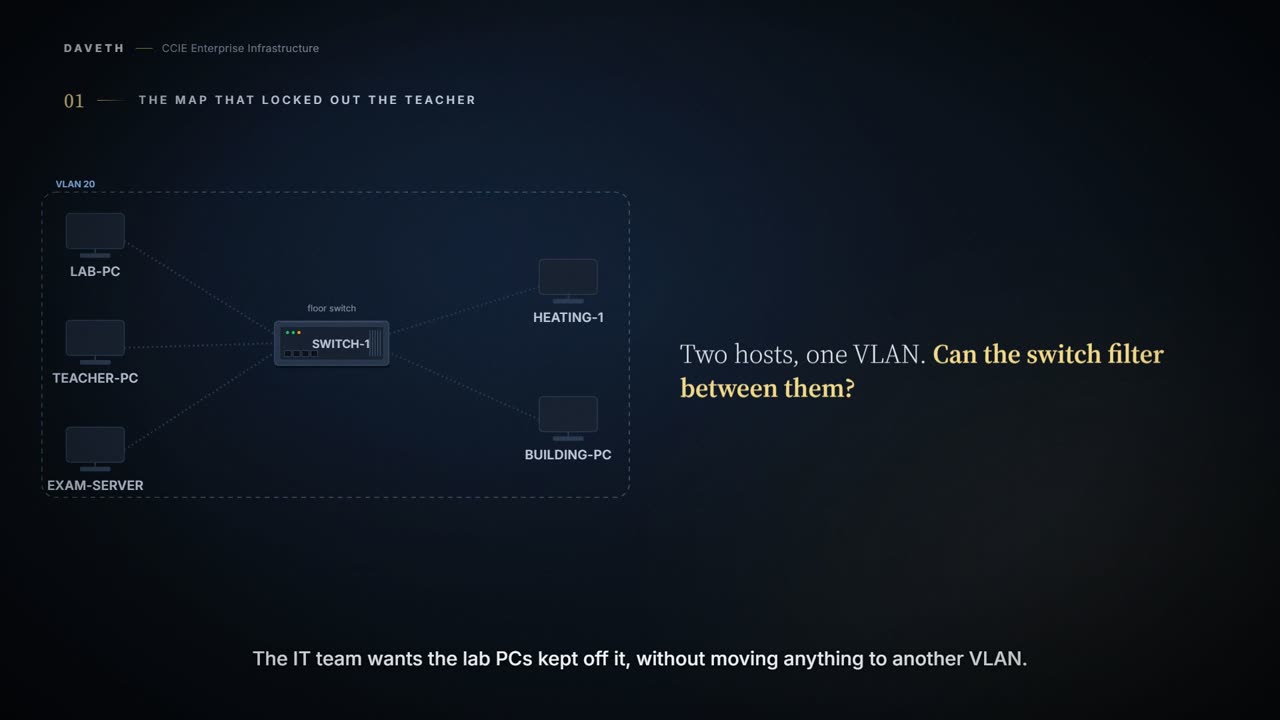
The map that locked out the teacher
A secondary school keeps its exam papers on a server, EXAM-SRV, in the same classroom VLAN as the student lab PCs and the teachers. The IT team wants the lab PCs kept off it, without moving anything to another VLAN. Can a switch filter traffic between two hosts in the same VLAN?
Plain words first. A VLAN is a group of switch ports that behave as one network. A VLAN map is a filter the switch applies to traffic moving inside one VLAN. A port ACL is an access list attached to a single switch port.
VLAN ACLs or VLAN maps are used to control the network traffic within a VLAN. You can apply VLAN maps to all packets that are bridged within a VLAN in the switch or switch stack. You can apply only one VLAN map to a VLAN.
This page assumes the access list basics from 4.2.b.ii: permit and deny lines, first match, and the deny at the end. It spends its length on what that lesson didn't cover.
Configuration: the first VLAN map, EXAM-GUARD, typed on SW-1 in the forms and at the prompts these commands use; the ACL names, map name and addresses are this course's own.
SW-1# configure terminal
SW-1(config)# ip access-list extended STUDENT-EXAM
SW-1(config-ext-nacl)# permit ip host 10.20.20.31 host 10.20.20.100
SW-1(config-ext-nacl)# exit
SW-1(config)# vlan access-map EXAM-GUARD 10
SW-1(config-access-map)# match ip address STUDENT-EXAM
SW-1(config-access-map)# action drop
SW-1(config-access-map)# exit
SW-1(config)# vlan filter EXAM-GUARD vlan-list 20
SW-1(config)# end
Look at the map: one entry, match LAB-PC to EXAM-SRV, action drop. Now TEACH-PC sends a packet to EXAM-SRV, and it matches no entry.
VLAN maps do not use the specific permit or deny keywords. To deny a packet by using VLAN maps, create an ACL that would match the packet, and set the action to drop. IP packets are matched against standard or extended IP access lists. Non-IP packets are only matched against named MAC extended access lists. If there is a match clause for that type of packet (IP or MAC) in the VLAN map, the default action is to drop the packet if the packet does not match any of the entries within the map. If there is no match clause for that type of packet, the default is to forward the packet.
Computed from the state, where each test packet goes. No command prints it in this form.
from      to        type   decided by              result
LAB-PC    EXAM-SRV  IP     map entry 10            dropped
TEACH-PC  EXAM-SRV  IP     default, IP clause      dropped
EXAM-SRV  TEACH-PC  IP     default, IP clause      dropped
LAB-PC    TEACH-PC  IP     default, IP clause      dropped
HEAT-1    BMS-HEAD  non-IP default, no MAC clause  forwarded
Read the second row: TEACH-PC to EXAM-SRV, decided by the default, dropped. The map has an IP match clause, so every IP packet that matches nothing is dropped. Now read the last row: the heating controller's non-IP traffic is forwarded, because the map has no MAC clause at all.
Computed from the state: EXAM-GUARD and its defaults. No command prints it in this form.
entry    matches                       action
10       IP STUDENT-EXAM               drop
no match IP packet                     drop (IP clause present)
no match non-IP packet                 forward (MAC clause absent)
One map, two packet types, two different defaults. The default isn't a deny at the end of a list; it depends on which clauses the map contains.
Two halves worth keeping apart, because the sentence people remember collapses them. The access list selects which packets are being talked about. The map's action decides what happens to them. Get the selection right and leave the action unstated and you have written something that looks complete and does something else entirely.
And note what the whole arrangement does not give you. Sharing a VLAN buys these machines nothing; being in one group is not permission to reach everything else in it, which is the entire reason somebody is configuring a filter inside a single VLAN in the first place.
Because there is a match clause for IP packets in the VLAN map, the default action is to drop any IP packet that does not match any of the match clauses.
From elsewhere: the chapter's first VLAN map example. The names, numbers and addresses come from elsewhere, not from this scenario.
Device(config)# ip access-list extended ip1
Device(config-ext-nacl)# permit tcp any any
Device(config-ext-nacl)# exit
Device(config)# vlan access-map map_1 10
Device(config-access-map)# match ip address ip1
Device(config-access-map)# action drop
Device(config-access-map)# end
One more entry
How do the teachers get EXAM-SRV back without letting the lab PCs in?
Each VLAN map consists of a series of entries. The order of entries in an VLAN map is important. A packet that comes into the device is tested against the first entry in the VLAN map. If it matches, the action specified for that part of the VLAN map is taken. If there is no match, the packet is tested against the next entry in the map.
From elsewhere: the chapter's drop-then-forward example. The names, numbers and addresses come from elsewhere, not from this scenario.
Device(config)# vlan access-map map2 10
Device(config-access-map)# match ip address http
Device(config-access-map)# action drop
Device(config-access-map)# exit
Device(config)# ip access-list extended match_all
Device(config-ext-nacl)# permit ip any any
Device(config-ext-nacl)# exit
Device(config)# vlan access-map map2 20
Device(config-access-map)# match ip address match_all
Device(config-access-map)# action forward
Device(config-access-map)# end
Watch the second entry in that example: an ACL named match_all that permits any IP to any IP, used with action forward. Entry 10 catches the traffic to drop; entry 20 catches everything else and forwards it.
Configuration: what entry 20 adds to EXAM-GUARD, typed on SW-1 in the forms and at the prompts these commands use; the ACL names, map name and addresses are this course's own.
SW-1# configure terminal
SW-1(config)# ip access-list extended ALL-IP
SW-1(config-ext-nacl)# permit ip any any
SW-1(config-ext-nacl)# exit
SW-1(config)# vlan access-map EXAM-GUARD 20
SW-1(config-access-map)# match ip address ALL-IP
SW-1(config-access-map)# action forward
SW-1(config-access-map)# end
Computed from the state, where each test packet goes now. No command prints it in this form.
from      to        type   decided by              result
LAB-PC    EXAM-SRV  IP     map entry 10            dropped
TEACH-PC  EXAM-SRV  IP     map entry 20            forwarded
EXAM-SRV  TEACH-PC  IP     map entry 20            forwarded
LAB-PC    TEACH-PC  IP     map entry 20            forwarded
HEAT-1    BMS-HEAD  non-IP default, no MAC clause  forwarded
Read the first two rows: LAB-PC still matches entry 10 and is dropped; TEACH-PC matches entry 20 and is forwarded. Order does the work, which is why entry 20 sits after entry 10.
If the VLAN map has no match clause, and the configured action is drop, all IP and Layer 2 packets are dropped.
Notice the other extreme in that sentence: an entry with no match clause and action drop drops everything, IP and Layer 2 alike.
Binding it, and the missing direction
How does the map reach VLAN 20, and in which direction does it filter?
From elsewhere: the binding step. The names, numbers and addresses come from elsewhere, not from this scenario.
Device(config)# vlan filter map1 vlan-list 20-22
The list can be a single VLAN ID (22), a consecutive list (10-22), or a string of VLAN IDs (12, 22, 30). Spaces around the comma and hyphen are optional.
From elsewhere: the binding in the chapter's own example. The names, numbers and addresses come from elsewhere, not from this scenario.
Device(config)# vlan filter map2 vlan 1
Look at the two lines: the step prints vlan-list 20-22, and the example prints vlan 1. Both are on the page; this walk uses the step's form.
VLAN maps have no direction. To filter traffic in a specific direction by using a VLAN map, you need to include an ACL with specific source or destination addresses.
That is why STUDENT-EXAM names LAB-PC as the source and EXAM-SRV as the destination. The map has no in or out; the addresses in its ACL say which way the blocked traffic travels.
Proves: The configuration proves which entries exist, in what order, with which actions, which VLANs the map is filtered on, and which ports carry a port ACL. Does not prove: that the map is programmed in hardware, or which filter a given packet meets. A map that could not be applied reads the same, and a port ACL takes precedence over the map for that port's traffic.
The port ACL that opened the door
A term later, a technician adds a port ACL, LAB-IN, to LAB-PC's port, Gi1/0/1, to stop the lab PC reaching TEACH-PC. It has two lines: deny LAB-PC to TEACH-PC, permit everything else. What happens to the exam block?
Port ACLs are ACLs that are applied to Layer 2 interfaces on a switch. When a device has an IP access list or MAC access list applied to a Layer 2 interface, and you apply a VLAN map to a VLAN that the port belongs to, the port ACL takes precedence over the VLAN map.
Configuration: LAB-IN, added to Gi1/0/1, typed on SW-1 in the forms and at the prompts these commands use; the ACL names, map name and addresses are this course's own.
SW-1# configure terminal
SW-1(config)# ip access-list extended LAB-IN
SW-1(config-ext-nacl)# deny ip host 10.20.20.31 host 10.20.20.10
SW-1(config-ext-nacl)# permit ip any any
SW-1(config-ext-nacl)# exit
SW-1(config)# interface GigabitEthernet1/0/1
SW-1(config-if)# ip access-group LAB-IN in
SW-1(config-if)# end
Computed from the state, which filter each port's incoming packets meet. No command prints it in this form.
port     host      address       incoming packets filtered by
Gi1/0/1  LAB-PC    10.20.20.31   port ACL LAB-IN only
Gi1/0/2  TEACH-PC  10.20.20.10   VLAN map EXAM-GUARD
Gi1/0/3  EXAM-SRV  10.20.20.100  VLAN map EXAM-GUARD
Gi1/0/4  HEAT-1    non-IP        VLAN map EXAM-GUARD
Gi1/0/5  BMS-HEAD  non-IP        VLAN map EXAM-GUARD
Continue the lesson
The whole lesson, with its drawings and its questions. The rest of this section and 5 more after it.