
IPv6 ND inspection and snooping
Attach an IPv6 snooping policy with nothing but its name, and router advertisements and DHCPv6 server replies on the uplink are rejected: the default security level is guard. IPv6 snooping gleans bindings from neighbor discovery and DHCPv6. ND inspection drops neighbor discovery messages whose IPv6-to-MAC mapping cannot be verified, defending DAD, address resolution and router discovery. trusted-port disables the guard.
By Arif, founder of Daveth · Updated
The full 4 min walkthrough is in Daveth Pro (Network). See what the plan opens
What this page answers
Why does an IPv6 snooping policy block the router?
Its default policy is security-level guard, device-role node, and guard rejects router advertisements and DHCP server messages, so a policy with only a name drops them even on the uplink. Read it in “Three levels, and the default rejects the router”
What does IPv6 ND inspection drop?
Neighbor discovery messages that do not conform: a message is trusted only if its IPv6-to-MAC mapping can be verified against the binding table. Read it in “What ND inspection drops”
What does trusted-port do in an IPv6 snooping policy?
It disables the guard on the port, and bindings learned through a trusted port take preference over bindings learned on any other port. Read it in “Trust the uplink?”
You turned it on, and the router's messages stopped
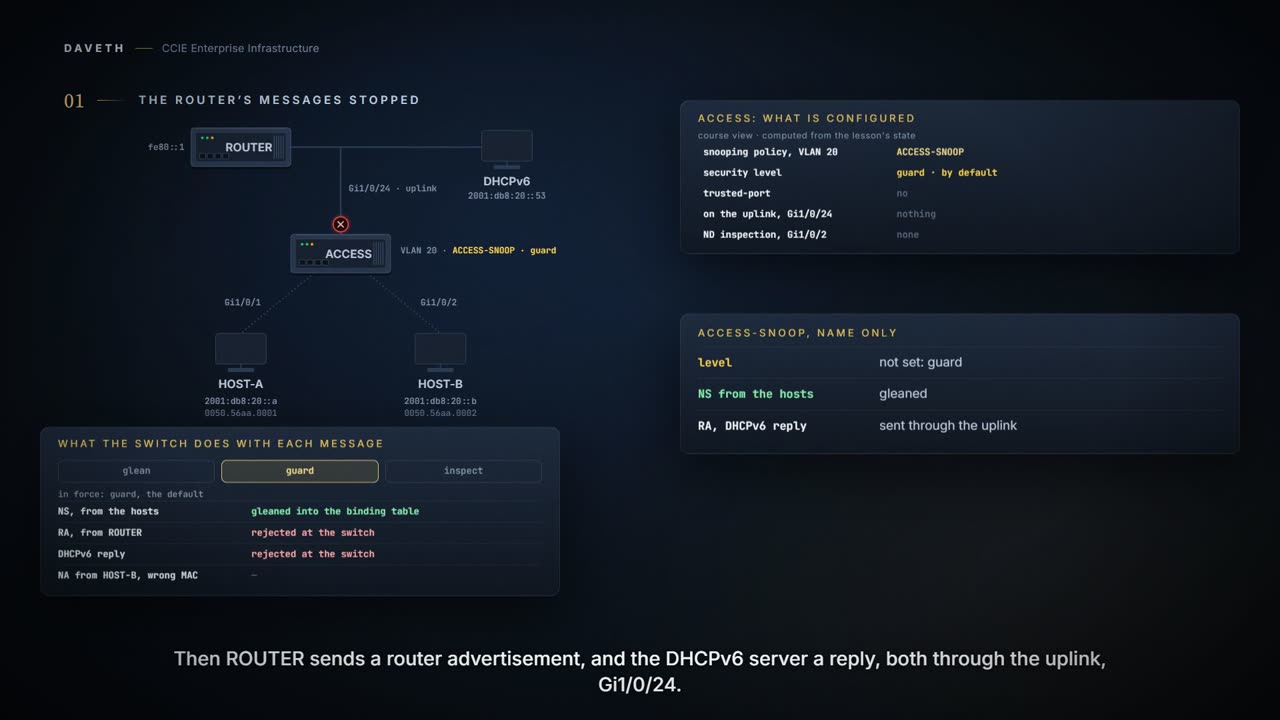
A snooping policy goes onto VLAN 20 on an access switch, with nothing configured but its name. Then ROUTER advertises and the DHCPv6 server replies, both through the uplink. What does the switch do with them?
This course's configuration: the switch
ACCESS# configure terminal
ACCESS(config)# ipv6 snooping policy ACCESS-SNOOP
ACCESS(config-ipv6-snooping)# exit
ACCESS(config)# vlan configuration 20
ACCESS(config-vlan-config)# ipv6 snooping attach-policy ACCESS-SNOOP
ACCESS(config-vlan-config)# end
This course's reading: what happens to each message
message                enters       fate       because
router advertisement   Gi1/0/24     rejected   guard rejects RA and DHCP server messages
DHCPv6 server reply    Gi1/0/24     rejected   guard rejects RA and DHCP server messages
Look at the fate column: both rejected. A host that does not receive router advertisements or DHCPv6 replies is left without what they carry. That consequence is this course's reading; the guide says what the switch does:
By default, a snooping policy has a security-level of guard. When a snooping policy is configured on an access switch, external IPv6 Router Advertisement (RA) or Dynamic Host Configuration Protocol for IPv6 (DHCPv6) server packets are blocked, even though the uplink port facing the device or DHCP server or relay is configured as a trusted port.
Three levels, and the default rejects the router
IPv6 Snooping acts as a container that enables most of the features available with FHS in IPv6 including following capabilities and functions: IPv6 Neighbor Discovery Snooping analyzes and verifies IPv6 Neighbor Discovery Protocol (NDP) traffic. During inspection, it gleans address bindings (IP, MAC, port, etc) and stores it in the binding table. DHCPv6 Snooping traps DHCPv6 packets between DHCPv6 Client and DHCPv6 Server. From the packets snooped, assigned addresses are learnt and stored in the binding table. With the IPv6 Snooping feature one can limit the number of addresses any node on the link can claim. This feature can be used to protect the switch binding table against denial of service flooding attacks.
A snooping policy enforces one of three levels:
Specifies the level of security enforced by the feature. Default is guard. glean: Gleans addresses from messages and populates the binding table without any verification. inspect: Gleans addresses, validates messages for consistency and conformance, and enforces address ownership. guard: Gleans addresses and inspects messages. In addition, it rejects RA and DHCP server messages. This is the default option.
This course's reading: the three levels, and which is in force on VLAN 20
level    gleans  validates  rejects RA/DHCP server  in force
glean    yes     no         no
inspect  yes     yes        no
guard    yes     yes        yes                     yes
Read guard against inspect. Guard is not a stricter inspect; it adds rejecting exactly the two kinds of message a host needs from the uplink. Whether guard validates as inspect does is this course's reading of inspects messages.
Three clerks, three different jobs. One copies down what arrives. One checks the form against what is on file. One refuses to accept forms from the wrong desk entirely. They are not the same clerk turned up to three different settings, and that is the sentence that would have saved whoever opened this page at two in the morning.
Read the middle one and the last one again, because the difference is the outage. You reached for a policy that would watch traffic. What you attached was a policy that also turns messages away. Nobody typed a deny anywhere, so nobody thinks to go looking for one.
Where the clerk stops: you can ask a clerk why a form was refused. The verification command prints nothing for this, so a policy showing as configured tells you it exists and not what it has been doing to your traffic.
The default policy is, security-level guard, device-role node, protocol ndp and dhcp. The default policy is attached if the attach-policy option is not used.
What ND inspection drops
The IPv6 ND Inspection feature learns and secures bindings for stateless auto-configuration addresses in Layer 2 neighbor tables. It analyzes neighbor discovery messages in order to build a trusted binding table database. IPv6 neighbor discovery messages that do not conform are dropped. An neighbor discovery message is considered trustworthy if its IPv6-to-MAC mapping is verifiable. This feature mitigates some of the inherent vulnerabilities of the ND mechanism, such as attacks on DAD, address resolution, router discovery, and the neighbor cache.
The default policy is, device-role host, no drop-unsecure, limit address-count disabled, sec-level minimum is disabled, tracking is disabled, no trusted-port, no validate source-mac. Specifies the role of the device attached to the port. The default is host.
Look at the last default: no validate source-mac. Turn it on for HOST-B's port:
This course's configuration: the switch
ACCESS# configure terminal
ACCESS(config)# ipv6 nd inspection policy ND-CHECK
ACCESS(config-nd-inspection)# validate source-mac
ACCESS(config-nd-inspection)# exit
ACCESS(config)# interface GigabitEthernet1/0/2
ACCESS(config-if)# ipv6 nd inspection attach-policy ND-CHECK
ACCESS(config-if)# end
Checks the source media access control (MAC) address against the link-layer address.
HOST-B sends a neighbor advertisement whose link-layer address is not its frame's source MAC. What happens to it?
This course's reading: what happens to the advertisement
message                enters       fate       because
NA, mismatched MAC     Gi1/0/2      dropped    validate source-mac: source MAC is not the link-layer address
Dropped by the source-MAC check. Without that check the page does not decide the advertisement's fate: the default leaves it off, and how the default policy treats this message is not described.
And how do you see it? The guide's verification step is show ipv6 nd inspection policy: Verifies the ND inspection configuration. It prints no output for it, so this page draws none. A policy shown as configured would not prove any message was dropped.
Trust the uplink?
The obvious fix for rejected messages on an uplink is to trust the uplink. The guide's snooping policy has an option for it:
trusted-port: Sets up a trusted port. It disables the guard on applicable targets. Bindings learned through a trusted port have preference over bindings learned through any other port.
This course's configuration: the switch
ACCESS# configure terminal
ACCESS(config)# ipv6 snooping policy ACCESS-SNOOP
ACCESS(config-ipv6-snooping)# trusted-port
ACCESS(config-ipv6-snooping)# end
And the overview quoted at the top says the messages are blocked even though the uplink is configured as a trusted port. Does trusted-port save you?
This course's reading: the router advertisement, with trusted-port
message                enters       fate       because
router advertisement   Gi1/0/24     undecided  guard with trusted-port: both are documented
Not decided, here or in the model. The two sentences sit in the same chapter, neither names the applicable targets, and the guide's instructions for letting these messages through do not mention trusted-port. Test it on your platform before you rely on it.
Continue the lesson
The whole lesson, with its drawings and its questions. 5 more sections after the ones above.