
IP Source Guard
Dynamic ARP Inspection checks ARP; IP Source Guard checks data packets, so a host cannot use its neighbour's IP address. It relies on DHCP snooping bindings on untrusted interfaces, and once enabled, traffic from a host with no binding on that port is dropped. By default it filters on source IP address only; source IP and MAC filtering also catches a second machine borrowing an address.
By Arif, founder of Daveth · Updated
The full 8 min walkthrough is in Daveth Pro (Network). See what the plan opens
What this page answers
What does IP Source Guard do?
It prevents a host using another host's IP address by filtering incoming traffic on untrusted Layer 2 ports against the DHCP snooping bindings for that port. Read it in “One layer up from DAI”
What is the difference between IP Source Guard IP and IP-MAC filtering?
By default IPSG filters only on source IP address. Source IP and MAC filtering also checks the MAC, so a second machine sending with a valid IP but its own MAC is stopped. Read it in “Two modes, and a borrowed address”
One layer up from DAI
Dynamic ARP Inspection asked whether a host was telling the truth in ARP. It never looked at a data packet. So what stops a host that puts a neighbor’s address into an IP packet?
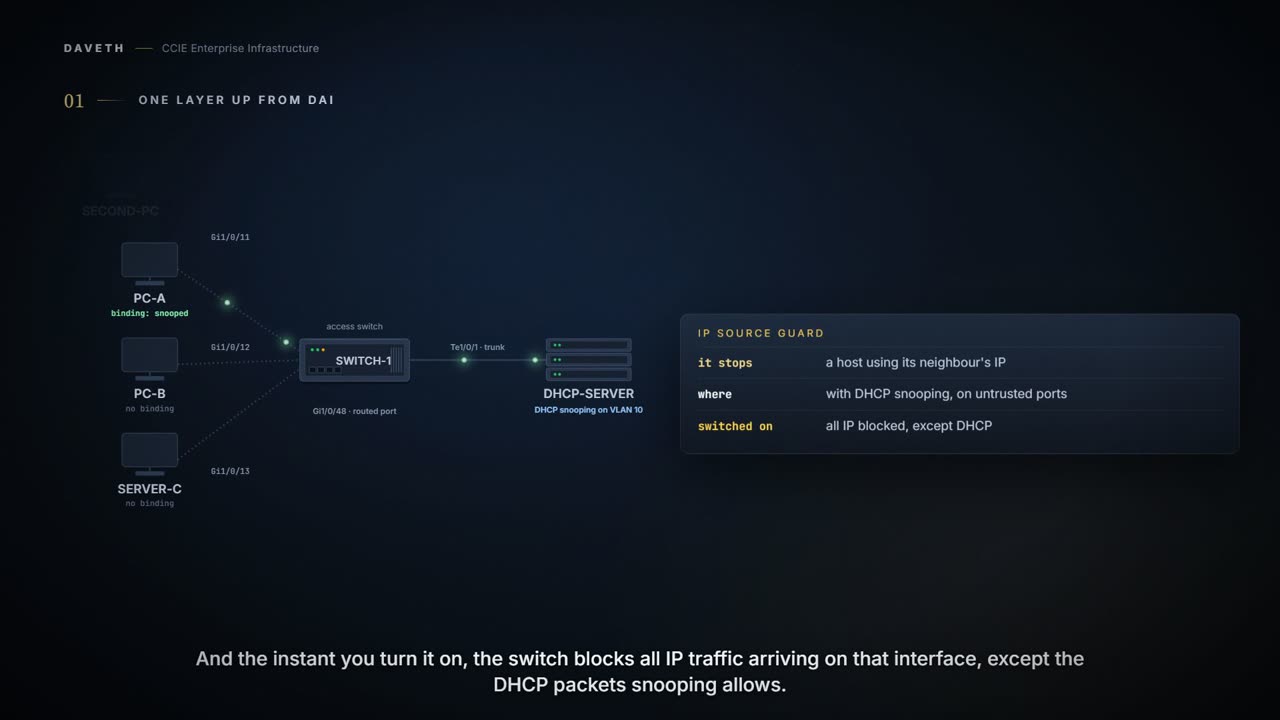
You can use IP source guard (IPSG) to prevent traffic attacks if a host tries to use the IP address of its neighbor and you can enable IP source guard when DHCP snooping is enabled on an untrusted interface.
And what happens the instant you turn it on?
After IPSG is enabled on an interface, the switch blocks all IP traffic received on the interface except for DHCP packets allowed by DHCP snooping. The switch uses a source IP lookup table in hardware to bind IP addresses to ports. For IP and MAC filtering, a combination of source IP and source MAC lookups are used. IP traffic with a source IP address in the binding table is allowed, all other traffic is denied.
The IP source binding table has bindings that are learned by DHCP snooping or are manually configured (static IP source bindings). An entry in this table has an IP address, its associated MAC address, and its associated VLAN number.
Read those together: default-deny, and a table of IP, MAC and VLAN that opens it. DHCP is the exception because a host with no binding still has to get the lease that creates one.
When IP source guard with source IP filtering is enabled on an interface, DHCP snooping must be enabled on the access VLAN for that interface.
Notice what that makes DHCP snooping: a prerequisite on the VLAN, not a neighboring feature you may or may not run.
Two ports, two leases
ip verify source goes on Gi1/0/11 and Gi1/0/12. Both hosts have valid leases from the same server.
Computed from the state: each host against its own port. No command prints it.
host      port       source IP     verdict
PC-A      Gi1/0/11   10.10.10.21   passes
  the source IP matches a binding
PC-B      Gi1/0/12   10.10.10.22   dropped
  no binding on this port has that source IP, so it is denied
SRV-C     Gi1/0/13   10.10.10.50   passes
  no filter on this port
What does the switch itself show for those two ports?
Drawn in the published layout: SW-1 after the filter goes on, in the states document 222274 prints. The ports, addresses and VLAN are this course's own.
SW-1# show ip verify source

Interface  Filter-type  Filter-mode  IP-address       Mac-address        Vlan
---------  -----------  -----------  ---------------  -----------------  ----
Gi1/0/11   ip           active       10.10.10.21                         10
Gi1/0/12   ip           active       deny-all                            10
Look at the IP-address column. Gi1/0/12 reads deny-all: the filter is running and has nothing to permit. The port is up, cabled and in the right VLAN.
Output from elsewhere: the same state on the document’s switch. The values in it come from elsewhere, not from this scenario.
F241.24.02-9500-1#show ip verify source

Interface  Filter-type  Filter-mode  IP-address       Mac-address        Vlan
---------  -----------  -----------  ---------------  -----------------  ----
Hu1/0/1    ip           active       10.20.30.2                          10
Hu1/0/3    ip           active       10.20.30.4                          10
Hu1/0/4    ip           active       10.20.30.3                          10
Hu1/0/6    ip           active       deny-all                            10
From this output, you can see the IP Address field is set to deny-all for Hu1/0/6 because there is no MAC-IP binding corresponding to this interface in the DHCP snooping binding table.
Proves: which ports are filtering, in which mode, and which address and MAC each is permitting, or that it permits nothing. Does not prove: that the host on the port owns the address; and neither cited page prints this output for a port on the static-hosts variant, so it is no evidence about one.
So why is there no binding? PC-B leased its address before DHCP snooping was turned on, and the troubleshooting document names that exact order:
The first thing to check while troubleshooting DAI and IPSG-related issues is to verify if the DHCP snooping binding table has been populated correctly.
While configuring DAI or IPSG in an environment where DHCP snooping is not already enabled and clients have already received IPs from the DHCP server, first enable DHCP snooping and perform either of the two steps: Bounce the client-connected interfaces so that they renew their lease. Wait for the clients to automatically renew their lease.
If this is not done and DAI or IPSG is immediately enabled after configuring DHCP snooping, you might land into an issue where all DHCP clients in the Network lose connectivity to the Network.
Look at the scale in that last sentence: all DHCP clients, not one port.
Computed from the state: PC-B's port bounced, and its lease renewed. No command prints it.
host      port       source IP     verdict
PC-A      Gi1/0/11   10.10.10.21   passes
  the source IP matches a binding
PC-B      Gi1/0/12   10.10.10.22   passes
  the source IP matches a binding
SRV-C     Gi1/0/13   10.10.10.50   passes
  no filter on this port
Turning the filter off would also restore service, and would tell you nothing about whether the table is being populated.
Two modes, and a borrowed address
Which mode do you need? Suppose a second machine behind Gi1/0/11 sends with PC-A's IP address and its own MAC.
IPSG is supported only on Layer 2 ports, including access and trunk ports. You can configure IPSG with source IP address filtering or with source IP and MAC address filtering.
By default, IPSG filters incoming traffic on untrusted ports based on only IP addresses.
Configuration: in the command forms the chapter prints; the interface, addresses and VLAN are this course’s own.
SW-1# configure terminal
SW-1(config)# interface Gi1/0/11
SW-1(config-if)# ip verify source mac-check
SW-1(config-if)# end
Computed from the state: the borrowed address against ip-mac filtering. No command prints it.
port            Gi1/0/11
source IP / MAC 10.10.10.21 / 00:11:22:33:44:99
verdict         dropped
  the source IP matches a binding but the source MAC does not, and ip-mac checks both
Would IP-only filtering have caught it? No: the source IP matches a binding, and only the MAC is wrong.
Which is the whole argument for the stricter mode in one line: the borrowed address fits, and the machine wearing it does not. Copying a neighbour's IP is easy and copying their identity as well is a different job, so checking both is what separates a host that owns an address from one that has simply typed it in.
And what does SW-1 now show for Gi1/0/11?
Drawn in the published layout: SW-1 with ip-mac on its first port, in the states document 222274 prints. The ports, addresses and VLAN are this course's own.
SW-1# show ip verify source

Interface  Filter-type  Filter-mode  IP-address       Mac-address        Vlan
---------  -----------  -----------  ---------------  -----------------  ----
Gi1/0/11   ip-mac       active       10.10.10.21      00:11:22:33:44:01   10
Gi1/0/12   ip           active       10.10.10.22                         10
Output from elsewhere: ip-mac on the document’s switch. The values in it come from elsewhere, not from this scenario.
F241.24.02-9500-1#show ip verify source

Interface  Filter-type  Filter-mode  IP-address       Mac-address        Vlan
---------  -----------  -----------  ---------------  -----------------  ----
Hu1/0/1    ip-mac       active       10.20.30.2       78:72:5D:1B:7F:3F   10
Hu1/0/3    ip-mac       active       10.20.30.4       2C:4F:52:01:AA:CC   10
Hu1/0/4    ip-mac       active       10.20.30.3       5C:71:0D:CD:EE:0C   10
Hu1/0/6    ip-mac       active       deny-all         deny-all            10
In this output, you can see that the Filter-type is ip-mac. So, the Switch now filters the incoming packets on these interfaces based on both source IP and MAC address.
Notice the last row: deny-all in both columns. With ip-mac, a port with no binding permits neither an address nor a MAC.
So a port being up and a port having a binding are two separate facts, and only one of them is about the cable. A link can come up perfectly, negotiate, show every counter you would want, and still pass nothing at all, because the question being asked of each packet is not about the link.
Which is worth knowing before you go looking for a fault in the physical layer. Nothing is wrong with the connection. The switch is asking the traffic for credentials it has never been given.
Continue the lesson
The whole lesson, with its drawings and its questions. 4 more sections after the ones above.