
IPv6 Source Guard
IPv6 Source Guard validates the source of data packets with a hardware filter: traffic passes only if its source address is in the binding table. The policy can deny global autoconfigured addresses and permit link-local. It attaches only to interfaces and EtherChannels, never to a VLAN. A host that spoofs nothing can still pass nothing, when no device-tracking is gleaning its bindings.
By Arif, founder of Daveth · Updated
The full 8 min walkthrough is in Daveth Pro (Network). See what the plan opens
What this page answers
How does IPv6 Source Guard work?
It uses a hardware (TCAM) filter that allows data traffic only when its source address has an entry in the binding table, preventing source address spoofing. Read it in “Same idea, built differently”
Can an IPv6 source guard policy be attached to a VLAN?
No. It is supported only at the interface level, including EtherChannels. Read it in “Where it attaches”
Why does IPv6 Source Guard drop all traffic from a host?
The host has no binding, often because nothing is gleaning on the port: with NDP and DHCP snooping off, no binding is created and every packet is dropped. Read it in “The port that passes nothing”
Same idea, built differently
You met this in IPv4. 4.2.a.iv made a port default-deny and let the binding table open it. What changes in IPv6?
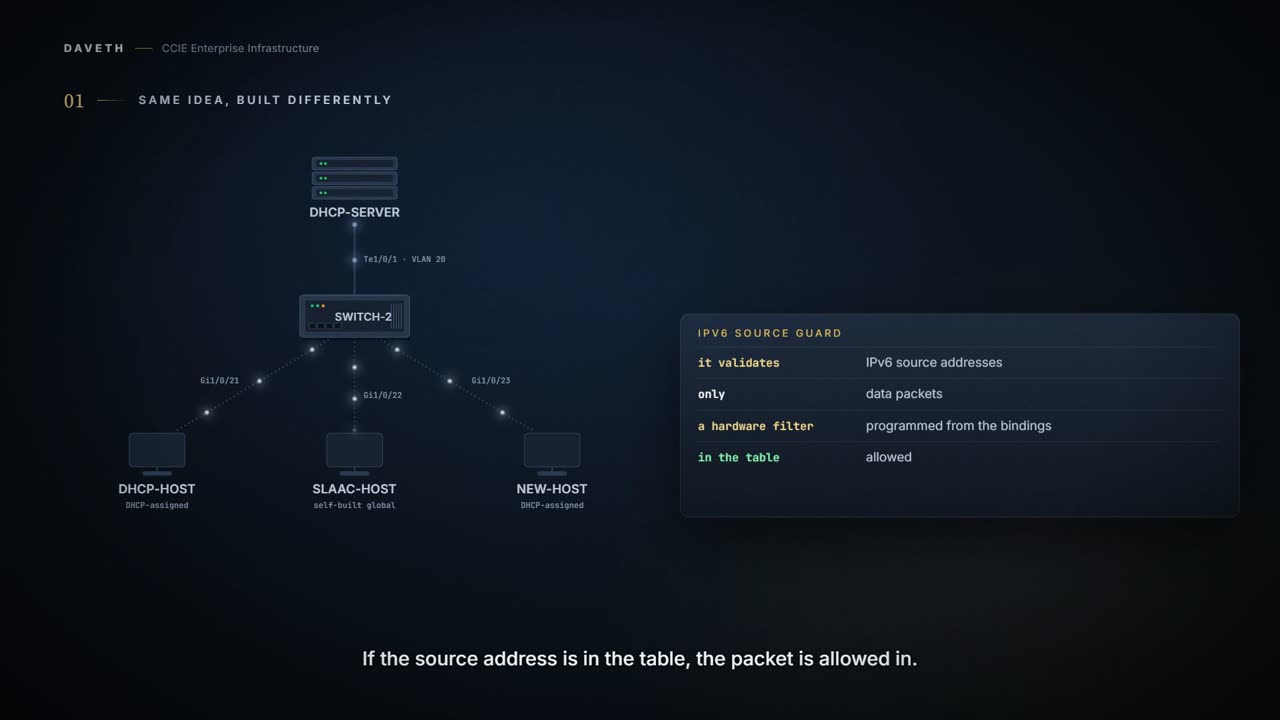
The IPv6 Source Guard feature validates the source of IPv6 traffic to prevent source address spoofing. It deals exclusively with data packet traffic.
It involves a hardware-programmed (TCAM table) filter which allows or denies traffic based on its source address. For the filter to work this way, an entry (of the source address) in the binding table is required. If the source address is in the binding table, the filter allows the packet into the network; if the address is not in the binding table, entry is denied and the packet is dropped.
Notice the word programmed. The filter is built from a binding. So what happens the moment the binding goes?
When an entry is removed from the binding table, the filter is also removed, and subsequent packets with that source address are dropped.
The IPv6 Source Guard and Prefix Guard features are supported only in the ingress direction and not supported in the egress direction.
Notice the direction: ingress only, so the filter judges what a host sends into the port, never what the switch sends out.
What the policy decides
IPv6 hosts build their own global addresses. HOST-S did, and the table has its binding. Does it pass under a strict policy?
deny global-autoconf: Denies data traffic from auto-configured global addresses. This is useful when all global addresses on a link are DHCP-assigned and the administrator wants to block hosts with self-configured addresses to send traffic.
permit link-local: Allows all data traffic that is sourced by a link-local address.
Configuration: policy STRICT on Gi1/0/21 and Gi1/0/22, in the forms the chapter prints; names, ports and VLAN are this course’s own.
SW-2# configure terminal
SW-2(config)# ipv6 source-guard policy STRICT
SW-2(config-sisf-sourceguard)# deny global-autoconf
SW-2(config-sisf-sourceguard)# permit link-local
SW-2(config-sisf-sourceguard)# exit
SW-2(config)# interface Gi1/0/21
SW-2(config-if)# ipv6 source-guard attach-policy STRICT
SW-2(config-if)# interface Gi1/0/22
SW-2(config-if)# ipv6 source-guard attach-policy STRICT
SW-2(config-if)# end
Computed from the state: each host’s global and link-local source against its port. No command prints it.
host     source                           verdict
HOST-L   2001:db8:20::10                  passes
  a binding for this source address, so a filter allows it
HOST-L   fe80::10                         passes
  sourced by a link-local address, and the policy permits link-local
HOST-S   2001:db8:20::211:22ff:fe33:4402  dropped
  the address is auto-configured global, and the policy denies global-autoconf
HOST-S   fe80::211:22ff:fe33:4402         passes
  sourced by a link-local address, and the policy permits link-local
HOST-D   2001:db8:20::30                  passes
  no source guard policy on this port
HOST-D   fe80::30                         passes
  no source guard policy on this port
Look at HOST-S’s two rows: the global address dropped, the link-local address passing, on the same port.
Trusted option under source guard policy is not supported.
Attaches the IPv6 Source Guard policy to the interface. The default policy is attached if the attach-policy option is not used.
Once a policy is attached, where do you read what it validates and which ports carry it? The chapter prints the reading for its own policy:
From elsewhere: show ipv6 source-guard policy for a policy that validates addresses. The values in it come from elsewhere, not from this scenario.
Device# show ipv6 source-guard policy src-guard-policy
Source guard policy src-guard-policy configuration:
  validate address
Policy src-guard-policy is applied on the following targets:
Target               Type  Policy               Feature        Target range
Gi1/0/1              PORT  src-guard-policy     Source guard   vlan all
Proves: what the policy validates and every target it is applied to, with the VLAN range. Does not prove: that any binding exists on those targets, or that a device-tracking policy is gleaning there.
Where it attaches
Will it attach to VLAN 20 like the other first-hop policies?
An IPv6 source guard policy cannot be attached to a VLAN. It is supported only at the interface level.
Computed from the state: STRICT attached to VLAN 20. No command prints it.
refused: an IPv6 source guard policy cannot be attached to a VLAN
IPv6 Source Guard and Prefix Guard is supported on EtherChannels
From elsewhere: source guard on an EtherChannel. The values in it come from elsewhere, not from this scenario.
Device(config)# ipv6 source-guard policy POL
Device(config-sisf-sourceguard) # validate address
Device(config-sisf-sourceguard)# exit
Device(config)# interface Port-Channel 4
Device(config-if)# ipv6 snooping
Device(config-if)# ipv6 source-guard attach-policy POL
Device(config-if)# end
Device#
PVLAN and Source or Prefix Guard cannot be applied together.
Look at how narrow that leaves the target list before you plan a rollout.
So: interfaces and EtherChannels, not VLANs, and not PVLAN ports.
The port that passes nothing
STRICT goes on Gi1/0/23, and HOST-D, which spoofs nothing, passes nothing at all. Why would a spoofing filter stop a host that is not spoofing?
Computed from the state: Gi1/0/23 with nothing tracking it. No command prints it.
source guard policy     STRICT
gleaning                off
data-glean recovery     off
server leasequery       off

port      Gi1/0/23
source    2001:db8:20::30
verdict   dropped
  no NDP or DHCP snooping on this port, so all data traffic from it is blocked
Look at the gleaning row: off. A total blackout, and that is the diagnosis. A spoofing filter blocks some sources; a port with no gleaning has no bindings to build any filter from, so it blocks every source. The chapter states the rule:
When IPv6 source guard is enabled on a switch port, NDP or DHCP snooping must be enabled on the interface to which the switch port belongs. Otherwise, all data traffic from this port will be blocked.
Computed from the state: Gi1/0/23 after a tracking policy gleaning NDP and DHCP is attached. No command prints it.
address                          port      origin
2001:db8:20::10                  Gi1/0/21  dhcp
2001:db8:20::211:22ff:fe33:4402  Gi1/0/22  autoconf
2001:db8:20::30                  Gi1/0/23  dhcp

port      Gi1/0/23
source    2001:db8:20::30
verdict   passes
  a binding for this source address, so a filter allows it
Detaching the source guard policy would also restore service, and leave the missing tracking exactly where it was.
When a binding goes away
What if the binding existed, and then did not? The chapter works through that case: DHCP-only gleaning, 802.1x, and a port that flaps. Put HOST-L’s port in it: tracking on Gi1/0/21 now gleans only DHCP, and the port is 802.1x-authenticated.
This means that any host in the network can use only a DHCP-assigned IP address to communicate.
What does DHCP-only gleaning look like on the switch? The chapter’s tracking policy for this case reads:
From elsewhere: a tracking policy that gleans only DHCPv6. The values in it come from elsewhere, not from this scenario.
Device# show device-tracking policy glean_only_DHCP
Device-tracking policy glean_only_DHCP configuration:
  security-level guard
  device-role node
  NOT gleaning from Neighbor Discovery
  gleaning from DHCP6
  NOT gleaning from ARP
  NOT gleaning from DHCP4
  NOT gleaning from protocol unkn
Policy glean_only_DHCP is applied on the following targets:
Target               Type  Policy               Feature        Target range
Gi1/0/1              PORT  glean_only_DHCP      Device-tracking vlan all
Continue the lesson
The whole lesson, with its drawings and its questions. The rest of this section and 4 more after it.