
The IPv6 binding table and SISF device tracking
IPv4's binding table came from DHCP alone, but IPv6 hosts often build their own addresses. The IPv6 binding table is filled by snooping both DHCPv6 and neighbor discovery, and by static entries. Each binding holds the IP and MAC address, interface, VLAN and state, and one MAC can sit behind IPv4 and IPv6 entries. On IOS XE, SISF device-tracking replaces the deprecated IPv6 snooping commands.
By Arif, founder of Daveth · Updated
The full 11 min walkthrough is in Daveth Pro (Network). See what the plan opens
What this page answers
What is in an IPv6 binding table entry?
The host's IP and MAC address, the interface, the VLAN and the state of the entry, which shows its reachability. The same MAC can be linked to an IPv4 and an IPv6 address. Read it in “What a binding holds”
How is the IPv6 binding table populated?
By IPv6 snooping, which gleans bindings from neighbor discovery messages and from DHCPv6 exchanges, and by manually added static entries, so self-configured addresses are learned too. Read it in “Two ways in”
What is SISF device-tracking?
Switch Integrated Security Features: the feature behind the IPv6 first-hop security binding table. It replaces the deprecated IPv6 snooping feature with the same capabilities; old commands still work but are being retired. Read it in “SISF, and the commands Cisco would rather you stopped using”
The table you already built, on different ground
You built this table once already, for IPv4. In 4.2.a.iii DHCP snooping watched each DHCP exchange and wrote down which address went to which port, and 4.2.a.iv used that table to decide what a port may send. One source filled it: the DHCP server's answers.
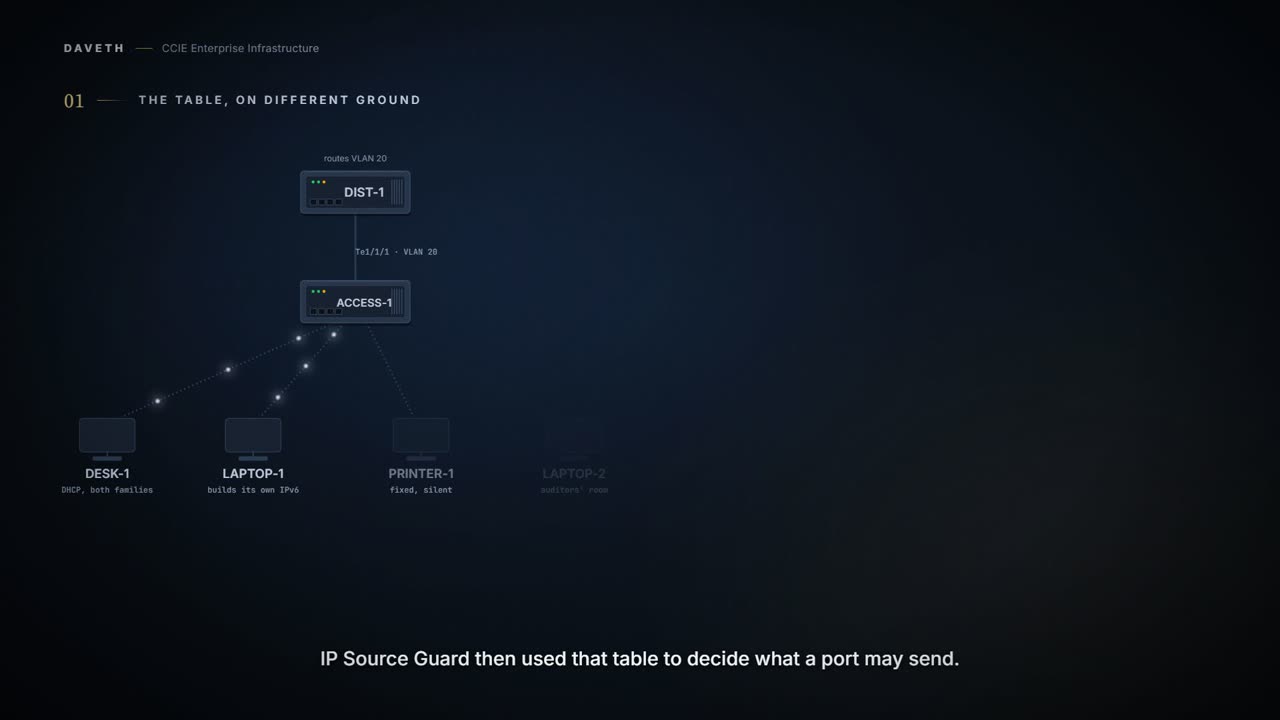
Now a town hall runs IPv6 on its council offices. ACCESS-1, the access switch for VLAN 20, serves DESK-1, which takes both its addresses from DHCP; LAPTOP-1, which builds its own IPv6 address; and PRINTER-1, which has fixed addresses and hardly ever speaks. How can the switch know an address that no server ever handed out?
Plain words first. A binding is one line in the switch's table tying an IP address to a MAC address and a port. SLAAC, stateless address autoconfiguration, is a host forming its own IPv6 address instead of asking a DHCPv6 server. Neighbor discovery, NDP, is the set of IPv6 messages hosts use to find each other on the link.
IPv6 FHS is composed of the following IPv6 security features: IPv6 Snooping, IPv6 Neighbor Discovery Inspection, IPv6 Router Advertisement Guard , IPv6 DHCP Guard, IPv6 Source Guard, IPv6 Prefix Guard, IPv6 Destination Guard.
Seven features, and the ones that enforce anything read one table. This page is about that table: how it fills, and how long an entry stays.
Configuration: ACCESS-1 before anything is configured, in the forms these commands take; the names and addresses are this course's own.
! no device-tracking configuration
Computed from the state: ACCESS-1's binding table. No command prints it in this form.
learned  address                          MAC             port     VLAN  state
no entries
not in the table: DESK-1 on Gi1/0/1 (no policy)
not in the table: LAPTOP-1 on Gi1/0/2 (no policy)
not in the table: PRINTER-1 on Gi1/0/3 (no policy)
0 entries: 0 IPv6, 0 IPv4
Look at the table: no entries, though DESK-1 and LAPTOP-1 are both busy.
SISF-based device-tracking is disabled by default. You can enable the feature on an interface or VLAN. The policy must be attached to an interface or VLAN. Only then is the binding table for that interface or VLAN populated - in accordance with policy parameters.
What a binding holds
What will each line of that table carry once it fills?
A binding entry includes information such as the IP and MAC address of the host, the interface, VLAN, state of the entry etc.
The same MAC address may be linked to an IPv4 and IPv6 address. The state of the entry, which indicates the reachability of the entry.
Notice the second quote: one MAC address can sit behind both an IPv4 and an IPv6 entry. The same table serves both families, which matters on a dual-stack floor like this one.
Two ways in
ACCESS-1 gets policy OFFICE on VLAN 20. LAPTOP-1 never asks a DHCPv6 server for its IPv6 address. Will that address appear?
The binding table is updated through the IPv6 Snooping feature, and through manually added static binding entries. IPv6 Snooping acts as a container that enables most of the features available with FHS in IPv6
DHCPv6 Snooping traps DHCPv6 packets between DHCPv6 Client and DHCPv6 Server. From the packets snooped, assigned addresses are learnt and stored in the binding table. IPv6 Neighbor Discovery Snooping analyzes and verifies IPv6 Neighbor Discovery Protocol (NDP) traffic. During inspection, it gleans address bindings (IP, MAC, port, etc) and stores it in the binding table.
The IPv6 ND Inspection feature learns and secures bindings for stateless auto-configuration addresses in Layer 2 neighbor tables.
Configuration: policy OFFICE on VLAN 20, in the forms these commands take; the names and addresses are this course's own.
ACCESS-1# configure terminal
ACCESS-1(config)# device-tracking policy OFFICE
! no protocol lines, so every protocol is gleaned
ACCESS-1(config-device-tracking)# exit
ACCESS-1(config)# vlan configuration 20
ACCESS-1(config-vlan-config)# device-tracking attach-policy OFFICE
ACCESS-1(config-vlan-config)# end
Sets the protocol to glean; by default, all are gleaned.
Computed from the state: ACCESS-1's binding table with OFFICE attached. No command prints it in this form.
learned  address                          MAC             port     VLAN  state
DHCPv6   2001:db8:20::21                  aabb.cc00.0100  Gi1/0/1  20    REACHABLE
NDP      fe80::a8bb:ccff:fe00:100         aabb.cc00.0100  Gi1/0/1  20    REACHABLE
DHCPv4   10.20.0.21                       aabb.cc00.0100  Gi1/0/1  20    REACHABLE
NDP      2001:db8:20::a8bb:ccff:fe00:200  aabb.cc00.0200  Gi1/0/2  20    REACHABLE
NDP      fe80::a8bb:ccff:fe00:200         aabb.cc00.0200  Gi1/0/2  20    REACHABLE
DHCPv4   10.20.0.32                       aabb.cc00.0200  Gi1/0/2  20    REACHABLE
not in the table: PRINTER-1 on Gi1/0/3 (policy OFFICE)
6 entries: 4 IPv6, 2 IPv4
Look at LAPTOP-1's rows: its global IPv6 address and its link-local address, both learned from NDP. DESK-1's rows came from DHCPv6 and DHCPv4. PRINTER-1 isn't there at all.
By this course's reading, the learned column shows which source reached each address first: DHCPv6 for an assigned IPv6 address, NDP for a self-built or link-local one, DHCPv4 for DESK-1's IPv4. The chapters list the sources; which one wins for an address is this course's choice.
Dynamic Host Configuration Protocol (DHCP) negotiation (DHCP REQUEST, and DHCP REPLY). This includes DHCPv4 and DHCPv6. In the output of the show device-tracking database details privileged EXEC command, such entries are prefixed with an abbreviation that clarifies the kind of dynamic learning event it was. For example, ARP for ARP packets, ND for NDP packets, and so on.
Read that last quote against the table above. The real details output marks entries with a short prefix such as ND or ARP; the chapter doesn't list the prefix for DHCP, so this course writes the source out in words.
And the printer? It is silent, so no protocol ever shows its address.
If there are silent but reachable hosts in the Layer 2 domain, you can create static binding entries to retain binding information even if the host becomes silent.
Configuration: the static entry for PRINTER-1, typed on top of OFFICE, in the forms these commands take; the names and addresses are this course's own.
ACCESS-1# configure terminal
ACCESS-1(config)# device-tracking binding vlan 20 2001:db8:20::50 interface Gi1/0/3 aabb.cc00.0300
ACCESS-1(config)# end
Computed from the state: ACCESS-1's binding table with the static entry. No command prints it in this form.
learned  address                          MAC             port     VLAN  state
DHCPv6   2001:db8:20::21                  aabb.cc00.0100  Gi1/0/1  20    REACHABLE
NDP      fe80::a8bb:ccff:fe00:100         aabb.cc00.0100  Gi1/0/1  20    REACHABLE
DHCPv4   10.20.0.21                       aabb.cc00.0100  Gi1/0/1  20    REACHABLE
NDP      2001:db8:20::a8bb:ccff:fe00:200  aabb.cc00.0200  Gi1/0/2  20    REACHABLE
NDP      fe80::a8bb:ccff:fe00:200         aabb.cc00.0200  Gi1/0/2  20    REACHABLE
DHCPv4   10.20.0.32                       aabb.cc00.0200  Gi1/0/2  20    REACHABLE
static   2001:db8:20::50                  aabb.cc00.0300  Gi1/0/3  20    -
7 entries: 5 IPv6, 2 IPv4
This means that when a static entry enters the STALE or DOWN state it remains in this state, and in the binding table, indefinitely.
That is why PRINTER-1's state shows a dash. The quote says a static entry stays in the table whatever state it reaches; this course doesn't claim which state a printer that never speaks is in.
SISF, and the commands Cisco would rather you stopped using
Which commands build that table on a Catalyst 9300 at 17.9? The FHS chapter's own configuration steps still use ipv6 snooping.
The IPv6 FHS Binding Table is supported through the Switch Integrated Security Feature (SISF) feature. The terms “SISF” “device-tracking” and “SISF-based device-tracking” are used interchangeably in this document and refer to the same feature.
The IPv6 Snooping feature is deprecated and the SISF feature replaces it and offers the same capabilities. While the IPv6 Snooping commands are still available on the CLI and the existing configuration continues to be supported, the commands will be removed from the CLI in a later release. The IPv6 Snooping Policy feature has been deprecated. Although the commands are visible on the CLI and you can configure them, we recommend that you use the Switch Integrated Security Feature (SISF)-based Device Tracking feature instead. Starting with Cisco IOS XE Amsterdam 17.1.1, the IPv6 Neighbor Discovery Inspection (IPv6 ND Inspection) feature is deprecated and the SISF feature replaces it and offers the same capabilities.
Deprecated, still visible, still configurable, still supported: rarely has a retirement been so busy.
If your device has no legacy IP Device Tracking or IPv6 Snooping configurations, you can use only the new SISF-based device tracking commands for all your future configuration. The legacy IPDT commands and IPv6 snooping commands are not available.
Read those two chapters together. The FHS chapter says the snooping commands are visible and configurable; the SISF chapter says a switch with no snooping configuration doesn't offer them at all. By this course's reading, the first describes a switch that already carries legacy configuration, which is the only place the old commands still earn their keep.
You cannot configure a mix of the old IPDT and IPv6 snooping CLI with the SISF-based device tracking CLI. (Recommended) Use the device-tracking upgrade-cli command to convert all your legacy configuration to the new SISF-based device tracking commands. After conversion, only the new device tracking commands will work on your device.
From elsewhere: the legacy attach command. The names, numbers and addresses come from elsewhere, not from this scenario.
Device(config-if)# ipv6 snooping attach-policy example_policy
From elsewhere: its SISF replacement. The names, numbers and addresses come from elsewhere, not from this scenario.
Device(config-if)# device-tracking attach-policy example_policy
Watch the shape: the same attach-policy form, a different leading keyword. The rest of this family attaches its policies the same way, so later lessons point back here rather than reprinting it.
Continue the lesson
The whole lesson, with its drawings and its questions. 6 more sections after the ones above.